Project: https://github.com/wordpress-mobile/WordPress-iOS/issues/15193 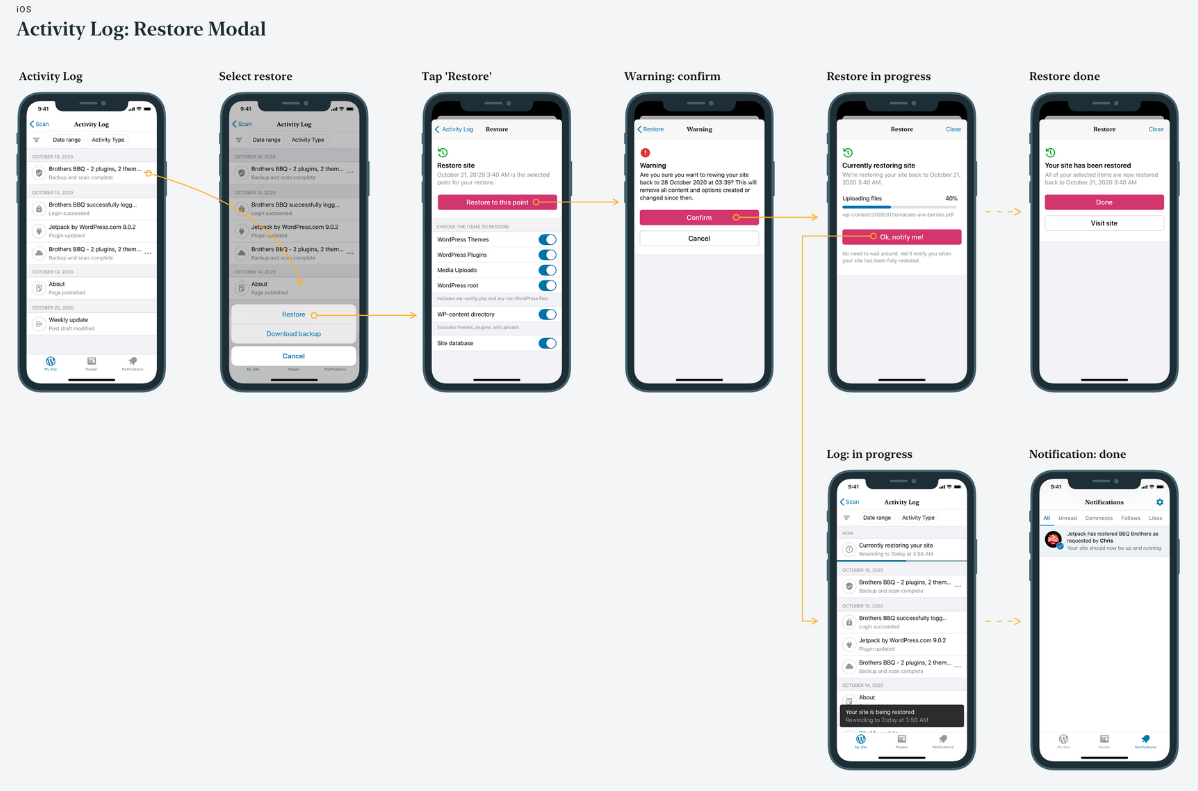 ## Tasks #### Network - [x] Add endpoints (https://github.com/wordpress-mobile/WordPressKit-iOS/pull/321) #### General - [x] Replace occurrences of Rewind with Restore to be inline with current branding (#15817) #### Activity Log - [x] Update backup table cell to use ⋮ ellipsis icon (https://github.com/wordpress-mobile/WordPress-iOS/pull/15555) - [x] Tap ⋮ ellipsis icon > present action sheet (https://github.com/wordpress-mobile/WordPress-iOS/pull/15555) - [x] Tap `Restore` > present Restore Options (https://github.com/wordpress-mobile/WordPress-iOS/pull/15555) - [x] Tap `Download backup` > present Backup Options (https://github.com/wordpress-mobile/WordPress-iOS/pull/15555) - [x] Display restore progress cell after returning to activity log from restore flow (https://github.com/wordpress-mobile/WordPress-iOS/pull/15689) - [x] Display backup progress cell after returning to activity log from backup flow (#15776) #### Activity Details - [x] Route `Restore` to Restore Options (https://github.com/wordpress-mobile/WordPress-iOS/pull/15598) - [x] Add `Download backup` cell (https://github.com/wordpress-mobile/WordPress-iOS/pull/15683) - [x] Route `Download backup` to Backup Options (https://github.com/wordpress-mobile/WordPress-iOS/pull/15683) #### Download / Restore Options View - [x] Create a reusable view controller for both `Restore` and `Download Backup` actions (https://github.com/wordpress-mobile/WordPress-iOS/pull/15566) - [x] Tap `Cancel` > dismiss (https://github.com/wordpress-mobile/WordPress-iOS/pull/15566) - [x] Tap `Download` button > push Backup Status (https://github.com/wordpress-mobile/WordPress-iOS/pull/15566) - [x] Tap `Restore` button > push Restore Warning (https://github.com/wordpress-mobile/WordPress-iOS/pull/15566) - [x] ~Check with designer if the entire view should be scrollable or just the download options~ Entire view should be scrollable #### Restore Warning View - [x] Tap `Confirm` > send request, push Restore Status (https://github.com/wordpress-mobile/WordPress-iOS/pull/15598) - [x] Tap `Cancel` > go back to Restore Options (https://github.com/wordpress-mobile/WordPress-iOS/pull/15598) #### Download / Restore Status View - [x] Create a new view controller (https://github.com/wordpress-mobile/WordPress-iOS/pull/15598) - [x] Optimistically display the progress at 0% (https://github.com/wordpress-mobile/WordPress-iOS/pull/15633) - [x] Add timer to poll the status every x seconds (https://github.com/wordpress-mobile/WordPress-iOS/pull/15633) - [x] Add progress bar update (https://github.com/wordpress-mobile/WordPress-iOS/pull/15633) - [x] Error handling - [x] No internet connection (https://github.com/wordpress-mobile/WordPress-iOS/pull/15673) - [x] Backup / Restore already running (https://github.com/wordpress-mobile/WordPress-iOS/pull/15689) - [x] Backup / Restore request failed (https://github.com/wordpress-mobile/WordPress-iOS/pull/15673) - [x] Backup / Restore status update failed (https://github.com/wordpress-mobile/WordPress-iOS/pull/15673) - [x] Restore failed (https://github.com/wordpress-mobile/WordPress-iOS/pull/15673) #### Download / Restore Success View - [x] Create a reusable view controller (https://github.com/wordpress-mobile/WordPress-iOS/pull/15633) - [x] Add customizable button (https://github.com/wordpress-mobile/WordPress-iOS/pull/15633) - [x] Add button actions - [x] Restore: Visit site (https://github.com/wordpress-mobile/WordPress-iOS/pull/15657) - [x] Backup: Share link (https://github.com/wordpress-mobile/WordPress-iOS/pull/15657) - [x] Backup: Download file / Open link in Safari (https://github.com/wordpress-mobile/WordPress-iOS/pull/15598) #### Download / Restore Failed View - [x] Add backup failure state (https://github.com/wordpress-mobile/WordPress-iOS/pull/15673) #### Notifications Tab - [x] Override the existing views in notifications tab to deep link to the download view (#15733) #### Tracks - [x] Add tracking: https://github.com/wordpress-mobile/WordPress-iOS/pull/15791 #### Finishing Touches - [x] Check dark mode: https://github.com/wordpress-mobile/WordPress-iOS/pull/15809 - [x] Check Accessibility: https://github.com/wordpress-mobile/WordPress-iOS/pull/15816 - [x] Check iPad: https://github.com/wordpress-mobile/WordPress-iOS/pull/15798 - [x] Check Small Devices: 🟢 - [x] Check RTL languages: https://github.com/wordpress-mobile/WordPress-iOS/pull/15810 - [x] Design Review
Project: #15193
Tasks
Network
General
Activity Log
Restore> present Restore Options (Jetpack Section: Present action sheet for backup and restore #15555)Download backup> present Backup Options (Jetpack Section: Present action sheet for backup and restore #15555)Activity Details
Restoreto Restore Options (Jetpack Section: Add Warning and Restore Status screens #15598)Download backupcell (Jetpack Section: Activity Detail Download Backup Button #15683)Download backupto Backup Options (Jetpack Section: Activity Detail Download Backup Button #15683)Download / Restore Options View
RestoreandDownload Backupactions (Jetpack Section: Add Backup/Restore Reusable VC #15566)Cancel> dismiss (Jetpack Section: Add Backup/Restore Reusable VC #15566)Downloadbutton > push Backup Status (Jetpack Section: Add Backup/Restore Reusable VC #15566)Restorebutton > push Restore Warning (Jetpack Section: Add Backup/Restore Reusable VC #15566)Check with designer if the entire view should be scrollable or just the download optionsEntire view should be scrollableRestore Warning View
Confirm> send request, push Restore Status (Jetpack Section: Add Warning and Restore Status screens #15598)Cancel> go back to Restore Options (Jetpack Section: Add Warning and Restore Status screens #15598)Download / Restore Status View
Download / Restore Success View
Download / Restore Failed View
Notifications Tab
Tracks
Finishing Touches