Search the Community
Showing results for tags 'plugin'.
-
Version 1.32.14
2,312 downloads
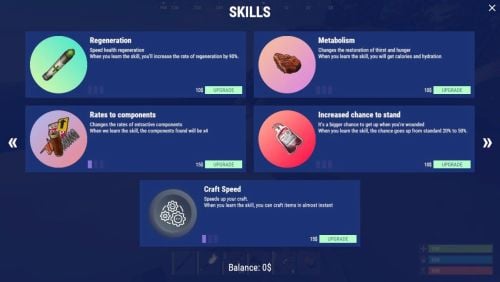
Plugin adds a system of 18+ different skills Features: Beautiful user interface Universality (plugin working with different economic plugins) Customization (all interface you can set up in configuration) Performance Commands skills - open interface giveallskills name/steamid - give the player every skills at the maximum stage giveskill name/steamid [SkillType] [Stage] [ID - for None] - give the player the skill with the stage skills.convert.olddata - convert from old data skills.wipe - wipe skills removeskill name/steamid [SkillType] [ID - for None] - remove a player's skill skills.permissions.wipe – use it to manually remove permissions from player data Permissions skills.bypass - bypass for skills skills.wipe - using the command "skills.wipe" Skills Types Wood Stones Metal Sulfur Attack Secure Regeneration Metabolism ComponentsRates StandUpChance CraftSpeed FastOven Kits (works only with the Kits by Mevent plugin) None Cloth Butcher Scrap RecyclerSpeed TransferWipe MixingTableSpeed Gather CraftRates FAQ Where can I see an example of a config? Config How do I set an image to the background? 1. Enter a link to the image in the "Image" field 2. Set "Save Image Color" to true 3. Reload Image Library (oxide.reload ImageLibrary) 4. Reload Skills (oxide.reload Skills) !ATTENTION: The image must not exceed 3 MB Example: https://pastebin.com/cDxiBVrh How to use BankSystem to store the economy "Economy": { "Balance add hook": "Deposit", "Balance remove hook": "Withdraw", "Balance show hook": "Balance", "Plugin name": "BankSystem" }, How to use ServerRewards to store the economy "Economy": { "Balance add hook": "AddPoints", "Balance remove hook": "TakePoints", "Balance show hook": "CheckPoints", "Plugin name": "ServerRewards" }, How to use "Required skills stages"? Config example: "Required skill stages": [ { "Type": "CraftSpeed", "ID": 0, "Stage": 1, "Require the presence of this skill? (otherwise only the stage will be checked)": true } ] Hooks CanSkillLearn(BasePlayer player, string skillType, int skillID, int stage) OnSkillLearned(BasePlayer player, string skillType, int skillID, int stage)$24.95 -

Version 1.0.0b
15 downloads
ExtraPlants Expand your farming with 10+ unique cultivatable plants! ExtraPlants introduces a brand-new farming system that goes beyond vanilla crops. Grow mushrooms, harvest resources from grubs, cultivate fruit trees. By default, all custom items are based on apples. We recommend that you set them to items that can be used with Cooking plugins, etc. This plugin has a trial version. If you are considering purchasing it, please download it here. FEATURES 10 Unique Plant Types • Mushroom - Grows naturally in planters with water and optional fertilizer • Sulfur Grub - Harvestable grub that yields sulfur ore — explodes when attacked ! You need to raise the larvae without being detected by enemies. • Metal Grub - Harvestable grub that yields metal ore • Zombie Soul - Mysterious Soul that yields bones • Aloe - Produces Aloe Vera • Cactus - Low water requirement, yields cactus flesh • Sugarcane - Produces sugar cane • Wood Tree - Grow your own wood supply • Fruits Tree - 15 fruit varieties: Apple, Orange, Strawberry, Cherry, Grape, Lemon, Peach, Pear, and more. • Tropical Fruits Tree - 11 exotic fruits: Mango, Pineapple, Banana, Dragon Fruit, Papaya, and more. • Nuts Tree - 10 nut varieties: Almond, Walnut, Coconut, Pistachio, Cashew, and more. By default, all custom items are based on apples. We recommend that you set them to items that can be used with Cooking plugins, etc. Custom Seeds System • Seeds use the fertilizer item with custom skins • Place seeds in any planter box to start growing • Each plant type has unique growth requirements Fully Configurable Every plant type can be customized: • Growth time intervals • Growth success chance • Water requirements • Drop items and quantities • Custom item names and skins • Death/consume probability for grubs COMMANDS PERMISSIONS extraplants.mushroom.nogrow - Prevents mushroom growth in player's planters Chat Commands (Admin Only) /seed Obtain 100 seeds of each type. Console Commands giveseed <steamID> <skinID> <amount> - Give special seeds to a player. Entering only "giveseed" will show the names of all plants. Aloe Sapling 3601726840 Cactus Sapling 3601727134 Tropical Fruits Tree Sapling 3601727963 Fruits Tree Sapling 3601727819 Wood Sapling 3601729292 Sulfur Grub 3601729483 Metal Grub 3601729552 Zombie Soul 3601727291 Sugarcane Sapling 3601727002 Nuts Tree Sapling 3601727388 Give Seed Example: giveseed 76561198000000000 3601726840 10 (Give 10 Aloe Sapling to 76561198012345678) Configuration Options For All Plants: • Growth Time (seconds) - Time between growth checks • Growth Chance (0.0-1.0) - Probability of successful growth • Water Required - Minimum water level needed • Seed Skin ID - Custom skin ID for the seed item For Harvestable Plants: • Max Drop Types Per Harvest - Number of different items dropped • Drop Items - List of items with amounts and drop chances For Grubs: • Probability Of Death (0.0-1.0) - Chance the plant dies after harvest HOW IT WORKS 1. Obtain Seeds - Admins give seeds using the giveseed command 2. Plant Seeds - Place seed (fertilizer with custom skin) in any planter 3. Water Plants - Ensure adequate water level for growth 4. Wait for Growth - Plants grow based on configured intervals 5. Harvest - grown plants to collect resources Special Mechanics • Sulfur Grub - Explodes when attacked Explosion Conditions The player attacks the sulfurous body with an axe or gun. The planter box containing the sulfurous is destroyed by the player or NPC, or is destroyed by weathering. (Pickup collection does not cause an explosion.) • Trees - Support multiple fruit types per harvest • Mushrooms - Can optionally require fertilizer for growth (config) FAQ Q: How do players obtain seeds? A: Seeds can only be given by server admins using the console command: giveseed <steamID> <skinID> <amount> You can integrate this with your server's shop plugin or reward system. Q: Do plants survive server restarts? A: Yes! All plant data is automatically saved and restored when the server restarts. The plugin uses persistent data files to track all planted seeds and their growth states. Q: Can I customize the drop items and amounts? A: Absolutely. Every plant type has fully configurable drop settings in the config file. You can change item types, quantities, drop chances, custom names, and skin IDs. Q: What happens if I attack the Sulfur Grub? A: The Sulfur Grub will explode, dealing 500 damage within a 12-meter radius. This is intentional — harvest it normally by interacting with it instead of attacking. Q: Why aren't my plants growing? A: Check the following: • Ensure the planter has enough water (each plant type has different requirements) • Verify the growth chance in config is set properly (0.0-1.0) • Check if the player has the "extraplants.mushroom.nogrow" permission (for mushrooms) • Wait for the configured growth interval to pass Q: Can I add my own custom plants? A: The current version supports 10 pre-configured plant types. Each plant type's drops, growth times, and requirements are fully customizable through the config file. Q: Do the fruit trees drop all fruits at once? A: No. The "Max Drop Types Per Harvest" setting controls how many different fruit types drop each harvest. For example, if set to 3, players will receive 3 random fruit types from the configured list. Q: What's the difference between Grubs and other plants? A: Grubs (Sulfur Grub, Metal Grub, Zombie Soul) have a "Probability Of Death" setting. After each growth cycle, there's a chance the grub will die and need to be replanted. Regular plants like trees continue producing indefinitely. Q: Which planters are supported? A: All vanilla planter types are supported: • Large Planter Box • Small Planter Box • Bathtub Planter • Minecart Planter • Railroad Planter • Triangle Planter • Single Plant Pot Q: Can players craft the seeds? A: No, seeds cannot be crafted by default. They must be distributed by admins. This gives you full control over your server's economy and progression. Q: Are the custom skins included? A: Yes, all skin IDs are pre-configured and included. The skins are applied automatically when seeds and harvested items are created. Q: Can I change the seed item from fertilizer to something else? A: The current version uses fertilizer items with custom skins as seeds. Changing the base item would require code modification. Q: How do I give seeds to offline players? A: The giveseed command works with sleeping players too. As long as the player has logged in at least once, you can give them seeds using their Steam ID. Q: What happens if a player's inventory is full when receiving seeds? A: The seeds will be dropped on the ground near the player's position. Issue [ 1/17 ] Bulk planting is limited by the specifications, but we are currently working on improving this.$20.00- 8 comments
- 1 review
-
- 2
-

-
- #rust
- #facepunch
- (and 12 more)
-
Version 2.8.30
14,751 downloads
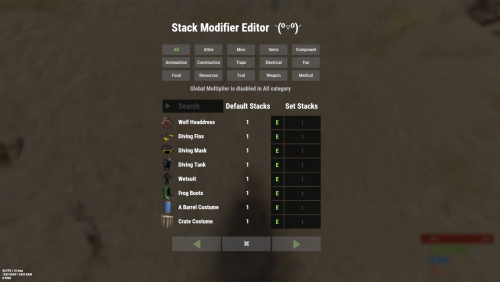
Stack Modifier is a performance-focused plugin that enhances and refines item stacking behavior in Rust. Features Includes GUI Editor - Blocks Player movements while using GUI Editor Including Keybinds! Adds NEW Stacking Support for the following. liquids ( like bota bags etc ) Stacking of Fuel Containers (hats, tools, etc.) Stacking of Guns Weapon Attachments Stacking of Skins Works with SkinBox plugins Supports stacking armor slot armors Supports Genetic Stacking Supports Food Spoil stacking Stacking of Custom Items Stacking of Custom Items with Custom Display Names Stacking of Key Cards without losing the stack when swiping Stacking Candy Cane Club without losing the stack while lick Support for modified presents for unwrapping Limits wearable clothing items to stack sizes of 1! ( on the player wear container only ) Limits weapon attachments to stack sizes of 1! ( On the weapon its self! so you can have bigger stacks! ) The largest possible value in C# is 2,147,483,647 Which means anything over this stack-size will break the plugin Patches All Industrial Conveyor stack issues! ( Yes custom items no problems! ) -- THIS IS NOW IT"S OWN PLUGIN AS AN ADDON. 4-2-2025 STACK MODIFIER INDUSTRIAL ADDON: Known Conflicts RoadBradley & HeliSignals Are doing item creations wrong and setting the item.name field as vanilla item display names thus breaking stack support. ( don't set a vanilla display name only set them if its custom names as the fix ) Conveyor Stacks Not needed & conflicts, stack-modifier already does this & has config settings for it. Davids Shop UI ( recently changed how his default data files are createdfor items ) ( you need to generate a new Items.json file and re-do custom items / pricing inside it to fix stack bugs with old data files ) Magic Coin uses some of the same hooks set up config in it correctly to not conflict Custom Skin Stack Fix not needed this handles it properly Stack Size Controller cannot have 2 of the same plugins basically Extra Loot causes a stacking bug when a reboot occurs with skinned items preventing old skinned items from stacking with new skinned items IndustrialCustomSkinsFix not needed stack-modifier has the same patch in it. IQAlcoholFarm by BadMandarin/Mercury is not supported & will cause stack bugs / problems ( could be supported with an author update, but current version is not supported ) ItemPerks by imthenewguy Causes stack bugs/problems just by having this plugin on your server due to harmony patching done inside it + repair logic is bugged. Item creation is also not handled properly resulting in duplication issues with Conveyor movements nothing can be done about that. ( plugin requires a full rewrite for proper support & repairs. ) Plugins that do not handle Item Creation Correctly: ( Which break stacks ) Custom Item Drops by Machine ( Always sets the vanilla display name when its supposed to be null for vanilla items ) XP System by fastburst ( Always sets the vanilla display name when its supposed to be null for vanilla items ) Copy Paste ( Items created by copy paste its self will not stack since item creation is not handled properly ) This list will be constantly updated as devs fix their code accordingly & new ones are discovered to be flawed. Getting Started - Click Either Link to play video Video One Video Two Permissions stackmodifier.admin - Allows players access to the UI Editor. Chat Commands /stackmodifier -- Opens Editor UI, Must enable config option "Enable UI Editor": true /stackmodifier.reset ( is also console cmd ) -- Requires stackmodifier.admin perm ( resets stack-sizes ) /resetvenders -- Requires being an admin, only resets facepunches messed-up vendors, not all /stackmodifiercolor <inputpanel|inputtext|text|transparent> <color> <alpha|ex, 0.98> Example /stackmodifiercolor inputpanel #207086 0.25 UI Editor Commands set 8 -- Inside a categories Search Bar, type set and a value and it will apply it to the whole category, reset -- Inside a categories Search Bar type reset hit the enter key or click out of the field and it resets it. multiply -- Inside a categorie use the Search Bar & type multiply and a value and it will apply it to the whole category. if you reset or set, re-click the Category Tab to refresh it before making more changes! Otherwise you will have to do your first edit twice for it to start working again UI Editor Without Images? * At the top of the config you will see the following setting set to true save and reload. "Disable Images for UI Editor": false, < Disables images and allows full use Having Problems? * Warning this plugin is not compatible with custom-skins-stacks-fix plugin since this already handles everything. * If you already have a plugin that modifies the rust stack sizes you will first need to remove that plugin. * Then you simply load Stack Modifier onto your server open the config and start editing the Modified values to your new stack-size amounts! * When you are done simply save and reload the plugin! ( oxide. reload StackModifier ) * Alternatively you can utilize the built-in UI Editor and not ever need to touch the config! * Admins - Auth level 2 will always be ignored. * This plugin is not compatible with BetterVanish, I only support Vanish from umod. How to revert to vanilla? * Run the reset command while having the stackmodifier.admin perm or Unload Stack Modifier, delete the config, and restart your server. * It will reset the config back to vanilla settings allowing you to start over. API Hooks Interface.CallHook("OnStackSizeUpdated"); //called after the plugin updates the stack sizes on server reboots & when reloading the plugin. //It's also still called right after the UI editor is closed from modifying. //Inside the oxide hook I use called OnItemAddedToContainer theirs a hook of mine, if called mine will not touch it or fix the stacks. if (Interface.CallHook("OnIgnoreStackSize", player, item) != null) return; ## Configuration { "Disable Industrial Conveyor Patch (true = disabled)": false, "Industrial Conveyor Max Stack Size Per Move Default = 60": 130, "Industrial Conveyor Move Frequency Default = 5 (Lower = faster moving)": 3, "Disable Weapon Attachment stack fix (Unsubscribes from both OnWeaponModChange & CanMoveItem)": false, "Disable Wearable Clothes fix (Unsubscribes from OnItemAddedToContainer)": false, "Disable Ammo/Fuel duplication fix (Recommended false)": false, "Disable Candy Cane Club Lick fix & unwrap fix (Unsubscribes from OnItemAction)": false, "Disable OnCardSwipe fix (Unsubscribes from OnCardSwipe)": false, "Enable VendingMachine Ammo Fix (Recommended)": true, "Enable UI Editor": true, "Disable Images / Toggles off Images for UI Editor": false, "Sets editor command": "stackmodifier", "Sets reset command for both console & chat": "stackmodifier.reset", "Sets editor color command": "stackmodifiercolor", "Sets Default Category to open": "All", "Stack Modifier UI Title": "Stack Modifier Editor ◝(⁰■¿⁰)◞", "UI - Stack Size Label": "Default Stacks", "UI - Set Stack Label": "Set Stacks", "UI - Search Bar Label": "Search", "UI - Back Button Text": "◀", "UI - Forward Button Text": "▶", "UI - Close Label": "✖", "Colors": { "InputPanel": { "Hex": "#0E0E10", "Rgb": "0.0549019607843137 0.0549019607843137 0.0627450980392157 0.98" }, "InputText": { "Hex": "#FFE24B", "Rgb": "1 0.886274509803922 0.294117647058824 0.15" }, "TextColor": { "Hex": "#FFFFFF", "Rgb": "1 1 1 1" }, "Transparency": { "Hex": "#", "Rgb": "0 0 0 0.95" } }, "Category Stack Multipliers": { "Attire": 1, "Misc": 1, "Items": 1, "Ammunition": 1, "Construction": 1, "Component": 1, "Traps": 1, "Electrical": 1, "Fun": 1, "Food": 1, "Resources": 1, "Tool": 1, "Weapon": 1, "Medical": 1 }, "Stack Categories": { "Attire": { "hat.wolf": { "DisplayName": "Wolf Headdress", "Modified": 10 }, "horse.shoes.basic": { "DisplayName": "Basic Horse Shoes", "Modified": 10 } }, "Misc": { "fogmachine": { "DisplayName": "Fogger-3000", "Modified": 10 }, "sickle": { "DisplayName": "Sickle", "Modified": 10 } }, "Items": { "kayak": { "DisplayName": "Kayak", "Modified": 10 }, "map": { "DisplayName": "Paper Map", "Modified": 10 } }, "Ammunition": { "ammo.grenadelauncher.buckshot": { "DisplayName": "40mm Shotgun Round", "Modified": 20 }, "ammo.rocket.sam": { "DisplayName": "SAM Ammo", "Modified": 10 } }, "Construction": { "door.double.hinged.metal": { "DisplayName": "Sheet Metal Double Door", "Modified": 10 }, "building.planner": { "DisplayName": "Building Plan", "Modified": 10 } }, "Component": { "bleach": { "DisplayName": "Bleach", "Modified": 2 }, "vehicle.module": { "DisplayName": "Generic vehicle module", "Modified": 10 } }, "Traps": { "trap.bear": { "DisplayName": "Snap Trap", "Modified": 30 }, "samsite": { "DisplayName": "SAM Site", "Modified": 10 } }, "Electrical": { "ceilinglight": { "DisplayName": "Ceiling Light", "Modified": 10 }, "wiretool": { "DisplayName": "Wire Tool", "Modified": 100 } }, "Fun": { "firework.boomer.blue": { "DisplayName": "Blue Boomer", "Modified": 200 }, "telephone": { "DisplayName": "Telephone", "Modified": 10 } }, "Food": { "apple": { "DisplayName": "Apple", "Modified": 100 }, "woodtea.pure": { "DisplayName": "Pure Wood Tea", "Modified": 100 } }, "Resources": { "skull.human": { "DisplayName": "Human Skull", "Modified": 10 }, "wood": { "DisplayName": "Wood", "Modified": 10 } }, "Tool": { "tool.instant_camera": { "DisplayName": "Instant Camera", "Modified": 10 }, "bucket.water": { "DisplayName": "Water Bucket", "Modified": 10 } }, "Weapon": { "gun.water": { "DisplayName": "Water Gun", "Modified": 10 }, "spear.wooden": { "DisplayName": "Wooden Spear", "Modified": 10 } }, "Medical": { "blood": { "DisplayName": "Blood", "Modified": 100 }, "bandage": { "DisplayName": "Bandage", "Modified": 30 } } } }$24.99- 194 comments
- 22 reviews
-
- 21
-
-

-

-

-
- #stacks
- #rust stacks
- (and 22 more)
-
Version 1.3.11
1,229 downloads
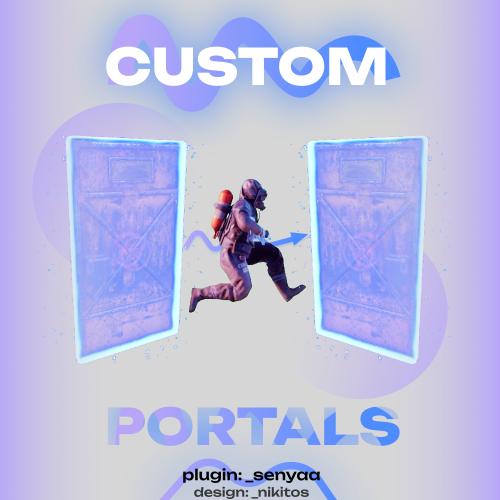
This plugin adds custom portals, which could be deployed on players' bases, vanilla and custom monuments. Custom maps To use Custom Portals on your map you need to place any prefab and create a custom prefab from it. Name it CustomPortals.<portal name> 2 portals with the same name will link. ! Make sure not to break the prefab and not to add them as part of other prefabs ! Commands Player Chat Commands /buyportal - buy portal (requires customportals.buy permission) /spawnportal - spawns portal (requires customportals.spawn permission) Admin Chat Commands All of the commands that are mentioned below require customportals.admin permission! /customportals add <portal name> - spawns portal on the monument you stand on /customportals remove - removes portal from the monument /customportals reset - removes all portals from the monument /changeportal - setup any portal Admin Console Commands giveportal <amount> <player name> - gives portal(s) to the specified player Permissions customportals.use - required to use portals customportals.admin - allows usage of /customportals and giveportal commands customportals.buy - allows players to buy portal, using /buyportal command customportals.free - allows players to get portal for free, using /buyportal command (buy permission is still required) customportals.freeuse - allows players to use the portal for free (if the use price is set) customportals.bypasslimit - allows players to place infinite amount of portals customportals.bypasslinkinglimits - allows players to link any portals customportals.spawn - alllows players to spawn portals using a command, instead of placing them manually If you are an admin, you can specify individual portal permissions. They are saved as customportals.portal.<portal permission name> Localization This plugin has built-in support for the following languages - English Russian API BasePortal SpawnPortal(Vector3 position, Quaternion rotation, string name) // spawns portal Item CreatePortalItem() // returns portal item$9.99 -
.thumb.gif.2c9d30f8e6612378c3556101d83247d1.gif)
Version 1.0.0d
14 downloads
HighJump adds a double jump ability to your Rust server. Players can perform a second jump while in mid-air, allowing them to reach higher places and traverse terrain more easily. The plugin features a realistic physics-based jump system with ceiling detection, fall damage protection, and a position reset command for safety. Features - Double Jump: Press jump again while airborne to perform a second jump - Permission-based Jump Force: 4 tiers with configurable jump heights for regular players and VIPs - Calorie Cost: Jumping consumes configurable calories for gameplay balance - Ceiling Detection: Automatically prevents jumping into ceilings or structures - Fall Damage Protection: Temporary immunity after double jumping (within safe limits) - Position Reset Command: /posreset returns player to their pre-jump location - Multi-language Support: English, Japanese, Chinese (Traditional), Russian Permissions HighJump.use - Basic double jump access (default force: 14) HighJump.vip1 - VIP tier 1 (default force: 20) HighJump.vip2 - VIP tier 2 (default force: 26) HighJump.vip3 - VIP tier 3 (default force: 32) Grant permissions using: oxide.grant user <username> HighJump.use oxide.grant group <groupname> HighJump.vip1 Commands /posreset - Teleports the player back to their position before the double jump. Useful if a player gets stuck or jumps somewhere unintended. It is for emergency use only, and will not work if used without any problems. Configuration { "Double Jump Calorie Cost": 1.0, "Jump Force - Use Permission": 14.0, "Jump Force - VIP1 Permission": 17.0, "Jump Force - VIP2 Permission": 20.0, "Jump Force - VIP3 Permission": 23.0 } Double Jump Calorie Cost: Amount of calories consumed per double jump Jump Force values: Higher values result in higher jumps How It Works 1. Player jumps normally from the ground 2. While airborne, within 0.4 seconds, press jump again to activate double jump 3. The player is boosted upward with physics-based movement 4. Ceiling detection prevents clipping through structures 5. Fall damage is negated for jumps within safe height limits 6. If something goes wrong, use /posreset to return to safety. It is for emergency use only, and will not work if used without any problems.$3.00 -
Version 1.1.0
1 download
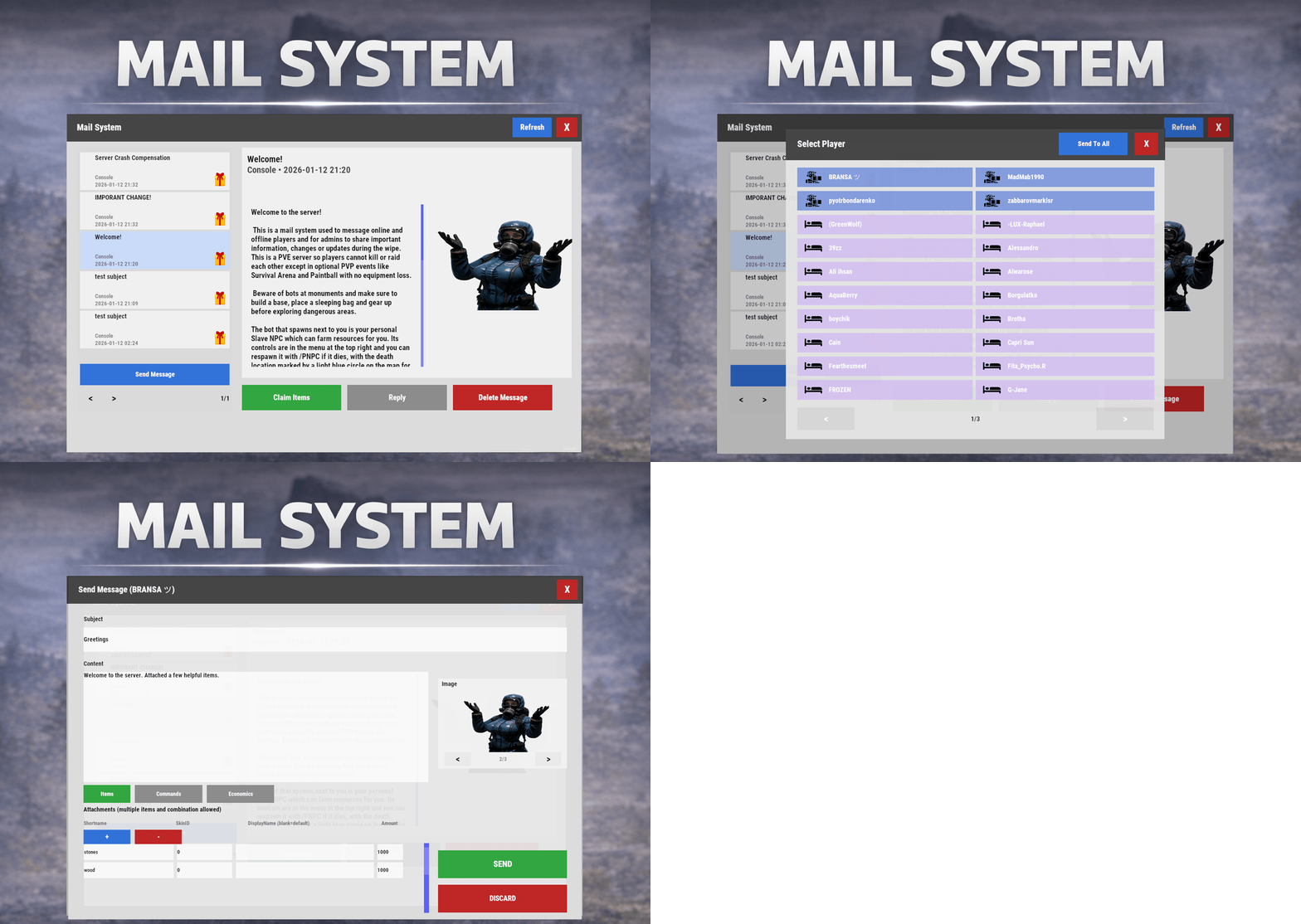
Mail System is an in-game mail and notification system for Rust servers, allowing players to send "emails" to online and offline players. Admins will also bnefit from being able to include attachments such as items, commands, and economy rewards. Designed for wipes, announcements, rewards, crash compensation and direct communication, Mail System ensures both online and sleeping players receive admin communication, as well as providing a great way for players to message each other anytime via a simple UI that players can access at any time. Perfect For Admin announcements Server rules and new player welcome messages Compensations Reward delivery Event prizes Player to Player communication Core Features Persistent inbox per player Messages are delivered even when players are currently offline Configurable inbox limits per player - oldest message deleted if limit exceeded. Optional wipe-based inbox clearing Simple message creation Ability to input subject and message content Recipient can be easily selected via a player picker UI, with unique colors and icons for Online/Sleeper/Staff Optional image per message via ImageLibrary. Available Image URLs (recommend square images eg 512x512) can be configured. Default/Example images have been included. Clean scrollable UI and configurable max length for long messages. Admins can easily include a combination of items, economies, or commands ran against the recipient. Messages and attachments can also be created via console commands, perfect for use in other plugins. Known Limitation: Rust does not currently have a functional multi-line support (as in, hitting enter to create a line break won't create a line break for the recipient). However. when typing message content, entering \n will create a new line in the resulting message as shown in attached screenshots. Facepunch is aware of this and UI input functionality will be updated accordingly. Unread notifications Notification sound upon receiving new message Visual indicator for unread messages and attachments Customizable position and size of on-screen notification bell Attachments & Rewards Each message can include any combination of: Item rewards Multiple items per message Custom display names Optional skin IDs Inventory-safe claiming Command rewards Ability to run server commands on claim Supports placeholders to ensure command is run against the recipient (%steamid%) Repeatable command execution via amount entry Economy rewards Economics ServerRewards TCBank each handled independently, with clear failure feedback if unavailable or failed Players claim attachments directly from the inbox with a single click and receive a clear summary of what was successfully claimed and what failed, if anything. 🛠 Admin & Console Tools Send messages with attachments: Using In-game UI Using Console commands Attach rewards and images using simple flag-based commands Ability to include attachments is admin permission based Target: Individual players All players (Online and Sleepers) Customization Customize HUD icon and unread indicators Customize online/sleeper/staff icons Built-in notification HUD position & size editor (no config guessing) Customize available images which can be included in messages. Adjust HUD colors Configure subject/message max lengths and inbox size. Localization via lang files Chat Commands: /inbox - Opens the Inbox UI where players can view and send/reply messages /sendmail "PlayerName" - optional chat command to send message to specific player without going through inbox/player picker /inbox_top - Admin command to view players with largest inbox sizes /inbox_clear "PlayerName" - Admin command to clear a specific player's inbox /notif_iconpos - Admin command to reposition and resize the notification icon (auto saves) Permissions: mailsystem.send - required to be able to send messages mailsystem.admin - required to add attachments via UI and run admin commands Console command functionality Console commands can be used for both messaging and attachment delivery using flags, with included option to select which image will appear in the message Basic command structure is as follows: mail.send <playername OR SteamID OR *> "<subject>" "<content>" [flags] Using the * star sign in place of recipient will send the message to all players. Available flags are desribed below and may be used multiple times and in any order: Image Flag: -img <number> Sets the message image. Uses the image list from the config Index starts at 0 0 = first image, 1 = second, etc. _______________________________ Item Flag: -item <shortname> <amount> <skinId> optional:"displayName" Adds an item attachment. skinId may be 0 Custom name is optional If omitted, the item’s default name is used _______________________________ Commands Flag: -cmd "<name>" "<command>" <amount> Runs a server command when claimed. amount specified how many time to run the command. It defaults to 1 Supports %steamid% and %name% wildcards - useful when sending to all players or via other plugins. "name" is what the player will see as the attachment name (instead of seeing the command itself) _______________________________ Economy Flag: -eco <type> <amount> Adds a currency attachment. Supported types: Economics ServerRewards TCBank _______________________________ Example Console Commands: Below are some example console commands. Note you can use \n\n for following text to start as a new paragraph Simple message only to single player(with image) mail.send PlayerName "Welcome!" "Welcome to the server. Enjoy your stay!" -img 0 Simple message only to all players (with image) mail.send * "Server Notice" "Welcome to the server everyone!" -img 0 Single item attachment (with image) mail.send PlayerName "Resource Gift" "Here are some materials to get you started." -img 1 -item wood 2000 0 Item attachment with custom display name and specific skinID (with image) mail.send PlayerName "Special AK" "You have received skinned HV pistol ammo." -img 2 -item rifle.ak 1 987654321 "Very Cool AK" Multiple items (with image) mail.send PlayerName "Supply Drop" "A mix of useful resources." -img 0 -item wood 3000 0 -item stones 2000 0 -item metal.fragments 500 0 Command attachment (with image) mail.send PlayerName "Starter Kit" "Claim this message to receive your starter kit." -img 1 -cmd "Starter Kit" "kit give %steamid% starter" Economy reward (Economics) (with image) mail.send PlayerName "Welcome Bonus" "You have received a currency reward." -img 0 -eco Economics 1000 Mix of Items + Economics (with image) mail.send PlayerName "Builder Pack" "Resources and money to help you build." -img 2 -item wood 4000 0 -item stones 4000 0 -eco Economics 2500 Mix of Items and Command (TWO vip kits) (with image) mail.send PlayerName "VIP Trial" "Enjoy a one time VIP kit." -img 1 -item scrap 250 0 -cmd "VIP Kit" "kit give %steamid% VIP" 2 Full mixed attachments (items + command + economy) (with image) mail.send PlayerName "Welcome Package" "Everything you need to get started." -img 0 -item wood 3000 0 -item ammo.pistol.hv 100 0 -cmd "Starter Kit" "kit give %steamid% starter" -eco Economics 1500 Full mixed attachments to all players (note using \n\n to create a new paragraph within message content) (with image) mail.send * "Attention Citizens!" "Thank you for being awesome.\n\nAttached some gifts." -img 0 -item wood 3000 0 -item ammo.pistol.hv 100 0 -cmd "Starter Kit" "kit give %steamid% starter" -eco Economics 1500 If using the commands within a JSON (config) file, you will need to ensure you escape the quotes with a backslash (place a backslash before any quote sign), for example: mail.send %SteamID% \"Welcome!\" \"Welcome to the server!\n\n This is a mail system used to message online and offline players and for admins to share important information, changes or updates during the wipe\n\nWe hope you have a great time\" -item ammo.pistol.hv 100 0 \"\" -img 1 If you’re looking for a modern replacement for chat spam, manual kit commands, or unreliable reward delivery, Mail System provides a polished, user-friendly solution that players will instantly understand and appreciate. I have done my best to document the full functionality, but if any doubt do not hesitate to open a support request.$19.99 -
Version 1.0.9
23 downloads
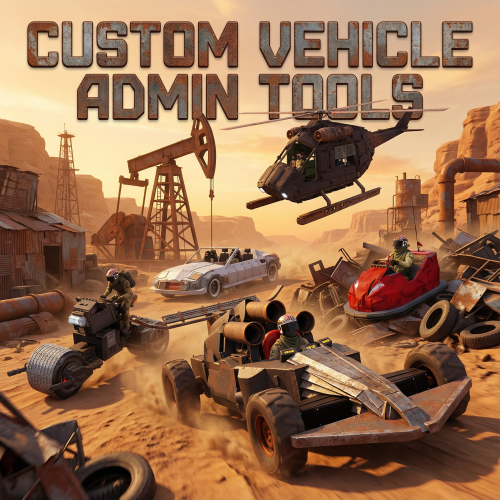
Custom Vehicle Admin Tools CustomVehicleAdminTools is a collection of admin utilities designed specifically for Karuza Custom Vehicles in Rust. It gives server admins additonal features such as visibility of player owned vehicled, access and recovery tools for custom vehicles. Built for real moderation needs: ownership checks, vehicle relocation and recovery, repairs and drowned vehicle detection. CustomVehicleAdminTools is built with safety and compatibility in mind: it only targets Karuza Custom Vehicles, never interfering with vanilla Rust vehicles, and all admin actions are non-destructive to prevent accidental damage or permanent changes. Every feature is fully permission-based, allowing precise control over who can use each tool, and all visual debugging elements automatically expire after a short duration to avoid client clutter or long-term visual noise. Features: Vehicle Ownership & Inspection Lock Bypass Vehicle Move/Relocate Tool Instant Vehicle Repair Underwater Vehicle Detection List Vehicles Owned by a Player List all vehicles Separate permission for each function Commands: /kowner Shows the owner (name and SteamID) of the Karuza custom vehicle you are looking at. /klockbypass Bypass the codelock on the vehicle you are looking at. This authorises you on the vehicle. Run command again to de-authorise yourself. /kmove Moves a Karuza custom vehicle in two steps: Look at a vehicle and run /kmove to select it. Look at a destination point and run /kmove again to move the vehicle there. /krepair Instantly repairs the Karuza custom vehicle you are looking at to full health /kunderwater Detects Karuza custom vehicles that are underwater, draws visual markers (sphere, arrow, and label) showing their location and prints their positions to chat. /kplayerveh <player name or SteamID> (OPTIONAL: radius) Lists and visually marks all Karuza custom vehicles owned by a specific player. Optionally limits results to a radius around the admin. Each matching vehicle is highlighted with a temporary sphere and label. /kvehall (OPTIONAL: radius) Lists and visually marks all Karuza custom vehicles owned by a specific player. Optionally limits results to a radius around the admin. Each matching vehicle is highlighted with a temporary sphere and label. Permissions: customvehicleadmintools.owner - required for /kowner customvehicleadmintools.bypass - required for /klockbypass customvehicleadmintools.move - required for /kmove customvehicleadmintools.repair - required for /krepair customvehicleadmintools.underwater - required for /kunderwater customvehicleadmintools.listbyowner - required for /kplayerveh customvehicleadmintools.listall - required for /kvehall$6.99 -

Version 1.1.17
4,107 downloads
The Offline Raid Protection plugin is a comprehensive solution designed to protect players' structures and vehicles while they are offline. It offers a range of customisable protection levels based on real-time or the length of time a player has been offline, and integrates with the Clans plugin and the in-game teams feature to determine protection status based on the online status of all clan or team members and authorised players. Key Features Configurable Protection Levels: Set protection levels based on real time or the amount of time since a player went offline. For example, a building can have 100% protection one hour after a player goes offline, and 50% protection after two hours. This feature is highly configurable. Clan/Team Integration: The plugin integrates with the Clans plugin and the in-game teams feature. The protection status of a structure or vehicle is determined by the online status of all clan or team members and authorised players. Penalty System: An optional penalty system is implemented to prevent abuse of the protection feature. For example, if a player leaves a clan or team, a penalty can be applied to all members and protection can be disabled for a configurable period of time. Game Tip Messages: The plugin displays game tip messages to players when they hit a protected structure or vehicle. The message includes the percentage of protection and is colour coded according to the level of protection. It supports all the languages available in Rust. Commands: Players with permission can use commands to check the protection status of other players, change the offline time of other players, and change the penalty status. Cache System: The plugin uses a caching system to optimise performance and keep the impact on the server to a bare minimum. Configuration: The plugin includes a configuration file that allows you to customise the behaviour of the plugin. Commands All commands can be configured. /orp or /ao <steam id or full name> — Check a player's offline protection status. You can type the command without a name when looking at a player's structure. /raidprot — Display offline raid protection information. /orp.fill.onlinetimes — Fill all players offline times. (Chat & Console command) /orp.test.offline <steam id or full name> <hours> — Change a player's offline time. /orp.test.online <steam id or full name> — Change a player's offline time to the current time. /orp.test.penalty <steam id or full name> <hours> — Change the duration of a player's penalty. A negative value or zero would disable the penalty. /orp.update.permission — Update the permissions status (offlineraidprotection.protect) for all players. orp.update.prefabs <true> - Updates the 'Prefabs to protect' list in the configuration. Overwrites the list with the 'true' argument. (Console command) orp.dump.prefabs - Clears the 'Prefabs to protect' list in the configuration. (Console command) Permissions All permissions can be configured. offlineraidprotection.protect — Allows a player to be protected from raids. offlineraidprotection.check — Allows a player to check the offline protection status of other players. offlineraidprotection.admin — Allows a player to use all admin commands of the plugin. To grant a permission, use carbon/oxide.grant <user or group> <steamname or ID> <permission>. To revoke a permission, use carbon/oxide.revoke <user or group> <steamname or ID> <permission>. Configuration The configuration is to a large extent self-explanatory. Raid Protection Options Only mitigate damage caused by players: Choose whether or not to only mitigate damage caused directly by players. Protect players that are online: Choose whether or not to protect the bases of the players who are online. Works when "Scale of damage depending on the current hour of the real day" is configured. Scale of damage depending on the current hour of the real day: Defines the protection levels based on the current hour of the real day. The key is the hour of the day (0-23), and the value is the protection scale (0 — 340282300000000000000000000000000000000). Example: "0": 0.0, "1": 0.0, "2": 0.0, "3": 0.0 This means that the protection level is 100% from midnight to 3am. Scale of damage depending on the offline time in hours: Defines the protection levels based on the time since the player went offline. The key is the number of hours since the player went offline, and the value is the protection scale (0 — 340282300000000000000000000000000000000). The value of the hours can also be a decimal number. Example: "12": 0.25, "24": 0.5, "48": 1.0, "96": 2.0 This means that 12 hours after the player goes offline, the protection level will be 75%. After 24 hours it will be 50% and after 48 hours it will be 0%. After 96 hours, the damage is increased by 200%. Cooldown in minutes: During this time, damage levels will remain vanilla. Raids are possible. Scale of damage between the cooldown and the first configured time: During this time, the level of damage between the cooldown and the first configured time can be set to a specific value, such as 0.0 Online time to qualify for offline raid protection in minutes: Time to qualify for offline raid protection after a player connects Protect all prefabs: Choose whether to protect all prefabs or only specific ones. This will protect anything in the TC range. Protect AI (animals, NPCs, Bradley and attack helicopters etc.) if 'Protect all Prefabs' is enabled: Choose whether or not to protect AI entities if "Protect all Prefabs" is enabled. May cause high hook times if set to true. Protect vehicles: Choose whether to protect vehicles or not. Vehicle authorisation always has priority. If you want to exclude certain vehicles from protection, add them to the blacklist. Protect twigs: Choose whether to protect twigs or not. Prefabs to protect: List of prefabs that will be protected. Make sure you remove the prefabs you don't want to protect, some of them are pointless. Prefabs blacklist: List of prefabs that will not be protected. Prefabs in the blacklist will always have priority to be unprotected. Timezone Options The fallback timezone is UTC if you leave it blank in the configuration, or if your configured timezone doesn't exist. The timezone identifiers are different for Windows and Linux. You can check the appendices to find your preferred timezone. Conclusion: The Offline Raid Protection plugin provides a comprehensive solution for protecting players' structures and vehicles. This plugin is essential for any Rust server owner who wants to provide a fair and enjoyable gaming experience for their players. Acknowledgments Special thanks to @Kulltero for his valuable feedback and suggestions during the development of this plugin. Windows_Timezones.txt Linux_Timezones.txt Prefabs.txtFree -
.thumb.png.4946b6bb28f5c8029dbc6ef637a0c10f.png)
Version 1.0.9
182 downloads
Introducing WoundedNPC — where NPCs don't just die; they make a scene! Watch in amusement as your NPCs go from tough guys to crybabies, collapsing and crying out in pain. They'll lie there, whining and wailing, giving you a show worth watching! Perfect for adding a touch of humor to your Rust world. Your NPCs will now collapse similar to players, with customizable scream (or other sound of your choice!) with a configurable chance to get back up for a second chance. Get ready for the most entertaining and theatrical NPC deaths ever with WoundedNPC! Features: NPCs will enter a wounded state Configurable % chance for them to get back up Configurable wounded timer for them Configurable scream sounds Lightweight format sounds stored in data for minimal delay Automatically checks if screams listed in config exist, if not, it's downloaded. Ability to exclude specific NPCs by either prefab path, or partial name matching (useful to exclude zombies or any other NPC which you wish to die immediately) Notes: Dependency plugin - TapeLibrary by Nikedemos - Included 5 scream sound files included Audio file format .ogg Mono channel (can convert mp3 to a mono .ogg here , then upload to a file host of your choice ensuring link leads directly to downloading the file) Sound Loops - worth ensuring your wounded timer is around the same length as sound files. Example config { "Enabled: ": true, // can disable the plugin features from the config if needed "Wounded timer: ": 20, // how long will the NPC stay in wounded state "Chance to die after wounded timer: ": 50, // percentage chance NPC will NOT get back up after being wounded "NPC Prefab paths to exclude: ": [], // can exclude an entire prefab path for an npc (eg for scarecrow) "Exclude NPC where their displayname contains: ": [ "Marauder", "Zombie" ], // can exclude NPCs by their full or partial display name. "Boombox Prefab Path: ": "assets/prefabs/voiceaudio/boombox/boombox.deployed.prefab", // don't need to touch unless boombox prefab path ever changes or there's a new boombox type item introduced. "Wounded Sounds URLs: ": [ "https://www.dropbox.com/scl/fi/vyhsne1efaictwl39oqgu/Scream-Medium-C1-www.fesliyanstudios.com.ogg?rlkey=7ae1rnbtwj662puo874t823y6&st=svp1qa0x&dl=1", "https://www.dropbox.com/scl/fi/j6zo85v7uuwje4scenmm3/longpain1.ogg?rlkey=7cmumo9z40no1xkdzkcwzxl36&st=gef2dhc7&dl=1", "https://www.dropbox.com/scl/fi/gb2jkxu1gxfsqjxmtum32/longpain2.ogg?rlkey=81iwgqqw9j26t7f7vfbzg1diw&st=f5s5k1to&dl=1", "https://www.dropbox.com/scl/fi/04o1ukje93tly4rjx9dvu/longpain3.ogg?rlkey=cjkv5ks97307yadnah0pvua8b&st=ns0tqygh&dl=1", "https://www.dropbox.com/scl/fi/e6ey5eqevqwey43b16xj2/longpain4.ogg?rlkey=28vksom5xd5o82rhvy5kmiaj7&st=wgo8v7ue&dl=1" ], // Direct URL to scream sound files "Enable Debug Messages: ": true // debug messages in console. Turn off to reduce spam. Turn on for troubleshooting }$16.98 -
Version 1.1.1
8 downloads
This plugin was made to allow players to have a boombox following them around, blasting tunes anytime, without having to physically hold it all the time. Whether you're farming ores, trees, bots or other players, take the music with you anywhere. Features: Tested on both Oxide and Carbon frameworks. A small boombox will appear to the right of the player. Players can interact with it by turning their head towards it. BoomBox is attached to the player's body, following them wherever they go Simple to use toggle command to spawn/despawn the boombox Collisions with other objects are disabled, boombox will phase through walls, rocks etc, helping prevent getting stuck. Permissions: ezboombox.use - required to use the chat command Commands: /boombox - spawns/despawns the boombox$2.00 -

Version 1.6.0
10,362 downloads
Adds a cargo plane crash event to your server. The crash site is guarded by NPCs that patrol the area and can chase players. You can also set up custom loot using the "SimpleLootTable" plugin. Features: Support for third-party plugins Great customization options in the config Console commands: callcargoplane - force the event to start callcargoplane {steamID/name} - the event will be reserved for one player crashcargoplane - force a cargo plane to crash cpc_stop - force the event to end Chat commands(need admin privileges): showcrashzone - displays the crash area setcrashzonecenter - set the center of the crash zone to where the player is callcargoplane - force the event to start callcargoplane {steamID/name} - the event will be reserved for one player crashcargoplane - force a cargo plane to crash cpc_stop - force the event to end cpc_add_crashzone - adds a new zone at the location where the player is, can be used if you use multiple zones(you can set the name and radius - /cpc_add_crashzone "name" "radius") Hooks: void CargoPlaneCrashStarted() // called when the event starts void CargoPlaneCrashCrashed() // called when a cargo plane crashes void CargoPlaneCrashEnded() // called when the event ends void CargoPlaneCrashEventWinner(BasePlayer player) // called when a player loots any crate first CargoPlaneCrash config: { "PVE mode (crates can only be looted by the player who first dealt damage to the NPC)": false, "Give event ownership to the owner's teammates if he is no longer the owner. Only if teammates are within the event radius (for PVE mode)": true, "Radius for event(for PVE mode)": 380, "Create a dome for PVE mode": false, "Dome transparency (the higher the value, the darker the dome, recommended 4)": 4, "Time after which the owner of the event will be deleted if he left the dome or left the server (for PVE mode)": 300, "Message when a player enters the event dome(only for PVE mode if there is a dome)": "You have entered the Cargo Plane Crash Event", "Message when the event owner leaves the event dome (only for PVE mode if there is a dome)": "Return to the event dome, otherwise after 300 seconds you will no longer be the owner of this event", "Do not allow other players into the event(only for PVE mode if there is a dome) Be careful, if the crash site is near the player's base and the player is not the owner of the event, he will be ejected from his base outside the dome": false, "Message when a player is ejected from the event dome(only for PVE mode if there is a dome)": "You cannot be here, you are not the owner of this event", "Allow admin to be in event dome (only for PVE mode if there is a dome)": true, "Triggering an event by timer (disable if you want to trigger the event only manually)": true, "Time to event start(in seconds)": 3600.0, "Random time to event start": false, "Minimum time to event start(in seconds)": 600, "Maximum time to event start(in seconds)": 10800, "CargoPlane speed(recommended 4 to 6)": 5.0, "Minimum amount of online players to trigger the event": 1, "Minimum crates amount(spawn after crash)": 1, "Maximum crates amount(spawn after crash)": 1, "Crate simple loot table name(plugin SimpleLootTable is required)": "", "Minimum number of items in a crate(plugin SimpleLootTable is required)": 0, "Maximum number of items in a crate(plugin SimpleLootTable is required)": 0, "Crates lifetime(in seconds). The crate will not be destroyed if it has been activated": 3600, "Crates timer(in seconds)": 900, "Remove crates after being looted by a player(in seconds)": 300, "Minimum airdrops amount(spawn after crash)": 1, "Maximum airdrops amount(spawn after crash)": 1, "Airdrop simple loot table name(plugin SimpleLootTable is required)": "", "Minimum number of items in an airdrop(plugin SimpleLootTable is required)": 0, "Maximum number of items in an airdrop(plugin SimpleLootTable is required)": 0, "Airdrops lifetime(in seconds)": 3600, "Fireballs amount(spawn after crash)": 5, "Passengers amount(spawn after crash)": 2, "Explosion marker on the map(spawn after crash)": true, "Explosion marker lifetime(in seconds)": 300, "Enable signal smoke(spawn after crash)": true, "Signal smoke lifetime(in seconds, max 214)": 214, "Map size(crash zone size), you can see the zone, use the chat command /showcrashzone": 4500.0, "Starting altitude, defaults to map size, can be increased if cargo plane hits high ground(no more than 10000 recommended)": 4500.0, "Crash zone center. Use chat command /setcrashzonecenter to set to player position. You can check crash zone center, use the chat command /showcrashzone": { "x": 0.0, "y": 0.0, "z": 0.0 }, "Use multiple zones": false, "Select a zone from the list sequentially(if false, then the crash zone will be chosen randomly)": false, "Zones list": [ { "name": "0", "radius": 300, "center": { "x": -300.0, "y": 0.0, "z": 0.0 } }, { "name": "1", "radius": 200, "center": { "x": 100.0, "y": 0.0, "z": 0.0 } } ], "Event message(if empty, no message will be displayed)": "CargoPlane event started", "Crash message(if empty, no message will be displayed)": "Cargo plane crashed", "Event end message(if empty, no message will be displayed)": "CargoPlaneCrash event ended", "Message about coordinates(will display the coordinates of the crash site. If empty, no message will be displayed)": "", "Kit name(you can use kits for passengers if you have Kits plugin)": "", "Passenger name": "Mister bot", "Use NPC prefab for passengers": false, "Minimum NPCs amount(spawn after crash)": 2, "Maximum NPCs amount(spawn after crash)": 2, "NPCs lifetime(in seconds)": 3600, "NPCs type(NPCs prefab, experimental setting, it is not known how the NPCs will behave) 0 - tunneldweller; 1 - underwaterdweller; 2 - excavator; 3 - full_any; 4 - lr300; 5 - mp5; 6 - pistol; 7 - shotgun; 8 - heavy; 9 - junkpile_pistol; 10 - oilrig; 11 - patrol; 12 - peacekeeper; 13 - roam; 14 - roamtethered; 15 - bandit_guard; 16 - cargo; 17 - cargo_turret_any; 18 - cargo_turret_lr300; 19 - ch47_gunner": 8, "NPCs health(0 - default)": 0, "NPCs damage multiplier": 1.0, "NPCs accuracy(the lower the value, the more accurate, 0 - maximum accuracy)": 2.0, "NPCs attack range": 75.0, "Radius of chasing the player(NPCs will chase the player as soon as he comes closer than the specified radius, must be no greater than the attack range)": 60.0, "Minimum distance to NPC damage": 75.0, "Message if the player attacks far away NPCs": "NPC is too far away, he doesn't take damage", "Kit for NPCs. The NPC will use the weapon that is in the first slot of the belt(requires Kits plugin)": "", "Default displayName for NPC(for SimpleKillFeed/DeathNotes plugin)": "Crashsite NPC", "List of displayNames for each NPC(for SimpleKillFeed/DeathNotes plugin)": [ "Crashsite NPC1", "Crashsite NPC2", "Crashsite NPC3" ], "Will NPCs attack zombies": true, "Remove NPC corpses": false, "Prohibit building near the crash site": false, "Building prohibition radius": 20.0, "How long construction is prohibited near the crash site(in seconds)": 1800, "Event marker on the map(spawn an event marker at the crash site)": false, "Display approximate end time of event on marker": false, "Event marker name": "Cargo plane crash site", "Event marker lifetime(in seconds)": 3600, "Event marker transparency(0-1)": 0.75, "Event marker radius": 0.5, "Event marker color.R(0-1)": 1.0, "Event marker color.G(0-1)": 0.0, "Event marker color.B(0-1)": 0.0, "Do not spawn crates and NPCs when a cargo plane falls under water (if the water depth is greater than)": 0.5, "Do not choose a crash site near monuments": false, "If possible, the crash site will not be chosen near player bases": true, "SteamID for chat message icon": 0, "Complete the event if all crates were destroyed after looting": false, "Use Notify plugin for messages": false, "Notify message type": 0 }$19.99- 263 comments
- 22 reviews
-
- 18
-
-
-
-
- #event
- #cargoplane
- (and 18 more)
-

Version 1.1.0
164 downloads
Give your players an autopilot, a feature that enables AI-controlled driving and flying! Players simply set a destination, sit back, and let the autopilot take them there! Features: Autopilot for Ground, Air and Water Vehicles • Works with cars, motorcycles, bicycles, helicopters and boats. Navigation System • AI determines the most efficient route to the selected destination. • Obstacle detection helps prevent car crashes. ⚙ Complete Customization & Control • Adjust maximum speed and AI behavior for ground vehicles. • Fine-tune altitude, pitch, and throttle strength for helicopters. How to Use: Type /autopilot in chat. Select a location on the in-game map. Your AI autopilot will take over and drive or fly you there! Permissions: Land Vehicles autopilot.modularcar – Grants access to autopilot for modular cars. autopilot.motorbike – Grants access to autopilot for motor bikes (motorcycles) autopilot.pedalbike – Grants access to autopilot for pedal bikes (bicycles) Air Vehicles autopilot.attackhelicopter – Grants access to autopilot for attack helicopters autopilot.scraptransporthelicopter – Grants access to autopilot for scrap transport helicopters autopilot.minicopter – Grants access to autopilot for minicopters Water Vehicles autopilot.motorrowboat – Grants access to autopilot for motor rowboats autopilot.rhib – Grants access to autopilot for RHIBs autopilot.tugboat – Grants access to autopilot for tugboats See It in Action! Watch the Video Configuration: { "Mini helicopter autopilot settings": { "Process control update timer(0 - 0.2)": 0.0, "Disable autopilot when trying to control the player": true, "Max speed": 20.0, "Distance to route control point to reach": 15.0, "Transport push force from obstacle in collision(0 - disables push)": 3.0, "Automatic supply of the specified amount of fuel from the player inventory (0 - disables supply)": 100, "Flight height setting": { "Min": 50.0, "Max": 150.0 } }, "Transport helicopter autopilot settings": { "Process control update timer(0 - 0.2)": 0.0, "Disable autopilot when trying to control the player": true, "Max speed": 20.0, "Distance to route control point to reach": 15.0, "Transport push force from obstacle in collision(0 - disables push)": 3.0, "Automatic supply of the specified amount of fuel from the player inventory (0 - disables supply)": 100, "Flight height setting": { "Min": 50.0, "Max": 150.0 } }, "Attack helicopter autopilot settings": { "Process control update timer(0 - 0.2)": 0.0, "Disable autopilot when trying to control the player": true, "Max speed": 20.0, "Distance to route control point to reach": 15.0, "Transport push force from obstacle in collision(0 - disables push)": 3.0, "Automatic supply of the specified amount of fuel from the player inventory (0 - disables supply)": 100, "Flight height setting": { "Min": 50.0, "Max": 150.0 } }, "Boat Auto Pilot Settings": { "Process control update timer(0 - 0.2)": 0.0, "Disable autopilot when trying to control the player": true, "Max speed": 20.0, "Distance to route control point to reach": 15.0, "Transport push force from obstacle in collision(0 - disables push)": 3.0, "Number of processes per cycle in 1 tick when searching for a route(increasing the parameter - reduces the time of searching for a route, but increases the load on fps)": 10, "Grid step for route search (increasing the parameter - increases the time of searching for a route, but makes it harder to lay out a route in narrow places)": 60, "Automatic supply of the specified amount of fuel from the player inventory (0 - disables supply)": 100, "Minimum depth for determining transport passability when searching for a route": 0.5, "Max speed on obstacle detection": 5.0 }, "RHIB Auto Pilot Settings": { "Process control update timer(0 - 0.2)": 0.0, "Disable autopilot when trying to control the player": true, "Max speed": 20.0, "Distance to route control point to reach": 15.0, "Transport push force from obstacle in collision(0 - disables push)": 3.0, "Number of processes per cycle in 1 tick when searching for a route(increasing the parameter - reduces the time of searching for a route, but increases the load on fps)": 10, "Grid step for route search (increasing the parameter - increases the time of searching for a route, but makes it harder to lay out a route in narrow places)": 60, "Automatic supply of the specified amount of fuel from the player inventory (0 - disables supply)": 100, "Minimum depth for determining transport passability when searching for a route": 0.5, "Max speed on obstacle detection": 5.0 }, "Tugboat Auto Pilot Settings": { "Process control update timer(0 - 0.2)": 0.0, "Disable autopilot when trying to control the player": true, "Max speed": 20.0, "Distance to route control point to reach": 15.0, "Transport push force from obstacle in collision(0 - disables push)": 3.0, "Number of processes per cycle in 1 tick when searching for a route(increasing the parameter - reduces the time of searching for a route, but increases the load on fps)": 10, "Grid step for route search (increasing the parameter - increases the time of searching for a route, but makes it harder to lay out a route in narrow places)": 60, "Automatic supply of the specified amount of fuel from the player inventory (0 - disables supply)": 100, "Minimum depth for determining transport passability when searching for a route": 0.5, "Max speed on obstacle detection": 5.0 }, "Car Auto Pilot Settings": { "Disable autopilot when trying to control the player": true, "Max speed": 20.0, "Distance to route control point to reach": 15.0, "Transport push force from obstacle in collision(0 - disables push)": 3.0, "Number of processes per cycle in 1 tick when searching for a route(increasing the parameter - reduces the time of searching for a route, but increases the load on fps)": 10, "Grid step for route search (increasing the parameter - increases the time of searching for a route, but makes it harder to lay out a route in narrow places)": 60, "Max speed on obstacle detection": 5.0, "Allow you to search for a route on roads (takes precedence over off-road)": true, "Allow you to search for an off-road route": true, "Automatic supply of the specified amount of fuel from the player inventory (0 - disables supply)": 100 }, "Motor Bike Auto Pilot Settings": { "Process control update timer(0 - 0.2)": 0.0, "Disable autopilot when trying to control the player": true, "Max speed": 20.0, "Distance to route control point to reach": 15.0, "Transport push force from obstacle in collision(0 - disables push)": 3.0, "Number of processes per cycle in 1 tick when searching for a route(increasing the parameter - reduces the time of searching for a route, but increases the load on fps)": 10, "Grid step for route search (increasing the parameter - increases the time of searching for a route, but makes it harder to lay out a route in narrow places)": 60, "Max speed on obstacle detection": 5.0, "Allow you to search for a route on roads (takes precedence over off-road)": true, "Allow you to search for an off-road route": true, "Automatic supply of the specified amount of fuel from the player inventory (0 - disables supply)": 100 }, "Pedal Bike Auto Pilot Settings": { "Process control update timer(0 - 0.2)": 0.0, "Disable autopilot when trying to control the player": true, "Max speed": 20.0, "Distance to route control point to reach": 15.0, "Transport push force from obstacle in collision(0 - disables push)": 3.0, "Number of processes per cycle in 1 tick when searching for a route(increasing the parameter - reduces the time of searching for a route, but increases the load on fps)": 10, "Grid step for route search (increasing the parameter - increases the time of searching for a route, but makes it harder to lay out a route in narrow places)": 60, "Max speed on obstacle detection": 5.0, "Allow you to search for a route on roads (takes precedence over off-road)": true, "Allow you to search for an off-road route": true } }$19.90- 24 comments
- 2 reviews
-
- 5
-
-
-
- #rust
- #walkinrey
- (and 9 more)
-
Version 1.0.1
17 downloads
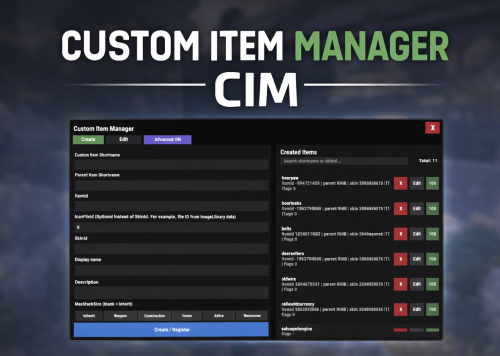
Custom Item Manager is an in-game admin UI for creating true custom Rust items by registering brand-new ItemDefinitions, leveraging the CustomItemDefinitions* framework. Unlike traditional “skinned item” approaches, this plugin adds items directly into the game’s item manifest, allowing them to be spawned, stored, traded, and in many cases interacted with exactly like vanilla items. Because these items exist as real ItemDefinitions, they can have their own unique itemID, shortname, display names, meaningful descriptions, icons, categories, flags, and blueprint rules**. This solves one of the biggest limitations of skin-based custom items: skinned items can only reuse the original item’s shortname, description and behavior, while CustomItemManager allows you to define entirely new identity and metadata for each item. All item creation and editing is done through an in-game UI. Items can be created, edited, unregistered, and re-registered instantly without editing code or restarting the server. Created items are stored persistently and automatically re-registered on server start. A searchable list andone-click give buttons makes testing fast and convenient. In short, CustomItemManager provides a clean workflow for adding more vanilla-like custom items to Rust servers, not just reskinned vanilla items. Why use this instead of skinned existing items? Skinned vanilla items: Share the original item’s behavior Cannot change the description meaningfully Are limited to cosmetic differences Custom Item Manager items: Exist as unique ItemDefinitions Have their own display name and custom description, in place of the ownership label, as well as additional customizable labels. Can have different rules, eg can/can't be dropped, configurable category (e.g. for sorting). Integrate cleanly with most Rust plugins that give or require specific item shortnames. RECYCLABLE - setting the Craftable value to True, and setting Blueprint Ingredients, will allow the item to be recycled. CRAFTABLE- by giving players a blueprint for the custom item, it can be crafted using the industrial workbench If you want items to feel like true, purpose-built content instead of cosmetic overrides, this plugin is the better approach, and will save you a lot of time chasing down skinIDs when configuring other plugins. Data and Persistence All created items are stored in the plugin data file Items are automatically re-registered on server start and plugin reload It is safe to reload the plugin without losing definitions On unload, all existing items will appear as a fallback item, and be restored to their original condition upon plugin load. Permissions customitemmanager.admin - required to use the utility Commands /cim - opens the CIM UI Recommendations Ensure you have the latest version of Custom Item Definitions framework For non-usable items (eg custom craft components, quest items), use RHIB as the parent item. It has a blank description to avoid confusion. When using the items in other plugins, you do not need to specify the SkinID again, only the shortname (skinID should be 0) If the items are already in player containers, prefer editing and re-registering over deleting. Text of the first, Green label on the item is configured in the lang file for Custom Item Definitions. All Display Names and Descriptions will be available in the lang file for Custom Item Manager, allowing you to easily translate the items. Custom Labels Example: The green label text is configured in the Custom Item Definitions lang file. The text when hovering over it, is the item description configured via my plugin. The blue and orange labels, can also be created via my plugin, with or without additional text when hovering over it. SPECIAL ITEM=|QUEST ITEM= After = you would enter the text you wish to display when hovering over the additional label. It's up to you to experiment and adapt it for your own needs. * This plugin is a UI utility to easily create and manage custom items, based on the required dependency - Custom Item Definitions framework developed by 0xF ** The plugin allows specifying whether the item can have a blueprint as well as the required components to craft, which allows the custom item to be recycled. The blueprint itself can be given to players and learned, however it will not appear in the vanilla crafting menu. It can however be crafted with an industrial crafter,$6.99 -
Version 2.5.5
4,930 downloads
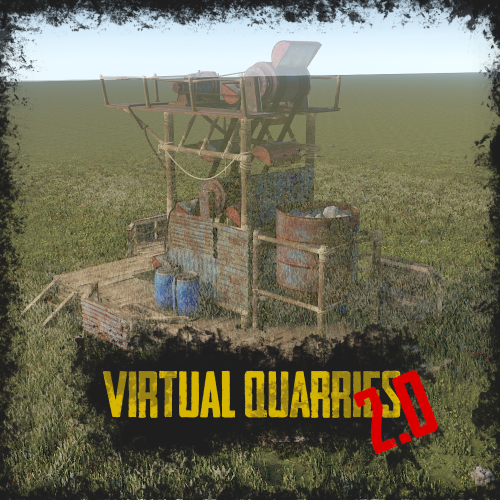
RUST Plugin Test Server TEST MY PLUGINS THERE! connect play.thepitereq.ovh:28050 Virtual Quarries plugin is a major upgrade to quarries. You can create and place quarries that extract any type of resource and access them from anywhere on the map. Set up an infinite number of quarry types, apply custom quarry limits with a permission system, grant friends access to resource storage, upgrade your quarry to get more resources, customize survey items and fuel, and much more! You can even customize the static quarries on the map to be instanced, allowing each player to have their own quarry. Extensive customization and enhancements for quarries. Place an infinite number of quarries of various types and give access to friends and teammates, including offline players. Customize the output for each quarry type, allowing them to dig anything from stone and ores to rockets and C4, with full support for skins and display names. The permission system lets you limit the number of quarries per player, and you can upgrade your quarries for better output, capacity, and fuel efficiency. The items required to place quarries can be customized based on the quarry's resource output. M ultiple types of survey charges, each corresponding to different quarry types. Full data merge through wipes. Responsive RUST-themed UI. Customizable fuel types for each quarry. Custom digging method ensures quarries dig once every 60 seconds by default to improve performance, but this frequency is configurable. Supports static quarries, pumpjacks, and the giant excavator pit, with instanced inventories for each player and customizable outputs. virtualquarries.use - Allows you to open /qr menu. (Needs to be enabled in config) virtualquarries.share - Allows players to give other teammates access to their quarries. (Needs to be enabled in config) virtualquarries.static.quarry - Gives access to static quarries. (Needs to be enabled in config) virtualquarries.static.pumpjack - Gives access to static pump jacks. (Needs to be enabled in config) virtualquarries.static.excavator - Gives access to giant excavator. (Needs to be enabled in config) /qr - Opens Virtual Quarry Menu. (Configurable) Economy Plugin Config 0 - None 1 - Economics 2 - ServerRewards 3 - IQEconomic 4 - BankSystem 5 - ShoppyStock Quarry Limit Extra You can limit sum of quarries by adding "*" into your permission list, so players can mix quarry profiles until they reach overall limit. Example: "virtualquarries.default": { "*": 3, "pumpjack": 1 }, Based on regular configuration this setup will limit player to have 3 of any type of quarrym but only 1 pumpjack, so he can have 2 quarries and 1 pumpjack or 3 quarries and no pumpjack. OnQuarryUpgraded(BasePlayer player, int quarryLevel, string quarryProfile) - Called when quarry is successfully upgraded. OnQuarryRemoved(BasePlayer player, string quarryProfile) - Called when quarry is successfully removed. OnCustomSurveyThrow(BasePlayer player, string quarryProfile) - Called when custom survey is successfully throwed. OnQuarryPlaced(BasePlayer player, string quarryProfile) - Called when quarry is succesfully placed. Example Config With additional quarry types, more upgrade levels etc. (my private configuration) VirtualQuarries.json { "Command List": [ "qr", "quarry", "quarries", "vq", "virtualquarry", "virtualquarries" ], "UI Action Cooldown (in seconds, 0 to disable)": 0.0, "Enable Console Logs": true, "PopUpAPI - Preset Name": "Legacy", "Override Custom Skinned Items With Steam Icons (no URLs needed)": false, "Additional Steam Image Download": false, "Require Permission For Use": false, "Lock Access To Quarry Profiles If Lost Permission": false, "Mining Quarry/Pump Jack Limit Permissions": { "virtualquarries.default": { "pumpjack": 1, "quarry": 2 }, "virtualquarries.vip": { "pumpjack": 2, "quarry": 3 } }, "Sharing - Require Permission": false, "Sharing - Remove Members If Owner Offline More Than X Days (0, to disable)": 0, "Sharing - Share Only To Teammates": false, "Data - Enable Data Wipe On Server Wipe": false, "Data - Store Container Data In File And Restore On Server Wipe": false, "Data - Store Container Interval (in seconds)": 1800, "Quarry Tick (how often quarries dig resources, in seconds)": 60, "Static Quarry Tick (how often quarries dig resources, in seconds)": 60, "Excavator Quarry Tick (how often quarries dig resources, in seconds)": 60, "Storage Prefab": "assets/prefabs/deployable/large wood storage/box.wooden.large.prefab", "Sound - Start Sound": "assets/prefabs/npc/autoturret/effects/online.prefab", "Sound - Stop Sound": "assets/prefabs/npc/autoturret/effects/offline.prefab", "Survey Charge - Allow Throwing Survey Charges": false, "Survey Charget Types": { "survey": { "Effect Path": "assets/bundled/prefabs/fx/survey_explosion.prefab", "Required Permission (empty, if not required)": "", "Chance For Resources (0-100)": 75, "Displayed Survey Title Translation Key": "SurveyCharge", "Required Item": { "Shortname": "surveycharge", "Skin": 0, "Amount": 1, "Display Name": null, "Icon URL": "" } } }, "Upgrades - Used Economy Plugin (0 - None, See Website For More Info)": 0, "Upgrades - Economy Currency (If Economy Plugin Is 5 - ShoppyStock)": "rp", "Removing Quarries - Refund Items": true, "Removing Quarries - Refund Upgrades": false, "Go Back Button - Position (1-2)": 1, "Upgrade UI - Responsive Position": true, "Static Quarries - Enable": false, "Static Quarries - Disable Running Effect": false, "Excavator Quarry - Enable": false, "Excavator Quarry - Lock Air Drops": false, "Excavator Quarry - Resource Container Size": 18, "Excavator Quarry - Fuel Container Size": 6, "Static Quarries - Quarry Requires Permission": false, "Static Quarries - Pump Jack Requires Permission": false, "Static Quarries - Excavator Requires Permission": false, "Static Quarries - Resource Container Size": 18, "Static Quarries - Fuel Container Size": 6, "Static Quarries - Fuel Item": { "Shortname": "lowgradefuel", "Skin": 0, "Amount": 1.0, "Display Name": null, "Icon URL": null }, "Excavator Quarry - Fuel Item": { "Shortname": "diesel_barrel", "Skin": 0, "Amount": 1.0, "Display Name": null, "Icon URL": null }, "Static Quarries - Metal Quarry Output": [ { "Shortname": "stones", "Skin": 0, "Amount Per Tick": 150.0, "Display Name": "" }, { "Shortname": "metal.ore", "Skin": 0, "Amount Per Tick": 22.5, "Display Name": "" } ], "Static Quarries - Sulfur Quarry Output": [ { "Shortname": "sulfur.ore", "Skin": 0, "Amount Per Tick": 22.5, "Display Name": "" } ], "Static Quarries - HQM Quarry Output": [ { "Shortname": "hq.metal.ore", "Skin": 0, "Amount Per Tick": 1.5, "Display Name": "" } ], "Static Quarries - Pump Jack Output": [ { "Shortname": "crude.oil", "Skin": 0, "Amount Per Tick": 6.0, "Display Name": "" } ], "Static Quarries - Excavator Outputs": { "HQM": [ { "Shortname": "hq.metal.ore", "Skin": 0, "Amount Per Tick": 50.0, "Display Name": "" } ], "Metal": [ { "Shortname": "metal.fragments", "Skin": 0, "Amount Per Tick": 2500.0, "Display Name": "" } ], "Stone": [ { "Shortname": "stones", "Skin": 0, "Amount Per Tick": 5000.0, "Display Name": "" } ], "Sulfur": [ { "Shortname": "sulfur.ore", "Skin": 0, "Amount Per Tick": 1000.0, "Display Name": "" } ] }, "Quarry Profiles": { "pumpjack": { "Required Permission (empty, if not required)": "virtualquarries.pumpjack", "Displayed Icon": { "Shortname": "mining.pumpjack", "Skin": 0, "Amount": 1, "Display Name": null, "Icon URL": "" }, "Survey Type": "survey", "Displayed Quarry Title Translation Key": "PumpjackTitle", "Chance": 5, "Minimal Resources Per Node": 1, "Maximal Resources Per Node": 2, "Fuel Required Per Tick": { "Shortname": "lowgradefuel", "Skin": 0, "Amount": 1.0, "Display Name": null, "Icon URL": null }, "Enable Upgrades": true, "Items Required To Place": [ { "Shortname": "mining.pumpjack", "Skin": 0, "Amount": 1, "Display Name": null, "Icon URL": "" } ], "Resources": { "crude": { "Output Item - Shortname": "crude.oil", "Output Item - Skin": 0, "Output Item - Display Name": "", "Output Item - Icon URL (Required if Skin not 0)": "", "Include Always": true, "Required Permission (empty if not required)": "", "Chance": 0, "Minimal Output Per Tick": 0.8, "Maximal Output Per Tick": 3.0, "Additional Items Required To Place": [] } }, "Upgrades": [ { "Required Items": [], "Required Currency (0 to disable)": 0, "Fuel Storage Capacity": 6, "Capacity": 6, "Gather Multiplier": 1.0, "Fuel Usage Multiplier": 1.0, "Additional Resources (Resources keys)": [] }, { "Required Items": [ { "Shortname": "wood", "Skin": 0, "Amount": 14000, "Display Name": null, "Icon URL": "" }, { "Shortname": "stones", "Skin": 0, "Amount": 10000, "Display Name": null, "Icon URL": "" } ], "Required Currency (0 to disable)": 12000, "Fuel Storage Capacity": 6, "Capacity": 9, "Gather Multiplier": 1.2, "Fuel Usage Multiplier": 1.0, "Additional Resources (Resources keys)": [] } ] }, "quarry": { "Required Permission (empty, if not required)": "", "Displayed Icon": { "Shortname": "mining.quarry", "Skin": 0, "Amount": 1, "Display Name": null, "Icon URL": "" }, "Survey Type": "survey", "Displayed Quarry Title Translation Key": "QuarryTitle", "Chance": 25, "Minimal Resources Per Node": 1, "Maximal Resources Per Node": 2, "Fuel Required Per Tick": { "Shortname": "lowgradefuel", "Skin": 0, "Amount": 1.0, "Display Name": null, "Icon URL": null }, "Enable Upgrades": true, "Items Required To Place": [ { "Shortname": "mining.quarry", "Skin": 0, "Amount": 1, "Display Name": null, "Icon URL": "" } ], "Resources": { "hq": { "Output Item - Shortname": "hq.metal.ore", "Output Item - Skin": 0, "Output Item - Display Name": "", "Output Item - Icon URL (Required if Skin not 0)": "", "Include Always": false, "Required Permission (empty if not required)": "", "Chance": 10, "Minimal Output Per Tick": 0.3, "Maximal Output Per Tick": 2.0, "Additional Items Required To Place": [] }, "metal": { "Output Item - Shortname": "metal.ore", "Output Item - Skin": 0, "Output Item - Display Name": "", "Output Item - Icon URL (Required if Skin not 0)": "", "Include Always": false, "Required Permission (empty if not required)": "virtualquarries.metal", "Chance": 50, "Minimal Output Per Tick": 22.5, "Maximal Output Per Tick": 45.0, "Additional Items Required To Place": [] }, "scrap": { "Output Item - Shortname": "scrap", "Output Item - Skin": 0, "Output Item - Display Name": "", "Output Item - Icon URL (Required if Skin not 0)": "", "Include Always": false, "Required Permission (empty if not required)": "virtualquarries.scrap", "Chance": 5, "Minimal Output Per Tick": 0.1, "Maximal Output Per Tick": 1.0, "Additional Items Required To Place": [ { "Shortname": "wood", "Skin": 0, "Amount": 7000, "Display Name": null, "Icon URL": "" } ] }, "stone": { "Output Item - Shortname": "stones", "Output Item - Skin": 0, "Output Item - Display Name": "", "Output Item - Icon URL (Required if Skin not 0)": "", "Include Always": true, "Required Permission (empty if not required)": "", "Chance": 0, "Minimal Output Per Tick": 150.0, "Maximal Output Per Tick": 300.0, "Additional Items Required To Place": [] }, "sulfur": { "Output Item - Shortname": "sulfur.ore", "Output Item - Skin": 0, "Output Item - Display Name": "", "Output Item - Icon URL (Required if Skin not 0)": "", "Include Always": false, "Required Permission (empty if not required)": "", "Chance": 50, "Minimal Output Per Tick": 15.0, "Maximal Output Per Tick": 30.5, "Additional Items Required To Place": [] } }, "Upgrades": [ { "Required Items": [], "Required Currency (0 to disable)": 0, "Fuel Storage Capacity": 6, "Capacity": 6, "Gather Multiplier": 1.0, "Fuel Usage Multiplier": 1.0, "Additional Resources (Resources keys)": [] }, { "Required Items": [ { "Shortname": "wood", "Skin": 0, "Amount": 7000, "Display Name": null, "Icon URL": "" }, { "Shortname": "stones", "Skin": 0, "Amount": 5000, "Display Name": null, "Icon URL": "" } ], "Required Currency (0 to disable)": 6000, "Fuel Storage Capacity": 6, "Capacity": 9, "Gather Multiplier": 1.2, "Fuel Usage Multiplier": 1.0, "Additional Resources (Resources keys)": [ "scrap" ] } ] } } }$35.00 -
I submitted my plugin on october. More than one month has now passed, yet I have received no progress whatsoever.
-
Version 2.0.2
50 downloads
The plugin has been revamped. Customize the Techtree however you like. It will replace the vanilla one by default, but this option can be changed in the configuration. Data files from previous versions are not compatible with the new version. You have two options: Replace the vanilla tech tree and customize it. Keep the vanilla tech tree and create a completely customized tech tree. If you use Oxide, Carbon Aliases if required ! Else ignore this. Feature TechTree customizable TechTree by Workbenchlevel Multiple rewards (ChatCommand / ConsoleCommand / Economics) Item custom support Reward if tree is all unlocked (in datafiles) No command to open Automatic replace the vanilla tree or press the Use key R on the Workbench to open Multilingual support CUI Editor CUI Editor Permissions techtree.use // Grants permission to use the tech tree techtree.unlock.free // Grants permission to unlock everything for free techtree.unlock.instant // Grants permission to bypass unlock time techtree.unlock.path // Grants permission to unlock the entire branch up to the unlocked node Information Default vanilla tree are created on plugin load Automatic import of new nodes added by Facepunch If you want to remove a vanilla node from your TechTree, you must first backlist it, otherwise it will be automatically added back the next time the plugin is reloaded. An option is available for this. I recommend modifying the tree only when players are not using it to avoid synchronization issues. General Settings { "Settings": { "Wipe Player Data at Wipe": true, "Time For Unlock Node": 1.0, "Selected Theme": "Default", "Use Permissions ?": false, "Use Economics ?": false, "Replace tree vanilla ? Open with [R] if false": true } } Techtree Data ID: ID of the node. Vanilla ID: default ID for facepunch Parent: List of parent node required to unlock this node. Image URL or Item: Image used, via URL or in-game item (ID/Skin). Type: Type of Image (URL or Item). Value: Url (string) if URL or ItemID and SkinID if Item. Grid Position: Node position on the grid (x, y). Player Info: information displayed on the UI Name: In-game name for this node. Lang: Dictionary for multilingual support Description: Short description of the node. Lang: Dictionary for multilingual support Price: Cost to unlock this node. Curency: Resource needed to pay the price (ID/Skin). ItemID SkinID Rewards: List of rewards obtained after unlocking. Type: Type of reward (ChatCommand, ConsoleCommand or Economics). Value: Value or command associated with the reward (string). "TechTree": [ { "ID": 40046421, "Vanilla ID": 84, "Parent": [ 1865581242 ], "Image URL or Item": { "Type": "Item", "Value": { "Item ID": 2090395347, "Skin ID": 0 } }, "Grid Position": { "x": 3.5, "y": 6.5 }, "Player Info": { "Ingame Name": { "Lang": {} }, "Description": { "Lang": {} } }, "Price": 30, "Curency": { "Item ID": -932201673, "Skin ID": 0 }, "Rewards": [ { "Type": "ChatCommand", "Value": "say Congratulations!" }, { "Type": "ConsoleCommand", "Value": "c.grant user playerID perm.use" }, { "Type": "Economics", "Value": "6500" } ] }, ], "Extra": { "Reward On All Node Unlocked": [ { "Type": "ChatCommand", "Value": "say Congratulations, you all unlocked!" }, { "Type": "Economics", "Value": "20000" } ] } Image configuration exemple With URL : "Image URL or Item": { "Type": "Url", "Value": "https://imgur.com/SRGgaKX.png" }, With ITEM : "Image URL or Item": { "Type": "Item", "Value": { "Item ID": -1966748496, "Skin ID": 0 } }, Lang { "CLOSE": "Close", "EDITMODE": "Edit mode", "PLAYERMODE": "Player mode", "SAVE": "Save", "ADD": "Add", "REMOVE": "Remove", "MODIFY": "Modify", "CANCEL": "Cancel", "CONFIRM": "Confirm", "SELECT": "Select", "NONE": "None", "GRIDSETTING": "Grid Setting", "NOTAVAILABLE": "Not yet available", "TOTALREQUIRED": "Total required", "OPEN": "[R] OPEN", "Workbench_1": "LEVEL 1", "Workbench_2": "LEVEL 2", "Workbench_3": "LEVEL 3", "Engineering": "ENGINEERING", "NO PERM": "You don't have permission.", "EXCLUDE": "Exclude from vanilla sync", "EXCLUDED_NODES": "Excluded Nodes", "NO_EXCLUDED_NODES": "No excluded nodes", "EXCLUDE_RESTORED": "{0} nodes restored", "EXCLUDE_ADDED": "{0} nodes excluded", "EXCLUDE_ALL": "Exclude All", "CLEAR_ALL": "Clear All", "DELETE_ALL_NODES": "Delete All Nodes", "UPDATE_GRID": "Update Grid", "NODES_DELETED": "{0} nodes deleted", "RESET_TO_VANILLA": "Reset to Vanilla", "ARE_YOU_SURE": "Are you sure ?", "SAVING_APPLY_TOOLTIP": "Saving apply", "RESET_VANILLA_TOOLTIP": "Tech tree reset to vanilla defaults", "EXCLUDE_TOOLTIP": "Excludes this vanilla node from automatic imports. Useful for permanently removing a vanilla node from your tech tree.", "REWARD_TOOLTIP": "Use the “playerID” tag in your command if you need to specify a player. ex: c.grant user playerID perm.use.", "LANG_TOOLTIP": "“Default” will use the default text for the item; otherwise, the added language will be used." } Api (Dictionary<string, object>) GetPlayerUnlocked(BasePlayer player) // Return key "workbench" and Dictionary value { Workbench, List<int> } (List<int>) GetPlayerUnlocked(BasePlayer player, Workbench workbench) // Return List<int> Hook // Called before a tech tree node is unlocked. private object OnNodeUnlock(Workbench workbench, Dictionary<string, object> node, BasePlayer player) { Puts("OnNodeUnlock has been called!"); return null; } // Called before a tech tree node is unlocked. private object OnNodeUnlock(BasePlayer player, Dictionary<string, object> node, Dictionary<string, object> treeData) { Puts("OnNodeUnlock has been called!"); return null; } // Called when a tech tree node is unlocked. private void OnNodeUnlocked(Workbench workbench, Dictionary<string, object> node, BasePlayer player) { Puts("OnNodeUnlocked has been called!"); } // Called when a tech tree node is unlocked. // Same behavior as OnNodeUnlocked but returns the list of notes directly. private void OnPathNodeUnlocked(Workbench workbench, List<object> nodes, BasePlayer player) { Puts("OnPathNodeUnlocked has been called!"); } Api and Hook Doc Dictionary<string, object> node: "id" : int "vanillaId" : int? "price" : int "parents" : List<int> "isVanilla" : bool "currency" : Dictionary<string, object> => "itemId" : int "skinId" : ulong Dictionary<string, object> treeData: "workbench" : Workbench "nodes" : List<Dictionary<string, object>> Api GetPlayerUnlocked(BasePlayer player) : Dictionary<string, object> => "workbench", { Workbench, List<int> } Api GetPlayerUnlocked(BasePlayer player, Workbench workbench) : List<int> Contact Send me a private message on Codefling Send me a message on Discord: gd.kenni$14.99 -
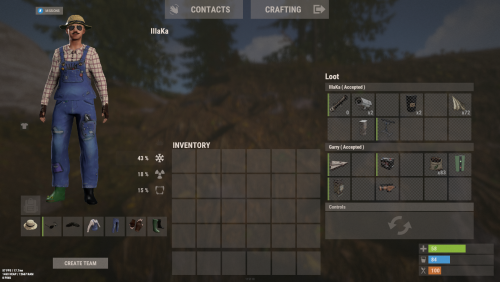
Version 0.1.2
81 downloads
An excellent plugin for remote trading between players with extensive functionality. The ability to log successful trades; The ability to create new permissions; The ability to customize permissions flexibly, including both new and existing ones; The ability to limit slots in trade; The ability to configure the method(personal, common minimum, common maximum) for limiting the number of slots; The ability to set a cooldown on sending trade requests; The ability to purchase a bypass for the trade request cooldown; The ability to set a daily limit on sending trade requests; The ability to purchase additional trade requests after reaching the daily limit; The ability to forbid trading when wounded; The ability to forbid trading while swimming; The ability to forbid trading while mounted on certain seats; The ability to forbid trading in specified monuments, by name or by monument type; The ability to forbid trading in someone else's building privileges; The ability to forbid trading when taking damage; The ability to forbid trading during a combat block; The ability to forbid trading during a raid block; The ability to forbid certain items from being traded; The ability to automatically generate language files for specified languages(with content filled in English); The ability to set an effect upon receiving a trade request; The ability to change the effect upon a successful trade completion; The ability to display a status bar while waiting for a trade; The ability to choose between bar types(TimeCounter and TimeProgressCounter); The ability to specify the order of the bar; The ability to change the height of the bar; The ability to customize the color and transparency of the background; The ability to set a material for the background; The ability to switch between CuiRawImageComponent and CuiImageComponent for the image; The ability to get images from the local folder(*SERVER*\oxide\data\AdvancedStatus\Images); The ability to set own image and customize the color and transparency of the image; The ability to set sprite instead of the image; The ability to customize the color, size and font of the text. { "Chat command": "trade", "List of 'accept' commands": [ "accept", "yes" ], "List of 'cancel' commands": [ "cancel", "no" ], "Is it worth enabling GameTips for messages?": true, "Is it worth saving trade logs to a file?": true, "List of language keys for creating language files": [ "en" ], "Slot limitation selection method. 0 - personal, 1 - common minimum, 2 - common maximum": 2, "Time in seconds given to respond to a trade request": 15.0, "Price to skip 60 seconds of the trade request cooldown": 10.0, "The prefab name for the effect triggered when a trade request is received": "assets/bundled/prefabs/fx/invite_notice.prefab", "The prefab name for the effect triggered when a trade is successfully completed": "assets/prefabs/building/wall.frame.shopfront/effects/metal_transaction_complete.prefab", "List of mount names where trading is prohibited": [ "horsesaddle", "horsesaddlerear", "bikedriverseat", "bikepassengerseat", "motorbikedriverseat", "motorbikepassengerseat", "modularcardriverseat", "modularcarpassengerseatleft", "modularcarpassengerseatright", "modularcarpassengerseatlesslegroomleft", "modularcarpassengerseatlesslegroomright", "modularcarpassengerseatsidewayleft", "miniheliseat", "minihelipassenger", "transporthelipilot", "transporthelicopilot", "attackhelidriver", "attackheligunner", "submarinesolodriverstanding", "submarineduodriverseat", "submarineduopassengerseat", "snowmobiledriverseat", "snowmobilepassengerseat", "snowmobilepassengerseat tomaha", "workcartdriver", "locomotivedriver", "craneoperator", "batteringramseat", "ballistagun.entity" ], "Status. Bar - Display time in seconds. A value of 0 keeps it visible until the cooldown ends": 15.0, "Status. Bar - Type(TimeProgressCounter or TimeCounter)": "TimeCounter", "Status. Bar - Height": 26, "Status. Bar - Order": 10, "Status. Background - Color(Hex or RGBA)": "#EFC570", "Status. Background - Transparency": 0.7, "Status. Background - Material(empty to disable)": "", "Status. Image - Url": "https://i.imgur.com/9khST6i.png", "Status. Image - Local(Leave empty to use Image_Url)": "Trader_Request", "Status. Image - Sprite(Leave empty to use Image_Local or Image_Url)": "", "Status. Image - Is raw image": false, "Status. Image - Color(Hex or RGBA)": "#EFC570", "Status. Image - Transparency": 1.0, "Status. Image Outline - Is it worth enabling an outline for the image?": false, "Status. Image Outline - Color(Hex or RGBA)": "0.1 0.3 0.8 0.9", "Status. Image Outline - Transparency": 1.0, "Status. Image Outline - Distance": "0.75 0.75", "Status. Text - Size": 12, "Status. Text - Color(Hex or RGBA)": "#FFFFFF", "Status. Text - Font(https://umod.org/guides/rust/basic-concepts-of-gui#fonts)": "RobotoCondensed-Bold.ttf", "Status. Text - Offset Horizontal": 0, "Status. Text Outline - Is it worth enabling an outline for the text?": false, "Status. Text Outline - Color(Hex or RGBA)": "#000000", "Status. Text Outline - Transparency": 1.0, "Status. Text Outline - Distance": "0.75 0.75", "Status. SubText - Size": 12, "Status. SubText - Color(Hex or RGBA)": "#FFFFFF", "Status. SubText - Font": "RobotoCondensed-Bold.ttf", "Status. SubText Outline - Is it worth enabling an outline for the sub text?": false, "Status. SubText Outline - Color(Hex or RGBA)": "0.5 0.6 0.7 0.5", "Status. SubText Outline - Transparency": 1.0, "Status. SubText Outline - Distance": "0.75 0.75", "Status. Progress - Background Color(Hex or RGBA)": "1 1 1 0.15", "Status. Progress - Background Transparency": 0.15, "Status. Progress - Reverse": true, "Status. Progress - Color(Hex or RGBA)": "#EFC570", "Status. Progress - Transparency": 0.7, "Status. Progress - OffsetMin": "0 0", "Status. Progress - OffsetMax": "0 0", "List of trade permissions": [ { "Permission Name": "trader.default", "Number of available trade slots": 3, "Cooldown time(in seconds) before next trade": 600.0, "Daily trade request limit. A value of 0 disables the limit": 50, "Price to purchase a trade after exceeding the daily limit. A value of 0 disables the purchase": 5.0, "Is it worth forbidding trade if the player is in a wounded state?": true, "Is it worth forbidding trade if the player is swimming?": true, "Is it worth forbidding trade if the player is mounted?": true, "Is it worth forbidding trade if the player is in someone else's building privilege area?": true, "Is it worth forbidding trade if the player has taken damage?": true, "Is it worth forbidding trade if the player has combat block?": true, "Is it worth forbidding trade if the player has raid block?": true, "List of monuments where recycling is forbidden": null, "List of monument types where recycling is forbidden": [ "RadTown", "RadTownWater", "RadTownSmall", "TunnelStation", "Custom" ], "List of forbidden trade items": [ "rock" ] }, { "Permission Name": "trader.vip", "Number of available trade slots": 6, "Cooldown time(in seconds) before next trade": 450.0, "Daily trade request limit. A value of 0 disables the limit": 100, "Price to purchase a trade after exceeding the daily limit. A value of 0 disables the purchase": 2.5, "Is it worth forbidding trade if the player is in a wounded state?": true, "Is it worth forbidding trade if the player is swimming?": true, "Is it worth forbidding trade if the player is mounted?": true, "Is it worth forbidding trade if the player is in someone else's building privilege area?": true, "Is it worth forbidding trade if the player has taken damage?": true, "Is it worth forbidding trade if the player has combat block?": true, "Is it worth forbidding trade if the player has raid block?": true, "List of monuments where recycling is forbidden": null, "List of monument types where recycling is forbidden": [ "RadTown", "RadTownWater", "TunnelStation" ], "List of forbidden trade items": [ "rock" ] }, { "Permission Name": "realpve.vip", "Number of available trade slots": 9, "Cooldown time(in seconds) before next trade": 300.0, "Daily trade request limit. A value of 0 disables the limit": 0, "Price to purchase a trade after exceeding the daily limit. A value of 0 disables the purchase": 0.0, "Is it worth forbidding trade if the player is in a wounded state?": false, "Is it worth forbidding trade if the player is swimming?": false, "Is it worth forbidding trade if the player is mounted?": false, "Is it worth forbidding trade if the player is in someone else's building privilege area?": false, "Is it worth forbidding trade if the player has taken damage?": false, "Is it worth forbidding trade if the player has combat block?": false, "Is it worth forbidding trade if the player has raid block?": false, "List of monuments where recycling is forbidden": [ "oilrig_1" ], "List of monument types where recycling is forbidden": null, "List of forbidden trade items": [ "rock" ] } ], "Version": { "Major": 0, "Minor": 1, "Patch": 2 } } EN: { "CmdNotAllowed": "You do not have permission to use this command!", "CmdPlayerNotFound": "Player '{0}' not found! You must provide the player's name or ID.", "CmdMultiplePlayers": "Multiple players found: {0}", "CmdEconomicsNotEnough": "Not enough funds!", "CmdMain": "Available trade commands:\n\n<color=#D1CBCB>/trade</color> <color=#D1AB9A>*nameOrId*</color> - Send a trade request to the specified player\n<color=#D1CBCB>/trade</color> <color=#83BA7C>accept/yes</color> - Accept a pending trade request\n<color=#D1CBCB>/trade</color> <color=#DE5757>cancel/no</color> - Decline a pending or active trade\n<color=#D1CBCB>/trade</color> <color=#D1AB9A>limits</color> - View your trade limits\n<color=#D1CBCB>/trade</color> <color=#D1AB9A>buy limits *amount*(optional)</color> - Purchase additional trade requests\n<color=#D1CBCB>/trade</color> <color=#D1AB9A>buy cd *amount*(optional)</color> - Purchase a 60 second(* by amount) cooldown skip\n\n--------------------------------------------------", "CmdDailyLimitExtra": "You have exceeded the daily limit({0}) for sending trade requests!\n<size=10>However, you can buy additional requests using the <color=#D1AB9A>/trade buy limits</color> command for <color=#D1CBCB>${1}</color></size>", "CmdDailyLimit": "You have exceeded the daily limit({0}) for sending trade requests!", "CmdCooldownSkip": "You must wait {0} seconds before sending another trade request!\n<size=10>However, you can skip the cooldown using the <color=#D1AB9A>/trade buy cd</color> command for <color=#D1CBCB>${1}</color> per 60 seconds</size>", "CmdCooldown": "You must wait {0} seconds before sending another trade request!", "CmdWoundBlock": "You can't trade while wounded!", "CmdSwimming": "You can't trade while swimming!", "CmdMountBlock": "You can't trade while mounted here!", "CmdBuildingBlock": "You can't trade inside someone else's base!", "CmdDamageBlock": "You can't trade while taking damage!", "CmdCombatBlock": "You can't trade during combat block!", "CmdRaidBlock": "You can't trade during a raid block!", "CmdAcceptEmpty": "You have no pending trade requests!", "CmdAcceptOngoing": "You already have an active trade with player '<color=#D1AB9A>{0}</color>'!", "CmdDeclineEmpty": "You have no pending or active trades!", "CmdDecline": "Trade between you and player '<color=#D1AB9A>{0}</color>' has been canceled!", "CmdDeclineOther": "Player '<color=#D1AB9A>{0}</color>' canceled the trade with you!", "CmdSendSelf": "You cannot send a trade request to yourself!", "CmdSendNoRespond": "Player '<color=#D1AB9A>{0}</color>' has not responded to your trade request!", "CmdSendAlredyHave": "You already have a pending or active trade with player '<color=#D1AB9A>{0}</color>'!\n<size=10><color=#83BA7C>/trade yes</color> - Accept the pending trade request\n<color=#DE5757>/trade no</color> - Decline the pending or active trade</size>", "CmdSendTargetAlredyHave": "Player '<color=#D1AB9A>{0}</color>' already has a pending or active trade with player '<color=#D1AB9A>{1}</color>'!", "CmdSendTo": "Trade request successfully sent to player '<color=#D1AB9A>{0}</color>'.", "CmdSendFrom": "Player '<color=#D1AB9A>{0}</color>' has sent you a trade request.\n<size=10><color=#83BA7C>/trade yes</color> - Accept the pending trade request\n<color=#DE5757>/trade no</color> - Decline the pending or active trade</size>", "CmdPurchaseNotLimited": "You haven't reached your daily limit yet!", "CmdPurchaseHaveExtra": "You still have {0} additional trade requests! Use them before purchasing more.", "CmdPurchaseLimitsNotAllowed": "Purchasing additional trade requests is unavailable!", "CmdPurchasedLimits": "You have successfully purchased <color=#D1CBCB>{0}</color> trade requests!\n<size=10>Now you have <color=#D1CBCB>{1}</color> additional trade requests</size>", "CmdPurchaseNoCooldown": "You don't have a cooldown for sending trade requests!", "CmdPurchaseCooldownNotAllowed": "Purchasing a cooldown skip for trade requests is not available!", "CmdPurchasedCooldown": "You have successfully purchased a cooldown skip for <color=#D1CBCB>{0} seconds</color> for trade requests!\n<size=10>Now you need to wait <color=#D1CBCB>{1} seconds</color></size>", "CmdMyLimits": "Your trade request limits:\n\n<color=#D1CBCB>Cooldown</color> - <color=#D1AB9A>{0} sec</color>\n<color=#D1CBCB>Daily Limit</color> - <color=#D1AB9A>{1}</color>\n\n--------------------------------------------------", "BarInitiator": "Trade to: {0}", "BarTarget": "Trade from: {0}", "BarCooldown": "Trade cooldown:", "MsgStarted": "You have started a trade with player '<color=#D1AB9A>{0}</color>'!", "MsgCompleted": "Trade with player '<color=#D1AB9A>{0}</color>' completed successfully!", "MsgCanceled": "Player '<color=#D1AB9A>{0}</color>' canceled the trade!" } RU: { "CmdNotAllowed": "У вас недостаточно прав для использования этой команды!", "CmdPlayerNotFound": "Игрок '{0}' не найден! Вы должны указать имя или ID игрока.", "CmdMultiplePlayers": "Найдено несколько игроков: {0}", "CmdEconomicsNotEnough": "Не достаточно средств!", "CmdMain": "Доступные команды для трейда:\n\n<color=#D1CBCB>/trade</color> <color=#D1AB9A>*имяИлиАйди*</color> - Отправить запрос на трейд указанному игроку\n<color=#D1CBCB>/trade</color> <color=#83BA7C>accept/yes</color> - Принять ожидающий запрос на трейд\n<color=#D1CBCB>/trade</color> <color=#DE5757>cancel/no</color> - Отклонить ожидающий или активный трейд\n<color=#D1CBCB>/trade</color> <color=#D1AB9A>limits</color> - Узнать свои лимиты\n<color=#D1CBCB>/trade</color> <color=#D1AB9A>buy limits *количество*(опционально)</color> - Докупить дополнительное количество трейд запросов\n<color=#D1CBCB>/trade</color> <color=#D1AB9A>buy cd *количество*(опционально)</color> - Купить пропуск 60 секунд(* на количество) задержки перед отправкой трейд запросов\n\n--------------------------------------------------", "CmdDailyLimitExtra": "Вы превысили допустимую дневную норму({0}) на отправку трейд запросов!\n<size=10>Но вы можете купить дополнительные запросы с помощью команды <color=#D1AB9A>/trade buy limits</color> за <color=#D1CBCB>{1}$</color></size>", "CmdDailyLimit": "Вы превысили допустимую дневную норму({0}) на отправку трейд запросов!", "CmdCooldownSkip": "Перед отправкой нового запроса на трейд вам необходимо подождать {0} секунд!\n<size=10>Но вы можете купить пропуск задержки с помощью команды <color=#D1AB9A>/trade buy cd</color> за <color=#D1CBCB>{1}$</color> за каждые 60 секунд</size>", "CmdCooldown": "Перед отправкой нового запроса на трейд вам необходимо подождать {0} секунд!", "CmdWoundBlock": "Вам запрещено пользоваться трейдом в предсмертном состоянии!", "CmdSwimming": "Вам запрещено пользоваться трейдом в воде!", "CmdMountBlock": "Вам запрещено пользоваться трейдом сидя в данном месте!", "CmdBuildingBlock": "Вам запрещено пользоваться трейдом в чужой базе!", "CmdDamageBlock": "Вам запрещено пользоваться трейдом при получении урона!", "CmdCombatBlock": "Вам запрещено пользоваться трейдом во время боя!", "CmdRaidBlock": "Вам запрещено пользоваться трейдом во время рейда!", "CmdAcceptEmpty": "У вас нет ожидающих запросов на трейд!", "CmdAcceptOngoing": "У вас уже есть активный трейд с игроком '<color=#D1AB9A>{0}</color>'!", "CmdDeclineEmpty": "У вас нет ожидающих или активных трейдов!", "CmdDecline": "Трейд между вами и игроком '<color=#D1AB9A>{0}</color>' отменён!", "CmdDeclineOther": "Игрок '<color=#D1AB9A>{0}</color>' отменил трейд с вами!", "CmdSendSelf": "Нельзя отправить трейд запрос самому себе!", "CmdSendNoRespond": "Игрок '<color=#D1AB9A>{0}</color>' не ответил на ваш трейд запрос!", "CmdSendAlredyHave": "У вас уже есть ожидающий или активный трейд с игроком '<color=#D1AB9A>{0}</color>'!\n<size=10><color=#83BA7C>/trade yes</color> - Принять ожидающий запрос на трейд\n<color=#DE5757>/trade no</color> - Отклонить ожидающий или активный трейд</size>", "CmdSendTargetAlredyHave": "У игрока '<color=#D1AB9A>{0}</color>' уже есть ожидающий или активный трейд с игроком '<color=#D1AB9A>{1}</color>'!", "CmdSendTo": "Игроку '<color=#D1AB9A>{0}</color>' был успешно отправлен запрос на трейд.", "CmdSendFrom": "Игрок '<color=#D1AB9A>{0}</color>' отправил вам запрос на трейд.\n<size=10><color=#83BA7C>/trade yes</color> - Принять ожидающий запрос на трейд\n<color=#DE5757>/trade no</color> - Отклонить ожидающий или активный трейд</size>", "CmdPurchaseNotLimited": "Вы ещё не исчерпали свой дневной лимит!", "CmdPurchaseHaveExtra": "У вас ещё есть {0} дополнительных трейд запросов! Используйте их прежде, чем покупать новые.", "CmdPurchaseLimitsNotAllowed": "Покупка дополнительных трейд запросов недоступна!", "CmdPurchasedLimits": "Вы успешно докупили <color=#D1CBCB>{0}</color> трейд запросов!\n<size=10>Теперь у вас <color=#D1CBCB>{1}</color> дополнительных трейд запросов</size>", "CmdPurchaseNoCooldown": "У вас нет задержки на отправку трейд запросов!", "CmdPurchaseCooldownNotAllowed": "Покупка пропуска задержки на трейд запросы недоступна!", "CmdPurchasedCooldown": "Вы успешно купили пропуск на <color=#D1CBCB>{0} секунд</color> задержки для трейд запросов!\n<size=10>Теперь вам нужно подождать <color=#D1CBCB>{1} секунд</color></size>", "CmdMyLimits": "Ваши лимиты трейд запросов:\n\n<color=#D1CBCB>Время задержки</color> - <color=#D1AB9A>{0} сек</color>\n<color=#D1CBCB>Дневной лимит</color> - <color=#D1AB9A>{1}</color>\n\n--------------------------------------------------", "BarInitiator": "Трейд с: {0}", "BarTarget": "Трейд от: {0}", "BarCooldown": "Задержка трейда:", "MsgStarted": "Вы начали трейд с игроком '<color=#D1AB9A>{0}</color>'!", "MsgCompleted": "Трейд с игроком '<color=#D1AB9A>{0}</color>' успешно завершён!", "MsgCanceled": "Игрок '<color=#D1AB9A>{0}</color>' отменил трейд!" } *nameOrId* - Send a trade request to the specified player. accept/yes - Accept a pending trade request. cancel/no - Decline a pending or active trade. limits - View your trade limits. buy limits *amount*(optional) - Purchase additional trade requests. buy cd *amount*(optional) - Purchase a 60 second(* by amount) cooldown skip. Example: /trade iiiaka /trade yes /trade limits /trade buy limits 1 /trade buy limits 0.5$9.99 -
Version 1.1.5
20 downloads
MBShop — Advanced UI Shop for Rust (Cart, Categories, Multi-Economy) MBShop is a modern and fully customizable UI-based shop system for Rust, featuring a shopping cart, category system, image-based interface, and multi-economy support. Designed for smooth gameplay, performance, and professional server presentation. Perfect for PvP, PvE, modded, and commercial servers. Key Features 🛍 Full Shopping Cart System Add multiple items Buy everything at once Dynamic total price calculation 🗂 Category System Fully configurable categories Multilingual category names (EN / UK / RU) Horizontal scrolling Multi-Language Support English Ukrainian Russian Multi-Economy Support MBCoins Economics ServerRewards Easy switching via config 🖼 Image-Based UI Custom background images Item cell backgrounds Buy button background NPC image Coin icon Error & success notification icons Styled UI Notifications No chat spam Visual error & success messages Auto-hide after a few seconds Safe Item Delivery Inventory space validation No item dropping on the ground No dupes No lost items Configuration { "NPC Image URL": "https://i.ibb.co/r2Ft9sJQ/MBNPC.png", "Coin image URL": "https://i.ibb.co/4n9C08GW/MBShop-Coin.png", "Scrollbar Handle Color": "1 0 0 0.6", "Configuration of Categories and Items": { "Weapons": { "Translations": { "en": { "Enabled": true, "Text": "Weapons" }, "uk": { "Enabled": false, "Text": "Зброя" }, "ru": { "Enabled": false, "Text": "Оружие" } }, "Items": [ { "Name": "AK-47", "Shortname": "rifle.ak", "Amount": 1, "Price": 0.15 }, { "Name": "Thompson", "Shortname": "smg.thompson", "Amount": 1, "Price": 0.12 } ] }, "Ammo": { "Translations": { "en": { "Enabled": true, "Text": "Ammo" }, "uk": { "Enabled": false, "Text": "Боєприпаси" }, "ru": { "Enabled": false, "Text": "Патроны" } }, "Items": [ { "Name": "5.56 Rifle Ammo", "Shortname": "ammo.rifle", "Amount": 30, "Price": 0.05 }, { "Name": "Pistol Ammo", "Shortname": "ammo.pistol", "Amount": 30, "Price": 0.04 } ] }, "Medical": { "Translations": { "en": { "Enabled": true, "Text": "Medical" }, "uk": { "Enabled": false, "Text": "Медицина" }, "ru": { "Enabled": false, "Text": "Медикаменты" } }, "Items": [ { "Name": "Medical Syringe", "Shortname": "syringe.medical", "Amount": 2, "Price": 0.05 }, { "Name": "Bandage", "Shortname": "bandage", "Amount": 5, "Price": 0.03 } ] }, "Resources": { "Translations": { "en": { "Enabled": true, "Text": "Resources" }, "uk": { "Enabled": false, "Text": "Ресурси" }, "ru": { "Enabled": false, "Text": "Ресурсы" } }, "Items": [ { "Name": "Wood", "Shortname": "wood", "Amount": 1000, "Price": 0.05 }, { "Name": "Stone", "Shortname": "stones", "Amount": 1000, "Price": 0.05 } ] }, "Tools": { "Translations": { "en": { "Enabled": true, "Text": "Tools" }, "uk": { "Enabled": false, "Text": "Інструменти" }, "ru": { "Enabled": false, "Text": "Инструменты" } }, "Items": [ { "Name": "Hatchet", "Shortname": "hatchet", "Amount": 1, "Price": 0.05 }, { "Name": "Pickaxe", "Shortname": "pickaxe", "Amount": 1, "Price": 0.06 } ] }, "Building": { "Translations": { "en": { "Enabled": true, "Text": "Building" }, "uk": { "Enabled": false, "Text": "Будівництво" }, "ru": { "Enabled": false, "Text": "Строительство" } }, "Items": [ { "Name": "Tool Cupboard", "Shortname": "cupboard.tool", "Amount": 1, "Price": 0.1 }, { "Name": "Sleeping Bag", "Shortname": "sleepingbag", "Amount": 1, "Price": 0.05 } ] }, "Clothing": { "Translations": { "en": { "Enabled": true, "Text": "Clothing" }, "uk": { "Enabled": false, "Text": "Одяг" }, "ru": { "Enabled": false, "Text": "Одежда" } }, "Items": [ { "Name": "T-Shirt", "Shortname": "tshirt", "Amount": 1, "Price": 0.03 }, { "Name": "Pants", "Shortname": "pants", "Amount": 1, "Price": 0.03 } ] } }, "Economy type (Economics, ServerRewards, MBCoins)": "MBCoins" } 🖱 Modern UI Controls Quantity selector (+ / -) Scrollable item grid Scrollable cart Animated UI background blur Highly Configurable Categories Item prices Item amounts UI images via URLs Economy type Supported Economies Economy PluginSupported MBCoins Economics ServerRewards Supported Languages English (Default) Ukrainian Russian All UI elements, buttons, cart, prices, and notifications are localized. Security & Stability Protected ConsoleCommand handlers No RCON abuse No UI exploits Safe balance deduction Inventory validation before purchase Memory cleaned on player disconnect 🖼 UI Image System All UI images are loaded dynamically using an internal Local Image Loader: Shop background Item cell background Category background Buy button Total price panel NPC image Coin icon Error icon Success icon Images are fully configurable via URLs in the config. Example Config Snippet { "NPC Image URL": "https://yourimage.com/npc.png", "Coin image URL": "https://yourimage.com/coin.png", "Economy type (Economics, ServerRewards, MBCoins)": "MBCoins" } Commands Command Description /shop Open the shop UI 🛠 Requirements At least ONE of the following economy plugins: MBCoins Economics ServerRewards No other dependencies required. Perfect For: Donat shops PvP storefronts PvE progression shops VIP reward systems Premium monetization systems$7.00 -
Version 2.3.8
7,379 downloads
Creates a unique event at the Harbor monument for players to participate in for rewards. Players must battle numerous NPCs and APCs to access the puzzle to open the loot room! Description This event started off as a warning on the chatbox about the ships coming soon to dock in Port, loaded with precious cargo. After the period has passed, a ship appears in one of the locations at Harbour that are accessible from the map, where the crane loads the container. The loading area is protected by one Tank and 7 NPCs by default. The container door is locked, you must push a button from inside the cranes cockpit to open the door. Inside the container, there is a default security camera, locked box, 2 DMS, 2 Elite, and 2 Military boxes. The locations and loot from all crates/NPCs can be configured within configurations, and unwanted crates/NPCs added or removed. Also, ships will generate the default ship loot, e.g. The config file allows to modify tank as well as loot inside of the ship. When the event occurs, the map displays the markers (configured in the config file). All players that are inside the event area will have a timer counting down the amount of time until the event ends. Dependencies Required NpcSpawn Dependencies (optional, not required) True PVE PveMode GUI Announcements Notify Discord Messages AlphaLoot CustomLoot NTeleportation HeliControl Economics Server Rewards IQEconomic Kits Chat commands (only for administrators) /harborstart – starting of the event /harborstop – ending of the event /harborpos – determining the position and rotation coordinates for changing the location of NPCs and crates.It should write in the configuration (Attention! The event must be started, the current position of the administrator in relation to the cargoship is read) Console commands (RCON only) harborstart – starting of the event harborstop – ending of the event Plugin Config en - example of plugin configuration in English ru - example of plugin configuration in Russian Hooks void OnHarborEventStart() – called when the event starts void OnHarborEventEnd() – called when the event ends void OnHarborEventWinner(ulong winnerId) – called at the end of the event, where the winnerId is the player who did more actions to complete the event My Discord: KpucTaJl#8923 Join the Mad Mappers Discord here! Check out more of my work here!$35.00 -
Version 2.1.7
6,087 downloads
This plugin adds to the game a variety of NPC bosses with different abilities and a very adaptable configuration Description Using this plugin you can add NPC bosses to any point on the map. You can set up any ability with the plugin configuration. If it is necessary, you can add multiple abilities to one boss. Abilities are divided into two categories, ones take place in a certain radius from the NPC, and others are triggered by damaging from an NPC. The map also displays the location of the actual bosses (their name and amount of health). You can give any clothes and weapons for NPCs using the configuration. Custom Map Maps that have a configuration for the appearance of boss on their custom monuments You can also download all these files for all maps here Dark Ages Blue Tears All files for custom maps are stored in the folder oxide/data/BossMonster/CustomMap. You don't have to delete files from there, the plugin will understand by itself which map is currently installed on the server and will download only the necessary file if there is one in this folder. The plugin will tell you about this process in the console during the plugin loading. It will write in the console what file works on the current map, and what ones don’t work If you want to create a custom place for the boss to appear on your custom map or on a map that is not in this list, you have to create the ID of this custom map. After that you need to place an item such as a RAND Switch on your map. It must be placed randomly, where it will not be visible to other players. You will get the identifier, if you add up the three coordinates of the position of this object from RustEdit (x, y and z) and write the resulting value in the parameter of your file (an example file can be taken from ready-made files) - ID As an example, let's take the coordinates (26.896, -456.158, 527.258), then our identifier is 26.896 - 456.158 + 527.258 = 97.996 Then you need to indicate a list of bosses that will appear on your map. You need to copy the configuration data block for each boss. In the database parameters you will specify the name of the boss and a list of positions where it can appear Dependencies (optional, not required) GUI Announcements Notify Discord Messages AlphaLoot CustomLoot Economics Server Rewards IQEconomic PveMode Chat commands (only for administrators) /WorldPos - displays the actual player’s position on the map /SavePos <name> - saves a new position to the configuration file for the boss with the name - name, relative to the nearest monument /SpawnBoss <name> - spawn of the boss with the name - name in the coordinates of the administrator Console commands (RCON only) SpawnBoss <name> – spawn of the boss with the name – name KillBoss <name> – kill all bosses with the name – name Plugin Config en - example of plugin configuration in English ru - example of plugin configuration in Russian Boss Config en - example of plugin configuration in English ru - example of plugin configuration in Russian Custom Map Config en - example of plugin configuration in English ru - example of plugin configuration in Russian Hooks void OnBossSpawn(ScientistNPC boss) - сalled when a boss appears on the map void OnBossKilled(ScientistNPC boss, BasePlayer attacker) - сalled when a player kills a boss API ScientistNPC SpawnBoss(string name, Vector3 pos) - spawns a boss named name in position pos void DestroyBoss(ScientistNPC boss) - destroys the boss My Discord: KpucTaJl#8923 Join the Mad Mappers Discord here! Check out more of my work here!$35.00- 449 comments
- 13 reviews
-
- 22
-
-
-
- #abilities
- #boss
- (and 16 more)
-
Version 1.2.7
2,746 downloads
This plugin does not have its own functionality This plugin is only used as an API for other plugins Creates a configurable PVE mode out of compatible events and plugins Supported Plugins AirEvent HarborEvent WaterEvent Satellite Dish Event Power Plant Event JunkyardEvent Defendable Bases BossMonster BetterNpc Convoy API void EventAddPveMode(string shortname, JObject configJson, Vector3 position, float radius, HashSet<uint> crates, HashSet<uint> scientists, HashSet<uint> tanks, HashSet<ulong> owners, BasePlayer owner) Creates a PVE event mode shortname – name of event configJson – PVE mode configuration (more details below in the description) position – event position on the map radius – radius of the event zone crates – list of all event crates (including locked crates) scientists – list of all NPCs active during event tanks – list of all Bradley events owners – list of all event owners (this parameter is necessary if you need to create an event zone several times) owner – event owner (this parameter is required if you need to run an event with the owner) void EventRemovePveMode(string shortname, bool addCooldownOwners) Removes PVE mode for the event shortname – name of event addCooldownOwners – should there be a cooldown for all event owners if this parameter is active in the PVE mode configuration? (this parameter is necessary if you need to create an event zone several times and issue a cooldown only in the last iteration) void EventAddCrates(string shortname, HashSet<uint> crates) Adds crates to the event if active in PVE mode shortname – name of event crates – list of event crates to be added (including locked crates) void EventAddScientists(string shortname, HashSet<uint> scientists) Adds NPCs to the event if active in PVE mode shortname – name of event scientists – list of added event NPCs to be added void EventAddTanks(string shortname, HashSet<uint> tanks) Adds Bradley to the event if active in PVE mode shortname – name of event tanks – list of added Bradleys event to be added HashSet<ulong> GetEventOwners(string shortname) Returns a list of SteamID for all of the Event Owners during the operation of an event shortname – name of event ulong GetEventOwner(string shortname) Returns the SteamID of the current Event Owner (if there is no Event Owner, it returns 0) shortname – name of event void SetEventOwner(string shortname, ulong owner) Sets the current Event Owner shortname – name of event owner – SteamID of the player HashSet<string> GetEventsPlayer(ulong id) Returns a list of event zones where the player is located id - SteamID of the player Dictionary<string, double> GetTimesPlayer(ulong id) Returns a list of events and the time when the player participated in the event the last time id - SteamID of the player PVE Mode Configuration float Damage – The amount of damage that the player has to do to become the Event Owner HashSet<ScaleDamageConfig> ScaleDamage – Damage coefficients for calculation to become the Event Owner bool LootCrate – Can other players and teams loot the crates if not Event Owner or their team? [true/false] bool HackCrate – Can other players and teams hack locked crates if not Event Owner or their team? [true/false] bool LootNpc – Can other players and teams loot NPC corpses if not Event Owner or their team? [true/false] bool DamageNpc – Can other players and teams deal damage to the NPC if not Event Owner or their team? [true/false] bool DamageTank – Can other players and teams do damage to Bradley if not Event Owner or their team? [true/false] bool TargetNpc – Can an Npc attack other players and teams if not Event Owner or their team? [true/false] bool TargetTank – Can Bradley attack other players and teams if not Event Owner or their team? [true/false] bool CanEnter – Allow other players and teams to enter the Event Zone if not Event Owner or their team? [true/false] bool CanEnterCooldownPlayer – Allow a player who has an active cooldown as the Event Owner to enter the event zone? [true/false] int TimeExitOwner – The time that the Event Owner can leave the Event Zone and retain title [sec.] int AlertTime – The Warning time until Event Owner status will end [sec.] bool RestoreUponDeath – Prevent RestoreUponDeath plugin from functioning in the Event Zone? (Player will drop gun and inventory when in Event Zone) [true/false] double CooldownOwner – Cooldown timer for Event Owner until they can achieve the title again, after the end of an event where the player was its owner [sec.] int Darkening – Darkening of the dome (0 – disables the dome) Example: JObject config = new JObject { ["Damage"] = 500f, ["ScaleDamage"] = new JArray { new JObject { ["Type"] = "NPC", ["Scale"] = 1f }, new JObject { ["Type"] = "Bradley", ["Scale"] = 2f } }, ["LootCrate"] = false, ["HackCrate"] = false, ["LootNpc"] = false, ["DamageNpc"] = false, ["DamageTank"] = false, ["TargetNpc"] = false, ["TargetTank"] = false, ["CanEnter"] = false, ["CanEnterCooldownPlayer"] = true, ["TimeExitOwner"] = 300, ["AlertTime"] = 60, ["RestoreUponDeath"] = true, ["CooldownOwner"] = 86400, ["Darkening"] = 12 }; Chat commands EventsTime - shows the player a list of how much time has passed since participating in the event the last time Console commands (RCON only) ClearTimePveMode {steamid} - clears the list of the time when the player with SteamID ({steamid}) participated in the event the last time My Discord: KpucTaJl#8923 Join the Mad Mappers Discord here! Check out more of my work here!$15.00 -

Version 2.1.2
725 downloads
Effortlessly allow players to place entities like large furnaces and oil refineries on foundations inside their bases. Simply place the items like normal, no chat commands needed, and supports water bases too! Simple Config { "Custom Placeable Entities": [ { "PrefabName": "assets/prefabs/deployable/furnace.large/furnace.large.prefab", "ItemID": -1992717673, "PlacementDistance": 2.2, "Permission": "indoorfurnace.largefurnace", "skinID": 0 }, { "PrefabName": "assets/prefabs/deployable/oil refinery/refinery_small_deployed.prefab", "ItemID": -1293296287, "PlacementDistance": 1.0, "Permission": "indoorfurnace.refinery", "skinID": 0 } ] } Support and More Checkout my discord server here.$9.99 -
Version 0.1.7
697 downloads
This plugin is designed for the forced decay of Building Blocks with Twigs grade. This plugin will be especially useful for PvE servers. The ability to enable and disable forced decay of Building Blocks with Twigs grade; The ability to specify the type of building block that will decay; The ability to adjust the interval of decay damage; The ability to specify the amount of decay damage; The ability to prevent players and the tool cupboard from repairing Building Blocks with a grade of Twigs; The ability to show warnings when placing/repairing Building Blocks with Twigs grade; The ability to specify the style type for GameTips; The ability to personally enable or disable warnings; The ability to automatically grade Building Blocks from Twig grade to Wood grade upon plugin initialization, if the owner player is offline. This helps to avoid the complete decay of buildings for those players who are offline and unable to upgrade right now; The ability to upgrade only undamaged building blocks during forced upgrades. { "Chat command": "twigs", "Is it worth enabling GameTips for messages?": true, "GameTips message style type - Blue_Normal(0), Red_Normal(1), Blue_Long(2), Blue_Short(3), Server_Event(4), Error(5).": 5, "List of language keys for creating language files": [ "en" ], "Is it worth upgrading Building Blocks from Twigs grade to Wood grade during plugin initialization if the players are offline?": false, "Is it worth forcing the upgrade to apply only to undamaged blocks? This is an addition to the setting above.": true, "Is it worth disallowing the repair of Building Blocks with Twigs grade?": true, "The interval, in seconds, at which damage is inflicted on the building.": 60.0, "The periodic damage inflicted. Ranges from 0 to 10. Set to 0 to disable.": 1.0, "Is it worth enabling the tracking list? If it's disabled, it will track all types of building blocks without needing to check the list each time.": false, "List of tracked building block types. Leave empty or null to return the default list.": [ "foundation", "foundation.triangle", "foundation.steps", "ramp", "floor", "floor.triangle", "floor.frame", "floor.triangle.frame", "wall", "wall.doorway", "wall.window", "wall.frame", "wall.half", "wall.low", "block.stair.ushape", "block.stair.lshape", "block.stair.spiral", "block.stair.spiral.triangle", "roof", "roof.triangle" ], "Version": { "Major": 0, "Minor": 1, "Patch": 7 } } EN: { "MsgWarningEnabled": "Forced decay warnings are enabled!", "MsgWarningDisabled": "Forced decay warnings are disabled!", "MsgOnTwigsPlace": "On this server, forced decay of Building Blocks with Twigs grade is enabled!\n<size=12><color=#9A9A9A>To toggle notifications, use </color><color=#BBBBBB>/{0} warn</color></size>", "MsgOnTwigsRepair": "Repairing of Building Blocks with Twigs grade is prohibited!\n<size=12><color=#9A9A9A>To toggle notifications, use </color><color=#BBBBBB>/{0} warn</color></size>" } RU: { "MsgWarningEnabled": "Предупреждения принудительного гниения включены!", "MsgWarningDisabled": "Предупреждения принудительного гниения выключены!", "MsgOnTwigsPlace": "На данном сервере включено принудительное гниение построек из соломы!\n<size=12><color=#9A9A9A>Чтобы включить или выключить уведомления, введите </color><color=#BBBBBB>/{0} warn</color></size>", "MsgOnTwigsRepair": "Ремонт построек из соломы запрещен!\n<size=12><color=#9A9A9A>Чтобы включить или выключить уведомления, введите </color><color=#BBBBBB>/{0} warn</color></size>" } warn - Enabling and disabling personal warning. Example: /twigs warn$6.99 -
Version 1.0.12
469 downloads
Paintball is a plugin that spawns an arena in the sky to host a paintball match using snowball launchers. Players have a set number of hits that they can take before they are eliminated. There are 2 game modes included with the plugin: Free-for-all: Everyone vs everyone. Team death-match: Players are split into 2 teams. Players can be awarded with items, economics, server rewards and custom commands if they win. The plugin comes with 2 dynamic arenas included, which will be selected randomly each game. EventHelper is used to automatically start the event and will also allow players to vote for the event manually. The only permission is paintball.admin. This is required to run all commands except for joining and leaving an event, or redeeming prizes. Command: pbstart Parameters: <optional: arenaFile, optional: heightMod, optional: startDelay> Type: Console & Chat Description: Manually starts the game. Command: pbend Parameters: none Type: Console & Chat Description: Manually stops the game. Command: pbjoin (configurable) Parameters: none Type: Console & Chat Description: Joins an active game. Command: pbleave (configurable) Parameters: none Type: Console & Chat Description: Leaves an active game. Command: pbprize (configurable) Parameters: none Type: Chat Description: Redeems a prize for winning. Command: pbsetcentrepoint Parameters: <arenaFile> Type: Chat Description: Sets the centre point of an arena at the players location. The arena will spawn from that location moving forward.$19.99 -
Version 1.1.9
1,137 downloads
The plugin adds a dungeon event to your server. Dungeons are bases with puzzles, NPC defenders, turrets and more. You can create your own dungeons of varying difficulty You can build your own bases or modify existing ones: There are moving NPC guardians in the dungeons: There are puzzles with protective doors in the dungeons: In the dungeons there are secret notes with codes in boxes or on NPCs: Commands: dungbase_start - force start event dungbase_start <entrance name> <dungeon name> - force start event using the specified entrance and dungeon dungbase_stop - force stop event Hooks: void DungeonBasesEventStarted() - // called when event starts void DungeonBasesEventEnded() - // called when event ends Configuration: { "Allow only the event owner (the one who entered the dungeon first) into the dungeon": true, "Allow owner's teammates to enter the dungeon": true, "Time before ownership is lost after leaving the server(in seconds)": 300, "Event marker on the map": true, "Event marker name": "Dungeon Base", "Event marker transparency(0-1)": 0.55, "Event marker radius": 0.5, "Event marker color.R(0-1)": 1.0, "Event marker color.G(0-1)": 0.0, "Event marker color.B(0-1)": 0.0, "Display event owner name on marker": true, "Display the time remaining until the end of the event on the marker": true, "Autostart event(disable if you want to trigger the event only manually)": true, "Calculate the time until the next event only after the previous one has finished": false, "Minimum time to event start(in seconds)": 3600, "Maximum time to event start(in seconds)": 7200, "Minimum event duration(in seconds)": 2000, "Maximum event duration(in seconds)": 3000, "Minimum number of online players to trigger an event": 1, "List of NPC names": [ "Dungeon NPC", "Dungeon Keeper", "Dungeon guard" ], "Dungeons list": [ "#dung#base1", "#dung#base2", "#dung#base3", "#dung#base4" ], "Entrances list": [ "#dung#entrance1", "#dung#entrance2", "#dung#entrance3", "#dung#entrance4" ], "Random order of choosing a dungeon from the list (if false, will be selected in turn)": true, "Random order of choosing the entrance to the dungeon from the list (if false, will be selected in turn)": true, "Change the time of day when entering the dungeon(from 0 to 23, if -1 - do not change the time)": 0.0, "How long before the end of the event does radiation start to affect players inside the dungeon": 180, "How long before the event ends will a warning message be displayed to players": 300, "How long after the event ends should the entrance be destroyed": 60, "Close the entrance and exit to the dungeon when the event time is over": true, "Will autoturrets attack NPCs": false, "Save event data (If true, the event will be saved and will continue even if you restart the server or plugin. Disable this if you get lag when saving)": true, "SteamID for chat message icon": 0 } Note: The plugin is guaranteed to work correctly with bases enabled. NPCs will not behave as standard, as they use different algorithms. Only one dungeon can spawn on the map at a time.$19.99











.thumb.png.d8730004887666a2775699ef18eb252c.png)