Search the Community
Showing results for tags 'api'.
-

Version 1.2.7
2,746 downloads
This plugin does not have its own functionality This plugin is only used as an API for other plugins Creates a configurable PVE mode out of compatible events and plugins Supported Plugins AirEvent HarborEvent WaterEvent Satellite Dish Event Power Plant Event JunkyardEvent Defendable Bases BossMonster BetterNpc Convoy API void EventAddPveMode(string shortname, JObject configJson, Vector3 position, float radius, HashSet<uint> crates, HashSet<uint> scientists, HashSet<uint> tanks, HashSet<ulong> owners, BasePlayer owner) Creates a PVE event mode shortname – name of event configJson – PVE mode configuration (more details below in the description) position – event position on the map radius – radius of the event zone crates – list of all event crates (including locked crates) scientists – list of all NPCs active during event tanks – list of all Bradley events owners – list of all event owners (this parameter is necessary if you need to create an event zone several times) owner – event owner (this parameter is required if you need to run an event with the owner) void EventRemovePveMode(string shortname, bool addCooldownOwners) Removes PVE mode for the event shortname – name of event addCooldownOwners – should there be a cooldown for all event owners if this parameter is active in the PVE mode configuration? (this parameter is necessary if you need to create an event zone several times and issue a cooldown only in the last iteration) void EventAddCrates(string shortname, HashSet<uint> crates) Adds crates to the event if active in PVE mode shortname – name of event crates – list of event crates to be added (including locked crates) void EventAddScientists(string shortname, HashSet<uint> scientists) Adds NPCs to the event if active in PVE mode shortname – name of event scientists – list of added event NPCs to be added void EventAddTanks(string shortname, HashSet<uint> tanks) Adds Bradley to the event if active in PVE mode shortname – name of event tanks – list of added Bradleys event to be added HashSet<ulong> GetEventOwners(string shortname) Returns a list of SteamID for all of the Event Owners during the operation of an event shortname – name of event ulong GetEventOwner(string shortname) Returns the SteamID of the current Event Owner (if there is no Event Owner, it returns 0) shortname – name of event void SetEventOwner(string shortname, ulong owner) Sets the current Event Owner shortname – name of event owner – SteamID of the player HashSet<string> GetEventsPlayer(ulong id) Returns a list of event zones where the player is located id - SteamID of the player Dictionary<string, double> GetTimesPlayer(ulong id) Returns a list of events and the time when the player participated in the event the last time id - SteamID of the player PVE Mode Configuration float Damage – The amount of damage that the player has to do to become the Event Owner HashSet<ScaleDamageConfig> ScaleDamage – Damage coefficients for calculation to become the Event Owner bool LootCrate – Can other players and teams loot the crates if not Event Owner or their team? [true/false] bool HackCrate – Can other players and teams hack locked crates if not Event Owner or their team? [true/false] bool LootNpc – Can other players and teams loot NPC corpses if not Event Owner or their team? [true/false] bool DamageNpc – Can other players and teams deal damage to the NPC if not Event Owner or their team? [true/false] bool DamageTank – Can other players and teams do damage to Bradley if not Event Owner or their team? [true/false] bool TargetNpc – Can an Npc attack other players and teams if not Event Owner or their team? [true/false] bool TargetTank – Can Bradley attack other players and teams if not Event Owner or their team? [true/false] bool CanEnter – Allow other players and teams to enter the Event Zone if not Event Owner or their team? [true/false] bool CanEnterCooldownPlayer – Allow a player who has an active cooldown as the Event Owner to enter the event zone? [true/false] int TimeExitOwner – The time that the Event Owner can leave the Event Zone and retain title [sec.] int AlertTime – The Warning time until Event Owner status will end [sec.] bool RestoreUponDeath – Prevent RestoreUponDeath plugin from functioning in the Event Zone? (Player will drop gun and inventory when in Event Zone) [true/false] double CooldownOwner – Cooldown timer for Event Owner until they can achieve the title again, after the end of an event where the player was its owner [sec.] int Darkening – Darkening of the dome (0 – disables the dome) Example: JObject config = new JObject { ["Damage"] = 500f, ["ScaleDamage"] = new JArray { new JObject { ["Type"] = "NPC", ["Scale"] = 1f }, new JObject { ["Type"] = "Bradley", ["Scale"] = 2f } }, ["LootCrate"] = false, ["HackCrate"] = false, ["LootNpc"] = false, ["DamageNpc"] = false, ["DamageTank"] = false, ["TargetNpc"] = false, ["TargetTank"] = false, ["CanEnter"] = false, ["CanEnterCooldownPlayer"] = true, ["TimeExitOwner"] = 300, ["AlertTime"] = 60, ["RestoreUponDeath"] = true, ["CooldownOwner"] = 86400, ["Darkening"] = 12 }; Chat commands EventsTime - shows the player a list of how much time has passed since participating in the event the last time Console commands (RCON only) ClearTimePveMode {steamid} - clears the list of the time when the player with SteamID ({steamid}) participated in the event the last time My Discord: KpucTaJl#8923 Join the Mad Mappers Discord here! Check out more of my work here!$15.00 -

Version 0.1.4
202 downloads
A plugin for collecting game statistics with database support, compatible with both SQL and web API methods. This functionality empowers website owners to display the desired statistics from the database on their sites. Moreover, it offers the capability to send data via API, which proves highly beneficial in scenarios where your gaming server and database reside on separate machines and the database restricts connections beyond localhost. Please note that an instruction manual will be included in the downloaded file and it is imperative for users to read it thoroughly. Collecting(The full list is available below in the section Collected Data) : Server information; Team information; Clan information(in future); Feedback(F7) information; Report(F7) information; Player information. Sending data through: direct MySQL; via API(POST query) to MySQL. { "Unique ID of the current server": 0, "Database upload method. 0 - disabled, 1 - via API, 2 - via MySQL": 1, "Interval in seconds at which an attempt to load changes into the database will occur": 300.0, "Is it worth logging messages to the console when uploading to the database?": true, "API - Service URL": "https://site.com/ExtendedStats/index.php", "API - Service access key": "GlBRw-elM6v-gjko3-cxSDk-Tsy7B", "MySQL - Host": "localhost", "MySQL - Port": 3306, "MySQL - Database name": "db_playrust", "MySQL - Username": "root", "MySQL - Password": "root", "Database table name - Servers": "db_servers", "Database table name - Teams": "db_teams", "Database table name - Clans": "db_clans", "Database table name - Feedbacks": "db_feedbacks", "Database table name - Reports": "db_reports", "Database table name - Players": "db_players", "Database table name - Players Balances": "db_players_balances", "Database table name - Players Stats": "db_players_stats", "Database table name - Players Farms": "db_players_farms", "Database table name - Players Gambling": "db_players_gambling", "Database table name - Players Kills": "db_players_kills", "Database table name - Players Explosions": "db_players_explosions", "Database table name - Players Raids": "db_players_raids", "Is it worth clearing saved statistics when a wipe is detected?": true, "Is it worth clearing the database when a wipe is detected?": true, "List of statistic categories to clear when a wipe is detected. Leave empty to recreate defaults": [ "players", "teams", "clans", "feedbacks", "reports" ], "Dictionary of display names for deployable entities by key": {}, "Wipe ID": null, "Version": { "Major": 0, "Minor": 1, "Patch": 4 } } ServerData: ServerName ServerIdentity ServerIP ServerPort QueryPort ServerDescription ServerHeader ServerURL ServerTime ServerTags GameTags MaxPlayers ServerEntities ServerFPS ServerAvgFPS ServerUptime ServerMap MapSize MapSeed FirstSave LastSave WipeID ServerVersion ServerProtocol RconPort RconPassword TeamData: TeamID TeamName CreatorID LeaderID TeamMembers ClanData(Temporarily not working) : ClanID ClanName CreatorID LeaderID ClanMembers FeedbackData(Since the corresponding Oxide hook has shifted, not all types of feedback are processed) : ID UserID Subject Type Message Time ReportData: ID UserID TargetID TargetName Subject Type Message Time PlayerData: Info: UserID DisplayName Flags Language GroupsList TeamID ClanID BanReason Connection: PlayedTime - requires the PlaytimeTracker/PlayTimeRewards plugins IdleTime - requires the PlaytimeTracker/PlayTimeRewards plugins Connections Ping FirstConnectionIP LastConnectionIP FirstConnectionDate LastConnectionDate Balance: Balance - requires the Economics plugin BankBalance - requires the BankSystem plugin Points - requires the ServerRewards plugin Experience Reputation - requires the ReputationMaster plugin Statistics: TimeAlive - updates only after the player's death TimeSleeping - updates only after the player's death DistanceWalked - updates only after the player's death DistanceRun - updates only after the player's death TimeWilderness - updates only after the player's death TimeInBase - updates only after the player's death TimeInMonument - updates only after the player's death TimeSwimming - updates only after the player's death TimeFlying - updates only after the player's death TimeBoating - updates only after the player's death TimeDriving - updates only after the player's death Wounded WoundsInflicted WoundAssisted WoundRecovered DamageInflicted DamageTaken - updates only after the player's death Healed - updates only after the player's death ShotsFired - updates only after the player's death ShotsHit ExcavatorStarts BearTrapInflicted BearTrapSteps MineInflicted MineSteps HandcuffsApplied Handcuffed PhoneCalls PhoneCallsTimeout MissionsStarted MissionsSucceeded MissionsFailed DeployedsList MonumentsList - requires the MonumentsWatcher plugin Farming: Barrels UnderWaterCrates ShreddedEntities DetectResourceFlags GreenDoors BlueDoors RedDoors FishAttempts Guts Supplies ExcavatorSupplies Chinooks Surveys ChickensHatched ChickenEggs BeehiveXP Blueprints CraftList GatherList RecycleList BuyerPurchaseList BuyerSpentList SellerSalesList SellerRevenueList CratesList FishList Gambling: BWG_Spins BWG_WinSpins BWG_SpendScraps BWG_WinScraps Slot_Spins Slot_WinSpins Slot_SpendScraps Slot_WinScraps Poker_Games - Placeholder Poker_WinGames - Placeholder Poker_SpendScraps - Placeholder Poker_WinScraps - Placeholder BlackJ_Games BlackJ_WinGames BlackJ_StandoffGames BlackJ_SpendScraps BlackJ_WinScraps RPS_Wins RPS_Losses RPS_Draws Kills: Kills FriendlyKills Deaths Suicides Beehives Chickens FarmChickens Snakes Boars Stags Horses Wolves Bears Polarbears Panthers Tigers Crocodiles Sharks PlayerNPCs Scientists Zombies Patrols Bradleys KillVehicles: PedalBikes MotorBikes Cars RowBoats RHIBs SubmarinesSolo SubmarinesDuo Tugs MiniHelis AttackHelis ScrapHelis Balloons Trains TrainWagons TrainCabooses Snowmobiles Ballistas BatteringRams Catapults SiegeTowers HitParts KillParts KillWeapons Explosions: Rockets RocketsHV RocketsIncendiary RocketsSmoke RocketsMissile RocketsMLRS Torpedoes ExplosiveAmmo Ammo40mmExplosive Ammo40mmSmoke GrenadesF1 GrenadesMolotov GrenadesFlash GrenadesSmoke GrenadesBean SatchelCharges C4Explosives PropaneBombs FireBombs Raids: Cupboards Doors Windows Foundations Ceilings Walls Doorways WindowFrames Stairs Hatches ExtWoodenGates ExtWoodenWalls ExtStoneGates ExtStoneWalls ExtIceWalls ExtIceShortWalls RaidedConstructionsList RaidedDeployableConstructionsList RaidableBases: RBEasy RBMedium RBHard RBExpert RBNightmare$19.99 -

Version 0.1.7
1,036 downloads
Useful plugin for managing temporary permissions, temporary groups and temporary permissions for groups. This is done through chat commands, built-in Oxide commands, and API methods. Note: The dates is in UTC format. The ability to grant players temporary permissions by specifying either the number of seconds, an exact expiration date or until the wipe occurs; The ability to add players to temporary groups by specifying either the number of seconds, an exact expiration date or until the wipe occurs; The ability to grant groups temporary permissions by specifying either the number of seconds, an exact expiration date or until the wipe occurs; The ability to revoke temporary permissions from players and groups prematurely; The ability to remove players from groups prematurely; The ability to perform all the above actions using existing and familiar console commands(e.g., o.grant), simply by adding the number of seconds, the expiration date or the word "wipe" at the end; The ability to perform all the above actions using a chat command (by default /tperm); The ability to perform all the above actions using API methods; The ability to remove all temporary permissions and groups upon wipe detection. temporarypermissions.admin - Grants access to the admin command(by default /tperm). { "Chat command": "myperm", "Chat admin command": "tperm", "Is it worth enabling GameTips for messages?": true, "Is it worth saving logs to a file?": true, "Is it worth using console logging?": true, "List of language keys for creating language files": [ "en" ], "Interval in seconds for expiration check": 1.0, "Interval in seconds for checking the presence of temporary permissions and temporary groups. A value of 0 disables the check": 600.0, "Is it worth restoring removed temporary permissions and temporary groups if the timer hasn't expired? There are cases where removal cannot be tracked in the usual way": true, "Is it worth revoking temporary permissions and temporary groups when unloading the plugin, without removing them from the data file?": true, "Is it worth revoking temporary permissions and temporary groups that haven't expired yet upon detecting a wipe?": false, "Custom wipe date(detected only during initialization). Only required if you're experiencing issues with the Wipe ID. Leave empty to use the Wipe ID. Example: 2025-06-25 13:00": "", "Wipe ID": null, "Version": { "Major": 0, "Minor": 1, "Patch": 7 } } EN: { "CmdAdmin": "Available admin commands:\n\n<color=#D1CBCB>/tperm</color> <color=#D1AB9A>grant user *nameOrId* realpve.vip wipe</color> - Grants or extends the specified permission for the specified player until the end of the current wipe\n<color=#D1CBCB>/tperm</color> <color=#D1AB9A>grant user *nameOrId* realpve.vip *intValue* *boolValue*(optional)</color> - Grants or extends the specified permission for the specified player for the given number of seconds\n<color=#D1CBCB>/tperm</color> <color=#D1AB9A>grant user *nameOrId* realpve.vip *expirationDate* *assignmentDate*(optional)</color> - Grants or extends the specified permission for the specified player until the given date\n<color=#D1CBCB>/tperm</color> <color=#D1AB9A>grant group *groupName* realpve.vip wipe</color> - Grants or extends the specified permission for the specified group until the end of the current wipe\n<color=#D1CBCB>/tperm</color> <color=#D1AB9A>grant group *groupName* realpve.vip *intValue* *boolValue*(optional)</color> - Grants or extends the specified permission for the specified group for the given number of seconds\n<color=#D1CBCB>/tperm</color> <color=#D1AB9A>grant group *groupName* realpve.vip *expirationDate* *assignmentDate*(optional)</color> - Grants or extends the specified permission for the specified group until the given date\n<color=#D1CBCB>/tperm</color> <color=#D1AB9A>revoke user *nameOrId* realpve.vip</color> - Revokes the specified permission from the specified player\n<color=#D1CBCB>/tperm</color> <color=#D1AB9A>revoke group *groupName* realpve.vip</color> - Revokes the specified permission from the specified group\n<color=#D1CBCB>/tperm</color> <color=#D1AB9A>add *nameOrId* *groupName* wipe</color> - Adds or extends the specified player's membership in the specified group until the end of the current wipe\n<color=#D1CBCB>/tperm</color> <color=#D1AB9A>add *nameOrId* *groupName* *intValue* *boolValue*(optional)</color> - Adds or extends the specified player's membership in the specified group for the given number of seconds\n<color=#D1CBCB>/tperm</color> <color=#D1AB9A>add *nameOrId* *groupName* *expirationDate* *assignmentDate*(optional)</color> - Adds or extends the specified player's membership in the specified group until the given date\n<color=#D1CBCB>/tperm</color> <color=#D1AB9A>remove *nameOrId* *groupName*</color> - Removes the specified player from the specified group\n<color=#D1CBCB>/tperm</color> <color=#D1AB9A>wipe *wipeDate*</color> - Set a custom wipe date. Used in case of issues with the Wipe ID. Format: yyyy-MM-dd HH:mm\n<color=#D1CBCB>/tperm</color> <color=#D1AB9A>wipe reset</color> - Reset the custom wipe date\n\n<color=#D1CBCB>Optional values:</color>\n*boolValue* - If false(default) and an existing permission or group membership has not expired, the specified time will be added to the existing time. Otherwise, including when true, the specified time will be counted from the current time\n*assignmentDate* - If the assignment date is not specified and there is no existing permission or group membership, the assignment date will be set to the current time. If the assignment date is specified, it will be applied regardless of existing permissions or group memberships\n\n--------------------------------------------------", "CmdPermissionNotFound": "Permission '{0}' not found!", "CmdPlayerNotFound": "Player '{0}' not found! You must provide the player's name or ID.", "CmdMultiplePlayers": "Multiple players found for '{0}': {1}", "CmdGroupNotFound": "Group '{0}' not found!", "CmdGrantWrongFormat": "Incorrect command format! Example: /tperm grant user/group *nameOrId* realpve.vip *secondsOrDateTime*", "CmdRevokeWrongFormat": "Incorrect command format! Example: /tperm revoke user/group *nameOrId* realpve.vip", "CmdUserGroupWrongFormat": "Incorrect command format! Example: /tperm group add/remove *nameOrId* *groupName*", "CmdUserGranted": "Permission '{0}' granted to player '{1}'.", "CmdGroupGranted": "Permission '{0}' granted to group '{1}'.", "CmdUserGroupAdded": "Player '{0}' has been added to group '{1}'.", "CmdUserRevoked": "Permission '{0}' has been revoked for player '{1}'.", "CmdGroupRevoked": "Permission '{0}' has been revoked for group '{1}'.", "CmdUserGroupRemoved": "Player '{0}' has been removed from group '{1}'.", "CmdWipeNew": "New wipe date successfully set to '{0}'. The wipe will take effect only after the plugin is loaded following this date.", "CmdWipeReset": "The custom wipe date has been reset. The wipe is now determined by the Wipe ID.", "CmdWipeFailed": "The specified date '{0}' has an invalid format(yyyy-MM-dd HH:mm) or has already passed. Example: '{1}'.", "CmdCheckNoActive": "You have no active temporary permissions or temporary groups!", "CmdCheckTargetNoActive": "Player '{0}' has no active temporary permissions or temporary groups!", "CmdCheckPermissions": "<color=#D1AB9A>You have {0} temporary permissions(time in UTC):</color>\n{1}", "CmdCheckGroups": "<color=#D1AB9A>You have {0} temporary groups(time in UTC):</color>\n{1}", "CmdCheckTargetPermissions": "<color=#D1AB9A>Player '{2}' has {0} temporary permissions(time in UTC):</color>\n{1}", "CmdCheckTargetGroups": "<color=#D1AB9A>Player '{2}' has {0} temporary groups(time in UTC):</color>\n{1}", "CmdCheckFormatPermissions": "'{0}' - {1}({2})", "CmdCheckFormatGroups": "'{0}' - {1}({2})", "CmdUntilWipe": "Until Wipe" } RU: { "CmdAdmin": "Доступные админ команды:\n\n<color=#D1CBCB>/tperm</color> <color=#D1AB9A>grant user *имяИлиАйди* realpve.vip wipe</color> - Выдать или продлить указанный пермишен указанному игроку до конца текущего вайпа\n<color=#D1CBCB>/tperm</color> <color=#D1AB9A>grant user *имяИлиАйди* realpve.vip *числовоеЗначение* *булевоеЗначение*(опционально)</color> - Выдать или продлить указанный пермишен указанному игроку на указанное количество секунд\n<color=#D1CBCB>/tperm</color> <color=#D1AB9A>grant user *имяИлиАйди* realpve.vip *датаИстечения* *датаНазначения*(опционально)</color> - Выдать или продлить указанный пермишен указанному игроку до указанной даты\n<color=#D1CBCB>/tperm</color> <color=#D1AB9A>grant group *имяГруппы* realpve.vip wipe</color> - Выдать или продлить указанный пермишен указанной группе до конца текущего вайпа\n<color=#D1CBCB>/tperm</color> <color=#D1AB9A>grant group *имяГруппы* realpve.vip *числовоеЗначение* *булевоеЗначение*(опционально)</color> - Выдать или продлить указанный пермишен указанной группе на указанное количество секунд\n<color=#D1CBCB>/tperm</color> <color=#D1AB9A>grant group *имяГруппы* realpve.vip *датаИстечения* *датаНазначения*(опционально)</color> - Выдать или продлить указанный пермишен указанной группе до указанной даты\n<color=#D1CBCB>/tperm</color> <color=#D1AB9A>revoke user *имяИлиАйди* realpve.vip</color> - Снять указанный пермишен у указанного игрока\n<color=#D1CBCB>/tperm</color> <color=#D1AB9A>revoke group *имяГруппы* realpve.vip</color> - Снять указанный пермишен у указанной группы\n<color=#D1CBCB>/tperm</color> <color=#D1AB9A>add *имяИлиАйди* *имяГруппы* wipe</color> - Добавить или продлить пребывание в указанной группе указанному игроку до конца текущего вайпа\n<color=#D1CBCB>/tperm</color> <color=#D1AB9A>add *имяИлиАйди* *имяГруппы* *числовоеЗначение* *булевоеЗначение*(опционально)</color> - Добавить или продлить пребывание в указанной группе указанному игроку на указанное количество секунд\n<color=#D1CBCB>/tperm</color> <color=#D1AB9A>add *имяИлиАйди* *имяГруппы* *датаИстечения* *датаНазначения*(опционально)</color> - Добавить или продлить пребывание в указанной группе указанному игроку до указанной даты\n<color=#D1CBCB>/tperm</color> <color=#D1AB9A>remove *имяИлиАйди* *имяГруппы*</color> - Отменить пребывание в указанной группе указанному игроку\n<color=#D1CBCB>/tperm</color> <color=#D1AB9A>wipe *датаВайпа*</color> - Установка кастомной даты вайпа. Используется при проблемах с Wipe ID. Формат: yyyy-MM-dd HH:mm\n<color=#D1CBCB>/tperm</color> <color=#D1AB9A>wipe reset</color> - Сброс кастомной даты вайпа\n\n<color=#D1CBCB>Опциональные значения:</color>\n*булевоеЗначение* - Если false(по умолчанию) и существующий пермишен или группа не истекли, указанное время будет добавлено к существующему времени. В противном случае, в т.ч. при true, указанное время будет отсчитываться от текущего времени\n*датаНазначения* - Если дата назначения не указана и нет существующего пермишена или группы, дата назначения будет равна текущей. Если дата назначения указана, то вне зависимости от существования пермишенов или групп, присвоится указанная дата\n\n--------------------------------------------------", "CmdPermissionNotFound": "Пермишен '{0}' не найден!", "CmdPlayerNotFound": "Игрок '{0}' не найден! Вы должны указать имя или ID игрока.", "CmdMultiplePlayers": "По значению '{0}' найдено несколько игроков: {1}", "CmdGroupNotFound": "Группа '{0}' не найдена!", "CmdGrantWrongFormat": "Не верный формат команды! Пример: /tperm grant user/group *имяИлиАйди* realpve.vip *секундыИлиДата*", "CmdRevokeWrongFormat": "Не верный формат команды! Пример: /tperm revoke user/group *имяИлиАйди* realpve.vip", "CmdUserGroupWrongFormat": "Не верный формат команды! Пример: /tperm group add/remove *имяИлиАйди* *имяГруппы*", "CmdUserGranted": "Пермишен '{0}' выдан игроку '{1}'.", "CmdGroupGranted": "Пермишен '{0}' выдан группе '{1}'.", "CmdUserGroupAdded": "Игрок '{0}' был добавлен в группу '{1}'.", "CmdUserRevoked": "Пермишен '{0}' был удален для игрока '{1}'.", "CmdGroupRevoked": "Пермишен '{0}' был удален для группы '{1}'.", "CmdUserGroupRemoved": "Игрок '{0}' был удален из группы '{1}'.", "CmdWipeNew": "Новая дата вайпа успешно установлена на '{0}'. Вайп вступит в силу только при загрузке плагина после этой даты.", "CmdWipeReset": "Кастомная дата вайпа была сброшена. Вайп снова определяется по Wipe ID.", "CmdWipeFailed": "Указанная дата '{0}' имеет неверный формат(yyyy-MM-dd HH:mm) или уже прошла. Пример: '{1}'.", "CmdCheckFormatGroups": "'{0}' - {1}({2})", "CmdCheckNoActive": "У вас нет активных временных пермишенов или временных групп!", "CmdCheckTargetNoActive": "У игрока '{0}' нет активных временных пермишенов или временных групп!", "CmdCheckPermissions": "<color=#D1AB9A>У вас есть {0} временных пермишенов(время по UTC):</color>\n{1}", "CmdCheckGroups": "<color=#D1AB9A>У вас есть {0} временных групп(время по UTC):</color>\n{1}", "CmdCheckTargetPermissions": "<color=#D1AB9A>У игрока '{2}' есть {0} временных пермишенов(время по UTC):</color>\n{1}", "CmdCheckTargetGroups": "<color=#D1AB9A>У игрока '{2}' есть {0} временных групп(время по UTC):</color>\n{1}", "CmdCheckFormatPermissions": "'{0}' - {1}({2})", "CmdUntilWipe": "До вайпа" } /myperm - Displays a list of all your temporary permissions and temporary groups; /myperm *NameOrId* - Displays a list of all temporary permissions and temporary groups of the specified player. Permission "temporarypermissions.admin" required. Admin commands(/tperm). Permission "temporarypermissions.admin" required: grant - Grants a temporary permission to a player or group. user *NameOrId* realpve.vip wipe - Grants a temporary permission to a player until the next wipe by specifying the player's name or Id, the permission name and the word "wipe"; *NameOrId* realpve.vip 3600 true/false - Grants a temporary permission to a player by specifying the player's name or Id, the permission name, the number of seconds and true/false(optional). If false(default) and an existing permission has not expired, the specified time will be added to the existing time. Otherwise, including when true, the specified time will be counted from the current time; *NameOrId* realpve.vip "2024-08-19 17:57" "2024-08-19 16:57" - Grants a temporary permission to a player by specifying the player's name or Id, the permission name, the expiration date and the assigned date(optional). If the assignment date is not specified and there is no existing permission, the assignment date will be set to the current time. If the assignment date is specified, it will be applied regardless of existing permissions. group *GroupName* realpve.vip wipe - Grants a temporary permission to a group until the next wipe by specifying the group's name, the permission name and the word "wipe"; *GroupName* realpve.vip 3600 true/false - Grants a temporary permission to a group by specifying the group's name, the permission name, the number of seconds, and true/false(optional). If false(default) and an existing group membership has not expired, the specified time will be added to the existing time. Otherwise, including when true, the specified time will be counted from the current time; *GroupName* realpve.vip "2024-08-19 17:57" "2024-08-19 16:57" - Grants a temporary permission to a group by specifying the group's name, the permission name, the expiration date and the assigned date(optional). If the assignment date is not specified and there is no existing group membership, the assignment date will be set to the current time. If the assignment date is specified, it will be applied regardless of existing group memberships. revoke - Revokes a temporary permission from a player or group. user *NameOrId* realpve.vip - Revokes a temporary permission from a player by specifying the player's name or Id and the permission name; group *GroupName* realpve.vip - Revokes a temporary permission from a group by specifying the group's name and the permission name. add - Temporary addition of a player to a group. *NameOrId* *GroupName* wipe - Temporary addition of a player to a group until the next wipe by specifying the player's name or Id, the group name and the word "wipe"; *NameOrId* *GroupName* 3600 true/false - Temporary addition of a player to a group by specifying the player's name or Id, the group name, the number of seconds, and true/false(optional). If true, the specified seconds will count from the current moment, otherwise(default), they will be added to the existing time; *NameOrId* *GroupName* "2024-08-19 17:57" "2024-08-19 16:57" - Temporary addition of a player to a group by specifying the player's name or Id, the group name, the expiration date and the assigned date(optional). If not specified, the assigned date will default to the current date, otherwise, it will be set to the provided date. remove *NameOrId* *GroupName* - Removal of a player from a temporary group by specifying the player's name or Id and the group name. wipe - Setting a custom wipe date. Used if you're experiencing issues with using the Wipe ID. *wipeDate* - Set a custom wipe date(yyyy-MM-dd HH:mm). Used in case of issues with the Wipe ID; reset - Reset the custom wipe date. Example: /tperm grant user iiiaka realpve.vip wipe /tperm grant user iiiaka realpve.vip 3600 true /tperm grant user iiiaka realpve.vip "2024-08-19 17:57" "2024-08-19 16:57" /tperm wipe "2025-06-25 13:00" Note: To access the commands, the player must be an admin(console or owner) or have the temporarypermissions.admin permission. P.S. Templates for the commands above can also be used with existing console commands. For example: o.grant user iiiaka realpve.vip 3600 true All developer documentation can be found in the Docs section.Free -

Version 0.1.8.1
1,294 downloads
A plugin that allows other plugins to interact with players and entities in monuments via API. The list of all monuments can be viewed in the: Default(Source of monument boundaries when changing the map or recreating boundaries) - *SERVER*\oxide\data\MonumentsWatcher\DefaultBounds.json Vanilla - *SERVER*\oxide\data\MonumentsWatcher\MonumentsBounds.json Custom - *SERVER*\oxide\data\MonumentsWatcher\CustomMonumentsBounds.json Note: MonumentsWatcher is utilized as an API for other plugins. You won't obtain any functionality beyond displaying monument boundaries without an additional plugin. The ability to automatically generate boundaries for vanilla and custom monuments; The ability to automatically regenerate boundaries for monuments on wipe; The ability to automatically adding languages for custom monuments; The ability to manually configure boundaries for monuments; The ability to track the entrance and exit of players, npcs and entities in a Monument and CargoShip; The ability to display boundaries. monumentswatcher.admin - Provides the capability to recreate or display monument boundaries. { "Chat command": "monument", "Is it worth enabling GameTips for messages?": true, "List of language keys for creating language files": [ "en" ], "Is it worth recreating boundaries(excluding custom monuments) upon detecting a wipe?": true, "List of tracked categories of monuments. Leave blank to track all": [], "Wipe ID": null, "Version": { "Major": 0, "Minor": 1, "Patch": 9 } } Note: The list of available categories for monuments can be found in the Developer API section. ENG: https://pastebin.com/nsjBCqZe RUS: https://pastebin.com/ut2icv9T Note: After the plugin initialization, keys for custom monuments will be automatically added. show *monumentID*(optional) *floatValue*(optional) - Display the boundary of the monument you are in or specified. The display will last for the specified time or 30 seconds; list - List of available monuments; rotate *monumentID*(optional) *floatValue*(optional) - Rotate the monument you are in or specified, either in the direction you are looking or in the specified direction; recreate custom/all(optional) - Recreate the boundaries of vanilla/custom/all monuments. Note: Instead of a monumentID, you can leave it empty, but you must be inside a monument. You can also use the word 'closest' to select the nearest monument to you. Example: /monument show closest /monument show gas_station_1 /monument show gas_station_1_4 /monument rotation /monument rotation closest /monument rotation gas_station_1_0 256.5 /monument recreate void OnMonumentsWatcherLoaded() Called after the MonumentsWatcher plugin is fully loaded and ready. void OnCargoWatcherCreated(string monumentID, string type, CargoShip cargoShip) Called when a watcher is created for a CargoShip. void OnCargoWatcherDeleted(string monumentID) Called when a watcher is removed for a CargoShip. void OnSpawnableWatcherCreated(string monumentID, string type, BaseEntity entity) Called when a watcher is created for a Spawnable monument. void OnSpawnableWatcherDeleted(string monumentID) Called when a watcher is removed for a Spawnable monument. void OnMonumentsWatcherLoaded() { Puts("MonumentsWatcher plugin is ready!"); } void OnCargoWatcherCreated(string monumentID, string type, CargoShip cargoShip) { Puts($"Watcher for monument {monumentID}({type}) has been created!"); } void OnCargoWatcherDeleted(string monumentID) { Puts($"Watcher for monument {monumentID} has been deleted!"); } void OnSpawnableWatcherCreated(string monumentID, string type, BaseEntity entity) { Puts($"Watcher for monument {monumentID}({type}) has been created!"); } void OnSpawnableWatcherDeleted(string monumentID) { Puts($"Watcher for monument {monumentID} has been deleted!"); } Entered hooks: void OnPlayerEnteredMonument(string monumentID, BasePlayer player, string type, string oldMonumentID) Called when a player enters any monument. void OnNpcEnteredMonument(string monumentID, BasePlayer npcPlayer, string type, string oldMonumentID) Called when an NPC player enters any monument. void OnEntityEnteredMonument(string monumentID, BaseEntity entity, string type, string oldMonumentID) Called when any other BaseEntity enters any monument. void OnPlayerEnteredMonument(string monumentID, BasePlayer player, string type, string oldMonumentID) { Puts($"{player.displayName} entered to {monumentID}({type}). His previous monument was {oldMonumentID}"); } void OnNpcEnteredMonument(string monumentID, BasePlayer npcPlayer, string type, string oldMonumentID) { Puts($"Npc({npcPlayer.displayName}) entered to {monumentID}({type}). Previous monument was {oldMonumentID}"); } void OnEntityEnteredMonument(string monumentID, BaseEntity entity, string type, string oldMonumentID) { Puts($"Entity({entity.net.ID}) entered to {monumentID}({type}). Previous monument was {oldMonumentID}"); } Exited hooks: void OnPlayerExitedMonument(string monumentID, BasePlayer player, string type, string reason, string newMonumentID) Called when a player exits any monument. void OnNpcExitedMonument(string monumentID, BasePlayer npcPlayer, string type, string reason, string newMonumentID) Called when an NPC player exits any monument. void OnEntityExitedMonument(string monumentID, BaseEntity entity, string type, string reason, string newMonumentID) Called when any other BaseEntity exits any monument. void OnPlayerExitedMonument(string monumentID, BasePlayer player, string type, string reason, string newMonumentID) { Puts($"{player.displayName} left from {monumentID}({type}). Reason: {reason}. They are now at '{newMonumentID}'."); } void OnNpcExitedMonument(string monumentID, BasePlayer npcPlayer, string type, string reason, string newMonumentID) { Puts($"Npc({npcPlayer.displayName}) left from {monumentID}({type}). Reason: {reason}. They are now in {newMonumentID}"); } void OnEntityExitedMonument(string monumentID, BaseEntity entity, string type, string reason, string newMonumentID) { Puts($"Entity({entity.net.ID}) left from {monumentID}({type}). Reason: {reason}. They are now in {newMonumentID}"); } [PluginReference] private Plugin MonumentsWatcher; There are 13 types of monuments: SafeZone(0): Bandit Camp, Outpost, Floating City, Fishing Village, Ranch and Large Barn. RadTown(1): Airfield, Arctic Research Base, Abandoned Military Base, Giant Excavator Pit, Ferry Terminal, Harbor, Junkyard, Launch Site; Military Tunnel, Missile Silo, Power Plant, Sewer Branch, Satellite Dish, The Dome, Toxic Village(Legacy Radtown), Train Yard, Water Treatment Plant. RadTownWater(2): Oil Rigs, Underwater Labs, Cargo Ships and Ghost Ships. RadTownSmall(3): Lighthouse, Oxum's Gas Station, Abandoned Supermarket and Mining Outpost. TunnelStation(4) MiningQuarry(5): Sulfur Quarry, Stone Quarry and HQM Quarry. BunkerEntrance(6) Cave(7) Swamp(8) IceLake(9) PowerSubstation(10) WaterWell(11) DeepSeaIsland(12) Custom(13) There are 25 api methods: GetAllMonuments: Used to retrieve an array of IDs for all available monuments. (string[])(MonumentsWatcher?.Call("GetAllMonuments") ?? Array.Empty<string>()); GetAllMonumentsCategories: Used to retrieve a dictionary of IDs and categories for all available monuments. (Dictionary<string, string>)(MonumentsWatcher?.Call("GetAllMonumentsCategories") ?? new Dictionary<string, string>()); GetMonumentsByCategory: Used to retrieve all available monuments by category. To call the GetMonumentsByCategory method, you need to pass 1 parameter: monument category as a string. (string[])(MonumentsWatcher?.Call("GetMonumentsByCategory", "SafeZone") ?? Array.Empty<string>()); GetMonumentCategory: Used to retrieve the category of the specified monument. Returns an empty string on failure. To call the GetMonumentCategory method, you need to pass 1 parameter: monumentID as a string. (string)(MonumentsWatcher?.Call("GetMonumentCategory", monumentID) ?? string.Empty); GetMonumentDisplayName: Used to retrieve the nicename of a monument in the player's language. Returns an empty string on failure. To call the GetMonumentDisplayName method, you need to pass 3 parameters: monumentID as a string; Available options: userID as a ulong or a string; player as a BasePlayer or an IPlayer. displaySuffix as a bool. Should the suffix be displayed in the name if there are multiple such monuments? This parameter is optional. (string)(MonumentsWatcher?.Call("GetMonumentDisplayName", monumentID, player.userID, true) ?? string.Empty);//(ulong)userID (string)(MonumentsWatcher?.Call("GetMonumentDisplayName", monumentID, player, true) ?? string.Empty);//(BasePlayer/IPlayer)player (string)(MonumentsWatcher?.Call("GetMonumentDisplayName", monumentID, player.UserIDString, true) ?? string.Empty);//(string)userID ***recommended option*** GetMonumentDisplayNameByLang: Used to retrieve the nicename of a monument in the specified language. Returns an empty string on failure. To call the GetMonumentDisplayNameByLang method, you need to pass 3 parameters: monumentID as a string; two-char language as a string; displaySuffix as a bool. Should the suffix be displayed in the name if there are multiple such monuments? This parameter is optional. (string)(MonumentsWatcher?.Call("GetMonumentDisplayNameByLang", monumentID, "en", true) ?? string.Empty); GetMonumentPosition: Used to retrieve the Vector3 position of the specified monument. Returns Vector3.zero on failure. To call the GetMonumentPosition method, you need to pass 1 parameter: monumentID as a string. (Vector3)(MonumentsWatcher?.Call("GetMonumentPosition", monumentID) ?? Vector3.zero); GetMonumentByPos: Used to retrieve the monument at the specified position. Returns an empty string on failure. To call the GetMonumentByPos method, you need to pass 1 parameter: position as a Vector3. (string)(MonumentsWatcher?.Call("GetMonumentByPos", pos) ?? string.Empty); Note: This method returns the first encountered monument. Occasionally, there may be multiple monuments at a single point. Therefore, it is recommended to use the GetMonumentsByPos method. GetMonumentsByPos: Used to retrieve all monuments at the specified position. Returns null on failure. To call the GetMonumentsByPos method, you need to pass 1 parameter: position as a Vector3. (string[])(MonumentsWatcher?.Call("GetMonumentsByPos", pos) ?? Array.Empty<string>()); GetClosestMonument: Used to retrieve the nearest monument to the specified position. Returns an empty string on failure. To call the GetClosestMonument method, you need to pass 1 parameter: position as a Vector3. (string)(MonumentsWatcher?.Call("GetClosestMonument", pos) ?? string.Empty); IsPosInMonument: Used to check whether the specified position is within the specified monument. Returns a false on failure. To call the IsPosInMonument method, you need to pass 2 parameters: monumentID as a string; position as a Vector3. (bool)(MonumentsWatcher?.Call("IsPosInMonument", monumentID, pos) ?? false); ShowBounds: Used to display the boundaries of the specified monument to the specified player. To call the ShowBounds method, you need to pass 3 parameters: monumentID as a string; player as a BasePlayer; displayDuration as a float. Duration of displaying the monument boundaries in seconds. This parameter is optional. MonumentsWatcher?.Call("ShowBounds", monumentID, player, 20f); Note: Since an Admin flag is required for rendering, players without it will be temporarily granted an Admin flag and promptly revoked. PLAYERS API GetMonumentPlayers: Used to retrieve an array of all players located in the specified monument. Returns null on failure. To call the GetMonumentPlayers method, you need to pass 1 parameter: monumentID as a string. (BasePlayer[])(MonumentsWatcher?.Call("GetMonumentPlayers", monumentID) ?? Array.Empty<BasePlayer>()); GetPlayerMonument: Used to retrieve the monument in which the specified player is located. Returns an empty string on failure. To call the GetPlayerMonument method, you need to pass 1 parameter: Available options: player as a BasePlayer; userID as a ulong or a string. (string)(MonumentsWatcher?.Call("GetPlayerMonument", player.UserIDString) ?? string.Empty);//(string)userID (string)(MonumentsWatcher?.Call("GetPlayerMonument", player) ?? string.Empty);//(BasePlayer)player (string)(MonumentsWatcher?.Call("GetPlayerMonument", player.userID) ?? string.Empty);//(ulong)userID ***recommended option*** GetPlayerMonuments: Used to retrieve all monuments in which the specified player is located. Returns null on failure. To call the GetPlayerMonuments method, you need to pass 1 parameter: Available options: player as a BasePlayer; userID as a ulong or a string. (string[])(MonumentsWatcher?.Call("GetPlayerMonuments", player.UserIDString) ?? Array.Empty<string>());//(string)userID (string[])(MonumentsWatcher?.Call("GetPlayerMonuments", player) ?? Array.Empty<string>());//(BasePlayer)player (string[])(MonumentsWatcher?.Call("GetPlayerMonuments", player.userID) ?? Array.Empty<string>());//(ulong)userID ***recommended option*** GetPlayerClosestMonument: Used to retrieve the nearest monument to the specified player. Returns an empty string on failure. To call the GetPlayerClosestMonument method, you need to pass 1 parameter: Available options: player as a BasePlayer; userID as a ulong or a string. (string)(MonumentsWatcher?.Call("GetPlayerClosestMonument", player.UserIDString) ?? string.Empty);//(string)userID (string)(MonumentsWatcher?.Call("GetPlayerClosestMonument", player.userID) ?? string.Empty);//(ulong)userID (string)(MonumentsWatcher?.Call("GetPlayerClosestMonument", player) ?? string.Empty);//(BasePlayer)player ***recommended option*** IsPlayerInMonument: Used to check whether the specified player is in the specified monument. Returns a false on failure. To call the IsPlayerInMonument method, you need to pass 2 parameters: monumentID as a string; Available options: player as a BasePlayer; userID as a ulong or a string. (bool)(MonumentsWatcher?.Call("IsPlayerInMonument", monumentID, player.UserIDString) ?? false);//(string)userID (bool)(MonumentsWatcher?.Call("IsPlayerInMonument", monumentID, player) ?? false);//(BasePlayer)player (bool)(MonumentsWatcher?.Call("IsPlayerInMonument", monumentID, player.userID) ?? false);//(ulong)userID ***recommended option*** NPCS API GetMonumentNpcs: Used to retrieve an array of all npcs located in the specified monument. Returns null on failure. To call the GetMonumentNpcs method, you need to pass 1 parameter: monumentID as a string. (BasePlayer[])(MonumentsWatcher?.Call("GetMonumentNpcs", monumentID) ?? Array.Empty<BasePlayer>()); GetNpcMonument: Used to retrieve the monument in which the specified npc is located. Returns an empty string on failure. To call the GetNpcMonument method, you need to pass 1 parameter: Available options: npcPlayer as a BasePlayer; netID as a NetworkableId. (string)(MonumentsWatcher?.Call("GetNpcMonument", npcPlayer) ?? string.Empty);//(BasePlayer)npcPlayer (string)(MonumentsWatcher?.Call("GetNpcMonument", npcPlayer.net.ID) ?? string.Empty);//(NetworkableId)netID ***recommended option*** GetNpcMonuments: Used to retrieve all monuments in which the specified npc is located. Returns null on failure. To call the GetNpcMonuments method, you need to pass 1 parameter: Available options: npcPlayer as a BasePlayer; netID as a NetworkableId. (string[])(MonumentsWatcher?.Call("GetNpcMonuments", npcPlayer) ?? Array.Empty<string>());//(BasePlayer)npcPlayer (string[])(MonumentsWatcher?.Call("GetNpcMonuments", npcPlayer.net.ID) ?? Array.Empty<string>());//(NetworkableId)netID ***recommended option*** IsNpcInMonument: Used to check whether the specified npc is in the specified monument. Returns a false on failure. To call the IsNpcInMonument method, you need to pass 2 parameters: monumentID as a string; Available options: npcPlayer as a BasePlayer; netID as a NetworkableId. (bool)(MonumentsWatcher?.Call("IsNpcInMonument", monumentID, npcPlayer.net.ID) ?? false);//(NetworkableId)netID (bool)(MonumentsWatcher?.Call("IsNpcInMonument", monumentID, npcPlayer) ?? false);//(BasePlayer)npcPlayer ***recommended option*** ENTITIES API GetMonumentEntities: Used to retrieve an array of all entities located in the specified monument. Returns null on failure. To call the GetMonumentEntities method, you need to pass 1 parameter: monumentID as a string. (BaseEntity[])(MonumentsWatcher?.Call("GetMonumentEntities", monumentID) ?? Array.Empty<BaseEntity>()); GetEntityMonument: Used to retrieve the monument in which the specified entity is located. Returns an empty string on failure. To call the GetEntityMonument method, you need to pass 1 parameter: Available options: entity as a BaseEntity; netID as a NetworkableId. (string)(MonumentsWatcher?.Call("GetEntityMonument", entity) ?? string.Empty);//(BaseEntity)entity (string)(MonumentsWatcher?.Call("GetEntityMonument", entity.net.ID) ?? string.Empty);//(NetworkableId)netID ***recommended option*** GetEntityMonuments: Used to retrieve all monuments in which the specified entity is located. Returns null on failure. To call the GetEntityMonuments method, you need to pass 1 parameter: Available options: entity as a BaseEntity; netID as a NetworkableId. (string[])(MonumentsWatcher?.Call("GetEntityMonuments", entity) ?? Array.Empty<string>());//(BaseEntity)entity (string[])(MonumentsWatcher?.Call("GetEntityMonuments", entity.net.ID) ?? Array.Empty<string>());//(NetworkableId)netID ***recommended option*** IsEntityInMonument: Used to check whether the specified entity is in the specified monument. Returns a false on failure. To call the IsEntityInMonument method, you need to pass 2 parameters: monumentID as a string; Available options: entity as a BaseEntity; netID as a NetworkableId. (bool)(MonumentsWatcher?.Call("IsEntityInMonument", monumentID, entity.net.ID) ?? false);//(NetworkableId)netID (bool)(MonumentsWatcher?.Call("IsEntityInMonument", monumentID, entity) ?? false);//(BaseEntity)entity ***recommended option***Free -
Version 0.1.24
4,476 downloads
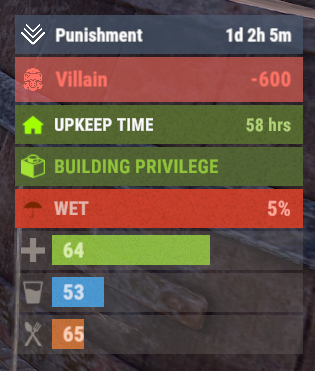
A useful API plugin that mimics in-game status bars and allows the addition of custom ones. Note: AdvancedStatus does not display any bars on its own. This is done by other plugins that work with it. An example plugin demonstrating interaction with AdvancedStatus. The ability to specify the frequency of calculating the number of bars; The ability to specify the order of the bar; The ability to change the height of the bar; The abillity to customize the color and transparency of the background; The ability to set a material for the background; The ability to switch between CuiRawImageComponent and CuiImageComponent for the image; The ability to get images from the local folder(*SERVER*\oxide\data\AdvancedStatus\Images); The abillity to set own image and customize the color and transparency of the image; The abillity to set sprite instead of the image; The ability to specify custom text; The ability to customize the color, size and font of the text; No need to pass all parameters; No need to manually delete your bar when unloading your plugin. advancedstatus.admin - Grants access to the chat command(by default /bar). { "Chat command": "bar", "Is it worth enabling console notifications for the successful loading of local images?": false, "Interval(in seconds) for counting in-game status bars": 0.5, "Interval(in seconds) for counting Building Privilege status bars. Note: Calculating Building Privilege is significantly more resource-intensive than other counts": 1.0, "Bar - Display Layer. If you have button bars, it's advisable to use Hud(https://umod.org/guides/rust/basic-concepts-of-gui#layers)": "Under", "Bar - Left to Right": true, "Bar - Offset between status bars": 2, "Bar - Default Height": 26, "Main - Default Color": "#505F75", "Main - Default Transparency": 0.7, "Main - Default Material(empty to disable)": "", "Image - Default Image": "AdvancedStatus_Default", "Image - Default Color": "#6B7E95", "Image - Default Transparency": 1.0, "Image - Outline Default Color": "#000000", "Image - Outline Default Transparency": 1.0, "Image - Outline Default Distance": "0.75 0.75", "Text - Default Size": 12, "Text - Default Color": "#FFFFFF", "Text - Default Transparency": 1.0, "Text - Default Font(https://umod.org/guides/rust/basic-concepts-of-gui#fonts)": "RobotoCondensed-Bold.ttf", "Text - Default Offset Horizontal": 0, "Text - Outline Default Color": "#000000", "Text - Outline Default Transparency": 1.0, "Text - Outline Default Distance": "0.75 0.75", "SubText - Default Size": 12, "SubText - Default Color": "#FFFFFF", "SubText - Default Transparency": 1.0, "SubText - Default Font": "RobotoCondensed-Bold.ttf", "SubText - Outline Default Color": "#000000", "SubText - Outline Default Transparency": 1.0, "SubText - Outline Default Distance": "0.75 0.75", "Progress - Default Color": "#89B840", "Progress - Default Transparency": 0.7, "Progress - Default OffsetMin": "25 2.5", "Progress - Default OffsetMax": "-3.5 -3.5", "Version": { "Major": 0, "Minor": 1, "Patch": 24 } } EN: { "MsgDays": "d", "MsgHours": "h", "MsgMinutes": "m", "MsgSeconds": "s" } RU: { "MsgDays": "д", "MsgHours": "ч", "MsgMinutes": "м", "MsgSeconds": "я" } images reload *ImageName* - Reloads the specified image from the image folder; all - Reloads all local images from the image folder. Example: /bar images reload all Note: To access the commands, the player must be an admin(console or owner) or have the advancedstatus.admin permission. OnAdvancedStatusLoaded: Called after the AdvancedStatus plugin is fully loaded and ready. OnPlayerGainedBuildingPrivilege: Called after the player enters their building privilege. OnPlayerLostBuildingPrivilege: Called after the player exits their building privilege. void OnAdvancedStatusLoaded() { Puts("The AdvancedStatus plugin is loaded and ready to go!"); } void OnPlayerGainedBuildingPrivilege(BasePlayer player) { Puts($"{player.displayName} entered the authorized building privilege zone."); } void OnPlayerLostBuildingPrivilege(BasePlayer player) { Puts($"{player.displayName} exited the authorized building privilege zone."); } [PluginReference] private Plugin AdvancedStatus; There are 15 methods: IsReady CreateBar UpdateContent DeleteBar DeleteCategory DeleteAllBars GetTotalClientBars GetTotalPlayerBars LoadImages LoadImage CopyImage DeleteImages DeleteImage BarExists InBuildingPrivilege There are 5 types of bar: Default - A simple bar that displays the provided information. Does not update the value of SubText by itself; Timed - Similar to the default bar, but it automatically disappears after the specified time in the TimeStamp parameter; TimeCounter - The SubText shows the remaining time until TimeStamp. Also automatically removed upon expiration of the TimeStamp; TimeProgress - Similar to the Timed bar, but additionally features an automatically filling progress bar; TimeProgressCounter - Similar to the TimeCounter bar, but additionally features an automatically filling progress bar. IsReady: Used to check if the AdvancedStatus plugin is loaded and ready to work. The IsReady method returns true if it is ready, or null if it is not. (bool)AdvancedStatus?.Call("IsReady");//Calling the IsReady method. If the result is not null(bool true), the plugin is ready. CreateBar: Used to create a bar or update bar values for a player. To call the CreateBar method, you need to pass 2 parameters. The first one is BasePlayer or <ulong>playerID. The second one is a dictionary with the parameters you need. In the CreateBar method, all parameters are optional, except for two: Id; Plugin. Parameters not specified when creating a new bar will use the values set in the AdvancedStatus plugin's configuration file. Parameters not specified during bar update will retain the values they had before the update. Note: The plugin does not update values automatically, you need to manually send new values. Dictionary<string, object> parameters = new Dictionary<string, object> { { "Id", "AdvancedStatusDemo_1" }, //<string>Unique identifier for the bar in your plugin. ***This is a required field. { "BarType", "Default" }, //<string>Type of the bar. There are 4 types: Default, Timed, TimeCounter and TimeProgress. { "Plugin", "AdvancedStatusDemo" }, //<string>Name of your plugin. ***This is a required field. { "Category", "Default" }, //<string>Internal plugin category of the bar. { "Order", 10 }, //<int>The position of your bar relative to others. Order is determined by increasing values(ASC). { "Height", 26 }, //<int>The height of your bar. A standard bar is 26 pixels. { "Main_Color", "#505F75" }, //<string>HTML Hex color of the bar background. { "Main_Transparency", 0.7f }, //<float>Transparency of the bar background. { "Main_Material", "assets/content/ui/uibackgroundblur.mat" }, //<string>Material of the bar background(empty to disable). { "Image", "scrap" }, //<string>Name of the image saved in the ImageLibrary or a direct link to the image if ImageLibrary is not used. { "Image_Local", "AdvancedStatusDemo_Scrap" }, //<string>The name of the image file(without its extension) located in *SERVER*\data\AdvancedStatus\Images. Leave empty to use Image. { "Image_Sprite", "" }, //<string>Sprite image of the bar. Leave empty to use Image_Local or Image. { "Is_RawImage", true }, //<bool>Which type of image will be used? True - CuiRawImageComponent. False - CuiImageComponent. { "Image_Color", "#6B7E95" }, //<string>HTML Hex color of the bar image. { "Image_Transparency", 1.0f }, //<float>Transparency of the image. { "Text", "Scrap" }, //<string>Main text. { "Text_Size", 12 }, //<int>Size of the main text. { "Text_Color", "#FFFFFF" }, //<string>HTML Hex color of the main text. { "Text_Font", "RobotoCondensed-Bold.ttf" }, //<string>Font of the main text. { "Text_Offset_Horizontal", 0 }, //<int>Horizontal offset for the main text. { "SubText", "35" }, //<string>Sub text. { "SubText_Size", 12 }, //<int>Size of the sub text. { "SubText_Color", "#FFFFFF" }, //<string>HTML Hex color of the sub text. { "SubText_Font", "RobotoCondensed-Bold.ttf" }, //<string>Font of the sub text. { "TimeStampStart", Network.TimeEx.currentTimestamp }, //<double>Responsible for specifying the start point of the time reference and 0% for TimeProgress and TimeProgressCounter bars. Used if the bar type is Timed, TimeCounter, TimeProgress or TimeProgressCounter. { "TimeStamp", Network.TimeEx.currentTimestamp + 6 }, //<double>Specifies the end time point after which the bar will be destroyed and 100% for TimeProgress and TimeProgressCounter bars. Used if the bar type is Timed, TimeCounter, TimeProgress or TimeProgressCounter. { "TimeStampDestroy", Network.TimeEx.currentTimestamp + 3 }, //<double>If TimeStampDestroy is specified and it is less than TimeStamp, the bar will be destroyed by TimeStampDestroy. Used if the bar type is Timed, TimeCounter, TimeProgress or TimeProgressCounter. { "Progress", (float)35 / 100f }, //<float>Progress. From 0.0 to 1.0. { "Progress_Reverse", false }, //<bool>Progress reverse. A value of false means that the progress will increase. Used if the bar type is TimeProgress or TimeProgressCounter. { "Progress_Color", "#89B840" }, //<string>Progress color. { "Progress_Transparency", 1f }, //<float>Progress transparency. { "Progress_OffsetMin", "25 2.5" }, //<string>Progress OffsetMin: "*left* *bottom*". { "Progress_OffsetMax", "-3.5 -3.5" }, //<string>Progress OffsetMax: "*right* *top*". { "Command", "kit" } //<string>If the field is not empty, the bar becomes clickable, and the specified command is executed upon clicking. Note: the command must be covalence. }; AdvancedStatus?.Call("CreateBar", player.userID.Get(), parameters); //Calling the CreateBar method with the passing of BasePlayer/playerID and a dictionary containing the required parameters. UpdateContent: Used to update only the content of an existing status bar. To call the UpdateContent method, you need to pass 2 parameters. The first one is BasePlayer or <ulong>playerID. The second one is a dictionary with the parameters you need. In the UpdateBar method, all parameters are optional, except for two: Id; Plugin. var parameters = new Dictionary<string, object> { { "Id", "MyID" }, //<string>Unique identifier for the bar in your plugin. ***This is a required field. { "Plugin", Name }, //<string>Name of your plugin. ***This is a required field. { "Text", "MyText" }, //<string>Main text. { "SubText", "MyText" }, //<string>Sub text. { "Progress", (float)amount / 100f }, //<float>Progress. From 0.0 to 1.0. }; AdvancedStatus?.Call("UpdateContent", player.userID.Get(), parameters); //Calling the UpdateContent method with the passing of BasePlayer/playerID and a dictionary containing the required parameters. DeleteBar: Used to remove the bar for a player. There are two methods for removing a bar by ID: with specifying a particular player; To call this method, you need to pass 3 parameters. The first one is BasePlayer or <ulong>playerID. The second one is Id of your bar and the third one is name of your plugin. without specifying a particular player (which removes it for all players) To call this method, you need to pass 2 parameters. The first one is Id of your bar and the second one is name of your plugin. AdvancedStatus?.Call("DeleteBar", player.userID.Get(), barID, Name); //Calling the DeleteBar method with the passing of BasePlayer/playerID, ID of the bar and the name of your plugin. AdvancedStatus?.Call("DeleteBar", barID, Name); //Calling the DeleteBar method with the passing of ID of the bar and the name of your plugin. If you try to delete a bar that doesn't exist, nothing bad will happen. So feel free to delete the bar without checking its existence. P.S. When unloading your plugin, there is no need to manually delete bars for players, AdvancedStatus will handle it automatically. DeleteCategory: Used to remove all bars associated with the plugin's category. To call the DeleteCategory method, you need to pass 2 parameters. The first one is category and the second one is name of your plugin. AdvancedStatus?.Call("DeleteCategory", "Default", Name);//Calling the DeleteCategory method by passing the category and name of your plugin DeleteAllBars: Used to remove all bars associated with the plugin. To call the DeleteAllBars method, you need to pass only 1 parameter. It is name of your plugin. AdvancedStatus?.Call("DeleteAllBars", Name);//Calling the DeleteAllBars method, passing the name of your plugin GetTotalClientBars: Used to get the number of client bars for the player. To call the GetTotalClientBars method, you need to pass only 1 parameter. It is BasePlayer or <ulong>playerID. (int)AdvancedStatus?.Call("GetTotalClientBars", player.userID.Get());//Calling the GetTotalClientBars method, passing the name of BasePlayer/playerID GetTotalPlayerBars: Used to get the number of active custom bars for the player. To call the GetTotalPlayerBars method, you need to pass only 1 parameter. It is BasePlayer or <ulong>playerID. (int)AdvancedStatus?.Call("GetTotalPlayerBars", player.userID.Get());//Calling the GetTotalPlayerBars method, passing the name of BasePlayer/playerID LoadImages: Used to check if the local images specified in the list are loaded. If any of the images are not loaded but their files exist in the images folder, the plugin will load them. To call the LoadImages method, you need to pass only 2 parameters. The first one is the <List<string>>list of image's name and the second one(optional) is <bool>force, which, if set to true, will force reload the image even if it already exists. AdvancedStatus?.Call("LoadImages", list, false);//Calling the LoadImages method, passing a list of image names LoadImage: Used to check if the local image is loaded. If the file is not loaded and exists in the images folder, the plugin will load it. To call the LoadImage method, you need to pass 2 parameters. The first one is the <string>image's name and the second one(optional) is <bool>force, which, if set to true, will force reload the image even if it already exists. AdvancedStatus?.Call("LoadImage", imgName, false);//Calling the LoadImage method, passing an image's name CopyImage: Used to create and load a copy of an existing image. To call the CopyImage method, you need to pass 3 parameters. The first parameter is the <string>source image's name, the second parameter is the <string>new image's name and the third one(optional) is <bool>force, which, if set to true, will force copy and reload the image even if it already exists. AdvancedStatus?.Call("CopyImage", "ZoneStatus_Default", "ZoneStatus_NewZone", false);//Calling CopyImage, passing the source image name and the new image name. DeleteImages: Used to delete a list of images and their files. To call the DeleteImages method, you need to pass 2 parameters. The first one is the <List<string>>list of image's name and the second one(optional) parameter is <bool>deleteFile, which, if set to true, will delete image's file too. AdvancedStatus?.Call("DeleteImages", list, true);//Calling DeleteImages, passing a list of image names. DeleteImage: Used for removing the image and the image file. To call the DeleteImage method, you need to pass 2 parameters. The first parameter is the <string>image's name and the second one(optional) parameter is <bool>deleteFile, which, if set to true, will delete image's file too. AdvancedStatus?.Call("DeleteImage", "ZoneStatus_NewZone", true);//Calling DeleteImage, passing the image name. BarExists: Used to check if the specified bar exists. To call the BarExists method, you need to pass 3 parameters. The first one is BasePlayer or <ulong>playerID. The second one is Id of your bar. And the third one is name of your plugin. (bool)AdvancedStatus?.Call("BarExists", player.userID.Get(), barID, Name);//Calling the BarExists method with the passing of BasePlayer/playerID, ID of the bar and name of your plugin. InBuildingPrivilege: Used to check if the player has authorized building privileges. To call the InBuildingPrivilege method, you need to pass BasePlayer or <ulong>playerID. (bool)AdvancedStatus?.Call("InBuildingPrivilege", player.userID.Get());//Checking if the player has Building Privilege.$1.99 -
.thumb.gif.be4d7c48ffb8b6bd133b250f73404356.gif)
Version 1.0.6
42 downloads
What is Vote System ? Vote System is a sophisticated plugin designed to track player votes in real-time on various ranking sites. It offers two main functionalities: Integration with other plugins: Vote System can be paired with other plugins to enhance its features. See the list of compatible plugins. API for Developers: With a robust API, developers can create plugins that directly interact with the voting system, allowing for advanced customization. Supported Plugins Vote System is compatible with the following plugins: CustomReward: Allows players to receive rewards through a user interface after voting. Economics: Converts votes into virtual currency for players. Documentation : More informations on documentation Supported Ranking Sites Vote System currently supports the following ranking sites: rust-servers.net top-games.net top-serveurs.net$4.99 -
Version 1.0.5
1,213 downloads
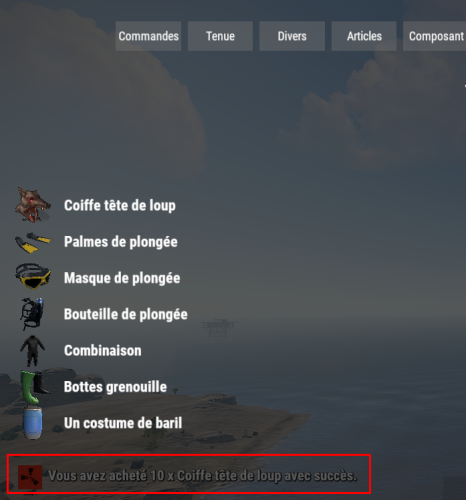
Automatically translates rust item display names & descriptions to use in you're plugins. Most Recent Update for Repo is 12-16-2021 at 1pm ( Pacific Standard Time ) Features No config needed! Automatic language generations! Supports All 30 Rust Native Translations! Works With latest GUIShop beta branch, StackModifier, and EasyResearch! GitHub repository is updated when Facepunch updates which in return means as soon as your server is rebooted or you reload this plugin it will take affect! API Hooks // OnLangAPIFinished is called when LangAPI is finished processing private bool _isLangAPIReady; private void OnLangAPIFinished() { _isLangAPIReady = true; } // Added IsReady bool which will return true/false when your plugin is loaded to know if it's ready // Example usage below. private void OnServerInitialized() { if (LangAPI != null && LangAPI.IsLoaded) _isLangAPIReady = LangAPI.Call<bool>("IsReady"); } //How to properly check valid displaynames when using custom item displaynames in plugins. //Example first hook call usage method expects item.DisplayName.english ( returns true or false ) //Example second hook call usage method expects item.shortname, item.DisplayName.english, player.UserIDString string GetItemDisplayName(string shorname, string displayName, string userID) { if (LangAPI != null && LangAPI.Call<bool>("IsDefaultDisplayName", displayName)) { return LangAPI.Call<string>("GetItemDisplayName", shorname, displayName, userID) ?? displayName; } return displayName; } //Example expects the item.shortname, item.displayName.english, player.UserIDString //Return type is string LangAPI.Call<string>("GetItemDisplayName", "rifle.ak", "Assault Rilfe", player.UserIDString) //Example expects the item.shortname, item.displayDescription.english, player.UserIDString //Return type is string LangAPI.Call<string>("GetItemDescription", "rifle.ak", "High damage machine rilfe", player.UserIDString) //Added a new API bool check to detect valid item displaynames. //Retrun type is bool LangAPI.Call<bool>("IsDefaultDisplayName", "Assault Rifle") // IsReady bool will return true/false when your plugin is loaded to know if it's ready LangAPI.Call<bool>("IsReady")Free -
Version 2.0.3
2,656 downloads
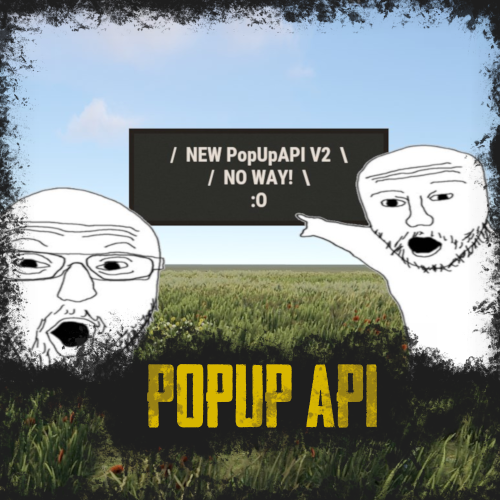
RUST Plugin Test Server TEST MY PLUGINS THERE! connect play.thepitereq.ovh:28050 PopUp API streamlines notifications into one minimalist plugin, particularly handy during player inventory actions when the chat is hidden. Pop-ups are fully customizable, allowing for infinite designs to be created. Please note that the ImageLibrary plugin is only required if you intend to use images in your pop-ups. You can generate an infinite number of customized pop-ups and display them to players using the built-in command. The PopUp API supports detailed customization, allowing you to add multiple panel/image details to your pop-up background. You can create pop-up presets within your plugins by hooking the function to generate a new preset with a simple JObject hook. showpopup <userId> <configName> <time> <fontSize> "<text>" - Shows pop-up with set preset to desired player. showpopup * <configName> <time> <fontSize> "<text>" - Shows pop-up with set preset to all players. How to create presets? Creating presets is very easy. You just need to know basics of RUST UI. Let's start from the beginning. Anchor Position It's a position on screen where pop-up will be hooked. It's based on 2 values in one string. Example: "0.5 1" Values are numbers from 0 to 1. First one is the width position of the anchor. Width is calculated from left to right. The second one is the height position of the anchor. Height is calculated from the bottom to the top. In our example, our pop-up is anchored to the middle-top of the screen. Value "0 0" would be bottom-right, and "1 1" would be top-left. Panel Parent Each UI have their parent. Based on that, it will know how "deep" it needs to be displayed. Sometimes we want pop-up to be shown in inventory, some of them not. Here is a small list of valid values with addition of RUST screen UIs. Indexes are from top to bottom. Overall > RUST Chat Overlay Hud.Menu > RUST Inventory Hud Under Panel Family Name It's a really basic config value. If you don't want your different pop-ups to overlap if they are in the same position, make the family name the same. Like if you want to create the pop-up on the middle top, keep the family name "Legacy", it will keep pop-ups remove if new one will show up there. Text/Background Position Basic RUST UI scale 1.0 is made on 1280x720 resolution. Position is just an offset from your previously set anchor. It's based on 2 values in one string. Example: "-180 -250" First value is width position, second is height position. Like in anchor option. For example, if you set Min. Value to "-200 -100" and Max. Value to "200 0" and if we will take the anchor of "0.5 1" our UI will be the size of 400x100 proportionally scaled to your resolution from 1280x720. Text Anchor These values are how text is positioned on your pop-up. A full list of anchors is available on Unity Docs HERE! Available Fonts Unfortunatelly RUST Fonts are limited to 4 for now. Here's a full list of them: DroidSansMono.ttf PermanentMarker.ttf RobotoCondensed-Bold.ttf RobotoCondensed-Regular.ttf The rest options should be easy to configure. Just test them! ^^ PopUp API 2.0 void ShowPopUp(BasePlayer player, string panelName, string text, int fontSize = 16, float time = 10f) #Shows pop-up in new 2.0 format. EXAMPLE USAGE: PopUpAPI.Call("ShowPopUp", player, "Market", Lang("MyLangMessage", player.UserIDString), 20, 15f); PopUp API void API_ShowPopup(BasePlayer player, string text, float time = 10f, string parent = "Hud.Menu", int fontSize = 25) #(Deprecated) Shows pop-up in old 1.0 format. For older plugins. Creating PopUp Schemas bool AddNewPopUpSchema(string pluginName, JObject schema) #Allows you to call plugin to create new pop-up preset for your plugin. EXAMPLE USAGE: JObject popUpConfig = new JObject() { { "key", "Market" }, #<- Config Key value. { "anchor", "0.5 1" }, { "name", "Legacy" }, { "parent", "Hud.Menu" }, { "background_enabled", true }, { "background_color", "0.145 0.135 0.12 1" }, { "background_fadeIn", 0.5f }, { "background_fadeOut", 0.5f }, { "background_offsetMax", "180 0" }, { "background_offsetMin", "-180 -65" }, { "background_smooth", false }, { "background_url", "" }, { "background_additionalObjectCount", 1 }, #<- This is value how many details is in this schema. { "background_detail_0_color", "0.185 0.175 0.16 1" }, { "background_detail_0_offsetMax", "356 65" }, { "background_detail_0_offsetMin", "4 4" }, { "background_detail_0_smooth", false }, { "background_detail_0_url", "" }, { "text_anchor", "MiddleCenter" }, { "text_color", "0.91 0.87 0.83 1" }, { "text_fadeIn", 0.5f }, { "text_fadeOut", 0.5f }, { "text_font", "RobotoCondensed-Bold.ttf" }, { "text_offsetMax", "180 0" }, { "text_offsetMin", "-180 -65" }, { "text_outlineColor", "0 0 0 0" }, { "text_outlineSize", "0 0" } }; PopUpAPI.Call("AddNewPopUpSchema", Name, popUpConfig); { "PopUp Schematics": { "Legacy": { "Anchor Position": "0.5 1", "Panel Parent": "Hud.Menu", "Panel Family Name": "Legacy", "Text": { "Text Position - Min": "-180 -250", "Text Position - Max": "180 -50", "Font (list available on website)": "RobotoCondensed-Bold.ttf", "Text Display Time Override": -1.0, "Text Font Size Override": -1, "Text Color": "1 1 1 1", "Text Anchor": "MiddleCenter", "Outline - Color": "0 0 0 1", "Outline - Size": "0.7 0.7", "Fade In Time (in seconds)": 0.5, "Fade Out Time (in seconds)": 0.5 }, "Background": { "Enabled": false, "Background Position - Min": "-180 -250", "Background Position - Max": "180 -50", "Background Color": "1 1 1 1", "Smooth Background": false, "Background Image URL": "", "Fade In Time (in seconds)": 0.5, "Fade Out Time (in seconds)": 0.5, "Background Details": [] } }, "NoWay": { "Anchor Position": "0.5 1", "Panel Parent": "Hud.Menu", "Panel Family Name": "Legacy", "Text": { "Text Position - Min": "-100 -200", "Text Position - Max": "100 -125", "Font (list available on website)": "RobotoCondensed-Bold.ttf", "Text Display Time Override": -1.0, "Text Font Size Override": -1, "Text Color": "0.91 0.87 0.83 1", "Text Anchor": "MiddleCenter", "Outline - Color": "0 0 0 0", "Outline - Size": "0 0", "Fade In Time (in seconds)": 0.5, "Fade Out Time (in seconds)": 0.5 }, "Background": { "Enabled": true, "Background Position - Min": "-100 -200", "Background Position - Max": "100 -125", "Background Color": "0.145 0.135 0.12 1", "Smooth Background": false, "Background Image URL": "", "Fade In Time (in seconds)": 0.5, "Fade Out Time (in seconds)": 0.5, "Background Details": [ { "Background Position - Min": "4 4", "Background Position - Max": "196 71", "Background Color": "0.185 0.175 0.16 1", "Smooth Background": false, "Background Image URL": "" }, { "Background Position - Min": "-100 -120", "Background Position - Max": "300 110", "Background Color": "1 1 1 1", "Smooth Background": false, "Background Image URL": "https://images.pvrust.eu/ui_icons/PopUpAPI/noway_0.png" } ] } } } }Free -

Version 2.0.3
1,549 downloads
RUST Plugin Test Server TEST MY PLUGINS THERE! connect play.thepitereq.ovh:28050 Discord Core creates essential links between your RUST and Discord servers. It let you display player count, synchronize ranks, chat between game and Discord, even manage tickets and votes. You can also print F7 reports into your discord and manage cupboard access through private messages. Allows you to connect users RUST accounts to their Discord accounts. Most recent Discord methods implementation (modals, buttons, slash commands) Send private messages to connected players through the API.. You can grant Discord or game roles to players who have linked their accounts. Show your player count in the bot's status. Grant game group reward for boosting your discord server Create Rust - Discord chat channel to communcate between platforms. You can create a chat between Discord and RUST, displaying messages from RUST in a Discord channel. Create discord tickets. Needed something for myself, so I though it might be cool to add it to the plugin. Make votes on the Discord, where vote weight is based on playtime and owned ranks. Send F7 reports into your admin channels. Send F7 ideas into discord channel so players can vote for best ideas. Manage cupboard authorization. Recommended for PvE servers. You can make that player before authorization need to accept auth through game if he is online, or through Discord if he have connected account. To make this plugin work, you need to have the Discord Extension and a pre-made Discord Bot. A full tutorial on how to set it up is available on the Discord Extension web page. Please note, the bot must be connected to only one server! How to connect? To connect your Steam account to Discord: As an Discord admin you need to use /generateconnect command to create button for verification. This message is visible for everyone and everyone can use this button. Click the button on generated message. It will generate an 6-digit code. Write this code in /connect <code> command (default command, can be changed) in-game, and if code is valid your account is connected. In-Game Commands /connect <code> - If code is valid, makes connection between your game and Discord account. (Editable in config) Discord Commands /close - Closes the ticket. /vote - Opens modal for vote creation. (requires admin perms) /voteend <messageId> - Force-end vote and print results. Must be sent on same channel as vote exist. (requires admin perms) /generateconnect - Creates embed for Discord-RUST connection. (requires admin perms) /generateticket - Creates ticket creation embed. (requires admin perms) void API_SendPrivateMessage(string userId, string message) - If player is connected, it sends private message to connected discord user. void API_SendMessage(string channelId, string message) - Sends message to channel on discord. void API_SendEmbedMessage(string channelId, string title, string description, string color, string thumbnailUrl = "", string footerUrl = "", string footerText = "") - Sends embed message to channel on discord. void API_SynchronizeDiscord(ulong userId) - Synchronize discord connection with player. If not present will remove all bonuses. { "BOT API Token": "Paste Token Here!", "Show Player Count In Status": true, "Connection - In-Game Command": "connect", "Connection - Granted Discord Group ID": "", "Connection - Synced Groups": { "svip": "332265", "vip": "123456" }, "Connection - Synchronize In-Game Nickname": true, "Connection - Granted RUST Group Name": "", "Connection - Nitro Boost Granted RUST Group Name": "", "Discord Rust Chat - Enabled": true, "Discord Rust Chat - Channel ID": "", "Discord Rust Chat - Discord To Rust Format": "<color=#aaee32>[Discord]</color> <color=#5c81ed>{0}</color> » {1}", "Discord Rust Chat - Discord To Rust Format With Required Permission": { "discordcore.chat.admin": "<color=#aaee32>[Discord]</color> <color=red>[Admin]</color> <color=#5c81ed>{0}</color> » {1}", "discordcore.chat.vip": "<color=#aaee32>[Discord]</color> <color=yellow>[VIP]</color> <color=#5c81ed>{0}</color> » {1}" }, "Discord Rust Chat - Rust To Discord Format": "**{0}** » *{1}*", "Discord Rust Chat - Rust To Discord Format With Required Permission": { "discordcore.chat.admin": "*[A]* **{0}** » *{1}*", "discordcore.chat.vip": "*[VIP]* **{0}** » *{1}*" }, "Discord Rust Chat - Valid ChatNations Channels": [ "en", "pl", "de", "ru" ], "Tickets - Enabled": true, "Tickets - Language Buttons": { "en": { "Displayed Name": "English", "Displayed Icon": "", "Assigned Support Discord Group IDs": [ "5643345", "223235" ], "Response Message": "Ticket has been created! {0}", "Greeting Message - Title": "New Ticket", "Greeting Message - Description": "Hey, <@{0}>! Welcome in your ticket! \nSupport group has been informed about your problem.\n**Describe your problem here and wait for the answer!**\nIf you want to close your ticket, feel free to write **/close** command." }, }, "Tickets - Log Tickets To Files": true, "Tickets - New Tickets Parent ID": "", "Tickets - Closed Tickets Parent ID": "", "Votes - Enabled": true, "Votes - Ping Role ID": "", "Votes - Default Vote Title": "Map Vote", "Votes - Default Vote Description": "Feel free to vote for one of the maps that will appear on the next wipe.\nYour vote will have more points if you played enough on current wipe.\nYour ranks also may vary on the point amount.\nIf your account is not connected to discord you will vote with 1 point.", "Votes - Default Vote Fields": "Procedural Map\nCustom Map", "Votes - Default Vote Time": "24h", "Votes - Playtime Vote Points (minutes : points)": { "1800": 3, "300": 2, "4500": 4, "9000": 5 }, "Votes - Permission Vote Points Multipliers (perm : multiplier)": { "discordcore.svip": 2.0, "discordcore.vip": 1.5 }, "F7 Reports - Enabled": true, "F7 Reports - Abuse Report Channel (0, to disable)": "", "F7 Reports - Bug Report Channel (0, to disable)": "", "F7 Reports - Cheat Report Channel (0, to disable)": "", "F7 Reports - General Report Channel (0, to disable)": "", "F7 Reports - Offensive Report Channel (0, to disable)": "", "F7 Reports - Idea Report Channel (0, to disable)": "", "F7 Reports - Idea Yes Emote": ":yes:1038108556542627891", "F7 Reports - Idea No Emote": ":no:1038108555007492187", "Cupboard Auth Check - Enabled": true, "Cupboard Auth Check - Command": "tcallow", "Text Messages": { "Connection - Embed Title": "[Discord - RUST] Connection Verification", "Connection - Embed Description": "Click button below to generate code that will allow you to connect your Discord account with your RUST account.", "Connection - Embed Button Text": "Verify Connection", "Connection - Sent Code": "Your verification code is **{0}**.\nGo to the server and run `/{1} {0}` to connect your Discord to Rust account.", "Vote - End Title": "Vote has ended.", "Vote - End Description": "These are the vote results:\n\n", "Vote - End Time": "\nVote results will be available {0}.", "Vote - Ended": "This vote has been ended. You can no longer vote for that!", "Vote - Button": "Vote", "Vote - Voting Title": "Vote Submit - Your vote will have {0} points", "Vote - Voting Text": "Vote by letter. You can use {0} letters.", "Vote - Not Valid Input": "Your vote input is not valid. Try again!", "Vote - Valid Input": "You've successfully voted for **{0}** with **{1}** points!", "Tickets - Embed Title": "Create Report", "Tickets - Embed Description": "If you need help, feel free to create a ticket to get in touch with **Admins**.\nSelect in what language you need to get in touch.", "Tickets - Cannot Close": "This channel isn't an ticket that can be closed or it has been closed already.", "Tickets - Closed Title": "Ticket Closed", "Tickets - Closed Description": "Ticket has been closed.\nIt will be automatically removed after 24 hours.", "Cupboard Auth Check - Title": "Cupboard Authorization Request", "Cupboard Auth Check - Description": "Player **{0}** is requesting for cupboard access at **{1}**.\nClick button to grant him access or just ignore this message.", "Cupboard Auth Check - Button": "Authorize", "Cupboard Auth Check - Error": "An error occured while trying to respond to this request. Probably cupboard is missing, or you've already responded to this request.", "Cupboard Auth Check - Granted Access": "You've successfully granted access to the cupboard!" } }Free- 26 comments
- 1 review
-
- 1
-

-
- #discord
- #discordbot
- (and 14 more)
-
[PluginReference] private Plugin TemporaryPermissions; There are 30 methods: IsReady User's Permissions: GrantUserPermission RevokeUserPermission UserHasPermission GrantActiveUsersPermission GrantAllUsersPermission RevokeActiveUsersPermission RevokeAllUsersPermission UserGetAllPermissions UserGetPermissionByExpiry UserGetAllPermissionsByExpiry ActiveUsersGetAllPermissions AllUsersGetAllPermissions User's Groups: AddUserGroup RemoveUserGroup UserHasGroup AddActiveUsersGroup AddAllUsersGroup RemoveActiveUsersGroup RemoveAllUsersGroup UserGetAllGroups ActiveUsersGetAllGroups AllUsersGetAllGroups Group's Permissions: GrantGroupPermission RevokeGroupPermission GroupHasPermission GrantAllGroupsPermission RevokeAllGroupsPermission GroupGetAllPermissions AllGroupsGetAllPermissions IsReady: Used to check if the TemporaryPermissions plugin is loaded and ready to work. The IsReady method returns true if it is ready, or null if it is not. (bool)TemporaryPermissions?.Call("IsReady");//Calling the IsReady method. If the result is not null(bool true), the plugin is ready. GrantUserPermission: Used to grant a temporary permission to a player. Returns true if the grant was successful. To call the GrantUserPermission method, you need to pass 5 parameters, 3 of which are optional: IPlayer or BasePlayer or <string>playerID - The player object or their Id; <string>permName - The name of the permission; <int>secondsToAdd or <DateTime>expireDate - Optional. The time in seconds to add, or the end date. If a number less than 1 is specified, or if this parameter is not specified, the permission will be valid until the wipe; <bool>fromNow or <DateTime>assignedDate - Optional. true/false to specify whether the seconds should be added to the current date or to the existing time, or an exact assignment date. Defaults to the current date; <bool>checkExistence - Optional. Whether to check for the existence of the permission. (bool)TemporaryPermissions?.Call("GrantUserPermission", player.UserIDString, "realpve.vip");//Calling the GrantUserPermission method without specifying the third parameter, to grant temporary permission until the wipe. (bool)TemporaryPermissions?.Call("GrantUserPermission", player.UserIDString, "realpve.vip", 0);//Calling the GrantUserPermission method with the specified number less than 1, to grant temporary permission until the wipe. (bool)TemporaryPermissions?.Call("GrantUserPermission", player.UserIDString, "realpve.vip", 3600, true, true);//Calling the GrantUserPermission method with the specified number of seconds to add. (bool)TemporaryPermissions?.Call("GrantUserPermission", player.UserIDString, "realpve.vip", expireDate, assignedDate, true);//Calling the GrantUserPermission method with the specified DateTime for the end and start of the temporary permission. RevokeUserPermission: Used to revoke a temporary permission from a player. Returns true if the revoke was successful. To call the RevokeUserPermission method, you need to pass 2 parameters: IPlayer or BasePlayer or <string>playerID - The player object or their Id; <string>permName - The name of the permission. (bool)TemporaryPermissions?.Call("RevokeUserPermission", player.UserIDString, "realpve.vip"); UserHasPermission: Used to check if a player has a temporary permission. Returns true if the player has the specified temporary permission. To call the UserHasPermission method, you need to pass 2 parameters: IPlayer or BasePlayer or <string>playerID - The player object or their Id; <string>permName - The name of the permission. (bool)TemporaryPermissions?.Call("UserHasPermission", player.UserIDString, "realpve.vip"); GrantActiveUsersPermission: Used to temporarily grant a permission to all online players. Returns the <int>number of successful grants of temporary permissions to players. To call the GrantActiveUsersPermission method, you need to pass 3 parameters, 2 of which is optional: <string>permName - The name of the permission; <int>secondsToAdd or <DateTime>expireDate - Optional. The time in seconds to add, or the end date. If a number less than 1 is specified, or if this parameter is not specified, the permission will be valid until the wipe; <bool>fromNow or <DateTime>assignedDate - Optional. true/false to specify whether the seconds should be added to the current date or to the existing time, or an exact assignment date. Defaults to the current date. (int)TemporaryPermissions?.Call("GrantActiveUsersPermission", "realpve.vip");// Calling the GrantActiveUsersPermission method without specifying the second parameter, to grant all online players temporary permission until the wipe. (int)TemporaryPermissions?.Call("GrantActiveUsersPermission", "realpve.vip", 0);//Calling the GrantActiveUsersPermission method with the specified number less than 1, to grant all online players temporary permission until the wipe. (int)TemporaryPermissions?.Call("GrantActiveUsersPermission", "realpve.vip", 3600, true);//Calling the GrantActiveUsersPermission method with the specified number of seconds to add. (int)TemporaryPermissions?.Call("GrantActiveUsersPermission", "realpve.vip", expireDate, assignedDate);//Calling the GrantActiveUsersPermission method with the specified DateTime for the end and start of the temporary permission. GrantAllUsersPermission: Used to grant a temporary permission to all players. Returns the <int>number of successful grants of temporary permissions to players. To call the GrantAllUsersPermission method, you need to pass 3 parameters, 2 of which is optional: <string>permName - The name of the permission; <int>secondsToAdd or <DateTime>expireDate - Optional. The time in seconds to add, or the end date. If a number less than 1 is specified, or if this parameter is not specified, the permission will be valid until the wipe; <bool>fromNow or <DateTime>assignedDate - Optional. true/false to specify whether the seconds should be added to the current date or to the existing time, or an exact assignment date. Defaults to the current date. (int)TemporaryPermissions?.Call("GrantAllUsersPermission", "realpve.vip");//Calling the GrantAllUsersPermission method without specifying the second parameter, to grant all players temporary permission until the wipe. (int)TemporaryPermissions?.Call("GrantAllUsersPermission", "realpve.vip", 0);//Calling the GrantAllUsersPermission method with the specified number less than 1, to grant all players temporary permission until the wipe. (int)TemporaryPermissions?.Call("GrantAllUsersPermission", "realpve.vip", 3600, true);//Calling the GrantAllUsersPermission method with the specified number of seconds to add. (int)TemporaryPermissions?.Call("GrantAllUsersPermission", "realpve.vip", expireDate, assignedDate);//Calling the GrantAllUsersPermission method with the specified DateTime for the end and start of the temporary permission. RevokeActiveUsersPermission: Used to revoke a temporary permission from all online players. Returns the <int>number of successful revokes of temporary permissions to players. To call the RevokeActiveUsersPermission method, you need to pass 1 parameter: <string>permName - The name of the permission. (int)TemporaryPermissions?.Call("RevokeActiveUsersPermission", "realpve.vip"); RevokeAllUsersPermission: Used to revoke a temporary permission from all players. Returns the <int>number of successful revokes of temporary permissions to players. To call the RevokeAllUsersPermission method, you need to pass 1 parameter: <string>permName - The name of the permission. (int)TemporaryPermissions?.Call("RevokeAllUsersPermission", "realpve.vip"); UserGetAllPermissions: Used to retrieve all temporary permissions of a player. Returns a Dictionary<string, DateTime[]> where the key is the permission name and the value is an array of 2 DateTimes: the first date is the assignment date and the second date is the expiration date of the permission. If the expiration date is set to default, it means the permission is valid until the wipe. To call the UserGetAllPermissions method, you need to pass 1 parameter: <string>playerID - The player's Id. (Dictionary<string, DateTime[]>)TemporaryPermissions?.Call("UserGetAllPermissions", player.UserIDString); UserGetPermissionByExpiry: Used to get the expiration date of a player's temporary permission, considering the temporary permission for the group they may belong to. The latest date is taken. Returns a DateTime[]: the first date is the assignment date and the second date is the expiration date of the permission. If the expiration date is set to default, it means the permission is valid until the wipe. To call the UserGetPermissionByExpiry method, you need to pass 2 parameters: IPlayer or BasePlayer or <string>playerID - The player object or their Id; <string>permName - The name of the permission. (DateTime[])TemporaryPermissions?.Call("UserGetPermissionByExpiry", player.UserIDString, "realpve.vip"); UserGetAllPermissionsByExpiry: Used to get the expiration date of all temporary permissions for a player, considering the temporary permissions for the group they may belong to. The latest date is taken. Returns a Dictionary<string, DateTime[]> where the key is the permission name and the value is an array of 2 DateTimes: the first date is the assignment date and the second date is the expiration date of the permission. If the expiration date is set to default, it means the permission is valid until the wipe. To call the UserGetAllPermissionsByExpiry method, you need to pass 1 parameter: IPlayer or BasePlayer or <string>playerID - The player object or their Id. (Dictionary<string, DateTime[]>)TemporaryPermissions?.Call("UserGetAllPermissionsByExpiry", player.UserIDString); ActiveUsersGetAllPermissions: Used to retrieve all temporary permissions of all online players who have temporary permissions. Returns a Dictionary<string, Dictionary<string, DateTime[]>> where the key is userID and the value is another Dictionary<string, DateTime[]>, where the key is the permission name and the value is an array of 2 DateTimes: the first date is the assignment date and the second date is the expiration date of the permission. If the expiration date is set to default, it means the permission is valid until the wipe. (Dictionary<string, Dictionary<string, DateTime[]>>)TemporaryPermissions?.Call("ActiveUsersGetAllPermissions"); AllUsersGetAllPermissions: Used to retrieve all temporary permissions of all players who have temporary permissions. Returns a Dictionary<string, Dictionary<string, DateTime[]>> where the key is userID and the value is another Dictionary<string, DateTime[]>, where the key is the permission name and the value is an array of 2 DateTimes: the first date is the assignment date and the second date is the expiration date of the permission. If the expiration date is set to default, it means the permission is valid until the wipe. (Dictionary<string, Dictionary<string, DateTime[]>>)TemporaryPermissions?.Call("AllUsersGetAllPermissions"); AddUserGroup: Used to temporarily add a player to a group. Returns true if the addition was successful. To call the AddUserGroup method, you need to pass 5 parameters, 3 of which are optional: IPlayer or BasePlayer or <string>playerID - The player object or their Id; <string>groupName - The name of the group; <int>secondsToAdd or <DateTime>expireDate - Optional. The time in seconds to add, or the end date. If a number less than 1 is specified, or if this parameter is not specified, the group will be valid until the wipe; <bool>fromNow or <DateTime>assignedDate - Optional. true/false to specify whether the seconds should be added to the current date or to the existing time, or an exact assignment date. Defaults to the current date; <bool>checkExistence - Optional. Whether to check for the existence of the group. (bool)TemporaryPermissions?.Call("AddUserGroup", player.UserIDString, "vip");//Calling the AddUserGroup method without specifying the third parameter to temporarily add a player, to a group until the wipe. (bool)TemporaryPermissions?.Call("AddUserGroup", player.UserIDString, "vip", 0);//Calling the AddUserGroup method with the specified number less than 1, to temporarily add a player to a group until the wipe. (bool)TemporaryPermissions?.Call("AddUserGroup", player.UserIDString, "vip", 3600, true, true);//Calling the AddUserGroup method with the specified number of seconds to add. (bool)TemporaryPermissions?.Call("AddUserGroup", player.UserIDString, "vip", expireDate, assignedDate, true);//Calling the AddUserGroup method with the specified DateTime for the end and start of the temporary permission. RemoveUserGroup: Used to remove a temporary group from a player. Returns true if the removal was successful. To call the RemoveUserGroup method, you need to pass 2 parameters: IPlayer or BasePlayer or <string>playerID - The player object or their Id; <string>groupName - The name of the group. (bool)TemporaryPermissions?.Call("RemoveUserGroup", player.UserIDString, "vip"); UserHasGroup: Used to check if a player has a temporary group. Returns true if the player has the specified temporary group. To call the UserHasGroup method, you need to pass 2 parameters: IPlayer or BasePlayer or <string>playerID - The player object or their Id; <string>groupName - The name of the group. (bool)TemporaryPermissions?.Call("UserHasGroup", player.UserIDString, "vip"); AddActiveUsersGroup: Used to temporarily add a group to all online players. Returns the <int>number of successful additions of the temporary group to players. To call the AddActiveUsersGroup method, you need to pass 3 parameters, 2 of which is optional: <string>groupName - The name of the group; <int>secondsToAdd or <DateTime>expireDate - Optional. The time in seconds to add, or the end date. If a number less than 1 is specified, or if this parameter is not specified, the group will be valid until the wipe; <bool>fromNow or <DateTime>assignedDate - Optional. true/false to specify whether the seconds should be added to the current date or to the existing time, or an exact assignment date. Defaults to the current date. (int)TemporaryPermissions?.Call("AddActiveUsersGroup", "vip");//Calling the AddActiveUsersGroup method without specifying the second parameter to temporarily add all online players to a group until the wipe. (int)TemporaryPermissions?.Call("AddActiveUsersGroup", "vip", 0);//Calling the AddActiveUsersGroup method with the specified number less than 1, to temporarily add all online players to a group until the wipe. (int)TemporaryPermissions?.Call("AddActiveUsersGroup", "vip", 3600, true);//Calling the AddActiveUsersGroup method with the specified number of seconds to add. (int)TemporaryPermissions?.Call("AddActiveUsersGroup", "vip", expireDate, assignedDate);//Calling the AddActiveUsersGroup method with the specified DateTime for the end and start of the temporary permission. AddAllUsersGroup: Used to temporarily add a group to all players. Returns the <int>number of successful additions of the temporary group to players. To call the AddAllUsersGroup method, you need to pass 3 parameters, 2 of which is optional: <string>groupName - The name of the group; <int>secondsToAdd or <DateTime>expireDate - Optional. The time in seconds to add, or the end date. If a number less than 1 is specified, or if this parameter is not specified, the group will be valid until the wipe; <bool>fromNow or <DateTime>assignedDate - Optional. true/false to specify whether the seconds should be added to the current date or to the existing time, or an exact assignment date. Defaults to the current date. (int)TemporaryPermissions?.Call("AddAllUsersGroup", "vip");//Calling the AddAllUsersGroup method without specifying the second parameter to temporarily add all players to a group until the wipe. (int)TemporaryPermissions?.Call("AddAllUsersGroup", "vip", 0);//Calling the AddAllUsersGroup method with the specified number less than 1, to temporarily add all players to a group until the wipe. (int)TemporaryPermissions?.Call("AddAllUsersGroup", "vip", 3600, true);//Calling the AddAllUsersGroup method with the specified number of seconds to add. (int)TemporaryPermissions?.Call("AddAllUsersGroup", "vip", expireDate, assignedDate);//Calling the AddAllUsersGroup method with the specified DateTime for the end and start of the temporary permission. RemoveActiveUsersGroup: Used to remove a temporary group from all online players. Returns the <int>number of successful removals of temporary groups from players. To call the RemoveActiveUsersGroup method, you need to pass 1 parameter: <string>groupName - The name of the group. (int)TemporaryPermissions?.Call("RemoveActiveUsersGroup", "vip"); RemoveAllUsersGroup: Used to remove a temporary group from all players. Returns the <int>number of successful removals of temporary groups from players. To call the RemoveAllUsersGroup method, you need to pass 1 parameter: <string>permName - The name of the permission. (int)TemporaryPermissions?.Call("RemoveAllUsersGroup", "vip"); UserGetAllGroups: Used to retrieve all temporary groups of a player. Returns a Dictionary<string, DateTime[]> where the key is the group name and the value is an array of 2 DateTimes: the first date is the assignment date and the second date is the expiration date of the group. If the expiration date is set to default, it means the group is valid until the wipe. To call the UserGetAllGroups method, you need to pass 1 parameter: <string>permName - The name of the permission. (Dictionary<string, DateTime[]>)TemporaryPermissions?.Call("UserGetAllGroups", player.UserIDString); ActiveUsersGetAllGroups: Used to retrieve all temporary groups of all online players who have temporary groups. Returns a Dictionary<string, Dictionary<string, DateTime[]>> where the key is userID and the value is another Dictionary<string, DateTime[]>, where the key is the group name and the value is an array of 2 DateTimes: the first date is the assignment date and the second date is the expiration date of the group. If the expiration date is set to default, it means the group is valid until the wipe. (Dictionary<string, Dictionary<string, DateTime[]>>)TemporaryPermissions?.Call("ActiveUsersGetAllGroups"); AllUsersGetAllGroups: Used to retrieve all temporary groups of all players who have temporary groups. Returns a Dictionary<string, Dictionary<string, DateTime[]>> where the key is userID and the value is another Dictionary<string, DateTime[]>, where the key is the group name and the value is an array of 2 DateTimes: the first date is the assignment date and the second date is the expiration date of the group. If the expiration date is set to default, it means the group is valid until the wipe. (Dictionary<string, Dictionary<string, DateTime[]>>)TemporaryPermissions?.Call("AllUsersGetAllGroups"); GrantGroupPermission: Used to grant a temporary permission to a group. Returns true if the grant was successful. To call the GrantGroupPermission method, you need to pass 5 parameters, 3 of which are optional: <string>groupName - The name of the group; <string>permName - The name of the permission; <int>secondsToAdd or <DateTime>expireDate - Optional. The time in seconds to add, or the end date. If a number less than 1 is specified, or if this parameter is not specified, the permission will be valid until the wipe; <bool>fromNow or <DateTime>assignedDate - Optional. true/false to specify whether the seconds should be added to the current date or to the existing time, or an exact assignment date. Defaults to the current date; <bool>checkExistence - Optional. Whether to check for the existence of the permission. (bool)TemporaryPermissions?.Call("GrantGroupPermission", "vip", "realpve.vip");//Calling the GrantGroupPermission method without specifying the third parameter, to grant temporary permission until the wipe. (bool)TemporaryPermissions?.Call("GrantGroupPermission", "vip", "realpve.vip", 0);//Calling the GrantGroupPermission method with the specified number less than 1, to grant temporary permission until the wipe. (bool)TemporaryPermissions?.Call("GrantGroupPermission", "vip", "realpve.vip", 3600, true, true);//Calling the GrantGroupPermission method with the specified number of seconds to add. (bool)TemporaryPermissions?.Call("GrantGroupPermission", "vip", "realpve.vip", expireDate, assignedDate, true);//Calling the GrantGroupPermission method with the specified DateTime for the end and start of the temporary permission. RevokeGroupPermission: Used to revoke a temporary permission from a group. Returns true if the revoke was successful. To call the RevokeGroupPermission method, you need to pass 2 parameters: <string>groupName - The name of the group; <string>permName - The name of the permission. (bool)TemporaryPermissions?.Call("RevokeGroupPermission", "vip", "realpve.vip"); GroupHasPermission: Used to check if a group has a temporary permission. Returns true if the group has the specified temporary permission. To call the GroupHasPermission method, you need to pass 2 parameters: <string>groupName - The name of the group; <string>permName - The name of the permission. (bool)TemporaryPermissions?.Call("GroupHasPermission", "vip", "realpve.vip"); GrantAllGroupsPermission: Used to temporarily grant a permission to all groups. Returns the <int>number of successful grants of temporary permissions to groups. To call the GrantAllGroupsPermission method, you need to pass 3 parameters, 2 of which is optional: <string>permName - The name of the permission; <int>secondsToAdd or <DateTime>expireDate - Optional. The time in seconds to add, or the end date. If a number less than 1 is specified, or if this parameter is not specified, the permission will be valid until the wipe; <bool>fromNow or <DateTime>assignedDate - Optional. true/false to specify whether the seconds should be added to the current date or to the existing time, or an exact assignment date. Defaults to the current date. (int)TemporaryPermissions?.Call("GrantAllGroupsPermission", "realpve.vip");//Calling the GrantAllGroupsPermission method without specifying the second parameter, to grant all groups temporary permission until the wipe. (int)TemporaryPermissions?.Call("GrantAllGroupsPermission", "realpve.vip", 0);//Calling the GrantAllGroupsPermission method with the specified number less than 1, to grant all groups temporary permission until the wipe. (int)TemporaryPermissions?.Call("GrantAllGroupsPermission", "realpve.vip", 3600, true);//Calling the GrantAllGroupsPermission method with the specified number of seconds to add. (int)TemporaryPermissions?.Call("GrantAllGroupsPermission", "realpve.vip", expireDate, assignedDate);//Calling the GrantAllGroupsPermission method with the specified DateTime for the end and start of the temporary permission. RevokeAllGroupsPermission: Used to revoke a temporary permission from all groups. Returns the <int>number of successful revokes of temporary permissions to groups. To call the RevokeAllGroupsPermission method, you need to pass 1 parameter: <string>permName - The name of the permission. (int)TemporaryPermissions?.Call("RevokeAllGroupsPermission", "realpve.vip"); GroupGetAllPermissions: Used to retrieve all temporary permissions of a group. Returns a Dictionary<string, DateTime[]> where the key is the permission name and the value is an array of 2 DateTimes: the first date is the assignment date and the second date is the expiration date of the permission. If the expiration date is set to default, it means the permission is valid until the wipe. To call the GroupGetAllPermissions method, you need to pass 1 parameter: <string>groupName - The name of the group. (Dictionary<string, DateTime[]>)TemporaryPermissions?.Call("GroupGetAllPermissions", "vip"); AllGroupsGetAllPermissions: Used to retrieve all temporary permissions of all groups that have temporary permissions. Returns a Dictionary<string, Dictionary<string, DateTime[]>> where the key is the group name and the value is another Dictionary<string, DateTime[]>, where the key is the permission name and the value is an array of 2 DateTimes: the first date is the assignment date and the second date is the expiration date of the permission. If the expiration date is set to default, it means the permission is valid until the wipe. (Dictionary<string, Dictionary<string, DateTime[]>>)TemporaryPermissions?.Call("AllGroupsGetAllPermissions");
-
OnTemporaryPermissionsLoaded: Called after the TemporaryPermissions plugin is fully loaded and ready. OnTemporaryPermissionGranted: Called after the player has been granted a temporary permission. OnTemporaryPermissionUpdated: Called after the player's temporary permission has been updated. OnTemporaryPermissionRevoked: Called after the player's temporary permission has expired or been revoked. OnTemporaryGroupAdded: Called after the player has been temporarily added to the group. OnTemporaryGroupUpdated: Called after the player's temporary group has been updated. OnTemporaryGroupRemoved: Called after the player's temporary group has expired or been removed. OnGroupTemporaryPermissionGranted: Called after the group has been granted a temporary permission. OnGroupTemporaryPermissionUpdated: Called after the group's temporary permission has been updated. OnGroupTemporaryPermissionRevoked: Called after the group's temporary permission has expired or been revoked. void OnTemporaryPermissionsLoaded(VersionNumber version = default) { Puts("The TemporaryPermissions plugin is loaded and ready to go!"); } void OnTemporaryPermissionGranted(string userID, string perm, DateTime expireDate, DateTime assignedDate) { Puts($"Player {userID} has been granted the temporary permission {perm} from {assignedDate} until {expireDate}."); } void OnTemporaryPermissionUpdated(string userID, string perm, DateTime expireDate, DateTime assignedDate) { Puts($"Player {userID}'s temporary permission {perm} has been updated. New expiration date: {expireDate}. Assigned date: {assignedDate}."); } void OnTemporaryPermissionRevoked(string userID, string perm, bool isExpired) { Puts($"Player {userID} has had the temporary permission {perm} revoked. Permission expired: {isExpired}."); } void OnTemporaryGroupAdded(string userID, string groupName, DateTime expireDate, DateTime assignedDate) { Puts($"Player {userID} has been added to the temporary group {groupName} from {assignedDate} until {expireDate}."); } void OnTemporaryGroupUpdated(string userID, string groupName, DateTime expireDate, DateTime assignedDate) { Puts($"Player {userID}'s temporary group {groupName} has been updated. New expiration date: {expireDate}. Assigned date: {assignedDate}."); } void OnTemporaryGroupRemoved(string userID, string groupName, bool isExpired) { Puts($"Player {userID} has had the temporary group {groupName} revoked. Group expired: {isExpired}."); } void OnGroupTemporaryPermissionGranted(string groupName, string perm, DateTime expireDate, DateTime assignedDate) { Puts($"Group {groupName} has been granted the temporary permission {perm}, valid from {assignedDate} until {expireDate}."); } void OnGroupTemporaryPermissionUpdated(string groupName, string perm, DateTime expireDate, DateTime assignedDate) { Puts($"Group {groupName}'s temporary permission {perm} has been updated. New expiration date: {expireDate}. Assigned date: {assignedDate}."); } void OnGroupTemporaryPermissionRevoked(string groupName, string perm, bool isExpired) { Puts($"Group {groupName} has had the temporary permission {perm} revoked. Permission expired: {isExpired}."); }
-
Developer API API Methods bool Deposit(string playerID, int amount) Returns true if successful. bool Deposit(string playerID, int amount, ulong toolCupboardID) Returns true if successful. bool Withdraw(string playerID, int amount) Returns true if successful. bool Withdraw(string playerID, int amount, ulong toolCupboardID) Returns true if successful. bool AddToWallet(string playerID, int amount) Returns true if successful. bool AddToBank(string playerID, int amount) Returns true if successful. bool AddToBank(string playerID, int amount, ulong toolCupboardID) Returns true if successful. bool RemoveFromWallet(string playerID, int amount) Returns true if successful. bool RemoveFromBank(string playerID, int amount) Returns true if successful. bool RemoveFromBank(string playerID, int amount, ulong toolCupboardID) Returns true if successful. bool ResetWallet(string playerID) Returns true if successful. bool ResetBank(string playerID) Returns true if successful. int GetWalletBalance(string playerID) Returns player's wallet balance. int GetBankBalance(string playerID) Returns player's bank balance. int GetBankBalance(string playerID, ulong toolCupboardID) Returns player's bank balance. void RefreshOverlay(string playerID) Refreshes a player's balance overlay GUI. Which API methods to use? There are many API methods available but the three below are the most commonly used in place of Economics and ServerRewards method calls. Check player's balance int GetWalletBalance(string playerID) Returns player's wallet balance. Remove money from player's balance bool RemoveFromWallet(string playerID, int amount) Returns true if successful. Add money to player's balance bool AddToWallet(string playerID, int amount) Returns true if successful.
-
Hook Methods // Temporarily disable all buffs for the target public void DisableBuffs(ulong id) // Enable disabled buffs for the target public void EnableBuffs(ulong id) // Temporarily disable xp gain for the target public void DisableXP(ulong id) // Enable xp gain for the target public void EnableXP(ulong id) // Returns if xp gain is disabled for the target public bool IsXPDisabled(ulong id) // Allows external plugins to roll loot using the Loot_Pickup buff. Returns true if successful. public bool RolledLootPickup(BasePlayer player) // Give skill points to the target public void GiveSkillPoints(BasePlayer player, int amount) // Add a global xp modifier. Only the highest value is used. public void AddGlobalXPModifier(string pluginName, float modifier) // Removes a global xp modifier. public void RemoveGlobalXPModifier(string pluginName) // Give the player xp. noMod is whether the xp amount should be modified by permissions, nighttime xp bonuses, rested xp etc. public void AwardXP(BasePlayer player, double value, string plugin, bool noMod = false) // Returns a double representing the total respec cost. public double GetTotalRespecCost(BasePlayer player) // Respecs the player void RespecPlayer(BasePlayer player, PlayerInfo playerData = null) // Returns a list<object[]> of items inside of the players pouch_items. object[] is made from the itemInfo class. /* public class ItemInfo { public string shortname; public ulong skin; public int amount; public float condition; public float maxCondition; public int ammo; public string ammotype; public int position; public int frequency; public Item.Flag flags; public KeyInfo instanceData; public class KeyInfo { public int dataInt; public int blueprintTarget; public int blueprintAmount; } public int contentsSlots; public List<ItemInfo> item_contents; public string text; public string name; public List<ItemOwnershipShare> ownershipShares; public int armorSlots; public object[] ToObject() { return new object[] { shortname, skin, amount, condition, maxCondition, ammo, ammotype, position, frequency, flags, instanceData, instanceData?.dataInt, instanceData?.blueprintTarget, instanceData?.blueprintAmount, contentsSlots, text, name, ownershipShares, armorSlots }; } } */ List<object[]> STGetExtraPocketsItems(ulong id) // Returns the max level. public int STGetMaxLevel() // Returns name, xp, prestige level, current level and xpdebt as a Dictionary<ulong, (string Name, double XP, int PrestigeLevel, int CurrentLevel, double XPDebt)> public object GetSkillTreeData() // Remotely updates player stats. public void RemoteUpdatePlayerStats(string userid, string json) // Returns a float with the buff value of the specified buff. float GetBuffValue(BasePlayer player, string skill) /* Returns: - Current level (int) - Current total xp (double) - XP value that the currently level started at (double) - XP value that the next level will start at (double) - XP Debt - PrestigeLevel */ object[] GetXPStats(ulong id) // Returns the current prestige level of the player object GetPrestigeLevel(ulong id) // Returns the xp amount for the specified level. public double GetLevelExp(int level) // Returns the player level public int GetPlayerLevel(BasePlayer player) // Forces the players pouch to be dropped. public void ForceDropPouch(BasePlayer player, bool bypassPerm) // Remotely set the yields for skill tree's yield system public void SetSkillTreeYields(Dictionary<int, float> dict) // Remote set the yield for the specified yield type. public void SetSkillTreeYield(int type, float multiplier) // Returns a string[] with the players levle and xp. public string[] ST_GetPlayerLevel(BasePlayer player) // Returns xp over and above the players current level. private double GetExcessXP(BasePlayer player) // Removes xp from a player (cannot go below level xp). private void RemoveXP(BasePlayer player, double value) // Returns the horse stats as a float or null if the horse isnt modified. private object STGetHorseStats(BasePlayer player, ulong id) // Returns if the container uid is an extra pockets container. public object IsExtraPocketsContainer(ulong uid) // Adds a skill from a plugin. public void AddNode(string tree, string node, bool enabled, int max_Level, int tier, float value_Per_Buff, string _buff, string _buffType, string icon_url, object[] _perms = null, ulong skin = 0, bool overwrite = false) Hook Calls // Returning non-null prevents yield from the Harvest_Grown_Yield skill. object STCanReceiveYield(BasePlayer player, GrowableEntity entity) object STCanReceiveYield(BasePlayer player, GrowableEntity entity, Item item) // Returning non-null prevents SkillTree from increasing the yield for dispensers (trees/rocks/animals). object STCanReceiveYield(BasePlayer player, BaseEntity entity, Item item) // Prevents skill tree from increasing the gather yield for collectible entities. object STCanReceiveYield(BasePlayer player, CollectibleEntity entity) // Returning non-null prevents the Lock_Picker skill from running. object STOnLockpickAttempt(BasePlayer player, BaseLock baseLock) // Returning non-null prevents SkillTree from handling dispenser gather skills. object OnSkillTreeHandleDispenser(BasePlayer player, BaseEntity entity, Item item) // Returning non-null prevents instant gather from triggering. object OnInstantGatherTrigger(BasePlayer player, ResourceDispenser dispenser, string pluginName) // Triggered when an instant gather skill creates a new item (before it is given to the player). void OnInstantGatherTriggered(BasePlayer player, ResourceDispenser dispenser, Item newItem, string pluginName) // Returning non-null prevents the item repair from happening. object STOnItemRepairWithMaxRepair(Item item) // Returning non-null prevents the Rationer from running. object STOnRationTrigger(BasePlayer player, Item item) // Returning non-null prevents the horses stats from being modified by the Riding_Speed skill. object STCanModifyHorse(BasePlayer player, RidableHorse horse, float value) // Returning non-null prevents the pouch from dropping. object STOnPouchDrop(BasePlayer player) // Returning non-null prevents the player from losing xp. object STOnLoseXP(BasePlayer player) // Returning non-null prevents the boats speed from being modified by the Boat_Speed skill. object STOnModifyBoatSpeed(BasePlayer player, MotorRowboat boat) // Returning non-null prevents bonus loot from being added to the container. object STCanReceiveBonusLootFromContainer(BasePlayer player, LootContainer container) // Triggered when the player levels up. void STOnPlayerLevel(BasePlayer player, int currentLevel, int newLevel) // Returning a bool prevents the xp gain. Returning a double overwrites the xp amount to the value of the double. object STCanGainXP(BasePlayer player, string plugin, double xp) object STCanGainXP(BasePlayer player, BaseEntity source, double xp, string source_string) object STCanGainXP(ulong userid, string plugin, double xp) // Returning non-null prevents the pouch from being opened. object STOnPouchOpen(BasePlayer player) // Triggered when the pouch is opened. void STOnPouchOpened(BasePlayer player, StorageContainer container) // Returning non-null prevents xp gain from a swipe card object OnGainXPFromSwipeCard(BasePlayer player, int cardLevel, ulong cardReaderID) // Returning non-null prevents the swipe card from being bypassed with the Build_Craft_Ultimate. object OnSwipeAccessLevelBypass(BasePlayer player, CardReader cardReader, Keycard card) // Returning non-null prevents the Raiding_Ultimate from acquiring a target. object OnRaidingUltimateTargetAcquire(BasePlayer player, Vector3 pos) // Triggered when a player advances a prestige levels void STOnPlayerPrestigeLevelled(BasePlayer player, int newPrestigeLevel) // Returning non-null will prevent the skill from triggering object STOnRespawnTree(BasePlayer player, ResourceEntity dispenser)
-
.thumb.gif.5d4481dc5db80dcbb7dc4257193dcb12.gif)
Version 1.1.1
224 downloads
NCP is a highly optimized and professional notification system designed specifically for Rust servers. Built with performance in mind, it provides server administrators with a powerful yet lightweight solution for displaying custom notifications to players using authentic Rust UI elements and color schemes. The plugin features extensive customization options, multiple positioning presets, and seamless integration with other plugins through a comprehensive API system. All notifications use genuine Rust game assets and follow the official UI design patterns for a native gaming experience. Main Features Authentic Rust UI: Uses genuine Rust game assets, icons, and color palette for native look and feel High Performance: Optimized for minimal server impact Fully Customizable: Configure colors, gradients, materials, sprites, icons, and positioning for each notification type Flexible Positioning: Support for TopLeft, TopRight, BottomLeft and BottomRight screen positioning Easy Integration: Comprehensive API for seamless integration with other plugins Smart Management: Automatic notification queuing, duration control, and fade effects Sound Effects: Optional sound effects for each notification type Multiple Types: Pre-configured Info, Warning, Error, and Success notifications with unlimited custom types Visual Effects: Gradient overlays, borders, shadows, and material effects using Rust's UI system Lightweight: Minimal memory footprint with automatic cleanup and resource management Permissions ncp.see: Allows players to see notifications (required for visibility) ncp.notify: Grants permission to use the show command for testing ncp.player: Allows sending notifications to specific players ncp.allplayers: Permits broadcasting notifications to all online players Chat Commands /ncp.show <type> <message>: Display notification to yourself (testing purposes) /ncp.player <player> <type> <message>: Send notification to specific player /ncp.allplayers <type> <message>: Broadcast notification to all online players /ncp.edit <type>: Opens the configurator UI Console Commands ncp.show <type> <message>: Display notification from server console ncp.player <player> <type> <message>: Send notification to player from console ncp.allplayers <type> <message>: Broadcast to all players from console Notification Types: 0 (Info), 1 (Warning), 2 (Error), 3 (Success), or any custom type configured Note: Most commands require appropriate permissions except for viewing notifications API Methods SendNotify(BasePlayer player, int type, string message) SendNotify(string userId, int type, string message) SendNotify(ulong userId, int type, string message) SendNotifyAllPlayers(int type, string message) Usage Examples // Send notification to specific player NCP?.Call("SendNotify", player, type, message); // BasePlayer NCP?.Call("SendNotify", "76561198000000000", type, message); // String UserID NCP?.Call("SendNotify", 76561198000000000L, type, message); // uLong UserID // Send notification to all online players NCP?.Call("SendNotifyAllPlayers", type, message); Example Integration [PluginReference] private Plugin NCP; private void ShowPlayerNotification(BasePlayer player) { NCP?.Call("SendNotify", player, 0, "Welcome to our server!"); // Info NCP?.Call("SendNotify", player, 1, "Low health detected!"); // Warning NCP?.Call("SendNotify", player, 2, "Access denied!"); // Error NCP?.Call("SendNotify", player, 3, "Item crafted successfully!"); // Success // Global broadcast NCP?.Call("SendNotifyAllPlayers", 1, "Server event starting in 5 minutes!"); } Config { "Permission (empty = no permission required)": "", "UI Settings": { "Anchor Position (TopLeft, TopRight, BottomLeft, BottomRight)": "TopRight", "Width": 240.0, "Height": 50.0, "X Offset": -15.0, "Y Offset": -15.0, "Spacing": 5.0, "Max Visible": 5 }, "Notification Types": { "0": { "Enabled": true, "Title": "Information", "Icon Asset": "assets/icons/info.png", "Background Color": { "HEX": "#1a1a1a", "Opacity (0 - 100)": 92.0 }, "Enable Gradient": true, "Gradient Color": { "HEX": "#4A90E2", "Opacity (0 - 100)": 20.0 }, "Sprite": "assets/content/ui/ui.background.transparent.linearltr.tga", "Material": "Assets/Icons/IconMaterial.mat", "Icon Background Color": { "HEX": "#4A90E2", "Opacity (0 - 100)": 80.0 }, "Border Color": { "HEX": "#4A90E2", "Opacity (0 - 100)": 50.0 }, "Title Color": { "HEX": "#FFFFFF", "Opacity (0 - 100)": 80.0 }, "Text Color": { "HEX": "#CCCCCC", "Opacity (0 - 100)": 85.0 }, "Title Font Size": 12, "Message Font Size": 8, "Duration": 5.0, "Fade In": 0.3, "Fade Out": 1.2, "Sound Effect": "assets/bundled/prefabs/fx/notice/item.select.fx.prefab" }, "1": { "Enabled": true, "Title": "Warning", "Icon Asset": "assets/icons/warning.png", "Background Color": { "HEX": "#1a1a1a", "Opacity (0 - 100)": 92.0 }, "Enable Gradient": true, "Gradient Color": { "HEX": "#E2A04A", "Opacity (0 - 100)": 20.0 }, "Sprite": "assets/content/ui/ui.background.transparent.linearltr.tga", "Material": "Assets/Icons/IconMaterial.mat", "Icon Background Color": { "HEX": "#E2A04A", "Opacity (0 - 100)": 80.0 }, "Border Color": { "HEX": "#E2A04A", "Opacity (0 - 100)": 50.0 }, "Title Color": { "HEX": "#FFFFFF", "Opacity (0 - 100)": 80.0 }, "Text Color": { "HEX": "#CCCCCC", "Opacity (0 - 100)": 85.0 }, "Title Font Size": 12, "Message Font Size": 8, "Duration": 7.0, "Fade In": 0.3, "Fade Out": 1.2, "Sound Effect": "assets/bundled/prefabs/fx/notice/item.select.fx.prefab" }, "2": { "Enabled": true, "Title": "Error", "Icon Asset": "assets/icons/close.png", "Background Color": { "HEX": "#1a1a1a", "Opacity (0 - 100)": 92.0 }, "Enable Gradient": true, "Gradient Color": { "HEX": "#CE422B", "Opacity (0 - 100)": 25.0 }, "Sprite": "assets/content/ui/ui.background.transparent.linearltr.tga", "Material": "Assets/Icons/IconMaterial.mat", "Icon Background Color": { "HEX": "#CE422B", "Opacity (0 - 100)": 85.0 }, "Border Color": { "HEX": "#CE422B", "Opacity (0 - 100)": 60.0 }, "Title Color": { "HEX": "#FFFFFF", "Opacity (0 - 100)": 80.0 }, "Text Color": { "HEX": "#CCCCCC", "Opacity (0 - 100)": 85.0 }, "Title Font Size": 12, "Message Font Size": 8, "Duration": 8.0, "Fade In": 0.3, "Fade Out": 1.2, "Sound Effect": "assets/bundled/prefabs/fx/notice/item.select.fx.prefab" }, "3": { "Enabled": true, "Title": "Success", "Icon Asset": "assets/icons/thumbsup.png", "Background Color": { "HEX": "#1a1a1a", "Opacity (0 - 100)": 92.0 }, "Enable Gradient": true, "Gradient Color": { "HEX": "#7ED321", "Opacity (0 - 100)": 20.0 }, "Sprite": "assets/content/ui/ui.background.transparent.linearltr.tga", "Material": "Assets/Icons/IconMaterial.mat", "Icon Background Color": { "HEX": "#7ED321", "Opacity (0 - 100)": 80.0 }, "Border Color": { "HEX": "#7ED321", "Opacity (0 - 100)": 50.0 }, "Title Color": { "HEX": "#FFFFFF", "Opacity (0 - 100)": 80.0 }, "Text Color": { "HEX": "#CCCCCC", "Opacity (0 - 100)": 85.0 }, "Title Font Size": 12, "Message Font Size": 8, "Duration": 5.0, "Fade In": 0.3, "Fade Out": 1.2, "Sound Effect": "assets/bundled/prefabs/fx/notice/item.select.fx.prefab" } } }Free -
i want to integrate the mods/plugins from https://codefling.com/plugins/multi-events?tab=details NOT the event viewer (MultiEvents.cs) but every other plugin in to this Events manager https://codefling.com/plugins/events-manager?tab=details and add an option to clear/ get rid of a selected category. i know MultiEvents.cs already has the mods integrated but it doesnt have a timer option and isnt as "user/idiot" proof
-
Version 1.2.1
936 downloads
RUST Plugin Test Server TEST MY PLUGINS THERE! connect play.thepitereq.ovh:28050 Redeem Storage API enables you to consolidate all your plugin item sources into a single inventory. This means you can condense multiple storage containers into one and eliminate the need for free space in your inventory. Please note that this plugin doesn't have any standalone functionality; it requires another plugin that utilizes this API. Move your all plugin item rewards/outputs to one storage. You can create multiple custom redeem inventories. Each storage have their own data file, so it's easy to clear only certain inventories on wipes. RUST themed UI. Supports almost infinite amount of items. void AddItem(ulong userId, string name, Item item, bool popUp = false) - Moves the previously created item to the desired redeem inventory of the player. createredeemitem <storageName> <userId> <shortname> [amount] [skinId] [itemName] [popup (true/false)] - Console command for generating redeem items, optional way rather than using an API. { "Redeem Commands": [ "redeem", "red" ], "PopUp API Preset": "Legacy", "Redeem Storage Item Reminder (in seconds, 0 to disable)": 600, "Redeem Inventories": { "default": { "Default Redeem Inventory (only one)": true, "PopUp Message (configurable in lang file)": false, "Redeem Only In Safezone": true, "Redeem Only If Authed": true, "Allow When No Cupboard (works is option above is true)": false, "Drop Overflow Items Onto Ground (true = drop, false = delete)": true }, "shop": { "Default Redeem Inventory (only one)": false, "PopUp Message (configurable in lang file)": true, "Redeem Only In Safezone": false, "Redeem Only If Authed": false, "Allow When No Cupboard (works is option above is true)": false, "Drop Overflow Items Onto Ground (true = drop, false = delete)": true } } }Free -
Action Hooks * Use these to forcefully interrupt or stop plugin behavior when a player becomes Combat or Raid blocked (e.g., using bgrade, skinbox, etc.): private void OnCombatBlock(BasePlayer player) private void OnRaidBlock(BasePlayer player) Check Hooks * Use these to check a player's current block status before allowing an action (e.g., using a command, teleporting, etc.): private bool IsCombatBlocked(BasePlayer player) | IsCombatBlocked(string player) | IsCombatBlocked(ulong player) private bool IsRaidBlocked(BasePlayer player) | IsRaidBlocked(string player) | IsRaidBlocked(ulong player) private bool IsEscapeBlocked(BasePlayer player) | IsEscapeBlocked(string player) | IsEscapeBlocked(ulong player)
-
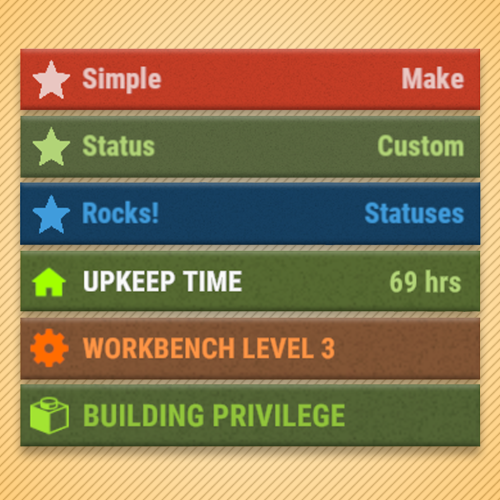
Version 1.2.11
7,557 downloads
Overview Provides an API for adding custom status messages that fit in with those of vanilla Rust. This plugin requires another plugin to utilize it, it does not do anything on its own. Check out the "Works With" list above for some plugins that utilize this API. Commands /ts Toggles the visibility of statuses for a player. This command can be changed in the config settings. Custom Status Framework This plugin is a sequel to Custom Status Framework and features much better performance. They do the same thing, but are NOT compatible with each other. Do not load both on your server or you may run into issues. Plugins that require Custom Status Framework will need to be updated to support Simple Status, it is not backwards compatible. If you are a plugin developer and need help writing your plugin to use Simple Status, please reach out to me! Advanced Status As of 1.2.0, this plugin can integrate with Advanced Status so that the statuses no longer overlap with each other. This means that all Simple Status plugins will work alongside Advanced Status plugins without developers having to explicitly support both. This is a new feature, if you find issues with this integration please report them! API void CreateStatus(Plugin plugin, string statusId, Dictionary<string, object> properties) // Registers a new status, should be called during plugin init within the OnSimpleStatusReady() hook. // See the properties section for a list of properties to set. void SetStatus(string userId, string statusId, int duration = int.MaxValue, bool pauseOffline = true) // Assigns a player a status with a duration. Set duration to int.MaxValue for an infinite status. Set to 0 to clear a status. void SetStatusProperty(string userId, string statusId, Dictionary<string, object> properties) // Set multiple properties for a player status with a single API call. Will minimize the number of redraws, so its better than individually setting properties. // See the properties section for a list of properties to set. int GetDuration(string userId, string statusId) // Returns the duration in seconds of a status that a player has. Returns 0 if the player does not have that status. Hooks void OnStatusSet(string userId, string statusId, int duration) // Called when a status is initially set for a player. void OnStatusEnd(string userId, string statusId, int duration) // Called when a status is removed for a player. (When the duration reaches 0). void OnStatusUpdate(string userId, string statusId, string property, string value) // Called when a status property is updated. // See the properties section for a list of properties to set. Properties // The following are valid property keys that are used in multiple API methods var properties = { ["color"] = "1 1 1 1", // Background color of the status ["title"] = "hello", // Message for the left hand side of the status. If this string is found in the localization for your plugin, that localization message will be used. ["titleColor"] = "0 0 0 1", // Color of the title message ["text"] = "subtext", // Message for the right hand side of the status. If this string is found in the localization for your plugin, that localization message will be used. If set to null, then this will be replaced with a duration counter (if there is a duration). ["textColor"] = "0 0 0 1", // Color of the text message ["icon"] = "star", // Icon used in the status. If using a non-sprite path, then it is expected that this image is already loaded into ImageLibrary. See ImageTypes section. ["iconColor"] = "0 0 0 1", // Color of the icon ["progress"] = 0.0, // Used to denote a status as a progress status. This value should be from between 0.0 and 1.0. Set this to null if you dont want it to be a progress status (otherwise it will be styled like one). ["progressColor"] = "0 0 0 0.5", // Color of the progress status bar. ["rank"] = 0 // Order in which this status will be drawn in respect to others. Statuses will a lower rank will be before those with a higher rank. } Image Types Using the API you can specify different image types with a prefix. For raw images, prefix the image with "raw:" for item icon ids prefix it with "itemid:". If you want to use a sprite asset path, the plugin will be expecting "assets/". If you just want to use a simple recolorable image then no prefix is required. Here are examples: Asset paths can be found here and item ids can be found here. Code Example This is an example of a plugin that utilizes Simple Status to produce the image in the thumbnail. For plugin developer reference. Download link below: SimpleStatusDemo.csFree -
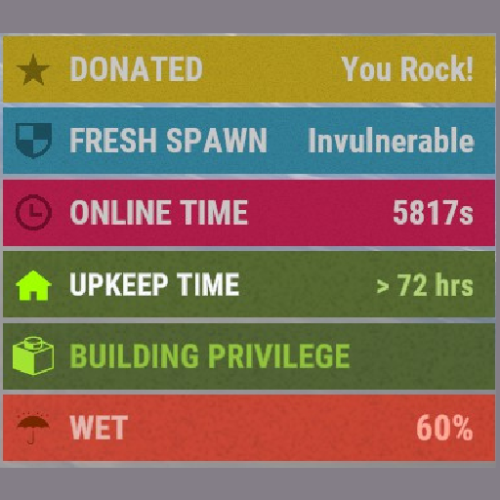
Version 1.1.3
3,276 downloads
This plugin does not introduce any functionality by itself, but rather provides a framework for other plugins to manipulate the status list that appears in the game UI on the right. New Version Available This plugin has been rewritten to improve performance! The new version is now called Simple Status and can be downloaded (for free) here: Why is it a new plugin and not just an update to this one? Because I understand that many people have already written awesome plugins that utilize CSF and in order to maximize performance, the plugin needed a complete overhaul. So instead of forcing all those developers to update their plugins, I'm letting CSF stay its own thing for now, but I strongly encourage developers to move to Simple Status when they can. With the release of this new plugin, I do not plan on updating CSF at this time. Positioning As of v1.1.0 you can optionally designate where on the screen the custom statuses are stacked. The vanilla position will stack the statuses nicely on top of the default game ones, this requires more server processing, but achieves a seamless look with the Rust UI. If you don't mind sacrificing that for greater performance, you can optionally change the position property to any other valid position and the plugin won't have to track all those vanilla Rust statuses. Valid Positions: top left top top right left vanilla (default) right bottom left bottom bottom right Performance Tuning If you are not seeing performance issues, there is no need to make any changes. As of v1.1.0 there are configuration options that will help you increase performance on your server by disabling/adjusting feature. If you are having performance issues with CSF, please refer to the following configuration tips: Tip 1: Avoid using the "vanilla" position In the config you have the option to specify a position. This is where the statuses for CSF are stacked. By default, this is set to "vanilla", which means that any custom statuses will stack on top of the vanilla rust ones. This provides a clean and seamless look, however, in order to achieve this, the plugin must calculate all the scenarios for which vanilla statuses are show and then redraw them for each player on the server - which can cause performance issue. For optimal performance, change the "Position" property to any other valid value (see the Positioning section). Tip 2: Make sure "Fast Refresh" is set to "false" By default, as of v.1.1.0, statuses are refreshed once every second, which means that it may take up to one second for a player's status to be removed from their screen. If you you enable "Fast Refresh" in the config, statuses will be updated at a much quicker rate, but this will put more stress on the server. For optimal performance, set "Fast Refresh" to false. Tip 3: Limit the number of CSF plugins that use global statuses The more plugins you have that rely on CSF the more updates will need to be made. If a CSF dependent plugin is written optimally (avoiding global/dynamic statuses) then it won't hurt performance much. However, if you are running a lot of plugins that *do* use dynamic/global statuses, then you might see performance issues. It is up to the developer of CSF dependent plugins to utilize CSF efficiently. Try disabling plugins one at a time to see which ones are causing poor performance. Developer API Check out this demo for a code example of how to use the API for this plugin. (Updated 9/15/2023) Note for developers: when possible, avoid using dynamic statuses, as they are a significant performance draw. If possible, instead manually update statuses when appropriate. // API Documentation for Custom Status Framework v1.0.5 // Returns a list of all statuses for a player, both vanilla and custom ones. List<string> GetStatusList ( BasePlayer basePlayer ) // Returns true if a player has a status matching the given id. bool HasStatus ( BasePlayer basePlayer, string id ) // Method for showing a simple temporary status to a player. // This status will appear and then disappear after some time. void ShowStatus ( BasePlayer basePlayer, string id, string color = null, string text = null, string textColor = null, string subText = null, string subTextColor = null, string imageLibraryIconId = null, string iconColor = null, float seconds = 4f ) // Creates a status for the given player. private void SetStatus ( BasePlayer basePlayer, string id, string color, string text, string textColor, string subText, string subTextColor, string imageLibraryIconId, string iconColor ) // Removes the specified status from the given player. private void ClearStatus ( BasePlayer basePlayer, string id ) // Performs a ClearStatus and then a SetStatus. // Useful if you want to simply refresh a status value. private void UpdateStatus ( BasePlayer basePlayer, string id, string color, string text, string textColor, string subText, string subTextColor, string imageLibraryIconId, string iconColor ) // Creates a global status with a static value. // The value of this status will not change, but will be dynamically applied to all // players who meet the specified condition function. private void CreateStatus ( string id, string color, string text, string textColor, string subText, string subTextColor, string imageLibraryIconId, string iconColor, Func<BasePlayer, bool> condition ) // Creates a global status with a dynamic value. // The value of this status will change, and is dynamically set for each player // based on the return of the dynamicValue function. // This status will be dynamically applied to all players who meet the specified // condition function. private void CreateDynamicStatus ( string id, string color, string text, string textColor, string subTextColor, string imageLibraryIconId, string iconColor, Func<BasePlayer, bool> condition, Func<BasePlayer, string> dynamicValue ) // Deletes a global status by id. private void DeleteStatus ( string id )Free -
Version 1.0.2
1,397 downloads
Simple API for retrieving in-game grid coordinates from a Vector3 position, and vice versa. string[] GetGrid(Vector3 pos) returns the grid coordinates for the given position. object IntersectionPosFromGrid(string a, string b) returns Vector3 intersection (top left on map) for a given set of map coordinates. returns string message if input strings are not valid. object MiddlePosFromGrid(string a, string b) returns Vector3 centre of grid for a given set of map coordinates. returns string message if input strings are not valid. object RandomPosFromGrid(string a, string b, int radius) returns Vector3 viable player position for a given set of map coordinates, within the provided radius of grid centre. returns string message if input strings are not valid. returns string message if no valid location can be found. *Useful for Tping or spawning players/npcs.Free -
I'm posting my address in case someone needs it. https://api.yamang.xyz:2096/rustapi http://api.yamang.xyz:2095/rustapi Carbon, Oxide, Rust Client, Rust Client Staging, Rust Server Rust News, news data [UTC - 13:46:18] SQL server needs to be reinstalled, it will be unavailable for 24 hour.
-
Version 1.1.1
438 downloads
Send Gametip messages on a timed interval to online players Features : Simple configuration. Sends Gametip messages on a configurable timed interval and duration (seconds). Can use a permission to ignore a player to get the messages. API support for other plugins to use its simplified queue system. Permissions : randomtips.exclude : To exclude the player from getting the Gametips sent by this plugin Configuration : Show Messages is set to false by default so it will not run the standard messages on plugin install. If you don't want to use a prefix , then you can leave it empty. Warning tips (RED) have a max lifetime of 5 seconds { "Show Messages": true, "Prefix": "[YourServer] ", "Interval (seconds)": 600, "Global Tip Duration (seconds)": 5.0, "Show as warning (max 5 sec)": false, "Messages": [ "Join our Discord ,Click <color=orange>[view webpage]</color> button.", "We run several cool Plugins !", "Grab one of our kits using /kit .", "<color=red>Color</color> code is supported" ] } API : void TIP(BasePlayer player, string message, float dur , bool warning) example call RandomTips?.Call("TIP", player, "Your text here", 6f ,true);Free -

Version 1.0.1
137 downloads
For developers to integrate OpenAI endpoints into their plugins. Features API Key Verification: Automatically verifies the provided OpenAI API key. Chat Commands: Provides in-game commands for administrators to interact with the OpenAI API. Model Listing: Fetches and lists available models from OpenAI. Chat Completions: Handles chat-based interactions with OpenAI's language models. Configuration { "DefaultAssistantModel": { "max_completion_tokens": 150, "max_prompt_tokens": 150, "Model": "gpt-4o" }, "DefaultCompletionsModel": { "MaxTokens": 150, "Model": "gpt-4o" }, "OpenAI_Api_Key": { "OpenAI API Key": "your-api-key-here" } } Commands /openaitest Tests the connection to the OpenAI API using a predefined message. Only available to administrators. /listmodels Fetches and lists all available models from the OpenAI API. Only available to administrators. Public Methods There are two main API interactions through the completions and the assistant API. Completions_SimpleChat Example of Completions_SimpleChat - Creates a simple chat interaction with OpenAI. private void AskGptCommand(BasePlayer player, string command, string[] args) { if (!permission.UserHasPermission(player.UserIDString, "RustGPT.chat")) { player.ChatMessage("<color=#ff0000>You do not have permission to use this command.</color>"); return; } if (args.Length == 0) { player.ChatMessage("Usage: /askgpt <your question>"); return; } if (!HasCooldownElapsed(player)) { return; } var userMessage = string.Join(" ", args); var messages = new List<object> { new { role = "system", content = _config.DefaultContent }, new { role = "user", content = userMessage } }; player.ChatMessage("Sending your message to OpenAI..."); OpenAI?.Call("Completions_SimpleChat", messages, (System.Action<JObject>)((response) => { if (response != null && response["choices"] != null && response["choices"].HasValues) { string GPT_Chat_Reply = response["choices"][0]["message"]["content"].ToString().Trim(); if (GPT_Chat_Reply.Length > 1200) { CreateNotesForResponse(player, GPT_Chat_Reply); } else { SendChatMessageInChunks(player, $"<color={_config.ReplyPrefixColor}>{_config.ReplyPrefix}</color> {GPT_Chat_Reply}", 250); } } else { player.ChatMessage("<color=#ff0000>Failed to get a valid response from OpenAI. Please try again later.</color>"); } })); } Assistant_CreateAssistant [HookMethod("Assistant_CreateAssistant")] public void Assistant_CreateAssistant(string name = null, string description = null, string instructions = null, List<object> tools = null, object toolResources = null, Dictionary<string, string> metadata = null, double? temperature = null, double? topP = null, object responseFormat = null, Action<JObject> callback = null) Example: var openAIPlugin = (OpenAI)plugins.Find("OpenAI"); openAIPlugin.Assistant_CreateAssistant("MyAssistant", "An assistant for my game", "You are a helpful assistant.", null, null, null, null, null, null, response => { if (response != null) { Puts("Assistant created successfully: " + response.ToString()); } else { Puts("Failed to create assistant."); } }); Assistant_CreateVectorStore Example use of Assistant_CreateVectorStore to save chat interactions in the OpenAI platform using the Assistants API. var openAIPlugin = (OpenAI)plugins.Find("OpenAI"); List<string> fileIds = new List<string>(); // Initially, no file IDs string name = "OpenAIChatHistory"; object expiresAfter = DateTime.UtcNow.AddDays(30); // Expires after 30 days object chunkingStrategy = null; // Define your chunking strategy if any Dictionary<string, string> metadata = new Dictionary<string, string> { { "game", "Rust" }, { "description", "Vector store for storing chat interactions with OpenAI" } }; openAIPlugin.Assistant_CreateVectorStore(fileIds, name, expiresAfter, chunkingStrategy, metadata, response => { if (response != null) { Puts("Vector store created successfully: " + response.ToString()); } else { Puts("Failed to create vector store."); } }); Pubic Methods FetchModels Completions_CreateChat Completions_SimpleChat Assistant_CreateAssistant CreateThread RetrieveThread ModifyThread DeleteThread Assistant_CreateMessage Assistant_ListMessages Assistant_RetrieveMessage Assistant_ModifyMessage Assistant_DeleteMessage Assistant_CreateRun Assistant_CreateThreadAndRun Assistant_ListRuns Assistant_RetrieveRun Assistant_ModifyRun Assistant_CancelRun Assistant_ListRunSteps Assistant_RetrieveRunStep Assistant_CreateVectorStore Assistant_ListVectorStores Assistant_RetrieveVectorStore Assistant_ModifyVectorStore Assistant_DeleteVectorStore Assistant_SubmitToolOutput All of these interactions are built using the OpenAI platform as a scaffold. Using the OpenAI documentation you can see response examples for all of the available methods. https://platform.openai.com/docs/api-reference/introductionFree -

Version 4.3.5
30 downloads
Friends Plugin for Rust Server "Friends" is a robust and flexible plugin designed to enhance the in-game friends system in Rust. It will help streamline the interaction between friends, simplify the process of authorization, and access to important game elements, and manage damage between friends. Key Features: Damage Control: An integrated feature of damage blocking among friends helps prevent accidental damage. This feature can be easily enabled or disabled by command. Enhanced Friends Authorization System: The plugin allows activating friends' authorization for a wide range of elements, including: Turrets SAM site Code locks Key locks Cupboards Upon removal from the friends' list, the player will automatically be deauthorized from all the listed elements. Remote Friend Invitation: With a special command, you can invite a player to be friends, even from afar. Authorization Settings Flexibility: Choose between two authorization methods for code locks - guest authorization ("guestPlayers") or full authorization ("whitelistPlayers"). Compatibility and Optimization: The "Friends" plugin is optimized for maximum performance and is compatible with many other plugins. Extensive API: The plugin offers a comprehensive API for developers, providing flexibility and the possibility of further customization. Detailed Logging System: "Friends" includes a logging system, providing transparency and control over activities. Optimize your gameplay with the "Friends" plugin for Rust server. It will help improve your gaming experience, simplify interactions with friends, and make your server safer and more manageable. Commands: /team - Additional info /team invite/add <Nickname> /team ff - Friendly fire Default Configuration: { "Chat commands": [ "team", "ff", "friend" ], "Maximum number of friends": 3, "Time to accept team invite (in seconds)": 20.0, "Enable friend authorization for turrets?": true, "Enable friend authorization for SAM sites?": true, "Enable friend authorization for code locks?": true, "Enable friend authorization for key locks?": true, "Enable friend authorization for cupboards?": true, "Authorization method for code locks (guestPlayers - guest authorization, whitelistPlayers - full authorization)": "guestPlayers", "Enable logging system ?": false, "Chat prefix (IQChat)": "<color=#5cd6skykey>[Friends]</color>\n" } API for Developers HasFriend(ulong playerId, ulong friendId) //Checks if the specified user is a friend of the player. HasFriends(string playerS, string friendS) //Checks if the player has friends by their string identifiers. IsFriend(ulong playerId, ulong friendId) //Checks if the specified user is a friend of the player. AreFriends(ulong playerId, ulong friendId) //Checks if the specified players are friends. AreFriends(string playerS, string friendS) //Checks if the specified players are friends by their string identifiers. IsFriends(string playerS, string friendS) //Checks if the player has friends by their string identifiers. GetFriends(ulong playerId) //Returns the player's friends list. GetFriendList(string playerS) //Returns the player's friends list by the string identifier. GetFriends(string playerS) //Returns the player's friends list by the string identifier. IsFriendOf(ulong playerId) //Returns a list of players who are friends of the specified player. IsFriendOf(string playerS) //Returns a list of players who are friends of the specified player by the string identifier. GetFriendList(ulong playerId) //Returns the friends list of the specified player.$8.99 -
Version 1.1.0
13 downloads
paBots RustMaps Module is a Python Discord bot module for the custom and FREE paBots Autoloader. It allows you to host your map manager Discord bot on your Pterodactyl panel and access it in ANY Discord server you choose. Included Features Integrated map generation – allows you to generate maps from RustMaps directly to your Discord server. Basic map preview feature – allows you to send map previews to a specified channel. Autowiper support – allows you to modify your auto wipers settings file and prepare your server for the next wipe. Comprehensive config – allowing you to modify almost every aspect of the module. Detailed setup instructions – provides you a detailed overview of how to set up the module and autoloader from start to finish. Self-hosted files – lets you run the bot on your high-powered servers. Full support – to help you fix or implement any desired feature. Commands /generate – Allows you to generate a map using one of your saved configs from RustMaps. Allows you to select config name, map size, seed, and if its for staging. /preview – Sends a simple Map Preview to a designated channel. /setnextwipe – (Requires an autowiper) Updates your autowiper's configuration to use a certain map. /show – Allows you to see the server names, monthly limit of generations, and config names. Disclaimers Requires RustMaps Subscription – You must have an ACTIVE RustMaps subscription for this to work. Limited to Pterodactyl – The support is limited to pterodactyl. Special Thanks Mr. Blue – Allowing me to use RustMaps' name and logo's within the bot. lencorp – Allowing me to add native integration with his autowiper.$6.00
.thumb.png.d8730004887666a2775699ef18eb252c.png)