Search the Community
Showing results for tags 'code'.
Found 6 results
-
Version 0.1.4
60 downloads
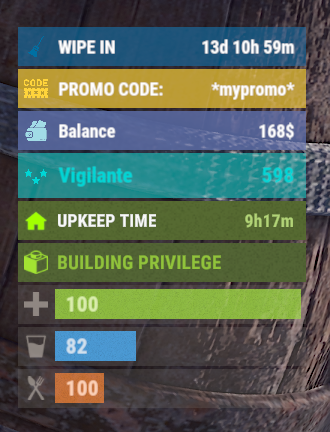
The plugin allows displaying promo codes in the status bar. Depends on AdvancedStatus plugin. The ability to display promo codes in the status bar; The ability to automatically generate language files for different languages(filled in English); The ability to individually toggle the display of status bars; The ability to customize the status bar for each promo; The ability to specify the order of the bar; The ability to change the height of the bar; The abillity to customize the color and transparency of the background; The ability to set a material for the background; The ability to switch between CuiRawImageComponent and CuiImageComponent for the image; The ability to get images from the local folder(*SERVER*\oxide\data\AdvancedStatus\Images); The abillity to set own image and customize the color and transparency of the image; The abillity to set sprite instead of the image; The ability to customize the color, size, font and outline of the text. promostatus.admin - Provides the ability to admin commands. { "Chat command": "promo", "Is it worth enabling GameTips for messages?": true, "List of language keys for creating language files": [ "en" ], "Default time in seconds for displaying the promo code in the status bar. A value of 0 will keep the bar visible until the promo code expires": 600.0, "List of promo codes": [], "List of status bar settings. Leave empty or null to recreate the default list": { "_default": { "Order": 20, "Height": 26, "Main_Color(Hex or RGBA)": "#FFD33A", "Main_Transparency": 0.7, "Main_Material(empty to disable)": "", "Image_Url": "https://i.imgur.com/q15Cmu5.png", "Image_Local(Leave empty to use Image_Url)": "PromoStatus_Default", "Image_Sprite(Leave empty to use Image_Local or Image_Url)": "", "Image_IsRawImage": false, "Image_Color(Hex or RGBA)": "#FFD33A", "Image_Transparency": 1.0, "Is it worth enabling an outline for the image?": false, "Image_Outline_Color(Hex or RGBA)": "0.1 0.3 0.8 0.9", "Image_Outline_Transparency": 1.0, "Image_Outline_Distance": "0.75 0.75", "Text_Key": "BarDefault", "Text_Size": 12, "Text_Color(Hex or RGBA)": "#FFFFFF", "Text_Font(https://umod.org/guides/rust/basic-concepts-of-gui#fonts)": "RobotoCondensed-Bold.ttf", "Text_Offset_Horizontal": 0, "Is it worth enabling an outline for the text?": false, "Text_Outline_Color(Hex or RGBA)": "#000000", "Text_Outline_Transparency": 1.0, "Text_Outline_Distance": "0.75 0.75", "SubText_Size": 12, "SubText_Color(Hex or RGBA)": "#FFFFFF", "SubText_Font": "RobotoCondensed-Bold.ttf", "Is it worth enabling an outline for the sub text?": false, "SubText_Outline_Color(Hex or RGBA)": "0.5 0.6 0.7 0.5", "SubText_Outline_Transparency": 1.0, "SubText_Outline_Distance": "0.75 0.75" } }, "Version": { "Major": 0, "Minor": 1, "Patch": 4 } } EN: { "BarDefault": "PROMO CODE:", "CmdNotAllowed": "You do not have permissions to use this command!", "CmdWrongCommand": "You entered an incorrect command!\nExample: /{0} toggle", "CmdWrongArguments": "You have not provided enough arguments for this command!", "CmdPromoNotFound": "Promo code '{0}' not found!", "CmdAddFailed": "Failed to add promo code. Invalid format or expiration date is earlier than the current date.\nExample: /{1} add \"{0}\" \"{2}\" \"{3}\"(optional)", "CmdPromoAdded": "Promo code '{0}' has been successfully added. Valid until '{1}'.", "CmdPromoUpdated": "Promo code '{0}' has been successfully updated. Valid until '{1}'.", "CmdPromoRemoved": "Promo code '{0}' has been successfully removed!", "CmdDisplayFailed": "Failed to update promo code display time.\nExample: /{1} display \"{0}\" 600", "CmdDisplayUpdated": "A new display time({1} sec) has been set in the status bar for promo code '{0}'.", "CmdBarEnabled": "Displaying the promo bar is enabled!", "CmdBarDisabled": "Displaying the promo bar is disabled!", "CmdPromoEmpty": "No available promo codes!", "CmdPromoList": "List of available promo codes(UTC):\n{0}" } RU: { "BarDefault": "ПРОМОКОД:", "CmdNotAllowed": "У вас недостаточно прав для использования этой команды!", "CmdWrongCommand": "Вы ввели не правильную команду!\nПример: /{0} toggle", "CmdWrongArguments": "Вы ввели не достаточно аргументов для этой команды!", "CmdPromoNotFound": "Промокод '{0}' не найден!", "CmdAddFailed": "Не удалось добавить промокод. Не верный формат, либо дата истечения меньше текущей даты.\nПример: /{1} add \"{0}\" \"{2}\" \"{3}\"(опционально)", "CmdPromoAdded": "Промокод '{0}' был успешно добавлен. Действителен до '{1}'.", "CmdPromoUpdated": "Промокод '{0}' был успешно обновлен. Действителен до '{1}'.", "CmdPromoRemoved": "Промокод '{0}' был успешно удален!", "CmdDisplayFailed": "Не удалось обновить время отображения промокода.\nПример: /{1} display \"{0}\" 600", "CmdDisplayUpdated": "Установлено новое время({1} сек) отображения в статус баре для промокода '{0}'.", "CmdBarEnabled": "Отображение промо баров включено!", "CmdBarDisabled": "Отображение промо баров выключено!", "CmdPromoEmpty": "Нет доступных промокодов!", "CmdPromoList": "Список доступных промокодов(UTC):\n{0}" } bar - personal toggle for displaying promo status bars; list - displays a list of all active promo codes in the chat; list_admin - displays a list of all active promo codes in the chat, include inactive ones. Permission "promostatus.admin" required; add *code* *expireDate* *startDate*(optional) - adds a new promo code. Permission "promostatus.admin" required; remove *code* - removes a promo code. Permission "promostatus.admin" required; display *code* *seconds* - changes the display time(in seconds) of the promo code for each player. Permission "promostatus.admin" required. Example: /promo bar /promo list /promo add "test" "2024-12-23 14:06" /promo display "test" 360 There are 2 hooks that the plugin is subscribed to: OnPromoCodeAdded OnPromoCodeRemoved OnPromoCodeAdded: Used to add a new promo code. To call the OnPromoCodeAdded hook, you need to pass 3 parameters, 1 of which is optional: <string>promoCode - The promo code; <DateTime>expireDate - The expiration date; <DateTime>startDate - Optional. The start date of validity; <string>barCfgId - Optional. The key for the status bar settings. Interface.CallHook("OnPromoCodeAdded", "*Your promo*", expireDate, startDate, "_default");//Calling the OnPromoCodeAdded hook to add a new promo code. OnPromoCodeRemoved: Used to remove a promo code. To call the OnPromoCodeRemoved hook, you need to pass 1 parameter: <string>promoCode - The promo code. Interface.CallHook("OnPromoCodeRemoved", "*Your promo*");//Calling the OnPromoCodeRemoved hook to remove a promo code.$3.99 -
i want to integrate the mods/plugins from https://codefling.com/plugins/multi-events?tab=details NOT the event viewer (MultiEvents.cs) but every other plugin in to this Events manager https://codefling.com/plugins/events-manager?tab=details and add an option to clear/ get rid of a selected category. i know MultiEvents.cs already has the mods integrated but it doesnt have a timer option and isnt as "user/idiot" proof
-
Version 1.1.1
154 downloads
Put in sale properties (house, building, etc) so that players can buy them, rented. Work with all doors that can include a lock code, Works with Economics Permissions propertybuying.manager.use - Gives access to the (creates, suprimed ) properties propertybuying.manager.admin - See all properties created and (creates , suprimed ) properties Commands /property - Accesses the property management ( added, removed ) How to add a property ? CopyPaste Decay Config Payment Time Model Lang$19.99 -
Version 1.0.1
30 downloads
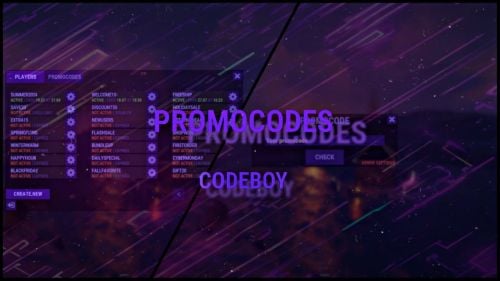
The promo code plugin for Rust game provides the ability to reward players for entering a code word. This plugin includes a variety of settings and functionality for easy management and configuration of promo codes in the admin panel. Main Features Creation and Configuration of Promo Codes: Promo Code: The administrator can create unique promo codes. Item Configuration: The administrator can determine which items will be given when the promo code is activated. Item Parameters Shortname: The code word for issuing a specific item. SkinID: The skin identifier of the item. DisplayName: The displayed name of the item. Amount: The number of items given by the promo code. Flexible Settings Promo Code Duration: Ability to set an end date until which the promo code will be active. Usage Limit: Setting a limit on the number of times the promo code can be used. Command Configuration Ability to replace item issuance with the execution of a specific server command when the promo code is activated. Example Usage Admin usage Give admin permission - promocodes.admin Open UI with command (can be changed in config, default: /p) Creating a Promo Code: Create the promo code "SUMMER21". Set its expiration date to July 31. Set a usage limit of 100 times. Player usage Open UI with command (can be changed in config, default: /p) Enter promocode Press CHECK button Item Configuration Add an item: shortname - "rifle.ak", skinid - "123456", displayname - "AK-47 Elite", amount - 1. Add an item: shortname - "ammo.rifle", skinid - "0", displayname - "Rifle Ammo", amount - 100. Command Replacement Set the command "give %STEAMID% some_reward" to be executed when the promo code is activated instead of issuing items. Configuration file { "Cooldown for promocode": 65, "Commands to open UI": [ "promocode", "promo", "code", "pc", "p" ] }$9.99 -
.thumb.png.dccc8fc736f607ab1286fc4ce34b1699.png)
Version 1.0.0
1 download
About UPromocodes This essential plugin allows players to redeem exclusive in-game benefits by entering unique promo codes. Whether unlocking special items, resources, or perks, players can enhance their Rust experience with this intuitive promo code system. Plugin config { "Promo codes": [ { "Names ( chat command names )": [ "promo", "promo2" ], "Commands with delay": [ { "Delay seconds": 0.0, "Console commands": [ "test 1 %STEAMID%", "test 2 %STEAMID%" ] }, { "Delay seconds": 86400.0, "Console commands": [ "test 1 %STEAMID%", "test 2 %STEAMID%" ] } ] }, { "Names ( chat command names )": [ "promo", "promo2" ], "Commands with delay": [ { "Delay seconds": 0.0, "Console commands": [ "test 1 %STEAMID%", "test 2 %STEAMID%" ] }, { "Delay seconds": 86400.0, "Console commands": [ "test 1 %STEAMID%", "test 2 %STEAMID%" ] } ] } ] } Localization { "Chat_PromoWasActivated": "You successfully activated promo code.", "Chat_PromoAlreadyActivated": "You have already activated this promo code." } Contacts: Need help or custom plugin for your server? Contact me using Discord: metangerine ----------------------------------------------------------------------$10.00 -

Version 0.1.2
180 downloads
What is it? This allows players to unlock codelocks on any storage containers, there are 2 options: With a command (most likely for admins), where you come to a locked chest, type /loothack and the codelock instantly unlocks With an item (targeting computer), where you come to a locked chest, select targeting computer in your hotbar, then left-click the storage container and there you will need to wait for few seconds (if set) untill the container unlocks, also you can set in the config if the targeting computer gets consumed. Permissions loothacker.cmnd -- Gives player permission to use the command. loothacker.item -- Gives player permission to use the item. Chat Command /loothack -- Instantly unlocks the codelock on the storage cont. you are looking at Localization //FORMAT: {0} = storage short prefab name, {1} = seconds to unlock ["MustLookAtStorage"] = "You must be looking at a locked storage container to hack it!", ["NoPerms"] = "You don't have permission to use this!", ["UnlocksIn"] = "{0} will unlock in {1} secs", ["Unlocked"] = "Unlocked {0}" Configuration { "Seconds until storage unlocks": 5.0, "Consume Targeting Computer on use": true }Free