Search the Community
Showing results for tags 'controller'.
Found 16 results
-
Version 1.0.1
11 downloads
TC Controller A premium quality of life Rust plugin that gives players fast, safe, and clean Tool Cupboard management through an in-game UI No more sprinting to every TC to manually top them up. What it does One command, instant TC control Use /tc (configurable) to open a slick TC management panel that lists every Tool Cupboard you’re authorized on within a configurable radius. Each TC entry shows the essentials at a glance: - Distance to the cupboard - Upkeep protection time with clear colour status (Green / Yellow / Red / Decaying) - Authorized player count - Storage usage (slots used / capacity) ------------------------------------------------------------------------------------------------------------------ Fast upkeep deposits (no hassle) Top up the selected TC directly from your inventory: - Wood - Stone - Metal Fragments - HQM Includes easy deposit buttons: - Configurable quick amounts (e.g. 100 / 1,000 / 5,000 / 10,000) - Plus an ALL button for instant full transfer ------------------------------------------------------------------------------------------------------------------ Top Up multiple cupboards in one click Got more than one tc? No problem. Use Top Up to distribute upkeep across all nearby authorized TCs, with smart filters: - Top up ALL - Green only - Yellow only - Red only Perfect for large compounds ------------------------------------------------------------------------------------------------------------------ Smart sorting + organization Keep things tidy with built-in sorting options: - Sort by Distance - Sort by Nickname - Sort by Protection status/time Add custom TC nicknames (saved per-player) like: - “Main” - “Compound” - “Farm” - “External” …and instantly find what you need. ------------------------------------------------------------------------------------------------------------------ Built-in protection against abuse (raid-friendly) Optional Raid Block system If a building is taking damage and the attacker is not authorized on its cupboards, the building is flagged as “being raided” for a configurable duration. While raid-blocked, the UI prevents: - Empty TC - Repair Base This helps stop “evacuate everything” or “instant repair” abuse mid raid. Optional Exterior Entry Access Check (Anti “Through-Walls” Abuse) To prevent “through-walls” style TC interaction, you can enable an extra rule: A TC is only usable through the UI if the plugin can detect a legitimate exterior entry path to the building (anti-bunker / anti-sealed-base abuse). ------------------------------------------------------------------------------------------------------------------ Extra convenience tools Empty TC to inventory Move as much as possible into your inventory (anything that can’t fit stays in the TC). Repair Base (inventory-based) Scan nearby building pieces and repair them using materials from the player’s inventory Undo last deposit Made a mistake? TC Controller supports a short undo window that can return deposited items back to you when possible. ------------------------------------------------------------------------------------------------------------------ Permissions & access control - tccontroller.use — allows players to use the UI$19.99 -

Version 1.0.0
6 downloads
Stack Size Controller – Balanced Configuration Packs Includes 4 different configs. Pick one to use, or use different configs on multiple servers. Some stack values are based on the gather rate; however, overall, resources and similar items are set higher based on player experience and community feedback. Server Compatibility - Suitable for 3x, 5x, 10x and PvE servers - If higher stack sizes are desired, the 3x preset can safely be used on 2x servers without causing major balance issues or technical problems Professionally Designed & Tested All configurations are manually created from scratch and are not auto-generated or simple default edits. Each configuration has been: - Actively tested on live servers for over 2 years - Used on long-running, active servers - Adjusted based on real player behavior and feedback - Balanced with economic flow and recycler outputs in mind The goal is to improve quality of life without breaking progression or server economy. Balanced Design Philosophy Not every item is meant to be stacked. Below are the core principles behind how these configurations are designed. Durability & Skin Safety Weapons, clothing, doors, and certain electrical items are intentionally excluded from stacking. These items rely on durability (condition) mechanics and often support skins. Stacking them may cause condition conflicts, incorrect durability behavior, skin desynchronization, and inventory-related bugs. To maintain server stability and predictable gameplay, these item types are deliberately kept unstacked. Explosives & Economy Control F1 Grenades, Smoke Grenades, and similar explosive items are intentionally excluded from stacking or only increased by reasonable amounts. This approach helps prevent gunpowder inflation, balance abuse, and uncontrolled progression. Stackable Item Categories - Resources (Some resources have been stacked above the normal limits in line with strong player demand, especially wood and stone, among others.) - Components (Excessive stacking has not been applied in order to maintain recycling balance; it has been kept at a controlled and balanced level.) - Food items - Medical items - Ammunition Easy Installation 1. Choose one of the 4 configuration presets 2. Copy StackSizeController.json into your config folder 3. Oxide.reload StackSizeController OR c.reload StackSizeController Required Plugin This configuration pack requires the Stack Size Controller plugin. You can download it for free from uMod: https://umod.org/plugins/stack-size-controller$12.99-
- 1
-

-
- #stack size controller
- #stacks
- (and 25 more)
-

Version 0.1.7
1,036 downloads
Useful plugin for managing temporary permissions, temporary groups and temporary permissions for groups. This is done through chat commands, built-in Oxide commands, and API methods. Note: The dates is in UTC format. The ability to grant players temporary permissions by specifying either the number of seconds, an exact expiration date or until the wipe occurs; The ability to add players to temporary groups by specifying either the number of seconds, an exact expiration date or until the wipe occurs; The ability to grant groups temporary permissions by specifying either the number of seconds, an exact expiration date or until the wipe occurs; The ability to revoke temporary permissions from players and groups prematurely; The ability to remove players from groups prematurely; The ability to perform all the above actions using existing and familiar console commands(e.g., o.grant), simply by adding the number of seconds, the expiration date or the word "wipe" at the end; The ability to perform all the above actions using a chat command (by default /tperm); The ability to perform all the above actions using API methods; The ability to remove all temporary permissions and groups upon wipe detection. temporarypermissions.admin - Grants access to the admin command(by default /tperm). { "Chat command": "myperm", "Chat admin command": "tperm", "Is it worth enabling GameTips for messages?": true, "Is it worth saving logs to a file?": true, "Is it worth using console logging?": true, "List of language keys for creating language files": [ "en" ], "Interval in seconds for expiration check": 1.0, "Interval in seconds for checking the presence of temporary permissions and temporary groups. A value of 0 disables the check": 600.0, "Is it worth restoring removed temporary permissions and temporary groups if the timer hasn't expired? There are cases where removal cannot be tracked in the usual way": true, "Is it worth revoking temporary permissions and temporary groups when unloading the plugin, without removing them from the data file?": true, "Is it worth revoking temporary permissions and temporary groups that haven't expired yet upon detecting a wipe?": false, "Custom wipe date(detected only during initialization). Only required if you're experiencing issues with the Wipe ID. Leave empty to use the Wipe ID. Example: 2025-06-25 13:00": "", "Wipe ID": null, "Version": { "Major": 0, "Minor": 1, "Patch": 7 } } EN: { "CmdAdmin": "Available admin commands:\n\n<color=#D1CBCB>/tperm</color> <color=#D1AB9A>grant user *nameOrId* realpve.vip wipe</color> - Grants or extends the specified permission for the specified player until the end of the current wipe\n<color=#D1CBCB>/tperm</color> <color=#D1AB9A>grant user *nameOrId* realpve.vip *intValue* *boolValue*(optional)</color> - Grants or extends the specified permission for the specified player for the given number of seconds\n<color=#D1CBCB>/tperm</color> <color=#D1AB9A>grant user *nameOrId* realpve.vip *expirationDate* *assignmentDate*(optional)</color> - Grants or extends the specified permission for the specified player until the given date\n<color=#D1CBCB>/tperm</color> <color=#D1AB9A>grant group *groupName* realpve.vip wipe</color> - Grants or extends the specified permission for the specified group until the end of the current wipe\n<color=#D1CBCB>/tperm</color> <color=#D1AB9A>grant group *groupName* realpve.vip *intValue* *boolValue*(optional)</color> - Grants or extends the specified permission for the specified group for the given number of seconds\n<color=#D1CBCB>/tperm</color> <color=#D1AB9A>grant group *groupName* realpve.vip *expirationDate* *assignmentDate*(optional)</color> - Grants or extends the specified permission for the specified group until the given date\n<color=#D1CBCB>/tperm</color> <color=#D1AB9A>revoke user *nameOrId* realpve.vip</color> - Revokes the specified permission from the specified player\n<color=#D1CBCB>/tperm</color> <color=#D1AB9A>revoke group *groupName* realpve.vip</color> - Revokes the specified permission from the specified group\n<color=#D1CBCB>/tperm</color> <color=#D1AB9A>add *nameOrId* *groupName* wipe</color> - Adds or extends the specified player's membership in the specified group until the end of the current wipe\n<color=#D1CBCB>/tperm</color> <color=#D1AB9A>add *nameOrId* *groupName* *intValue* *boolValue*(optional)</color> - Adds or extends the specified player's membership in the specified group for the given number of seconds\n<color=#D1CBCB>/tperm</color> <color=#D1AB9A>add *nameOrId* *groupName* *expirationDate* *assignmentDate*(optional)</color> - Adds or extends the specified player's membership in the specified group until the given date\n<color=#D1CBCB>/tperm</color> <color=#D1AB9A>remove *nameOrId* *groupName*</color> - Removes the specified player from the specified group\n<color=#D1CBCB>/tperm</color> <color=#D1AB9A>wipe *wipeDate*</color> - Set a custom wipe date. Used in case of issues with the Wipe ID. Format: yyyy-MM-dd HH:mm\n<color=#D1CBCB>/tperm</color> <color=#D1AB9A>wipe reset</color> - Reset the custom wipe date\n\n<color=#D1CBCB>Optional values:</color>\n*boolValue* - If false(default) and an existing permission or group membership has not expired, the specified time will be added to the existing time. Otherwise, including when true, the specified time will be counted from the current time\n*assignmentDate* - If the assignment date is not specified and there is no existing permission or group membership, the assignment date will be set to the current time. If the assignment date is specified, it will be applied regardless of existing permissions or group memberships\n\n--------------------------------------------------", "CmdPermissionNotFound": "Permission '{0}' not found!", "CmdPlayerNotFound": "Player '{0}' not found! You must provide the player's name or ID.", "CmdMultiplePlayers": "Multiple players found for '{0}': {1}", "CmdGroupNotFound": "Group '{0}' not found!", "CmdGrantWrongFormat": "Incorrect command format! Example: /tperm grant user/group *nameOrId* realpve.vip *secondsOrDateTime*", "CmdRevokeWrongFormat": "Incorrect command format! Example: /tperm revoke user/group *nameOrId* realpve.vip", "CmdUserGroupWrongFormat": "Incorrect command format! Example: /tperm group add/remove *nameOrId* *groupName*", "CmdUserGranted": "Permission '{0}' granted to player '{1}'.", "CmdGroupGranted": "Permission '{0}' granted to group '{1}'.", "CmdUserGroupAdded": "Player '{0}' has been added to group '{1}'.", "CmdUserRevoked": "Permission '{0}' has been revoked for player '{1}'.", "CmdGroupRevoked": "Permission '{0}' has been revoked for group '{1}'.", "CmdUserGroupRemoved": "Player '{0}' has been removed from group '{1}'.", "CmdWipeNew": "New wipe date successfully set to '{0}'. The wipe will take effect only after the plugin is loaded following this date.", "CmdWipeReset": "The custom wipe date has been reset. The wipe is now determined by the Wipe ID.", "CmdWipeFailed": "The specified date '{0}' has an invalid format(yyyy-MM-dd HH:mm) or has already passed. Example: '{1}'.", "CmdCheckNoActive": "You have no active temporary permissions or temporary groups!", "CmdCheckTargetNoActive": "Player '{0}' has no active temporary permissions or temporary groups!", "CmdCheckPermissions": "<color=#D1AB9A>You have {0} temporary permissions(time in UTC):</color>\n{1}", "CmdCheckGroups": "<color=#D1AB9A>You have {0} temporary groups(time in UTC):</color>\n{1}", "CmdCheckTargetPermissions": "<color=#D1AB9A>Player '{2}' has {0} temporary permissions(time in UTC):</color>\n{1}", "CmdCheckTargetGroups": "<color=#D1AB9A>Player '{2}' has {0} temporary groups(time in UTC):</color>\n{1}", "CmdCheckFormatPermissions": "'{0}' - {1}({2})", "CmdCheckFormatGroups": "'{0}' - {1}({2})", "CmdUntilWipe": "Until Wipe" } RU: { "CmdAdmin": "Доступные админ команды:\n\n<color=#D1CBCB>/tperm</color> <color=#D1AB9A>grant user *имяИлиАйди* realpve.vip wipe</color> - Выдать или продлить указанный пермишен указанному игроку до конца текущего вайпа\n<color=#D1CBCB>/tperm</color> <color=#D1AB9A>grant user *имяИлиАйди* realpve.vip *числовоеЗначение* *булевоеЗначение*(опционально)</color> - Выдать или продлить указанный пермишен указанному игроку на указанное количество секунд\n<color=#D1CBCB>/tperm</color> <color=#D1AB9A>grant user *имяИлиАйди* realpve.vip *датаИстечения* *датаНазначения*(опционально)</color> - Выдать или продлить указанный пермишен указанному игроку до указанной даты\n<color=#D1CBCB>/tperm</color> <color=#D1AB9A>grant group *имяГруппы* realpve.vip wipe</color> - Выдать или продлить указанный пермишен указанной группе до конца текущего вайпа\n<color=#D1CBCB>/tperm</color> <color=#D1AB9A>grant group *имяГруппы* realpve.vip *числовоеЗначение* *булевоеЗначение*(опционально)</color> - Выдать или продлить указанный пермишен указанной группе на указанное количество секунд\n<color=#D1CBCB>/tperm</color> <color=#D1AB9A>grant group *имяГруппы* realpve.vip *датаИстечения* *датаНазначения*(опционально)</color> - Выдать или продлить указанный пермишен указанной группе до указанной даты\n<color=#D1CBCB>/tperm</color> <color=#D1AB9A>revoke user *имяИлиАйди* realpve.vip</color> - Снять указанный пермишен у указанного игрока\n<color=#D1CBCB>/tperm</color> <color=#D1AB9A>revoke group *имяГруппы* realpve.vip</color> - Снять указанный пермишен у указанной группы\n<color=#D1CBCB>/tperm</color> <color=#D1AB9A>add *имяИлиАйди* *имяГруппы* wipe</color> - Добавить или продлить пребывание в указанной группе указанному игроку до конца текущего вайпа\n<color=#D1CBCB>/tperm</color> <color=#D1AB9A>add *имяИлиАйди* *имяГруппы* *числовоеЗначение* *булевоеЗначение*(опционально)</color> - Добавить или продлить пребывание в указанной группе указанному игроку на указанное количество секунд\n<color=#D1CBCB>/tperm</color> <color=#D1AB9A>add *имяИлиАйди* *имяГруппы* *датаИстечения* *датаНазначения*(опционально)</color> - Добавить или продлить пребывание в указанной группе указанному игроку до указанной даты\n<color=#D1CBCB>/tperm</color> <color=#D1AB9A>remove *имяИлиАйди* *имяГруппы*</color> - Отменить пребывание в указанной группе указанному игроку\n<color=#D1CBCB>/tperm</color> <color=#D1AB9A>wipe *датаВайпа*</color> - Установка кастомной даты вайпа. Используется при проблемах с Wipe ID. Формат: yyyy-MM-dd HH:mm\n<color=#D1CBCB>/tperm</color> <color=#D1AB9A>wipe reset</color> - Сброс кастомной даты вайпа\n\n<color=#D1CBCB>Опциональные значения:</color>\n*булевоеЗначение* - Если false(по умолчанию) и существующий пермишен или группа не истекли, указанное время будет добавлено к существующему времени. В противном случае, в т.ч. при true, указанное время будет отсчитываться от текущего времени\n*датаНазначения* - Если дата назначения не указана и нет существующего пермишена или группы, дата назначения будет равна текущей. Если дата назначения указана, то вне зависимости от существования пермишенов или групп, присвоится указанная дата\n\n--------------------------------------------------", "CmdPermissionNotFound": "Пермишен '{0}' не найден!", "CmdPlayerNotFound": "Игрок '{0}' не найден! Вы должны указать имя или ID игрока.", "CmdMultiplePlayers": "По значению '{0}' найдено несколько игроков: {1}", "CmdGroupNotFound": "Группа '{0}' не найдена!", "CmdGrantWrongFormat": "Не верный формат команды! Пример: /tperm grant user/group *имяИлиАйди* realpve.vip *секундыИлиДата*", "CmdRevokeWrongFormat": "Не верный формат команды! Пример: /tperm revoke user/group *имяИлиАйди* realpve.vip", "CmdUserGroupWrongFormat": "Не верный формат команды! Пример: /tperm group add/remove *имяИлиАйди* *имяГруппы*", "CmdUserGranted": "Пермишен '{0}' выдан игроку '{1}'.", "CmdGroupGranted": "Пермишен '{0}' выдан группе '{1}'.", "CmdUserGroupAdded": "Игрок '{0}' был добавлен в группу '{1}'.", "CmdUserRevoked": "Пермишен '{0}' был удален для игрока '{1}'.", "CmdGroupRevoked": "Пермишен '{0}' был удален для группы '{1}'.", "CmdUserGroupRemoved": "Игрок '{0}' был удален из группы '{1}'.", "CmdWipeNew": "Новая дата вайпа успешно установлена на '{0}'. Вайп вступит в силу только при загрузке плагина после этой даты.", "CmdWipeReset": "Кастомная дата вайпа была сброшена. Вайп снова определяется по Wipe ID.", "CmdWipeFailed": "Указанная дата '{0}' имеет неверный формат(yyyy-MM-dd HH:mm) или уже прошла. Пример: '{1}'.", "CmdCheckFormatGroups": "'{0}' - {1}({2})", "CmdCheckNoActive": "У вас нет активных временных пермишенов или временных групп!", "CmdCheckTargetNoActive": "У игрока '{0}' нет активных временных пермишенов или временных групп!", "CmdCheckPermissions": "<color=#D1AB9A>У вас есть {0} временных пермишенов(время по UTC):</color>\n{1}", "CmdCheckGroups": "<color=#D1AB9A>У вас есть {0} временных групп(время по UTC):</color>\n{1}", "CmdCheckTargetPermissions": "<color=#D1AB9A>У игрока '{2}' есть {0} временных пермишенов(время по UTC):</color>\n{1}", "CmdCheckTargetGroups": "<color=#D1AB9A>У игрока '{2}' есть {0} временных групп(время по UTC):</color>\n{1}", "CmdCheckFormatPermissions": "'{0}' - {1}({2})", "CmdUntilWipe": "До вайпа" } /myperm - Displays a list of all your temporary permissions and temporary groups; /myperm *NameOrId* - Displays a list of all temporary permissions and temporary groups of the specified player. Permission "temporarypermissions.admin" required. Admin commands(/tperm). Permission "temporarypermissions.admin" required: grant - Grants a temporary permission to a player or group. user *NameOrId* realpve.vip wipe - Grants a temporary permission to a player until the next wipe by specifying the player's name or Id, the permission name and the word "wipe"; *NameOrId* realpve.vip 3600 true/false - Grants a temporary permission to a player by specifying the player's name or Id, the permission name, the number of seconds and true/false(optional). If false(default) and an existing permission has not expired, the specified time will be added to the existing time. Otherwise, including when true, the specified time will be counted from the current time; *NameOrId* realpve.vip "2024-08-19 17:57" "2024-08-19 16:57" - Grants a temporary permission to a player by specifying the player's name or Id, the permission name, the expiration date and the assigned date(optional). If the assignment date is not specified and there is no existing permission, the assignment date will be set to the current time. If the assignment date is specified, it will be applied regardless of existing permissions. group *GroupName* realpve.vip wipe - Grants a temporary permission to a group until the next wipe by specifying the group's name, the permission name and the word "wipe"; *GroupName* realpve.vip 3600 true/false - Grants a temporary permission to a group by specifying the group's name, the permission name, the number of seconds, and true/false(optional). If false(default) and an existing group membership has not expired, the specified time will be added to the existing time. Otherwise, including when true, the specified time will be counted from the current time; *GroupName* realpve.vip "2024-08-19 17:57" "2024-08-19 16:57" - Grants a temporary permission to a group by specifying the group's name, the permission name, the expiration date and the assigned date(optional). If the assignment date is not specified and there is no existing group membership, the assignment date will be set to the current time. If the assignment date is specified, it will be applied regardless of existing group memberships. revoke - Revokes a temporary permission from a player or group. user *NameOrId* realpve.vip - Revokes a temporary permission from a player by specifying the player's name or Id and the permission name; group *GroupName* realpve.vip - Revokes a temporary permission from a group by specifying the group's name and the permission name. add - Temporary addition of a player to a group. *NameOrId* *GroupName* wipe - Temporary addition of a player to a group until the next wipe by specifying the player's name or Id, the group name and the word "wipe"; *NameOrId* *GroupName* 3600 true/false - Temporary addition of a player to a group by specifying the player's name or Id, the group name, the number of seconds, and true/false(optional). If true, the specified seconds will count from the current moment, otherwise(default), they will be added to the existing time; *NameOrId* *GroupName* "2024-08-19 17:57" "2024-08-19 16:57" - Temporary addition of a player to a group by specifying the player's name or Id, the group name, the expiration date and the assigned date(optional). If not specified, the assigned date will default to the current date, otherwise, it will be set to the provided date. remove *NameOrId* *GroupName* - Removal of a player from a temporary group by specifying the player's name or Id and the group name. wipe - Setting a custom wipe date. Used if you're experiencing issues with using the Wipe ID. *wipeDate* - Set a custom wipe date(yyyy-MM-dd HH:mm). Used in case of issues with the Wipe ID; reset - Reset the custom wipe date. Example: /tperm grant user iiiaka realpve.vip wipe /tperm grant user iiiaka realpve.vip 3600 true /tperm grant user iiiaka realpve.vip "2024-08-19 17:57" "2024-08-19 16:57" /tperm wipe "2025-06-25 13:00" Note: To access the commands, the player must be an admin(console or owner) or have the temporarypermissions.admin permission. P.S. Templates for the commands above can also be used with existing console commands. For example: o.grant user iiiaka realpve.vip 3600 true All developer documentation can be found in the Docs section.Free -
Version 2.2.4
2,138 downloads
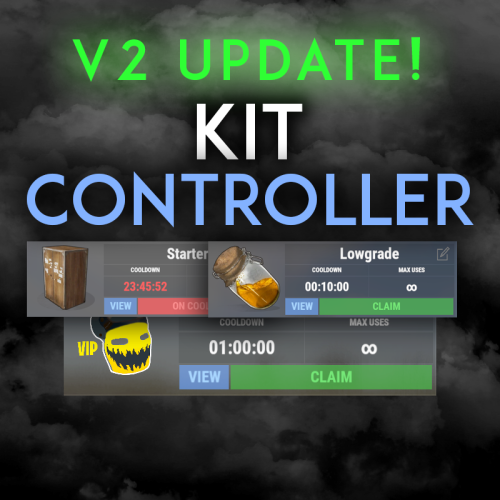
Kit Controller is a simple, amazing kit system! Easily create kits, redeem kits, and edit kits all within the amazing UI! FEATURES - Instantly import your old kits data from the UMod Rust Kits plugin with the /convertkits command! - Effortlessly design kits directly within the user interface, streamlining the creation process. - Experience convenience with automatic kit allocation upon player spawn, ensuring immediate readiness. - Organize kits into distinct categories for easy navigation and selection. - Change the quantity of an item in a kit right from the kit edit page - Put a price on kits to allow them to be purchased (Supports RP, Economics, and Items for currency) - Kit admin commands for giving kits, deleting kits, and clearing user data. - Edit kits without the hassle of keybind adjustments or movement interruptions. - Automatically purge player data with each server wipe, maintaining optimal performance. - Customize kit accessibility with cooldowns, maximum redemption limits, and permission-based controls. - Choose to display kits universally or exclusively to players with specific permissions. - Utilize the Kit Viewer for comprehensive insights into each kit's contents. - Easily identify weapon attachments included in each kit. - Personalize the kits panel with an image slot at the bottom, perfect for promotional material like VIP kit discounts. COMMANDS AND PERMISSIONS /kit or /kits - Configurable in the config /kitadmin /kitadmin give /kitadmin delete /kitadmin reset - kitcontroller.admin - kitcontroller.<> - You can set permissions for auto kits and normal kits, these permissions will be what you set them to Need support or want updates about what is coming to the plugin? Join the support discord here https://discord.gg/RVePam7pd7$19.99 -

Version 1.0.0
6 downloads
BoatControl is a Rust server plugin that completely enhances boat handling. When taking the helm, a user-friendly CUI interface appears, allowing players to raise/lower sails and anchors, start/stop engines, and switch navigation direction forward or backward. The plugin also supports automatic reloading when the player has ammunition, cannon firing with configurable cooldown (or bypass via permission), and toggling all torches and lanterns without fuel consumption. Additionally, players can control navigation using W/S and fire cannons with the left mouse click. Video Update 1.0.0 Features Displays a CUI interface when taking the helm that allows you to: Raise / lower sails. Raise / lower anchors. Turn engines on / off. Change the navigation direction forward / backward (engines and sails reverse accordingly). Reload (if the player has ammunition in their inventory, with a permission to bypass this). Fire cannons with a cooldown (or without it if you have the bypass permission). Turn all torches and lamps on/off without fuel consumption. You can also change the navigation direction using the W and S keys, and fire the cannons with the left mouse click. I'm open to further improving this plugin over time. If you'd like to see any features integrated, please mention them in the discussion section. Ideas I've tried but haven't been able to implement: Modifying the build area (net size) to make it larger. It doesn't seem possible to change this. Making the engines work without fuel consumption. I managed to do this in an initial test, but then FacePunch changed something and it's no longer possible. I'll try to see if I can adjust fuel consumption to make it more economical. Ability to automatically repair the entire ship, using the necessary materials from the player's inventory. The way the ship's health system is currently implemented is a bit strange, as it seems to work by blocks, but then the health is distributed among all the parts. I'll review this again later. Permissions boatcontrol.use – Enables the functionality for the player when mounting the boat’s helm. boatcontrol.bypassammo – Allows you to fire cannons without using real ammunition from your inventory. Free ammo! (not recommended to give to regular players) boatcontrol.bypasscannoncooldown – Allows you to fire cannons with no cooldown. Maximum bombardment! Commands It currently has no chat or console commands. Configuration DEFAULT CONFIGURATION { "Enable WASD Direction": true, "Enable Cannon Fire Key (Left Mouse Button)": true, "Cannon Aim Step (degrees per click)": 5.0, "Cannon Fire Cooldown": 5.0, "Cannon Crew": { "Enable": true, "Name": "Cannon Man", "Health": 100.0, "Wear": { "burlap.shirt": 1380044819, "burlap.trousers": 1380047706, "burlap.shoes": 2215057317, "hat.boonie": 965553937 }, "RequireOperate": true, "ToggleCrewCooldown": 30.0 }, "Alert Chat": true, "Alert Notify Plugin": false, "Notify: select what notification type to be used": { "error": 0, "info": 0 }, "Color Prefix Chat": "#f74d31", "GUI": { "GUI Windows Belt": { "BG Color Primary": "0.10 0.15 0.10 1", "BG Color Secundary": "0.2 0.30 0.2 0.80", "OffsetMin": "-200 15", "OffsetMax": "181 79", "AnchorMin": "0.5 0", "AnchorMax": "0.5 0" }, "GUI Windows Info": { "BG Color Primary": "0.10 0.10 0.10 0.8", "BG Color Secundary": "0.2 0.30 0.2 0.80", "OffsetMin": "400 500", "OffsetMax": "630 700", "AnchorMin": "0.5 0", "AnchorMax": "0.5 0" }, "GUI Windows Cannons Menu": { "BG Color Primary": "0.10 0.15 0.10 1", "BG Color Secundary": "0.2 0.30 0.2 0.80", "OffsetMin": "-130 85", "OffsetMax": "130 140", "AnchorMin": "0.5 0", "AnchorMax": "0.5 0" } }, "Show Info Window": true, "Light Items (shortnames)": [ "tunalight", "lantern", "torchholder", "largecandles", "smallcandles", "jackolantern.angry", "jackolantern.happy", "chineselantern", "chineselanternwhite" ], "Config Version": "1.0.0" } For any problem, doubt, suggestion or assistance do not hesitate to contact me by Discord ninco90#6219$15.00-
- 3
-

-
- #boat
- #controller
- (and 4 more)
-
Version 3.0.5
471 downloads
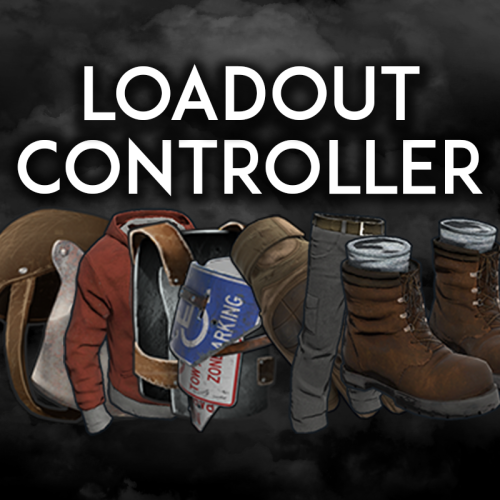
Loadout controller is made to assist in allowing your Battlefield or even PVE community to thrive with customizable loadouts. FEATURES - Supports infinite permission groups - Easy UI system to modify permission groups - PERMISSION GROUP OPTIONS: - Item saving amount per item - Item saving amount per category (Weapons, attire, etc*) - Blacklisted ammo types loaded in weapons - Blacklied skin ID's - Priority settings - Max saves per permission - ETC* - Plyers can easily save their loadouts through the UI or chat commands. - The UI shows players exactly what items they can save, can't save, or can only save part of. - You can easily delete, override, select, or save new loadouts through the UI. - You can see what items are in your currently selected loadout in the UI - Loadouts automatically apply when a player respawns - Extremely performant UI system$19.99 -

Version 1.0.4
113 downloads
Change the speed, fuel time and resource gained from all quarries and the giant excavator with a simple config. Works with GatherManager. Console commands (admin only): qc.data - Displays in chat the values for each of the quarries qc.reload - Reloads all quarries Config: You can easily configure each quarry type separately: Fuel time - How long does a diesel last (in seconds) Resource tickrate - How often resources are added to the output container (in seconds) Amount of resources - Total amount of resources from each diesel. A value of 1000 means it makes the same amount as vanilla. Changing this value to 2000 means it makes 2 times as much as vanilla, or 500 means half as much as vanilla. (example: in vanilla 1 diesel = 50 hqm at the HQM quarry. Setting the value to 2000 gives you 100 hqm for each diesel, and a value of 500 gives 25 hqm for each diesel. Note: Any GatherManager multipliers are multiplied on top of this setting Excavator fuel time - How long a diesel last for the giant excavator (in seconds) Excavator resource tickrate - How often resources are added to the output container for the giant excavator (in seconds) Excavator resource multiplier - Multiplies the output resource with this value. Note: This multiplier and GatherManager multiplier will stack (if "Use excavator settings if GatherManager exists" is set to true) Use excavator settings if GatherManager exists - If GatherManager is loaded (or reloaded) and this setting is true, it will override GatherManager excavator settings. Note: GatherManager still modifies the output as normal Default config (vanilla values): { "Stone Quarry": { "Fuel time per diesel (seconds)": 120.0, "Resource tickrate (seconds)": 5.0, "Amount of resources per diesel (1000 = vanilla)": 1000.0 }, "Sulfur Quarry": { "Fuel time per diesel (seconds)": 120.0, "Resource tickrate (seconds)": 5.0, "Amount of resources per diesel (1000 = vanilla)": 1000.0 }, "High quality metal Quarry": { "Fuel time per diesel (seconds)": 120.0, "Resource tickrate (seconds)": 5.0, "Amount of resources per diesel (1000 = vanilla)": 1000.0 }, "Pumpjack": { "Fuel time per diesel (seconds)": 120.0, "Resource tickrate (seconds)": 5.0, "Amount of resources per diesel (1000 = vanilla)": 1000.0 }, "Excavator": { "Excavator fuel time per diesel (seconds)": 120.0, "Excavator resource tickrate": 3.0, "Excavator resource multiplier": { "Stone": 1.0, "Sulfur": 1.0, "Metal fragments": 1.0, "High quality metal": 1.0 } }, "Personal Quarry": { "Enabled": false, "Fuel time per diesel (seconds)": 120.0, "Resource tickrate (seconds)": 5.0 }, "Use excavator settings if GatherManager exists": true } Useful convar: excavatorsignalcomputer.chargeneededforsupplies - Time until it's possible to call a supplydrop at the excavator. Default value 600 (seconds)$7.99- 14 comments
- 2 reviews
-
- 1
-

-
- #quarry
- #controller
- (and 7 more)
-
Version 2.0.3
518 downloads
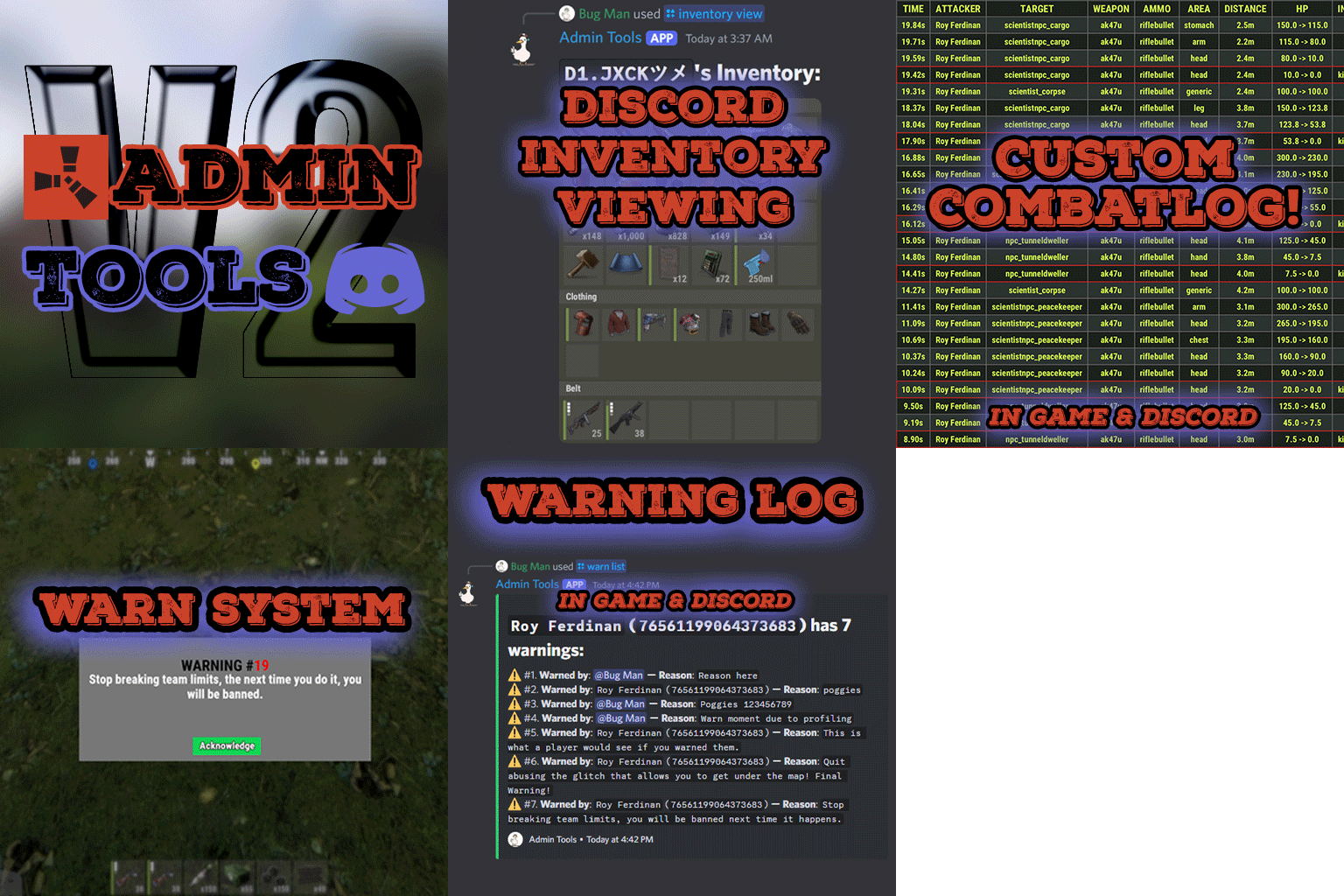
Admin Tools is an all-in-one plugin designed to make your job as a server owner/admin easier. This plugin has a wide range of features and commands that allow you to control your server easily, both in-game and via Discord. It also adds custom quality of life features exclusive to this plugin! ★ Inventory Viewing System - View an NPC or player's inventory in Discord and in-game ★ Multi-Server Support - Allows you to manage multiple Rust servers from a single bot ★ Custom Combatlog System - View a player's combatlog in Discord and in-game ★ Backpack Viewing System - View a player's backpack (uMod plugin) in Discord ★ Custom ID System - Get the ID of players on your server quick and easy, copy directly from chat ★ Warn System - Inform players of their wrongdoings and keep track of them (Warn Visuals: UI, Chat, Chat + Toast/Gametip) ★ Watchlist System - Lets you put suspicious players on a list for you to monitor, logs in-game and to discord ★ Server Command System - Reload/load/unload plugins and other console commands in Discord and in-game ★ F7 Report Logging System - Log F7 reports to discord with their combat log attached (if enabled) ★ and more! (Rest of features below) Please note, the Permissions UI Shown on screen towards the start of this video is FROM CARBON, NOT THE PLUGIN Please note, the Permissions UI Shown on screen towards the start of this video is FROM CARBON, NOT THE PLUGIN (Changed/Exclusive): * Timestamps for video in video's description - Make sure to up video quality if watching from this site. * Timestamps for video in video's description - Make sure to up video quality if watching from this site. ★ Permission System - Grant/revoke permissions to groups and players from Discord and in-game ★ Minecraft Creative System - While enabled, hold middle click to get the item you're looking at ★ Rename System - Rename the players who think they are funny (toggle in config) ★ Tempban System - Tempban players with no database required ★ Unique ID System - Find players even when they have the same or similar names -- Thanks to nivex ★ Kill, Wound, Revive & Respawn System - Kill, wound (down), revive and respawn players from Discord and in-game ★ Team Viewing System - View a player's team members from Discord and in-game Q: Does this plugin have a GUI or do its commands use GUI? A: No. The only UI in-game for this plugin is the warning screens. Please do not purchase this plugin thinking it has GUI for its commands, they are ALL commands entered into chat, Discord, or RCON. There are however, 'modals' for Discord, but nothing GUI based for within the game other than the warning screens displayed when '/warn'ing a user (which can be configured by the user). Q: How do I set up the bot? A: Set Up Instructions - If you miss any permissions, can always add them to the Admin Tools role in discord after you invite the bot. Q: Does this plugin link players to Rust? A: No. You can use the free plugin DiscordCore by MJSU if you would like to link your players. Q: Does this plugin log kills/PMs/F1 Spawn/chat? A: No. Admin Tools only logs the following if enabled: F7 Reports, Bans, commands from this plugin, and players who are watchlisted. You can always view a player's combatlog from discord though. You can use the free logging plugins DiscordLogger by MONoH or DiscordChat by MJSU depending on your goal. However, personally, I recommend against using logging functionality that would be occurring very frequently due to Discord's rate limiting. Though, DIscordLogger is made in a way that combines messages if possible to prevent limiting. Q: Can this log to multiple Discord servers? A: YES. All you need to put for logging to multiple servers is the channel ID you want to log to in the list of channel IDs in the config. Q: Does this plugin ONLY work with Discord Extension 3.0.0+? A: YES. You need to download the 3.0.0+ version from GitHub, it is linked at the top (and right here) as a required dependency. Any version prior to 3.0.0 will not work with this plugin, but any version 3.0.0 and later will. Q: Will this work on a shared hosting server? A: Yes, BUT you will not be able to take advantage of the threading done within the plugin. It should still work fine, but when you're on a shared host, you may only have access to a single core/thread (not positive on which) and as a result the threading I am doing in the plugin will just be ran on the main thread. As a result some of the discord functionality (ie: image generation) may affect the server as its now running on the main thread (what the server uses to run the game on) instead of a separate thread which would normally not affect the server. The image generation stuff (backpack and inventory) is normally pretty quick depending on number of items and pictures being used/sent, and can be between 100-250ms to generate on my server, however that was while no players were on. Q: How do I fix this error Response Code: Forbidden Discord Error Code: 50001 Discord Error: Missing Access ? A: All you need to fix this issue is MFA/2FA on the account used to create the bot. This issue is caused by Discord requiring your account to have either MFA or 2FA due to the bot being in a Community Discord server. After you add 2FA/MFA this error will go away. Q: Renaming isn't working, how do I fix this? A: The issue is likely that you don't have it enabled in the config, make sure to enable it in the config, its above the warning options and the discord API options. Q: My commands aren't appearing, how do I fix this? A: You can do the following in an attempt to try and force the bot to update its commands: Discord > Server Settings > Integrations > Admin Tools Bot > Toggle one of the checkboxes it shows in either Roles & Members or Channels > Save > Undo toggle > Save again. Q: Does this work with Rustcord? A: Yes, however you need this version here by MJSU as it has been updated to work with DiscordExtension 3.0.0+ versions. Q: How do I set up Multi-Server Support? A: Do as follows: Enable the bool (true/false) config option for multi-server system. Fill and keep the list of servers order the same if possible between configs (not required, but recommended). Use the /server command in discord to swap to the server you want to start listening to/sending commands to. On first use of command, it will error in all but one server console (tries to reply to a message more than once), that is expected and doesn't do that after that first command. It is used to set it up. If you want the activity information to change when swapping servers, make sure to enable that functionality in the config. Special thanks to Nivex for both creating and allowing me to use the method used to generate unique IDs for players. For support, please make a support ticket or join the Cobalt Studios Discord.$29.99 -

Version 2.0.0
31 downloads
Ore Spawn Scaler is a professional, high-performance ore generation system designed to give server administrators complete control over the ore population. Replace Rust's unpredictable default spawns with a fully customizable, grid-based engine that ensures balanced and optimized resource distribution across your entire map. Main Features Interactive UI: A sleek, modern, and intuitive in-game UI allows administrators to modify all core spawning parameters in real-time without needing to edit configuration files. Grid-Based Spawning: Distributes ore nodes across the map using a fully configurable grid system for even and predictable placement, with options to add random offsets for a more natural look. Biome-Specific Probabilities: Define unique spawn probabilities for Stone, Metal, and Sulfur in each of Rust's four biomes (Temperate, Arid, Tundra, Arctic), giving you unparalleled control over your server's resource landscape. Advanced Spawn Control: Intelligently prevents ore from spawning in unwanted areas, including in water, near player buildings, inside monuments, on roads, or on excessively steep slopes. High-Performance Engine: Utilizes a highly optimized, queue-based batch spawning system to generate thousands of nodes with minimal impact on server performance, ensuring a smooth experience for your players. In-Game Map Visualization: Administrators can instantly view all spawned ore nodes directly on the in-game map. Nodes are represented by color-coded markers, making it easy to verify spawn densities and patterns at a glance. Full Customization: Control everything from spawn density (grid size) and batch sizes to minimum distances from players and buildings. Permissions orespawnscaler.use: Grants administrative access to the main configuration UI (/oregen) and allows usage of the UI buttons to save, reload, and reset the ore spawns. orespawnscaler.show: Grants access to commands for displaying and hiding the ore node markers on the in-game map. Chat Commands /oregen: Opens the main configuration UI. /oreshow: Displays all custom-spawned ore nodes on the player's map for 30 seconds. /orehide: Clears the ore node markers from the player's map. /orehelp: Shows a list of available commands in chat. Config { "Stone Settings": { "Grid Size": 150.0, "Prefab Path": "assets/bundled/prefabs/autospawn/resource/ores/stone-ore.prefab", "Biome Probabilities": { "Arid Biome": 0.3, "Temperate Biome": 0.4, "Arctic Biome": 0.2, "Tundra Biome": 0.35 }, "Enabled": true }, "Metal Settings": { "Grid Size": 200.0, "Prefab Path": "assets/bundled/prefabs/autospawn/resource/ores/metal-ore.prefab", "Biome Probabilities": { "Arid Biome": 0.25, "Temperate Biome": 0.3, "Arctic Biome": 0.35, "Tundra Biome": 0.25 }, "Enabled": true }, "Sulfur Settings": { "Grid Size": 180.0, "Prefab Path": "assets/bundled/prefabs/autospawn/resource/ores/sulfur-ore.prefab", "Biome Probabilities": { "Arid Biome": 0.4, "Temperate Biome": 0.25, "Arctic Biome": 0.15, "Tundra Biome": 0.3 }, "Enabled": true }, "Debug Mode": false, "Spawn Delay (seconds)": 1.0, "Min Distance From Players": 175.0, "Min Distance From Buildings": 28.0, "Water Buffer Height": 1.5, "Max Slope Angle": 35.0, "Batch Size": 10 }$9.99 -
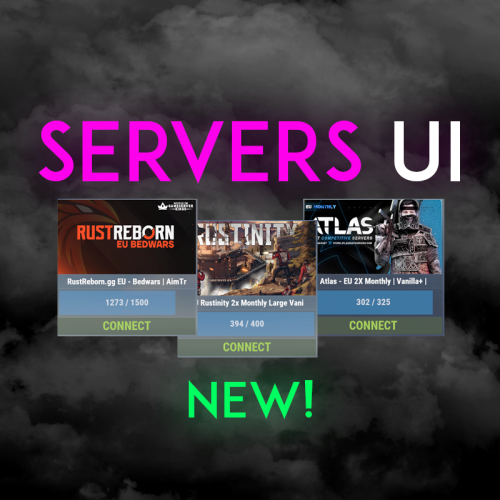
Version 1.0.2
183 downloads
Easily display all your servers within a very clean a simple UI. Even put a quick connect button for people to instantly connect to the server! FEATURES - Simple setup - Very clean UI - Auto receives server info to display to your players - Instant connect buttons - Little to no performance impact - Easy integration with Welcome Controller To get your battlemetrics server ID, all you need to do is view your server on Battlemetrics, and it's the little number at the end of the URL. https://www.battlemetrics.com/servers/rust/6803740 Support? Questions? Comments? Concerns? Message me in my Discord! https://discord.gg/RVePam7pd7 { "Servers Commands": [ "servers", "sv" ], "Servers": [ { "Server ID's (BattleMetrics Id's)": "6803740", "PlaceholderBanner": "https://i.ibb.co/c6Y58gQ/Placeholder-Banner.png" }, { "Server ID's (BattleMetrics Id's)": "12747928", "PlaceholderBanner": "https://i.ibb.co/c6Y58gQ/Placeholder-Banner.png" }, { "Server ID's (BattleMetrics Id's)": "7482472", "PlaceholderBanner": "https://i.ibb.co/c6Y58gQ/Placeholder-Banner.png" }, { "Server ID's (BattleMetrics Id's)": "10519728", "PlaceholderBanner": "https://i.ibb.co/c6Y58gQ/Placeholder-Banner.png" }, { "Server ID's (BattleMetrics Id's)": "16741517", "PlaceholderBanner": "https://i.ibb.co/c6Y58gQ/Placeholder-Banner.png" }, { "Server ID's (BattleMetrics Id's)": "15532055", "PlaceholderBanner": "https://i.ibb.co/c6Y58gQ/Placeholder-Banner.png" }, { "Server ID's (BattleMetrics Id's)": "8113880", "PlaceholderBanner": "https://i.ibb.co/c6Y58gQ/Placeholder-Banner.png" }, { "Server ID's (BattleMetrics Id's)": "9929204", "PlaceholderBanner": "https://i.ibb.co/c6Y58gQ/Placeholder-Banner.png" } ], "UI Colors": { "BlurBackgroundColor": "0 0 0 .4", "MainUIColor": "0 0 0 .4", "MultiMainPanelColor": "0 0 0 .5", "MultiServerTitlePanelColor": "0 0 0 .4", "MultiServerTitleTextColor": "1 1 1 1", "MultiPlayerPanelColor": "0 0 0 .5", "MultiPlayerPanelFillColor": "0.17 0.68 1 .5", "MultiPlayerPanelTextColor": "1 1 1 .6", "MultiPlayerConnectPanelColor": ".25 .31 .16 .8", "MultiPlayerConnectTextColor": ".66 .86 .30 .8", "SingleMainBlurColor": "0 0 0 .4", "SingleMainPanelColor": ".17 .17 .17 1", "SingleServerTitlePanelColor": "1 1 1 .1", "SingleServerTitleTextColor": "1 1 1 1", "SinglePlayerPanelColor": "1 1 1 .1", "SinglePlayerPanelFillColor": "0.17 0.68 1 .7", "SinglePlayerPanelTextColor": "1 1 1 .7", "SinglePlayerConfirmPanelColor": ".25 .31 .16 1", "SinglePlayerConfirmTextColor": ".66 .86 .30 1", "SinglePlayerCancelPanelColor": "0.76 0.14 0.14 .4", "SinglePlayerCancelTextColor": "0.93 0.18 0.18 .75", "SingleDescPanelColor": "1 1 1 .1", "SingleDescTextColor": "1 1 1 .7" } }$14.99 -
Version 4.0.7
590 downloads
The plugin allows to define opening and closing times for raids for each day of the week, with the ability to block damage outside of those hours. The configuration is customizable with many options, #FEATURES Defined schedules raids are allowed during the day. Blocks damage or execute console command outside the allowed period. Displaying an UI or use CustomStatusFramework. Everything is customizable, configurable with many options. Protects the player if he has recently joined the server Prevents raids if not enough time to play #INFO Bypass allows you to destroy if is not the raid time (only if block damage is enabled). All options are optional and can be configured The plugin is compatible with players languages The times displayed can be configured for the players, in order to adapt to the format of their country /craid (for open panel) #API private bool API_IsRaidTime() => _mainController.currentSchedule.isRaidTime; private List<int> API_StartSchedule() { return new List<int> { (int)_mainController.currentSchedule.start.day, _mainController.currentSchedule.start.hour, _mainController.currentSchedule.start.minute }; } private List<int> API_EndSchedule() { return new List<int> { (int)_mainController.currentSchedule.end.day, _mainController.currentSchedule.end.hour, _mainController.currentSchedule.end.minute }; }$23.00 -

Version 1.0.3
211 downloads
Extremely easy and dynamic Calendar system for your server! In just a few seconds you could inform players about the next few months of wipes, events, etc! FEATURES - Built in editor - Auto schedule events and wipe info - Click one button to add the next needed month - Auto generates the new month if you forget to - Page with all months listed - Schedule based on week day - Schedule based on x amount of days - Built in legend editor to alter your legends - Built in day editor if you just want to edit one day at a time - Support for Welcome Controller - Add images on specific days - Add larger images within the info of that day - Editable commands - All UI colors are easily editable - Full lang file - ETC!!**** EXTRA INFO ADMIN PERMISSION: calendarcontroller.admin Default commands: /calendar & /wipe Support? Questions? Comments? Concerns? Message me in my Discord! https://discord.gg/RVePam7pd7$19.99 -

Version 1.2.8
292 downloads
Open UI - /craftcontrole (craftcontroller.use) FEATURES: Changing the minimum required workbench for item crafting Craft time is adjustable For items with a certain skinID Block crafting Block explore a blueprint Block explore at the workbench P.s - (My Discord - tofurahie#4144) Config: { "Craft Rate in %": 50, "Item Settings": { "ammo.shotgun.slug": { "Default Skin": 0, "Block craft": false, "Block to explore a blueprint": false, "Block to explore at the workbench": false, "Craft time (-1 => Default)": -1.0, "WorkbenchLevel (-1 => Default)": -1 }, "ammo.rifle": { "Default Skin": 0, "Block craft": true, "Block to explore a blueprint": true, "Block to explore at the workbench": false, "Craft time (-1 => Default)": 15.0, "WorkbenchLevel (-1 => Default)": 1 } } }$8.49 -
Version 1.0.5
974 downloads
Welcome Controller Additions is exactly what it sounds like. Some QOL addons for Welcome Controller! MORE FEATURES COMING VERY SOON! FEATURES - Q&A Dropdowns - VIP Rank display - Social links How to add into Welcome Controller... To add in one of the add-ons you need to do the following Firstly, if you want to use the social links, there is a toggle for it in Welcome Controllers config, enable that and fill out the info in the additions plugin and that's good to go. Second, vip ranks. Go to the addons section in the Welcome Controller config, where it says "Plugin Addon Name" You'll need to add "WUIAttachments_VipRanks" Third, Q&A's. Go to the addons section in the Welcome Controller config, where it says "Plugin Addon Name" You'll need to add "WUIAttachments_IdentiferYouSetForTheQ&A" of course replacing "IdentiferYouSetForTheQ&A" with the actual identifier you set in the additions plugin. Need support or want updates about what is coming to the plugin? Join the support discord here https://discord.gg/RVePam7pd7$9.99- 17 comments
- 1 review
-
- 4
-
-
-
-
- #welcome
- #controller
- (and 9 more)
-
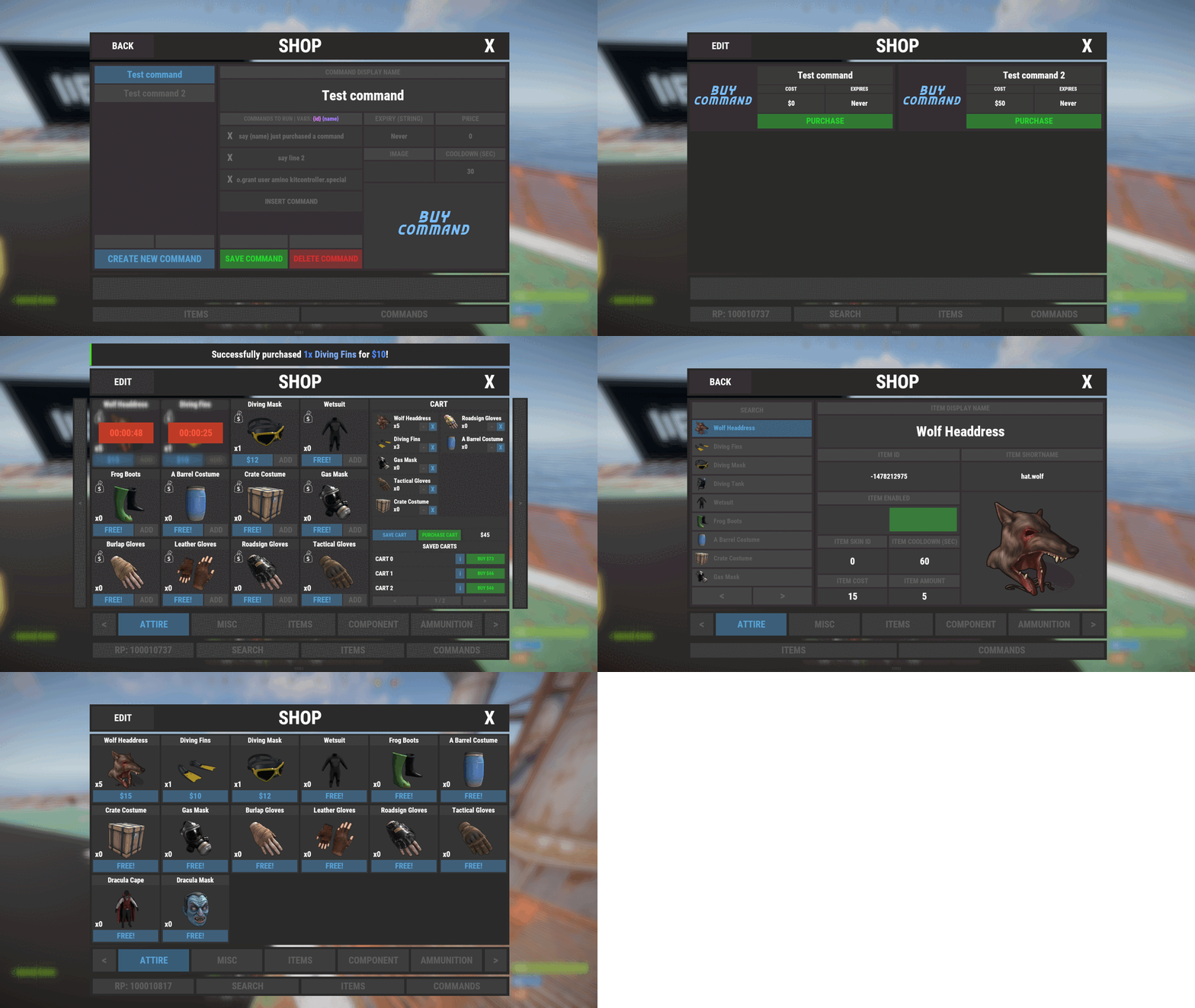
Version 1.1.0
1,239 downloads
Shop Controller is an advanced shop UI system. Offers selling of items and commands as well as an in-game item editor. FEATURES • UI Cart system (Optional) • In-game item editor • In-game command editor • Item cooldowns • Command cooldowns • Custom item skins • Sell back to shop (Optional) • Easy color editing of the UI • Multi currency support (RP, Economics, any item) • Custom shop commands PERMISSIONS shopcontroller.use shopcontroller.admin SETUP The setup is very easy! - Set the commands you want the shop to be opened with - Set your currency. It supports RP, Economics, or any item (use the shortname)! - Set if you want to use the cart system or not - Plugin images, change if you want to use images other than the default ones. - UI Elements, all of these are color, "Rust Format" > https://tools.rustplugins.io/colors Support? Questions? Comments? Concerns? Message me in my Discord! https://discord.gg/RVePam7pd7$29.99 -
Version 1.0.2
558 downloads
Allows you to control the spawns of entities on your server. Features Spawn Control: Define spawn chances for entities to control their frequency. Configurable: Easily customize the configuration to fit your server's needs. Automatic Cleanup: Remove entities with a spawn chance of 0. Configuration { "Enabled": false, "Spawns": [] } Enabled: if set to true it enables the plugin. Spawns: list of entities's prefabs and it's spawn chances (auto generated when you first load the plugin).Free