Search the Community
Showing results for tags 'unlock'.
Found 5 results
-
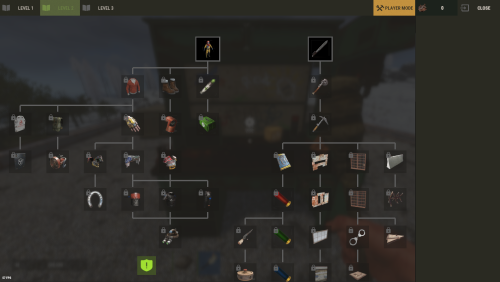
Version 2.0.2
50 downloads
The plugin has been revamped. Customize the Techtree however you like. It will replace the vanilla one by default, but this option can be changed in the configuration. Data files from previous versions are not compatible with the new version. You have two options: Replace the vanilla tech tree and customize it. Keep the vanilla tech tree and create a completely customized tech tree. If you use Oxide, Carbon Aliases if required ! Else ignore this. Feature TechTree customizable TechTree by Workbenchlevel Multiple rewards (ChatCommand / ConsoleCommand / Economics) Item custom support Reward if tree is all unlocked (in datafiles) No command to open Automatic replace the vanilla tree or press the Use key R on the Workbench to open Multilingual support CUI Editor CUI Editor Permissions techtree.use // Grants permission to use the tech tree techtree.unlock.free // Grants permission to unlock everything for free techtree.unlock.instant // Grants permission to bypass unlock time techtree.unlock.path // Grants permission to unlock the entire branch up to the unlocked node Information Default vanilla tree are created on plugin load Automatic import of new nodes added by Facepunch If you want to remove a vanilla node from your TechTree, you must first backlist it, otherwise it will be automatically added back the next time the plugin is reloaded. An option is available for this. I recommend modifying the tree only when players are not using it to avoid synchronization issues. General Settings { "Settings": { "Wipe Player Data at Wipe": true, "Time For Unlock Node": 1.0, "Selected Theme": "Default", "Use Permissions ?": false, "Use Economics ?": false, "Replace tree vanilla ? Open with [R] if false": true } } Techtree Data ID: ID of the node. Vanilla ID: default ID for facepunch Parent: List of parent node required to unlock this node. Image URL or Item: Image used, via URL or in-game item (ID/Skin). Type: Type of Image (URL or Item). Value: Url (string) if URL or ItemID and SkinID if Item. Grid Position: Node position on the grid (x, y). Player Info: information displayed on the UI Name: In-game name for this node. Lang: Dictionary for multilingual support Description: Short description of the node. Lang: Dictionary for multilingual support Price: Cost to unlock this node. Curency: Resource needed to pay the price (ID/Skin). ItemID SkinID Rewards: List of rewards obtained after unlocking. Type: Type of reward (ChatCommand, ConsoleCommand or Economics). Value: Value or command associated with the reward (string). "TechTree": [ { "ID": 40046421, "Vanilla ID": 84, "Parent": [ 1865581242 ], "Image URL or Item": { "Type": "Item", "Value": { "Item ID": 2090395347, "Skin ID": 0 } }, "Grid Position": { "x": 3.5, "y": 6.5 }, "Player Info": { "Ingame Name": { "Lang": {} }, "Description": { "Lang": {} } }, "Price": 30, "Curency": { "Item ID": -932201673, "Skin ID": 0 }, "Rewards": [ { "Type": "ChatCommand", "Value": "say Congratulations!" }, { "Type": "ConsoleCommand", "Value": "c.grant user playerID perm.use" }, { "Type": "Economics", "Value": "6500" } ] }, ], "Extra": { "Reward On All Node Unlocked": [ { "Type": "ChatCommand", "Value": "say Congratulations, you all unlocked!" }, { "Type": "Economics", "Value": "20000" } ] } Image configuration exemple With URL : "Image URL or Item": { "Type": "Url", "Value": "https://imgur.com/SRGgaKX.png" }, With ITEM : "Image URL or Item": { "Type": "Item", "Value": { "Item ID": -1966748496, "Skin ID": 0 } }, Lang { "CLOSE": "Close", "EDITMODE": "Edit mode", "PLAYERMODE": "Player mode", "SAVE": "Save", "ADD": "Add", "REMOVE": "Remove", "MODIFY": "Modify", "CANCEL": "Cancel", "CONFIRM": "Confirm", "SELECT": "Select", "NONE": "None", "GRIDSETTING": "Grid Setting", "NOTAVAILABLE": "Not yet available", "TOTALREQUIRED": "Total required", "OPEN": "[R] OPEN", "Workbench_1": "LEVEL 1", "Workbench_2": "LEVEL 2", "Workbench_3": "LEVEL 3", "Engineering": "ENGINEERING", "NO PERM": "You don't have permission.", "EXCLUDE": "Exclude from vanilla sync", "EXCLUDED_NODES": "Excluded Nodes", "NO_EXCLUDED_NODES": "No excluded nodes", "EXCLUDE_RESTORED": "{0} nodes restored", "EXCLUDE_ADDED": "{0} nodes excluded", "EXCLUDE_ALL": "Exclude All", "CLEAR_ALL": "Clear All", "DELETE_ALL_NODES": "Delete All Nodes", "UPDATE_GRID": "Update Grid", "NODES_DELETED": "{0} nodes deleted", "RESET_TO_VANILLA": "Reset to Vanilla", "ARE_YOU_SURE": "Are you sure ?", "SAVING_APPLY_TOOLTIP": "Saving apply", "RESET_VANILLA_TOOLTIP": "Tech tree reset to vanilla defaults", "EXCLUDE_TOOLTIP": "Excludes this vanilla node from automatic imports. Useful for permanently removing a vanilla node from your tech tree.", "REWARD_TOOLTIP": "Use the “playerID” tag in your command if you need to specify a player. ex: c.grant user playerID perm.use.", "LANG_TOOLTIP": "“Default” will use the default text for the item; otherwise, the added language will be used." } Api (Dictionary<string, object>) GetPlayerUnlocked(BasePlayer player) // Return key "workbench" and Dictionary value { Workbench, List<int> } (List<int>) GetPlayerUnlocked(BasePlayer player, Workbench workbench) // Return List<int> Hook // Called before a tech tree node is unlocked. private object OnNodeUnlock(Workbench workbench, Dictionary<string, object> node, BasePlayer player) { Puts("OnNodeUnlock has been called!"); return null; } // Called before a tech tree node is unlocked. private object OnNodeUnlock(BasePlayer player, Dictionary<string, object> node, Dictionary<string, object> treeData) { Puts("OnNodeUnlock has been called!"); return null; } // Called when a tech tree node is unlocked. private void OnNodeUnlocked(Workbench workbench, Dictionary<string, object> node, BasePlayer player) { Puts("OnNodeUnlocked has been called!"); } // Called when a tech tree node is unlocked. // Same behavior as OnNodeUnlocked but returns the list of notes directly. private void OnPathNodeUnlocked(Workbench workbench, List<object> nodes, BasePlayer player) { Puts("OnPathNodeUnlocked has been called!"); } Api and Hook Doc Dictionary<string, object> node: "id" : int "vanillaId" : int? "price" : int "parents" : List<int> "isVanilla" : bool "currency" : Dictionary<string, object> => "itemId" : int "skinId" : ulong Dictionary<string, object> treeData: "workbench" : Workbench "nodes" : List<Dictionary<string, object>> Api GetPlayerUnlocked(BasePlayer player) : Dictionary<string, object> => "workbench", { Workbench, List<int> } Api GetPlayerUnlocked(BasePlayer player, Workbench workbench) : List<int> Contact Send me a private message on Codefling Send me a message on Discord: gd.kenni$14.99 -
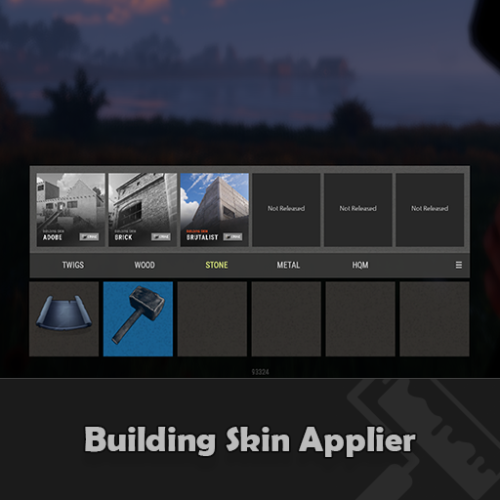
Version 1.0.12
215 downloads
Allow visitors of your server to make use of the premium building skins without having to own them. Compact and minimalistic UI. Fully UI Controlled. ( no commands required ) Only visible when the player has a hammer in their hands. When the UI is open, Hit a toolbelt hotkey so you can instantly swap to a weapon when being attacked. Create custom themes and let players choose the one they prefer. Apply the building skin to a single block or to all blocks of the same grade in the building. Optional keypress check to apply skins, so that by default the hammer retains its normal functionality. Optional background blur. Previews Toolbar will only be visible once the hammer has been selected, So its not cluttering the screen when its not required to be. Selected skin will be colored to make it stand out while the unselected skins are greyed out. Automatic adding of tabs when a skin is colorable to keep things clean and minimalistc. Create your own custom themes or modify existing ones and let players select themselves which one they prefer. User Settings On Upgrade Automatically apply the selected skin when upgrading a building block. Hammer Hit Enabled Updates the skin when a building block is being hit with the hammer. Hammer Hit Contagious Updates all the building blocks of the same grade with one hit of hammer. Requires Keypress Updating the skin with a hammer hit requires you to either hold the "SPRINT" or "RELOAD" button. This way it retains the repair function of the hammer without accidently change skins. Skin Change Animation Whenever a skin is being changed it will trigger the upgrade animation. Screen Blur When the hud is in use it will blur the baground to improve visibility of the hud. Permissions buildingskinapplier.use | Allow players to make use of the plugin. buildingskinapplier.on_upgrade | Update the skin when a part of the structure gets upgraded. buildingskinapplier.hammer_apply | Update skin on hammer hit. buildingskinapplier.hammer_contagious | Update skin on hammer hit for all objects of the same grade. Questions / Answers Q: How to choose a building skin? A: Press "Enter" to open chat this allows you to make use of the cursor, Click with the cursor on one of the grade catégories to show the skins available for the selected tier. Select one of the availible skin packs, when the image is colored it means that this is the selected skin pack, when all the skin pack images are greyed out the default skin will be selected. Q: How to apply a skin? A: Hit an building block with the hammer while holding the "SPRINT" button, the block will change to the selected skin. Q: How to apply a skin to all objects of the same grade at once? A: Hit an building block with the hammer while holding the "RELOAD" button, all blocks that are part of the building will change to the selected skin. Q: How to change huds theme? A: Click on the menu button located on the right side of the toolbar, Select the theme tab located at the top of the hud. Click on one of the prefered themes listed below and the hud will directly update its appearance. Q: How to change a skin color? A: When a skin pack is colorable you can change the color by going into the grade category of which you would like change the color, if the selected skin is recolorable then a color tab button at the rop of the hud will appear. Click on this button and select your prefered color below. For a quick response to questions, problems or bugs contact me at discord https://discord.gg/UHpZtN4jgz$9.99 -
Version 1.2.2
249 downloads
No more blueprints ! Great for those crazy, heavy modded servers. You can control to which users the blueprints will be unlocked by granting the permission blueprintunlocker.tierX.unlock. If you'd like to unlock to all your players just grant the permission to the default group on the console like so: oxide.grant group default blueprintunlocker.tier0.unlock oxide.grant group default blueprintunlocker.tier1.unlock oxide.grant group default blueprintunlocker.tier2.unlock oxide.grant group default blueprintunlocker.tier3.unlock [NEW] Automatic unlock/reset based on permission: when a tier permission is assigned to a user all the bps will be unlocked when a tier permission is revoked from a user all the bps will be reset$2.99- 17 comments
- 2 reviews
-
- 1
-

-
- #blueprints
- #manager
- (and 5 more)
-

Version 1.0.8
2,026 downloads
Create a list of items or item categories to automatically unlock blueprints for players in that umod/oxide group. Each group can be configured individually and will stack if player is in multiple groups. Commands Commands can be used in RCON or in game via console. bpunlock bpunlock unlock <group> <item or category> (Unlocks a blueprint or blueprints from specified group.) bpunlock lock <group> <item or category> (Locks a blueprint or blueprints from specified group. Does not remove if already learned.) bpunlock update (Applies blueprint changes to online players.) bpunlock reload (Loads manual changes to data file into memory.) Permissions bpunlock.admin Categories All items in these categories will be applied if you decide to use them over individual items. Weapon Construction Items Resources Attire Tool Medical Food Ammunition Traps Misc All Common Component Search Favourite Electrical Fun Thanks to @SawyerWD for icon!Free- 22 comments
-
- 1
-
-
- #blueprints
- #unlock
- (and 3 more)
-
Version 1.2.4
64 downloads
This plugin is based on Hackable Crate Unlock. Hackable Crate UI adds a terminal-like user interface when a player starts unlocking a hackable crate. Firstly, a loading bar appears on the screen while login credentials (specified in the config) are sent to the player (either by chat or a note added to his/her inventory). When it finishes, a button can be clicked to "use the computer" and insert the username and password. After that, the player will be logged into the computer and has the possibility to access various functions, such as locking the crate (to prevent other users from looting it), reducing the hacking time, and seeing information about nearby players. Features Great user interface, which makes you look like a real h4x0r 1337. A lock function that makes impossible for players to loot the crate, except to the one who started the hack (or members of his/her clan). Accelerate unlock time by using targeting computers in your inventory or ServerRewards/Economics balance. View the name and distance from the crate of nearby players. This information can be extended with direction, health and active item. Highly configurable plugin, with three different permissions (see the config below). Set different unlock times for hackable crates depending on permissions. Set the maximum distance from the crate to be able to use the UI. Check the players with most hackable crates unlocked with /hc rank. Discord webhooks integration. Edits the message when crate is fully hacked or its unlocking time has been reduced, and deletes it when the entity is killed. Update 1.1.0: Function to view the content of the crate before it's unlocked. Update 1.2.0: Integration with ServerRewards/Economics. Set the price to use each function. and more! Permissions hackablecrateui.vip2 hackablecrateui.vip1 hackablecrateui.admin Commands /hc rank - Shows top 10 of players with most hackable crates unlocked. /hc clear - Wipes data file for /hc rank. Configuration Localization$9.99- 3 comments
-
- 3
-
-

-
- #crate
- #hackablecrate
- (and 4 more)