
What is the Best Day and Crew for this Work Order? When you have complex staff and equipment requirements for a job, you need a way to quickly see which of your potential dates most closely match your job’s criteria. Here, a small instance of DayBack is embedded on the work order. DayBack is picking […]
New Features
Waitlists in DayBack

In this two-part blog series, we’ll explore two powerful ways to customize DayBack’s right-hand sidebar — first, to manage an appointment waitlist, and second, to schedule a series of follow-up appointments. Managing a Cancellation Waitlist Imagine you’re running a busy outpatient surgical clinic where surgeries are often booked weeks or months in advance. With DayBack’s […]
Best-Fit Scheduling for Salesforce

This customer has been scheduling with DayBack for a few years, but recently wanted to add some additional automation and best-fit scheduling to avoid gaps in their schedule. They asked if DayBack could first suggest appointments that don’t leave gaps and then offer other less ideal slots if the patient couldn’t book the ideal times. […]
Drive Times in Your Calendar
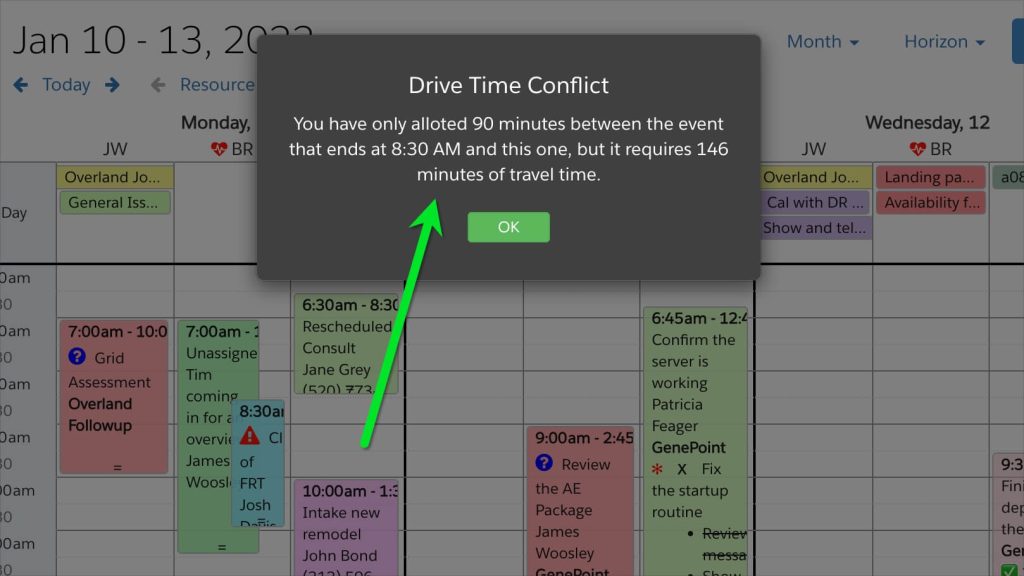
It’s not always obvious when you’re scheduling a difficult day for one of your teammates. DayBack can double-check all the invisible constraints in your schedule to make sure you’re making promises you can keep. In this example, a custom action checks that we’re leaving enough drive time between two appointments: If that action looks useful, […]
Scheduling with Maps in Salesforce

Connecting Maps and Calendars DayBack’s calendar platform now includes maps in Salesforce so you can make better scheduling decisions. DayBack now has built-in access to distance and drive-time calculations, so it’s easier to create scheduling workflows that consider location. Scheduling in DayBack makes your invisible constraints visible, and location is often an important constraint. Here’s […]