v3.0 Class Search functions
Again screenshots of v3.0. In these screenshots you can see the new class search functions in v3.0
In this example i have opened Actor.uc file. Once i select the word Actor and right click anywhere inside code editor i get extra 4 options.

When clicked on “Find files extended from Actor“, Unreal X-Editor will list all files extended from Actor.uc file. Double clicking on any name will open that file in new tab.

Click for larger image
When clicked on “Find references for Actor“, Unreal X-Editor will list all references found for Actor.uc with line number. It will also show you the number of references found. Double clicking on any line number will open up that file in new tab and automatically navigates to the selected line.

Click for larger image
When clicked on “Find usages for Actor“, Unreal X-Editor will list all usages found for Actor.uc with line number. It will also show you the number of usages found. Double clicking on any line number will open up that file in new tab and automatically navigates to the selected line.

Click for larger image
[Tutorial] Weapon Magazine Reload
In this tutorial i will show you how to create a weapon with Reload function. I will also show you how to create a ammo pickup that will add clips instead of ammo. Then we will create a custom Inventory Manager to track our ammo and tells the weapon to add clips if the maximum clips is lesser the current clips.
So lets get started.
v3.0 Class Usage Finder
I’ve added some features which i believe will save a lot of time in development. One of the feature is “Class Usage Finder“. In the below screenshot, you can see some of the new options after right clicking on my selected class name.

Click to see larger image
In the below screenshot, you can see what happens after selecting “Find usages for AK_Weapon“. It will display the results with where you used the class name, Line Number and location of that script file.

Click for larger image
Another v3.0 Screenshots
Hello everyone…I’ve been working on v3.0 for quite sometime and now i decided to post two new screenshots.
In this screenshot, you can see a new Template window with some tutorial buttons that re-directs to some of the most popular and useful UDK/UnrealScript tutorials. You’ll be able to submit new Presets, Snippets and Tutorials which i’ll include in each update. I have improved Ribbon customization too. Now user can right click on any Ribbon icon and add it to Custom Page (NOTE: Custom Page can be renamed to whatever name you like).
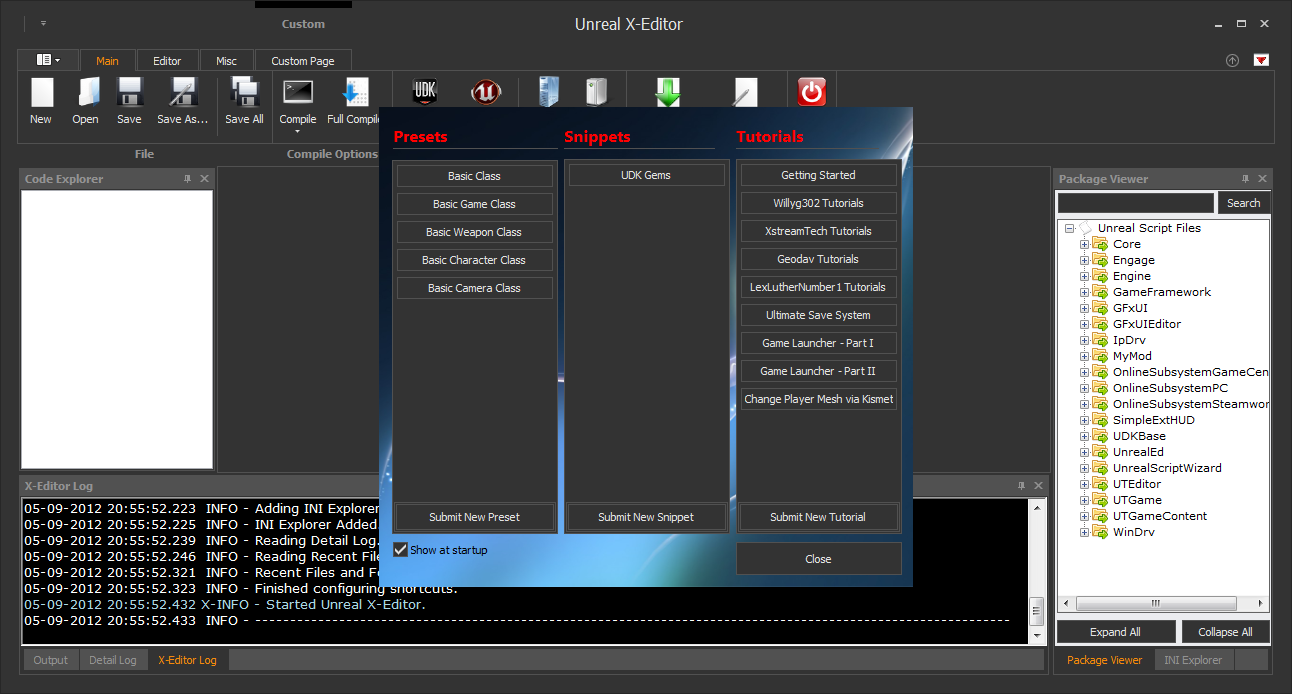
Click for larger image
And in this screenshot you can see its now possible to open the original UC File which you extended from with a single click.

Click for larger image
Cant wait to share it with you guys! 😀

Scaleform Door Lock UI
I made this Scaleform door lock ui inside Unreal Development Kit (Inspired from the game Dead Space). Here is the final result.
Watch in HD:
Download Project Files: Click Here
Avira confirmed Unreal X-Editor as False Positive
Thanks to Pivotraze from UDK Forums.

Click For Larger Image

 Unreal X-Editor