UDK Melee Weapon Video Tutorial by draxov
UDK Forum member draxov made a tutorial on how to make a melee weapon in UDK using trace sockets.
This video explains:
- How to rig the model in blender
- Export it as an FBX
- Import it into UDK
- Setting it up in UDK
- Scripting the melee weapon with X-Editor
For More Information and source files, visit his UDK Thread: http://forums.epicgames.com/threads/915761-UDK-Melee-Weapon-Video-Tutorial
v2.6.1 Beta Available
New version of Unreal X-Editor is now available. Click on “Check For Updates” to download.
Changelog:
–Fixed INI Editor crash
–Fixed No-Ribbon UI crash when double clicking close all tabs
–Fixed minimize issues after clicking Unreal Frontend
–Registration and Unhandled Exception reports now works
Suspicious Account Activity
Due to some suspicious activity i was forced to change my email account. So Registrations and Unhandled Exception Reports will not work at the moment. I will release a new update soon to resolve this.
v2.6 Beta Available
New version of Unreal X-Editor is now available. Click on “Check For Updates” to download.
KNOWN ISSUE: I just noticed that in this version No-Ribbon UI and new commandlines are completely broken. That means if you run with “-noribbon” or “-noweb” or “-nostartupweb” will crash Unreal X-Editor on startup. A fix will be released soon. I apologize for the inconvenience.
Issue Fixed. Please download here. (NOTE: This is ONLY for v2.6. DO NOT apply this fix if you are using v2.4 or earlier.)
Changelog:
–New and Improved Application menu now shows Recent Files and Folders (Ribbon-UI Only)
–Hovering mouse over current tab will show filepath
–Previous tab is now selected after closing a tab
–Window State setting has been removed
–Reset Dock Layout button added
–Font selection has been added
–Users can add Custom Parameters for UDK Game
–Added UDK Game Remote Control
–Added a few more commandline arguments
–Unsaved files will show asterisk
–Folding lines (dotted lines between brackets) is available
–Shift+Backspace now works
–Users can choose Win64 compiler
–Autocomplete will now show quickly
–Autocomplete now supports TAB key
–Added Embed Selection
–Users can submit if any Unhandled Exception occurs
–Auto Indent added
–Added Shortcut Editor
–Fixed a rare popup error message while compiling scripts
–Fixed issues with Save As button
–Fixed Save button not updating when switching tabs
–Fixed incorrect information displayed on UDKGame pop up window
–Fixed Not valid tray icon showing even if correctly configured
–Fixed tray icon issues after exiting Unreal X-Editor
–Fixed Multi-Comment issues

Recent File List
Embed Selection Feature:

Select some text –> Right Click –> Embed Selection
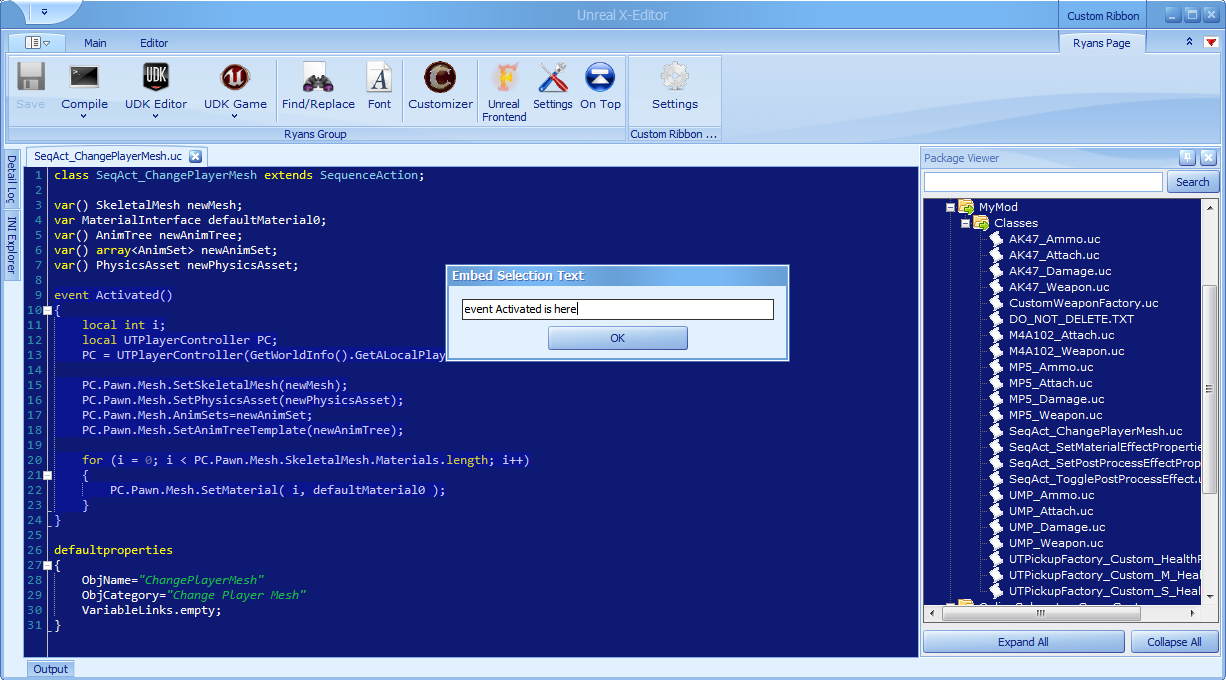
Type a name for your selection and press OK

The selected text is now folded with the specified name
[FIX] Windows Text blurriness
Recently i updated my Nvidia driver to 301.42. Since then i have this issue where Console Command text’s, Windows Live text’s are blurred and difficult to read. I found that the fix is disabling Anti-Aliasing – FXAA in Nvidia Control Panel.
Like this:

Fix:

Click for larger image
Game Launcher *UPDATE*
Few days ago i made this VB (Visual Basic) project which lists all supported resolutions of your screen in a dropdownlist. This will also give Screen Width and Screen Height separately so its easy to update UDK ini file.
[Code] Heartbeat sound when life is low
Big Thanks to Crusha K. Rool and 100GPing100 from UDK Forums.
Use this code in your custom Pawn class:
class MyNewPawn extends UTPawn;
var AudioComponent HealthSound;

event TakeDamage(int DamageAmount, Controller EventInstigator, vector HitLocation, vector Momentum, class<DamageType> DamageType, optional TraceHitInfo HitInfo, optional Actor DamageCauser)
{
    super.TakeDamage(DamageAmount, EventInstigator, HitLocation, Momentum, DamageType, HitInfo, DamageCauser);
    if (Health <= 25)
    {
        HealthSound.Play();
    }
}

function Tick(float DeltaTime)
{
    Super.Tick(DeltaTime);

    if (Health > 25)
         HealthSound.Stop();
}

simulated event Destroyed()
{
    HealthSound = None;
    super.Destroyed();
}

defaultproperties
{
    Begin Object class=AudioComponent name=MenuAudioComponent
        SoundCue = SoundCue'Sounds.Misc.Heartbeat_Cue' //Change this to your soundcue.
    End Object
    HealthSound = MenuAudioComponent
    Components.Add(MenuAudioComponent)
}

 Unreal X-Editor