Java Comparator with null fields

I have a list of entities Entity with the fields id and createdDate. I want to sort them as following:

  • higher id first
  • if id null, most recent createdDate first

I’ve tried the following unsuccessfuly, as it throwns a NullPointerException when id is null

Comparator comp = Comparator
                .nullsFirst(Comparator.comparing(e -> ((Entity) e).getId()))
                .thenComparing(e -> ((Entity e).getCreatedDate())
                .reversed();
entities.stream().sorted(comp).findFirst();

For what I see, Comparator.nullsFirst handles when the entity is null, not when the field to be compared is null. How can I handle this situation?

Solution:

I think you are looking for comparator like this :

Comparator<MyClass> comparator = Comparator.comparing(MyClass::getId, Comparator.nullsLast(Comparator.reverseOrder()))
                .thenComparing(MyClass::getCreateDate);

The code to test it :

List<MyClass> list = new ArrayList<>();

list.add(new MyClass(null, LocalDate.now()));
list.add(new MyClass(4L, LocalDate.now()));
list.add(new MyClass(2L, LocalDate.now()));
list.add(new MyClass(4L, LocalDate.now().plusDays(1)));
list.add(new MyClass(null, LocalDate.now().plusDays(1)));

Comparator<MyClass> comparator = Comparator.comparing(MyClass::getId, Comparator.nullsLast(Comparator.reverseOrder()))
                .thenComparing(MyClass::getCreateDate);

list.stream().sorted(comparator).forEach(myClass -> System.out.println(myClass.id + " " + myClass.createDate));

The output is :

4 2019-06-14
4 2019-06-15
2 2019-06-14
null 2019-06-14
null 2019-06-15

If you want nulls to be first just change nullsLast to nullsFirst.
Why Kotlin sortBy() seems to operate in reverse order?

When I perform:

val array = arrayListOf<String?>(null, "hello", null)
array.sortBy { it == null }
println(array)

I expect it would print null values first as that’s the selector I specified. However, println(array) returns [hello, null, null].

Why is this?

Solution:

The expression:

it == null

returns a Boolean result true or false and this is what you use to sort the array.
The value true is greater than false, you can see it by executing:

println(false < true)

which will print

true

With your code:

array.sortBy { it == null }

for every item that the expression it == null returns false it will be placed before any item for which it will return true.
So do the opposite:

array.sortBy { it != null }

Result:

[null, null, hello]

How to return the most frequent letters in a string and order them based on their frequency count

I have this string: s = "china construction bank". I want to create a function that returns the 3 most frequent characters and order them by their frequency of appearance and the number of times they appear, but if 2 characters appears the same number of times, they should be ordered based on their alphabetical order. I also want to print each character in a separate line.

I have built this code by now:

from collections import Counter
def ordered_letters(s, n=3):
    ctr = Counter(c for c in s if c.isalpha())
    print ''.join(sorted(x[0] for x in ctr.most_common(n)))[0], '\n', ''.join(sorted(x[0] for x in ctr.most_common(n)))[1], '\n', ''.join(sorted(x[0] for x in ctr.most_common(n)))[2]`

This code applied to the above string will yield:

a 
c 
n

But this is not what i really want, what i would like as output is:

1st most frequent: 'n'. Appearances: 4
2nd most frequent: 'c'. Appearances: 3
3rd most frequent: 'a'. Appearances: 2

I’m stuck in the part where i have to print in alphabetical order the characters which have the same frequencies. How could i do this?

Thank you very much in advance

Solution:

You can use heapq.nlargest with a custom sort key. We use -ord(k) as a secondary sorter to sort by ascending letters. Using a heap queue is better than sorted as there’s no need to sort all items in your Counter object.

from collections import Counter
from heapq import nlargest

def ordered_letters(s, n=3):
    ctr = Counter(c.lower() for c in s if c.isalpha())

    def sort_key(x):
        return (x[1], -ord(x[0]))

    for idx, (letter, count) in enumerate(nlargest(n, ctr.items(), key=sort_key), 1):
        print('#', idx, 'Most frequent:', letter, '.', 'Appearances:', count)

ordered_letters("china construction bank")

# 1 Most frequent: n . Appearances: 4
# 2 Most frequent: c . Appearances: 3
# 3 Most frequent: a . Appearances: 2

unique values out of two files

i have two separate files, from which i need to make a new one, which has the unique values out of the two files.

Example:
File A:

1234567890123456720100603104500 Random text or data.
2345678901234567820100602104500 [New] Random Text.
3456789012345678920100509213849 Earlier \Date.
4567890123456789020100521195058 & InBetween Date 

File B:

    1234567890123456720100603104500 Random text or data altered.
    2345678901234567820100602104500 [New] Random Text.
    3456789012345678920100509213849 Earlier \Date.
    4567890123456789020100521195058 & InBetween Date 

Output:

    1234567890123456720100603104500 Random text or data.
    1234567890123456720100603104500 Random text or data altered.       
    2345678901234567820100602104500 [New] Random Text.
    3456789012345678920100509213849 Earlier \Date.
    4567890123456789020100521195058 & InBetween Date 

sort -u does the job when it has to do with one file, but what when we have two, three, etc files? I would also appreciate implementation with sed and awk

Solution:

sort accepts multiple files. Simply run sort -u FILE1 FILE2 ....

Python – Sorting a list item by alphabet in a list of lists, and have other lists follow the swapping order

I am trying to sort a list of lists in Python by the first row (specifically not using Numpy, I know there are many solutions using Numpy but this is a question that specifically asks for a way without using Numpy)

Here is my list of lists:

listOfLists = [ ['m', 'e', 'l', 't', 's'],
                ['g', 'p', 's', 'k', 't'],
                ['y', 'q', 'd', 'h', 's'] ]

I am looking to sort this list 1) alphabetically BUT 2) only by the first list item, the vertical slices should just follow the order of the first list item. For example:

newListofLists = [ ['e', 'l', 'm', 's', 't'],
                   ['p', 's', 'g', 't', 'k'],
                   ['q', 'd', 'y', 's', 'h'] ]

The first item in listOfLists is ‘melts’, which is then sorted alphabetically to become ‘elmst’. The rest of the items in the list of list aren’t sorted alphabetically, rather they are ‘following’ the switch and sort pattern of the first item in the list.

I may be being ridiculous but I’ve spent hours on this problem (which forms part of a larger program). I have tried slicing the first item from the list of lists and sorting it alphabetically on its own, then comparing this to a slice of the first list in the list of lists that HASN’T been sorted, and comparing positions. But I just can’t seem to get anything working.

Solution:

You can transpose the list using zip, sort the transpose, and then transpose that list back into one of the correct dimensions.

listOfLists = [ ['m', 'e', 'l', 't', 's'],
                ['g', 'p', 's', 'k', 't'],
                ['y', 'q', 'd', 'h', 's'] ]

print(list(zip(*sorted(zip(*listOfLists)))))
# [('e', 'l', 'm', 's', 't'), ('p', 's', 'g', 't', 'k'), ('q', 'd', 'y', 's', 'h')]

Edit:

As @StevenRumbalski points out in the comments, the above will completely sort the vertical slices (by first letter, then second letter, etc), instead of sorting them stably by first letter (sorting by first letter, then by relative order in the input). I’ll reproduce his solution here for visibility:

from operator import itemgetter
list(map(list, zip(*sorted(zip(*listOfLists), key=itemgetter(0)))))

Find maximum value of time in list containing tuples of time in format ('hour', 'min', 'AM/PM')

I have a list of of tuples that represent different times

timeList = [('4', '12', 'PM'), ('8', '23', 'PM'), ('4', '03', 'AM'), ('1', '34', 'AM'), 
('12', '48', 'PM'), ('4', '13', 'AM'), ('11', '09', 'AM'), ('3', '12', 'PM'), 
('4', '10', 'PM')]

I want to return the max from the list, after some searching I realized I could use the key in max to search by the AM or PM first.
print(max(timeList, key = operator.itemgetter(2)))

When I run this however, I’m getting the wrong max ('4', '12', 'PM')

I thought about it, and not only does it not make sense, given that 8:23 should be max, but I also realized that 12:48 would probably return max since it’s a PM and also technically greater than 8 in my search.

That being said, how might I get this max to find the latest possible time, given formatting of the list can not be changed.

Solution:

Just define an appropriate key-function. You want int(hour), int(minute) and 'PM' already sorts lexicographically higher than "AM", but it should be considered first, so. Also, you need to take the hours modulus 12, so that 12 sorts less than other numbers, within a pm/am:

In [39]: timeList = [('4', '12', 'PM'), ('8', '23', 'PM'), ('4', '03', 'AM'), ('1', '34', 'AM'),
    ...: ('12', '48', 'PM'), ('4', '13', 'AM'), ('11', '09', 'AM'), ('3', '12', 'PM'),
    ...: ('4', '10', 'PM')]

In [40]: def key(t):
...:     h, m, z = t
...:     return z, int(h)%12, int(m)
...:

In [41]: max(timeList,key=key)
Out[41]: ('8', '23', 'PM')

But what would make the most sense is to actually use datetime.time objects, instead of pretending a tuple of strings is a good way to store time.

So something like:

In [49]: def to_time(t):
    ...:     h, m, z = t
    ...:     h, m = int(h)%12, int(m)
    ...:     if z  == "PM":
    ...:         h += 12
    ...:     return datetime.time(h, m)
    ...:

In [50]: real_time_list = list(map(to_time, timeList))

In [51]: real_time_list
Out[51]:
[datetime.time(16, 12),
 datetime.time(20, 23),
 datetime.time(4, 3),
 datetime.time(1, 34),
 datetime.time(12, 48),
 datetime.time(4, 13),
 datetime.time(11, 9),
 datetime.time(15, 12),
 datetime.time(16, 10)]

In [52]: list(map(str, real_time_list))
Out[52]:
['16:12:00',
 '20:23:00',
 '04:03:00',
 '01:34:00',
 '12:48:00',
 '04:13:00',
 '11:09:00',
 '15:12:00',
 '16:10:00']

Note, now max “just works”:

In [54]: t = max(real_time_list)

In [55]: print(t)
20:23:00

And if you need a pretty string to print, just do the formatting at that point:

In [56]: print(t.strftime("%I:%M %p"))
08:23 PM

Numpy: Fastest way to insert value into array such that array's in order

Suppose I have an array my_array and a singular value my_val. (Note that my_array is always sorted).

my_array = np.array([1, 2, 3, 4, 5])
my_val = 1.5

Because my_val is 1.5, I want to put it in between 1 and 2, giving me the array [1, 1.5, 2, 3, 4, 5].

My question is: What’s the fastest way (i.e. in microseconds) of producing the ordered output array as my_array grows arbitrarily large?

The original way I though of was concatenating the value to the original array and then sorting:

arr_out = np.sort(np.concatenate((my_array, np.array([my_val]))))
[ 1.   1.5  2.   3.   4.   5. ]

I know that np.concatenate is fast but I’m unsure how np.sort would scale as my_array grows, even given that my_array will always be sorted.

Edit:

I’ve compiled the times for the various methods listed at the time an answer was accepted:

Input:

import timeit

timeit_setup = 'import numpy as np\n' \
               'my_array = np.array([i for i in range(1000)], dtype=np.float64)\n' \
               'my_val = 1.5'
num_trials = 1000

my_time = timeit.timeit(
    'np.sort(np.concatenate((my_array, np.array([my_val]))))',
    setup=timeit_setup, number=num_trials
)

pauls_time = timeit.timeit(
    'idx = my_array.searchsorted(my_val)\n'
    'np.concatenate((my_array[:idx], [my_val], my_array[idx:]))',
    setup=timeit_setup, number=num_trials
)

sanchit_time = timeit.timeit(
    'np.insert(my_array, my_array.searchsorted(my_val), my_val)',
    setup=timeit_setup, number=num_trials
)

print('Times for 1000 repetitions for array of length 1000:')
print("My method took {}s".format(my_time))
print("Paul Panzer's method took {}s".format(pauls_time))
print("Sanchit Anand's method took {}s".format(sanchit_time))

Output:

Times for 1000 repetitions for array of length 1000:
My method took 0.017865657746239747s
Paul Panzer's method took 0.005813951002013821s
Sanchit Anand's method took 0.014003945532323987s

And the same for 100 repetitions for an array of length 1,000,000:

Times for 100 repetitions for array of length 1000000:
My method took 3.1770704101754195s
Paul Panzer's method took 0.3931240139911161s
Sanchit Anand's method took 0.40981490723551417s

Solution:

Use np.searchsorted to find the insertion point in logarithmic time:

>>> idx = my_array.searchsorted(my_val)
>>> np.concatenate((my_array[:idx], [my_val], my_array[idx:]))
array([1. , 1.5, 2. , 3. , 4. , 5. ])

Note 1: I recommend looking at @Willem Van Onselm’s and @hpaulj’s insightful comments.

Note 2: Using np.insert as suggested by @Sanchit Anand may be slightly more convenient if all datatypes are matching from the beginning. It is, however, worth mentioning that this convenience comes at the cost of significant overhead:

>>> def f_pp(my_array, my_val):
...      idx = my_array.searchsorted(my_val)
...      return np.concatenate((my_array[:idx], [my_val], my_array[idx:]))
... 
>>> def f_sa(my_array, my_val):
...      return np.insert(my_array, my_array.searchsorted(my_val), my_val)
...
>>> my_farray = my_array.astype(float)
>>> from timeit import repeat
>>> kwds = dict(globals=globals(), number=100000)
>>> repeat('f_sa(my_farray, my_val)', **kwds)
[1.2453778409981169, 1.2268288589984877, 1.2298014000116382]
>>> repeat('f_pp(my_array, my_val)', **kwds)
[0.2728819379990455, 0.2697303680033656, 0.2688361559994519]

Java – Check if array is sorted descendant

I need to check if array was sorted strictly descendant.
I wrote following code

public boolean isSortedDescendant(int [] array){
    if ((array.length == 0) || (array.length == 1)) {
        return true;
    } else {
        for(int i = 0; i < array.length - 1; i++){
            if (array[i] > array[i + 1]) {
                return true;
            }
        }
        return false;
    }
}

But it not working correctly. for

   int[] array2 = {3, 2, 2};

at least. I spend a lot of time for different approaches, but without any luck.

Solution:

You should only return true after checking all the pair of elements:

public boolean isSortedDescendant(int [] array){
    if ((array.length == 0) || (array.length == 1)) {
        return true;
    } else {
        for(int i = 0; i < array.length - 1; i++){
            if (array[i] <= array[i + 1]) {
                return false;
            }
        }
        return true;
    }
}

Replace the top 10 values in numpy

Is there any easy way to replace the top 10 values with 1 and the rest of them with zeros? I have found that numpy argpartition can give me a new array with the index but I haven’t been able to easily use it in the original array?
Can anyone help?
Thanks in Advance

Solution:

You could do it using np.sort to find the 10th largest value, and then use np.where to flag the array.

import numpy as np

a = np.random.rand(30)

a_10 = np.sort(a)[-10]

a_new = np.where(a >= a_10, 1, 0)

print(a)     # Print the original
print(a_new) # Print the boolean array

EDIT: A single-line, in-place operation is thus

a = np.where(a >= np.sort(a)[-10], 1, 0)

EDIT2: The answer can be extended to 2D. I made a 6×6 matrix, where I flag per row the 3 largest values with a 1.

# 2D example, save top3 per 
a = np.random.rand(6, 6)

a_3 = np.sort(a, axis=1)[:,-3]
a_new = np.where(a >= a_3[:,None], 1, 0)

print(a)
print(a_new)

Custom sorting of the level 1 index of a multiindex Pandas DataFrame according to the level 0 index

I have a multindex DataFrame, df:

arrays = [['bar', 'bar', 'baz', 'baz', 'baz', 'baz', 'foo', 'foo'],
          ['one', 'two', 'one', 'two', 'three', 'four', 'one', 'two']]

df = pd.DataFrame(np.ones([8, 4]), index=arrays)

which looks like:

             0    1    2    3
bar one    1.0  1.0  1.0  1.0
    two    1.0  1.0  1.0  1.0
baz one    1.0  1.0  1.0  1.0
    two    1.0  1.0  1.0  1.0
    three  1.0  1.0  1.0  1.0
    four   1.0  1.0  1.0  1.0
foo one    1.0  1.0  1.0  1.0
    two    1.0  1.0  1.0  1.0

I now need to sort the ‘baz‘ sub-level into a new order, to create something that looks like df_end:

arrays_end = [['bar', 'bar', 'baz', 'baz', 'baz', 'baz', 'foo', 'foo'],
              ['one', 'two', 'two', 'four', 'three', 'one', 'one', 'two']]

df_end = pd.DataFrame(np.ones([8, 4]), index=arrays_end)

which looks like:

             0    1    2    3
bar one    1.0  1.0  1.0  1.0
    two    1.0  1.0  1.0  1.0
baz two    1.0  1.0  1.0  1.0
    four   1.0  1.0  1.0  1.0
    three  1.0  1.0  1.0  1.0
    one    1.0  1.0  1.0  1.0
foo one    1.0  1.0  1.0  1.0
    two    1.0  1.0  1.0  1.0

I thought that I might be able to reindex the baz row:

new_index = ['two','four','three','one']

df.loc['baz'].reindex(new_index)

Which gives:

         0    1    2    3
two    1.0  1.0  1.0  1.0
four   1.0  1.0  1.0  1.0
three  1.0  1.0  1.0  1.0
one    1.0  1.0  1.0  1.0

…and insert these values back into the original DataFrame:

df.loc['baz'] = df.loc['baz'].reindex(new_index)

But the result is:

             0    1    2    3
bar one    1.0  1.0  1.0  1.0
    two    1.0  1.0  1.0  1.0
baz one    NaN  NaN  NaN  NaN
    two    NaN  NaN  NaN  NaN
    three  NaN  NaN  NaN  NaN
    four   NaN  NaN  NaN  NaN
foo one    1.0  1.0  1.0  1.0
    two    1.0  1.0  1.0  1.0

Which is not what I’m looking for! So my question is how I can use new_index to reorder the rows in the baz index. Any advice would be greatly appreciated.

Solution:

Edit: (to fit the desired layout)

arrays = [['bar', 'bar', 'baz', 'baz', 'baz', 'baz', 'foo', 'foo'],
          ['one', 'two', 'one', 'two', 'three', 'four', 'one', 'two']]

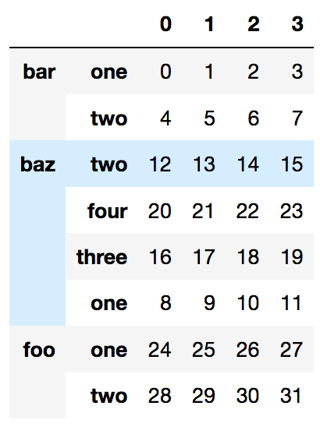
df = pd.DataFrame(np.arange(32).reshape([8, 4]), index=arrays)
new_baz_index = [('baz', i) for i in ['two','four','three','one']]
index = df.index.values.copy()
index[df.index.get_loc('baz')] = new_baz_index
df.reindex(index)

df.index.get_loc('baz') will get the location of the baz part as a slice object and we replace the part there only.

enter image description here