How to return the most frequent letters in a string and order them based on their frequency count

I have this string: s = "china construction bank". I want to create a function that returns the 3 most frequent characters and order them by their frequency of appearance and the number of times they appear, but if 2 characters appears the same number of times, they should be ordered based on their alphabetical order. I also want to print each character in a separate line.

I have built this code by now:

from collections import Counter
def ordered_letters(s, n=3):
    ctr = Counter(c for c in s if c.isalpha())
    print ''.join(sorted(x[0] for x in ctr.most_common(n)))[0], '\n', ''.join(sorted(x[0] for x in ctr.most_common(n)))[1], '\n', ''.join(sorted(x[0] for x in ctr.most_common(n)))[2]`

This code applied to the above string will yield:

a 
c 
n

But this is not what i really want, what i would like as output is:

1st most frequent: 'n'. Appearances: 4
2nd most frequent: 'c'. Appearances: 3
3rd most frequent: 'a'. Appearances: 2

I’m stuck in the part where i have to print in alphabetical order the characters which have the same frequencies. How could i do this?

Thank you very much in advance

Solution:

You can use heapq.nlargest with a custom sort key. We use -ord(k) as a secondary sorter to sort by ascending letters. Using a heap queue is better than sorted as there’s no need to sort all items in your Counter object.

from collections import Counter
from heapq import nlargest

def ordered_letters(s, n=3):
    ctr = Counter(c.lower() for c in s if c.isalpha())

    def sort_key(x):
        return (x[1], -ord(x[0]))

    for idx, (letter, count) in enumerate(nlargest(n, ctr.items(), key=sort_key), 1):
        print('#', idx, 'Most frequent:', letter, '.', 'Appearances:', count)

ordered_letters("china construction bank")

# 1 Most frequent: n . Appearances: 4
# 2 Most frequent: c . Appearances: 3
# 3 Most frequent: a . Appearances: 2
Invalid syntax during reading of csv file in python

I am trying to read a file using csv.reader in python. I am new to Python and am using Python 2.7.15.

The example that I am trying to recreate is gotten from “Reading CSV Files With csv” section of this page. This is the code:

import csv

with open('employee_birthday.txt') as csv_file:
    csv_reader = csv.reader(csv_file, delimiter=',')
    line_count = 0
    for row in csv_reader:
        if line_count == 0:
            print(f'Column names are {", ".join(row)}')
            line_count += 1
        else:
            print(f'\t{row[0]} works in the {row[1]} department, and was born in {row[2]}.')
            line_count += 1
    print(f'Processed {line_count} lines.')

During execution of the code, I am getting the following errors:

File "sidd_test2.py", line 11
  print(f'Column names are {", ".join(row)}')
                                         ^
SyntaxError: invalid syntax 

What am I doing wrong? How can I avoid this error. I will appreciate any help.

Solution:

Because f in front of strings (f-strings) are only for versions above python 3.5, so try this:

print('Column names are',", ".join(row))

Or:

print('Column names are %s'%", ".join(row))

Or:

print('Column names are {}'.format(", ".join(row)))

How to iterate over a dictionary and operate with its elements?

I have this dictionary, where the keys represent atom types and the values represent the atomic masses:

mass = {'H': 1.007825, 'C': 12.01, 'O': 15.9994, 'N': 14.0067, 'S': 31.972071,
        'P': 30.973762}

what I want to do is to create a function that given a molecule, for instance ('H2-N-C6-H4-C-O-2H'), iterates over the mass dictionary and calculates the atomic mass on the given molecule. The value of the mass must be multiplied by the number that comes right after the atom type: H2 = H.value * 2

I know that firstly I must isolate the keys of the given molecules, for this I could use string.split('-'). Then, I think I could use and if block to stablish a condition to accomplish if the key of the given molecule is in the dictionary. But later I’m lost about how I should proceed to find the mass for each key of the dictionary.

The expected result should be something like:

mass_counter('H2-N15-P3')

out[0] 39351.14

How could I do this?

EDIT:

This is what I’ve tried so far

# Atomic masses
mass = {'H': 1.007825, 'C': 12.01, 'O': 15.9994, 'N': 14.0067, 'S': 31.972071, 
        'P': 30.973762}

def calculate_atomic_mass(molecule):
    """
    Calculate the atomic mass of a given molecule
    """
    mass = 0.0
    mol = molecule.split('-')

    for key in mass:
        if key in mol:
            atom = key

    return mass

print calculate_atomic_mass('H2-O')
print calculate_atomic_mass('H2-S-O4')
print calculate_atomic_mass('C2-H5-O-H')
print calculate_atomic_mass('H2-N-C6-H4-C-O-2H')

Solution:

Given all components have the shape Aa123, It might be easier here to identify parts with a regex, for example:

import re
srch = re.compile(r'([A-Za-z]+)(\d*)')
mass = {'H': 1.007825, 'C': 12.01, 'O': 15.9994, 'N': 14.0067, 'S': 31.972071, 'P': 30.973762}

def calculate_atomic_mass(molecule):
    return sum(mass[a[1]]*int(a[2] or '1') for a in srch.finditer(molecule))

Here our regular expression [wiki] thus captures a sequence of [A-Z-a-z]s, and a (possibly empty) sequence of digits (\d*), these are the first and second capture group respectively, and thus can be obtained for a match with a[1] and a[2].

this then yields:

>>> print(calculate_atomic_mass('H2-O'))
18.01505
>>> print(calculate_atomic_mass('H2-S-O4'))
97.985321
>>> print(calculate_atomic_mass('C2-H5-O-H'))
46.06635
>>> print(calculate_atomic_mass('H2-N-C6-H4-C-O-2H'))
121.130875
>>> print(calculate_atomic_mass('H2-N15-P3'))
305.037436

We thus take the sum of the mass[..] of the first capture group (the name of the atom) times the number at the end, and we use '1' in case no such number can be found.

Or we can first split the data, and then look for a atom part and a number part:

import re
srch = re.compile(r'^([A-Za-z]+)(\d*)$')

def calculate_atomic_mass(molecule):
    """
    Calculate the atomic mass of a given molecule
    """
    result = 0.0
    mol = molecule.split('-')
    if atm in mol:
        c = srch.find(atm)
        result += result[c[1]] * int(c[2] or '1')
    return result

IndentationError: unexpected indent after comment

I am trying to write some Python example code with a line commented out:

user_by_email = session.query(User)\
    .filter(Address.email=='one')\
    #.options(joinedload(User.addresses))\
    .first()

I also tried:

user_by_email = session.query(User)\
    .filter(Address.email=='one')\
#    .options(joinedload(User.addresses))\
    .first()

But I get IndentationError: unexpected indent.
If I remove the commented out line, the code works.
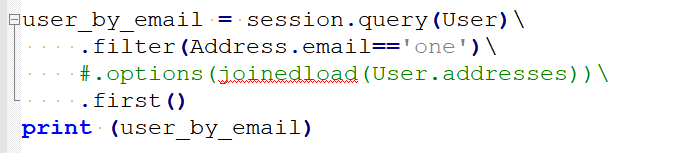
I am decently sure that I use only spaces (Notepad++ screenshot):

enter image description here

Solution:

Enclose the statement in paranthesis

user_by_email = (session.query(User)
     .filter(Address.email=='one')
     #.options(joinedload(User.addresses))
     .first())

How can I store multiple function as a value of the dictionary?

In the following code I try to store multiple functions as a value of the dictionary. This code doesn’t work. The two functions are returned as a tuple. But I don’t want to iter over the dictionary. I want to use a special key, and then I want the dictionary to run the two functions.

from functools import partial

def test_1(arg_1 = None):
     print "printing from test_1 func with text:", arg_1

def test_2(arg_2 = None):
     print "printing from test_2 func with text:", arg_2

dic = {'a':(partial(test_1, arg_1 = 'test_1'),
            partial(test_2, arg_2 = 'test_2'))}

dic['a']()

Solution:

You can build a closure to do that like:

Code:

def chain_funcs(*funcs):
    """return a callable to call multiple functions"""
    def call_funcs(*args, **kwargs):
        for f in funcs:
            f(*args, **kwargs)

    return call_funcs

Test Code:

def test_1(arg_1=None):
    print("printing from test_1 func with text: %s" % arg_1)


def test_2(arg_2=None):
    print("printing from test_2 func with text: %s" % arg_2)


from functools import partial
dic = {'a': chain_funcs(partial(test_1, arg_1='test_1'),
                        partial(test_2, arg_2='test_2'))}

dic['a']()

Results:

printing from test_1 func with text: test_1
printing from test_2 func with text: test_2

">" not working to direct output of python command to file

I have decided to try snakefood to help with a refactoring to check the imports. It keeps dumping output on the screen and “>” does not send it to a file, it just creates an empty file.

I had to unfortunately create a virtualenv with Python 2.7 as it probably does not work properly in Python 3. Still, it can probably check a Python 2 project, even though it is written in Python 2. Am using a Mac, but it seems to use similar commands to Linux on the command line.

I did

pip install six
pip install graphviz
pip install snakefood

once the Python 2 environment was activated.

Then if I type

$ sfood-checker path/to/folder

..it dumps a huge amount of text on the screen, but

$ sfood-checker path/to/folder > check.txt

..only creates an empty file. Any idea what is wrong, how to fix it? Would like to carefully go through the file in sublime.

Solution:

You are redirecting stdout, but your program is writing to stderr. The fix is to redirect stderr:

$ sfood-checker path/to/folder 2> check.txt

Or redirect both stdout and stderr:

$ sfood-checker path/to/folder &> check.txt

Background: when processes are initially created, they generally always have three initial file descriptors already opened for them:

  • 0, stdin, “Standard Input”, a read-only stream
  • 1, stdout, “Standard Output”, a write-only stream
  • 2, stderr, “Standard Error”, a write-only stream

There is precisely zero difference between stdout and stderr, other than convention and the file descriptor number. By convention, then, status messages and other “informational” content is output to stderr (some version of fwrite(stderr, informational_data);, and the data required for normal operations of the program are written to stdout.

Why is the result of chr(0x24) + chr(0x84) different in python 2 and 3

I was using python to solve the protostar challenges from exploit-exercises. And I was surprised by the different output for this code with python 3.

payload = chr(0x24) + chr(0x84)
print (payload)

In terminal:

$ python exploit-stack3.py | xxd
00000000: 2484 0a                                  $..
$ python3 exploit-stack3.py | xxd
00000000: 24c2 840a                                $...

Could someone please explain where the c2 is comming from ?

Solution:

It’s coming from encoding the character as UTF-8.

>>> '\x84'.encode('utf-8')
b'\xc2\x84'

Why does chained assignment work this way?

I found the assignment a = a[1:] = [2] in an article. I tried it in python3 and python2; it all works, but I don’t understand how it works. = here is not like in C; C processes = by right to left. How does python process the = operator?

Solution:

Per the language docs on assignment:

An assignment statement evaluates the expression list (remember that this can be a single expression or a comma-separated list, the latter yielding a tuple) and assigns the single resulting object to each of the target lists, from left to right.

In this case, a = a[1:] = [2] has an expression list [2], and two “target lists”, a and a[1:], where a is the left-most “target list”.

You can see how this behaves by looking at the disassembly:

>>> import dis
>>> dis.dis('a = a[1:] = [2]')
  1           0 LOAD_CONST               0 (2)
              2 BUILD_LIST               1
              4 DUP_TOP
              6 STORE_NAME               0 (a)
              8 LOAD_NAME                0 (a)
             10 LOAD_CONST               1 (1)
             12 LOAD_CONST               2 (None)
             14 BUILD_SLICE              2
             16 STORE_SUBSCR
             18 LOAD_CONST               2 (None)
             20 RETURN_VALUE

(The last two lines of the disassembly can be ignored, dis is making a function wrapper to disassemble the string)

The important part to note is that when you do x = y = some_val, some_val is loaded on the stack (in this case by the LOAD_CONST and BUILD_LIST), then the stack entry is duplicated and assigned, from left to right, to the targets given.

So when you do:

a = a[1:] = [2]

it makes two references to a brand new list containing 2, and the first action is a STORE one of these references to a. Next, it stores the second reference to a[1:], but since the slice assignment mutates a itself, it has to load a again, which gets the list just stored. Luckily, list is resilient against self-slice-assignment, or we’d have issues (it would be forever reading the value it just added to add to the end until we ran out of memory and crashed); as is, it behaves as a copy of [2] was assigned to replace any and all elements from index one onwards.

The end result is equivalent to if you’d done:

_ = [2]
a = _
a[1:] = _

but it avoids the use of the _ name.

To be clear, the disassembly annotated:

Make list [2]:

  1           0 LOAD_CONST               0 (2)
              2 BUILD_LIST               1

Make a copy of the reference to [2]:

              4 DUP_TOP

Perform store to a:

              6 STORE_NAME               0 (a)

Perform store to a[1:]:

              8 LOAD_NAME                0 (a)
             10 LOAD_CONST               1 (1)
             12 LOAD_CONST               2 (None)
             14 BUILD_SLICE              2
             16 STORE_SUBSCR

How to save numpy ndarray as .csv file?

I created a numpy array as follows:

import numpy as np

names  = np.array(['NAME_1', 'NAME_2', 'NAME_3'])
floats = np.array([ 0.1234 ,  0.5678 ,  0.9123 ])

ab = np.zeros(names.size, dtype=[('var1', 'U6'), ('var2', float)])
ab['var1'] = names
ab['var2'] = floats

The values in ab are shown below:

array([(u'NAME_1',  0.1234), (u'NAME_2',  0.5678), (u'NAME_3',  0.9123)],
      dtype=[('var1', '<U6'), ('var2', '<f8')])

When I try to save ab as a .csv file using savetxt() command,

np.savetxt('D:\test.csv',ab,delimiter=',')

I get below error

---------------------------------------------------------------------------
TypeError                                 Traceback (most recent call last)
<ipython-input-66-a71fd201aefe> in <module>()
----> 1 np.savetxt('D:\Azim\JF-Mapping-workflow-CRM\Backup\delete.csv',ab,delimiter=',')

c:\python27\lib\site-packages\numpy\lib\npyio.pyc in savetxt(fname, X, fmt, delimiter, newline, header, footer, comments)
   1256                     raise TypeError("Mismatch between array dtype ('%s') and "
   1257                                     "format specifier ('%s')"
-> 1258                                     % (str(X.dtype), format))
   1259         if len(footer) > 0:
   1260             footer = footer.replace('\n', '\n' + comments)

TypeError: Mismatch between array dtype ('[('var1', '<U6'), ('var2', '<f8')]') and format specifier ('%.18e,%.18e')

Solution:

Your array include strings, but np default formatting is for floats.

Try manually setting the format:

np.savetxt(r'g:\test.csv',ab,delimiter=',', fmt=('%s, %f'))

Can someone explain to me why this second method does not fully update the string?

I’ve been trying to write a function which converts under_score_words to camelCaseWords. The following is how I’d do something like this in the past;

functionName = "function_for_test_case"
for character in functionName:
    if character == "_":
        functionName = functionName.replace("_" + functionName[functionName.index(character) + 1], functionName[functionName.index(character) + 1].upper())

print functionName

which correctly outputs:

functionForTestCase

However this time I originally tried doing it another way, which I found a bit neater:

functionName = "function_for_test_case"
for index, character in enumerate(functionName):
    if character == "_":
        functionName = functionName.replace("_" + functionName[index + 1], functionName[index + 1].upper())

print functionName

Which instead outputs:

functionFor_test_case

I was stumped to why it wasn’t working… I figured it might’ve been since I was changing the length of the string (by removing the underscore), but then I’m not sure why the first method works.

Also, if you print the replace as it goes for the second function, you can see it does actually find and replace the rest of the values, but ofcourse it does not save them. For example:

functionName = "function_for_test_case"
for index, character in enumerate(functionName):
    if character == "_":
        print functionName.replace("_" + functionName[index + 1], functionName[index + 1].upper())


functionFor_test_case
function_forTest_case
function_for_testCase

From what I could tell, these functions were essentially doing the same thing in different wording, could anyone explain why they have a different output?

Edit: I’ved edited the for loops to make it more obvious of what I was trying

Solution:

enumerate(functionName) is being evaluated when program enters the loop.
The first time you replace 2 chars with just 1 (_f -> F), the indices become invalid. So at some point you have this situation:

index == 12
character == '_'
functionName == 'functionFor_test_case'
functionName[index + 1] == 'e'

So you try to replace _e with E and it’s simply not there.

BTW, take a look at camelize() function in inflection library.