NumPy: why does np.linalg.eig and np.linalg.svd give different V values of SVD?

I am learning SVD by following this MIT course.

the Matrix is constructed as

C = np.matrix([[5,5],[-1,7]])
C
matrix([[ 5,  5],
        [-1,  7]])

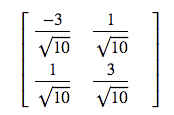
the lecturer gives the V as
enter image description here

this is close to

w, v = np.linalg.eig(C.T*C)
matrix([[-0.9486833 , -0.31622777],
        [ 0.31622777, -0.9486833 ]])

but np.linalg.svd(C) gives a different output

u, s, vh = np.linalg.svd(C)
vh
matrix([[ 0.31622777,  0.9486833 ],
        [ 0.9486833 , -0.31622777]])

it seems the vh exchange the elements in the V vector, is it acceptable?

did I do and understand this correctly?

Solution:

For linalg.eig your Eigenvalues are stored in w. These are:

>>> w
array([20., 80.])

For your singular value decomposition you can get your Eigenvalues by squaring your singular values (C has maximum rank so everything is easy here):

>>> s**2
array([80., 20.])

As you can see their order is flipped.

From the linalg.eig documentation:

The eigenvalues are not necessarily ordered

From the linalg.svd documentation:

Vector(s) with the singular values, within each vector sorted in descending order. …

In general routines that give you Eigenvalues and Eigenvectors do not “sort” them necessarily the way you might want them. So it is always important to make sure you have the Eigenvector for the Eigenvalue you want. If you need them sorted (e.g. by Eigenvalue magnitude) you can always do this yourself (see here: sort eigenvalues and associated eigenvectors after using numpy.linalg.eig in python).

Finally note that the rows in vh contain the Eigenvectors, whereas in v it’s the columns.

So that means that e.g.:

>>> v[:,0].flatten()
matrix([[-0.9486833 ,  0.31622777]])
>>> vh[:,1].flatten()
matrix([[ 0.9486833 , -0.31622777]])

give you both the Eigenvector for the Eigenvalue 20.
Python, Pandas: A Better way to get the first None position in list which give maximum consecutive None count

I have lists that contain None like the following lists.

l1 = [None, 1, None, None, 2, None, None]
l2 = [None, 1, 1, None, None, None, 2, None, None]

I want to get the first None position in this list which gives the maximum consecutive None count.

get_start_None_pos(l1) # should return 2
get_start_None_pos(l2) # should return 3

My current approach with Pandas which works fine but it too slow when I have so many lists to deal with.

def get_start_None_pos(l: list) -> int:
    s = pd.Series(l)
    s = s.isna()
    s = s.cumsum() - s.cumsum().where(~s).ffill().fillna(0)
    return int(s.idxmax() - s.max() + 1)

I would like to know, is there any better way to solve something like this?

Solution:

Here’s one with NumPy –

def maxconsecNone_start(l):
    a = np.isnan(np.asarray(l, dtype=np.float64))
    a1 = np.r_[False,a,False]
    idx = np.flatnonzero(a1[:-1] != a1[1:])
    return idx[2*(idx[1::2]-idx[::2]).argmax()]

Sample runs –

In [49]: l1
Out[49]: [None, 1, None, None, 2, None, None]

In [50]: l2
Out[50]: [None, 1, 1, None, None, None, 2, None, None]

In [51]: maxconsecNone_start(l1)
Out[51]: 2

In [52]: maxconsecNone_start(l2)
Out[52]: 3

numpy array indicator operation

I want to modify an empty bitmap by given indicators (x and y axis).
For every coordinate given by the indicators the value should be raised by one.

So far so good everything seems to work. But if I have some similar indicators in my array of indicators it will only raise the value once.

>>> img
array([[0, 0, 0, 0, 0],
       [0, 0, 0, 0, 0],
       [0, 0, 0, 0, 0],
       [0, 0, 0, 0, 0],
       [0, 0, 0, 0, 0]])

>>> inds
array([[0, 0],
       [3, 4],
       [3, 4]])

Operation:

>>> img[inds[:,1], inds[:,0]] += 1

Result:

>>> img
    array([[1, 0, 0, 0, 0],
           [0, 0, 0, 0, 0],
           [0, 0, 0, 0, 0],
           [0, 0, 0, 0, 0],
           [0, 0, 0, 1, 0]])

Expected result:

>>> img
    array([[1, 0, 0, 0, 0],
           [0, 0, 0, 0, 0],
           [0, 0, 0, 0, 0],
           [0, 0, 0, 0, 0],
           [0, 0, 0, 2, 0]])

Does someone have an idea how to solve this? Preferably a fast approach without the use of loops.

Solution:

This is one way. Counting algorithm courtesy of @AlexRiley.

For performance implications of relative sizes of img and inds, see @PaulPanzer’s answer.

# count occurrences of each row and return array
counts = (inds[:, None] == inds).all(axis=2).sum(axis=1)

# apply indices and counts
img[inds[:,1], inds[:,0]] += counts

print(img)

array([[1, 0, 0, 0, 0],
       [0, 0, 0, 0, 0],
       [0, 0, 0, 0, 0],
       [0, 0, 0, 0, 0],
       [0, 0, 0, 2, 0]])

Close form solution for finding a root

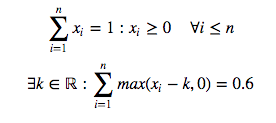
Suppose I have a Pandas Series s whose values sum to 1 and whose values are also all greater than or equal to 0. I need to subtract a constant from all values such that the sum of the new Series is equal to 0.6. The catch is, when I subtract this constant, the values never end up less than zero.

In math formula, assume I have a series of x‘s and I want to find k

enter image description here

MCVE

import pandas as pd
import numpy as np
from string import ascii_uppercase

np.random.seed([3, 141592653])
s = np.power(
    1000, pd.Series(
        np.random.rand(10),
        list(ascii_uppercase[:10])
    )
).pipe(lambda s: s / s.sum())

s

A    0.001352
B    0.163135
C    0.088365
D    0.010904
E    0.007615
F    0.407947
G    0.005856
H    0.198381
I    0.027455
J    0.088989
dtype: float64

The sum is 1

s.sum()

0.99999999999999989

What I’ve tried

I can use Newton’s method (among others) found in Scipy’s optimize module

from scipy.optimize import newton

def f(k):
    return s.sub(k).clip(0).sum() - .6

Finding the root of this function will give me the k I need

initial_guess = .1
k = newton(f, x0=initial_guess)

Then subtract this from s

new_s = s.sub(k).clip(0)
new_s

A    0.000000
B    0.093772
C    0.019002
D    0.000000
E    0.000000
F    0.338583
G    0.000000
H    0.129017
I    0.000000
J    0.019626
dtype: float64

And the new sum is

new_s.sum()

0.60000000000000009

Question

Can we find k without resorting to using a solver?

Solution:

Updated: Three different implementations – interestingly, the least sophisticated scales best.

import numpy as np

def f_sort(A, target=0.6):
    B = np.sort(A)
    C = np.cumsum(np.r_[B[0], np.diff(B)] * np.arange(N, 0, -1))
    idx = np.searchsorted(C, 1 - target)
    return B[idx] + (1 - target - C[idx]) / (N-idx)

def f_partition(A, target=0.6):
    target, l = 1 - target, len(A)
    while len(A) > 1:
        m = len(A) // 2
        A = np.partition(A, m-1)
        ls = A[:m].sum()
        if ls + A[m-1] * (l-m) > target:
            A = A[:m]
        else:
            l -= m
            target -= ls
            A = A[m:]
    return target / l            

def f_direct(A, target=0.6):
    target = 1 - target
    while True:
        gt = A > target / len(A)
        if np.all(gt):
            return target / len(A)
        target -= A[~gt].sum()
        A = A[gt]

N = 10
A = np.random.random(N)
A /= A.sum()

print(f_sort(A), np.clip(A-f_sort(A), 0, None).sum())
print(f_partition(A), np.clip(A-f_partition(A), 0, None).sum())
print(f_direct(A), np.clip(A-f_direct(A), 0, None).sum())

from timeit import timeit
kwds = dict(globals=globals(), number=1000)

N = 100000
A = np.random.random(N)
A /= A.sum()

print(timeit('f_sort(A)', **kwds))
print(timeit('f_partition(A)', **kwds))
print(timeit('f_direct(A)', **kwds))

Sample run:

0.04813686999999732 0.5999999999999999
0.048136869999997306 0.6000000000000001
0.048136869999997306 0.6000000000000001
8.38109541599988
2.1064437470049597
1.2743922089866828

NumPy broadcasting to improve dot-product performance

This is a rather simple operation, but it is repeated millions of times in my actual code and, if possible, I’d like to improve its performance.

import numpy as np

# Initial data array
xx = np.random.uniform(0., 1., (3, 14, 1))
# Coefficients used to modify 'xx'
a, b, c = np.random.uniform(0., 1., 3)

# Operation on 'xx' to obtain the final array 'yy'
yy = xx[0] * a * b + xx[1] * b + xx[2] * c

The last line is the one I’d like to improve. Basically, each term in xx is multiplied by a factor (given by the a, b, c coefficients) and then all terms are added to give a final yy array with the shape (14, 1) vs the shape of the initial xx array (3, 14, 1).

Is it possible to do this via numpy broadcasting?

Solution:

We could use broadcasted multiplication and then sum along the first axis for the first alternative.

As the second one, we could also bring in matrix-multiplication with np.dot. Thus, giving us two more approaches. Here’s the timings for the sample provided in the question –

# Original one
In [81]: %timeit xx[0] * a * b + xx[1] * b + xx[2] * c
100000 loops, best of 3: 5.04 µs per loop

# Proposed alternative #1
In [82]: %timeit (xx *np.array([a*b,b,c])[:,None,None]).sum(0)
100000 loops, best of 3: 4.44 µs per loop

# Proposed alternative #2
In [83]: %timeit np.array([a*b,b,c]).dot(xx[...,0])[:,None]
1000000 loops, best of 3: 1.51 µs per loop

Index a NumPy array row-wise

Say I have a NumPy array:

>>> X = np.array([[1, 2, 3, 4], [5, 6, 7, 8], [9, 10, 11, 12]])
>>> X
array([[ 1,  2,  3,  4],
       [ 5,  6,  7,  8],
       [ 9, 10, 11, 12]])

and an array of indexes that I want to select for each row:

>>> ixs = np.array([[1, 3], [0, 1], [1, 2]])
>>> ixs
array([[1, 3],
       [0, 1],
       [1, 2]])

How do I index the array X so that for every row in X I select the two indices specified in ixs?

So for this case, I want to select element 1 and 3 for the first row, element 0 and 1 for the second row, and so on. The output should be:

array([[2, 4],
       [5, 6],
       [10, 11]])

A slow solution would be something like this:

output = np.array([row[ix] for row, ix in zip(X, ixs)])

however this can get kinda slow for extremely long arrays. Is there a faster way to do this without a loop using NumPy?

EDIT: Some very approximate speed tests on a 2.5K * 1M array (10GB):

np.array([row[ix] for row, ix in zip(X, ixs)]) 0.16s

X[np.arange(len(ixs)), ixs.T].T 0.175s

X.take(idx+np.arange(0, X.shape[0]*X.shape[1], X.shape[1])[:,None]) 33s

np.fromiter((X[i, j] for i, row in enumerate(ixs) for j in row), dtype=X.dtype).reshape(ixs.shape) 2.4s

Solution:

You can use this:

X[np.arange(len(ixs)), ixs.T].T

Here is the reference for complex indexing.

numpy broadcasting to all dimensions

I have a 3d numpy array build like this:

a = np.ones((3,3,3))

And I would like to broadcast values on all dimensions starting from a certain point with given coordinates, but the number of dimensions may vary.

For example if i’m given the coordinates (1,1,1) I can do these 3 functions:

a[1,1,:] = 0
a[1,:,1] = 0
a[:,1,1] = 0

And the result will be my desired output which is:

array([[[1., 1., 1.],
        [1., 0., 1.],
        [1., 1., 1.]],

       [[1., 0., 1.],
        [0., 0., 0.],
        [1., 0., 1.]],

       [[1., 1., 1.],
        [1., 0., 1.],
        [1., 1., 1.]]])

Or if i’m given the coordinates (0,1,0) the corresponding broadcast will be:

a[0,1,:] = 0
a[0,:,0] = 0
a[:,1,0] = 0

Is there any way to do this in a single action instead of 3? I’m asking because the actual arrays i’m working with have even more dimensions which makes the code seem long and redundant. Also if the number of dimensions change I would have to rewrite the code.

EDIT: It doesn’t have to be a single action, I just need to do it in all dimensions programatically such that if the number of dimensions change the code will stay the same.

EDIT 2: About the logic of this, i’m not sure if that’s relevant, but i’m being given the value of a point (by coordinates) on a map and based on that I know the values of the entire row, column and height on the same map (that’s why i’m updating all 3 with 0 as an example). In other cases the map is 2-dimensions and I still know the same thing about the row and column, but can’t figure out a function that works for a varied numbers of dimensions.

Solution:

Here’s a way to generate string of exactly the 3 lines of code you’re currently using, and then execute them:

import numpy as np

a = np.ones([3,3,3])
coord = [1, 1, 1]

for i in range(len(coord)):
   temp = coord[:]
   temp[i] = ':'
   slice_str = ','.join(map(str, temp))
   exec("a[%s] = 0"%slice_str)

print a

This may not be the best approach, but at least it’s amusing. Now that we know that it works, we can go out and find the appropriate syntax to do it without actually generating the string and execing it. For example, you could use slice:

import numpy as np

a = np.ones([3,3,3])
coord = [1, 1, 1]

for i, length in enumerate(a.shape):
   temp = coord[:]
   temp[i] = slice(length)
   a[temp] = 0
print a

Summing array values by repeating index for an array

I want to sum the values in vals into elements of a smaller array a specified in an index list idx.

import numpy as np

a = np.zeros((1,3))
vals = np.array([1,2,3,4])
idx = np.array([0,1,2,2])

a[0,idx] += vals

This produces the result [[ 1. 2. 4.]] but I want the result [[ 1. 2. 7.]], because it should add the 3 from vals and 4 from vals into the 2nd element of a.

I can achieve what I want with:

import numpy as np

a = np.zeros((1,3))
vals = np.array([1,2,3,4])
idx = np.array([0,1,2,2])

for i in np.unique(idx):
    fidx = (idx==i).astype(int)
    psum = (vals * fidx).sum()
    a[0,i] = psum 

print(a)

Is there a way to do this with numpy without using a for loop?

Solution:

Possible with np.add.at as long as the shapes align, i.e., a will need to be 1D here.

a = a.squeeze()
np.add.at(a, idx, vals)

a
array([1., 2., 7.])

Numpy: Fastest way to insert value into array such that array's in order

Suppose I have an array my_array and a singular value my_val. (Note that my_array is always sorted).

my_array = np.array([1, 2, 3, 4, 5])
my_val = 1.5

Because my_val is 1.5, I want to put it in between 1 and 2, giving me the array [1, 1.5, 2, 3, 4, 5].

My question is: What’s the fastest way (i.e. in microseconds) of producing the ordered output array as my_array grows arbitrarily large?

The original way I though of was concatenating the value to the original array and then sorting:

arr_out = np.sort(np.concatenate((my_array, np.array([my_val]))))
[ 1.   1.5  2.   3.   4.   5. ]

I know that np.concatenate is fast but I’m unsure how np.sort would scale as my_array grows, even given that my_array will always be sorted.

Edit:

I’ve compiled the times for the various methods listed at the time an answer was accepted:

Input:

import timeit

timeit_setup = 'import numpy as np\n' \
               'my_array = np.array([i for i in range(1000)], dtype=np.float64)\n' \
               'my_val = 1.5'
num_trials = 1000

my_time = timeit.timeit(
    'np.sort(np.concatenate((my_array, np.array([my_val]))))',
    setup=timeit_setup, number=num_trials
)

pauls_time = timeit.timeit(
    'idx = my_array.searchsorted(my_val)\n'
    'np.concatenate((my_array[:idx], [my_val], my_array[idx:]))',
    setup=timeit_setup, number=num_trials
)

sanchit_time = timeit.timeit(
    'np.insert(my_array, my_array.searchsorted(my_val), my_val)',
    setup=timeit_setup, number=num_trials
)

print('Times for 1000 repetitions for array of length 1000:')
print("My method took {}s".format(my_time))
print("Paul Panzer's method took {}s".format(pauls_time))
print("Sanchit Anand's method took {}s".format(sanchit_time))

Output:

Times for 1000 repetitions for array of length 1000:
My method took 0.017865657746239747s
Paul Panzer's method took 0.005813951002013821s
Sanchit Anand's method took 0.014003945532323987s

And the same for 100 repetitions for an array of length 1,000,000:

Times for 100 repetitions for array of length 1000000:
My method took 3.1770704101754195s
Paul Panzer's method took 0.3931240139911161s
Sanchit Anand's method took 0.40981490723551417s

Solution:

Use np.searchsorted to find the insertion point in logarithmic time:

>>> idx = my_array.searchsorted(my_val)
>>> np.concatenate((my_array[:idx], [my_val], my_array[idx:]))
array([1. , 1.5, 2. , 3. , 4. , 5. ])

Note 1: I recommend looking at @Willem Van Onselm’s and @hpaulj’s insightful comments.

Note 2: Using np.insert as suggested by @Sanchit Anand may be slightly more convenient if all datatypes are matching from the beginning. It is, however, worth mentioning that this convenience comes at the cost of significant overhead:

>>> def f_pp(my_array, my_val):
...      idx = my_array.searchsorted(my_val)
...      return np.concatenate((my_array[:idx], [my_val], my_array[idx:]))
... 
>>> def f_sa(my_array, my_val):
...      return np.insert(my_array, my_array.searchsorted(my_val), my_val)
...
>>> my_farray = my_array.astype(float)
>>> from timeit import repeat
>>> kwds = dict(globals=globals(), number=100000)
>>> repeat('f_sa(my_farray, my_val)', **kwds)
[1.2453778409981169, 1.2268288589984877, 1.2298014000116382]
>>> repeat('f_pp(my_array, my_val)', **kwds)
[0.2728819379990455, 0.2697303680033656, 0.2688361559994519]

Pandas Datetimeindex with numpy.maximum gives error

I’m experiencing an error that is possibly a bug in pandas (v. 0.22 on Windows, Python version 3.6.3), or rather in its interaction with NumPy (v. 1.14), but I wonder if I’m missing something more profound.

Here’s the issue: if I have two Datetimeindex objects of the same length and I use np.maximum between them, the output is as expected:

import pandas as pd
import numpy as np
v1 = pd.DatetimeIndex(['2016-01-01', '2018-01-02', '2018-01-03'])
v2 = pd.DatetimeIndex(['2017-01-01', '2017-01-02', '2019-01-03'])
np.maximum(v1, v2)

returns the elementwise maximum:

DatetimeIndex([‘2017-01-01’, ‘2018-01-02’, ‘2019-01-03′], dtype=’datetime64[ns]’, freq=None)

However, if I try to only use one element of the two, I get an error:

np.maximum(v1, v2[0])

pandas_libs\tslib.pyx in pandas._libs.tslib._Timestamp.richcmp()

TypeError: Cannot compare type ‘Timestamp’ with type ‘int’

Two workarounds that work, but both are rather nasty to write, are either to use slicing or to explicitly convert to pydatetime:

np.maximum(v1, v2[:1])

DatetimeIndex([‘2017-01-01’, ‘2018-01-02’, ‘2018-01-03′], dtype=’datetime64[ns]’, freq=None)

or:

v1.to_pydatetime() - v2[0].to_pydatetime()

array([datetime.datetime(2017, 1, 1, 0, 0),
datetime.datetime(2018, 1, 2, 0, 0),
datetime.datetime(2018, 1, 3, 0, 0)], dtype=object)

The first workaround is actually quite weird, because doing v2 - v1[0] works correctly, while v2 - v1[:1] gives an error (rather as expected this time, since the two resulting time series have unaligned indices).

Solution:

One solution is to convert to a pd.Series, and then use pd.Series.clip:

pd.Series(v1).clip(v2[0])

# 0   2017-01-01
# 1   2018-01-02
# 2   2018-01-03
# dtype: datetime64[ns]