Replace certain text with value if text in list

I’m just getting up to speed on Pandas and cannot resolve one issue. I have a list of Counties in NY State. If the County is one of the 5 boroughs, I want to change the county name to New York, otherwise I leave it alone. The following gives the idea, but is not correct.

EDIT – so if the counties in the County column of the first few rows were Albany, Allegheny, Bronx before the change, they would be Albany, Allegheny, New York after the change

# clean up county names
# 5 boroughs must be combined to New York City
# eliminate the word county
nyCounties = ["Kings", "Queens", "Bronx", "Richmond", "New York"]

nypopdf['County'] = ['New York' for nypopdf['County'] in nyCounties else   
nypopdf['County']]

Solution:

A small mockup:

In [44]: c = ['c', 'g']
In [45]: df = pd.DataFrame({'county': list('abccdefggh')})
In [46]: df['county'] = df['county'].where(~df['county'].isin(c), 'N')
In [47]: df
Out[47]:   county
         0      a
         1      b
         2      N
         3      N
         4      d
         5      e
         6      f
         7      N
         8      N
         9      h

So this is using pd.Series.where ~df['county'].isin(c) selects rows that are not in the list c (the ~ at the start is the ‘not’ operation), the second argument is the value to replace with (when the condition is False).

To fit your example:

nypopdf['County'] = nypopdf['County'].where(~nypopdf['County'].isin(nyCounties), 'New York')

or

nypopdf['County'].where(~nypopdf['County'].isin(nyCounties), 'New York', inplace=True)

Complete example:

nypopdf = pd.DataFrame({'County': ['Albany', 'Allegheny', 'Bronx']})
nyCounties = ["Kings", "Queens", "Bronx", "Richmond", "New York"]
print(nypopdf)
      County
0     Albany
1  Allegheny
2      Bronx
nypopdf['County'].where(~nypopdf['County'].isin(nyCounties), 'New York', inplace=True)
print(nypopdf)
      County
0     Albany
1  Allegheny
2   New York
Python, why is this lamdba function not correct?

flight_data is dataframe in panda:

  for c in flight_data.columns:
      if ('Delay' in c):
          flight_data[c].fillna(0, inplace = True)

How do I do this in 1 line using lambda function?

map(lambda c: flight_data[c].fillna(0, inplace = True), list(filter(lambda c : 'Delay' in c, flight_data.columns)))

Why aren’t these two equivalent?

When printing out the data, NaN is not replaced by 0.

Solution:

Don’t use lambda

lambda only obfuscates logic here. Just specify in-scope columns and use fillna directly:

cols = df.filter(like='Delay').columns
df[cols] = df[cols].fillna(0)

How do I do this in 1 line using lambda function?

But to answer your question, you can do this without relying on side-effects of map or a list comprehension:

df = df.assign(**df.pipe(lambda x: {c: x[c].fillna(0) for c in x.filter(like='Delay')}))

Pandas replace all numeric values not equal to a specific value

My DataFrame:

            HLLM  HXBX  JHWO  RPNZ  ZHNL
2008-08-31     0     0     0     0     0
2008-09-30     0     0     0     0     0
2008-10-31     3     1     0     0     5
2008-11-30     0    -1     0     0     0

I am trying to replace all values that are NOT equal to 0 to the value 1

df = df.replace(df != 0, 1)

How can I rewrite this so that it works?

Solution:

You can simply use

df[df != 0] = 1        

HLLM  HXBX  JHWO  RPNZ  ZHNL
2008-08-31     0     0     0     0     0
2008-09-30     0     0     0     0     0
2008-10-31     1     1     0     0     1
2008-11-30     0     1     0     0     0

Vectorized way of checking dataframe values (as key, value tuple) against a dictionary?

I’d like to create a column in my dataframe that checks whether the values in one column are the dictionary values of another column which comprises the dictionary keys, like so:

In [3]:
df = pd.DataFrame({'Model': ['Corolla', 'Civic', 'Accord', 'F-150'],
                   'Make': ['Toyota', 'Honda', 'Toyota', 'Ford']})
dic = {'Prius':'Toyota', 'Corolla':'Toyota', 'Civic':'Honda', 
       'Accord':'Honda', 'Odyssey':'Honda', 'F-150':'Ford', 
       'F-250':'Ford', 'F-350':'Ford'}
df

Out [3]:
     Model    Make
0  Corolla  Toyota
1    Civic   Honda
2   Accord  Toyota
3    F-150    Ford

And after applying a function, or whatever it takes, I’d like to see:

Out [10]:
     Model    Make   match
0  Corolla  Toyota    TRUE
1    Civic   Honda    TRUE
2   Accord  Toyota   FALSE
3    F-150    Ford    TRUE

Thanks in advance!

Edit: I tried making a function that is passed a tuple which would be the two columns, but I don’t think I’m passing the arguments correctly:

def is_match(make, model):
  try:
    has_item = dic[make] == model
  except KeyError:
    has_item = False
  return(has_item)

df[['Model', 'Make']].apply(is_match)

results in:
TypeError: ("is_match() missing 1 required positional 
argument: 'model'", 'occurred at index Model')

Solution:

You can using map

df.assign(match=df.Model.map(dic).eq(df.Make))
Out[129]: 
     Make    Model  match
0  Toyota  Corolla   True
1   Honda    Civic   True
2  Toyota   Accord  False
3    Ford    F-150   True

How to sum N columns in python?

I’ve a pandas df and I’d like to sum N of the columns. The df might look like this:

A B C D ... X

1 4 2 6     3
2 3 1 2     2 
3 1 1 2     4
4 2 3 5 ... 1

I’d like to get a df like this:

A Z

1 14
2 8
3 8
4 11

The A variable is not an index, but a variable.

Solution:

Use join for new Series created by sum all columns without A:

df = df[['A']].join(df.drop('A', 1).sum(axis=1).rename('Z'))

Or extract column A first by pop:

df = df.pop('A').to_frame().join(df.sum(axis=1).rename('Z'))

If want select columns by positions use iloc:

df = df.iloc[:, [0]].join(df.iloc[:, 1:].sum(axis=1).rename('Z'))

print (df)
   A   Z
0  1  15
1  2   8
2  3   8
3  4  11

Custom sorting of the level 1 index of a multiindex Pandas DataFrame according to the level 0 index

I have a multindex DataFrame, df:

arrays = [['bar', 'bar', 'baz', 'baz', 'baz', 'baz', 'foo', 'foo'],
          ['one', 'two', 'one', 'two', 'three', 'four', 'one', 'two']]

df = pd.DataFrame(np.ones([8, 4]), index=arrays)

which looks like:

             0    1    2    3
bar one    1.0  1.0  1.0  1.0
    two    1.0  1.0  1.0  1.0
baz one    1.0  1.0  1.0  1.0
    two    1.0  1.0  1.0  1.0
    three  1.0  1.0  1.0  1.0
    four   1.0  1.0  1.0  1.0
foo one    1.0  1.0  1.0  1.0
    two    1.0  1.0  1.0  1.0

I now need to sort the ‘baz‘ sub-level into a new order, to create something that looks like df_end:

arrays_end = [['bar', 'bar', 'baz', 'baz', 'baz', 'baz', 'foo', 'foo'],
              ['one', 'two', 'two', 'four', 'three', 'one', 'one', 'two']]

df_end = pd.DataFrame(np.ones([8, 4]), index=arrays_end)

which looks like:

             0    1    2    3
bar one    1.0  1.0  1.0  1.0
    two    1.0  1.0  1.0  1.0
baz two    1.0  1.0  1.0  1.0
    four   1.0  1.0  1.0  1.0
    three  1.0  1.0  1.0  1.0
    one    1.0  1.0  1.0  1.0
foo one    1.0  1.0  1.0  1.0
    two    1.0  1.0  1.0  1.0

I thought that I might be able to reindex the baz row:

new_index = ['two','four','three','one']

df.loc['baz'].reindex(new_index)

Which gives:

         0    1    2    3
two    1.0  1.0  1.0  1.0
four   1.0  1.0  1.0  1.0
three  1.0  1.0  1.0  1.0
one    1.0  1.0  1.0  1.0

…and insert these values back into the original DataFrame:

df.loc['baz'] = df.loc['baz'].reindex(new_index)

But the result is:

             0    1    2    3
bar one    1.0  1.0  1.0  1.0
    two    1.0  1.0  1.0  1.0
baz one    NaN  NaN  NaN  NaN
    two    NaN  NaN  NaN  NaN
    three  NaN  NaN  NaN  NaN
    four   NaN  NaN  NaN  NaN
foo one    1.0  1.0  1.0  1.0
    two    1.0  1.0  1.0  1.0

Which is not what I’m looking for! So my question is how I can use new_index to reorder the rows in the baz index. Any advice would be greatly appreciated.

Solution:

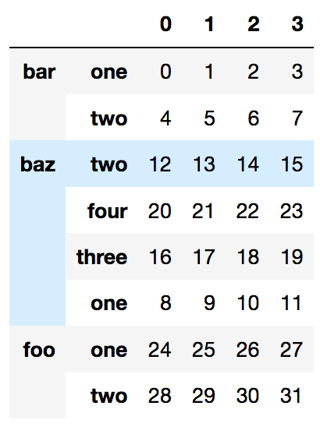
Edit: (to fit the desired layout)

arrays = [['bar', 'bar', 'baz', 'baz', 'baz', 'baz', 'foo', 'foo'],
          ['one', 'two', 'one', 'two', 'three', 'four', 'one', 'two']]

df = pd.DataFrame(np.arange(32).reshape([8, 4]), index=arrays)
new_baz_index = [('baz', i) for i in ['two','four','three','one']]
index = df.index.values.copy()
index[df.index.get_loc('baz')] = new_baz_index
df.reindex(index)

df.index.get_loc('baz') will get the location of the baz part as a slice object and we replace the part there only.

enter image description here

What is the difference between using loc and using just square brackets to filter for columns in Pandas/Python?

I’ve noticed three methods of selecting a column in a Pandas DataFrame:

First method of selecting a column using loc:

df_new = df.loc[:, 'col1']

Second method – seems simpler and faster:

df_new = df['col1']

Third method – most convenient:

df_new = df.col1

Is there a difference between these three methods? I don’t think so, in which case I’d rather use the third method.

I’m mostly curious as to why there appear to be three methods for doing the same thing.

Solution:

If you are selecting a single column, a list of columns, or a slice or rows then there is no difference. However, [] does not allow you to select a single row, a list of rows or a slice of columns. More importantly, if your selection involves both rows and columns, then assignment becomes problematic.

df[1:3]['A'] = 5

This selects rows 1 and 2, and then selects column ‘A’ of the returning object and assign value 5 to it. The problem is, the returning object might be a copy so this may not change the actual DataFrame. This raises SettingWithCopyWarning. The correct way of this assignment is

df.loc[1:3, 'A'] = 5

With .loc, you are guaranteed to modify the original DataFrame. It also allows you to slice columns (df.loc[:, 'C':'F']), select a single row (df.loc[5]), and select a list of rows (df.loc[[1, 2, 5]]).

Also note that these two were not included in the API at the same time. .loc was added much later as a more powerful and explicit indexer. See unutbu’s answer for more detail.


Note: Getting columns with [] vs . is a completely different topic. . is only there for convenince. It only allows accessing columns whose name are valid Python identifier (i.e. they cannot contain spaces, they cannot be composed of numbers…). It cannot be used when the names conflict with Series/DataFrame methods. It also cannot be used for non-existing columns (i.e. the assignment df.a = 1 won’t work if there is no column a). Other than that, . and [] are the same.

How do I open a binary matrix and convert it into a 2D array or a dataframe?

I have a binary matrix in a txt file that looks as follows:

0011011000
1011011000
0011011000
0011011010
1011011000
1011011000
0011011000
1011011000
0100100101
1011011000

I want to make this into a 2D array or a dataframe where there is one number per column and the rows are as shown. I’ve tried using numpy and pandas, but the output has only one column that contains the whole number. I want to be able to call an entire column as a number.

One of the codes I’ve tried is:

with open("a1data1.txt") as myfile:
    dat1=myfile.read().split('\n')
dat1=pd.DataFrame(dat1)

Solution:

After you read your txt, you can using following code fix it

pd.DataFrame(df[0].apply(list).values.tolist())
Out[846]: 
   0  1  2  3  4  5  6  7  8  9
0  0  0  1  1  0  1  1  0  0  0
1  1  0  1  1  0  1  1  0  0  0
2  0  0  1  1  0  1  1  0  0  0
3  0  0  1  1  0  1  1  0  1  0
4  1  0  1  1  0  1  1  0  0  0
5  1  0  1  1  0  1  1  0  0  0
6  0  0  1  1  0  1  1  0  0  0
7  1  0  1  1  0  1  1  0  0  0
8  0  1  0  0  1  0  0  1  0  1
9  1  0  1  1  0  1  1  0  0  0

Is there a way to avoid typing the dataframe name, brackets, and quotes when creating a new column in a Python/Pandas dataframe?

Suppose I had a Python/Pandas dataframe called df1 with columns a and b, each with only one record (a = 1 and b = 2). I want to create a third column, c, whose value equals a + b or 3.

Using Pandas, I’d write:

df1['c'] = df1['a'] + df1['b'] 

I’d prefer just to write something simpler and easier to read, like the following:

with df1:
    c = a + b

SAS allows this simpler syntax in its “data step”. I would love it if Python/Pandas had something similar.

Thanks a lot!
Sean

Solution:

Short answer: no. pandas is constrained by Python’s syntax rules. The expression c = a + b requires a, b, and c to be names in the global namespace and it is not a good idea for a library to modify global namespace like that (what if you already have those names? What happens if there is a conflict?). That leaves out “no quotes” part.

With quotes, you have some options. For adding a new column, you can use eval:

df.eval('c = a + b')

The eval method basically evaluates the expression passed as a string. In this case, it adds a new column to a copy of the original DataFrame. Eval is quite limited though, see the docs for its usage and limitations.

For adding a new column, another option is assign. It is designed to add new columns on the fly but since it allows callables, you can also write things like:

very_long_data_frame_name.assign(new_column=lambda x: x['col1'] + x['col2'])

This is an alternative to the following:

very_long_data_frame_name['col1'] + very_long_data_frame_name['col2']

pandas also adds column names as attributes to the DataFrame if the column name is a valid Python identifier. That allows using the dot notation as juanpa.arrivillaga also mentioned:

df['c'] = df1.a + df2.a

Note that for non-existing columns you still have to use the brackets (see the left hand side of the assignment). If you already have a column named c, you can use df.c on the left side too.

Similar to eval, there is a query method for selection. It doesn’t add a new column but queries the DataFrame by parsing the string passed to it. The string, again, should be a valid Python expression.

Convert multiple boolean columns which names start with string `abc_` at once into integer dtype

I need to have 1 and 0 instead of True and False in a pandas data frame for only columns starting with abc_. Is there any better way of doing this other than my loop:

for col in df:
  if col[:4] =='abc_':
     df[col] = df[col].astype(int) 

Solution:

You can do this with filter and an in-place update.

df.update(df.filter(regex='^abc_').astype(int))