Skip to content
This repository was archived by the owner on Sep 29, 2023. It is now read-only.

Add an option to upgrade an existing app (fix #1131)#1138

Merged
ronjouch merged 18 commits into
nativefier:masterfrom
TheCleric:feature/upgrade
Apr 29, 2021
Merged

Add an option to upgrade an existing app (fix #1131)#1138
ronjouch merged 18 commits into
nativefier:masterfrom
TheCleric:feature/upgrade

Conversation

@TheCleric

@TheCleric TheCleric commented Mar 15, 2021

Copy link
Copy Markdown
Collaborator

This adds a --upgrade option to upgrade-in-place an old app, re-using its options it can.

Should help fix #1131

@ronjouch ronjouch left a comment

Copy link
Copy Markdown
Contributor

Choose a reason for hiding this comment

The reason will be displayed to describe this comment to others. Learn more.

Hi there. Great job; here's a first review but I'm tired, I'll do a second one probably during the weekend. Finishing this first review to chat about three things (apart from the nits):

  1. There are lots of new testable things. If you have the time to add tests where you feel it's worthwhile, that would be awesome. (Not asking for 100% coverage; this is just a little push to have some more tests up to you where you feel they're valuable).
  2. The comment about nativefier.json starting with "Here and everywhere else: you're going to great lengths"
  3. Given that --upgrade will upgrade the Electron version,
    1. I'd like an early log.info warning about it. Something like "Your old app will be upgraded using Electron "
    2. Electron version conditions the userAgent string, which lives in nativefier.json. So, a new userAgent should be determined from it. Am I seeing no mention of it because it naturally works and is part of the options that are destructured/spread, or does it need more work?

Comment thread docs/api.md Outdated
Comment thread src/cli.ts Outdated
Comment thread src/helpers/upgrade/executableHelpers.ts Outdated
Comment thread src/helpers/upgrade/plistInfoXMLHelpers.ts
Comment thread src/helpers/upgrade/upgrade.ts
Comment thread src/helpers/upgrade/upgrade.ts Outdated
Comment thread src/helpers/upgrade/executableHelpers.ts
Co-authored-by: Ronan Jouchet <ronan@jouchet.fr>
@ronjouch

Copy link
Copy Markdown
Contributor

@TheCleric also, a ping about the comment of the whole PR, which I'm not sure you have seen:

  1. There are lots of new testable things. If you have the time to add tests where you feel it's worthwhile, that would be awesome. (Not asking for 100% coverage; this is just a little push to have some more tests up to you where you feel they're valuable).

  2. Given that --upgrade will upgrade the Electron version,

    1. I'd like an early log.info warning about it. Something like "Your old app will be upgraded using Electron "
    2. Electron version conditions the userAgent string, which lives in nativefier.json. So, a new userAgent should be determined from it. Am I seeing no mention of it because it naturally works and is part of the options that are destructured/spread, or does it need more work?

@TheCleric

Copy link
Copy Markdown
Collaborator Author

@ronjouch sorry. I did see your comment, I apologize I didn't respond to it. Life's been a little hectic, but I'll get back to addressing what you wrote soon. I know the ball is in my court at the moment. 😄

@ronjouch

Copy link
Copy Markdown
Contributor

@TheCleric no worry, there's no rush, and good luck with Real Life™. Ping me to send the ball back to me.

@TheCleric

Copy link
Copy Markdown
Collaborator Author

Alright @ronjouch I THINK I've addressed your concerns here. In my latest commit I've:

  • Added more log.debug statements
  • Added some integration testing
  • Try to save off more to the nativefier.json file
  • Try to reuse anything present in the nativefier.json file before doing things like detecting the os and arch

Sorry for the long timeline between this pr and this update. Let me know if I accidentally left anything unaddressed.

@ronjouch ronjouch left a comment

Copy link
Copy Markdown
Contributor

Choose a reason for hiding this comment

The reason will be displayed to describe this comment to others. Learn more.

Alright @ronjouch I THINK I've addressed your concerns here. In my latest commit I've:

  • Added more log.debug statements
  • Added some integration testing
  • Try to save off more to the nativefier.json file
  • Try to reuse anything present in the nativefier.json file before doing things like detecting the os and arch

@TheCleric thanks, great work 👏 . I have two remaining questions. Also, warning, if you do more work, pls pull, I pushed a merge and a few nits to your branch.

Comment thread src/build/prepareElectronApp.ts
Comment thread src/integration-test.ts
Comment thread src/integration-test.ts Outdated
@ronjouch

ronjouch commented Apr 12, 2021

Copy link
Copy Markdown
Contributor

@TheCleric I gave it a try, and there's something I don't understand:

  1. I build an app using -e 12.0.1 (an old Electron version)
  2. I --upgrade ... it

Expected: app is upgraded to the latest Nativefier ./app, flags are kept, and Electron version is updated.

Actual: logs say it will bundle Electron version 12.0.2 (the default one in current Nativefier 43.0.1), but looking at navigator.userAgent inside the app, it's still running 12.0.1. TL;DR: --upgrade kept the old Electron.

The starting point of this feature was to let users facing our "old build" warning easily upgrade an existing app, "upgrade" being defined as:

  • Preserving options...
  • ... but by default not preserving the old Electron version. It's one of two things:
    • A user might pass along with their --upgrade argument a -e flag in the command-line (expressing "please upgrade, but keep this version I want") and we honor it, because they have reasons for it...
    • ... but by default, if they don't pass anything (if they just pass --upgrade /path/to/app), in this case we must re-bundle with the current default Electron version, to keep them secure on a recent Electron/Chromium.

Am I missing something?

@TheCleric

TheCleric commented Apr 12, 2021

Copy link
Copy Markdown
Collaborator Author

Am I missing something?

@ronjouch You are not. I will look into this. This was working at one time, but I may have made a mistake in later checkins.

@TheCleric

Copy link
Copy Markdown
Collaborator Author

Alright @ronjouch this should be in better shape again. As well I added some tests to the integration tests to ensure these things occur.

@ronjouch

Copy link
Copy Markdown
Contributor

@TheCleric thanks.

I tested with your last commit, and there's one more thing that is unexpected to me: the upgrade results into a new app written to the current folder.

I assumed an upgrade would be in-place: writing to where the current app is, so that once the upgrade is run, there's nothing to do and you just have to run it as usual. But that's just my assumption.

→ Was it intentional to instead write to the current directory? If intentional, I'm not fundamentally about it (maybe it's better, actually: avoiding access rights trouble maybe? Other reasons?), but pls clarify it in the doc. Right now, when I read

This option will attempt to extract all existing options from the old app, and upgrade it using the current Nativefier CLI.

, the "upgrade it" bit makes me think it's in-place.

@TheCleric

TheCleric commented Apr 17, 2021

Copy link
Copy Markdown
Collaborator Author

@TheCleric thanks.

I tested with your last commit, and there's one more thing that is unexpected to me: the upgrade results into a new app written to the current folder.

I assumed an upgrade would be in-place: writing to where the current app is, so that once the upgrade is run, there's nothing to do and you just have to run it as usual. But that's just my assumption.

→ Was it intentional to instead write to the current directory? If intentional, I'm not fundamentally about it (maybe it's better, actually: avoiding access rights trouble maybe? Other reasons?), but pls clarify it in the doc. Right now, when I read

This option will attempt to extract all existing options from the old app, and upgrade it using the current Nativefier CLI.

, the "upgrade it" bit makes me think it's in-place.

@ronjouch you raise some good points. Not doing it in place was intentional for two reasons:

  • Existing functionality when creating a new app, so by "least surprise" principle I thought continuing this would make sense, but based on your reaction, maybe this wasn't the "least surprise" 🤣
  • More importantly, I was going by "first do no harm", meaning that if something were to go wrong here (or at least in a way the user did not expect) then they'd still have their old app to fall back on.

I'm flexible on either of these, or at the very least providing better documentation of the behavior so the user can know what to expect.

@ronjouch

Copy link
Copy Markdown
Contributor

@TheCleric

  • Existing functionality when creating a new app, so by "least surprise" principle I thought continuing this would make sense, but based on your reaction, maybe this wasn't the "least surprise" 🤣

No worry. Expectations vary.

  • More importantly, I was going by "first do no harm", meaning that if something were to go wrong here (or at least in a way the user did not expect) then they'd still have their old app to fall back on.

👍! Alright with your approach, then.

I'm flexible on either of these, or at the very least providing better documentation of the behavior so the user can know what to expect.

Yes please to an explicit paragraph in the doc (and in --help if this doesn't make it too long).

@theoludwig

theoludwig commented Apr 17, 2021

Copy link
Copy Markdown

I assumed an upgrade would be in-place: writing to where the current app is, so that once the upgrade is run, there's nothing to do and you just have to run it as usual. But that's just my assumption.

Exactly I'd rather to have nothing else to do/configure once I upgraded the app.
So maybe we could a new flag combine with this one to allow the update of the app with this approach, wo we could have both.

I don't like the fact that when I update the app, It doesn't remove the old one and it creates a new folder, it feels weird to have 2 version of the same app.
With this approach, it seems like we're just installing the app again, so in my opinion it is not really an update but rather a new install. 😕

Btw Thanks @TheCleric for this PR and @ronjouch for this awesome CLI tool! 😄

@TheCleric

Copy link
Copy Markdown
Collaborator Author

I don't like the fact that when I update the app, It doesn't remove the old one and it creates a new folder, it feels weird to have 2 version of the same app.

With this approach, it seems like we're just installing the app again, so in my opinion it is not really an update but rather a new install. 😕

I think we could do this optionally with --overwrite. What do you think @ronjouch ?

@ronjouch

ronjouch commented Apr 18, 2021

Copy link
Copy Markdown
Contributor

@divlo thx for chiming in and adding your voice confirming the expectation to upgrade in-place feels natural.

@TheCleric regarding an --overwrite flag, here comes my usual blah (😄) about limiting new flags, since Nativefier already has a bajillion. Then, updated thoughts:

  • Right now, Nativefier has flag --no-overwrite (do not override output directory if it already exists), and it defaults to false. Our default behavior is already to overwrite an existing app by default (and thus, maybe doing harm 🤷 ).
    @divlo's comment made me reconsider priorities; changing my mind back that upgrading in-place seems logical, so that's what should happen by default. You're right that an upgrade in place is a bit of an extra risk, but that's Nativefier's job, after all, and it seems the logical thing to do. Then, bugs may happen and we may break users apps, but so what, they'll report them and we'll fix them.
  • If you still want to support upgrading not in-place, I see two possibilities not implying a new flag, up to you to implement, but I'm not sure they're desired/necessary. They are non-exclusive, and both will keep the default behavior to upgrading in-place:
    1. --upgrade could output to a separate folder if a second path arg is passed
    2. --upgrade could output to the current dir (like it does in your current implementation) if --no-overwrite true is passed.

Lots of back-and-forth on this one, I know. Thanks for the patience and keeping up.

@TheCleric

Copy link
Copy Markdown
Collaborator Author

@divlo thx for chiming in and adding your voice confirming the expectation to upgrade in-place feels natural.

@TheCleric regarding an --overwrite flag, here comes my usual blah (😄) about limiting new flags, since Nativefier already has a bajillion. Then, updated thoughts:

  • Right now, Nativefier has flag --no-overwrite (do not override output directory if it already exists), and it defaults to false. Our default behavior is already to overwrite an existing app by default (and thus, maybe doing harm 🤷 ).
    @divlo's comment made me reconsider priorities; changing my mind back that upgrading in-place seems logical, so that's what should happen by default. You're right that an upgrade in place is a bit of an extra risk, but that's Nativefier's job, after all, and it seems the logical thing to do. Then, bugs may happen and we may break users apps, but so what, they'll report them and we'll fix them.

  • If you still want to support upgrading not in-place, I see two possibilities not implying a new flag, up to you to implement, but I'm not sure they're desired/necessary. They are non-exclusive, and both will keep the default behavior to upgrading in-place:

    1. --upgrade could output to a separate folder if a second path arg is passed
    2. --upgrade could output to the current dir (like it does in your current implementation) if --no-overwrite true is passed.

Lots of back-and-forth on this one, I know. Thanks for the patience and keeping up.

@ronjouch sorry, I was thinking of --no-overwrite not intending to add a new flag. Here's what I think is a solid solution when using --upgrade based on your comments:

  1. By default we'd update the app in place, with a big fat warning and docs being updated.
  2. If --no-overwrite is specified, we output to current dir.
  3. If a path is passed, output to the path.
  4. If --no-overwrite AND a path is specified we'd output to that path if no app is already there, otherwise error out.

So here's some bonuses I'd like to see, but I'm not going to push hard for:

  1. Have a yes/no prompt for any potential data loss causing output (such as the in-place upgrade).
  2. Since this would break potential automated uses of Nativefier, add a flag like -y to auto-accept.

@ronjouch sound right?

@divlo would this fall in line with your expected user experience?

@theoludwig

Copy link
Copy Markdown

Currently I'm using nativefier for Notion because they don't have Ubuntu/Linux desktop version, and one day I had this warning message saying that it is a old build, I already thought of that when I installed the application : How to handle security/bug fixes with generated application like that, nevertheless I didn't ask more than that as it was really useful and convenient for me to have this "native" app.

But now that I've got this warning, it got me thinking again, I searched through issues/PRs to find how to update Electron/Chromium with nativefier and I came across this issue, so yeah I'm currently waiting to have this merged to update my application, I'm too lazy to reinstall it myself. 😅

Ideally as discussed in #1131, we could automatically update to the latest version of Electron/Chromium like most browsers do, like Google Chrome.
But I guess that's for another PR, I could try to implement it once this has been merged but I have no idea how to do it.

The --upgrade flag is indeed a good workaround, to easily update.

@divlo would this fall in line with your expected user experience?

Thanks for asking! @TheCleric
If I could do nativefier --upgrade ./ inside my application folder, and it updates Electron/Chrome to the latest version, I would be already happy with this approach even if as said above, it could be better if it would be automatic.

@ronjouch

Copy link
Copy Markdown
Contributor

@TheCleric

sorry, I was thinking of --no-overwrite not intending to add a new flag.

👍

Here's what I think is a solid solution when using --upgrade based on your comments:

  1. By default we'd update the app in place, with a big fat warning and docs being updated.
  2. If --no-overwrite is specified, we output to current dir.
  3. If a path is passed, output to the path.
  4. If --no-overwrite AND a path is specified we'd output to that path if no app is already there, otherwise error out.

👍. Nit regarding 1: I'm not sure we want a "big fat warning": this may sound scary, but again, it's already today's Nativefier job. An extra log, sure, but it doesn't have to be big / all-caps scary.

So here's some bonuses I'd like to see, but I'm not going to push hard for:

  1. Have a yes/no prompt for any potential data loss causing output (such as the in-place upgrade).

I don't think that's desirable/necessary:

  1. Again, modifying in-place is existing behavior and we don't prompt. I understand you don't want your new code to wreak havoc, but with new code comes risk, and a new prompt won't make these risks disappear. Bugs may happen, they might trash a few users apps, who will have to recreate them manually, will grumble here for a fix, and that's okay.
  2. Most importantly, how is the prompt alleviating later data loss? Breaking an app after saying y to a prompt is the same as without prompt: app is broken. What extra thinking would you expect from users in a prompt displayed after typing nativefier --upgrade /path/to/app ? I don't see anything; they expressed they want this upgrade and your code validates /path/to/app is a valid app; there's no extra safety to having an extra roadblock at that point.
    • Said differently, it's reasonable for a sudo dd if=/dev/zero of=/dev/sdb to prompt for a confirmation/password, because that prompt is the occasion for the user to check one last time if /dev/sdb is indeed the hard disk they want to wipe, or if they're about to whoopsie-wipe their system disk. On the contrary, there's no last-minute checking to expect from users when they nativefier --upgrade /path/to/app . Your new code already validates /path/to/app is upgradeable, so let's just upgrade it without asking.
    • Reading the last above sentence, okay, there's one use case the extra prompting might prevent: a user --upgrading the app B rather than app A. Meh, so what, they'll have upgraded app B too, no big deal.
  1. Since this would break potential automated uses of Nativefier, add a flag like -y to auto-accept.

--Answering to this point on its own for the sake of answering, but as discussed above, if there's no prompting, there's no need for an extra -y)-- This doesn't sound like a concern: --upgrade is new, and I doubt it'd be useful for folks automating building Nativefier apps. Those users want to control what they do in a reproducible way, they want to run a script passing their options, they don't want to --upgrade. --upgrade is for another kind of users.

@TheCleric

Copy link
Copy Markdown
Collaborator Author

👍. Nit regarding 1: I'm not sure we want a "big fat warning": this may sound scary, but again, it's already today's Nativefier job. An extra log, sure, but it doesn't have to be big / all-caps scary.

  • Said differently, it's reasonable for a sudo dd if=/dev/zero of=/dev/sdb to prompt for a confirmation/password, because that prompt is the occasion for the user to check one last time if /dev/sdb is indeed the hard disk they want to wipe, or if they're about to whoopsie-wipe their system disk. On the contrary, there's no last-minute checking to expect from users when they nativefier --upgrade /path/to/app . Your new code already validates /path/to/app is upgradeable, so let's just upgrade it without asking.
  • Reading the last above sentence, okay, there's one use case the extra prompting might prevent: a user --upgrading the app B rather than app A. Meh, so what, they'll have upgraded app B too, no big deal.

@ronjouch My use case for the two above revolve around telling the user "Hey you might want to back that up in case this goes sideways. You did back that up right?" but it seems like I may be leaning towards being too cautious here (and towards a potentially poor user experience). I'll implement what we've agreed to.

@ronjouch

Copy link
Copy Markdown
Contributor

My use case for the two above revolve around telling the user "Hey you might want to back that up in case this goes sideways. You did back that up right?" but it seems like I may be leaning towards being too cautious here (and towards a potentially poor user experience). I'll implement what we've agreed to.

@TheCleric got it. Let's add a bit of wrapping around potential early sharp edges of the new (and maybe buggy) feature, then, but somewhere that's not impacting the expected flow:

  1. You can mention in the doc that this feature was added in version 43.1.0 (btw, documenting in API.md when each feature was introduced should always be done, I'll make a pass to add "introduction release" for each feature someday), mention that there might be bugs, and suggest users to first back up their app if --upgrade breaking it would be a disaster to them. Then we'll remove the warning in a few weeks/months, after user confirmation that the feature works well.
  2. I'll make a similar mention in the release notes.

@theoludwig

Copy link
Copy Markdown

@ronjouch What do you think is necessary for :

Ideally as discussed in #1131, we could automatically update to the latest version of Electron/Chromium like most browsers do, like Google Chrome.
But I guess that's for another PR, I could try to implement it once this has been merged but I have no idea how to do it.

I could maybe try to implement it and open a PR for that, of course only when this PR has been merged, what do you think ?
Should I give it a try ?

@ronjouch

Copy link
Copy Markdown
Contributor

Ideally as discussed in #1131, we could automatically update to the latest version of Electron/Chromium like most browsers do, like Google Chrome. But I guess that's for another PR, I could try to implement it once this has been merged but I have no idea how to do it.

I could maybe try to implement it and open a PR for that, of course only when this PR has been merged, what do you think ? Should I give it a try ?

@divlo thoughts:

  1. 100% go ahead and hack a PoC on your side, to gauge feasibility and build a mental model of what needs to change.
  2. Then, as soon as a quick & dirty PoC is done, before you (or anyone else) move to polish, you must write a concise RFC / spec in a GitHub issue (see e.g. #1130 - [RFC] nativefier-catalog and interactivity). It should discuss the approach, bring structure, lay out open questions, list considerations/problems discovered and proposals/solutions to each, and exhibit what you learned from your PoC. All this:
    1. Will make sure we implement the right thing, by confronting our point of views and getting users feedback...
    2. ... and will limit the amount of painful midway changes due to mis-understandings on the way to the final implementation.
  3. Also, should you abandon mid-way, your PoC and RFC will stand on their own and will be useful to future contributors. So, if you're feeling motivated now, totally go ahead and push on them, because even if you bail out after them, they'll be useful to whoever wants to push this to the finish line. But if you want to push to the final "production" implementation, be sure you have enough time & motivation before committing to it. It's going to be a large change, and nobody likes abandoned / lingering / un-rebasable PRs
  4. Technically speaking, @TheCleric will certainly have a lot to bring when chatting in an eventual RFC, given his work on the current PR. If you have the time for it, I'll appreciate your involvement, @TheCleric. Also, maybe you can collaborate and/or pair on the speccing & implementation. Up to both of you. Do you have anything to add?

@theoludwig

Copy link
Copy Markdown

Right, sounds good to me! 👍

@TheCleric

Copy link
Copy Markdown
Collaborator Author

Alright @ronjouch I'm hoping we're at the point where everyone is happy. :)

@ronjouch ronjouch left a comment

Copy link
Copy Markdown
Contributor

Choose a reason for hiding this comment

The reason will be displayed to describe this comment to others. Learn more.

Looks good and behaves as expected in a local test.

🎉 🎉 🎉 🎉 🎉 🎉

Comment thread docs/api.md
@ronjouch ronjouch changed the title Add an option to upgrade an old app Add an option to upgrade an existing app (fix #1131) Apr 29, 2021
@ronjouch ronjouch merged commit 9330c84 into nativefier:master Apr 29, 2021
@TheCleric TheCleric deleted the feature/upgrade branch April 29, 2021 03:13
TheCleric added a commit to TheCleric/nativefier that referenced this pull request Apr 29, 2021
…tivefier#1138)

This adds a `--upgrade` option to upgrade-in-place an old app, re-using its options it can.
Should help fix nativefier#1131

Co-authored-by: Ronan Jouchet <ronan@jouchet.fr>
TheCleric added a commit that referenced this pull request Apr 30, 2021
* Add ability to inject multiple css/js files

* API doc: Move misplaced macOS shortcuts doc (PR #1158)

When I added this documentation originally, I guess I placed it in the wrong location.

* README: use quotes in example, to divert users from shell globbing pitfalls

Follow-up of #1159 (comment)

* Support opening URLs passed as arg to Nativefied application (fix #405) (PR #1154)

Co-authored-by: Ronan Jouchet <ronan@jouchet.fr>

* macOS: Fix crash when using --tray (fix #527), and invisible icon (fix #942, fix #668) (#1156)

This fixes:

1. A startup crash on macOS when using the `--tray` option; see #527.
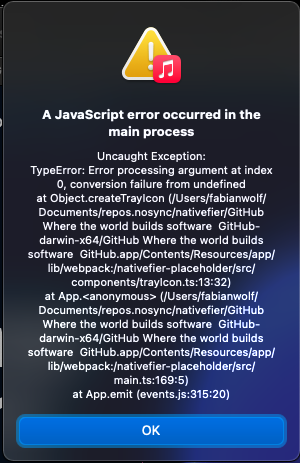
  ![image](https://user-images.githubusercontent.com/22625791/115987741-99544600-a5b6-11eb-866a-dadb5640eecb.png)
2. Invisible tray icon on macOS; see #942 and #668.  
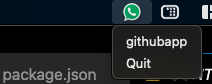
   ![image](https://user-images.githubusercontent.com/22625791/115988276-24364000-a5b9-11eb-80c3-561a8a646754.png)

Co-authored-by: Ronan Jouchet <ronan@jouchet.fr>

* API.md / --widevine: document signing apps to make some sites like HBO Max & Udemy work (fix #1147)

* Prompt to confirm when page is attempting to prevent unload (#1163)

Should alleviate part of the issue in #1151

* Add an option to upgrade an existing app (fix #1131) (PR #1138)

This adds a `--upgrade` option to upgrade-in-place an old app, re-using its options it can.
Should help fix #1131

Co-authored-by: Ronan Jouchet <ronan@jouchet.fr>

* Bump to Electron 12.0.5 with Chrome 89.0.4389.128

* Add newly discovered Google internal login page (#1167)

* Fix Widevine by properly listening to widevine-... events, and update docs (fix #1153) (PR #1164)

As documented in #1153, for Widevine support to work properly, we need to listen for the Widevine ready event, and as well for certain sites the app must be signed.

This PR adds the events, and as well adds better documentation on the signing limitation.

This may also help resolve #1147

* Improve suffix creation + tests

* API: clarif in existing doc by the way

* Typo

Co-authored-by: Ronan Jouchet <ronan@jouchet.fr>
Co-authored-by: Ben Curtis <github@nosolutions.com>
Co-authored-by: Fabian Wolf <22625791+fabiwlf@users.noreply.github.com>
Adam777Z pushed a commit to Adam777Z/nativefier that referenced this pull request Nov 9, 2022
…tivefier#1138)

This adds a `--upgrade` option to upgrade-in-place an old app, re-using its options it can.
Should help fix nativefier#1131

Co-authored-by: Ronan Jouchet <ronan@jouchet.fr>
Adam777Z pushed a commit to Adam777Z/nativefier that referenced this pull request Nov 9, 2022
…1162)

* Add ability to inject multiple css/js files

* API doc: Move misplaced macOS shortcuts doc (PR nativefier#1158)

When I added this documentation originally, I guess I placed it in the wrong location.

* README: use quotes in example, to divert users from shell globbing pitfalls

Follow-up of nativefier#1159 (comment)

* Support opening URLs passed as arg to Nativefied application (fix nativefier#405) (PR nativefier#1154)

Co-authored-by: Ronan Jouchet <ronan@jouchet.fr>

* macOS: Fix crash when using --tray (fix nativefier#527), and invisible icon (fix nativefier#942, fix nativefier#668) (nativefier#1156)

This fixes:

1. A startup crash on macOS when using the `--tray` option; see nativefier#527.
  ![image](https://user-images.githubusercontent.com/22625791/115987741-99544600-a5b6-11eb-866a-dadb5640eecb.png)
2. Invisible tray icon on macOS; see nativefier#942 and nativefier#668.  
   ![image](https://user-images.githubusercontent.com/22625791/115988276-24364000-a5b9-11eb-80c3-561a8a646754.png)

Co-authored-by: Ronan Jouchet <ronan@jouchet.fr>

* API.md / --widevine: document signing apps to make some sites like HBO Max & Udemy work (fix nativefier#1147)

* Prompt to confirm when page is attempting to prevent unload (nativefier#1163)

Should alleviate part of the issue in nativefier#1151

* Add an option to upgrade an existing app (fix nativefier#1131) (PR nativefier#1138)

This adds a `--upgrade` option to upgrade-in-place an old app, re-using its options it can.
Should help fix nativefier#1131

Co-authored-by: Ronan Jouchet <ronan@jouchet.fr>

* Bump to Electron 12.0.5 with Chrome 89.0.4389.128

* Add newly discovered Google internal login page (nativefier#1167)

* Fix Widevine by properly listening to widevine-... events, and update docs (fix nativefier#1153) (PR nativefier#1164)

As documented in nativefier#1153, for Widevine support to work properly, we need to listen for the Widevine ready event, and as well for certain sites the app must be signed.

This PR adds the events, and as well adds better documentation on the signing limitation.

This may also help resolve nativefier#1147

* Improve suffix creation + tests

* API: clarif in existing doc by the way

* Typo

Co-authored-by: Ronan Jouchet <ronan@jouchet.fr>
Co-authored-by: Ben Curtis <github@nosolutions.com>
Co-authored-by: Fabian Wolf <22625791+fabiwlf@users.noreply.github.com>
Sign up for free to subscribe to this conversation on GitHub. Already have an account? Sign in.

Labels

None yet

Projects

None yet

Development

Successfully merging this pull request may close these issues.

Add a --upgrade option that takes an existing app path, extracts options from nativefier.json and recreates the app

3 participants

