Search the Community
Showing results for tags 'sorting'.
Found 6 results
-
Version 1.7.6
259 downloads
Transform your Rust server's storage experience with intelligent automation, overflow chains, and PvP-safe raid protection. Why SmartSorter? For Players: Stop manually sorting hundreds of items after raids, monuments and roams Never lose loot to overflowing boxes again Set up once, automate forever For Server Owners: Reduce player frustration and improve retention Performance-optimized for high-pop servers PvP-friendly with raid/combat blocking Zero dependencies - works out of the box What Makes It Unique? Drop Box Automation Mark any container as a "Drop Box" - toss items in and watch them automatically route to nearby filtered containers. No manual sorting needed. Sorting Chains (Overflow System) Link unlimited containers together. When one fills up, items automatically overflow to the next in the chain. Perfect for massive loot rooms. Raid & Combat Protection Full integration with RaidBlock, NoEscape, and CombatBlock - prevent sorting abuse during raids with granular control over what gets disabled. Essential for PvP servers. Defense Auto-Fill One-click filling of turrets, SAM sites, flame turrets, and shotgun traps. Set your preferred ammo/fuel amounts once and forget it. Smart Template System Save filter configurations as templates, load them onto any container, and share setups across your base in seconds. Core Features Automatic Sorting Drop Box system for hands-free organization Category and item-specific filters (granular control) Works with 50+ container types Intelligent handling of furnaces, refineries, recyclers, and vending machines Smart routing with sorting chains Manual Control Tools Send Near - Distribute inventory to nearby filtered containers within radius Send to Box - Fill the specific container you're looting Dump All - Empty your entire inventory instantly Loot All - Grab everything from a container (supports backpacks!) In-Container Sort - Organize by name or category with one click Inventory and backpack Sorting Sorting Chains (Overflow System) Link unlimited containers for automatic overflow routing Visual chain inspection with in-game colored lines and spheres Cycle detection prevents infinite loops Per-player chain ownership Configurable visualization duration and appearance Defense Management Auto-fill Auto Turrets, SAM Sites, Flame Turrets, Shotgun Traps Customizable ammo/fuel amounts per defense type Radius-based batch filling Automatic weapon mounting for turrets Per-player preferences saved Raid & Combat Protection Integrates with RaidBlock, NoEscape, and CombatBlock Granular control - disable specific features during raids/combat Optional chat notifications when actions are blocked Essential for PvP servers - prevents sorting abuse Template System Save filter configurations by name Load templates onto any container instantly Share setups between boxes Per-player template ownership with admin override Easy template management (delete, rename) Player Preferences Toggle auto-opening of filter panels (/ssautofilters) Minimize UI to compact button mode Per-player defense ammo/fuel settings Settings persist across sessions Visual Interface Dynamic context-aware UI (changes based on container type) Built-in help system with full-color image guides Fully customizable layouts, colors, and button positions Responsive design adapts to 1-column or 2-column layout ImageLibrary support for item icons Technical Specifications Supported Containers (50+) Storage boxes, large boxes, coffins, barrels, fridges, lockers, tool cupboards, vending machines, furnaces (all types), refineries, recyclers, BBQs, campfires, lanterns, mannequins, drop boxes, wall cabinets, beehives, chicken coops, composters, cauldrons, stashes, and all defense entities. Performance Optimized Configurable processing intervals Batch processing limits (MaxDirtyBoxesPerTick) Optimization mode for high-population servers Efficient memory pooling throughout Automatic cleanup of deleted container data Framework Compatible Full support for uMod/Oxide Native Carbon framework support No external dependencies required Works out of the box Safety Features Wall-check system (prevent looting through walls) Building privilege requirement Configurable item blacklist/whitelist Automatic cleanup of old container data (configurable grace period) Permission-based access control Configuration Highlights 1000+ Customization Options UI Customization: Every color, position, size, and text label Button Layouts: 4 preset layouts (Default, DropBox, Awaiting, HasChain) Timing: Sort delays, cooldowns, debounce intervals Distances: Default radius, visualization settings Category Overrides: Reclassify any item into any category Furnace/Refinery: Custom fuel and smeltable item lists Support & Updates Documentation: Built-in visual help system Active Development: Regular updates and improvements Bug Reports: Fast response on CodeFling Feature Requests: Always welcome What's Included Plugin file (.cs) Default configuration Built-in help system with images Full permissions setup 50+ container support Raid/combat block integration Template system Performance optimization Extensive customization options Perfect For: Large Base Builders - Automate loot rooms with chains PvP Servers - Raid block integration prevents abuse High-Pop Servers - Performance optimized Casual Servers - Quality of life improvement Modded Servers - Works with custom items PLAYER COMMANDS /ss or /smartsorter Opens the visual help guide UI /sshelp Opens the visual help guide UI (same as /ss) /sscommands Shows a list of all available chat commands /sstoggle Shows or hides the SmartSorter UI completely /ssremovechains Removes ALL sorting chains you own /ssautofilters [on|off] Toggles whether the filters panel auto-opens when looting filtered containers /ssrefresh Refreshes the UI if it gets stuck or doesn't display properly /ssshowchains Visually displays your sorting chains for 15 seconds using colored lines and spheres /ssdefense Opens the defense configuration panel to set ammo/fuel amounts for turrets and traps ADMIN COMMANDS /ssdebug on|off Enables or disables debug logging in console /ssreloadconfig Reloads the configuration file from disk /ssclearfilters <containerID> Clears all filters on a specific container by NetworkID /ssconfig [setting] [value] Opens the config UI, or sets a specific config value ━━━━━━━━━━━━━━━━━━━━━━━━━━━━━━━━━ smartsorter.use - Required for all features smartsorter.admin - Admin commands and config access ━━━━━━━━━━━━━━━━━━━━━━━━━━━━━━━━━ DEPENDENCIES None required. Optional ImageLibrary support for enhanced item icons. ━━━━━━━━━━━━━━━━━━━━━━━━━━━━━━━━━ Give your players the gift of time. Install Smart Sorter today.$24.99- 104 comments
- 5 reviews
-
- 2
-

-
- #sorting
- #auto-sort
- (and 66 more)
-
Version 1.0.1
75 downloads
Combined Storage lets players connect multiple storage containers so they function as one large inventory. Includes automatic item sorting, search functionality, and filtering to keep storage clean and efficient. Readme Link - Click Here for Instruction and Documentation Highly recommend reading the FAQ section! All Your Items - In One Place Link multiple containers so they all share a single organized inventory. Automatic Sorting Items are automatically sorted as they are inserted, no manual effort required. Search Functionality Quickly find any item across all linked containers using a fast, built-in search bar. Simple Setup Simply press Link in a container to hook it up with the rest of them in your base. Unique View for Each Player Each player sees their own automatically sorted and filtered view of the shared inventory based on their preferences, without affecting anyone else.$24.99- 9 comments
- 2 reviews
-
- 3
-

-
- #inventory
- #storage
- (and 20 more)
-

Version 1.1.5
561 downloads
UItemSort UItemSort - this plugin allows the player to sort, and stack items in boxes and inventory. Plugin config variables "Use button images?": false, "Send plugin messages/reply?": true, "Sort button color.": "0.968627453 0.921568632 0.882352948 0.2", "Take similar button color.": "0.968627453 0.921568632 0.882352948 0.2", "Take all button color.": "0.968627453 0.921568632 0.882352948 0.2", "Sort image.": "https://i.imgur.com/uEiuf3N.png", "Similar image.": "https://i.imgur.com/3PkbAH8.png", "Take/Put all.": "https://i.imgur.com/beKBAl3.png", "Allow only containers with owners?": false, "All containers allowed?": false, "Black list if all allowed else this is white list.": [ "assets/prefabs/deployable/woodenbox/woodbox_deployed.prefab", "assets/prefabs/deployable/large wood storage/box.wooden.large.prefab", ] Plugin lang "UILootSimilar": "Same items, that you already own, were looted! (if exist)", "UILootAll": "You've looted everything you could!", "UISort": "Items were successfully sorted!", "UIPutSimilar": "You've put same items that are in a storage! (if exist)", "UIPutAll": "You've put all the items you could!", "UIBtnSort": "Sort", "UIBtnTakeSimilar": "Take Similar", "UIBtnTakeAll": "Take All", "UIBtnPutSimilar": "Put Similar", "UIBtnPutAll": "Put All" Permissions: uitemsort.use - allows to see and use sorting buttons. uitemsort.ignore - prevents from using sorting buttons if player has 'uitemsort.use' permission. Contacts: Need help or custom plugin for your server? Contact me using Discord: metangerine ---------------------------------------------------------------------- Video how plugin works:$9.99 -
Version 1.0.8
565 downloads
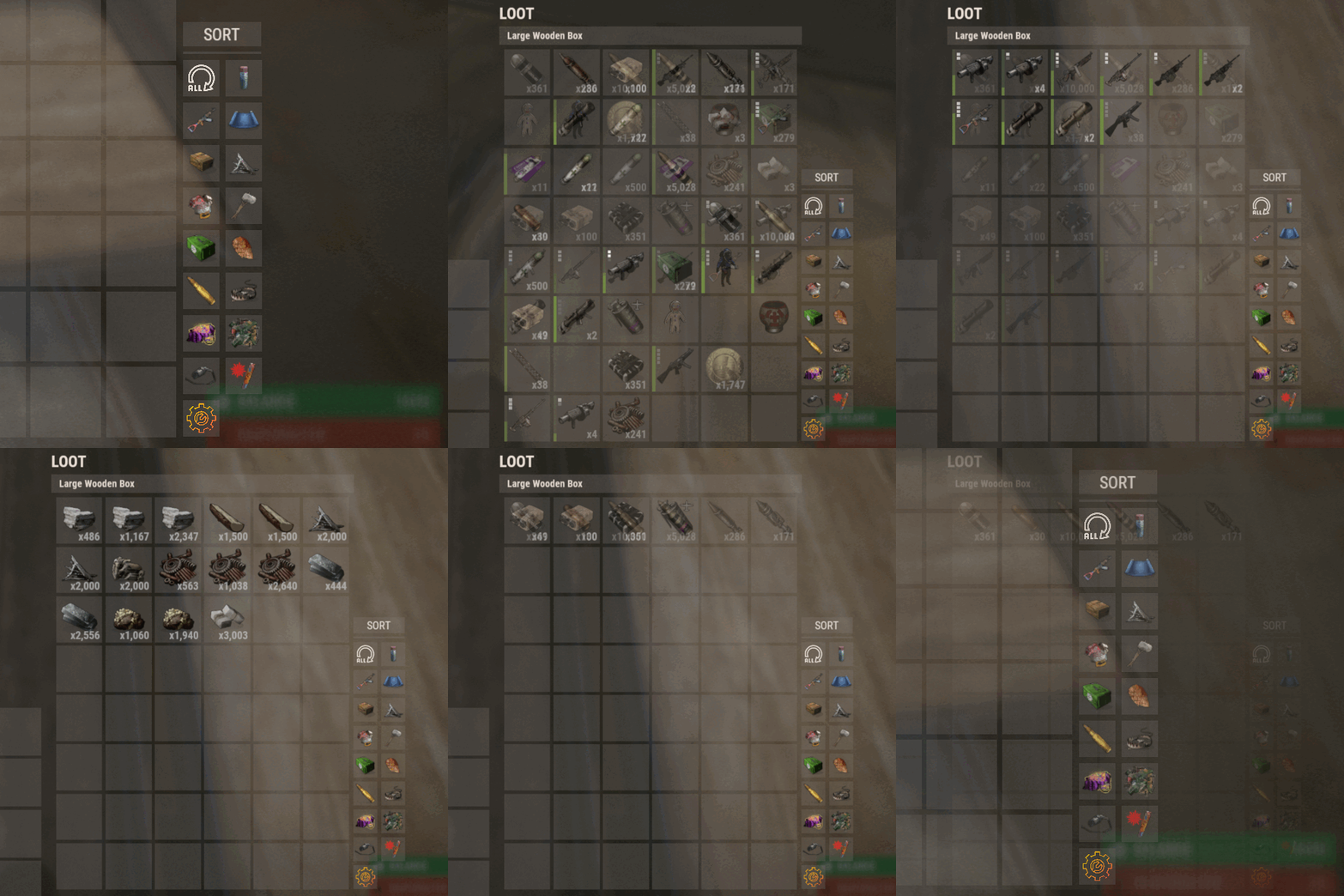
Introducing Sortify, the best plugin for making it easy to sort and filter boxes and containers from various plugins, all without the need for complex integrations. Sortify offers an intuitive solution to easily categorize your items, all within an elegant and efficient Rust-style user interface. Key Features: Custom Categories: With Sortify, you can create and customize your own categories to suit your unique needs. Rust style user interface: The plugin has a minimalistic and aesthetic Rust style user interface. Ease of Use: Sortify is designed with ease of use in mind. Whether you're a beginner or an experienced user, you'll find Sortify incredibly easy to use. It does not require complex training or any action on the part of the player, which allows the player to immediately begin organizing elements effectively. Permissions: sortify.allow - permission to use the plugin Video at moment version 1.0.0 (after the sorting scheme was changed, see gif):$15.00- 27 comments
- 3 reviews
-
- 3
-
-
- #sorting
- #filtering
- (and 6 more)
-
Version 1.2.0
39 downloads
The problem: Let's be honest: each of us found himself in a situation with too much storage containers and without any knowledge on where to find which item. Sure, you could just add some storage adaptors and pipes to your boxes but then you'll need to configurate each conveyor and care about splitting, routing and combining multiple pipes with multiple conveyors. Finally set up, the items - configured in the conveyor filters - will just be thrown into the next free slot and it will still be a big mess. Chest slot config gets you rid of this problem by sorting each item into the slot it belongs in, either by using an industrial conveyor system or by manually moving items into boxes. Save your (vip) players a ton of work and time they otherwise would waste on searching for items in boxes. Features: - Assign an item definition for each slot in small and large wooden boxes - Automatic sorting when attached to an industrial conveyor system - Manual sorting when right clicking, drag'n'dropping or hover looting items from your inventory - Display an overlay for the assigned item definition on each slot - Open the configuration by holding a configurable item or hold the secondary fire button while opening a chest - Quick select item definitions from categories - Search for item definitions by name - Removing and overwriting assigned item definitions - View-Only mode for players that should not be able to change the configuration Attention: Items will be sorted into the first slot with a matching item definition assigned OR with no item definition assigned. Since an unconfigured slot will accept every item, the inserted items will be dropped into it even if there's a slot with the correct item definition assigned AFTER the unconfigured slot. This logic does apply when storing items manually AND using a conveyor system. Permissions: ChestSlotConfig.use Player can open and use the full slot configuration. ChestSlotConfig.viewOnly Player can only view the assigned item definitions but not change them. Roadmap / Planned features: - Full UI rewrite: Yes I know the UI is flickering and looks awful. I'm a developer, not a designer - "Clear all" button: Removes all assigned item definitions. - "Move box" feature: Destroy a box and place it somewhere else without loosing the slot configuration. Just use the plugin "Telekinesis by WhiteThunder", move the box and reattach the storage adaptor. He did a great work with this plugin. - "Block slot" feature: Blocks a slot entirely so that no item will be sorted into. Useful for later assignment. - "Copy and paste" feature: Let's you copy and paste the configuration for a whole box (of the same type). - "Assign slot range" feature: Let's you assign a range of slot instead of having to click every single slot when assigning the same item definition. - Adding more storage containers: Tool cupboards, lockers etc. - "Favourite" feature: Let's you mark item definitions as favourite to let you find/access them faster. - Translation of item definition names: Currently only english is supported since the server does not know which language the clients use. Maybe I will use the "Rust Translation API by Arainrr". - "Assigned slot first" feature: Items will fill up slots with a matching item definition assigned to it first, even if there are free/unconfigured slots BEFORE matching slots. Known issues / bugs: - Conveyors not working when placing storage adaptors with "Ubertool by k1lly0u" (chaos code): Not a bug with my plugin only, just an information: if you place storage adaptors while "Ubertool" is active, the adaptor will snap to the boxes but will now connect logically. The conveyor will not transport items until you remove the adaptor and place it again with disabled "Ubertool"$29.99- 2 comments
- 1 review
-
- 2
-
-
- #conveyor
- #industrial
- (and 8 more)
-

Version 1.0.1
143 downloads
HAVEN'T TESTED IN A WHILE BUT I'VE UPDATED THE PAGE AND IT'S NOW FREE! Auto Deposit is a very simple plugin, When the command is active it will do a simple compare between two containers if the target container is allowed in the config that is. Once it finds a match between two items if the item isn't blacklisted in the config it will simply move the item to the target container. Simply use /depo to activate, You can also change the command name in the config file! Permissions autodeposit.use - Simply used to grant users access to the command. The Config AllowedContainers is a list of all container names a player can use autodeposit with. DisallowedItemNames is a list of all short item names that can't be auto deposited. UseTimer is used if you with the player to not have to reenter the command to disable. AuytoDisableTime is how many seconds it takes to disable auto depositing. DepositCommand is the command players will enter to activate auto deposit. Brief demo of early concept will update with a new video when I can Please leave any comments of features you may wantFree




.thumb.png.ccf8a947948c9eb1445ad21a7931247b.png)