Search the Community
Showing results for tags 'optimization'.
Found 11 results
-

Version 1.0.2
19 downloads
Better Body Bags optimizes server and client side performance of ragdolls and body bags. This is done by custom handeling of physics and streamlining native methods to assist with server performance and reduce the heavy networking impacts to clients, causing client side lag. Stop client side lag in high deathtoll zones Stabalize fps dips caused by ragdolls and bodybags Hookless - This plugin uses harmony for the best performance Configurable - Customize despawn times per item, dropping of weapons & burying of items Performance will vary depending on the number of players, client hardware and server hardware. If you have a high pop server, low end client hardware or low end server hardware then this plugin is for you. { "Corpse Removal Time": 10.0, "Block Active Item Drop": true, "Bury Leftover Items": true, "Despawn Time Tier 0 (seconds)": 30.0, "Despawn Time Tier 1 (seconds)": 300.0, "Despawn Time Tier 2 (seconds)": 600.0, "Despawn Time Tier 3 (seconds)": 1800.0, "Ground Watch - Updates bag position if ground is missing": true, "Advance mode (reload on first true)": false, "CustomTimes": {} }$14.99- 2 comments
- 1 review
-
- 1
-

-
- #betterbodybags
- #better body bags
- (and 9 more)
-
Version 1.7.6
259 downloads
Transform your Rust server's storage experience with intelligent automation, overflow chains, and PvP-safe raid protection. Why SmartSorter? For Players: Stop manually sorting hundreds of items after raids, monuments and roams Never lose loot to overflowing boxes again Set up once, automate forever For Server Owners: Reduce player frustration and improve retention Performance-optimized for high-pop servers PvP-friendly with raid/combat blocking Zero dependencies - works out of the box What Makes It Unique? Drop Box Automation Mark any container as a "Drop Box" - toss items in and watch them automatically route to nearby filtered containers. No manual sorting needed. Sorting Chains (Overflow System) Link unlimited containers together. When one fills up, items automatically overflow to the next in the chain. Perfect for massive loot rooms. Raid & Combat Protection Full integration with RaidBlock, NoEscape, and CombatBlock - prevent sorting abuse during raids with granular control over what gets disabled. Essential for PvP servers. Defense Auto-Fill One-click filling of turrets, SAM sites, flame turrets, and shotgun traps. Set your preferred ammo/fuel amounts once and forget it. Smart Template System Save filter configurations as templates, load them onto any container, and share setups across your base in seconds. Core Features Automatic Sorting Drop Box system for hands-free organization Category and item-specific filters (granular control) Works with 50+ container types Intelligent handling of furnaces, refineries, recyclers, and vending machines Smart routing with sorting chains Manual Control Tools Send Near - Distribute inventory to nearby filtered containers within radius Send to Box - Fill the specific container you're looting Dump All - Empty your entire inventory instantly Loot All - Grab everything from a container (supports backpacks!) In-Container Sort - Organize by name or category with one click Inventory and backpack Sorting Sorting Chains (Overflow System) Link unlimited containers for automatic overflow routing Visual chain inspection with in-game colored lines and spheres Cycle detection prevents infinite loops Per-player chain ownership Configurable visualization duration and appearance Defense Management Auto-fill Auto Turrets, SAM Sites, Flame Turrets, Shotgun Traps Customizable ammo/fuel amounts per defense type Radius-based batch filling Automatic weapon mounting for turrets Per-player preferences saved Raid & Combat Protection Integrates with RaidBlock, NoEscape, and CombatBlock Granular control - disable specific features during raids/combat Optional chat notifications when actions are blocked Essential for PvP servers - prevents sorting abuse Template System Save filter configurations by name Load templates onto any container instantly Share setups between boxes Per-player template ownership with admin override Easy template management (delete, rename) Player Preferences Toggle auto-opening of filter panels (/ssautofilters) Minimize UI to compact button mode Per-player defense ammo/fuel settings Settings persist across sessions Visual Interface Dynamic context-aware UI (changes based on container type) Built-in help system with full-color image guides Fully customizable layouts, colors, and button positions Responsive design adapts to 1-column or 2-column layout ImageLibrary support for item icons Technical Specifications Supported Containers (50+) Storage boxes, large boxes, coffins, barrels, fridges, lockers, tool cupboards, vending machines, furnaces (all types), refineries, recyclers, BBQs, campfires, lanterns, mannequins, drop boxes, wall cabinets, beehives, chicken coops, composters, cauldrons, stashes, and all defense entities. Performance Optimized Configurable processing intervals Batch processing limits (MaxDirtyBoxesPerTick) Optimization mode for high-population servers Efficient memory pooling throughout Automatic cleanup of deleted container data Framework Compatible Full support for uMod/Oxide Native Carbon framework support No external dependencies required Works out of the box Safety Features Wall-check system (prevent looting through walls) Building privilege requirement Configurable item blacklist/whitelist Automatic cleanup of old container data (configurable grace period) Permission-based access control Configuration Highlights 1000+ Customization Options UI Customization: Every color, position, size, and text label Button Layouts: 4 preset layouts (Default, DropBox, Awaiting, HasChain) Timing: Sort delays, cooldowns, debounce intervals Distances: Default radius, visualization settings Category Overrides: Reclassify any item into any category Furnace/Refinery: Custom fuel and smeltable item lists Support & Updates Documentation: Built-in visual help system Active Development: Regular updates and improvements Bug Reports: Fast response on CodeFling Feature Requests: Always welcome What's Included Plugin file (.cs) Default configuration Built-in help system with images Full permissions setup 50+ container support Raid/combat block integration Template system Performance optimization Extensive customization options Perfect For: Large Base Builders - Automate loot rooms with chains PvP Servers - Raid block integration prevents abuse High-Pop Servers - Performance optimized Casual Servers - Quality of life improvement Modded Servers - Works with custom items PLAYER COMMANDS /ss or /smartsorter Opens the visual help guide UI /sshelp Opens the visual help guide UI (same as /ss) /sscommands Shows a list of all available chat commands /sstoggle Shows or hides the SmartSorter UI completely /ssremovechains Removes ALL sorting chains you own /ssautofilters [on|off] Toggles whether the filters panel auto-opens when looting filtered containers /ssrefresh Refreshes the UI if it gets stuck or doesn't display properly /ssshowchains Visually displays your sorting chains for 15 seconds using colored lines and spheres /ssdefense Opens the defense configuration panel to set ammo/fuel amounts for turrets and traps ADMIN COMMANDS /ssdebug on|off Enables or disables debug logging in console /ssreloadconfig Reloads the configuration file from disk /ssclearfilters <containerID> Clears all filters on a specific container by NetworkID /ssconfig [setting] [value] Opens the config UI, or sets a specific config value ━━━━━━━━━━━━━━━━━━━━━━━━━━━━━━━━━ smartsorter.use - Required for all features smartsorter.admin - Admin commands and config access ━━━━━━━━━━━━━━━━━━━━━━━━━━━━━━━━━ DEPENDENCIES None required. Optional ImageLibrary support for enhanced item icons. ━━━━━━━━━━━━━━━━━━━━━━━━━━━━━━━━━ Give your players the gift of time. Install Smart Sorter today.$24.99- 104 comments
- 5 reviews
-
- 2
-
-
- #sorting
- #auto-sort
- (and 66 more)
-

Version 1.0.3
25 downloads
xAutoPurge - Automatically purges all entities owned by players which are inactive for X days. - Configurable parameters for: InactiveDays - Defines when a players gets purged if not online for X days. (Default: 7 days) CheckIntervalSeconds - Defines how often it should be checked for inactive players. (Default: 1 hour) LogToConsole - Defines if purging activities are getting logged to the console. (Default: true) ExcludedSteamIDs - Defines an exception list for specific SteamIDs, entered SteamIDs doesn't get purged. (Default: none) ResetDataOnWipe - Resets data on wipe automatically, so it doesn't happen that someone gets purged after wipe. (Default: true) Console Commands purge.run [Triggers the purging immediately with its configurations] purge.player PLAYERNAME/STEAMID [Purges a specific player immediately (ignoring configuration) - Example usage: purge.player xNullPointer95]$6.00 -
Version 1.0.2
7 downloads
xPermissionManager A modern, intuitive, and powerful permission management tool for Rust servers. xPermissionManager provides a complete visual interface for managing user and group permissions directly ingame. No more console commands, guesswork, or digging through permission lists. Everything is organized, accessible, and easy to control through an straight forward UI. Whether you're adjusting a single permission, overseeing full group structures, or assigning temporary access, xPermissionManager gives server owners a fast and efficient possibility to do so. Plugin Preview (Video) Full Permission Control Grant or revoke any permission from groups or individual players. Timed Permission System Assign temporary permissions that automatically expire (e.g., 30m, 1h, 1d, 1w, custom durations). Timed Group Memberships Add players to groups for a limited time - Perfect for kits, VIP, special events or whatever. Comprehensive UI A clean and intuitive interface for browsing permissions, switching groups, managing users, and applying timed access. User & Group Browsing View all available groups, check individual player permissions, and toggle them instantly. Clear Feedback Every change is acknowledged with clear messages to help admins avoid mistakes. Permission xpermissionmanager.use // Allows a player to open and use the xPermissionManager UI Chat Commands /xpm /xpmuser <name or steamID> /xpmtimed /xpmgroups /xpm [Opens the Permission Manager UI] PERMISSION OR ADMIN REQUIRED /xpmuser <name or steamID> [Opens the UI for managing a specific player’s permissions/groups] PERMISSION OR ADMIN REQUIRED /xpmtimed [Shows all active timed permissions for a player. Includes remaining duration and whether they came from a group] /xpmgroups [Shows all active timed group memberships for a player] Console Commands </> API$11.99-
- 1
-

-
- #permission
- #manager
- (and 20 more)
-

Version 1.1.8
949 downloads
Drop Bags tracks items dropped into the rust world. When there are high-volume drops, they are combined into a single "drop bag.” This method enhances performance by streamlining the handling of item drops and reducing item physics. Stop server stalls and freezing from item spam Works on craft spam, dropped item spam, gutted shark spam and horse dung! Light weight and easy to use Easy config DropBags uses one light weight hook to track dropped items. Dependent on how many items are dropped in a given radius those items get placed into a drop bag. This stops mass item spam effecting your server performance. { "Area Size - How far away items can be moved into a container": 7, "Max drops before moving items to container": 36, "Time to wait before moving items": 5.0, "Vischeck - checks items are visable before moving to container": true, "Calculate despawntime from drop bag items": true, "Reset dropbag despawn time on loot": false, "Override drop bag despawn time (seconds), 0 = false": 0.0 }$14.99- 16 comments
- 7 reviews
-
- 2
-
-

-
- #dropbags
- #drop bags
- (and 26 more)
-

Version 1.0.0
29 downloads
Clean Server allows you to keep your server clean from random buildings, deployed items, and corpses to help prevent unwanted items from taking up space and server resources. Set an automatic timer to clean the server every few mins or hours to keep your server running smooth. Manually scan the server by chat command at anytime to clean up unwanted items on the fly. [Features] * Automatically Clean server from corpse (animal, NPCs, players) * Set delay in corpse removal * Set corpse to drop loot on removal (NPCs / Players) * Automatically remove abandoned building blocks after x amount of time * Manually Remove abandoned building blocks * All settings adjustable by chat command * Option to list items to ignore from removal [Chat Commands] * /cleanserver - Runs a clean check and removes items * /clean <setting> <value> - changes the settings to the value you enter Settings: * Save - saves settings, no value needed * help - show all commands in chat - no value needed * tcrange - requires # value - sets the TC range for safe items * check - requires # value - sets the time in mins when items will be scanned and removed * timer - requires # value - sets the time for how long items can be placed before deleted on next scan * delay - requires # value - sets the delay time when corpse are removed * corpse - requires on/off value - turns on/off corpse removal * item - requires add/remove value and item ShortPrefab name - adds or removes item from the excluded list * animals - requires value on/off - turns on/off animal corpse removal * droploot - requires value on/off - turns on/off loot drop when corpse are removed * debug - requires value on/off - turns on/off debug mode for troubleshootin NOTES: If corpse removal is enabled and drop loot is on it will drop 2 bags. One with the inventory contents and one with all the equipped items (weapon and armor) No Corpse Preview: Config Example: { "Settings": { "checktimer": 10.0, "buildingtimer": 1, "tcrange": 20.0, "removecorpse": true, "droploot": true, "removeanimalcorpse": false, "removaldelay": 1.0, "debug": true, "excludeitems": ", lock.code" } } Language File Example: { "cs_001": "Missing settings and value -> /clean <setting> <value> \n Try the help command for list of all commands. /clean help", "cs_002": "Remove NPC/Player Corpse: {0}", "cs_003": "Remove Animal Corpse: {0}", "cs_004": "Commands: \n /cleanserver \n /cleanserver <#> \n /clean <setting> <value> \n Settings: \n corpse, animals, tcrange, timer, delay, droploot, debug, check, item \n Values: \n on, off, #, add, remove, list \n /clean save \n /clean help", "cs_005": "TC Range: {0}", "cs_006": "Remove Timer: {0} mins", "cs_007": "Clean Server Setting Saved", "cs_008": "Corpse Removal Delay: {0} (min value = 1)", "cs_009": "Corpse Drop Loot: {0}", "cs_010": "Debug Mode: {0}", "cs_011": "Check Timer: {0} mins", "cs_012": "Item {0} has been added to the excluded list", "cs_013": "Item {0} has been removed from the excluded list", "cs_014": "Excluded Item List: \n {0}" }$5.99- 5 comments
-
- 1
-
-
- #cleanserver
- #optimization
- (and 2 more)
-
Version 2.0.5
734 downloads
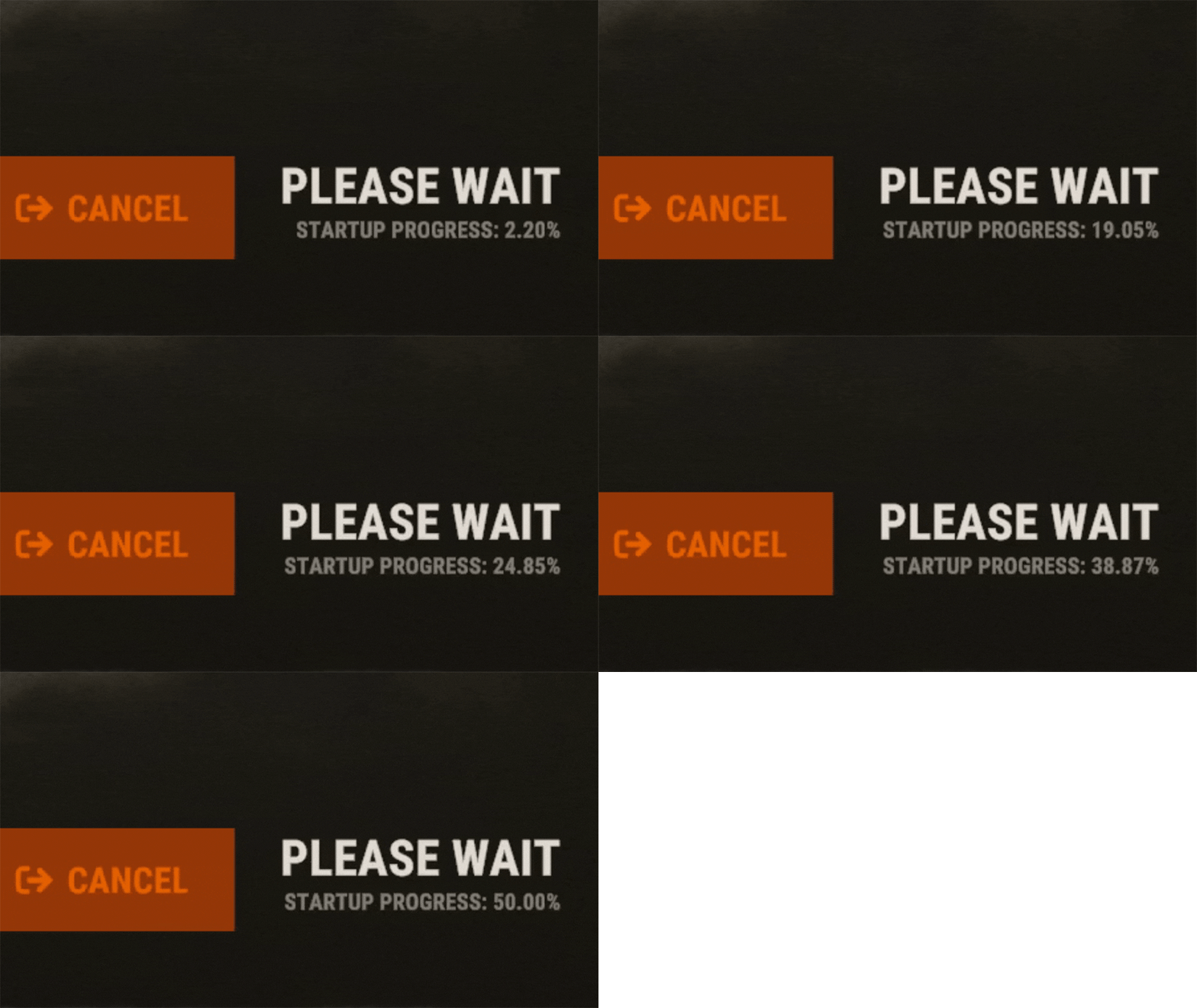
EarlyQ allows players to join prematurely the server while it is still starting. By default the server needs to fully start (which takes ~5 min, depends on map/specs) and after all that time its finally time for players to join, but they still have to wait warming prefabs & download the world. EarlyQ optimizes the process of players joining & startup of the server and minimizes wait times because its splitting the work in parallel. Features Allows players to load faster by initiating Asset Warmup as they are waiting for the server to start up! The world data is sent to the player as soon as its ready, so when the server is ready they can join right away without waiting! The steam server is started only after ~10 seconds when you launch the rust server! This means players can see it in the global server list even while it is loading! Increases your server uptime metrics! Custom messages that show the current loading progress of the server! You can customize said messages Demo (the demo is older & does not start loading the world after its ready, so im waiting a bit longer in the video. This is already implemented in EarlyQ) Custom message If you need to customize the message your players get when waiting for the server, you have to specify the message as a launch option on the server +earlyq.loading_msg - The loading message shown when the server is loading and the client is waiting for the server to load the world +earlyq.loading_icon - The icon shown +earlyq.ready_msg - The loading message shown when the client finishes loading fully and is waiting for the server +earlyq.ready_icon - The icon shown Default messages (Example): +earlyq.loading_msg "<color=#c47070>PLEASE WAIT (alot of spaces here) SERVER IS STILL STARTING: {progress}" +earlyq.loading_icon "Server" +earlyq.ready_msg "<color=#59a358>YOU ARE READY (alot of spaces here) WAITING FOR THE SERVER: {progress}" +earlyq.ready_icon "CheckCircle" You can see all the icons you can use here You can use some unity rich text components in the message: "color", "u", "b" and "i". If you want to add a new line currently the only way I found out is to spam a bunch of spaces since it will wrap to the next line, max is 3 lines At the time of writing this, these are all the limitations, they might change in the future. You can also use a config file if you prefer The config file needs to be created in a folder of the root of the server called "EarlyQ" and in the folder a file needs to be created called "config.json", it should look like "EarlyQ/config.json" The content of the config.json file need to be: { "loading_msg": "your custom msg", "loading_icon": "your custom icon", "ready_msg": "your custom msg", "ready_icon": "your custom icon" } Installation As this is a Harmony mod you need to place the EarlyQ.dll file in HarmonyMods folder, after that restart the server. (do not use harmony.load command with EarlyQ!) EarlyQ works for Linux & Windows EarlyQ works with the newest networking update EarlyQ works with RakNet and SteamNetworking EarlyQ works with Vanilla, Oxide and Carbon Note Facepunch confirmed this Harmony mod is not allowed on official servers, if you want to use it on official, do it at your own risk. Contact You can contact me on discord: turner1337$7.99- 37 comments
- 9 reviews
-
- 9
-
-
-
- #optimize
- #optimization
- (and 19 more)
-
Version 1.0.2
180 downloads
This plugin let you manage the placement of vending machines by permission and limit. It ´s also possible to prevent from placing vending machines on land or/and water seperatly. Permissions Allow above water managevendingplacement.canplace.abovewater Allow under water managevendingplacement.canplace.underwater Allow above water with limit managevendingplacement.canplace.limited.abovewater Allow under water with limit managevendingplacement.canplace.limited.underwater Chat Command Show the List of limits by rank /vplimit Configuration { "AllowAboveWaterDefault": true, "AllowUnderWaterDefault": true, "ChatCommand": "vplimit", "DefaultLandLimit": 5, "DefaultWaterLimit": 3, "GroupLandLimits": { "default": 5, "vip": 10 }, "GroupWaterLimits": { "default": 3, "vip": 6 } } Localization English & German { "CannotPlaceUnderwater": "You cannot place vending machines underwater.", "ReachedLandLimit": "You have reached the land limit for placing vending machines.", "ReachedWaterLimit": "You have reached the water limit for placing vending machines.", "NoPermission": "You do not have permission to place vending machines.", "CheckLimit": "You have placed {0} out of {1} allowed vending machines.", "NoLimitedPermission": "You do not have a limited permission to place vending machines.", "RankLimits": "Land Limits: {0}\nWater Limits: {1}", "LimitsHeader": "Vending Machine Limits by Rank:" } The plugin was created in parts with the help of artificial intelligenceFree -

Version 1.0.1
6 downloads
{ "maxCorpses": 4 <- Limit } https://umod.org/plugins/no-backpacks add despawn 0s$10.00 -
Version 1.0.0
87 downloads
Limit the installation of prefabs that you want! Delete the oldest prefab Tested with 200+ people online without causing drawdowns Very unloads massive PVP zones without interfering with the construction of the base Building zone detection function Players in the closet area can bet at least as much$18.00 -
Version 1.0.0
46 downloads
Item Monitor is a plugin that was made to help with server performance by managing dropped items. Item Monitor scans dropped items every X seconds defined in config, and sees if an item is over the desired limit you have set in the config. With this plugin, it will notify in the server console when it scans an item over limit, and will then set the items to be removed within X seconds. Config { "Check Interval Time (Secs)": 60, "Removal Time (Secs) (Must be lower then the check time)": 45, "Item Removal Times": [] }$5.00