Search the Community
Showing results for tags 'groups'.
Found 14 results
-

Version 1.6.0
31 downloads
═══════════════════════════════════════════════════ TITLE SELECTOR v1.6.0 Customize Chat Titles Without Losing Permission Groups by romzar.games ═══════════════════════════════════════════════════ DESCRIPTION ----------- TitleSelector provides an intuitive UI for players to select, hide, or show their chat titles from BetterChat. It also integrates seamlessly with SkillTree, giving players independent control over their Level and Prestige indicators. Players can customize which titles appear in chat without losing their permission groups. ═══════════════════════════════════════════════════ WHAT'S NEW IN v1.5.0 ═══════════════════════════════════════════════════ ✓ Emoji Toggle - New toggle to hide emoji-only titles (:coffeecan:, :medal:, etc.) - Removes emojis from mixed titles (e.g., "Admin :star:" → "Admin") - Works with selected titles and Hide All mode - "Emoji: ON/OFF" button in the Filters row ✓ BetterChatGradients Support - Full native support for gradient colors in titles - Gradients render correctly when selecting custom titles - Supports both hex colors (#ff0000) and named colors (red, blue, yellow) - Multi-color gradients: red,orange,yellow,green ✓ Extra Patterns (Config Only) - Advanced regex patterns for complex title formats - Handles uMod gradient tags: [#red,blue]text[/#] - Handles HTML color tags: <color=#fff>:emoji:</color> - No UI toggle - applied automatically with Emoji toggle ✓ Named Color Support - Gradients support color names: red, green, blue, yellow, orange, purple, pink, cyan, white, black, gray, gold, silver - Mix hex and named: #ff0000,orange,yellow ═══════════════════════════════════════════════════ KEY FEATURES ------------ ✓ Visual Title Selection - Clean modal UI where players can enable/disable their owned titles - Green checkbox for active titles, gray for available, locked icon for unowned - Intuitive interface for easy title management ✓ Collectible Display - Shows locked titles players can work towards obtaining - Motivates players to unlock new titles - Clear visual distinction between owned and locked titles ✓ SkillTree Integration - Independent toggle controls for Level [Lv.X] indicators - Independent toggle controls for Prestige [Pr.X] indicators - Mix and match visibility settings ✓ Hide All Option - Quickly hide all BetterChat titles with one click - Keep SkillTree indicators visible while hiding rank titles - Perfect for players who want minimal chat clutter ✓ Pagination System - Handles large title collections with page navigation - Configurable items per page - Smooth browsing experience ✓ Multi-language Support - Fully translatable via Oxide lang system - All UI text customizable - Easy localization for any language ✓ Permission Based Access - Control who can access the title selector - Simple permission system - Grant to specific groups or players ✓ Persistent Data - Player preferences saved automatically - Settings persist across sessions and restarts - No data loss on plugin reload INSTALLATION ------------ 1. Upload TitleSelector.cs to oxide/plugins/ or carbon/plugins/ 2. Ensure BetterChat is installed and configured 3. Grant permission: o.grant group default titleselector.use 4. Reload the plugin if needed: o.reload TitleSelector 5. (Optional) Customize the config and lang files DEPENDENCIES ------------ Required: - BetterChat - This plugin hooks into BetterChat to modify title display Optional: - SkillTree - If installed, players can toggle Level/Prestige visibility - BetterChatGradients - If installed, gradient colors render natively PERMISSIONS ----------- titleselector.use - Allows access to the title selector UI - Required for players to open the /title menu - Grant to groups or individual players PERMISSION EXAMPLES ------------------- Grant to all players: o.grant group default titleselector.use Grant to VIP group only: o.grant group vip titleselector.use Grant to specific player: o.grant user PlayerName titleselector.use o.grant user 76561198000000000 titleselector.use COMMANDS -------- /title (Chat) - Opens the Title Selector UI - Requires: titleselector.use permission - Main command for accessing the interface /titulo (Chat) - Alternative command (configurable) - Same functionality as /title /titulos (Chat) - Alternative command (configurable) - Same functionality as /title CONFIGURATION ------------- File Location: oxide/config/TitleSelector.json Default Configuration: { "Allow hide all titles": true, "Allow toggle SkillTree level": true, "Allow toggle SkillTree prestige": true, "Allow toggle emoji titles": true, "Level patterns (regex)": [ "\\s*<color=[^>]*>\\[Lv\\.\\d+\\]</color>\\s*", "\\s*<color=[^>]*>\\[Level\\s*\\d+\\]</color>\\s*", "\\s*\\[Lv\\.\\d+\\]\\s*", "\\s*\\[Level\\s*\\d+\\]\\s*" ], "Prestige patterns (regex)": [ "\\s*<color=[^>]*>\\[Pr\\.\\d+\\]</color>\\s*", "\\s*<color=[^>]*>\\[Prestige\\s*\\d+\\]</color>\\s*", "\\s*\\[Pr\\.\\d+\\]\\s*", "\\s*\\[Prestige\\s*\\d+\\]\\s*" ], "Emoji patterns (regex)": [ "\\s*:\\w+:\\s*" ], "Extra patterns (regex) - applied with emoji toggle": [ "\\s*\\[#[\\w,\\s#]+\\]\\[\\+\\d+\\]\\s*:\\w+:\\s*\\[/\\+\\]\\[/#\\]\\s*", "\\s*\\[#[\\w,\\s#]+\\]\\s*:\\w+:\\s*\\[/#\\]\\s*", "\\s*<color=[^>]*>:\\w+:</color>\\s*" ], "Max selectable titles": 3, "Main command": "title", "Alternative commands": ["titulo", "titulos"], "Ignored groups (hidden from UI)": ["default", "player", "guest"], "Items per page": 7, "UI - Background color": "0.1 0.1 0.1 0.95", "UI - Header color": "0.15 0.15 0.15 1", "UI - Available item color": "0.2 0.2 0.2 0.9", "UI - Locked item color": "0.12 0.12 0.12 0.7", "UI - Selected item color": "0.1 0.4 0.1 0.9", "UI - Close button color": "0.8 0.2 0.2 1", "UI - Active checkbox color": "0.3 0.8 0.3 1", "UI - Inactive checkbox color": "0.3 0.3 0.3 1" } Configuration Options: - Allow hide all titles: Enable/disable the "Hide All" button - Allow toggle SkillTree level: Enable/disable Level toggle for players - Allow toggle SkillTree prestige: Enable/disable Prestige toggle for players - Allow toggle emoji titles: Enable/disable Emoji toggle for players - Level patterns: Regex patterns to detect Level indicators from SkillTree - Prestige patterns: Regex patterns to detect Prestige indicators from SkillTree - Emoji patterns: Regex patterns to detect emoji-only titles - Extra patterns: Advanced regex patterns for complex formats (applied with emoji toggle) - Max selectable titles: Maximum number of titles a player can display at once - Main command: Primary chat command to open the UI - Alternative commands: Additional commands that open the UI - Ignored groups: BetterChat groups to hide from the UI (e.g., default groups) - Items per page: Number of titles shown per page in the UI - UI colors: Customize the appearance of the interface HOW IT WORKS ------------ 1. Player with 'use' permission types /title in chat 2. Title Selector UI opens showing all available titles 3. Player sees their titles organized by status: - Green checkbox = Title is active and will show in chat - Gray checkbox = Title is available but not selected - Locked icon = Title the player doesn't own yet (collectible) 4. Player clicks titles to enable/disable them 5. When no titles are selected, BetterChat displays titles based on priority 6. Player preferences are saved automatically TITLE SELECTION SYSTEM ---------------------- AVAILABLE (Player owns the title): - Displayed with interactive checkbox - Click to toggle on/off - Limited by Max selectable titles setting SELECTED (Currently active): - Green checkbox indicator - Will display in chat messages - Can be deselected by clicking LOCKED (Player doesn't own): - Shown as collectible/goal - Locked icon displayed - Cannot be selected until unlocked SKILLTREE INTEGRATION --------------------- The bottom row of the UI shows toggle buttons for SkillTree indicators: Level Toggle: - Controls visibility of [Lv.109] style indicators - "Level: ON" = Level shown in chat - "Level: OFF" = Level hidden from chat Prestige Toggle: - Controls visibility of [Pr.1] style indicators - "Prestige: ON" = Prestige shown in chat - "Prestige: OFF" = Prestige hidden from chat These work independently - players can show Level but hide Prestige, or vice versa. EMOJI TOGGLE ------------ The Filters row includes a toggle for emoji visibility: Emoji Toggle: - Controls visibility of emoji-only titles (:coffeecan:, :medal:, etc.) - Removes emojis from mixed titles (e.g., "Admin :star:" → "Admin") - "Emoji: ON" = Emojis shown in chat - "Emoji: OFF" = Emojis hidden from chat - Works with both selected titles and Hide All mode - Extra patterns are applied automatically when emoji toggle is OFF BETTERCHATGRADIENTS SUPPORT --------------------------- TitleSelector natively supports BetterChatGradients: Features: - Gradient colors render correctly when selecting custom titles - Supports hex colors: #ff0000, #00ff00, #0000ff - Supports named colors: red, green, blue, yellow, orange, purple, pink, cyan, white, black, gray, gold, silver - Multi-color gradients: red,orange,yellow,green - Mix hex and named colors: #ff0000,orange,yellow No additional configuration required - gradients work automatically. HIDE ALL FEATURE ---------------- The "Hide All" button provides quick title management: - Hides all BetterChat titles with one click - Respects SkillTree toggle settings - Respects Emoji toggle settings - Players can hide rank titles while showing Level/Prestige - "Show All" button reverses the action PLAYER WORKFLOW --------------- 1. Type /title to open the Title Selector UI 2. Browse available titles using pagination if needed 3. Click checkboxes to select desired titles (up to max limit) 4. Toggle SkillTree Level/Prestige visibility as desired 5. Toggle Emoji visibility as desired 6. Use "Hide All" for quick hiding of all BetterChat titles 7. Close the UI - preferences are saved automatically 8. Chat messages now display only selected titles ADMIN WORKFLOW -------------- 1. Install the plugin with BetterChat dependency 2. Configure ignored groups to hide default/system groups 3. Set max selectable titles based on server preference 4. Customize UI colors to match server theme 5. Grant 'titleselector.use' permission to appropriate groups 6. Translate lang file if needed for non-English servers API METHODS ----------- For developers who want to integrate with TitleSelector: API_GetSelectedTitles(string odId) - Returns: List<string> of player's selected titles - Use to check what titles a player has enabled API_IsHidingTitles(string odId) - Returns: bool indicating if player is hiding all titles - Use to check player's hide status API_SetSelectedTitles(string odId, List<string> titles) - Sets player's selected titles programmatically - Use to modify player preferences via code API_RefreshTitles() - Refreshes the title cache - Call after BetterChat config changes API USAGE EXAMPLE ----------------- [PluginReference] private Plugin TitleSelector; void Example(BasePlayer player) { // Get selected titles var titles = TitleSelector?.Call<List<string>>( "API_GetSelectedTitles", player.UserIDString); // Check if hiding var isHiding = TitleSelector?.Call<bool>( "API_IsHidingTitles", player.UserIDString) ?? false; // Set titles TitleSelector?.Call("API_SetSelectedTitles", player.UserIDString, new List<string> { "vip", "donator" }); // Refresh cache TitleSelector?.Call("API_RefreshTitles"); } LOCALIZATION ------------ All UI text is customizable via the lang file. File Location: oxide/lang/en/TitleSelector.json Default Messages: { "NoPermission": "<color=#ff5555>You don't have permission to use this command.</color>", "BetterChatNotLoaded": "<color=#ff5555>BetterChat is not loaded!</color>", "TitleLocked": "<color=#ff5555>You don't own this title!</color>", "MaxTitlesReached": "<color=#ff5555>Maximum of {max} titles reached!</color>", "HideNotAllowed": "<color=#ff5555>Hiding titles is not enabled.</color>", "ToggleLevelNotAllowed": "<color=#ff5555>Toggle level is not enabled.</color>", "TogglePrestigeNotAllowed": "<color=#ff5555>Toggle prestige is not enabled.</color>", "ToggleEmojiNotAllowed": "<color=#ff5555>Toggle emoji is not enabled.</color>", "UITitle": "TITLE SELECTOR", "UIStatusHidden": "All titles are hidden", "UIStatusDefault": "Showing default titles (based on priority)", "UIStatusSelected": "{count}/{max} titles selected", "UILocked": "Locked", "UISelected": "Active", "UIAvailable": "Available", "UIClear": "Clear", "UIHideAll": "Hide All", "UIShowAll": "Show All", "UIClose": "Close", "UISkillTreeLabel": "Filters:", "UILevelVisible": "Level: ON", "UILevelHidden": "Level: OFF", "UIPrestigeVisible": "Prestige: ON", "UIPrestigeHidden": "Prestige: OFF", "UIEmojiVisible": "Emoji: ON", "UIEmojiHidden": "Emoji: OFF" } USE CASES --------- • VIP Customization: Let VIP players customize their chat appearance • Roleplay Servers: Players choose titles that fit their character • Rank Management: Players hide unwanted default titles • Clean Chat: Minimalist players can hide all titles • SkillTree Control: Show progress without cluttering chat • Emoji Control: Hide emoji titles for cleaner chat • Collectibles: Motivate players to unlock new titles • Multi-Title Servers: Let players display multiple earned titles • Gradient Titles: Beautiful color gradients in player titles TROUBLESHOOTING --------------- Q: UI not opening when typing /title A: Check that player has the 'titleselector.use' permission Q: Titles not showing in chat after selection A: Ensure BetterChat is loaded and properly configured Q: SkillTree toggles not appearing A: SkillTree must be installed for these options to show Q: Some titles not appearing in the UI A: Check the "Ignored groups" config - groups listed there are hidden Q: Player can't select more titles A: They've reached the "Max selectable titles" limit in config Q: Changes not saving A: Check oxide/data folder permissions and console for errors Q: Emoji toggle not working A: Check "Allow toggle emoji titles" is true in config Q: Gradients not rendering A: Ensure BetterChatGradients is installed and working PERFORMANCE ----------- • Lightweight and optimized • Data saved per-player efficiently • UI rendered on-demand only • No performance impact when UI is closed • Safe to use on high-population servers COMPATIBILITY ------------- • Requires BetterChat (mandatory dependency) • Optional SkillTree integration • Optional BetterChatGradients integration - Gradients work natively when selecting titles - No conflicts - TitleSelector applies gradients directly • Works with Oxide and Carbon • No conflicts with other chat plugins • Compatible with permission plugins SUPPORT ------- For support, bug reports, or feature requests, please use the discussion tab or contact the author. VERSION HISTORY --------------- v1.5.0 - Emoji & Gradient Update - New Emoji toggle to hide emoji-only titles - Full BetterChatGradients native support - Extra patterns for complex title formats - Named color support in gradients - UI label changed from "SkillTree:" to "Filters:" v1.4.0 - Initial public release - Full BetterChat integration - SkillTree Level/Prestige toggle support - Pagination for large title collections - Hide All feature with SkillTree independence - Comprehensive API for developers LICENSE ------- This plugin is provided for use on Rust game servers. Redistribution or resale of this plugin is prohibited. © 2025 romzar.games - All rights reserved. ══════════════════════════════════════════════════ Thank you for using Title Selector! Give your players control over their chat identity! ══════════════════════════════════════════════════$14.99 -
Version 1.3.12
1,270 downloads
Allows both PVE and PVP players to exist on a server at the same time. PVE players will have certain configurable protections and restrictions. You can have players use a command to flag themselves as PVP/PVE or you can assign it to them when they first spawn. If you have ZoneManager you can also designate specific zones to force player's to be PVE or PVP. Plugin is also compatible with SimpleStatus. Note: Video is outdated, see documentation for a full list of new features! Documentation: A full readme including permissions, commands, and config options is available in this google doc link. Disclaimer: Like all of my plugins - this plugin is sold as is. I will be happy to take feature requests into consideration but make no guarantees about which ones get implemented. Please refer to the feature list before you make your purchase! Developer API: API Methods // Returns the mode of the given entity. Also takes into account if the entity is in a forced mode zone. string GetEntityMode(BaseEntity entity); // Returns the group name for the given mode. For example if given 'pve' will return 'warmodepve' string GetModeGroup(string modeId); // Returns the target type for a given entity. Target types are the category that an entity falls into. // For example, if given a BasePlayer entity, it will return 'players'. If given a horse entity is will // return 'horses'. string GetEntityTargetType(BaseEntity entity); Hooks - place these in your plugin and WarMode will call them. // Called when a player's mode has been updated or config changes have ocurred that may affect the mode. private void WarMode_PlayerModeUpdated(string userid, string modeId) // Used to override WarMode logic for taking damage. // If true/false is returned then WarMode logic will be skipped. Return null to continue WarMode logic. private object CanEntityTakeDamage(BaseCombatEntity target, HitInfo info) // Used to override WarMode logic for targeting. // If true/false is returned then WarMode logic will be skipped. Return null to continue WarMode logic. private object CanEntityBeTargeted(BasePlayer target, BaseEntity attacker, bool skipVendingCheck) // Used to override WarMode logic for triggering a trap. // If true/false is returned then WarMode logic will be skipped. Return null to continue WarMode logic. private object CanEntityTrapTrigger(BaseTrap trap, BasePlayer basePlayer) // Used to override WarMode logic for looting an entity. // If true/false is returned then WarMode logic will be skipped. Return null to continue WarMode logic. private object CanEntityLoot(BasePlayer looter, BaseEntity target, bool skipVendingCheck) FREE Extension Plugins: War Mode Admin Panel Use the /warmode.config or /wmc command to open a panel that allows admins to update mode rules in game without having to reload the pluign. Requires the warmode.admin permission to use. I HIGHLY recommend you use this extension! WarModeAdminPanel.cs War Mode Spawn UI Provides a UI that is shown to players when they first spawn that prompts them to choose whether they want to be PVP or PVE. Also supports custom modes. Localization and config options available. This can also be configured to appear when players use the /flag command. WarModeSpawnUI.cs War Mode Rules UI Using the /rules command (which is configurable) players can see a list of what restrictions they have for their current mode. These ruling will update dynamically based on your config settings. WarModeRulesUI.cs War Mode Badges Customizable UI elements that will appear on the player's HUD to indicate what their current mode is. WarModeBadges.cs$24.99 -

Version 1.1.4
1 download
Wipe Permission Groups Tired of manually removing permission groups and player permissions every wipe? Players keeping their earned titles, ranks, and special permissions from the previous wipe when they shouldn't? Spending the first hours of every wipe cleaning up your permission system instead of enjoying the fresh start? WipePermissionGroups is your solution. How It Works On every map wipe, the plugin detects the OnNewSave event Automatically removes all players from your configured permission groups Revokes specified user permissions (supports wildcards like kits.* to remove all kit permissions at once) Logs everything to console so you know exactly what happened Features Zero Maintenance: Set it up once, never worry about it again Wildcard Support: Bulk permission removal with patterns like kits.* Manual Commands: /wipegroups and /wipepermissions available anytime Detailed Logging: Full console output (can be disabled in config) Perfect For Servers with progression-based rank systems Event rewards that should reset Raid tier permissions Any permission that should reset with the wipe Set it once, wipe worry-free.$7.99 -

Version 0.1.8
92 downloads
GUI and sound announcements for online teammates. Announcements about teammates who have connected, disconnected, been wounded or killed while sleeping. Additionally, announcements from the team leader, in Team chat channel using "!" as a first char. { "Chat command": "teama", "Is it worth enabling GameTips for messages?": true, "Is it worth enabling leader's group announcements?": true, "Is it worth enabling sound announcements?": true, "Radius within which a wounded ally notification is received": 100.0, "Radius within which a sound effect is triggered when an ally is wounded": 50.0, "Sound effect triggered when an ally is wounded": "assets/bundled/prefabs/fx/player/beartrap_scream.prefab", "Notification settings for each type": [ { "Notification type. Do not touch this parameter": "Connected", "Language_Key": "MsgPlayerConnected", "Duration": 6.0, "Main_Color": "#4F6133", "Main_Transparency": 0.8, "Main_Material": "", "Image_URL": "https://i.imgur.com/5Q9rxNO.png", "Image_Sprite": "", "Image_IsRawImage": false, "Image_Color": "#8CBA42", "Image_Transparency": 1.0, "Text_Size": 16, "Text_Color": "#8CBA42", "Text_Font": "RobotoCondensed-Bold.ttf", "Sound_Effect": "assets/prefabs/npc/scientist/sound/chatter.prefab" }, { "Notification type. Do not touch this parameter": "Disconnected", "Language_Key": "MsgPlayerDisconnected", "Duration": 6.0, "Main_Color": "#BF3B26", "Main_Transparency": 0.8, "Main_Material": "", "Image_URL": "https://i.imgur.com/5Q9rxNO.png", "Image_Sprite": "", "Image_IsRawImage": false, "Image_Color": "#FFD173", "Image_Transparency": 1.0, "Text_Size": 16, "Text_Color": "#FFD173", "Text_Font": "RobotoCondensed-Bold.ttf", "Sound_Effect": "assets/prefabs/npc/scientist/sound/death.prefab" }, { "Notification type. Do not touch this parameter": "LeaderAnnounce", "Language_Key": "", "Duration": 6.0, "Main_Color": "#216699", "Main_Transparency": 0.8, "Main_Material": "", "Image_URL": "https://i.imgur.com/RSaRsp0.png", "Image_Sprite": "", "Image_IsRawImage": false, "Image_Color": "#82C7F5", "Image_Transparency": 1.0, "Text_Size": 16, "Text_Color": "#82C7F5", "Text_Font": "RobotoCondensed-Bold.ttf", "Sound_Effect": "assets/prefabs/npc/scientist/sound/aggro.prefab" }, { "Notification type. Do not touch this parameter": "WoundedDistance", "Language_Key": "MsgPlayerWoundedDistance", "Duration": 6.0, "Main_Color": "#FFC21A", "Main_Transparency": 0.8, "Main_Material": "", "Image_URL": "https://i.imgur.com/jMAs33v.png", "Image_Sprite": "", "Image_IsRawImage": false, "Image_Color": "#FFF54C", "Image_Transparency": 1.0, "Text_Size": 16, "Text_Color": "#FFF54C", "Text_Font": "RobotoCondensed-Bold.ttf", "Sound_Effect": "assets/prefabs/npc/scientist/sound/takecover.prefab" }, { "Notification type. Do not touch this parameter": "WoundedGrid", "Language_Key": "MsgPlayerWoundedGrid", "Duration": 6.0, "Main_Color": "#FFC21A", "Main_Transparency": 0.8, "Main_Material": "", "Image_URL": "https://i.imgur.com/jMAs33v.png", "Image_Sprite": "", "Image_IsRawImage": false, "Image_Color": "#FFF54C", "Image_Transparency": 1.0, "Text_Size": 16, "Text_Color": "#FFF54C", "Text_Font": "RobotoCondensed-Bold.ttf", "Sound_Effect": "assets/prefabs/npc/scientist/sound/takecover.prefab" }, { "Notification type. Do not touch this parameter": "DeadWhileSleeping", "Language_Key": "MsgPlayerDeadWhileSleeping", "Duration": 6.0, "Main_Color": "#FFC21A", "Main_Transparency": 0.8, "Main_Material": "", "Image_URL": "https://i.imgur.com/gwk73Tk.png", "Image_Sprite": "", "Image_IsRawImage": false, "Image_Color": "#FFF54C", "Image_Transparency": 1.0, "Text_Size": 16, "Text_Color": "#FFF54C", "Text_Font": "RobotoCondensed-Bold.ttf", "Sound_Effect": "assets/prefabs/npc/scientist/sound/responddeath.prefab" }, { "Notification type. Do not touch this parameter": "Banned", "Language_Key": "MsgPlayerBanned", "Duration": 6.0, "Main_Color": "#BF3B26", "Main_Transparency": 0.8, "Main_Material": "", "Image_URL": "https://i.imgur.com/8WsmOMo.png", "Image_Sprite": "", "Image_IsRawImage": false, "Image_Color": "#FFD173", "Image_Transparency": 1.0, "Text_Size": 16, "Text_Color": "#FFD173", "Text_Font": "RobotoCondensed-Bold.ttf", "Sound_Effect": "assets/prefabs/missions/effects/mission_failed.prefab" } ], "Version": { "Major": 0, "Minor": 1, "Patch": 8 } } EN: { "MsgPlayerConnected": "Your teammate {0} has been connected!", "MsgPlayerDisconnected": "Your teammate {0} has been disconnected!", "MsgPlayerWoundedDistance": "Your teammate {0} was wounded by {1}!\nHe is {2} meters away from you.", "MsgPlayerWoundedGrid": "Your teammate {0} was wounded by {1} at {2}!", "MsgPlayerDeadWhileSleeping": "Your teammate {0} was killed by {1} while he was sleeping at {2}!", "MsgPlayerBanned": "Your teammate {0} has been banned!\nReason: {1}.", "MsgEmptyTeam": "There is only you in your team!", "MsgNotLeader": "Only the team leader can send announcements!", "MsgOfflineMates": "All your teammates are offline!", "MsgEnableSound": "Sound notifications are enabled!", "MsgDisableSound": "Sound notifications are disabled!", "MsgEnableConnected": "Team mates connection notifications are enabled!", "MsgDisableConnected": "Team mates connection notifications are disabled!", "MsgEnableDisconnected": "Team mates disconnection notifications are enabled!", "MsgDisableDisconnected": "Team mates disconnection notifications are disabled!", "MsgEnableWounded": "Team mates wounded notifications are enabled!", "MsgDisableWounded": "Team mates wounded notifications are disabled!", "MsgEnableDeath": "Team mates sleeping kill notifications are enabled!", "MsgDisableDeath": "Team mates sleeping kill notifications are disabled!", "MsgEnableAll": "All team mates notifications are enabled!", "MsgDisableAll": "All team mates notifications are disabled!", "MsgKillerUnknown": "Unknown", "bear": "Bear", "polarbear": "PolarBear", "wolf": "Wolf", "stag": "Stag", "boar": "Boar", "chicken": "Chicken", "horse": "Horse", "simpleshark": "Shark", "patrolhelicopter": "Patrol Heli", "bradleyapc": "Bradley APC", "scientistnpc_arena": "Scientist", "scientistnpc_cargo": "Cargo Scientist", "scientistnpc_cargo_turret_any": "Cargo Scientist", "scientistnpc_cargo_turret_lr300": "Cargo Scientist", "scientistnpc_ch47_gunner": "Chinook Scientist", "scientistnpc_excavator": "Excavator Scientist", "scientistnpc_full_any": "Scientist", "scientistnpc_full_lr300": "Scientist", "scientistnpc_full_mp5": "Scientist", "scientistnpc_full_pistol": "Scientist", "scientistnpc_full_shotgun": "Scientist", "scientistnpc_heavy": "Heavy Scientist", "scientistnpc_junkpile_pistol": "Road Scientist", "scientistnpc_oilrig": "Oilrig Scientist", "scientistnpc_patrol": "Patrol Scientist", "scientistnpc_peacekeeper": "Peacekeeper Scientist", "scientistnpc_roam": "Roam Scientist", "scientistnpc_roam_nvg_variant": "Roam NVG Scientist", "scientistnpc_roamtethered": "Roam Scientist" } RU: { "MsgPlayerConnected": "Ваш союзник {0} подключился!", "MsgPlayerDisconnected": "Ваш союзник {0} отключился!", "MsgPlayerWoundedDistance": "Вашего союзника {0} серьёзно ранил {1}!\nОн в {2} метрах от вас.", "MsgPlayerWoundedGrid": "Вашего союзника {0} серьёзно ранил {1} в {2}!", "MsgPlayerDeadWhileSleeping": "Вашего союзника {0} убил {1}, пока тот спал в {2}!", "MsgPlayerBanned": "Ваш союзник {0} был заблокирован!\nПричина: {1}.", "MsgEmptyTeam": "У тебя нет союзников!", "MsgNotLeader": "Только лидер группы может отправлять объявления!", "MsgOfflineMates": "Все ваши союзники не в сети!", "MsgEnableSound": "Звуковые уведомления включены!", "MsgDisableSound": "Звуковые уведомления выключены!", "MsgEnableConnected": "Оповещение о подключении союзников включено!", "MsgDisableConnected": "Оповещение о подключении союзников выключено!", "MsgEnableDisconnected": "Оповещение об отключении союзников включено!", "MsgDisableDisconnected": "Оповещение об отключении союзников выключено!", "MsgEnableWounded": "Оповещение о ранении союзников включено!", "MsgDisableWounded": "Оповещение о ранении союзников выключено!", "MsgEnableDeath": "Оповещение о смерти во сне союзников включено!", "MsgDisableDeath": "Оповещение о смерти во сне союзников выключено!", "MsgEnableAll": "Все оповещения о состоянии союзников включены!", "MsgDisableAll": "Все оповещения о состоянии союзников выключены!", "MsgKillerUnknown": "Неизвестный", "bear": "Медведь", "polarbear": "Полярный медведь", "wolf": "Волк", "stag": "Олень", "boar": "Кабан", "chicken": "Курица", "horse": "Лошадь", "simpleshark": "Акула", "patrolhelicopter": "Патрульный вертолет", "bradleyapc": "Танк", "scientistnpc_arena": "Ученый", "scientistnpc_cargo": "Защитник карго", "scientistnpc_cargo_turret_any": "Защитник карго", "scientistnpc_cargo_turret_lr300": "Защитник карго", "scientistnpc_ch47_gunner": "Защитник чинука", "scientistnpc_excavator": "Защитник экскаватора", "scientistnpc_full_any": "Ученый", "scientistnpc_full_lr300": "Ученый", "scientistnpc_full_mp5": "Ученый", "scientistnpc_full_pistol": "Ученый", "scientistnpc_full_shotgun": "Ученый", "scientistnpc_heavy": "Heavy Scientist", "scientistnpc_junkpile_pistol": "Road Scientist", "scientistnpc_oilrig": "Oilrig Scientist", "scientistnpc_patrol": "Patrol Scientist", "scientistnpc_peacekeeper": "Peacekeeper Scientist", "scientistnpc_roam": "Roam Scientist", "scientistnpc_roam_nvg_variant": "Roam NVG Scientist", "scientistnpc_roamtethered": "Roam Scientist" } con - Personal enabling/disabling connected announcement; dis - Personal enabling/disabling disconnected announcement; wound - Personal enabling/disabling wounded announcement; death - Personal enabling/disabling sleeper's death announcement; sound - Personal enabling/disabling sound effects; all - Personal enabling all announcements; clear - Personal disabling all announcements(except leader and ban announces). Example: /teama con$3.99 -
Version 0.1.3
289 downloads
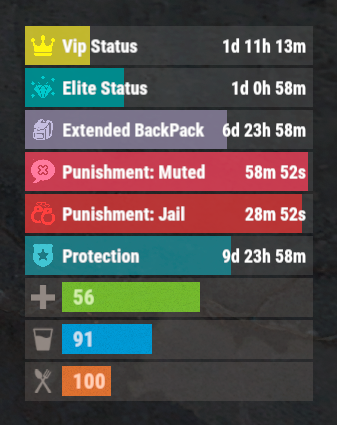
The plugin that displays temporary permissions and groups in the status bar. Depends on AdvancedStatus plugin. The ability to display temporary and permanent permissions; The ability to display temporary and permanent groups; The ability to display temporary and permanent permissions from groups; The ability to automatically generate language files for different languages(filled in English); The ability to customize the bar for each permission and group; The ability to choose between bar types(TimeCounter and TimeProgressCounter); The ability to specify the order of the bar; The ability to change the height of the bar; The abillity to customize the color and transparency of the background; The ability to set a material for the background; The ability to switch between CuiRawImageComponent and CuiImageComponent for the image; The ability to get images from the local folder(*SERVER*\oxide\data\AdvancedStatus\Images); The abillity to set own image and customize the color and transparency of the image; The abillity to set sprite instead of the image; The ability to customize the color, size, font and outline of the text. { "Chat command": "pstatus", "Is it worth enabling GameTips for messages?": true, "Is it worth clearing saved settings for permissions and groups upon detecting a wipe?": false, "Is it worth copying local images for new permissions or groups? Note: If set to true, it may create a lot of unnecessary images": false, "Is it worth displaying the status bar only when players are in the safe zone or have building privilege?": false, "List of language keys for creating language files": [ "en" ], "Default display mode for new permissions. 0 - disabled, 1 - show only temporary, 2 - show all": 1, "Default display mode for new groups. 0 - disabled, 1 - show only temporary, 2 - show all": 1, "Type of status bar for permissions. Note: You can only choose between TimeProgressCounter and TimeCounter": "TimeProgressCounter", "Type of status bar for groups. Note: You can only choose between TimeProgressCounter and TimeCounter": "TimeProgressCounter", "Default status bar settings for new permissions and groups": { "BarType - You can choose only between TimeProgressCounter and TimeCounter": "TimeProgressCounter", "Order": 20, "Height": 26, "Main_Color(Hex or RGBA)": "#FFFFFF", "Main_Transparency": 0.15, "Main_Material": "", "Image_Url": "https://i.imgur.com/BtK7YHa.png", "Image_Local(Leave empty to use Image_Url)": "PermissionsStatus_Default", "Image_Sprite(Leave empty to use Image_Local or Image_Url)": "", "Image_IsRawImage": false, "Image_Color(Hex or RGBA)": "#FFF53D", "Image_Transparency": 1.0, "Is it worth enabling an outline for the image?": false, "Image_Outline_Color(Hex or RGBA)": "0.1 0.3 0.8 0.9", "Image_Outline_Transparency": 1.0, "Image_Outline_Distance": "0.75 0.75", "Text_Size": 12, "Text_Color(Hex or RGBA)": "1 1 1 1", "Text_Font(https://umod.org/guides/rust/basic-concepts-of-gui#fonts)": "RobotoCondensed-Bold.ttf", "Text_Offset_Horizontal": 0, "Is it worth enabling an outline for the text?": false, "Text_Outline_Color(Hex or RGBA)": "#000000", "Text_Outline_Transparency": 1.0, "Text_Outline_Distance": "0.75 0.75", "SubText_Size": 12, "SubText_Color(Hex or RGBA)": "1 1 1 1", "SubText_Font": "RobotoCondensed-Bold.ttf", "Is it worth enabling an outline for the sub text?": false, "SubText_Outline_Color(Hex or RGBA)": "0.5 0.6 0.7 0.5", "SubText_Outline_Transparency": 1.0, "SubText_Outline_Distance": "0.75 0.75", "Progress_Reverse": true, "Progress_Color(Hex or RGBA)": "#FFD700", "Progress_Transparency": 0.7, "Progress_OffsetMin": "0 0", "Progress_OffsetMax": "0 0" }, "Wipe ID": "88c8bc1efdde4be39f8806c954123e36", "Version": { "Major": 0, "Minor": 1, "Patch": 3 } } EN: { "CmdFailed": "The entered command is incorrect! Try '/{0} display'", "CmdDisplayEnabled": "Displaying the bar is enabled!", "CmdDisplayDisabled": "Displaying the bar is disabled!", "BarUntilWipe": "Until wipe", "BarPermanent": "Permanent" } RU: { "CmdFailed": "Введена не верная команда! Попробуйте '/{0} display'", "CmdDisplayEnabled": "Отображение бара включено!", "CmdDisplayDisabled": "Отображение бара выключено!", "BarUntilWipe": "До вайпа", "BarPermanent": "Постоянный" } The language file is generated during the plugin initialization process. Additionally, when creating a new permission or group, a key for it will be automatically added. Note: You can also specify in the configuration file the generation of language files for other languages besides en and ru.$9.99 -
Version 1.1.5
691 downloads
Team Tracker is your is the best admin tool for monitoring player associations and enforce team size rules. Whether you need to ban an entire team or track players abusing the system, Team Tracker has you covered. It offers live logging, team queries, and auto-banning—all in one customizable and performant package. Dynamic identification of player teams Live discord logging Query a player team at any time Automatic custom ban system Battlemetrics integration High Performance clearplayerdata - deletes a players team data/history teamcheck - Sends a discord embed with a report of group data, warnings and current team players to discord. Note: All chat commands are universal meaning they can be used via the console, rcon(for import commands) and can be customized via the configuration. teamtracker.whitelist - Whitelists a player from being included in any team alerts (Admins and Developers are automatically whitelisted) teamtracker.admin - allows the use of the checkteam and whitelist commands Proximity - configurable distance between players Sleeping bag placement - bags given or placed within building Codelock authorization - authorized players on a codelock Turret authorization - authorized players on a turret Toolcupboard authorization - authorized players on a toolcupboard Healing - healing and reviving of other players Vehicle mounting - mounting of the same vehicle at the same time Team-members - history of team members PVP - players breaking team limits when pvping/roaming Raiding - players raiding together Looting - looting other players together Alerts: All alert types can be customized via the plugin config. Options include: Enable - this toggles any usage of the alert type to enable or disable the alert type Log to discord - Enables discord logs Warn Players - Sends an ingame warning to a player up to 30 seconds after the offense Weighting - configures how important the alert type is. This contributes to the ban by association score value. Warnings: Warnings are logged as a type of violation. This provides discord logs and the optional in game warning display to the violator. Display Warnings to Players - option to disable in game warnings Length of time to display warning - optional length of time to display warnings Warning Text - customizable warning text Bans: Team-Tracker allows for customizable automatic bans of players, who go over the group limits. Enable Bans - allows toggeling of the ban system Ban text - text to display as the reason for a player ban Log Bans to Discord - optionally log bans to discord. Logging Only Mode: Set Enable Bans & Log Bans to Discord to true and set Local Bans and Battlemetrics Bans to False Enable Ban by Max Association - enables banning a player or a team by summing all association values to create a total weighting. Example: if the team limit is 5 players and the Max Association Weighting is 10, if a player has more than 5 players with an association weighting of more than 10 this will apply a ban. Max Association Weighting - set the max association weighting per player in a group Ban Duration - length of time to ban for Ban Team - ban all team members of a banned player Ban Associations - bans all players over Max Association Weighting in relation to a banned player Local Bans - apply bans locally An API token for your battlemetrics org is required to use the battlemetrics ban features. A token can be acquired by visiting: https://www.battlemetrics.com/developers Server ID - set the BM server ID Go to https://www.battlemetrics.com/rcon, click into the select server. Check the address bar in your browser, the address will be ending with the Server Id, for example: https://www.battlemetrics.com/rcon/servers/123456 means 123456 is the Server Id. Org ID - set an organisation ID Go to https://www.battlemetrics.com/rcon/orgs, click into the org. Check the address bar in your browser, the address will be ending with the Organization Id, for example: https://www.battlemetrics.com/rcon/orgs/edit/123456 means 123456 is the Organization Id. BanList ID - adds a ban to a specific ban list Go to https://www.battlemetrics.com/rcon/ban-lists, click "View Bans". Check the address bar in your browser, the address will be ending with the Banlist Id, for example: https://www.battlemetrics.com/rcon/bans/?filter[banList]=abcdef-123456-example-banlist-example91011 means abcdef-123456-example-banlist-example91011 is the Banlist Id. Org Wide Ban - true if the ban should be applied to all servers in your organization Auto Add - true if the ban should automatically ban new identifiers after kicking a matching player. Native Enabled - true if native bans should be issued for this ban$24.99- 16 comments
- 5 reviews
-
- 4
-

-

-
- #teamalerts
- #team
- (and 28 more)
-
Version 1.0.4
569 downloads
Simple plugin that allows crafting speed multipliers to be set per permission group. Adjust how fast each group can craft, from slower progression to instant crafting, depending on your server’s needs. Commands These commands can be ran via ingame console (with permission) or RCON. gcraft gcraft <group> <multiplier> Permissions The following permission is only needed to allow users to access commands via ingame console. groupcrafting.admin Configuration The config can be edited directly or can be adjusted with the commands above. "group": Multiplier, "group2": Multiplier Existing server groups are automatically detected when the plugin loads. The default multiplier is 1, higher values increase crafting speed, and a value of 0 enables instant crafting. Thanks to @SawyerWD for icon!Free -

Version 1.1.7
479 downloads
Multi permission based entity limit system Limit number of entities per player/group/team/clan UI config setup options Auto updating player permissions Chat Commands: /limits: Opens the user interface (UI) for managing entity limits Console Commands: ael.createnew <advancedentitylimit.NAME> <optional: copy from advancedentitylimit.NAME>: Adds new permissions for entities. Optionally, you can copy permissions from an existing entity limit. Player Permissions: advancedentitylimit.ui: Allows players to seethe UI. advancedentitylimit.default: Applies the default entity limits advancedentitylimit.vip: Applies the vip entity limits You can create custom permission groups to have various limits per group. Admin Permissions: advancedentitylimit.setlimit: Grants permission to set limits for entities. advancedentitylimit.createperm: Allows the creation of new permissions for entities. advancedentitylimit.admin: Provides full access. { "Auto-fill missing entities?": true, "Chat prefix": "<color=red>[Limits]</color>: ", "A message when the player reaches the maximum limit of objects": "You have <color=red>reached</color> the limit of this object ({0})", "Use teams for sum them constructions": false, "Use clans?": false, "Clans plugin for sum player constructions (Mevent, k1lly0u)": "Mevent" } Credit to @MuB-Studios the original author of this plugin$15.99- 80 comments
- 14 reviews
-
- 5
-
-

-
- #limit
- #advanceentitylimit
- (and 21 more)
-
Version 1.1.1
28 downloads
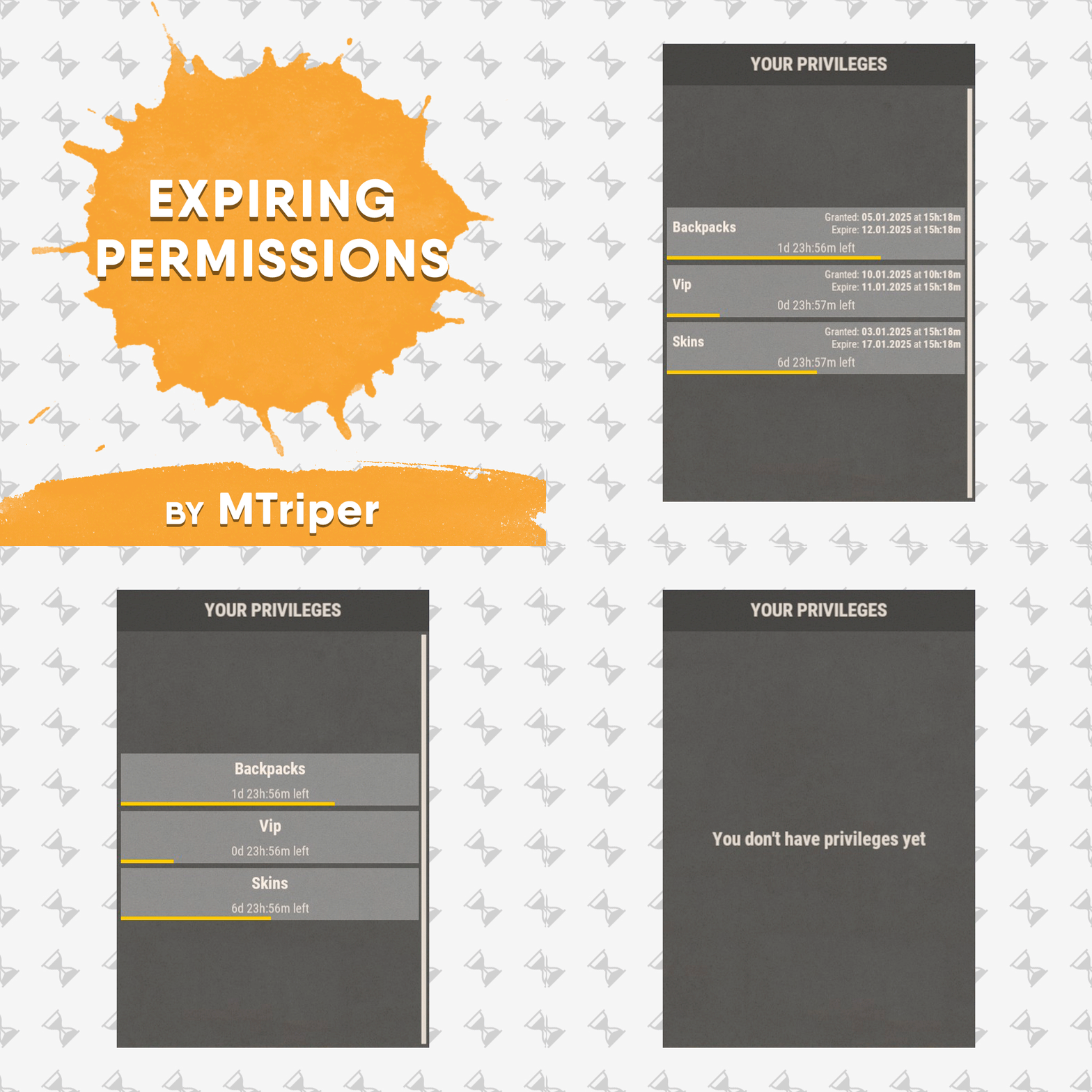
This is a simple, lightweight and easy to use plugin that allows you to grant permissions and groups for a specific amount of time. It also supports the creation of permission packs, which makes it easy to grant a large number of permissions at a time. Features Granting privileges until the end of the current wipe. Information panel with current user privileges. Customize notification in all popular notification plugins. Full-featured API for plugin developers (ability to create your own interface or integrate display of privileges into your game menu plugin). Ability to create privilege packs. Supported plugins: Notify, GUIAnnouncements - these plugins are used to display notifications. Permissions expiringpermissions.admin - to use commands to grant and revoke privileges. expiringpermissions.gui - to show a panel with the player's current privileges. Commands Commands can be entered from wherever you want: via chat, game console (F1) or server console. eperms (configurable) – shows a panel with the current privileges of the current player. setpack steamid/nickname packname time – to temporarily grant a pack of privileges to a player. revokepack steamid/nickname packname – forcibly revoke a pack of privileges from a player. grantperm steamid/nickname permission time title – temporarily grant a player a permission. revokeperm steamid/nickname permission – forcibly revoke a player's permission. addgroup steamid/nickname group time title – temporarily add a player to the group. removegroup steamid/nickname group – forcibly remove a player from a group. Description of command arguments: steamid/nickname - steamid or nickname of your choice. permission/group - plugin permission/oxide group. packname - package name from the Package name field in the config. time - duration of privileges, in the format 7d10h20m (e.g. 14d, 1d5h, 10m and etc.). You can also use the word "wipe" here. In this case the privilege will be valid until the end of the current wipe. title (optional) - name that will be displayed in the panel and indicated in messages to the player. If it is not specified, the plugin will write *title not specified*. General settings Check interval [sec] – interval for checking expiring player privileges. Show the start and end date of the permission in the panel (depends on the time on the physical server)? – in addition to the privilege name (if specified), the panel will display the privilege activation date and expiration date. Keep in mind that the plugin works with the time of the server machine (physical server). If the time and date are not configured there, they will be displayed incorrectly in the plugin. Type of notifications when permission are granted (none, title - only with name, all) none – the player will not be notified when a privilege is granted to him. title – the player will be notified about those privileges that have the name specified. all – the player will be notified when all privileges have been granted. If the privilege does not have a name set, *title not specified* will be displayed. Type of notifications when permission expire (none, title - only with name, all) – similar to the setting above, only when the privilege is revoked/expired. Show a notification if the permission is manually revoked? – show a notification to the player when an administrator manually removes a privilege. Notification settings Notification type (Chat, GameTips, Notify, GUIAnnouncements) – if this section is enabled, you must specify the type/plugin to notify the player of different warnings. Chat – notification to regular chat. GameTips – notification in the in-game Rust tooltips (blue or red at the bottom of the screen). Notify – notification in the Notify plugin by Mevent. GUIAnnouncements – notification in the GUIAnnouncements plugin by JoeSheep. Just below that are the customization fields for the specific type of notification. Setting permission packages To display privileges correctly in the panel, you can create packs. They allow you to collect several privileges or groups together. In this way you reduce the number of commands and assign a name to this pack, which will be displayed in the panel and when the player is notified. This is actually very convenient and saves problems and confusion. Display name – package name, it is displayed in the panel and in notifications. Package name – package short name, it is used when using commands. Permissions – list of permissions that will be included in the package. Groups – list of groups that will be included in the package. Then you just use the setpack command where you specify the name of the pack. Then everything in the pack (permissions and groups) will be given to the player. Plugin Api object ExpPermCanSetPackage(BasePlayer target, TimeSpan timeSpan, string packageName) { return null; } // before the pack is issued void ExpPermOnPackageSet(BasePlayer target, TimeSpan timeSpan, string packageName) // after issuing the pack object ExpPermCanRevokePackage(BasePlayer target, string packageName) { return null; } // before the pack is revoked void ExpPermOnPackageRevoked(BasePlayer target, string packageName) // after the pack is revoked object ExpPermCanGrantPermission(BasePlayer target, string permission, TimeSpan timeSpan, string title) { return null; } // before the permission is granted void ExpPermOnPermissionGranted(BasePlayer target, string permission, TimeSpan timeSpan, string title) // after the permission is granted object ExpPermCanRevokePermission(BasePlayer target, string permission) { return null; } // before the permission is revoked void ExpPermOnPermissionRevoked(BasePlayer target, string permission) // after the permission is revoked object ExpPermCanAddToGroup(BasePlayer target, string group, TimeSpan timeSpan, string title) { return null; } // before adding a player to the group void ExpPermOnAddedToGroup(BasePlayer target, string permission, TimeSpan timeSpan, string title) // after adding a player to the group object ExpPermCanRemoveFromGroup(BasePlayer target, string group) { return null; } // before a player is removed from the group void ExpPermOnRemovedFromGroup(BasePlayer target, string group) // after a player is removed from the group void ExpPermOnPackageExpired(string userId, string title, string packName) // when the privilege pack expired void ExpPermOnPermissionExpired(string userId, string title, string permName) // when the permission expired void ExpPermonGroupExpired(string userId, string title, string groupName) // when the group expired // *use the title to display the name of the privileges in your plugin // If timespan = TimeSpan.MaxValue then this privilege is valid until the end of the current wipe ExpiringPermissions.Call<bool>("HasActivePermissions", string userID); ExpiringPermissions.Call<bool>("TryGetPlayerData", out List<Dictionary<string, object>> packages, out List<Dictionary<string, object>> permissions, out List<Dictionary<string, object>> groups); /* packages/permissions/groups Dictionary contains: ["value"] = string ["title"] = string ["startDate"] = DateTime ["expireDate"] = DateTime If expireDate = DateTime.MaxValue then this privilege is valid until the end of the current wipe */ Plugin Config Example of plugin configuration in English: Example of plugin configuration in Russian. If you need Russian config, open it (ExpiringPermissions.cs) before loading the plugin, and at the top set the variable "isRus = true". Then save and upload this file to your server.$5.00 -
Version 1.0.0
3 downloads
GroupLink is a lightweight Rust plugin designed for the Oxide modding framework, created to manage group relationships between leader (parent) groups and their associated subgroups. Its primary function is to automatically remove players from specified subgroups when they are no longer part of their corresponding leader group, ensuring that subgroup permissions are tied to leader group membership. This is particularly useful for servers using timed or subscription-based group systems, such as those managed by the TimedPermissions plugin. When a player loses membership in a leader group (either through manual removal or expiration via TimedPermissions), GroupLink checks for and removes them from all linked subgroups defined in its configuration. Upon each subgroup removal, it sends a private, customizable chat message to the affected player, informing them of the change. The plugin uses a periodic check system to ensure compatibility with external group management plugins, making it efficient with minimal server performance impact. Key features: Automatically removes players from subgroups when their leader group membership ends Sends private, styled chat messages (configurable size and color) to affected players Lightweight design with deferred operations using NextTick to reduce resource usage Configurable leader groups, subgroups, message format, and check interval Admin commands for testing and debugging group status Configuration Explanation The plugin generates a configuration file named GroupLink in the oxide/config directory. Below is the default configuration with an explanation of each field: json { "LeaderGroups": [ "vipplus", "mvp", "fanatic" ], "SubGroups": { "vipplus": [ "cvipplusbuilders", "cvipplusfarmers", "cvipplusindustrial" ], "mvp": [ "bmvpbuilders", "bmvpfarmers", "bmvpindustrial" ], "fanatic": [ "afanaticbuilders", "afanaticfarmers", "afanaticindustrial" ] }, "MessageFormat": "{0} you have left group {1} as your {2} subscription has ended", "MessageSize": 24, "MessageColor": "green", "CheckInterval": 60.0 } LeaderGroups: An array of strings listing the parent group names (e.g., "vipplus", "mvp", "fanatic"). These are the primary groups that, when removed from a player, trigger subgroup removal. SubGroups: A dictionary mapping each leader group to an array of its associated subgroups. For example, "vipplus" is linked to "cvipplusbuilders", "cvipplusfarmers", and "cvipplusindustrial". When a player loses the leader group, they are removed from all listed subgroups. MessageFormat: A string defining the chat message sent to players upon subgroup removal. It uses indexed placeholders: {0}: Player's username {1}: Subgroup name {2}: Leader group name Example output: "UrbanViking you have left group bmvpbuilders as your mvp subscription has ended" MessageSize: An integer setting the font size of the chat message (default: 24). MessageColor: A string defining the color of the chat message in HTML color format (default: "green"). Can be changed to other colors like "red", "#FF0000", etc. CheckInterval: A float specifying how often (in seconds) the plugin checks all connected players for leader group status (default: 60.0). Adjust this to balance responsiveness and server load. Adding/Removing Groups from the Config To modify the groups in the config, edit oxide/config/GroupLink.json and reload the plugin using oxide.reload GroupLink or /grouplink reload. Here's how to add or remove groups: Adding a New Leader Group and Subgroups Open GroupLink.json. In the "LeaderGroups" array, add the new leader group name: json "LeaderGroups": [ "vipplus", "mvp", "fanatic", "elite" // Added new leader group ] In the "SubGroups" dictionary, add a new entry for the leader group with its subgroups: json "SubGroups": { "vipplus": ["cvipplusbuilders", "cvipplusfarmers", "cvipplusindustrial"], "mvp": ["bmvpbuilders", "bmvpfarmers", "bmvpindustrial"], "fanatic": ["afanaticbuilders", "afanaticfarmers", "afanaticindustrial"], "elite": ["elitebuilders", "elitefarmers", "eliteindustrial"] // Added subgroups for "elite" } Save the file and reload the plugin. Removing a Leader Group and Its Subgroups Open GroupLink.json. In the "LeaderGroups" array, remove the leader group name: "LeaderGroups": [ "vipplus", "fanatic" // Removed "mvp" ] In the "SubGroups" dictionary, remove the corresponding entry: "SubGroups": { "vipplus": ["cvipplusbuilders", "cvipplusfarmers", "cvipplusindustrial"], "fanatic": ["afanaticbuilders", "afanaticfarmers", "afanaticindustrial"] // Removed "mvp" entry } Save the file and reload the plugin. Adding/Removing Subgroups for an Existing Leader Group To add a subgroup, append it to the array under the leader group in "SubGroups": "mvp": ["bmvpbuilders", "bmvpfarmers", "bmvpindustrial", "mvpraiders"] // Added "mvpraiders" To remove a subgroup, delete it from the array: "mvp": ["bmvpbuilders", "bmvpfarmers"] // Removed "bmvpindustrial" Save and reload the plugin. Hooks Needed by Other Plugins GroupLink uses the following Oxide hook, which other plugins might need to interact with or be aware of: OnUserGroupRemoved(BasePlayer player, string group): Called when a player is removed from a group via Oxide's permission system. GroupLink uses this as a fallback to catch manual group removals, though its primary mechanism is a periodic check for TimedPermissions compatibility. Other plugins can call this hook to trigger GroupLink's removal logic if they remove players from leader groups manually.$9.99 -
Version 1.2.6
485 downloads
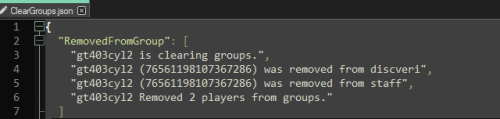
Clear Groups is a simple plugin that allows admin to remove all players from specific groups with a single command. In the configuration file you can: Specify which groups you want to clear. Specify to ignore admin. Set the command for clearing the group(s). Set the command for clearing the data file. Chat Commands: /cleargroups - Clear groups /cleargroupsdata - Clear data file Console Commands: cg - Clear groups cgd - Clear data file Permissions: "cleargroups.admin" - Allows admin to clear the data file and clear the selected group(s). Default Configuration File: { "Change Commands": { "Manually clear groups": "cleargroups", "Delete clear groups data": "cleargroupsdata" }, "Main Options": { "Ignore Admin": true, "Clear Data on wipe": false }, "Group Names": [ "", "" ] } Default Data File: { "RemovedFromGroup": [] } For support: Contact me here or on Discord: gt403cyl2Free -
Version 1.0.2
20 downloads
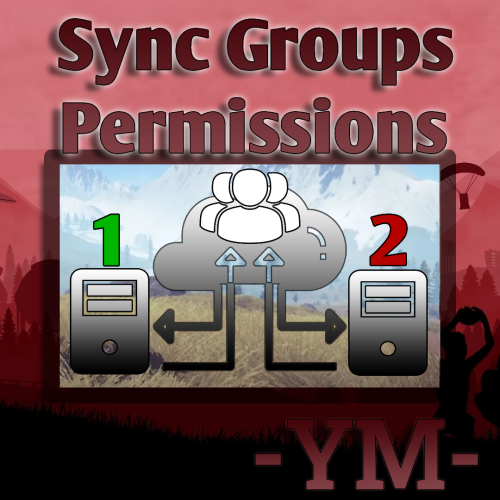
This plugin synchronizes groups, group permissions, player groups, and player permissions across multiple servers. Questions & Answer: Config: { "General Settings": { "Prefix": "[PG-Sync]", "SteamID": "0", "Debug": false }, "Sync Settings": { "Main Server (This should be true only on the main server among servers.)": false, "Main Server Redirect IP": "127.0.0.1", "Main Server Redirect Port": "28015", "Sync Groups?": true, "Sync Players Permissions?": true, "Sync Groups in Permissions?": true, "Sync Save Time (secs)": 60, "Exception for Auto Group Sync": [], "Exception for Auto Permissons Sync": [] }, "Mysql Settings (Recommended v5.7.37)": { "MySqlIp": "", "MySqlPort": 3389, "MySqlUsername": "", "MySqlPasword": "", "MySqlDatabase": "" }, "Version": { "Major": 1, "Minor": 0, "Patch": 0 } } This plugin was created at the request of the client.$30.00 -
Version 1.0.0.0
14 downloads
Rust Manager is a robust and user-friendly windows application designed to streamline the management of your Rust game server. Built on the latest .NET 8 framework, Rust Manager offers a comprehensive suite of tools to help you efficiently manage your server and its users, all from a local environment without the need to log on to any rust servers. Key Features: • User Management: Easily register, edit, and manage user accounts with a secure and intuitive interface. The application supports user authentication and email confirmation to ensure the integrity of your user base. • Local Management: All management tasks are performed locally, ensuring that your data remains secure and private. There is no need to log on to your rust servers, providing you with complete control over your server management. • Email Notifications: Integrated email sending capabilities allow you to send confirmation emails and other notifications directly from the application. • Profile Editing: Users can update their profiles, including changing their passwords, directly within the application. • Secure Authentication: The application uses ASP.NET Core Identity for secure user authentication and management, ensuring that your server remains protected from unauthorized access. • Permission Group Management: Easily manage permission groups and individual permissions through the intuitive UI. Create, delete, and sync groups across multiple Rust servers seamlessly. • Group Synchronization: Sync permission groups across multiple Rust servers, ensuring consistency and ease of management. • Permission Comparison: Compare permissions and groups across different servers to identify discrepancies and ensure uniformity. Rust Manager is the easiest way to manage permissions across a single or multiple servers. It runs on windows as a stand alone application and you maintain 100% of the information. No subscriptions or hosting is required. Rust Manager is the perfect solution for Rust server administrators who want a powerful, secure, and easy-to-use tool for managing their servers locally. DEMO VIDEO$39.99 -
Version 3.1.1
739 downloads
Custom Gather allows you to have dynamic gather rates on your server! This allows you to assign different gather rates for as many groups of players as you would like. What this plugin offers that other gather rate plugins don't: Create custom gather rates based on oxide permission groups Example: Have a global 2x gather rate, but have VIPs gather at 4x, and Elite VIPs gather at 8x. Modify resources in Unloadable Train Wagons Set separate custom rates for Public and Private quarries Modify Fishing Rate Gather rate modifier includes grubs/worms picked from plants Configuring JSON Files This plugin creates two JSON files, one is located in Oxide/Config/CustomGather.json, and the other is in Oxide/Data/CustomGather.json. The config file is used to set the global on/off switches, unloadable train wagon settings, the blacklists and the global override list. The data file is used to create and specify custom groups to be assigned via oxide permissions. The 'default' group makes a permission named customgather.default and automatically assigns it to the default oxide group All other groups generate permissions titled customgather.{groupname} that then must be assigned to an oxide group or player. Do NOT delete the data json file during server wipe. It will reset all your custom group settings and need to be reconfigured. Tutorial Blacklists & Global Override List The Blacklists reverts an item's gather rate to 1x for the specified method of gathering that it is listed under. The Global Override List is similar, but you specify a custom gather rate for specific items that is then applied globally, regardless of permission groups or gather method. Items need to be entered in with their short names. Use this reference to find any item's short name. Insert items by their short names inside quotations and separated by commas. Chat Commands /cg info -- Displays each custom group and their gather rates Config JSON - Example { "Global On/Off Switches. Only set these to false if you use a separate plugin to control specific gather rates.": { "Modify rates for items picked off the terrain (ex: plants, tree stumps, small ore nodes)": true, "Modify rates for items grown in planters": true, "Modify rates for fishing": true, "Modify rates for PUBLIC Quarries and Pumpjacks": true, "Modify rates for PRIVATE Quarries and Pumpjacks": true, "Modify rates for the Giant Excavator": true, "Modify rates for Dispensers (ex: ore nodes, trees, animal corpses)": true, "Modify rates for Resource Train Wagons": true }, "Unloadable Train Wagon Settings": { "Multiplication Rate": 20, "Single Stack of Resources?": true }, "Blacklists (items to gather at vanilla rates)": { "Harvested Items": [ "human.skull", "skull.wolf" ], "Pickup Items": [ "cloth" ], "Planter Box Items": [ "clone.hemp" ], "Fishing": [ "fish.anchovy" ], "Quarries & Pumpjacks": [ "stones" ], "Excavator": [ "stones" ], "Train Resource Wagons": [ "metal.ore" ] }, "Global Override List": { "pumpkin": 20, "hq.metal.ore": 10 } } Data JSON - Example { "Custom Permission Group Settings": { "default": { "Gather Rate": 1, "PUBLIC Quarries & Pumpjacks Rate": 1, "PRIVATE Quarries & Pumpjacks Rate": 1, "Giant Excavator Rate": 1, "Fishing Rate": 1 }, "vip": { "Gather Rate": 2, "PUBLIC Quarries & Pumpjacks Rate": 2, "PRIVATE Quarries & Pumpjacks Rate": 2, "Giant Excavator Rate": 2, "Fishing Rate": 2 }, "Elite": { "Gather Rate": 3, "PUBLIC Quarries & Pumpjacks Rate": 3, "PRIVATE Quarries & Pumpjacks Rate": 3, "Giant Excavator Rate": 3, "Fishing Rate": 3 }, "SuperElite": { "Gather Rate": 4, "PUBLIC Quarries & Pumpjacks Rate": 4, "PRIVATE Quarries & Pumpjacks Rate": 4, "Giant Excavator Rate": 4, "Fishing Rate": 4 }, "MegaElite": { "Gather Rate": 5, "PUBLIC Quarries & Pumpjacks Rate": 5, "PRIVATE Quarries & Pumpjacks Rate": 5, "Giant Excavator Rate": 5, "Fishing Rate": 5 } } }$5.00- 25 comments
- 3 reviews
-
- 1
-
-
- #gathering
- #gather rates
- (and 11 more)