Latency Numbers for various components in a system

Units of time

UnitAbbreviationFraction of 1 second
Minutem60
Seconds1
Milisecondms0.001 or 1 × 10⁻³
Microsecondμs1 × 10-6
Nanosecondns1 × 10-9
Picosecondps1 × 10-12

Time scale of system latencies
Numbers are from runs on (4 vCPUs, 16 GB memory), SSD persistent – Intel Cascade machine.

EventLatency
L1 cache reference1ns
Branch mispredict3ns
L2 cache reference4ns
Mutex lock/unlock17ns
Main memory reference100ns
SSD Random read16μs
Read 1 MiB from memory3μs
Read 1MiB sequentially from SSD49μs
Read 1MiB sequentially from HDD825μs
System Call500ns
Context Switch10μs
Sequential Memory R/W 1MiB100μs
Random HDD Seek 1MiB15ms
Random SSD Seek 1MiB15ms
Sequential SSD write 1MiB (with fsync)100ms
Sequential SSD write 1MiB (without fsync)1ms

Key terms for system performance

The following are key terms for systems performance.

  1. IOPS: Input/output operations per second is a measure of the rate of data transfer operations. 
  2. Throughput: The rate of work performed
  3. Response time: The time required for an operation to complete. This includes time spent by the request waiting for resources.
  4. Latency: The time spent by the request waiting. Sometimes it might be used as an equivalent of response time.
  5. Utilisation: Measure of how busy a resource is for a given interval when it was servicing requests.
  6. Saturation: The amount of queued work a resource has which it cannot service.
  7. Bottleneck: A resource that limits the system performance.
  8. Workload: Load on/Input to the system
  9. Cache: A system that can buffer a limited amount of data, usually faster than the underlying primary storage.
  10. Bandwidth: Maximum transfer rate of a channel

The Math behind Fibonacci Numbers

In this blog we will see how to find index of a particular number in fibonacci series and find the number at a particular index in fibonacci series

1. Find the number at a particular index in fibonacci series

The Fibonacci numbers are defined recursively by the following difference equation:

\left\{\begin{matrix} F_{n} = F_{n-1} + F_{n-2} & & & & \\ F_{1} = 1 & & & & \\ F_{0} = 0 & & & & \end{matrix}\right.

It is easy to compute the first few elements in the sequence:

0,1,1,2,3,5,8,13,21,34⋯

Derivation of the general formula

It is possible to derive a general formula for F_{n} without computing all the previous numbers in the sequence. If a gemetric series (i.e. a series with a constant ratio between consecutive terms r^n ) is to solve the difference equation, we must have

r^n = r^{n-1} + r^{n-2}

which is equivalent to

r^2 = r + 1

This equation has two unique solutions

\varphi = \frac {1 + \sqrt{5}}{2} \approx 1.61803

\frac {1 - \sqrt{5}}{2} = 1 - \varphi = - \frac {1}{\varphi } \approx -0.61803

In particular the larger root is known as the golden ratio
\varphi = \frac {1 + \sqrt{5}}{2} \approx 1.61803

Now, since both roots solve the difference equation for Fibonacci numbers, any linear combination of the two sequences also solves it

a\begin{pmatrix} \frac {1 + \sqrt{5}}{2} \end{pmatrix}^n + b\begin{pmatrix} \frac {1 - \sqrt{5}}{2} \end{pmatrix}^n

It’s not hard to see that all Fibonacci numbers must be of this general form because we can uniquely solve for a and b such that the initial conditions of F_{1}=1 and F_{0}=0 are met

\left\{\begin{matrix} F_{0} = a\begin{pmatrix} \frac {1 + \sqrt{5}}{2} \end{pmatrix}^0 + b\begin{pmatrix} \frac {1 - \sqrt{5}}{2} \end{pmatrix}^0 & \\ F_{1} = a\begin{pmatrix} \frac {1 + \sqrt{5}}{2} \end{pmatrix}^1 + b\begin{pmatrix} \frac {1 - \sqrt{5}}{2} \end{pmatrix}^1 & \end{matrix}\right.

yielding

\left\{\begin{matrix} a= \frac {1}{\sqrt{5}}\\ b= \frac {-1}{\sqrt{5}} \end{matrix}\right.

We have therefore derived the general formula for the n-th Fibonacci number

F_{n}= \frac {1}{\sqrt{5}}\bigl(\begin{smallmatrix} \frac {1 + \sqrt{5}}{2} \end{smallmatrix}\bigr)^n + \frac {1}{\sqrt{5}}\bigl(\begin{smallmatrix} \frac {1 - \sqrt{5}}{2} \end{smallmatrix}\bigr)^n

Since the second term has an absolute value smaller than 1, we can see that the ratios of Fibonacci numbers converge to the golden ratio
\lim_{n -> \infty } \frac {F_{n}}{F_{n-1}} = \frac {1 + \sqrt{5}}{2}

Python code:

def findFibIndexValue(index):
    golden_ratio = (1 + math.sqrt(5)) / 2
    return round(((golden_ratio ** index) - ((1 - golden_ratio) ** index)) / math.sqrt(5))

2. Find index of a particular number in fibonacci series

We know that
F_{n} = \frac {1}{\sqrt{5}}\left ( \varphi ^n - \hat \varphi^n \right )
where
\varphi = \frac {1}{2}\left ( 1 + \sqrt{5} \right ) and \hat \varphi = \frac {1}{2}\left ( 1 - \sqrt{5} \right )

n = round \begin{Bmatrix} \frac {logF_{n}+log\sqrt{5}}{log \varphi} \end{Bmatrix}

where “round” means round to the nearest integer. For speed of computation we should simplify this to:
n = round \begin{Bmatrix} \alpha \cdot log F_{n} + \beta \end{Bmatrix}

where the 𝛼 and 𝛽 constants are precomputed as:
\alpha = \frac {1}{log \varphi } \approx 2.078087
\beta = \frac {log \sqrt{5}}{log \varphi} \approx 1.672276

Python code:

def findFibIndex(val):
    return round(2.078087 * math.log(val) + 1.672276)

3. Count number of digits in the nth Fibonacci number

F_{n}= \frac {1}{\sqrt{5}}\bigl(\begin{smallmatrix} \frac {1 + \sqrt{5}}{2} \end{smallmatrix}\bigr)^n + \frac {1}{\sqrt{5}}\bigl(\begin{smallmatrix} \frac {1 - \sqrt{5}}{2} \end{smallmatrix}\bigr)^n

The above formula can be simplified,
F_{n} = round\left ( \frac {\varphi ^n}{\sqrt {5}} \right )
Count of digits in Fib(n)
= log_{10}F_{n}
= log_{10}\left ( \frac {\varphi ^n}{\sqrt{5}} \right )
= n \cdot log_{10}\varphi - log_{10}\sqrt{5}
= n \cdot log_{10}\varphi - \frac {log_{10}5}{2}


Python code:

phi = (1 + 5**.5) / 2
def numberOfDig (n) : 
    if n == 1 : 
        return 1
    return math.ceil((n * math.log10(phi) - 
                      .5 * math.log10(5)))

Upgrade python packages with pip: use “sudo” or “–user”?

pip install -U PACKAGENAME --user

With --user they are installed in your $HOME directory in:

$HOME/.local/lib/python2.7/site-packages

Using sudo your package will be installed in:

/usr/local/lib/python2.7/dist-packages/

How to get pip to work behind a proxy server

On Ubuntu, you can set proxy by using

export http_proxy=http://username:password@proxy:port
export https_proxy=http://username:password@proxy:port

or if you are having SOCKS error use

export all_proxy=http://username:password@proxy:port

Then run pip

sudo -E pip3 install {packageName}

The pip’s proxy parameter is, according to pip --help, in the form scheme://[user:passwd@]proxy.server:port

You should use the following:

pip install --proxy http://user:password@proxyserver:port TwitterApi

Also, the HTTP_PROXY env var should be respected.

pip install – locale.Error: unsupported locale setting

Problem:

  ~ pip install virtualenv
Traceback (most recent call last):
  File "/usr/bin/pip", line 11, in <module>
    sys.exit(main())
  File "/usr/lib/python3.4/site-packages/pip/__init__.py", line 215, in main
    locale.setlocale(locale.LC_ALL, '')
  File "/usr/lib64/python3.4/locale.py", line 592, in setlocale
    return _setlocale(category, locale)
locale.Error: unsupported locale setting

Solution:

Short answer-

just run the following command:

$ export LC_ALL=C

If you keep getting the error in new terminal windows, add it at the bottom of your .bashrc file.

Long answer-

Here is my locale settings:

$ locale
LANG=en_US.UTF-8
LANGUAGE=
LC_CTYPE="C"
LC_NUMERIC="C"
LC_TIME="C"
LC_COLLATE="C"
LC_MONETARY="C"
LC_MESSAGES="C"
LC_PAPER="C"
LC_NAME="C"
LC_ADDRESS="C"
LC_TELEPHONE="C"
LC_MEASUREMENT="C"
LC_IDENTIFICATION="C"
LC_ALL=C

Apache: Permission denied: exec of ‘/var/www/html/cgi-test/first.pl’ failed

Problem:

So, I’m new to CGI / Perl, I’m trying to move a perl-based web app to a new server.

My new server is CentOS 7, which runs Apache HTTPD 2.4.6.

I’m trying to get a basic Perl CGI working from an HTTP request.

The web request is returning “500 Internal Server Error”

The error log is showing “permission denied”:

[Tue May 12 16:56:44.604660 2015] [cgi:error] [pid 12302] [client 10.0.2.2:56693] AH01215: (13)Permission denied: exec of '/var/www/html/cgi-test/first.pl' failed
[Tue May 12 16:56:44.604708 2015] [cgi:error] [pid 12302] [client 10.0.2.2:56693] End of script output before headers: first.pl

My CGI script is in /var/www/html/cgi-test/first.pl

It looks like this:

#!/usr/bin/perl
print "Content-type: text/html\n\n";
print "Hello, World.";

In the cgi-test directory the permissions look like this:

drwxr-xr-x. 2 root root 21 May 12 16:48 .
drwxr-xr-x. 4 root root 32 May 12 16:48 ..
-r-xr-xr-x. 1 root root 76 May 12 16:48 first.pl

Perl is in the normal place and has I think normal permissions

[root@localhost cgi-test]# ls -al /usr/bin/perl
-rwxr-xr-x. 2 root root 11400 Mar  6 05:07 /usr/bin/perl

My httpd.conf is the default. I’ve just added the following section in order to allow cgi in my cgi-test directory:

<Directory "/var/www/html/cgi-test">
    Options +ExecCGI
    AddHandler cgi-script .cgi .pl
</Directory>

To eliminate the possibility of suexec being the cause of this issue I’ve moved it from /usr/sbin/suexec to another file name.

Httpd is running as user “apache” which is in group “apache”

[root@localhost cgi-test]# ps -Af | grep httpd
root     12298     1  0 16:56 ?        00:00:00 /usr/sbin/httpd -DFOREGROUND
apache   12299 12298  0 16:56 ?        00:00:00 /usr/sbin/httpd -DFOREGROUND
apache   12300 12298  0 16:56 ?        00:00:00 /usr/sbin/httpd -DFOREGROUND
apache   12301 12298  0 16:56 ?        00:00:00 /usr/sbin/httpd -DFOREGROUND
apache   12302 12298  0 16:56 ?        00:00:00 /usr/sbin/httpd -DFOREGROUND
apache   12303 12298  0 16:56 ?        00:00:00 /usr/sbin/httpd -DFOREGROUND
root     12342 12260  0 17:20 pts/0    00:00:00 grep --color=auto httpd
[root@localhost cgi-test]# groups apache
apache : apache

I have tried running the script as apache, it works without any problem.

[root@localhost cgi-test]# su -s /bin/bash apache
bash-4.2$ perl /var/www/html/cgi-test/first.pl 
Content-type: text/html

Hello, World.bash-4.2$

Presumably I’m hitting some security precaution of Apache. Lots of conflicting advice about what this might be. Any help much appreciated.

Solution:

I see from your own answer that it was a SELinux permissions issue due to trying to run CGI scripts from within apache in a non-standard directory.

The proper way to solve the permissions issue while maintaining SELinux in ‘enforcing’ mode, and thus improving your server’s security is to apply the proper context to the files in your custom CGI script directory. If it is to be a permanent directory, you should change the selinux policy to automatically create new files with the proper permissions.

You can check the selinux policy for the cgi-bin directory with the command:

$ semanage fcontext --list | grep cgi-bin 
 (...)
/var/www/[^/]*/cgi-bin(/.*)?                       all files          system_u:object_r:httpd_sys_script_exec_t:s0
/var/www/html/[^/]*/cgi-bin(/.*)?                  all files          system_u:object_r:httpd_sys_script_exec_t:s0
 (...)

This means that every file created inside the standard cgi-bin directories for apache will be automatically given the SELinux type httpd_sys_script_exec_t and be executable by httpd, so this is what your files in the cgi-test directory should have as well.

NOTE: the examples shown below are based on CentOS/RHEL6, it should work just the same for RHEL7 with the eventual tweak.

Temporary solution

You can simply change your perl script’s SELinux context with:

$ chcon -t httpd_sys_script_exec_t /var/www/html/cgi-test/first.pl

Check the file’s SELinux attributes with ls -laZ:

$ ls -laZ /var/www/html/cgi-test/first.pl
-rwxr-xr-x. root root system_u:object_r:httpd_sys_script_exec_t:s0 /var/www/html/cgi-test/first.pl

However, if there’s a SELinux relabel operation on this filesystem, the attributes will be reverted to the defaults and it will stop working again. It will also have to be done every time a new CGI script is added.

Definite solution

You can change the SELinux policy by adding a rule for your custom CGI directory and all contained subdirectories and files.

This is done via the semanage command (available in the policycoreutils-python RPM package):

$ semanage fcontext -a -t httpd_sys_script_exec_t "/var/www/html/cgi-test(/.*)?"

This will take a while to run. After changing the policy any new files created in your custom directory will have the new context. For the ones already there, you can apply the policy manually with:

$ restorecon -R -v /var/www/html/cgi-test

You can check your newly-added rule with:

$ semanage fcontext --list | grep cgi-test

NumPy: why does np.linalg.eig and np.linalg.svd give different V values of SVD?

I am learning SVD by following this MIT course.

the Matrix is constructed as

C = np.matrix([[5,5],[-1,7]])
C
matrix([[ 5,  5],
        [-1,  7]])

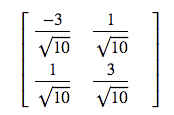
the lecturer gives the V as

enter image description here

this is close to

w, v = np.linalg.eig(C.T*C)
matrix([[-0.9486833 , -0.31622777],
        [ 0.31622777, -0.9486833 ]])

but np.linalg.svd(C) gives a different output

u, s, vh = np.linalg.svd(C)
vh
matrix([[ 0.31622777,  0.9486833 ],
        [ 0.9486833 , -0.31622777]])

it seems the vh exchange the elements in the V vector, is it acceptable?

did I do and understand this correctly?

Solution:

For linalg.eig your Eigenvalues are stored in w. These are:

>>> w
array([20., 80.])

For your singular value decomposition you can get your Eigenvalues by squaring your singular values (C has maximum rank so everything is easy here):

>>> s**2
array([80., 20.])

As you can see their order is flipped.

From the linalg.eig documentation:

The eigenvalues are not necessarily ordered

From the linalg.svd documentation:

Vector(s) with the singular values, within each vector sorted in descending order. …

In general routines that give you Eigenvalues and Eigenvectors do not “sort” them necessarily the way you might want them. So it is always important to make sure you have the Eigenvector for the Eigenvalue you want. If you need them sorted (e.g. by Eigenvalue magnitude) you can always do this yourself (see here: sort eigenvalues and associated eigenvectors after using numpy.linalg.eig in python).

Finally note that the rows in vh contain the Eigenvectors, whereas in v it’s the columns.

So that means that e.g.:

>>> v[:,0].flatten()
matrix([[-0.9486833 ,  0.31622777]])
>>> vh[:,1].flatten()
matrix([[ 0.9486833 , -0.31622777]])

give you both the Eigenvector for the Eigenvalue 20.

json.loads() returns a string

Why is json.loads() returning a string? Here’s is my code:

import json

d = """{
    "reference": "123432",
    "business_date": "2019-06-18",
    "final_price": 40,
    "products": [
        {
            "quantity": 4,
            "original_price": 10,
            "final_price": 40,
        }
    ]
}"""

j = json.loads(json.dumps(d))
print(type(j))

Output:

<class 'str'>

Shouldn’t it returning a json object? What change is required here?

Solution:

Two points:

  1. You have a typo in your products key : "final_price": 40, should be "final_price": 40 (without comma)
  2. j should be json.loads(d)

Output

dict

EDIT

Reasons why you can not have a trailing comma in a json objects are explained in this post Can you use a trailing comma in a JSON object?

Unfortunately the JSON specification does not allow a trailing comma. There are a few browsers that will allow it, but generally you need to worry about all browsers.