Remove substring in a column pandas

I have a dataframe where one column has strings that sometimes contain a word and parentheses around the value I want to keep. How do I do remove them? Here’s what I have:

import pandas as pd

df = pd.read_csv("Espacios_@cronista.csv")
del df['Espacio']

df[df['Tamano'].str.contains("Variable")]

Output I have:

         Tamano              Subastas  Imp         Fill_rate  
0        Variable (300x600)  43        13          5.99   
1        Variable (266x600)  43        5           4.44  
2        266x600             43        5           4.44  

Output I need:

   Tamano  Subastas  Imp         Fill_rate  
0   300x600  43      13          5.99   
1   266x600  43      5           4.44   
2   266x600  43      5           4.44  

Solution:

This is a good use case for pd.Series.str.extract

pipelined
Meaning, assign creates a copy. You can use fillna to fill in spots that became NaN.

pat = 'Variable\s*\((.*)\)'
df.assign(Tamano=df.Tamano.str.extract(pat, expand=False).fillna(df.Tamano))

    Tamano  Subastas  Imp  Fill_rate
0  300x600        43   13       5.99
1  266x600        43    5       4.44
2  266x600        43    5       4.44
in place
Meaning we alter df

pat = 'Variable\s*\((.*)\)'
df.update(df.Tamano.str.extract(pat, expand=False))
df

    Tamano  Subastas  Imp  Fill_rate
0  300x600        43   13       5.99
1  266x600        43    5       4.44
2  266x600        43    5       4.44

If ElseIf Else condition in pandas dataframe list comprehension

I have a dataframe with 11 columns: Status1-Status5, Time1-Time5 & Time_Min

df = pd.DataFrame([[100,200,150,400,500,'a','b','a','c','a',100], [300,400,200,500,250,'b','b','c','c','c',200]], columns=['TIME_1', 'TIME_2', 'TIME_3', 'TIME_4', 'TIME_5','STATUS_1','STATUS_2','STATUS_3','STATUS_4','STATUS_5','TIME_MIN'])

I would like to reproduce a code I have in SAS currently which does the following

IF TIME_1 = TIME_MIN THEN STATUS = STATUS_1;
ELSE IF TIME_2 = TIME_MIN THEN STATUS = STATUS_2;
ELSE IF TIME_3 = TIME_MIN THEN STATUS = STATUS_3;
ELSE IF TIME_4 = TIME_MIN THEN STATUS = STATUS_4;
ELSE STATUS = STATUS_5;

Expected output for column STATUS would be

['a','c']

I tried building something along these lines (which would need to be extended with else ifs)

df['STATUS'] = [a if x == y else b for x,y,a,b in df[['TIME_MIN','TIME_1','STATUS_1','STATUS_2']]]

But this just gives an error. I’m sure it’s a simple fix, but I can’t quite figure it out.

Solution:

You can write a function

def get_status(df):
    if df['TIME_1'] == df['TIME_MIN']:
        return df['STATUS_1']
    elif df['TIME_2'] == df['TIME_MIN']:
        return df['STATUS_2']
    elif df['TIME_3'] == df['TIME_MIN']:
        return df['STATUS_3']
    elif df['TIME_4'] == df['TIME_MIN']:
        return df['STATUS_4']
    else:
        return df['STATUS_5']

df['STATUS'] = df.apply(get_status, axis = 1)

Or use a very-nested np.where,

df['STATUS'] = np.where(df['TIME_1'] == df['TIME_MIN'], df['STATUS_1'],\ 
        np.where(df['TIME_2'] == df['TIME_MIN'], df['STATUS_2'],\
        np.where(df['TIME_3'] == df['TIME_MIN'], df['STATUS_3'],\
        np.where(df['TIME_4'] == df['TIME_MIN'], df['STATUS_4'], df['STATUS_5']))))

Cannot create an instance of a namedtuple superclass: TypeError: __new__() takes exactly 4 arguments (3 given)

I seem to be unable to instantiate a namedtuple superclass:

from collections import namedtuple

foo = namedtuple("foo",["a","b","c"])
class Foo(foo):
    def __init__(self, a, b):
        super(Foo, self).__init__(a=a,b=b,c=a+b)

When I try to create an instance, I get:

>>> Foo(1,2)
TypeError: __new__() takes exactly 4 arguments (3 given)

I expected Foo(1,2,3).

There seems to be a workaround: using a class method instead of __init__:

class Foo(foo):
    @classmethod
    def get(cls, a, b):
        return cls(a=a, b=b, c=a+b)

Now Foo.get(1,2) indeed returns foo(a=1, b=2, c=3).

However, this looks ugly.

Is this the only way?

Solution:

Named tuples are immutable, you need to use the __new__ method instead:

class Foo(foo):
    def __new__(cls, a, b):
        return super(Foo, cls).__new__(cls, a=a, b=b, c=a+b)

(Note: __new__ is implicitly made a static method, so you need to pass on the cls argument explicitly; the method returns the newly created instance).

__init__ can’t be used because that is called after the instance has already been created and so would not be able to mutate the tuple anymore.

Note that you should really add a __slots__ = () line to your subclass; a named tuple has no __dict__ dictionary cluttering up your memory, but your subclass will unless you add the __slots__ line:

class Foo(foo):
    __slots__ = ()
    def __new__(cls, a, b):
        return super(Foo, cls).__new__(cls, a=a, b=b, c=a+b)

That way you get to keep the memory footprint of your named tuples low. See the __slots__ documentation:

The action of a __slots__ declaration is limited to the class where it is defined. As a result, subclasses will have a __dict__ unless they also define __slots__ (which must only contain names of any additional slots).

How can I port this "one-line for loop" from Python to Javascript?

I’m sorry if this is a duplicate question; I’m not sure about the terminology used (I think it’s called “lambda” or something like that), so I cannot do a proper search.

The following line in Python:

 a, b, c, d, e = [SomeFunc(x) for x in arr]

How can I do the same in Javascript?

I have this to begin with:

let [a, b, c, d, e] = arr;

But I still need to call SomeFunc on every element in arr.

Thank you!!!

Solution:

A close approximation would be to use the array method map. It uses a function to perform an operation on each array element, and returns a new array of the same length.

const add2 = (el) => el + 2;

const arr = [1, 2, 3, 4, 5];
let [a, b, c, d, e] = arr.map(add2);

console.log(a, b, c, d, e);

Be careful when you use array destructuring to ensure that you’re destructuring the right number of elements for the returned array.

Remove string characters from a given found substring until the end in Python

I’ve got the following string: blah blah blah blah in Rostock

What’s the pythonic way for removing all the string content from the word ‘in’ until the end, leaving the string like this: ‘blah blah blah blah’

Solution:

Using split(" in "), you can split the string from the “in”.

This produces a list with the two ends. Now take the first part by using [0]:

string.split(" in ")[0]

If you don’t want the space character at the end, then use rstrip():
string.split(" in ")[0].rstip()

Welcome.

Where does "\N{SPECIAL CHARACTER}" in Python come from?

I started to feel comfortable with Python until I came across some urwid tutorial, which included an example with code such as this:

...
main = urwid.Padding(menu(u'Pythons', choices), left=2, right=2)
top = urwid.Overlay(main, urwid.SolidFill(u'\N{MEDIUM SHADE}'),
    align='center', width=('relative', 60),
    valign='middle', height=('relative', 60),
    min_width=20, min_height=9)
urwid.MainLoop(top, palette=[('reversed', 'standout', '')]).run()

That u'\N{MEDIUM SHADE}' string literal drove me nuts for almost the entire day until I found out it was included — as comments! — in files under /usr/lib/python3.5/encodings/… But nowhere did I find any hint as to using such a notation. I browsed Python documentation and could find nothing. Not even a clue!

Now I feel like a n00b. Again. For I imagine there’s many more features that I missed like this… out of being mentioned nowhere — or at least in no obvious and remarkable place.

Out of curiosity I ran in my python interpreter:

print(u'\N{LOWER ONE QUARTER BLOCK}')

and I got

Where does that kind of black magic come from? I mean, where is it explained one can use that… notation (?) to print out special characters using their friendly names? Does Python hide any other surprises like this one?

Solution:

Towards the end of https://docs.python.org/3/reference/lexical_analysis.html#string-and-bytes-literals:

\N{name} – Character named name in the Unicode database

Custom sorting of the level 1 index of a multiindex Pandas DataFrame according to the level 0 index

I have a multindex DataFrame, df:

arrays = [['bar', 'bar', 'baz', 'baz', 'baz', 'baz', 'foo', 'foo'],
          ['one', 'two', 'one', 'two', 'three', 'four', 'one', 'two']]

df = pd.DataFrame(np.ones([8, 4]), index=arrays)

which looks like:

             0    1    2    3
bar one    1.0  1.0  1.0  1.0
    two    1.0  1.0  1.0  1.0
baz one    1.0  1.0  1.0  1.0
    two    1.0  1.0  1.0  1.0
    three  1.0  1.0  1.0  1.0
    four   1.0  1.0  1.0  1.0
foo one    1.0  1.0  1.0  1.0
    two    1.0  1.0  1.0  1.0

I now need to sort the ‘baz‘ sub-level into a new order, to create something that looks like df_end:

arrays_end = [['bar', 'bar', 'baz', 'baz', 'baz', 'baz', 'foo', 'foo'],
              ['one', 'two', 'two', 'four', 'three', 'one', 'one', 'two']]

df_end = pd.DataFrame(np.ones([8, 4]), index=arrays_end)

which looks like:

             0    1    2    3
bar one    1.0  1.0  1.0  1.0
    two    1.0  1.0  1.0  1.0
baz two    1.0  1.0  1.0  1.0
    four   1.0  1.0  1.0  1.0
    three  1.0  1.0  1.0  1.0
    one    1.0  1.0  1.0  1.0
foo one    1.0  1.0  1.0  1.0
    two    1.0  1.0  1.0  1.0

I thought that I might be able to reindex the baz row:

new_index = ['two','four','three','one']

df.loc['baz'].reindex(new_index)

Which gives:

         0    1    2    3
two    1.0  1.0  1.0  1.0
four   1.0  1.0  1.0  1.0
three  1.0  1.0  1.0  1.0
one    1.0  1.0  1.0  1.0

…and insert these values back into the original DataFrame:

df.loc['baz'] = df.loc['baz'].reindex(new_index)

But the result is:

             0    1    2    3
bar one    1.0  1.0  1.0  1.0
    two    1.0  1.0  1.0  1.0
baz one    NaN  NaN  NaN  NaN
    two    NaN  NaN  NaN  NaN
    three  NaN  NaN  NaN  NaN
    four   NaN  NaN  NaN  NaN
foo one    1.0  1.0  1.0  1.0
    two    1.0  1.0  1.0  1.0

Which is not what I’m looking for! So my question is how I can use new_index to reorder the rows in the baz index. Any advice would be greatly appreciated.

Solution:

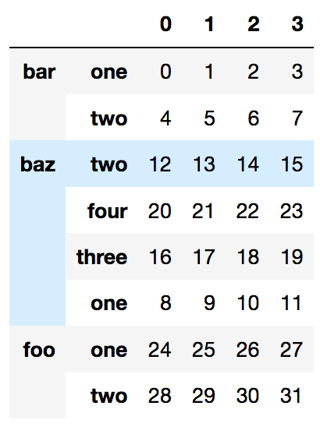
Edit: (to fit the desired layout)

arrays = [['bar', 'bar', 'baz', 'baz', 'baz', 'baz', 'foo', 'foo'],
          ['one', 'two', 'one', 'two', 'three', 'four', 'one', 'two']]

df = pd.DataFrame(np.arange(32).reshape([8, 4]), index=arrays)
new_baz_index = [('baz', i) for i in ['two','four','three','one']]
index = df.index.values.copy()
index[df.index.get_loc('baz')] = new_baz_index
df.reindex(index)

df.index.get_loc('baz') will get the location of the baz part as a slice object and we replace the part there only.

enter image description here

Why BeautifulSoup add <html><body><p> to my results?

The problem

I have the following Page01.htm

<!DOCTYPE html><html lang="it-IT"><head>    <meta charset="utf-8">    <meta http-equiv="X-UA-Compatible" content="IE=Edge">    <head><title>Title here</title></head>
<body>


</body></html>

and I want to extract the informations inside the JSON between the the script tags with ID=TargetID.

What I’ve done

I wrote the following Python 3.6 code:

from bs4 import BeautifulSoup
import codecs

page_path="/Users/me/Page01.htm"

page = codecs.open(page_path, "r", "utf-8")

soup = BeautifulSoup(page.read(), "lxml")
vegas = soup.find_all(id="TargetID")

invalid_tags = ['script']
soup = BeautifulSoup(str(vegas),"lxml")
for tag in invalid_tags: 
    for match in soup.findAll(tag):
        match.replaceWithChildren()

JsonZ = str(soup)

Now, if I look inside vegas variable I can see

[ "name":"Kate", "age":22, "city":"Boston"} ]]> ]

but if I try to remove the script tags (using this answer script), I get the following JsonZ variable

'<html><body><p>[&lt;![CDATA[\n{ "name":"Kate", "age":22, "city":"Boston"}\n]]&gt;\n]</p></body></html>'

that have no script tags but have another 3 tags (<html><body><p>) completely unuseful.
My target is to get the following string { "name":"Kate", "age":22, "city":"Boston"} to load with Python JSON modules.

Solution:

BeautifulSoup will take practically anything give it and attempt to transform that into a complete page of HTML. That’s why you received '<html><body> ...'. Usually this is a good thing in that the HTML can be pretty badly formed yet BeautifulSoup will still process it.

In your case, one way of extracting that json would be like this.

>>> import bs4
>>> page = bs4.BeautifulSoup(open('Page01.htm').read(), 'lxml')
>>> first_script = page.select('#TargetID')[0].text
>>> first_script 
'<![CDATA[\n{ "name":"Kate", "age":22, "city":"Boston"}\n]]>\n'
>>> content = first_script[first_script.find('{'): 1+first_script.rfind('}')]
>>> content
'{ "name":"Kate", "age":22, "city":"Boston"}'

Once you have this you can turn it into a Python dictionary, like this.

>>> import json
>>> d = json.loads(content)
>>> d['name']
'Kate'
>>> d['age']
22
>>> d['city']
'Boston'

Alternative ways to apply a user defined aggregate function in pyspark

I am trying to apply a user defined aggregate function to a spark dataframe, to apply additive smoothing, see the code below:

import findspark
findspark.init()
import pyspark as ps
from pyspark.sql import SQLContext
from pyspark.sql.functions import col, col, collect_list, concat_ws, udf

try:
    sc
except NameError:
    sc = ps.SparkContext()
    sqlContext = SQLContext(sc)

df = sqlContext.createDataFrame([['A', 1],
                            ['A',1],
                            ['A',0],
                            ['B',0],
                            ['B',0],
                            ['B',1]], schema=['name', 'val'])


def smooth_mean(x):
    return (sum(x)+5)/(len(x)+5)

smooth_mean_udf = udf(smooth_mean)

df.groupBy('name').agg(collect_list('val').alias('val'))\
.withColumn('val', smooth_mean_udf('val')).show()

Does it make sense to do it this way? To my understanding this does not scale well, since I am using a udf. I also fail to find the exact working of collect_list, the collect part in the name seems to indicate that data is ‘collected’ to the edge node, but I assume that data is ‘collected’ to various nodes?

Thanks in advance for any feedback.

Solution:

To my understanding this does not scale

Your understanding is correct and the biggest problem here is collect_list which is just good old groupByKey. Python udf has much lesser impact, but it doesn’t make sense to use it, for simple arithmetic operations.

Just use standard aggregations

from pyspark.sql.functions import sum as sum_, count

(df
    .groupBy("name")
    .agg(((sum_("val") + 5) / (count("val") + 5)).alias("val"))
    .show())

# +----+-----+
# |name|  val|
# +----+-----+
# |   B| 0.75|
# |   A|0.875|
# +----+-----+

When would a Python float lose precision when cast to Protobuf/C++ float?

I’m interested in minimising the size of a protobuf message serialised from Python.

Protobuf has floats (4 bytes) and doubles (8 bytes). Python has a float type that’s actually a C double, at least in CPython.

My question is: given an instance of a Python float, is there a “fast” way of checking if the value would lose precision if it was assigned to a protobuf float (or really a C++ float) ?

Solution:

You can check convert the float to a hex representation; the sign, exponent and fraction each get a separate section. Provided the fraction uses only the first 6 hex digits (the remaining 7 digits must be zero), and the 6th digit is even (so the last bit is not set) will your 64-bit double float fit in a 32-bit single. The exponent is limited to a value between -126 and 127:

import math
import re

def is_single_precision(
        f,
        _isfinite=math.isfinite,
        _singlepat=re.compile(
            r'-?0x[01]\.[0-9a-f]{5}[02468ace]0{7}p'
            r'(?:\+(?:1[01]\d|12[0-7]|[1-9]\d|\d)|'
            r'-(?:1[01]\d|12[0-6]|[1-9]\d|\d))$').match):
    return not _isfinite(f) or _singlepat(f.hex()) is not None or f == 0.0

The float.hex() method is quite fast, faster than roundtripping via struct or numpy; you can create 1 million hex representations in under half a second:

>>> timeit.Timer('(1.2345678901e+26).hex()').autorange()
(1000000, 0.47934128501219675)

The regex engine is also pretty fast, and with name lookups optimised in the function above we can test 1 million float values in about 1.1 seconds:

>>> import random, sys
>>> testvalues = [0.0, float('inf'), float('-inf'), float('nan')] + [random.uniform(sys.float_info.min, sys.float_info.max) for _ in range(2 * 10 ** 6)]
>>> timeit.Timer('is_single_precision(f())', 'from __main__ import is_single_precision, testvalues; f = iter(testvalues).__next__').autorange()
(1000000, 1.1044921400025487)

The above works because the binary32 format for floats allots 23 bits for the fraction. The exponent is allotted 8 bits (signed). The regex only allows for the first 23 bits to be set, and the exponent to be within the range for a signed 8-bit number.

Also see

This may not be what you want however! Take for example 1/3rd or 1/10th. Both are values which require approximation in floating point values, and both fail the test:

>>> (1/3).hex()
'0x1.5555555555555p-2'
>>> (1/10).hex()
'0x1.999999999999ap-4'

You may have to instead take a heuristic approach; if your hex value has all zeros in the first 6 digits of the fraction, or an exponent outside of the (-126, 127) range, converting to double would lead to too much loss.