Difference Between Temporary Table and Table Variable in Sql Server

This is the first article in the series of articles on Difference Between Temporary Table and Table Variable. This article lists out difference between Temporary Table and Table Variable.

Below is the complete list of articles in this series:

Difference Between Temporary Table and Table Variable – Summary

Both Temporary Tables (a.k.a # Tables) and Table Variables (a.k.a @ Tables) in Sql Server provide a mechanism for Temporary holding/storage of the result-set for further processing.

Below table lists out some of the major difference between Temporary Table and Table Variable. Each of these differences are explained in-detail with extensive list of examples in the next articles in this series which are listed above.

1. SYNTAX

Below is the sample example of Creating a Temporary Table, Inserting records into it, retrieving the rows from it and then finally dropping the created Temporary Table.

-- Create Temporary Table
CREATE TABLE #Customer 
(Id INT, Name VARCHAR(50))
--Insert Two records
INSERT INTO #Customer
VALUES(1,'Basavaraj') 
INSERT INTO #Customer 
VALUES(2,'Kalpana')
--Reterive the records
SELECT * FROM #Customer
--DROP Temporary Table
DROP TABLE #Customer
GO


Below is the sample example of Declaring a Table Variable, Inserting records into it and retrieving the rows from it.

-- Create Table Variable
DECLARE @Customer TABLE
(
 Id INT,
 Name VARCHAR(50)   
)
--Insert Two records
INSERT INTO @Customer 
VALUES(1,'Basavaraj') 
INSERT INTO @Customer 
VALUES(2,'Kalpana')
--Reterive the records
SELECT * FROM @Customer
GO

RESULT:

2. MODIFYING STRUCTURE

Temporary Table structure can be changed after it’s creation it implies we can use DDL statements ALTER, CREATE, DROP.
Below script creates a Temporary Table #Customer, adds Address column to it and finally the Temporary Table is dropped.

--Create Temporary Table
CREATE TABLE #Customer
(Id INT, Name VARCHAR(50))
GO
--Add Address Column
ALTER TABLE #Customer 
ADD Address VARCHAR(400)
GO
--DROP Temporary Table
DROP TABLE #Customer
GO
Table Variables doesn’t support DDL statements like ALTER, CREATE, DROP etc, implies we can’t modify the structure of Table variable nor we can drop it explicitly.
3. STORAGE LOCATION
One of the most common MYTH about Temporary Table & Table Variable is that: Temporary Tables are created in TempDB and Table Variables are created In-Memory. Fact is that both are created in TempDB, below Demos prove this reality.
4. TRANSACTIONS
Temporary Tables honor the explicit transactions defined by the user. Table variables doesn’t participate in the explicit transactions defined by the user.
5. USER DEFINED FUNCTION
Temporary Tables are not allowed in User Defined Functions. Table Variables can be used in User Defined Functions.
6. INDEXES
Temporary table supports adding Indexes explicitly after Temporary Table creation and it can also have the implicit Indexes which are the result of Primary and Unique Key constraint. Table Variables doesn’t allow the explicit addition of Indexes after it’s declaration, the only means is the implicit indexes which are created as a result of the Primary Key or Unique Key constraint defined during Table Variable declaration.
7. SCOPE
There are two types of Temporary Tables, one Local Temporary Tables whose name starts with single # sign and other one is Global Temporary Tables whose name starts with two # signs.Scope of the Local Temporary Table is the session in which it is created and they are dropped automatically once the session ends and we can also drop them explicitly. If a Temporary Table is created within a batch, then it can be accessed within the next batch of the same session. Whereas if a Local Temporary Table is created within a stored procedure then it can be accessed in it’s child stored procedures, but it can’t be accessed outside the stored procedure.Scope of Global Temporary Table is not only to the session which created, but they will visible to all other sessions. They can be dropped explicitly or they will get dropped automatically when the session which created it terminates and none of the other sessions are using it. Scope of the Table variable is the Batch or Stored Procedure in which it is declared. And they can’t be dropped explicitly, they are dropped automatically when batch execution completes or the Stored Procedure execution completes.

The above listed differences are discussed in-detail with extensive list of examples in the below articles:

ALSO READ

Querying Data Using SELECT In Sql Server

Sql Server Tutorial Lesson 5: Querying Data Using SELECT

SELECT is one of the basic construct of Sql Server, which basically facilitates the retrieval of information from Tables. This lesson covers the following Topics with extensive list of real-time examples.

  1. Introduction to SELECT Statement
  2. Using WHERE Clause
  3. Using Boolean Operators AND, OR and NOT
  4. Using LIKE Predicate
  5. Using BETWEEN Clause
  6. Table and Column Name Alias
  7. Using ORDER BY Clause
  8. Concatenation

To demo these features let us first create the Employee table with seven employee records as depicted in the below image by using the following script:

QueryingDataUsingSELECT

CREATE DATABASE SqlHintsQueryingDataDemo
GO
USE SqlHintsQueryingDataDemo
GO
CREATE TABLE dbo.Employee
(EmployeeId INT, Name NVARCHAR(50),
DOJ DateTime,City NVarchar(50), Salary Money)
GO
INSERT INTO dbo.Employee VALUES(1,'ShreeGanesh Biradar','2011/12/18','Pune',45000)
INSERT INTO dbo.Employee VALUES(2,'Sandeep Patil','2010/02/24',NULL,55000)
INSERT INTO dbo.Employee VALUES(3,'Abhi Akkanna','2008/03/22','Bangalore',89000)
INSERT INTO dbo.Employee VALUES(4,'Sandy Thomas','2008/04/28','Delhi',39000)
INSERT INTO dbo.Employee VALUES(5,'Kalpana Biradar','2013/11/15','Bangalore',60000)
INSERT INTO dbo.Employee VALUES(6,'Basav Biradar','2012/11/15','Bangalore',54000)
INSERT INTO dbo.Employee VALUES(7,'Deepak Kumar','2006/04/08','Hyderabad',75000)

1. Introduction to SELECT Statement

Demo 1: Retrieve All the Records from the Employee Table

SELECT * FROM dbo.Employee

RESULT:

QueryingDataUsingSELECTDemo1

Demo 2: Retrieve only the Required Information

In most of the scenario’s we don’t need the complete table data, so it is always best practice to include the columns which are required in the Select query to reduce unnecessary data transfer over the Network and IO’s.

SELECT EmployeeId,Name,City FROM dbo.Employee

RESULT:

QueryingDataUsingSELECTDemo2

2. Using WHERE Clause

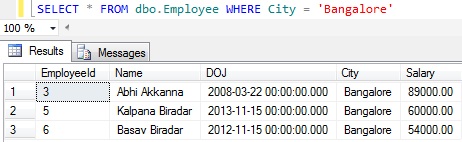
Demo 1: Get all the Employees whose City is Bangalore

SELECT * FROM dbo.Employee WHERE City = 'Bangalore'

RESULT:

UsingWHEREClause1

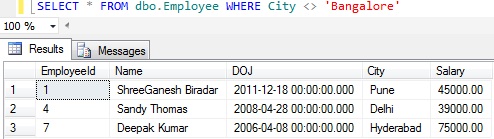
Demo 2: Get all the Employees whose city is not Bangalore

SELECT * FROM dbo.Employee WHERE City <> 'Bangalore'

RESULT:

UsingWHEREClause4

Note: This query ignored the employees whose City column value is NULL, because NULL value can’t be compared with some value (i.e. Null means unknown value, so it can’t be used to compare with any know values).  The only operation we can do with NULL is we can check whether it is NULL or NOT NULL as shown in the below Demos 3 an 4.

Demo 3: Get all the Employees whose city column has some value (i.e. employees whose City column value is NOT NULL)

SELECT * FROM dbo.Employee WHERE City is NOT NULL

RESULT:

UsingWHEREClause2

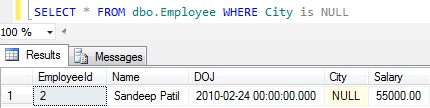
Demo 4: Get all the Employees whose city column value is null

SELECT * FROM dbo.Employee WHERE City is NULL

RESULT:

UsingWHEREClause3

3. Using Boolean Operators AND, OR and NOT

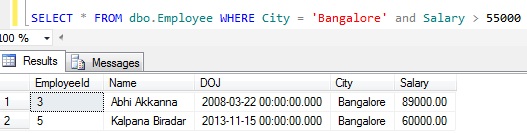
Demo 1 Using Boolean Operator AND: Get all the Employees whose City is Bangalore and Salary is above 55000

SELECT * FROM dbo.Employee 
WHERE City = 'Bangalore' AND Salary > 55000

RESULT:

UsingBooleanOperatorAND

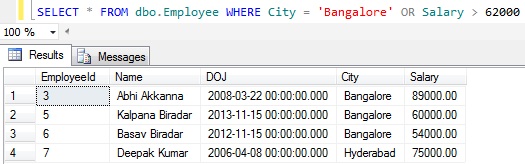
Demo 2 Using Boolean Operator ORGet all the Employees whose city is either Bangalore or have salary above 62000

SELECT * FROM dbo.Employee 
WHERE City = 'Bangalore' OR Salary > 62000

RESULT:

UsingBooleanOperatorOR

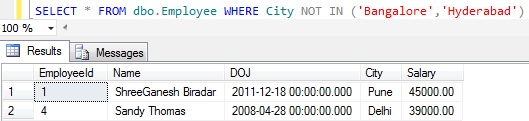
Demo 3 Using Boolean Operator NOT: Get all the Employees whose city is other than Bangalore and Hyderabad

SELECT * FROM dbo.Employee 
WHERE City NOT IN ('Bangalore','Hyderabad')

RESULT:

UsingBooleanOperatorNOT

Note: The above query didn’t return the employees whose is CITY column value is NULL. As explained previously NULL means unknown value, it can’t be compared with a known value.

4. Using LIKE Predicate

Demo 1: Get all the Employees who have word deep anywhere in their Name.

SELECT * FROM dbo.Employee WHERE Name Like '%deep%'

RESULT:

LIKE1

Demo 2: Get all the Employees whose Name starts with the word dee

SELECT * FROM dbo.Employee WHERE Name Like 'deep%'

RESULT:

LIKE2

Demo 3: Get all the Employees whose Name starts with the character a or b or c.
Note the below three SELECT statements are equivalent

SELECT * FROM dbo.Employee WHERE Name like '[a-c]%'
SELECT * FROM dbo.Employee WHERE Name like '[abc]%'
SELECT * FROM dbo.Employee WHERE Name like '[a,b,c]%'

RESULT:

LIKE3

Demo 4: Get all the Employees whose Name starts with the character a or b or c and second character must be a

SELECT * FROM dbo.Employee WHERE Name like '[a-c][a]%'

RESULT:

LIKE4

Demo 5: Get all the Employees whose Name is not starting with letter a or b or c

SELECT * FROM dbo.Employee WHERE Name like '[^a-c]%'

RESULT:

LIKE5

5. Using BETWEEN Clause

BETWEEN clause can be used to compare range of values.

Demo 1: Get all the Employees whose Salary is between 45000 to 60000.

SELECT * FROM dbo.Employee
WHERE Salary between 45000 AND 60000

RESULT:

UsingBETWEENClause1

Demo 2: Above Demo 1 query can also be written without between Clause as below:

SELECT * FROM dbo.Employee 
WHERE Salary >= 45000 AND Salary <= 60000

RESULT:

UsingBETWEENClause2

6. Table and Column Name Alias

Sql Server provides an option to give temporary alias name for the Table and it’s Column Names in the query. In that way we can give an meaning full alias to the Tables. And if two tables are joined both have the same column name in it, then we have to write two part column names i.e. [Table Name].[Column Name] otherwise Sql server gives an ambiguous column name error. If table name is too long it looks to clumsy, so better give a short alias name for the table and use this alias table name in the Two part column name specification to avoid ambiguity.

Demo 1: Table Alias Name demo. In this demo example for Employee Table the alias name specified is E in the FROM clause. Because of this we can access the employee table column names by prefixing E. 

SELECT E.Name, E.City FROM dbo.Employee E

RESULT:

TableAndColumnNameAlias1

Demo 2: Table and Column Name Alias demo. In this demo example for Employee Table the alias name specified is E in the FROM clause. Because of this we can access the employee table column names by prefixing E. . And for the Name column we are specifying the alias name as ‘Employee Name’ and for City column the alias name is ‘Employee City’

SELECT E.Name AS 'Employee Name', E.City AS [Employee City]
FROM dbo.Employee AS E

RESULT:

TableAndColumnNameAlias2

7. Using ORDER BY Clause

ORDER BY Clause can be used to sort the result set based on the Column Value.

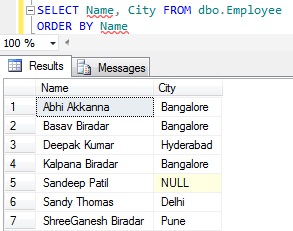
Demo 1: Sort the Employee records based on Name column value. The default sorting of the ORDER BY clause is in the Ascending Orders.

SELECT Name, City FROM dbo.Employee
ORDER BY Name

RESULT:

UsingOrderByClause4

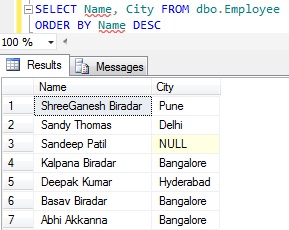
Demo 2: Sort the Employee records based on Name column value in the descending order. Here using the keyword DESC in conjunction with ORDER By clause to sort the records by Name in Descending order.

SELECT Name, City FROM dbo.Employee
ORDER BY Name DESC

RESULT:

UsingOrderByClause2

8. Concatenation

‘+’ symbol  is used for concatenating string values

Demo 1: Concatenate Name and City Column Value.


SELECT Name + City as [Name & City]
FROM dbo.Employee

RESULT:

ConcateNation1

Note:  If ‘+’ symbol is used to concatenate the values, then if one of the values is NULL then resultant concatenated value will also be NULL.

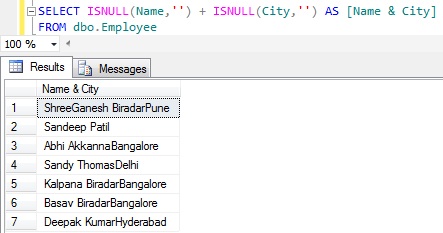
Demo 2: One way of avoiding NULL as the RESULT of concatenation if one of the value of the to be concatenated is NULL is to use the ISNULL function like below. Here ISNULL function returns an empty string if the value is NULL otherwise the specified value.

SELECT ISNULL(Name,'') + ISNULL(City,'') AS [Name & City]
FROM dbo.Employee

RESULT:

ConcateNation6

Demo 3: Add an empty space between Name and City.

SELECT ISNULL(Name,'') + ' ' + ISNULL(City,'') AS [Name & City]
FROM dbo.Employee

RESULT:

ConcateNation5

You may like to go through the string function CONCAT() which is introduced in Sql Server 2012 for concatenation.

How to get Day, Month and Year Part from DateTime in Sql Server

Many a times we may need to get Day, Month and Year Part from DateTime in Sql Server. In this article we will see how we can get these parts of the DateTime in Sql Server.

You may like to read the other popular articles on Date and Time:

1. DAY part of DateTime in Sql Server

Following are the different ways of getting DAY part of the DateTime in Sql Server

[ALSO READ] How to get Day or Weekday name from date in Sql Server

Approach 1: Using DAY Function

We can use DAY() function to get the DAY part of the DateTime in Sql Server.

SELECT GETDATE() 'Today', DAY(GETDATE()) 'Day Part'

RESULT:
DayPart1

Approach 2: Using DATEPART Function

We can use DATEPART() function to get DAY part of the DateTime in Sql Server, here we need specify datepart parameter of the DATEPART function as day or dd or d all will return the same result.

SELECT GETDATE() 'Today', DATEPART(day,GETDATE()) 'Day Part'
SELECT GetDate() 'Today', DATEPART(dd,GETDATE())  'Day Part'
SELECT GetDate() 'Today', DATEPART(d,GETDATE())	  'Day Part'

RESULT:
DayPart2

Approach 3: Day returned should always be of TWO digits.

If we see the previous two approaches as Today is 3rd day of February, it is always returning day as 3 i.e one digit instead of 03. Below examples shows how to get two digits day part of a DateTime.

SELECT GETDATE() 'Today', 
  CONVERT(varchar(2), getdate(), 103) 'Day Part'
SELECT GETDATE() 'Today', 
  RIGHT('0' + CAST(DAY(GETDATE()) AS varchar(2)), 2) 'Day Part'

RESULT:
DayPart3

2. MONTH part of DateTime in Sql Server

Following are the different ways of getting MONTH part of the DateTime in Sql Server

[ALSO READ] How to get month name from date in Sql Server

Approach 1: Using MONTH Function

We can use MONTH() function to get the MONTH part of the DateTime in Sql Server.

SELECT GETDATE() 'Today', MONTH(GETDATE()) 'MONTH Part'

RESULT:
MonthPart1

Approach 2: Using DATEPART Function

We can use DATEPART() function to get MONTH part of the DateTime in Sql Server, here we need specify datepart parameter of the DATEPART function as month or mm or all will return the same result.

SELECT GETDATE() 'Today',DATEPART(month,GETDATE()) 'Month Part'
SELECT GetDate() 'Today', DATEPART(mm,GETDATE())  'Month Part'
SELECT GetDate() 'Today', DATEPART(m,GETDATE())	  'Month Part'

RESULT:
MonthPart2

Approach 3: Month returned should always be of TWO digits.

If we see the previous two approaches as Today’s month is February, it is always returning month as 2 i.e one digit instead of 02. Below examples shows how to get two digits month part of a DateTime.

SELECT GETDATE() 'Today', 
 CONVERT(varchar(2), getdate(), 101) 'Month Part'
SELECT GETDATE() 'Today', 
 RIGHT('0'+CAST(MONTH(GETDATE()) AS varchar(2)),2) 'Month Part'

RESULT:
MonthPart3

3. YEAR part of DateTime in Sql Server

Following are the different ways of getting YEAR part of the DateTime in Sql Server

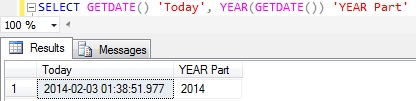
Approach 1: Using YEAR Function

We can use YEAR() function to get the YEAR part of the DateTime in Sql Server.

SELECT GETDATE() 'Today', YEAR(GETDATE()) 'YEAR Part'

RESULT:
YearPart1

Approach 2: Using DATEPART Function

We can use DATEPART() function to get YEAR part of the DateTime in Sql Server, here we need specify datepart parameter of the DATEPART function as year or yyyy or yy all will return the same result.

SELECT GETDATE() 'Today', DATEPART(year,GETDATE()) 'Year Part'
SELECT GetDate() 'Today', DATEPART(yyyy,GETDATE()) 'Year Part'
SELECT GetDate() 'Today', DATEPART(yy,GETDATE())   'Year Part'

RESULT:
YearPart2