How to get Time, Hour, Minute, Second and Millisecond Part from DateTime in Sql Server

Many a times we may need to get the Time, Hour, Minute, Second and Millisecond Part from DateTime in Sql Server. In this article we will see how we can get these parts of the DateTime in Sql Server.

You may like to read the other popular articles on Date and Time:

1. TIME part of DateTime in Sql Server

Following demos shows how to get some of the commonly required Time Part format from a DateTime.

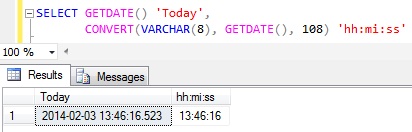
Demo 1: Time in the 24-hour format hh:mi:ss

SELECT GETDATE() 'Today', 
       CONVERT(VARCHAR(8), GETDATE(), 108) 'hh:mi:ss'

RESULT:
TimePart1

Demo 2: Time in the 24-hour format hh:mi:ss:mmm

SELECT GETDATE() 'Today',
	CONVERT(VARCHAR(12),GETDATE(),114) 'hh:mi:ss:mmm'

RESULT:
TimePart2

Demo 3: Time in the 12-hour format hh:mi:ss:mmmAM (or PM)

SELECT  GETDATE() 'Today',
 RIGHT(CONVERT(VARCHAR(26), GETDATE(), 109),14) 'hh:mi:ss:mmmAM (or PM)'

RESULT:
TimePart3

Demo 4: Time in the 12-hour format hh:miAM (or PM)

SELECT LTRIM(RIGHT(CONVERT(VARCHAR(20), GETDATE(), 100), 7))

RESULT:
TimePart4

Demo 5: Time in the 24-hour format hh:miAM (or PM)

SELECT  GETDATE() 'Today',
	CONVERT(VARCHAR(5), GETDATE(), 108) + 
	(CASE WHEN DATEPART(HOUR, GETDATE()) > 12 THEN 'PM' 
		ELSE 'AM' 
	END) 'hh:miAM (or PM)'

RESULT:
TimePart5

Demo 6: Time in the 24-hour format  hh:mm:ss.nnnnnnn

Note this script will work in sql Server 2008 and above as here I am using TIME datatype and SYSDATETIME() functions which were introduced in Sql Server 2008.

SELECT   GETDATE() 'Today',
		CAST(SYSDATETIME() AS TIME) 'hh:mm:ss.nnnnnnn'

RESULT:
TimePart6

2. HOUR part of the DateTime in Sql Server

We can use DATEPART() function to get the HOUR part of the DateTime in Sql Server, here we need to specify datepart parameter of the DATEPART function as hour or hh.

SELECT GETDATE() 'Today', DATEPART(hour,GETDATE()) 'Hour Part'
SELECT GETDATE() 'Today', DATEPART(hh,GETDATE()) 'Hour Part'

RESULT:
Hour Part of DateTime in Sql Server

3. MINUTE part of the DateTime in Sql Server

We can use DATEPART() function to get the MINUTE part of the DateTime in Sql Server, here we need to specify datepart parameter of the DATEPART function as minute or mi or n.

SELECT GETDATE() 'Today', 
       DATEPART(minute,GETDATE()) 'Minute Part'
SELECT GETDATE() 'Today', DATEPART(mi,GETDATE()) 'Minute Part'
SELECT GETDATE() 'Today', DATEPART(n,GETDATE()) 'Minute Part'

RESULT:
Minute Part of DateTime in Sql Server

4. SECOND part of the DateTime in Sql Server

We can use DATEPART() function to get the SECOND part of the DateTime in Sql Server, here we need to specify datepart parameter of the DATEPART function as second or ss or s.

SELECT GETDATE() 'Today', 
       DATEPART(second,GETDATE()) 'Second Part'
SELECT GETDATE() 'Today', DATEPART(ss,GETDATE()) 'Second Part'
SELECT GETDATE() 'Today', DATEPART(s,GETDATE()) 'Second Part'

RESULT:
Second Part of DateTime in Sql Server

5. MILLISECOND part of the DateTime in Sql Server

We can use DATEPART() function to get the MILLISECOND part of the DateTime in Sql Server, here we need to specify datepart parameter of the DATEPART function as millisecond or mi .

SELECT GETDATE() 'Today', 
       DATEPART(millisecond,GETDATE()) 'MilliSecond Part'
SELECT GETDATE() 'Today', 
       DATEPART(ms,GETDATE()) 'MilliSecond Part'

RESULT:
MilliSecond Part Of DateTime in Sql Server

Comparative Analysis of Temporary Table and Table Variable based on the aspects like User Defined Functions, Indexes and Scope in Sql Server

This is the third article in the series of articles on Difference Between Temporary Table and Table Variable. This article provides the Comparative Analysis of Temporary Table and Table Variable based on the aspects like User Defined Functions, Indexes and Scope with extensive list of examples.

Below is the complete list of articles in this series:

Comparative Analysis of Temporary Table and Table Variable based on the aspects like User Defined Functions, Indexes and Scope

1. USER DEFINED FUNCTION

Temporary Tables are not allowed in User Defined Functions, whereas Table Variables can be used in User Defined Functions.

Table Variable

DEMO 1: User defined Functions allow Table Variables in it.

--Create a function which is using a Table Variable
CREATE FUNCTION TableVariableWithinAFunction()
RETURNS INT
AS
BEGIN
	--Declare Table Variable
	DECLARE @TableVariable TABLE(Name VARCHAR(50)) 
	IF EXISTS(SELECT 1 FROM @TableVariable)
		RETURN 1

	RETURN 0
END
GO
--Call the function
PRINT dbo.TableVariableWithinAFunction()
GO

RESULT:
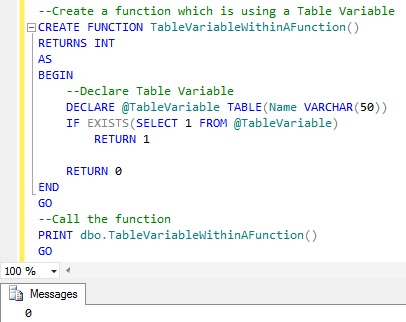
FUNCTION Table Variable

Temporary Table

DEMO 1: User defined Functions doesn’t allow Temporary Table in it.

CREATE FUNCTION TemporaryTableWithinAFunction()
RETURNS INT
AS
BEGIN
	CREATE TABLE #TempTable (Name VARCHAR(50)) 
	IF EXISTS(SELECT 1 FROM #TempTable)
		RETURN 1

	RETURN 0
END

RESULT:
Msg 2772, Level 16, State 1, Procedure TemporaryTableWithinAFunction, Line 5
Cannot access temporary tables from within a function.
Msg 2772, Level 16, State 1, Procedure TemporaryTableWithinAFunction, Line 6
Cannot access temporary tables from within a function.

2. INDEXES

Table Variables doesn’t allow the explicit addition of Indexes after it’s declaration, the only means is the implicit indexes which are added as a result of the Primary Key or Unique Key constraint defined during Table Variable declaration. On the other hand Temporary table supports adding Indexes explicitly after Temporary Table creation and it can also have the implicit Indexes which are the result of Primary and Unique Key constraint.

Temporary Table

Demo 1: You can add Indexes to the Temporary Table both explicitly and implicitly. Below script creates a Temporary Table #Employee which has Primary Key with Clustered option, it means it will implicitly create a Clustered Index on the Id column. After the creation of the Temporary Table, explicitly adds a Non-Clustered Index IX_#Employee_FirstName on the FirstName column.

--Create Temporary Table
CREATE TABLE #Employee
(
  Id INT PRIMARY KEY CLUSTERED,
  FirstName NVARCHAR(50),
  LastName NVARCHAR(50)
)
--Add Non-Clustered Index
CREATE NONCLUSTERED INDEX IX_#Employee_FirstName 
      ON #Employee(FirstName)
GO

Table Variable

You can’t add Indexes explicitly to the Table Variable. But as Table variables support Primary and Unique Key constraints, so specifying these constraints during Table variable declaration internally creates Indexes on the Table Variable columns. But as we know both Primary and Unique Key doesn’t allow duplicate values in it (i.e. enforces unique constraint), so they provide means to create only Implicit Clustered or Non-Clustered Unique indexes.  It implies Tables Variables doesn’t support adding a  Non-Unique Non-Clustered indexes either implicitly or explicitly.

Demo 1:  Below script creates a Table variable @Employee which has Primary Key with NonClustered option, this means it will implicitly create a Unique Non-Clustered Index on the Id column. And it also has Unique Clustered Constraint on the Name column, so it will create an Unique Clustered Index on the Name column.

DECLARE @Employee TABLE
(
  Id INT PRIMARY KEY NONCLUSTERED,
  Name NVARCHAR(50) UNIQUE CLUSTERED(Name)
)

3. SCOPE

Table Variable

Scope of the Table variable is the Batch or Stored Procedure in which it is declared. And they can’t be dropped explicitly, they are dropped automatically when batch execution completes or the Stored Procedure execution completes.

Temporary Table

There are two types of Temporary Tables, one Local Temporary Tables whose name starts with single # sign and other one is Global Temporary Tables whose name starts with two # signs.

Scope of the Local Temporary Table is the session in which it is created and they are dropped automatically once the session ends and we can also drop them explicitly. If a Temporary Table is created within a batch, then it can be accessed within the next batch of the same session. Whereas if a Local Temporary Table is created within a stored procedure then it can be accessed in it’s child stored procedures, but it can’t be accessed outside the stored procedure.

Scope of Global Temporary Table is not only to the session which created, but they will visible to all other sessions. They can be dropped explicitly or they will get dropped automatically when the session which created it terminates and none of the other sessions are using it.

Below DEMOS explain the above explained scoping aspect of the Table Variable and Temporary Tables with extensive list of examples.

DEMO 1: This example demonstrates that a Table variables Scope is the Batch in which it is created, they are not accessible in the same session’s next batch of statement.

--Declare Table Variable 
DECLARE @TableVariableScopeBatchDemo TABLE (Name VARCHAR(50)) 
--Insert a Record in the Table Variable
INSERT INTO  @TableVariableScopeBatchDemo
VALUES ('Basavaraj Biradar')
--Try to Access Table Variable in the batch scope
SELECT * FROM @TableVariableScopeBatchDemo
GO -- GO Statement Signals the END of the BATCH
--Try to Access the Table Variable outside the batch 
--but within the same session scope
SELECT * FROM @TableVariableScopeBatchDemo
GO

RESULT:
Scope Of Table Variables Is The Batch1

DEMO 2: This example demonstrates that a Local Temporary Table scope is the session in which it is created. Here a local Temporary Table created within the first batch is accessible in the same session’s next batch of statements.

--Create Temporary Table 
CREATE TABLE #TemporaryTableScopeBatchDemo (Name VARCHAR(50)) 
--Insert a Record in the Temporary Table
INSERT INTO  #TemporaryTableScopeBatchDemo 
VALUES ('Basavaraj Biradar')
--Try to Access Temporary Table in the batch scope
SELECT * FROM #TemporaryTableScopeBatchDemo
GO -- GO Statement Signals the END of the BATCH
--Try to Access the Temporary Table outside the batch 
--but within the same session scope
SELECT * FROM #TemporaryTableScopeBatchDemo
GO

Scope Of Temporary Table Is The Session

DEMO 3: This example demonstrates that a Local Temporary Table created within a stored procedure can’t be accessed outside the stored procedure scope.

CREATE PROCEDURE dbo.SomeSPForTempTableDemo
AS
BEGIN
 --Create Temporary Table 
 CREATE TABLE #TemporaryTableScopeSPDemo(Name VARCHAR(50)) 
 --Insert a Record in the Temporary Table
 INSERT INTO #TemporaryTableScopeSPDemo
 VALUES ('Basavaraj Biradar')
 --Try to Access Temporary Table
 SELECT * FROM #TemporaryTableScopeSPDemo
END
GO
--Execute the Stored Procedure
EXEC dbo.SomeSPForTempTableDemo
--Try to Access the Temporary Table created during the SP 
--SomeSPForTempTableDemo execution by previous statement
SELECT * FROM #TemporaryTableScopeSPDemo
GO

Scope of Temporary Table Created within Stored Procedure

DEMO 4: This example demonstrates that a Table Variable created within a stored procedure can’t be accessed outside the stored procedure scope.

CREATE PROCEDURE dbo.SomeSPForTableVariableDemo
AS
BEGIN
 --Declare Table Variable
 DECLARE @TableVariableScopeSPDemo TABLE(Name VARCHAR(50)) 
 --Insert a Record in the Temporary Table
 INSERT INTO @TableVariableScopeSPDemo
 VALUES ('Basavaraj Biradar')
 --Try to Access Table Variable
 SELECT * FROM @TableVariableScopeSPDemo
END
GO

Try to execute the above stored procedure which creates a Table Variable and a statement accessing the Table Variable immediately after the Stored Procedure within the same batch as shown in the below script. This results in a compilation error.

--Execute the Stored Procedure
EXEC dbo.SomeSPForTableVariableDemo
--Try to Access the Table Variable created during the SP
--SomeSPForTableVariableDemo execution by previous statement
SELECT * FROM @TableVariableScopeSPDemo
GO

Scope of Table Variable Created within Stored Procedure1

Try to execute the above stored procedure which creates a Table Variable and a statement accessing the Table Variable created in the SP in separate batches one after another but in the same session as shown below. In such scenario the SP execution succeeds, but the statement trying to access the Table variable outside SP in the next batch errors-out.

--Execute the Stored Procedure
EXEC dbo.SomeSPForTableVariableDemo
GO
--Try to Access the Table Variable created during the SP 
--SomeSPForTempTableDemo execution by previous statement
 SELECT * FROM @TableVariableScopeSPDemo
GO

Scope of Table Variable Created within Stored Procedure2

DEMO 5: This example demonstrates that a Local Temporary Table created in the Parent Stored Procedure can be accessed by it’s child stored procedures.

-------------Create ParentSP----------------
CREATE PROCEDURE dbo.ParentSPForTempTableDemo
AS
BEGIN
 --Create Temporary Table 
 CREATE TABLE #TemporaryTableScopeSPDemo(Name VARCHAR(50)) 
 --Insert a Record in the Temporary Table
 INSERT INTO #TemporaryTableScopeSPDemo
 VALUES ('Basavaraj Biradar')
 --CALL Child SP
 EXEC dbo.ChildSPForTempTableDemo
END
GO
-------------Create ChildSP----------------
CREATE PROCEDURE dbo.ChildSPForTempTableDemo
AS
BEGIN
 --Try to Access Temp Table created in the Parent SP
 SELECT * FROM #TemporaryTableScopeSPDemo
END
GO
----------Execute the ParentSP----------
EXEC dbo.ParentSPForTempTableDemo

RESULT:
Scope of Temporary Table in Nested Stored Procedure

DEMO 6: This example demonstrates that a Table Variable Created in the Parent SP is not accessible by it’s child stored procedures. Basically, Sql Server doesn’t allow us to Create a Child Stored Procedure accessing the Table Variable Created in the Parent SP.

-------------Create ParentSP----------------
CREATE PROCEDURE dbo.ParentSPForTableVariableDemo
AS
BEGIN
 --Create Temporary Table 
 CREATE TABLE @TableVariableScopeSPDemo(Name VARCHAR(50)) 
 --Insert a Record in the Temporary Table
 INSERT INTO @TableVariableScopeSPDemo
 VALUES ('Basavaraj Biradar')
 --CALL Child SP
 EXEC dbo.ChildSPForTableVariableDemo
END
GO
-------------Create ChildSP----------------
CREATE PROCEDURE dbo.ChildSPForTableVariableDemo
AS
BEGIN
 --Try to Access the Table variable Created in Parent SP
 SELECT * FROM @TableVariableScopeSPDemo
END
GO

RESULT:
Scope of Table Variable in Nested Stored Procedure

You may like to read the other articles in this Series of articles on Difference Between Temporary Table and Table Variable:
Comparative Analysis of Temporary Table and Table Variable based on the aspects like Syntax, Storage Location and Transactions in Sql Server

This is the second article in the series of articles on Difference Between Temporary Table and Table Variable. This article provides the Comparative Analysis of Temporary Table and Table Variable based on the aspects like Syntax, Storage Location and Transactions with extensive list of examples.

Below is the complete list of articles in this series:

Comparative Analysis of Temporary Table and Table Variable based on the aspects like Syntax, Storage Location and Transactions

1. SYNTAX

TEMPORARY TABLE

Demo 1: Below is the sample example of Creating a Temporary Table, Inserting records into it, retrieving the rows from it and then finally dropping the created Temporary Table.

-- Create Temporary Table
CREATE TABLE #Customer ( Id INT, Name VARCHAR(50))
--Insert Two records
INSERT INTO #Customer VALUES(1,'Basavaraj') 
INSERT INTO #Customer VALUES(2,'Kalpana')
--Reterive the records
SELECT * FROM #Customer
--DROP Temporary Table
DROP TABLE #Customer
GO

RESULT:
Syntax Temporary Table Example

Demo 2: Temporary Table structure can be changed after it’s creation.Below script creates a Temporary Table #Customer and then after it’s creation adds Address column to it

--Create Temporary Table
CREATE TABLE #Customer ( Id INT, Name VARCHAR(50))
--Add Address Column to the #Customer
ALTER TABLE #Customer ADD Address VARCHAR(400)
GO

TABLE VARIABLE

Demo 1: Below is the sample example of Declaring a Table Variable, Inserting records into it and retrieving the rows from it. Table Variable doesn’t support DDL statements like ALTER, CREATE, DROP etc, implies we can’t modify the structure of Table variable nor we can drop it explicitly.

-- Create Table Variable
DECLARE @Customer TABLE
(
 Id INT,
 Name VARCHAR(50)   
)
--Insert Two records
INSERT INTO @Customer VALUES(1,'Basavaraj') 
INSERT INTO @Customer VALUES(2,'Kalpana')
--Reterive the records
SELECT * FROM @Customer
GO

RESULT:
Syntax Table Variable1

2. STORAGE LOCATION

One of the most common MYTH about Temporary Table & Table Variable is that: Temporary Tables are created in TempDB and Table Variables are created In-Memory. Fact is that both are created in TempDB, below Demos prove this reality.

Table Variable

Demo 1: Sys.Tables can be used to prove that Table Variables are created in TempDB.

USE MASTER
GO
--Below query lists all the Tables in TempDB
SELECT * From TEMPDB.sys.tables
GO
--Declare a Table Variable
DECLARE @TableVariableLocationDemo TABLE(Name VARCHAR(50))
--Verify whether Table Variable is created in TempDB
SELECT * From TEMPDB.sys.tables
GO

RESULT:
Table Variable Storage Location in TempDB1

From the above result it is clear that the Table Variables are created in TempDb as we are seeing an entry getting into the Sys.Tables of TempDB.

Demo 2: In this demo we will see that the data in the Table Variable is stored in the data pages of the TempDB data file. To prove this I will be using some of the Sql Server Undocumented and Unsupported Sql Server features, so use at your own risk. 

USE MASTER
GO
--Create Table Variable and insert one record in to it
DECLARE @TableVariable TABLE (Name VARCHAR(50)) 
INSERT INTO  @TableVariable VALUES ('Basavaraj Biradar')
--Get the Physical location of the row in the Table Variable
DECLARE @file_id INT, @page_id INT
SELECT @file_id = CAST(CONVERT(binary (2), REVERSE(
			SUBSTRING(%%physloc%%, 5, 2))) AS INT),
	   @page_id = CAST(CONVERT(binary (4), REVERSE(
			SUBSTRING (%%physloc%%, 1, 4))) AS INT)
FROM @TableVariable
--Check whether the Physical location of the Table Variable 
--Row is in the TEMPDB database by looking into the Page dump 
DBCC TRACEON(3604)
--Check FileId and Page ID in TEMPDB
DBCC PAGE('TEMPDB', @file_id, @page_id, 3)
DBCC TRACEOFF(3604)

RESULT:
PhysicalLocationOfTheTableVariableRow1

From the above result it is clear that the physical location of the Table Variable row is in the TempDB database’s data file.

The Undocumented DBCC PAGE statements first parameter passed in the above script is TempDB, the second parameter is the physical file_id of the Table variable row and third parameter is the page_id of the Table Variable row within the data file. Fourth parameter is the level of detailed information required in the output.

Temporary Table

Demo 1: Sys.Tables can be used to prove that Temporary Tables are created in TempDB.

USE MASTER
GO
--Below query lists all the Tables in TempDB
SELECT * From TEMPDB.sys.tables
GO
--Create a Temporary Table
CREATE TABLE #TemporaryTableLocationDemo(Name VARCHAR(50))
--Verify whether Temporary Table is created in TempDB
SELECT * From TEMPDB.sys.tables
GO

RESULT:
Temporary Table Storage Location in TempDB1

Demo 2: In this demo we will see that the data in the Temporary Table is stored in the data page of the TempDB data file. To prove this I will be using some of the Sql Server Undocumented and Unsupported Sql Server features, so use at your own risk.

USE MASTER
GO
--Create Temporary Table and insert one record in it
Create table #TempTable (Name VARCHAR(50)) 
INSERT INTO  #TempTable VALUES ('Basavaraj Biradar')
--Get the Physical location of the row in the Temporary Table
DECLARE @file_id INT, @page_id INT
SELECT @file_id = CAST(CONVERT(binary (2), REVERSE(
			SUBSTRING(%%physloc%%, 5, 2))) AS INT),
	   @page_id = CAST(CONVERT(binary (4), REVERSE(
			SUBSTRING (%%physloc%%, 1, 4))) AS INT)
FROM #TempTable
--Check whether the Physical location of the Temporary Table 
--Row is in the TEMPDB database by looking into the Page dump 
DBCC TRACEON(3604)
--Check FileId and Page ID in TEMPDB
DBCC PAGE('TEMPDB', @file_id, @page_id, 3)
DBCC TRACEOFF(3604)

RESULT:
PhysicalLocationOfTheTemporaryTablleRow1

From the above result it is clear that the physical location of the Temporary Table row is also in the TempDB database’s data file.

3. TRANSACTION

Table variables doesn’t participate in the explicit transactions defined by the user, where as Temporary Tables honor the Transactions.

Table Variable

Demo 1: Table variables doesn’t participate in the explicit transactions defined by the user.

--Declare Table Variable 
DECLARE @TableVariableTransactionDemo TABLE (Name VARCHAR(50)) 
--Start the Transaction
BEGIN TRAN
   --Insert a Record in the Table Variable
   INSERT INTO  @TableVariableTransactionDemo
   VALUES ('Basavaraj Biradar')
   --Rollback the Transaction
ROLLBACK TRAN
--Verify the records in the Table Variable
SELECT * FROM @TableVariableTransactionDemo
GO

RESULT: ROLLBACK TRAN statement didn’t revert back the record inserted in the Table variable within a Transaction.

Transaction Table Variable

Temporary Table

Demo 1: Table variables doesn’t participate in the explicit transactions defined by the user.

--Create Temporary Table 
CREATE TABLE #TemporaryTableTransactionDemo (Name VARCHAR(50)) 
--Start the Transaction
BEGIN TRAN
   --Insert a Record in the Temporary Table
   INSERT INTO  #TemporaryTableTransactionDemo
   VALUES ('Basavaraj Biradar')
  --Rollback the Transaction
ROLLBACK TRAN
--Verify the records in the Temporary Table
SELECT * FROM #TemporaryTableTransactionDemo
GO

RESULT: ROLLBACK TRAN statement reverted back the record which is inserted in the Temporary Table within a Transaction.

Transaction Temporary Table

You may like to read the other articles in this Series of articles on Difference Between Temporary Table and Table Variable: