Joins In Sql Server

Sql Server Tutorial Lesson 6: JOINS in Sql Server with Examples

Join facilitates the retrieval of information from multiple tables. In Sql server we have following 6 types of Joins:

  1. INNER JOIN
  2. LEFT OUTER JOIN
  3. RIGHT OUTER JOIN
  4. FULL OUTER JOIN
  5. CROSS JOIN
  6. SELF JOIN

To demo these features let us first create the Customers and Orders table as depicted in the below image by using the following script:

Joins1

CREATE DATABASE SqlHintsJoinDemo
GO
USE SqlHintsJoinDemo
GO
--Create Customers Table and Insert records
CREATE TABLE Customers 
( CustomerId INT, Name VARCHAR(50) )
GO
INSERT INTO Customers(CustomerId, Name) VALUES(1,'Shree')
INSERT INTO Customers(CustomerId, Name) VALUES(2,'Kalpana')
INSERT INTO Customers(CustomerId, Name) VALUES(3,'Basavaraj')
GO

--Create Orders Table and Insert records into it
CREATE TABLE Orders
(OrderId INT, CustomerId INT, OrderDate DateTime)
GO
INSERT INTO Orders(OrderId, CustomerId, OrderDate) 
VALUES(100,1,Getdate()-1)

INSERT INTO Orders VALUES(200,4,Getdate())
INSERT INTO Orders VALUES(300,3,Getdate()+1)
GO

[ALSO READ] Joining Two Tables without any Common Column between them

1. INNER JOIN in Sql Server

Inner Join returns only the matching rows in both the tables (i.e. returns only those rows for which the join condition satisfies).

Demo 1: As per the data in our demo tables, Customers with CustomerId 1 and 3 in Customers table have the orders in the Orders table. Where as the customer with CustomerId 2 doesn’t have any order in the Orders table. So the Inner Join on the CustomerId column between Customers and Orders table will return the Customer and Order details of the Customers with CustomerId 1 and 3 only.

SELECT * 
FROM  Customers C 
		INNER JOIN Orders O
			ON O.CustomerId = C.CustomerId

RESULT:
INNER JOIN

Demo 2: Below Inner Join query demonstrates how to get name of all the  Customer who have at-least one order in the Orders table.

SELECT C.Name 
FROM  Customers C 
		INNER JOIN Orders O
			ON O.CustomerId = C.CustomerId

RESULT:
Name
——————-
Basavaraj
Shree

2. Left OUTER JOIN in Sql Server

Left Outer Join/Left Join returns all the rows from the LEFT table and the corresponding matching rows from the right table. If right table doesn’t have the matching record then for such records right table column will have NULL value in the result.

Demo 1: As per the data in our demo tables, Customers with CustomerId 1 and 3 in Customers table have the orders in the Orders table. Where as the customer with CustomerId 2 doesn’t have any order in the Orders table. So the Left join on the CustomerId column between Customers and Orders table will return the Customer and Order details of the Customers with CustomerId 1 and 3 and for CustomerId 2 the Order Table columns will have NULL value in the result.

SELECT * 
FROM  Customers C 
		LEFT OUTER JOIN Orders O
			ON O.CustomerId = C.CustomerId

RESULT:
LEFT OUTER JOIN1

Demo 2: Below query demonstrates how to get the name of the Customer who don’t have Orders using LEFT OUTER JOIN.

SELECT C.CustomerId, C.Name 
FROM  Customers C 
		LEFT OUTER JOIN Orders O
			ON O.CustomerId = C.CustomerId
WHERE O.OrderId IS NULL

RESULT:
CustomerId Name
———– ————————————————–
2 Kalpana

3. RIGHT OUTER JOIN in Sql Server

Right Outer Join/Right Join returns all the rows from the RIGHT table and the corresponding matching rows from the left table. If left table doesn’t have the matching record then for such records left table column will have NULL value in the result.

Demo 1: As per the data in our demo tables, only for the order with OrderId 200 we don’t have it’s corresponding customer info with CustomerId 4 in the Customers table. And for the other two orders, the corresponding customer info is present in the Customers Table. So for the orders with CustomerId 1 and 3 will have customer details and for the order with CustomerId 4, the Customers table columns will have NULL value in the result.

SELECT *
FROM  Customers C 
		RIGHT OUTER JOIN Orders O
			ON O.CustomerId = C.CustomerId

RESULT:
RIGHT OUTER JOIN

Demo 2: Below query demonstrates how to get the Orders with a CustomerId, for which we don’t have a mapping any record in the Customers Table:

SELECT O.*
FROM  Customers C 
		RIGHT OUTER JOIN Orders O
			ON O.CustomerId = C.CustomerId
WHERE C.CustomerId IS NULL

RESULT:
OrderId CustomerId OrderDate
———– ———– ———————–
200 4 2014-01-31 23:48:32.853

4. FULL OUTER JOIN in Sql Server

It returns all the rows from both the tables, if there is no matching row in either of the sides then it displays NULL values in the result for that table columns in such rows.

Full Outer Join = Left Outer Join + Right Outer Join

Demo 1: As per the data in our Demo tables the Customer with CustomerId 2 doesn’t have order in the Orders table. So in the result of FULL Outer join between Customers and Orders table on the CustomerId column will have NULL values for the Orders table columns for the Customer with CustomerId 2.

And for the Order with OrderId 200 having CustomerId 4 doesn’t have a matching record in the customer table with CustomerId 4. So in the result of FULL Outer join between Customers and Orders table on the CustomerId column will have NULL values for the Customers table columns for the Order with OrderId 200.

SELECT *
	FROM Customers C
			FULL OUTER JOIN Orders O
				ON O.CustomerId = C.CustomerId

RESULT:
FULL OUTER JOIN

Demo 2: Below query demonstrates how to get the list of all the Customers without Orders and also the Orders which doesn’t have corresponding customer in the Customers Table.

SELECT *
	FROM Customers C
			FULL OUTER JOIN Orders O
				ON O.CustomerId = C.CustomerId
WHERE C.CustomerId IS NULL OR O.OrderId IS NULL

RESULT:
FULL OUTER JOINDemo2

5. CROSS JOIN in Sql Server

Cross join is also referred to as Cartesian Product. For every row in the LEFT Table of the CROSS JOIN all the rows from the RIGHT table are returned and Vice-Versa (i.e.result will have the Cartesian product of the rows from join tables).

No.of Rows in the Result of CRoss Join = (No. of Rows in LEFT Table) * (No. of Rows in RIGHT Table)

SELECT *
FROM Customers C
		CROSS JOIN Orders O

RESULT:
CROSS JOIN

6. SELF JOIN in Sql Server

If a Table is joined to itself using one of the join types explained above, then such a type of join is called SELF JOIN.

To demo this join let us create an Employee table with data as depicted in the below image by the following script:

SELF JOIN

CREATE TABLE Employee
(EmployeeId INT, Name NVARCHAR(50), ManagerId INT)
GO
INSERT INTO Employee VALUES(1,'Shree',1)
INSERT INTO Employee VALUES(2,'Kalpana',1)
INSERT INTO Employee VALUES(3,'Basavaraj',2) 
INSERT INTO Employee VALUES(4,'Monty',2) 
GO

Demo 1: Now if we need to get the name of the Employee and his Manager name for each employee in the Employee Table. Then we have to Join Employee Table to itself as Employee and his Manager data is present in this table only as shown in the below query:

SELECT E.EmployeeId, 
       E.Name 'Employee Name', M.Name 'Manager Name' 
FROM dbo.Employee E 
		INNER JOIN Employee M
			ON M.EmployeeId = E.ManagerId

RESULT:
SELF JOIN RESULT

[ALSO READ] Joining Two Tables without any Common Column between them
Working with Tables in Sql Server

Sql Server Tutorial Lesson 3: Working with Tables

TABLE

Tables in Sql Server stores data in the form of Rows and columns.

CREATE TABLE

Below is the basic syntax for a creating Table in Sql Server.

CREATE TABLE TableName
(
  ColumnName1 Datatype [CONSTRAINT],
  ColumnName2 Datatype [CONSTRAINT],
                .
                .
                .
  ColumnNameN Datatype [CONSTRAINT]
)

Let us first create a database SqlHintsTableTutorial for demonstrating this lesson’s examples

CREATE DATABASE SqlHintsTableTutorial
GO
USE SqlHintsTableTutorial
GO

Let us create a simple Customer table with three columns CustomerId, Name and PhoneNumber.

CREATE TABLE Customer
( 
	CustomerId INT NOT NULL, 
	Name NVARCHAR(100) NOT NULL,
	PhoneNumber VARCHAR(15) NULL  
)

Here CustomerId and Name columns have NOT NULL constraint, which enforces that each row in this table needs to have a value for this column. Where as PhoneNUmber Column in this table is optional, it allows NULL values for this column. By default if we don’t specify the NOT NULL constraint for column during table creation, then it is considered as Null-able column.

WHAT IS NULL

NULL represents unknown data. A Column with NULL value means column doesn’t have data/value. NULL is different from a value 0, spaces or empty string, they are not equivalent.

Reterieveing Data From Table

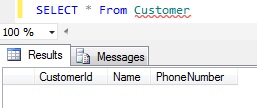
We can use the SELECT statment like below to fetch records from the Customer Table.

SELECT * From Customer

RESULT:
ReterievingTableData

Inserting Records

We can add records to the Table by using INSERT statement as shown in the below DEMOs

DEMO 1: Adding records to the Customer Table with all the column values.

INSERT INTO Customer(CustomerId, Name, PhoneNumber) 
VALUES (1, 'Shree', '1234567890')

No Need to mention Column Names if we are passing all the column values and values are specified in the same order as the columns position in the Table.

INSERT INTO Customer
VALUES (2, 'Ganesh', '1212121212')

Column names need be specified if we are not inserting all the column values and also if the order of the values is different from the actual column position in the table.

Let us verify the Customer Table Data.

SELECT * FROM Customer

ReterievingTableData1

DEMO 2: Insert without Optional column PhoneNumber value.

INSERT INTO Customer(CustomerId, Name) 
VALUES (3, 'Kalpana')

Let us verify the Customer Table Data.

SELECT * FROM Customer

RESULT:

ReterievingTableData2

DEMO 3: Sql Server will raise an exception if we don’t pass NOT NULL column value.

INSERT INTO Customer(Name, PhoneNumber) 
VALUES ('Patil', '1313131313')

RESULT:

Msg 515, Level 16, State 2, Line 1
Cannot insert the value NULL into column ‘CustomerId’, table ‘SqlHintsTableTutorial.dbo.Customer’; column does not allow nulls. INSERT fails.

The statement has been terminated.

ALTER TABLE

We can modify the Table structure using ALTER TABLE Statement.

DEMO 1: Add One more column DateOfBirth to the Customer table created above.

ALTER TABLE Customer
ADD DateOfBirth DATETIME NULL

Verify the Customer Table Data

SELECT * FROM Customer

ReterievingTableData3

DEMO 2: Insert one more customer record which has DateOfBirth column value

INSERT INTO dbo.Customer
(CustomerId, Name, PhoneNumber, DateOfBirth)
VALUES (4, ‘Basavaraj’, ‘1414141414’, ’01/01/1984′)
Verify the Customer Table Data

SELECT * FROM Customer

ReterievingTableData4

DEMO 3: Try to add a NOT NULL column City to the Customer Table having four rows.

ALTER TABLE Customer
ADD City NVARCHAR(50) NOT NULL

RESULT:
Msg 4901, Level 16, State 1, Line 1
ALTER TABLE only allows columns to be added that can contain nulls, or have a DEFAULT definition specified, or the column being added is an identity or timestamp column, or alternatively if none of the previous conditions are satisfied the table must be empty to allow addition of this column. Column ‘CITY’ cannot be added to non-empty table ‘Customer’ because it does not satisfy these conditions.

From the above DEMO result it is clear that we can add NOT NULL column to only an Empty Table.

DROP TABLE

DROP TABLE statement deletes both data and table definition permanently from the database. This action cannot be undone, so always double verify before issuing this command.

DEMO 1: Drop the Customer Table

DROP TABLE Customer

DEMO 2: Try to access a Table which is Dropped.

SELECT * FROM Customer

RESULT:
Msg 208, Level 16, State 1, Line 1
Invalid object name ‘Customer’.

Working with Databases in Sql Server

Sql Server Tutorial Lesson 2: Working with Databases

DATABASE

A Database in Sql Server consists of mainly database objects like Tables, Stored Procedures, User Defined Functions, Views and so on. Let us first understand how to Create Database, once we create the Database we can add other database objects to it which we learn over the course of this Tutorial.

CREATE DATABASE

Below is the Basic Syntax for Creating a Database in Sql Server

CREATE DATABASE DataBaseName

Demo 1: Let us Create a DataBase with Name SqlHintsTutorial

CREATE DATABASE SqlHintsTutorial

USE DATABASE

A database instance will usually be having multiple System Defined databases and User created databases. We can use the USE statement to select the Database on which we want to perform the database operations. Basically USE statement changes the database context to the Specified Database. Below is the basic syntax of the USE statement.

USE DatabaseName

Demo 2:Let us make the SqlHintsTutorial database as the current contextual database.

USE SqlHintsTutorial

DROP DATABASE

We can drop a database using DROP Statement. Dropping a database will permanently removes all the information stored in it, so be careful before using it. Below is the basic syntax for Dropping the Database.

DROP DATABASE DatabaseName

We can’t drop the database which is the current contextual database. To do it we have to change the current contextual database to some-other database and then issue the DROP statement as shown below.

DEMO 3: Let us try to drop a database which is the current Contextual database

USE SqlHintsTutorial
GO
DROP DATABASE SqlHintsTutorial

RESULT:
Msg 3702, Level 16, State 3, Line 1
Cannot drop database “SqlHintsTutorial” because it is currently in use.

DEMO 4: Below script demonstrate how to delete the current contextual database by changing the Current Context DB to some other database and then drop it

 -- Change Current db Context to System Database TempDB
USE TempDB
GO
DROP DATABASE SqlHintsTutorial

System Databases

Below are the list of System Databases which shipped with Sql Server by default. These databases are required for the Sql Server to function smoothly.

System Database Description
MASTER Records all system-level information for an instance of SQL Server.
MSDB Used by SQL Server Agent for scheduling alerts and jobs.
MODEL Used as the template for all databases created on the instance of SQL Server. Modifications made to the model database, such as database size, collation, recovery model, and other database options, are applied to any databases created afterward.
TEMPDB It is used for holding temporary objects or intermediate result-sets.