LTI/ZTI PowerShell: Using Modules in deployment scripts

A great feature of PowerShell is the use of Modules. You use modules to store reusable code such as functions as an alternate to storing hefty code at the start of your scripts.

MDT supports the use of modules in your deployments scripts. To use a module simply add the module folder to your deployment share under \Tools\Modules. Here I’ve added the PSPKI module for use later in a Hydration Kit I’m working on.
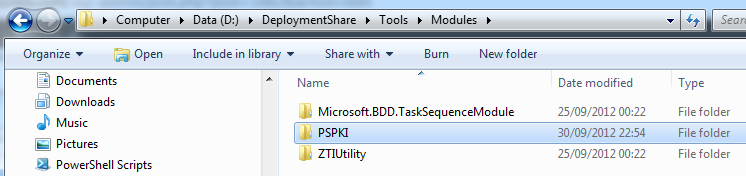
Any modules added there can be called directly in your Deployment scripts by using the Import-Module cmdlet. You do not need to specify a path to the module if stored in this location. It might be an idea to put your functions into a module rather than have loads of code at the start of your scripts.

Modules are useful for calling complex code, here I’ve use the excellent PSPKI module to configure my Certificate Revocation List for my Public Key Infrastructure.

Begin {
 Import-Module PSPKI
}
Process{
 $UserDNSDomain = ($Env:USERDNSDOMAIN).ToLower()
 Get-CA | Get-CDP | Add-CDP -URI "6:http://crl.$UserDNSDomain/crld/<CAName><CRLNameSuffix><DeltaCRLAllowed>.crl" | Set-CrlDistributionPoint
 Get-CA | Get-CDP | Add-CDP -URI "65:\\CON-APP1\crldist$\<CAName><CRLNameSuffix><DeltaCRLAllowed>.crl" | Set-CrlDistributionPoint -RestartCA
}

If you’re creating deployment media then the modules will be automatically added to your media from this location.

References:

about_Modules
Technet Wiki – Popular PowerShell Modules (en-US)
Import-Module cmdlet

Posted in MDT 2010, MDT 2012, PowerShell, Scripting | Tagged , , , | Leave a comment

LTI/ZTI PowerShell: Exit codes

When you run a script in your deployments, it’s good practice to let MDT/SCCM know how the script has ended. This will determine how your task sequence proceeds. You do this by exiting the script with a return code.

I’ve removed some of the enhancements to my Rename-Computer script to demonstrate Exit codes.


Param (
 [String]$Name = $TSEnv:OSDComputername,
 [String]$WorkGroupName
)

Begin{
 Import-Module ZTIUtility
}

Process{
 # Rename the Computer using WMI
 $Result = (Get-WmiObject win32_computersystem).rename($Name)
   If ($Result.ReturnValue -ne 0) {
   Write-Error "Error renaming computer"
   Exit $Result.ReturnValue
 }

# Join a Workgroup
 Add-Computer -WorkGroupName $WorkGroupName -WarningAction SilentlyContinue
 If ($? -eq $false) {
   Write-Error "Error Joining Workgroup"
   Exit 1
 }
}

End{
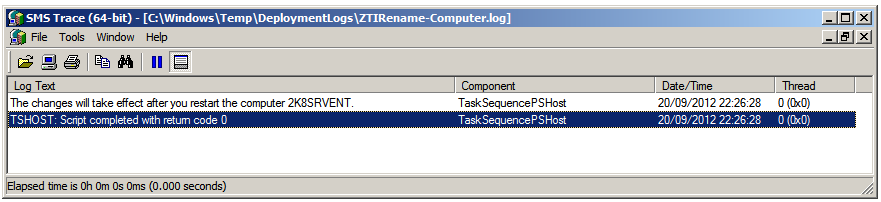
 Write-Host "The requested operation was successful. Changes will not be effective until the system is rebooted."
 Exit 0
}

There are 2 commands in the script and I’ve handled them differently. If there are no errors then the script will reach the end of the script and exit with the desired exit code.

Why exit with code 0? Well it’s not my choice but if you follow the MSDN – list of system error codes then you’ll see that the success exit code is 0.

ERROR_SUCCESS
  0 (0x0)
  The operation completed successfully.

A reboot is 3010:

ERROR_SUCCESS_REBOOT_REQUIRED
  3010 (0xBC2)
  The requested operation is successful. Changes will not be effective until the system is rebooted.

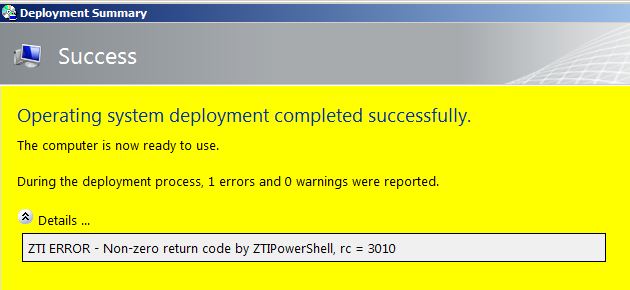
So why not use 3010 as this script will always require a reboot after a successful execution.? Well, I would but if your script exits with anything else from 0 then MDT gives you a great “Danger! Will Robinson!” at the end.

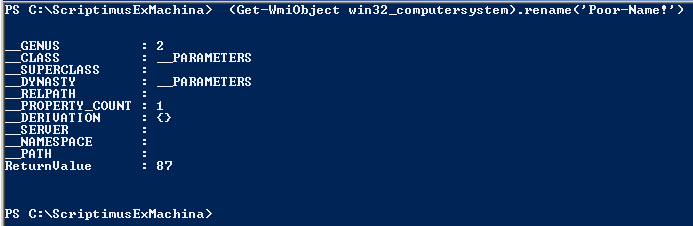
The 2 commands in the script work differently so I’ve handled them differently. The script passes the rename computer command to a $Results variable and checks that it has returned with a 0. if not then it passes the ReturnValue to the exit code.

With the join workgroup command the script checks that the last command has executed without error by testing the last completed action variable $?. If it is not true then the script exits with the return code 1.

Remember you only have to use Write-Error and non 0 codes if you want fire and brimstone at the end of your deployments, in response to undesired executions.

In some cases, you may wish to simply report the non 0 codes and exit with a friendly Write-Host message.

Additional reading:
Scripting Guy Blogs – Error Handling
Windows PowerShell Exit Codes

Posted in MDT 2010, MDT 2012, PowerShell, SCCM, Scripting | Tagged , , , | Leave a comment

LTI/ZTI PowerShell: Debugging Scripts (Part 3 of 3)

Testings results with a test matrix

My Rename-Computer script is in production and I’ve made some major changes to it so it’s time for some major testing.  It’s important when testing your scripts to understand and document what your expected outcomes are. You should then run through each scenario and ensure that you get the desired results.

I’m running my script with its new changes on my technicians PC. Remember, I’ve neutralised the script and added debug lines. For reference, here’s the code again.

Param (
 [String]$Name = $TSEnv:OSDComputername,
 [String]$WorkGroupName
)

Begin{
$DebugPreference="Continue"
Import-Module ZTIUtility
}
Process{
If ($Name) {
 # Rename the Computer using WMI
 # (Get-WmiObject win32_computersystem).rename($Name)
 Write-Debug "RUN COMMAND - Computer was renamed to $Name"
 }
# If the WorkGroupName variable has no value passed to the script.
 If (!($WorkGroupName)) {
 Write-Debug "WorkGroupName variable has no value passed to the script."
# If the Task Sequence variable JoinWorkgroup has a value.
 If ($TSEnv:JoinWorkgroup) {
 Write-Debug "Task Sequence variable JoinWorkgroup has a value."
 [String]$WorkGroupName = $TSEnv:JoinWorkgroup
 }
 }

 # Join a Workgroup
 # If the WorkGroupName variable has a value.
 If ($WorkGroupName) {
 Write-Debug "WorkGroupName variable has a value."
 # Add-Computer -WorkGroupName $WorkGroupName -WarningAction SilentlyContinue
 Write-Debug "RUN COMMAND - Joined the Workgroup $WorkGroupName"
 }
}
End{}

Below I’ve put together a simple testing matrix with the expected/desired results. Below which I’ve shown screenshots of the actual results.

Test 1 – Supply computer name Scriptimus to the command line
Expected results: Computer should be renamed.

Test 2 – Supply computer name Scriptimus and workgroup name ExMachina to the command line
Expected results: Computer and should be renamed and new workgroup joined.

Test 3 – Set Task Sequence Variable OSDComputername to CON-LAB1 and run script without supplying parameters
Expected results: Computer should be renamed.

Test 4 – Set Task Sequence Variables OSDComputername to CON-LAB1 and JoinWorkGroup to Continuum then run script without supplying parameters
Expected results: Computer and should be renamed and new workgroup joined.

Test 5 – Remove all variables and test script without parameters.
Expected results: No changes should be made.

Remove debug lines and reactivate script.

There’s a lot of debugging lines in this script that need to be removed. Sounds like a lot of work, right? No. Just comment out the line $DebugPreference=”Continue” and all the Write-Debug lines will be ignored as they are now run with the default “SilentlyContinue”.

The Import-Module ZTIUtility line can be left in as it will do nothing when run in production. In fact Microsoft suggest that this function will have helpful code in future MDT releases so they recommend that you keep the line in.

Finally the actual code needs to be re-enabled so remove the comment lines (#’s) from the 2 actual code lines and your script is now ready to return to production.

Param (
 [String]$Name = $TSEnv:OSDComputername,
 [String]$WorkGroupName
)

Begin{
# $DebugPreference="Continue"
Import-Module ZTIUtility
}
Process{
If ($Name) {
 # Rename the Computer using WMI
 (Get-WmiObject win32_computersystem).rename($Name)
 Write-Debug "RUN COMMAND - Computer was renamed to $Name"
 }
# If the WorkGroupName variable has no value passed to the script.
 If (!($WorkGroupName)) {
 Write-Debug "WorkGroupName variable has no value passed to the script."
# If the Task Sequence variable JoinWorkgroup has a value.
 If ($TSEnv:JoinWorkgroup) {
 Write-Debug "Task Sequence variable JoinWorkgroup has a value."
 [String]$WorkGroupName = $TSEnv:JoinWorkgroup
 }
 }

 # Join a Workgroup
 # If the WorkGroupName variable has a value.
 If ($WorkGroupName) {
 Write-Debug "WorkGroupName variable has a value."
 Add-Computer -WorkGroupName $WorkGroupName -WarningAction SilentlyContinue
 Write-Debug "RUN COMMAND - Joined the Workgroup $WorkGroupName"
 }
}
End{}
Posted in MDT 2010, MDT 2012, PowerShell, SCCM, Scripting | Tagged , , , , , | Leave a comment

LTI/ZTI PowerShell: Debugging Scripts (Part 2 of 3)

Testing variables with the ZTIUtility module

My Rename-Computer script worked great on a computer in a workgroup environment. But now, I have a new server that I want to rename before I join it to a domain. I’ve worked out that I’ll need the script to have the following functions:

  • Rename the Computer only if a parameter is passed to the script or if a value exists in the task sequence variable OSDComputername. If neither is true then do nothing.
  • Join a new Workgroup only if a parameter is passed to the script or if a value exists in the task sequence variable JoinWorkgroup. If neither is true then do nothing.

The first thing I need to do is create task sequence variables for testing outside of MDT. For this I will need the PowerShell drives TSEnv and TSEnvlist. Fortunately, there’s a module that can create these this for me. After which I can create the test variables manually.

To set this up, first copy the folders Microsoft.BDD.TaskSequenceModule and ZTIUtility from your deployment share \tools\modules folder to your Powershell modules folder.

Now you can add the line Import-Module ZTIUtility to your script and it will create your PSDrives for you.

In my case, I want to test that my script works with the OSDComputername set to CON-LAB1. From a PowerShell console I import the ZTIUtility module and set the variable. These 2 lines will do the trick.

Import-Module ZTIUtility
$TSEnv:OSDcomputername="CON-LAB1"

I can add/change a variable by using this example.

$TSEnv:OSDcomputername =”CON-LAB1″

I can call/test the variable in a number of ways. For example, by typing $TSEnv:OSDcomputername 

Next, after a moment in the script editor I’ve add my script changes, this is how my script looks now.

Param (
 [String]$Name = $TSEnv:OSDComputername,
 [String]$WorkGroupName
)

Begin{
$DebugPreference="Continue"
Import-Module ZTIUtility
}
Process{
If ($Name) {
 # Rename the Computer using WMI
 # (Get-WmiObject win32_computersystem).rename($Name)
 Write-Debug "RUN COMMAND - Computer was renamed to $Name"
 }
# If the WorkGroupName variable has no value passed to the script.
 If (!($WorkGroupName)) {
 Write-Debug "WorkGroupName variable has no value passed to the script."
# If the Task Sequence variable JoinWorkgroup has a value.
 If ($TSEnv:JoinWorkgroup) {
 Write-Debug "Task Sequence variable JoinWorkgroup has a value."
 [String]$WorkGroupName = $TSEnv:JoinWorkgroup
 }
 }

 # Join a Workgroup
 # If the WorkGroupName variable has a value.
 If ($WorkGroupName) {
 Write-Debug "WorkGroupName variable has a value."
 # Add-Computer -WorkGroupName $WorkGroupName -WarningAction SilentlyContinue
 Write-Debug "RUN COMMAND - Joined the Workgroup $WorkGroupName"
 }
}
End{}

In my next post, I walk through a testing matrix.

Posted in MDT 2010, MDT 2012, PowerShell, SCCM, Scripting | Tagged , , , , , | Leave a comment

LTI/ZTI PowerShell: Debugging Scripts (Part 1 of 3)

Adding new functions and features to a perfectly good script is common practice. One example is my evolving Rename-Computer script. I want to modify the way it works (again) but I don’t want to rename my computer and join a workgroup every time I test the script.

Using Write-Debug lines

One method I use when testing such a script is to neutralise it by replacing code with debug lines. I can then run the script and simulate the outcome. Here’s an example

Param (
 [String]$Name = $TSEnv:OSDComputername,
 [String]$WorkGroupName = $TSEnv:JoinWorkgroup
)
Begin{
$DebugPreference="Continue"
}
Process{
 # Rename the Computer using WMI
 # (Get-WmiObject win32_computersystem).rename($Name)
 Write-Debug "RUN COMMAND - Computer was renamed to $Name"
# Add the computer to a new workgroup
# Add-Computer -WorkGroupName $WorkGroupName -WarningAction SilentlyContinue
 Write-Debug "RUN COMMAND - Joined the Workgroup $WorkGroupName"
}
End{}

I’ve commented out the active commands and added Write-Debug commands below them. I’ve also activated the DebugPreference feature by adding the line $DebugPreference=”Continue” to the start of the script.

With this technique, I can test the logic of my code in a harmless environment while saving myself hours in reboots.

Posted in MDT 2010, MDT 2012, PowerShell, SCCM, Scripting | Tagged , , , , , | 2 Comments

LTI/ZTI PowerShell: Testing Script Parameters

Before running a parameterised script in your deployments, it’s important to test that the tab completion is working. To do this, open a PowerShell console and type the script name and a hyphen then press the {tab} key.

Tab Completion

Your script should return the available script parameters and function just like a regular PowerShell cmdlet. This test will prove that your script will pass parameters correctly when run in a task sequence.

You can find out more about script parameters by typing Get-Help About_Parameters in a PowerShell console. Below is a basic construct  for a parameterised script.

Param{
 $Name,
 $Value
}
Begin{}
Process{Write-Output "Values are $Name and $Value"}
End{}
Posted in MDT 2010, MDT 2012, PowerShell, SCCM, Scripting | Tagged , , , , | Leave a comment

LTI/ZTI PowerShell: Trapping warning messages(again!)

Over the last few posts I’ve mentioned the dreaded warning message returned from your PowerShell scripts. To recap, here’s my Rename-Computer script and what happens at the end of the deployment.

Param (
 [String]$Name = $TSEnv:OSDComputername,
 [String]$WorkGroupName = $TSEnv:JoinWorkgroup
)
Begin{}

Process{
 (Get-WmiObject win32_computersystem).rename($Name)
 Add-Computer -WorkGroupName $WorkGroupName
}
End{}

Warning-FinishAction

And this is what I get in the log file:

Warning-Log

Ok, so my script has worked exactly as expected yet I still get this warning message at the end. Aaarrrrhhhh! Like I said there are a couple ways of handling this. One method is to leverage the common parameters and supress the warning by adding –WarningAction “SilentlyContinue” to the end of the cmdlet line.

Add-Computer -WorkGroupName $WorkGroupName -WarningAction SilentlyContinue 

Another action is to supress the messages in the scope of the entire script itself by altering the warning preferences. Do this by adding this line to the start of your script.

$WarningPreference = “SilentlyContinue

FinishAction

Life is good? Not quite. One problem here is that the warning information is now gone(notice that we’re calling it information now?). But don’t worry, you can store the warning information in a variable and resurrect it later by simply appending the command line with the –WarningVariable common parameter.

Add-Computer -WorkGroupName $WorkGroupName -WarningAction SilentlyContinue -WarningVariable Message

Now you can take the warning message and transform it into a harmless information message.

Write-Host $Message 

Now when you check the log files, the information is preserved and your deployments end cleanly without warnings.

Information-Log

Looks like you can have your cake and eat it! This is how the full script looks now.

Param (
[String]$Name = $TSEnv:OSDComputername,
[String]$WorkGroupName = $TSEnv:JoinWorkgroup
)

Begin{}
Process{
(Get-WmiObject win32_computersystem).rename($Name)
Add-Computer -WorkGroupName $WorkGroupName -WarningAction SilentlyContinue -WarningVariable Message
Write-Host $Message
}
End{}
Posted in Uncategorized | Leave a comment

LTI/ZTI PowerShell: Deployment Script logging

The task sequence step “Run PowerShell Script” has some cool features. One of which is the way it handles information returned from the Write-Host, Write-Warning and Write-Error cmdlets.

MDT collects Information(Write-Host), Warnings(Write-Warning) and Errors(Write-Error) returned from a cmdlet in a script. The information is stored in the deployment logs(BDD.log and also a log with the scriptname).

To test this, I’ve written a simple script, just 3 lines.

Write-Host“This is an Information message.”
Write-Warning“This is a Warning message.”
Write-Error“This is an Error message.”

Running the script returns this at the end of the deployment:

As you can see, the warnings and errors returned from using the Write-Warning and Write-Error cmdlets are displayed at the end of the deployment(although, I’m not sure why it’s tripled the error count).

This yellow screen can generate unnecessary comeback sometimes. In some cases the warning is harmless. So in those situations I use the common parameter –WarningAction “SilentlyContinue” at the end of the script line to supress the messages. This prevents your deployments from looking like they’ve failed when they haven’t really.

Another thing you can try is to add this line to the start of your script.

$WarningPreference = “SilentlyContinue

Right, looking at my output, in the log files MDT has handled all the logs and coded them appropriately.

I’m pleased with this and am sure it will save me having to do a lot of work. Remember, if you call a module that has a function that uses Write-Warning then you will see the yellow screen at the end of your deployments. You may have to edit the function to supress the message as it exists within a different scope.

Posted in MDT 2010, MDT 2012, PowerShell, SCCM, Scripting | Tagged , , , | 2 Comments

LTI/ZTI PowerShell: Comment Based Help

I recommend using PowerShell comment based help to document your deployment scripts as described on Technet in about_Comment_Based_Help. This makes your scripts self documenting so colleagues can see who wrote it, what it does and examples and parameter usage. Below, I’ve added an example of comment based help to my evolving rename-computer script.

Anything between the <# and #> in PowerShell is a comment. I’ve also documented it internally by adding a # comment line to each section of code.

<#

.SYNOPSIS

Lite-Touch Deployment script to rename a computer


.DESCRIPTION

The ZTIRename-Computer.ps1 script will rename a computer and join a new workgroup.


.PARAMETER Name

Specifies the new computername


.PARAMETER WorkgroupName

Specifies the new Workgroup name


.EXAMPLE

%SCRIPTROOT%\ZTIRename-Computer.ps1

Add this line to your add powershell task sequence to take values from the deployment

properties OSDComputername and Workgroup. Remember to add the task sequence step

Restart Computer immediately after this step.


.EXAMPLE

ZTIRename-Computer.ps1 -Name PC01 -Workgroup Continuum

This will rename the computer to PC01 and the workgroup to Continuum after a reboot.


.NOTES

Author: Andrew Barnes

Date: 14 September 2012


.LINK

Online version: https://scriptimus.wordpress.com          

#>


Param (

    [String]$Name=$TSEnv:OSDComputername,

    [String]$WorkGroupName=$TSEnv:JoinWorkgroup

)


Begin{}

Process{

    # Rename the Computer using WMI

    (Get-WmiObject win32_computersystem).rename($Name)


    # Add the computer to a new workgroup

    Add-Computer -WorkGroupName $WorkGroupName -WarningAction SilentlyContinue

}

End{}

From a console, other users of the script can use the Get-Help cmdlet to access the documentation.

Comment_Based_Help

Posted in Deployment, MDT 2010, MDT 2012, PowerShell, SCCM, Scripting | Tagged , , , , | Leave a comment

LTI/ZTI PowerShell: Using parameterised scripts in Task Sequences

There are methods in creating PowerShell scripts suitable for task sequence deployment. A good starting point is the Technet article about_Scripts. One of the most useful features of MDT/SCCM are the deployment properties. Today, I’m going to talk about using script parameters to pass deployment data into your scripts.

As a subject, I’m going to create a script that renames a computer then joins a workgroup. This is because MDT doesn’t do this natively(Post OS deployment). If you clone a VM then this is usually the first task you will do. Yes, PowerShell 3 has a cmdlet now for this but for earlier versions this is the method.

Here is the first example of a simple parameterised script that will work in a task sequence.

To accept parameters from the task sequence.

The code is very simple and uses a standard PowerShell construct:

Param (
 [String]$Name,
 [String]$WorkGroupName
)

Begin{}
Process{
 (Get-WmiObjectwin32_computersystem).rename($Name)
 Add-Computer -WorkGroupName $WorkGroupName -WarningAction SilentlyContinue
}
End{}

Save the script in the deployment share under the scripts folder and call it ZTIRename-Computer.ps1

Next, add it to MDT by creating a new Run PowerShell Script, task sequence step.

TS Step 1

Set the PowerShell script value as: %SCRIPTROOT%\ZTI-Rename-Computer.ps1

Then set the Parameters value as: -Name CON-LAB1 -WorkGroupName Continuum

This is how you accept the parameters from the task sequence itself.

Note: This particular script will need a restart but MDT can handle that itself so I added a Restart Computer step beneath it rather than code it in PowerShell.

To use deployment parameters with a script.

You will probably want to use your script on a number of different computers. In which case, you will need to call parameters from the customsettings.ini file or deployment database. First configure the computer name and workgroup parameters as normal in the customsettings.ini or database. eg:

OSDComputername = CON-Lab1
JoinWorkGroup = Continuum

Next, modify the Task Sequence step and change the Parameters section to these values:

-Name $TSEnv:OSDComputername -WorkGroupName $TSEnv:JoinWorkGroup

TS Step 2

This will use the deployment parameters and overwrite any defaults that may have been coded in the script. Speaking of which. . .

To code parameter defaults in the script.

In the script modify the Param section to store the values to the deployment properties. You can hard code the values or use the deployment parameters like in this example:

Param (
 [String]$Name = $tsenv:ComputerName,
 [String]$WorkGroupName = $tsenv:JoinWorkgroup
)

Begin{}
Process{
 (Get-WmiObjectwin32_computersystem).rename($Name)
 Add-Computer-WorkGroupName$WorkGroupName-WarningActionSilentlyContinue
}
End{}

For a script like this I would prefer to keep the parameters in the script to save having to enter the parameters in the task sequence.

Posted in MDT 2010, MDT 2012, SCCM, Scripting | Tagged , , , , , | Leave a comment