Help the JDT Compiler helping you! – 1: Resource Leaks
During the Juno cycle a lot of work in the JDT has gone into more sophisticated static analysis, and some more is still in the pipe-line. I truly hope that once Juno is shipped this will help all JDT users to find more bugs immediately while still typing. However, early feedback regarding these features shows that users are starting to expect miracles from the analysis 🙂
On the one hand seeing this is flattering, but on the other hand it makes me think we should perhaps explain what exactly the analysis can see and what is beyond its vision. If you take a few minutes learning about the concepts behind the analysis you’ll not only understand its limitations, but more importantly you will learn how to write code that’s better readable – in this case for reading by the compiler. Saying: with only slightly rephrasing your programs you can help the compiler to better understand what’s going on, to the effect that the compiler can answer with much more useful error and warning messages.
Since there’s a lot of analysis in this JDT compiler I will address just one topic per blog post. This post goes to improvements in the detection of resource leaks.
Resource leaks – the basics
Right when everybody believed that Eclipse Indigo RC 4 was ready for the great release, another blocker bug was detected: a simple resource leak basically prevented Eclipse from launching on a typical Linux box if more than 1000 bundles are installed. Coincidentally, at the same time the JDT team was finishing up work on the new try-with-resources statement introduced in Java 7. So I was thinking: shouldn’t the compiler help users to migrate from notoriously brittle handling of resources to the new construct that was designed specifically to facilitate a safe style of working with resources?
What’s a resource?
So, how can the compiler know about resources? Following the try-with-resources concept, any instance of type java.lang.AutoCloseable is a resource. Simple, huh? In order to extend the analysis also to pre Java 7 code, we also consider java.io.Closeable (available since 1.5).
Resource life cycle
The expected life cycle of any resource is : allocate—use—close. Simple again.
From this we conclude the code pattern we have to look for: where does the code allocate a closeable and no call to close() is seen afterwards. Or perhaps a call is seen but not all execution paths will reach that call, etc.
Basic warnings
With Juno M3 we released a first analysis that could now tell you things like:
 Resource leak: “input” is never closed
- Resource leak: “input” is never closed at this location (if a method exit happens before reaching close())
If the problem occurs only on some execution paths the warnings are softened (saying “potential leak” etc.).
Good, but…
Signal to noise – part 1
It turned out that the analysis was causing significant noise. How come? The concepts are so clear and all code that wouldn’t exhibit the simple allocate—use—close life cycle should indeed by revised, shouldn’t it?
In fact we found several patterns, where these warnings were indeed useless.
Resource-less resources
We learned that not every subtype of Closeable really represents a resource that needs leak prevention. How many times have you invoked close() on a StringWriter, e.g.? Just have a look at its implementation and you’ll see why this isn’t worth the effort. Are there more classes in this category?
Indeed we found a total of 7 classes in java.io that purely operate on Java objects without allocating any resources from the operating system:
StringReaderStringWriterByteArrayInputStreamByteArrayOutputStreamCharArrayReaderCharArrayWriterStringBufferInputStream
For none of these does it make sense to warn about missing close().
To account for these classes we simply added a white list: if a class is in the list suppress any warnings/errors. This white list consists of exactly those 7 classes listed above. Sub-classes of these classes are not considered.
Wrapper resources
Another group of classes implementing Closeable showed up, that are not strictly resources themselves. Think of BufferedInputStream! Does it need to be closed?
Well? What’s your answer? The correct answer is: it depends. A few examples:
        void wrappers(String content) throws IOException {
                Reader r1, r2, r3, r4;
                r1 = new BufferedReader(new FileReader("someFile"));
                r2 = new BufferedReader(new StringReader(content));
                r3 = new FileReader("somefile");
                r4 = new BufferedReader(r3);
                r3.close();
        }
How many leaks? With same added smartness the compiler will signal only one resource leak: on r1. All others are safe:
r2is a wrapper for a resource-less closeable: no OS resources are ever allocated here.r3is explicitly closedr4is just a wrapper aroundr3and since that is properly closed,r4does not hold onto any OS resources at the end.- returning to
r1, why is that a leak? It’s a wrapper, too, but now the underlying resource (aFileReader) is not directly closed so it’s the responsibility of the wrapper and can only be triggered by callingclose()on the wrapperr1.
EDIT: We are not recommending to close a wrapped resource directly as done with r3, closing the wrapper (r4) is definitely cleaner, and when wrapping a FileOutputStream with a BufferedOutputStream closing the former is actually wrong, because it may lose buffered content that hasn’t been flushed. However, the analysis is strictly focused on resource leaks and for analysing wrappers we narrow that notion to leaks of OS resources. For the given example, reporting a warning against r4 would be pure noise.
Summarizing: wrappers don’t directly hold an OS resource, but delegate to a next closeable. Depending on the nature and state of the nested closeable the wrapper may or may not be responsible for closing. In arbitrary chains of wrappers with a relevant resource at the bottom, closing any closeable in the chain (including the bottom) will suffice to release the single resource. If a wrapper chain is not properly closed the problem will be flagged against the outer-most wrapper, since calling close() at the wrapper will be delegated along all elements of the chain, which is the cleanest way of closing.
Also for wrappers the question arises: how does the compiler know? Again we set up a white list with all wrapper classes we found in the JRE: 20 classes in java.io, 12 in java.util.zip and 5 in other packages (the full lists are in TypeConstants.java, search for “_CLOSEABLES”).
Status and outlook
Yes, a leak can be a stop-ship problem.
Starting with Juno M3 we have basic analysis of resource leaks; starting with Juno M5 the analysis uses the two white lists mentioned above: resource-less closeables and resource wrappers. In real code this significantly reduces the number of false positives, which means: for the remaining warnings the signal-to-noise ratio is significantly better.
M5 will actually bring more improvements in this analysis, but that will be subject of a next post.
A little statistics of the day
My latest query in Eclipse’s bugzilla answered 189 bugs.
Out of these a certain TLA was mentioned just in the bug summaries 54 times.
Additionally, the long form of the same word occurred 5 times.
Those who have followed my previous posts, know which three letters I’m referring to. Looks like they’re even more relevant in some Eclipse components than I ever fancied (no – not telling, in which component I searched 🙂 ).
Object Teams with Null Annotations
The recent release of Juno M4 brought an interesting combination: The Object Teams Development Tooling now natively supports annotation-based null analysis for Object Teams (OT/J). How about that? 🙂


The path behind us
Annotation-based null analysis has been added to Eclipse in several stages:
- Using OT/J for prototyping
- As discussed in this post, OT/J excelled once more in a complex development challenge: it solved the conflict between extremely tight integration and separate development without double maintenance. That part was real fun.
- Applying the prototype to numerous platforms
- Next I reported that only one binary deployment of the OT/J-based prototype sufficed to upgrade any of 12 different versions of the JDT to support null annotations — looks like a cool product line
- Pushing the prototype into the JDT/Core
- Next all of the JDT team (Core and UI) invested efforts to make the new feature an integral part of the JDT. Thanks to all for this great collaboration!
- Merging the changes into the OTDT
- Now, that the new stuff was mixed back into the plain-Java implementation of the JDT, it was no longer applicable to other variants, but the routine merge between JDT/Core HEAD and Object Teams automatically brought it back for us. With the OTDT 2.1 M4, annotation-based null analysis is integral part of the OTDT.
Where we are now
Regarding the JDT, others like Andrey, Deepak and Aysush have beaten me in blogging about the new coolness. It seems the feature even made it to become a top mention of the Eclipse SDK Juno M4. Thanks for spreading the word!
Ah, and thanks to FOSSLC you can now watch my ECE 2011 presentation on this topic.
Two problems of OOP, and their solutions
Now, OT/J with null annotations is indeed an interesting mix, because it solves two inherent problems of object-oriented programming, which couldn’t differ more:
1.: NullPointerException is the most widespread and most embarrassing bug that we produce day after day, again and again. Pushing support for null annotations into the JDT has one major motivation: if you use the JDT but don’t use null annotations you’ll no longer have an excuse. For no good reasons your code will retain these miserable properties:
- It will throw those embarrassing NPEs.
- It doesn’t tell the reader about fundamental design decisions: which part of the code is responsible for handling which potential problems?
Why is this problem inherent to OOP? The dangerous operator that causes the exception is this:

right, the tiny little dot. And that happens to be the least dispensable operator in OOP.
2.: Objectivity seems to be a central property on any approach that is based just on Objects. While so many other activities in software engineering are based on the insight that complex problems with many stakeholders involved can best be addressed using perspectives and views etc., OOP forces you to abandon all that: an object is an object is an object. Think of a very simple object: a File. Some part of the application will be interested in the content so it can decode the bytes and do s.t. meaningful with it, another part of the application (maybe an underlying framework) will mainly be interested in the path in the filesystem and how it can be protected against concurrent writing, still other parts don’t care about either but only let you send the thing over the net. By representing the “File” as an object, that object must have all properties that are relevant to any part of the application. It must be openable, lockable and sendable and whatnot. This yields
bloated objects and unnecessary, sometimes daunting dependencies. Inside the object all those different use cases it is involved in can not be separated!
With roles objectivity is replaced by a disciplined form of subjectivity: each part of the application will see the object with exactly those properties it needs, mediated by a specific role. New parts can add new properties to existing objects — but not in the unsafe style of dynamic languages, but strictly typed and checked. What does it mean for practical design challenges? E.g, direct support for feature oriented designs – the direct path to painless product lines etc.
Just like the dot, objectivity seems to be hardcoded into OOP. While null annotations make the dot safe(r), the roles and teams of OT/J add a new dimension to OOP where perspectives can be used directly in the implementation. Maybe it does make sense, to have both capabilities in one language 🙂 although one of them cleans up what should have been sorted out many decades ago while the other opens new doors towards the future of sustainable software designs.
The road ahead
The work on null annotations goes on. What we have in M4 is usable and I can only encourage adopters to start using it right now, but we still have an ambitious goal: eventually, the null analysis shall not only find some NPEs in your program, but eventually the absense of null related errors and warnings shall give the developer the guarantee that this piece of code will never throw NPE at runtime.
What’s missing towards that goal:
- Fields: we don’t yet support null annotations for fields. This is next on our plan, but one particular issue will require experimentation and feedback: how do we handle the initialization phase of an object, where fields start as being null? More on that soon.
- Libraries: we want to support null specifications for libraries that have no null annotations in their source code.
- JSR 308: only with JSR 308 will we be able to annotate all occurrences of types, like, e.g., the element type of a collection (think of
List)
Please stay tuned as the feature evolves. Feedback including bug reports is very welcome!
Ah, and one more thing in the future: I finally have the opportunity to work out a cool tutorial with a fellow JDT committer: How To Train the JDT Dragon with Ayushman. Hope to see y’all in Reston!

The Essence of Object Teams
When I write about Object Teams and OT/J I easily get carried away indulging in cool technical details. Recently in the Object Teams forum we were asked about the essence of OT/J which made me realize that I had neglected the high-level picture for a while. Plus: this picture looks a bit different every time I look at it, so here is today’s answer in two steps: short and extended.
Short version:
Extended version:
In software design, e.g., we are used to describing a system from multiple perspectives or views, like: structural vs. behavioral views, architectural vs. implementation views, views focusing on distribution vs. business logic, or just: one perspective per use case.

A collage of UML diagrams
© 2009, Kishorekumar 62, licensed under the Creative Commons Attribution-Share Alike 3.0 Unported license.
In regular OO programming this is not well supported, an object is defined by exactly one class and no matter from which perspective you look at it, it always has the exact same properties. The best we can do here is controlling the visibility of methods by means of interfaces.
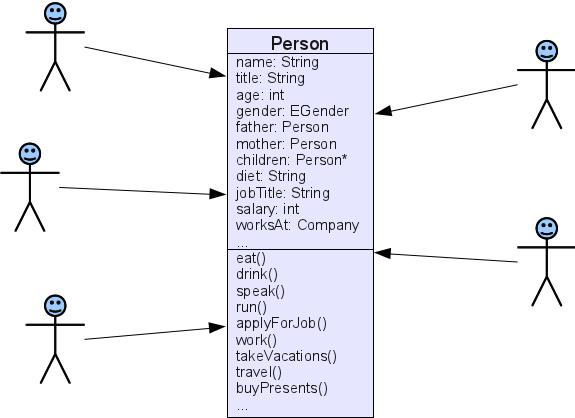
By contrast, in OT/J you start with a set of lean base objects and then you may attach specific roles for each perspective. Different use cases and their scenarios can be implemented by different roles. Visualization in the UI may be implemented by another independent set of roles, etc.

Code-level comparison?
I’ve been asked to compare standard OO and OT/J by direct comparison of code examples, but I’m not sure if it is a good idea to do, because OT/J is not intended to just provide a nicer syntax for things you can do in the same way using OO. OT/J – as any serious new programming language should do IMHO – wants you to think differently about your design. For example, we can give an educational implementation of the Observer pattern using OT/J, but once you “think Object Teams” you may not be interested in the Observer pattern any more, because you can achieve basically the same effect using a single callin binding as shown in our Stopwatch example.
So, positively speaking, OT/J wants you to think in terms of perspectives and make the perspectives you would naturally use for describing the system explicit by means of roles.
OTOH, a new language is of course only worth the effort if you have a problem with existing approaches. The problems OT/J addresses are inherently difficult to discuss in small examples, because they are:
- software complexity, e.g., with standard OO finding a suitable decomposition where different concerns are not badly tangled with each other becomes notoriously difficult.
- software evolution, e.g., the initial design will be challenged with change requests that no-one can foresee up-front.
(Plus all the other concerns addressed)
Both, theory and experience, tell me that OT/J excels in both fields. If anyone wants to challenge this claim using your own example, please do so and post your findings, or lets discuss possible designs together.
One more essential concept
I should also mention the second essence in OT/J: after slicing elements of your program into roles and base objects we also support to re-group the pieces in a meaningful way: as roles are contained in teams, those teams enable you to raise the level of abstraction such that each user-relevant feature, e.g., can be captured in exactly one team, hiding all the details inside. As a result, for a high-level design view you no longer have to look at diagrams of hundreds of classes but maybe just a few tens of teams.
Hope this helps seeing the big picture. Enough hand-waving for today, back to the code! 🙂
Builds are like real software – or even more so
Being a part-time release engineer for the Object Teams project I can only agree with every word Kim writes about the job, I wish I could hire her for our project 🙂
She writes:
“Nobody in needs to understand how the build works, they just need to push a button. That’s great. Until the day before a release when your build fails with a cryptic message about unresolved dependencies. And you have no idea how to fix it. And neither does anyone else on the team.”
That puts a sad smile on my face and I’d like to add a little quality metric that seems cruel for today’s build systems, but might actually be useful for any software:
One extreme I experienced was in a PDE/Build-ant-build which I had to set to verbose to get any useful answer but then I had to find the relevant error message deeply buried in literally tens of megabytes of log output. Takes ages to browse that log file. Other tools rank towards the other end of the spectrum saying basically “it didn’t work”.
Why is the worst error message relevant? When you hit that worst message it’s close to saying “game over”. Especially when working on a build I’ve come to the point time and again where all my creativity and productivity came to a grinding halt and for days or weeks I simply made zero progress because I had no idea why that system didn’t work and what it expected me to do to fix the thing. Knock-out.
Obviously I hate that state when I make no progress towards my goal. And typically that state is reached by poor communication from some framework back to me.
Real coolness
I know people usually don’t like to work on improving error messages, but please, don’t think good error messages are any bit less cool than running your software on mars. On the one hand we try to build tools that improve developers’ productivity by a few percent and than the tool will give answers that bring that very productivity down to zero. That’s – inconsistent.
I’m tempted to repeat the p2 story here. Many will remember the merciless dump of data from the sat solver that p2 gave in its early days. Some will consider the problem solved by now. Judge for yourself: what’s the worst-case time a regular Eclipse user will need to understand what p2 is telling him/her by one of its error messages.
The intention of this post is not to blame any particular technology. The list would be quite long anyway. It’s about general awareness (big words, sorry 🙂 ).
Consider the worst case
Again, why worst case? Because the worst case will happen. And it’s enough if it hits you once to easily compensate all the time savings the tool otherwise brought to you.
Communicate!
Framework developers, tool smiths: let your software communicate with the user and let it be especially helpful when the user is in dire need of help.
One small contribution in this field I’d like to share with you: in the OTDT every error/warning raised by the compiler not only tries to precisely describe what’s wrong but it is directly linked to the corresponding paragraph in the language definition that is violated by the current code. At least this should completely explain why the current code is wrong. It’s a small step, but I feel a strong need for linking specific help to every error message.
But first, the software has to anticipate every single error that will occur in order to produce useful messages. That’s the real reason why creating complex software is so challenging. Be it a build system or the “real” software.
Be cool, give superb error messages!
“OT/J 7”
In my previous post I wrote about the challenge of maintaining 12 variants of the JDT/Core to support any combination of Java 6 vs. 7, Java vs. OT/J, with or without support for null annotations at versions Indigo GA, SR1 and Juno M1.
Meanwhile I played a bit with the combination of OT/J with Java 7. While I’m not that excited about Java 7 I found a way to combine the two that I found quite cute.
The typical OT/J foo-bar story
Consider the following classes:
public class Foo {
    public void foo() { System.out.println("foo"); }
}
public team class MyTeam {
    protected class R playedBy Foo {
        callin void bar() { System.out.println("bar"); }
        bar <- replace foo;
    }
}
So, we can use the team to replace the output “foo” by the output “bar”.
Now, a client calls f.foo() every now and then and may want to use the team to turn just one of the foos into bar. He may try this:
    public static void main(String[] args) {
        Foo f = new Foo();
        f.foo();
        test(f);
        f.foo();
    }
    static void test(Foo f) {
        MyTeam aTeam = new MyTeam();
        aTeam.activate();
        f.foo();
    }
He may expect this output:
foo
bar
foo
BUT, that’s not what he gets: the team remains active and we’ll see
foo
bar
bar
BUMMER.
What is a resource?
I kind-of like the new try-with-resources construct, so what can we actually use it for, is it just for FileReaders and things like that?
Since a resource is anything that is a subtype of AutoCloseable we can use the concept for anything that has an open-close lifecycle. So, what about — teams? Well, teams don’t have open() and close() methods, but isn’t team activation related? Activation opens a context and deactivation closes the context, no?
Let’s turn the team into an AutoCloseable:
public team class MyTeam implements AutoCloseable {
    // role R as before ...

    /** Just a simple factory method for active teams. */
    public static MyTeam createActiveTeam() {
        MyTeam t = new MyTeam();
        t.activate();
        return t;
    }

    @Override
    public void close() { // please don't throw anything here, it spoils the whole story!
        deactivate();
    }
}
Compiler-guided development
Before jumping at the solution, let me show you, what the new warning from Bug 349326 will tell you:

Ah, this is when our developer wakes up: “I might have to close that thing, good, I’m smart enough to do that”. Unfortunately, our developer is too smart, relying on some magic of the hashCode of his Foo:

You imagine, that now the full power of the compiler’s flow analysis will watch whether the thing is really closed on every path!
But even when the dev stops trying to outsmart the compiler, the compiler isn’t 100% happy:

We see the desired output now, but the method can and probably should still be improved: tell us what you mean: are these just three independent method calls? No, lines 1 and 3 are intended as a bracket for line 2: only within this context should aTeam affect the behavior of f.
Here’s our brave new OT/J 7 world:

Method test2() normally behaves identical to test1(), but we have two important differences:
test2()is safe against exceptions, the team will always be deactivatedtest2()makes the intention explicit: thetry () { }construct is not only a lexical block, but also a well defined semantic context: telling us that only inside this contextaTeamis open/active, and outside it’s not. We don’t need to sequentially read the statements of the method to learn this.
An essential extension
Following my argumentation, OT/J must have been waiting for this language extension for a long time, no? Well, not exactly waiting. In fact, here’s something we had from the very beginning almost a decade ago:

But still, it’s nice to see that now every developer can achieve the same effect for different applications, beyond input streams and teams 🙂
Here’s an exercise for the reader: the within construct in OT/J activates the team only for the current thread. With try-with-resources you can easily setup a context for global team activation and deactivation.
Happy hacking!
Mix-n-match language support
I’ve been involved in the release of different versions of the JDT lately, supporting different flavors of Java.
Classical release management
At the core we have the plain JDT, of which we published the 3.7.0 release in June and right now first release candidates are being prepared towards the 3.7.1 service release, which will be the first official release to support Java 7. At the same time the first milestones towards 3.8 are being built. OK, this is almost normal business — with the exception of the service release differs more than usual from its base release, due to the unhappy timing of the release of Java 7 vs. Eclipse 3.7.
First variant: Object Teams
The same release plan is mirrored by the Object Teams releases 2.0.0, 2.0.1RC1, 2.1.0M1. Merging the delta from JDT 3.7 to 3.7.1 into the OTDT was a challenge, given that this delta contained the full implementation of all that’s new in Java 7. Still with the experience of regularly merging JDT/Core changes into the OT variant, the pure merging was less than one day plus a couple more days until all 50000+ tests were green again. The nice thing about the architecture of the OTDT: after merging the JDT/Core, I was done. Since all other adaptations of the JDT are implemented using OT/Equinox adopting, e.g., all the new quick assists for Java 7 required a total of zero minutes integration time.
I took the liberty of branching 2.0.x and 2.1 only after integrating the Java 7 support, which also means that 2.1 M1 has only a small number of OT-specific improvements that did not already go into 2.0.1.
Prototyping annotation based null analysis
As I wrote before, I’m preparing a comprehensive new feature for the JDT/Core: static analysis for potential NullPointerException based on annotations in the code. The latest patch attached to the bug had almost 3000 lines. Recent discussions at ECOOP made me change my mind in a few questions, so I changed some implementation strategies. Luckily the code is well modularized due to the use of OT/Equinox.
Now came the big question: against which version of the JDT should I build the null-annotation add-on? I mean, which of the 6 versions I have been involved in during the last 2 months?
As I like a fair challenge every now and then I decided: all six, i.e., I wanted to support adding the new static analysis to all six JDT versions mentioned before.
Integration details
Anybody who has worked on a Java compiler will confirm: if you change one feature of the compiler chances are that any other feature can be broken by the change (I’m just paraphrasing: “it’s complex”). And indeed, applying the nullity plug-in to the OTDT caused some headache at first, because both variants of the compiler make specific assumptions about the order in which specific information is available during the compilation process. It turned out that two of these assumptions where simply incompatible, so I had to make some changes (here I made the null analysis more robust).
At the point where I thought I was done, I tripped over an ugly problem that’s intrinsic to Java.
The nullity plug-in adapts a method in the JDT/Core which contains the following switch statement:
        while ((token = this.scanner.getNextToken()) != TerminalTokens.TokenNameEOF) {
                IExtendedModifier modifier = null;
                switch(token) {
                        case TerminalTokens.TokenNameabstract:
                                modifier = createModifier(Modifier.ModifierKeyword.ABSTRACT_KEYWORD);
                                break;
                        case TerminalTokens.TokenNamepublic:
                                modifier = createModifier(Modifier.ModifierKeyword.PUBLIC_KEYWORD);
                                break;
                        // more cases
                }
        }
I have a copy of this method where I only added a few lines to one of the case blocks.
Compiles fine against any version of the JDT. But Eclipse hangs when I install this plugin on top of a wrong JDT version. What’s wrong?
The problem lies in the (internal) interface TerminalTokens. The required constants TokenNameabstract etc. are of course present in all versions of this interface, however the values of these constants change every time the parser is generated anew. If constants were really abstractions that encapsulate their implementation values, all would be fine, but the Java byte code knows nothing about such an abstraction, all constant values are inlined during compilation. In other words: the meaning of a constant depends solely on the definitions which the compiler sees during compilation. Thus compiling the above switch statement hardcodes a dependency on one particular version of the interface TerminalTokens. BAD.
After recognizing the problem, I had to copy some different versions of the interface into my plug-in, implement some logic to translate between the different encodings and that problem was solved.
What’s next?
Nothing is next. At this point I could apply the nullity plug-in to all six versions of the JDT and all are behaving well.
Mix-n-match
Would you like Java with our without the version 7 enhancements (stable release or milestone)? May I add some role and team classes? How about a dash more static analysis? It turns out we have more than just one product, we have a full little product line with features to pick or opt-out:
| Java 6 | Java 7 | |||
|---|---|---|---|---|
| Indigo | Indigo SR1 | Juno M1 | ||
| no null annotations | Plain JDT | |||
| OTDT | ||||
| with null annotations | Plain JDT | |||
| OTDT | ||||
- OTDT: http://www.eclipse.org/objectteams/download.php
- Null ananlysis: http://wiki.eclipse.org/JDT_Core/Null_Analysis
Just make your choice 🙂
Happy hacking with null annotations and try-with-resources in OT/J.
 |
BTW: if you want to hear a bit more about the work on null annotations, you should really come to EclipseCon Europe — why not drop a comment at this submission 🙂 |
A use case for Java 7
Recent stress tests have revealed a few issues in the Eclipse platform where leaking file handles could cause “Too many open files”-style failures.
Until now that kind of issue was notoriously difficult to analyze, and a lot of luck was involved when I spotted one of those bugs by mere code inspection.
However, chances are that this particular kind of bug will soon be a curiosity from the past. How? Java 7 brings a new feature that should be used in exactly this kind of situation: by the new try-with-resources construct leaking of any resources can be safely avoided.
Now, current code certainly doesn’t use try-with-resources, how can we efficiently migrate existing code to using this new feature? As one step I just filed this RFE for a new warning where try-with-resources should probably be used but is not. At this point I can’t promise that we’ll be able to implement the new warning in a useful way, i.e., without too many false positives, but it sounds like a promising task, doesn’t it?
Here’s a mockup of what I’m thinking of:
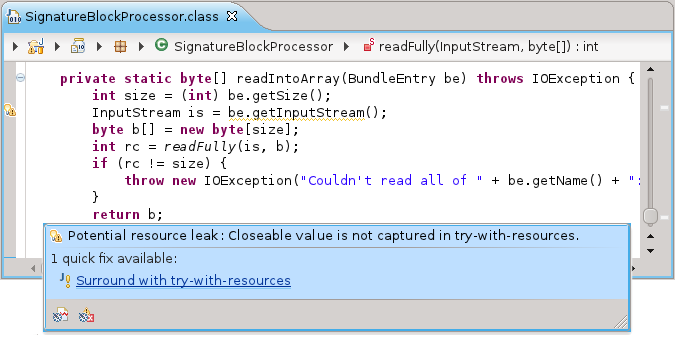
And this is what the quickfix would create:
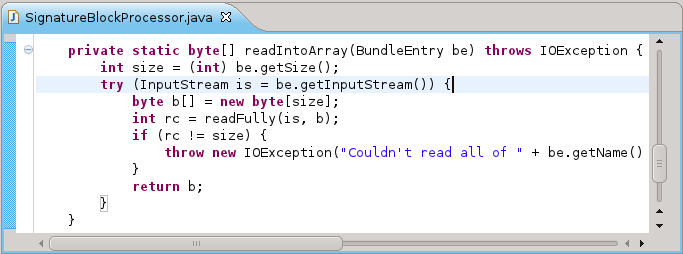
Sounds cool?
Between the Times
This week is (supposed to be) “quiet week” at Eclipse: Release Candidate 4 is in place and more testing is being done before the final Indigo Release. Time to speak of s.t. that the Object Teams project has neglected a bit in the past: compiling / building with Maven.
Compiling OT/J with Maven
In the days of Maven2, pluging-in a non-standard compiler required fiddling with the nexus compiler plugin, which was buggy and all that. With the recent development around Maven3 and Tycho things became easier. The following pom-snippet is all you need to tell Maven to use the OT/J compiler:
<build>
    <pluginManagement>
        <plugins>
            <plugin>
                <!-- Use compiler plugin with tycho as the adapter to the OT/J compiler. -->
                <artifactId>maven-compiler-plugin</artifactId>
                <configuration>
                    <source>1.6</source>
                    <target>1.6</target>
                    <compilerId>jdt</compilerId>
                </configuration>
                <dependencies>
                    <!-- This dependency provides the implementation of compiler "jdt": -->
                    <dependency>
                        <groupId>org.sonatype.tycho</groupId>
                        <artifactId>tycho-compiler-jdt</artifactId>
                        <version>${tycho.version}</version>
                        <exclusions>
                            <!-- Exclude the original JDT/Core to be replaced by the OT/J variant: -->
                            <exclusion>
                                <groupId>org.sonatype.tycho</groupId>
                                <artifactId>org.eclipse.jdt.core</artifactId>
                            </exclusion>
                        </exclusions>
                    </dependency>
                    <dependency>
                        <!-- plug the OT/J compiler into the tycho-compiler-jdt plug-in: -->
                        <groupId>org.eclipse</groupId>
                        <artifactId>objectteams-otj-compiler</artifactId>
                        <version>${otj.version}</version>
                    </dependency>
                </dependencies>
            </plugin>
        </plugins>
    </pluginManagement>
</build>
groupId has been changed to org.eclipse.objectteams (meanwhile, 3-part group IDs are the de-facto standard for Eclipse projects).
This relies on the fact, that the OT/J compiler is compatible with the JDT compiler, good.
To make things go smooth in various build phases a few more bits are required:
- provide the OT/J runtime jar and its dependency (bcel)
- tell surefire about required command line arguments for running OT/J programs
These basics are collected in a parent pom so that all you need are these two snippets:
<repositories>
    <repository>
        <id>ObjectTeamsRepository</id>
        <id>ObjectTeamsRepository</id>
        <name>Object Teams Repository</name>
        <url>http://download.eclipse.org/objectteams/maven/3/repository</url>
    </repository>
</repositories>
<parent>
    <groupId>org.eclipse</groupId>
    <artifactId>objectteams-parent-pom</artifactId>
    <version>2.0.0</version>
</parent>
groupId is org.eclipse.objectteams.
This converts any Java project into an OT/J project, simply enough, huh?
At least compiling and testing works out-of-the box. Let me know what additional sophistication you need and if adjustments to other build phases are needed.
OT/J over m2e
Well, I’m not much of a Maven expert, but I’m an Eclipse enthusiast, so, how can we use the above inside the IDE?
The bad news: the m2e plug-in has hardcoded its support for the compiler plugin to use “javac” as the compiler. Naive attempts to use tycho-compiler-jdt have failed with the infamous "Plugin execution not covered by lifecycle configuration".
The good news: By writing a tiny OT/Equinox plug-in I was able to remedy those issues. If you have the m2e plug-in installed (Indigo version), the normal “Update Project Configuration” action will suffice:

After that, the project is recognized as an OT/J project, both by the IDE …

… and also by maven …

Where to get it?
The mentioned plug-in is brand-new and as such it is not part of the regular OTDT distribution. OTOH, the plug-in is so simple, I don’t expect a lot of changes needed. So, if you have an Indigo-ish Eclipse just add this update site:
Then install “Maven Integration for Object Teams (Early Access)”:

Don’t forget the <repository> and <parent> definitions from above and you should be ready to go! Yesss, sometimes it pays off that OT/J is a kind of Java, a lot of the tooling can just piggy-back on what’s already there for Java 🙂
Follow-up: Object Teams Tutorial at EclipseCon 2011
At our EclipseCon tutorial we mentioned a bonus excercise, for which we didn’t have the time at the tutorial.
Now it’s time to reveal the solution.
Task
“Implement the following demo-mode for the JDT:
- • When creating a Java project let the user select:
- ❒ Project is for demo purpose only
- • When creating a class in a Demo project:
- insert class name as “Foo1”, “Foo2” …”
So creating classes in demo mode is much easier, and you’ll use the names “Foo1″… anyway 🙂
(See also our slides (#39)).
Granted, this is a toy example, yet it combines a few properties that I frequently find in real life and which cause significant pains without OT/J:
- The added behavior must tightly integrate with existing behavior.
- The added behavior affects code at distant locations,
here two plug-ins are affected:org.eclipse.jdt.uiandorg.eclipse.jdt.core. - The added behavior affects execution at different points in time,
here creation of a project plus creation of a class inside a project. - The added behavior requires to maintain more state at existing objects,
here a JavaProject must remember if it is a demo project.
Despite these characteristics the task can be easily described in a few English sentences. So the solution should be similarly concise and delivered as a single coherent piece.
Strategy
With a little knowledge about the JDT the solution can be outlined as this
- Add a checkbox to the New Java Project wizard
- When the wizard creates the project mark it as a demo project if the box is checked.
- Let the project also count the names of
Foo..classes it has created. - When the new class wizard creates a class inside a demo project pre-set the generated class name and make the name field unselectable.
From this we conclude the need to define 4 roles, playedBy these existing types:
org.eclipse.jdt.ui.wizards.NewJavaProjectWizardPageOne.NameGroup:
the wizard page section where the project name is entered and where we want to add the checkbox.org.eclipse.jdt.ui.wizards.NewJavaProjectWizardPageTwo:
the part of the wizard that triggers setup of the JavaProject.org.eclipse.jdt.core.IJavaProject:
this is where we need to add more state (isDemoProject and numFooClasses).org.eclipse.jdt.ui.wizards.NewTypeWizardPage:
this is where the user normally specifies the name for a new class to be created.
Note, that 3 classes in this list resided in org.eclipse.jdt.ui, but IJavaProject is from org.eclipse.jdt.core, which leads us to the next step:
Plug-in configuration
Our solution is developed as an OT/Equinox plug-in, with the following architecture level connections:

This simply says that the same team demohelper.ProjectAdaptor is entitled to bind roles to classes from both org.eclipse.jdt.ui and org.eclipse.jdt.core.
One more detail in these extensions shouldn’t go unmentioned: Don’t forget to set “activation: ALL_THREADS” for the team (otherwise you won’t see any effect …).
Now we’re ready to do the coding.
Implementing the roles
protected class DialogExtender playedBy NameGroup {

        protected SelectionButtonDialogField isDemoField;

        void createControl(Composite parent) <- after Control createControl(Composite composite)
                with { parent <- (Composite) result }

        private void createControl(Composite parent) {
                isDemoField= new SelectionButtonDialogField(SWT.CHECK);
                isDemoField.setLabelText("Project is for demo purpose only");
                isDemoField.setSelection(false);
                isDemoField.doFillIntoGrid(parent, 4);
        }
}
Our first role adds the checkbox. The implementation of createControl is straight-forward UI business. Lines 22,23 hook our role method into the one from the bound base class NameGroup. After the with keyword, we are piping the result from the base method into the parameter parent of the role method (with a cast). This construct is a parameter mapping.
Here’s the result:

Next we want to store the demo-flag to instances of IJavaProject, so we write this role:
protected class EnhancedJavaProject playedBy IJavaProject {

        protected boolean isDemoProject;
        private int numFooClasses = 1;

        protected String getTypeName() {
                return "Foo"+(numFooClasses++);
        }
}
Great, now any IJavaProject can play the role EnhancedJavaProject which holds the two additional fields, and we can automatically serve an arbitrary number of class names Foo1 …
In the IDE you will actually see a warning, telling you that binding a role to a base interface currently imposes a few restrictions, but these don’t affect us in this example.
Next comes a typical question: how to transfer the flag from role DialogExtender to role EnhancedJavaProject?? The roles don’t know about each other nor do the bound base classes. The answer is: use a chain of references.
protected class FirstPage playedBy NewJavaProjectWizardPageOne {

        DialogExtender getFNameGroup() -> get NameGroup fNameGroup;

        protected boolean isDemoProject() {
                return getFNameGroup().isDemoField.isSelected();
        }
}

protected class WizardExtender playedBy NewJavaProjectWizardPageTwo {

        FirstPage getFFirstPage() -> get NewJavaProjectWizardPageOne fFirstPage;

        markDemoProject <- after initializeBuildPath;
        private void markDemoProject(EnhancedJavaProject javaProject) {
                if (getFFirstPage().isDemoProject())
                        javaProject.isDemoProject = true;
        }
}
Role WizardExtender intercepts the event when the wizard initializes the IJavaProject (line 46). Method initializedBuildPath receives a parameter of type IJavaProject but the OT/J runtime transparently translates this into an instance of type EnhancedJavaProject (this – statically type safe – operation is called lifting). Another indirection is needed to access the checkbox: The base objects are linked like this:
This link structure is lifted to the role level by the callout bindings in lines 35 and 44.
We’re ready for our last role:
protected class NewTypeExtender playedBy NewTypeWizardPage {

        void setTypeName(String name, boolean canBeModified) -> void setTypeName(String name, boolean canBeModified);

        void initTypePage(EnhancedJavaProject prj) <- after void initTypePage(IJavaElement element)
                with { prj <- element.getJavaProject() }

        private void initTypePage(EnhancedJavaProject prj) {
                if (prj.isDemoProject)
                        setTypeName(prj.getTypeName(), false);
        }
}
Here we intercept the initialization of the type page of a New Java Project wizard (lines 66,67). Another parameter mapping is used to perform two adjustments in one go: fetch the IJavaProject from the enclosing element and lift it to its EnhancedJavaProject role. This follows the rule-of-thumb that base-type operations (like navigating from IJavaElement to IJavaProject) should happen at the right hand side, so that we are ready to lift the IJavaProject to EnhancedJavaProject when the data flow enters the team.
The EnhancedJavaProject can now be asked for its stored flag (isDemoProject) and it can be asked for a generated class name (getTypeName()). The generated class name is then inserted into the dialog using the callout binding in line 64. Looks like this:

See this? No need to think of a good class name 🙂
Wrap-up
So that’s it. All these roles are collected in one team class and here is the fully expanded outline:

All this is indeed one concise and coherent module. In the tutorial I promised to do this no more than 80 LOC, and indeed the team class has 74 lines including imports and white space.
Or, if you are interested just in how this module connects to the existing implementation, you may use the “binding editor” in which you see all playedBy, callout and callin bindings:

The full sources are also available for download.
have fun


 The Object Teams Blog
