Archive for the ‘Examples’ Category
Runtime Specialization – At Last
Between a rock and a hard place
Not long ago, I had to pull Object Teams out of the Eclipse simultaneous release train. Reason: the long standing issue of using BCEL for bytecode weaving, for which no Java 8 compatible version has yet been released. With the Eclipse platform moving to Java 8, this had escalated to a true blocker. During the last weeks I investigated two options in parallel:
- Upgrade BCEL to a release candidate of the upcoming 6.0 release.
- Finalize the alternative weaver for OT/J, which is based on ASM, and thus already capable of handling Java 8 byte codes
I soon found out that even BCEL 6.0 will not be a full solution, because it still has no real support for creating StackMapTable attributes for newly generated bytecode, which however is strictly mandatory for running on a JVM 8.
For that reason I then focussed on the OTDRE, the Object Teams Dynamic Runtime Environment. This has been announced long ago, and after all, I promised to show a sneak preview of this feature in my presentation at EclipseCon Europe:
Runtime Specialization
Java has never been so dynamic before
Success at last
Today I can report success in two regards:
- The Object Teams Development Tooling, which itself is a complex OT/J application, can (mostly) run on the new runtime!
- I created a first demo example that shows the new capability of runtime weaving in action – it works! 🙂
This is a major milestone! Running OTDT on top of OTDRE is a real stress test for that new component – once again I realize that dog-fooding an entire IDE on its own technology is quite an exciting exercise. While a few exceptions need to be ironed out before the Neon release, I’m confident now, that we’re finally and really on the home stretch of this effort.
And after all the hard work on Java 8, also OT/J can finally fully leverage the new version, not only in theory, but also in bytecode.
Less than one week to finalize the presentation. You can be sure this will be a fresh story. Join me on Wednesday, Nov 4, in Ludwigsburg:

PS: The “traditional” Object Teams Runtime Environment isn’t dead, yet. I really want to keep it as an option, because both variants (OTRE / OTDRE) have quite different characteristics, and after all this component has matured over more than 10 years. But with one option already (mostly) working, I can probably wait until a proper release of BCEL 6.0, and still have it back in game before the Neon release.
Compiling OT/Equinox projects using Tycho
In a previous post I showed how the tycho-compiler-jdt Maven plug-in can be used for compiling OT/J code with Maven.
Recently, I was asked how the same can be done for OT/Equinox projects. Given that we were already using parts from Tycho, this shouldn’t be so difficult, right?
Once you know the solution, finding the solution is indeed easy, also in this case. Here it is:
We use almost the same declaration as for plain OT/J applications:
    <pluginManagement>
	<plugin>
	    <groupId>org.eclipse.tycho</groupId>
	    <artifactId>tycho-compiler-plugin</artifactId>
	    <version>${tycho.version}</version>

	    <dependencies>
		<dependency>
		    <groupId>org.eclipse.tycho</groupId>
		    <artifactId>tycho-compiler-jdt</artifactId>
		    <version>${tycho.version}</version>
		    <exclusions>

			<exclusion>
			    <groupId>org.eclipse.tycho</groupId>
			    <artifactId>org.eclipse.jdt.core</artifactId>
			</exclusion>
		    </exclusions>
		</dependency>
		<dependency>

		    <groupId>org.eclipse</groupId>
		    <artifactId>objectteams-otj-compiler</artifactId>
		    <version>${otj.version}</version>
		</dependency>
	    </dependencies>
	</plugin>
    </pluginManagement>
So, what’s the difference? In both cases we need to adapt the tycho-compiler-jdt plug-in because that’s where we replace the normal JDT compiler with the OT/J variant. However, for plain OT/J applications tycho-compiler-jdt is pulled in as a dependency of maven-compiler-plugin and must be adapted on this path of dependencies, whereas in Tycho projects tycho-compiler-jdt is pulled in from tycho-compiler-plugin. Apparently, the exclusion mechanism is sensitive to how exactly a plug-in is pulled into the build. Interesting.
Once I figured this out, I created and published a new version of our Maven support for Object Teams: objectteams-parent-pom:2.1.1 — publishing Maven support for Object Teams 2.1.1 was overdue anyway 🙂
With the updated parent pom, a full OT/Equinox hello world pom now looks like this:
<project xmlns="http://maven.apache.org/POM/4.0.0"
    xmlns:xsi="http://www.w3.org/2001/XMLSchema-instance"
    xsi:schemaLocation="http://maven.apache.org/POM/4.0.0 http://maven.apache.org/xsd/maven-4.0.0.xsd">
    <modelVersion>4.0.0</modelVersion>

    <parent>

        <groupId>org.eclipse</groupId>
        <artifactId>objectteams-parent-pom</artifactId>
        <version>2.1.1</version>
    </parent>

    <artifactId>OTEquinox-over-tycho</artifactId>
    <version>1.0.0-SNAPSHOT</version>

    <packaging>eclipse-plugin</packaging>

    <repositories>


        <repository>
            <id>ObjectTeamsRepository</id>
            <name>Object Teams Repository</name>
            <url>http://download.eclipse.org/objectteams/maven/3/repository</url>
        </repository>


        <repository>
            <id>Juno</id>
            <name>Eclipse Juno Repository</name>
            <url>http://download.eclipse.org/releases/juno</url>
            <layout>p2</layout>
        </repository>
    </repositories>

    <build>
        <plugins>
            <plugin>

                <groupId>org.eclipse.tycho</groupId>
                <artifactId>tycho-maven-plugin</artifactId>
                <extensions>true</extensions>
            </plugin>
        </plugins>
    </build>
</project>
Looks pretty straight forward, right?
 |
To see the full OT/Equinox Hello World Example configured for Maven/Tycho simply import OTEquiTycho.zip as a project into your workspace. |
cheers,
Stephan
Using git for an interactive video – Replay the JDT tutorial
When preparing the tutorial How to train the JDT dragon, Ayushman and me packed way more material than we could possible teach in 3 hours time.
Luckily, Ayush came up with an idea that enables all of you to go through the exercise all on your own: instead of creating zip files with various stages of the example projects, we pushed everything to github. I apologize to those who were overwhelmed by how we pushed git onto the tutorial participants in Reston.
Now, as EclipseCon is over, here’s what you can do:
- Fetch the slides: PDF or slideshare
- Clone the material for the plain JDT part (git: URL), containing two projects for the first two exercises.
- org.eclipsecon2012.jdt.tutorial1: traverse the Java Model starting from the element selected in the UI
- org.eclipsecon2012.jdt.quickFix1: implement a quickfix for adding a missing null check
- Clone the misc repo (git: URL), containing
- handouts: instructions for the exercises
- org.eclipsecon2012.jdt.populator: plug-in that was used in the tutorial to create sample content in the runtime workbench; show cases how to programmatically create Java files from String content
- Clone the OT repo (git: URL), containing
- AntiDemo: the OT/Equinox hello-world: prohibition of class names starting with “Foo”.
- Reachability: a full blown reachability analysis in < 300 LOC.
The last exercise, “Reachability”, we couldn’t even show in Reston, but luckily this is the most detailed repo: in 13+1 commits I recorded the individual steps of adding inter-procedural reachability analysis piggy-back on top of the JDT compiler. If you replay these commits from the git repo you can watch me creating this little plug-in from scratch. Starting from step 5 you’ll be able to see the results when you fire up a runtime workbench: the analysis will print to stdout what methods it found during each full build.
Look at the commit comments which summarize what I would have explained in demo mode. Still the material is pretty dense as it explains three technologies at the same time:
- How does this analysis work?
- What points in the JDT do we hook onto?
- How is the integration achieved using Object Teams.
Speaking of integration: using the “Binding Editor” you can see all bindings in a tabular view:

The right hand side of the table give the full list of JDT elements we connect to:
- classes that are extended using a
 role
role - methods/fields that are accessed externally via a
 callout binding
 - methods that are intercepted using a
 callin binding.
As a special bonus, step 14 in the git repo shows how to add problem markers for each unreachable method, so that the JDT will actually offer its existing quickfix for removing:

(Yep, both methods are detected as unreachable: calling each other without being called from another reachable method doesn’t help).
I hope you enjoy playing with the examples. For questions please use one of the forums:
The Essence of Object Teams
When I write about Object Teams and OT/J I easily get carried away indulging in cool technical details. Recently in the Object Teams forum we were asked about the essence of OT/J which made me realize that I had neglected the high-level picture for a while. Plus: this picture looks a bit different every time I look at it, so here is today’s answer in two steps: short and extended.
Short version:
Extended version:
In software design, e.g., we are used to describing a system from multiple perspectives or views, like: structural vs. behavioral views, architectural vs. implementation views, views focusing on distribution vs. business logic, or just: one perspective per use case.

A collage of UML diagrams
© 2009, Kishorekumar 62, licensed under the Creative Commons Attribution-Share Alike 3.0 Unported license.
In regular OO programming this is not well supported, an object is defined by exactly one class and no matter from which perspective you look at it, it always has the exact same properties. The best we can do here is controlling the visibility of methods by means of interfaces.
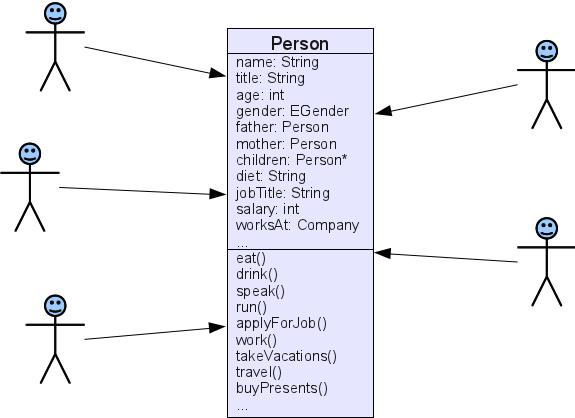
By contrast, in OT/J you start with a set of lean base objects and then you may attach specific roles for each perspective. Different use cases and their scenarios can be implemented by different roles. Visualization in the UI may be implemented by another independent set of roles, etc.

Code-level comparison?
I’ve been asked to compare standard OO and OT/J by direct comparison of code examples, but I’m not sure if it is a good idea to do, because OT/J is not intended to just provide a nicer syntax for things you can do in the same way using OO. OT/J – as any serious new programming language should do IMHO – wants you to think differently about your design. For example, we can give an educational implementation of the Observer pattern using OT/J, but once you “think Object Teams” you may not be interested in the Observer pattern any more, because you can achieve basically the same effect using a single callin binding as shown in our Stopwatch example.
So, positively speaking, OT/J wants you to think in terms of perspectives and make the perspectives you would naturally use for describing the system explicit by means of roles.
OTOH, a new language is of course only worth the effort if you have a problem with existing approaches. The problems OT/J addresses are inherently difficult to discuss in small examples, because they are:
- software complexity, e.g., with standard OO finding a suitable decomposition where different concerns are not badly tangled with each other becomes notoriously difficult.
- software evolution, e.g., the initial design will be challenged with change requests that no-one can foresee up-front.
(Plus all the other concerns addressed)
Both, theory and experience, tell me that OT/J excels in both fields. If anyone wants to challenge this claim using your own example, please do so and post your findings, or lets discuss possible designs together.
One more essential concept
I should also mention the second essence in OT/J: after slicing elements of your program into roles and base objects we also support to re-group the pieces in a meaningful way: as roles are contained in teams, those teams enable you to raise the level of abstraction such that each user-relevant feature, e.g., can be captured in exactly one team, hiding all the details inside. As a result, for a high-level design view you no longer have to look at diagrams of hundreds of classes but maybe just a few tens of teams.
Hope this helps seeing the big picture. Enough hand-waving for today, back to the code! 🙂
Follow-up: Object Teams Tutorial at EclipseCon 2011
At our EclipseCon tutorial we mentioned a bonus excercise, for which we didn’t have the time at the tutorial.
Now it’s time to reveal the solution.
Task
“Implement the following demo-mode for the JDT:
- • When creating a Java project let the user select:
- ❒ Project is for demo purpose only
- • When creating a class in a Demo project:
- insert class name as “Foo1”, “Foo2” …”
So creating classes in demo mode is much easier, and you’ll use the names “Foo1″… anyway 🙂
(See also our slides (#39)).
Granted, this is a toy example, yet it combines a few properties that I frequently find in real life and which cause significant pains without OT/J:
- The added behavior must tightly integrate with existing behavior.
- The added behavior affects code at distant locations,
here two plug-ins are affected:org.eclipse.jdt.uiandorg.eclipse.jdt.core. - The added behavior affects execution at different points in time,
here creation of a project plus creation of a class inside a project. - The added behavior requires to maintain more state at existing objects,
here a JavaProject must remember if it is a demo project.
Despite these characteristics the task can be easily described in a few English sentences. So the solution should be similarly concise and delivered as a single coherent piece.
Strategy
With a little knowledge about the JDT the solution can be outlined as this
- Add a checkbox to the New Java Project wizard
- When the wizard creates the project mark it as a demo project if the box is checked.
- Let the project also count the names of
Foo..classes it has created. - When the new class wizard creates a class inside a demo project pre-set the generated class name and make the name field unselectable.
From this we conclude the need to define 4 roles, playedBy these existing types:
org.eclipse.jdt.ui.wizards.NewJavaProjectWizardPageOne.NameGroup:
the wizard page section where the project name is entered and where we want to add the checkbox.org.eclipse.jdt.ui.wizards.NewJavaProjectWizardPageTwo:
the part of the wizard that triggers setup of the JavaProject.org.eclipse.jdt.core.IJavaProject:
this is where we need to add more state (isDemoProject and numFooClasses).org.eclipse.jdt.ui.wizards.NewTypeWizardPage:
this is where the user normally specifies the name for a new class to be created.
Note, that 3 classes in this list resided in org.eclipse.jdt.ui, but IJavaProject is from org.eclipse.jdt.core, which leads us to the next step:
Plug-in configuration
Our solution is developed as an OT/Equinox plug-in, with the following architecture level connections:

This simply says that the same team demohelper.ProjectAdaptor is entitled to bind roles to classes from both org.eclipse.jdt.ui and org.eclipse.jdt.core.
One more detail in these extensions shouldn’t go unmentioned: Don’t forget to set “activation: ALL_THREADS” for the team (otherwise you won’t see any effect …).
Now we’re ready to do the coding.
Implementing the roles
protected class DialogExtender playedBy NameGroup {

        protected SelectionButtonDialogField isDemoField;

        void createControl(Composite parent) <- after Control createControl(Composite composite)
                with { parent <- (Composite) result }

        private void createControl(Composite parent) {
                isDemoField= new SelectionButtonDialogField(SWT.CHECK);
                isDemoField.setLabelText("Project is for demo purpose only");
                isDemoField.setSelection(false);
                isDemoField.doFillIntoGrid(parent, 4);
        }
}
Our first role adds the checkbox. The implementation of createControl is straight-forward UI business. Lines 22,23 hook our role method into the one from the bound base class NameGroup. After the with keyword, we are piping the result from the base method into the parameter parent of the role method (with a cast). This construct is a parameter mapping.
Here’s the result:

Next we want to store the demo-flag to instances of IJavaProject, so we write this role:
protected class EnhancedJavaProject playedBy IJavaProject {

        protected boolean isDemoProject;
        private int numFooClasses = 1;

        protected String getTypeName() {
                return "Foo"+(numFooClasses++);
        }
}
Great, now any IJavaProject can play the role EnhancedJavaProject which holds the two additional fields, and we can automatically serve an arbitrary number of class names Foo1 …
In the IDE you will actually see a warning, telling you that binding a role to a base interface currently imposes a few restrictions, but these don’t affect us in this example.
Next comes a typical question: how to transfer the flag from role DialogExtender to role EnhancedJavaProject?? The roles don’t know about each other nor do the bound base classes. The answer is: use a chain of references.
protected class FirstPage playedBy NewJavaProjectWizardPageOne {

        DialogExtender getFNameGroup() -> get NameGroup fNameGroup;

        protected boolean isDemoProject() {
                return getFNameGroup().isDemoField.isSelected();
        }
}

protected class WizardExtender playedBy NewJavaProjectWizardPageTwo {

        FirstPage getFFirstPage() -> get NewJavaProjectWizardPageOne fFirstPage;

        markDemoProject <- after initializeBuildPath;
        private void markDemoProject(EnhancedJavaProject javaProject) {
                if (getFFirstPage().isDemoProject())
                        javaProject.isDemoProject = true;
        }
}
Role WizardExtender intercepts the event when the wizard initializes the IJavaProject (line 46). Method initializedBuildPath receives a parameter of type IJavaProject but the OT/J runtime transparently translates this into an instance of type EnhancedJavaProject (this – statically type safe – operation is called lifting). Another indirection is needed to access the checkbox: The base objects are linked like this:
This link structure is lifted to the role level by the callout bindings in lines 35 and 44.
We’re ready for our last role:
protected class NewTypeExtender playedBy NewTypeWizardPage {

        void setTypeName(String name, boolean canBeModified) -> void setTypeName(String name, boolean canBeModified);

        void initTypePage(EnhancedJavaProject prj) <- after void initTypePage(IJavaElement element)
                with { prj <- element.getJavaProject() }

        private void initTypePage(EnhancedJavaProject prj) {
                if (prj.isDemoProject)
                        setTypeName(prj.getTypeName(), false);
        }
}
Here we intercept the initialization of the type page of a New Java Project wizard (lines 66,67). Another parameter mapping is used to perform two adjustments in one go: fetch the IJavaProject from the enclosing element and lift it to its EnhancedJavaProject role. This follows the rule-of-thumb that base-type operations (like navigating from IJavaElement to IJavaProject) should happen at the right hand side, so that we are ready to lift the IJavaProject to EnhancedJavaProject when the data flow enters the team.
The EnhancedJavaProject can now be asked for its stored flag (isDemoProject) and it can be asked for a generated class name (getTypeName()). The generated class name is then inserted into the dialog using the callout binding in line 64. Looks like this:

See this? No need to think of a good class name 🙂
Wrap-up
So that’s it. All these roles are collected in one team class and here is the fully expanded outline:

All this is indeed one concise and coherent module. In the tutorial I promised to do this no more than 80 LOC, and indeed the team class has 74 lines including imports and white space.
Or, if you are interested just in how this module connects to the existing implementation, you may use the “binding editor” in which you see all playedBy, callout and callin bindings:

The full sources are also available for download.
have fun
Null annotations: prototyping without the pain

So, I’ve been working on annotations @NonNull and @Nullable so that the Eclipse Java compiler can statically detect your NullPointerExceptions already during compile time (see also bug 186342).
By now it’s clear this new feature will not be shipped as part of Eclipse 3.7, but that needn’t stop you from trying it, as I have uploaded the thing as an OT/Equinox plugin.
Behind the scenes: Object Teams
Today’s post shall focus on how I built that plugin using Object Teams, because it greatly shows three advantages of this technology:
- easier maintenance
- easier deployment
- easier development

Before I go into details, let me express a warm invitation to our EclipseCon tutorial on Thursday morning. We’ll be happy to guide your first steps in using OT/J for your most modular, most flexible and best maintainable code.
Maintenance without the pain
It was suggested that I should create a CVS branch for the null annotation support. This is a natural choice, of course. I chose differently, because I’m tired of double maintenance, I don’t want to spend my time applying patches from one branch to the other and mending merge conflicts. So I avoid it wherever possible. You don’t think this kind of compiler enhancement can be developed outside the HEAD stream of the compiler without incurring double maintenance? Yes it can. With OT/J we have the tight integration that is needed for implementing the feature while keeping the sources well separated.
The code for the annotation support even lives in a different source repository, but the runtime effect is the same as if all this already were an integral part of the JDT/Core. Maybe I should say, that for this particular task the integration using OT/J causes a somewhat noticable performance penalty. The compiler does an awful lot of work and hooking into this busy machine comes at a price. So yes, at the end of the day this should be re-integrated into the JDT/Core. But for the time being the OT/J solution well serves its purpose (and in most other situations you won’t even notice any impact on performance plus we already have further performance improvements in the OT/J runtime in our development pipeline).
Independent deployment
Had I created a branch, the only way to get this to you early adopters would have been via a patch feature. I do have some routine in deploying patch features but they have one big drawback: they create a tight dependency to the exact version of the feature which you are patching. That means, if you have the habit of always updating to the latest I-build of Eclipse I would have to provide a new patch feature for each individual I-build released at Eclipse!
Not so for OT/Equinox plug-ins: in this particular case I have a lower bound: the JDT/Core must be from a build ≥ 20110226. Other than that the same OT/J-based plug-in seemlessly integrates with any Eclipse build. You may wonder, how can I be so sure. There could be changes in the JDT/Core that could break the integration. Theoretically: yes. Actually, as a JDT/Core committer I’ll be the first to know about those changes. But most importantly: from many years’ experience of using this technology I know such breakage is very seldom and should a problem occur it can be fixed in the blink of an eye.
As a special treat the OT/J-based plug-in can even be enabled/disabled dynamically at runtime. The OT/Equinox runtime ships with the following introspection view:

Simply unchecking the second item dynamically disables all annotation based null analysis, consistently.
Enjoyable development
The Java compiler is a complex beast. And it’s not exactly small. Over 5 Mbytes of source spread over 323 classes in 13 packages. The central package of these (ast) comprising no less than 109 classes. To add insult to injury: each line of this code could easily get you puzzling for a day or two. It ain’t easy.
If you are a wizard of the patches feel free to look at the latest patch from the bug. Does that look like s.t. you’d like to work on? Not after you’ve seen how nice & clean things can be, I suppose.
First level: overview
Instead of unfolding the package explorer until it shows all relevant classes (at what time the scrollbar will probably be too small to grasp) a quick look into the outline suffices to see everything relevant:

Here we see one top-level class, actually a team class. The class encapsulates a number of role classes containing the actual implementation.
Navigation to the details
Each of those role classes is bound to an existing class of the compiler, like:
protected class MessageSend playedBy MessageSend { ...
MessageSend denotes a role class in the current team, whereas the second MessageSend refers to an existing base class imported from some other package).
Ctrl-click on the right-hand class name takes you to that base class (the packages containing those base classes are indicated in the above screenshot). This way the team serves as the single point of reference from which each affected location in the base code can be reached with a single mouse click – no matter how widely scattered those locations are.
When drilling down into details a typical roles looks like this:
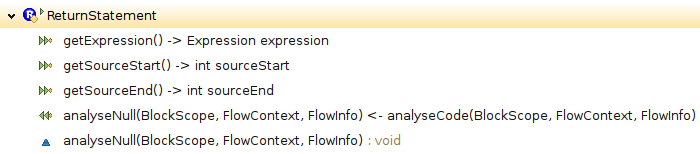
The 3 top items are “callout” method bindings providing access to fields or methods of the base object. The bottom item is a regular method implementing the new analysis for this particular AST node, and the item above it defines a “callin” binding which causes the new method to be executed after each execution of the corresponding base method.
Locality of new information flows
Since all these roles define almost normal classes and objects, additional state can easily be introduced as fields in role classes. In fact some relevant information flows of the implementation make use of role fields for passing analysis results directly from one role to another, i.e., the new analysis mostly happens by interaction among the roles of this team.
Selective views, e.g., on inheritance structures
As a final example consider the inheritance hierarchy of class Statement: In the original this is a rather large tree:

Way too large actually to be fully unfolded in a single screenshot. But for the implementation at hand most of these
classes are irrelevant. So at the role layer we’re happy to work with this reduced view:

This view is not obtained by any filtering in the IDE, but that’s indeed the real full inheritance tree of the role class Statement. This is just one little example of how OT/J supports the implementation of selective views. As a result, when developing the annotation based null analysis, the code immediately provides a focused view of everything that is relevant, where relevance is directly defined by design intention.
A tale from the real world
I hope I could give an impression of a real world application of OT/J. I couldn’t think of a nicer structure for a feature of this complexity based on an existing code base of this size and complexity. Its actually fun to work with such powerful concepts.
Did I already say? Don’t miss our EclipseCon tutorial 🙂
Hands-on introduction to Object Teams
| See you at |  |
Get for free what Coin doesn’t buy you
Ralf Ebert recently blogged about how he extended Java to support a short-hand notation for throwing exceptions, like:
throw "this is wrong";
It’s exactly the kind of enhancement you’d expect from Project Coin, but neither do they have it, nor would you want to wait until they release a solution.
At this point I gave it a few minutes, adapted Ralf’s code, applied Olivier’s suggestion wrapped it in a little plugin et voilà:
Install
Use this p2 repository, check two features…
…install and restart, and you’re ready to use your “Medal” IDE:
So that’s basically the same as what Ralf already showed except:
It’s a module!
In contrast to Ralf’s patch of the JDT/Core my little plugin can be easily deployed and installed into any Eclipse (≥3.6.0). It just requires another small feature called “Object Teams Equinox Integration” or “OT/Equinox” for short.
So we’re all going to use our private own ”’dialects of Java?”’ Hm, firstly, once compiled this is of course plain Java, you wouldn’t be able to tell that the sources looked “funny”.
And: here’s the Boss Key: when somebody sniffs about your monitor, a single click will make Eclipse behave “normal”:
In other words, you can ”’dynamically enable/disable”’ this feature at runtime. The OT/Equinox Monitor view in the snapshot shows all known Team instances in the currently running IDE, and the little check boxes simply send activate() / deactivate() messages to the selected instance.
I coined the name Medal as our own playground for Java extensions of this kind. Feel free to suggest/contribute more!
Implementation
For a quick introduction on how to setup an OT/Equinox project in Eclipse I’d suggest our Quick Start (let me know if anything is unclear). For this particular case the key is in defining one little extension:
which the package explorer will render as:
Drilling into the Team class ThrowString you’ll see:
The Team class contains two Role classes:
- Role DontReport binds to class
ProblemReporter(not shown in the Outline), intercepts calls toProblemReporter.cannotThrowTypeand if the type in question is String, simply ignores the “error” - Role Generate binds to class
ThrowStatementto make sure the correct bytecodes for creating aRuntimeExceptionare generated
Also, in the Outline you see both kinds of method bindings that are supported by Object Teams:
getExceptionType/setExceptionTypeare getter/setter definitions for fieldThrowStatement.exceptionType(callout-to-field in OT/J jargon)- Things like “
adjustType <- after resolve” establish method call interception (callin bindings in OT/J jargon – the “after” is symbolized by the specific icon)
The actual implementation is really simple, like (full listing of the first role):
protected class DontReport playedBy ProblemReporter { cannotThrowType <- replace cannotThrowType; @SuppressWarnings("basecall") callin void cannotThrowType(ASTNode exception, TypeBinding exceptionType) { if (exceptionType.id != TypeIds.T_JavaLangString) // do the actual reporting only if it's not a string base.cannotThrowType(exception, exceptionType); } }
The base-call (base.cannotThrowType) delegates back to the original method, but only if the exception type is not String. The @SuppressWarnings annotation documents that not all control flows through this method will issue a base-call, a decision that deserves a second thought as it means the base plugin (here JDT/Core) does not perform its task fully as usual.
Intercepting resolve has the purpose of replacing type String with RuntimeException so that other parts of the Compiler and the IDE see a well-typed structure.
The method that performs the actual work is generateCode. Since this method is essentially based on the original implementation, the best way to see the difference is (select either the callin method or the callin binding):
which gives you this compare editor:
This neatly shows the two code blocks I inserted, one for creating the RuntimeException instance, the other for invoking its constructor. Or, if you just want to read the full role method:
/* This method is partly copied from the base method. */
@SuppressWarnings({"basecall", "inferredcallout"})
callin void generateCode(BlockScope currentScope, CodeStream codeStream) {
        if ((this.bits & ASTNode.IsReachable) == 0)
                return;
        int pc = codeStream.position;
        // create a new RuntimeException:
        ReferenceBinding runtimeExceptionBinding = (ReferenceBinding) this.exceptionType;
        codeStream.new_(runtimeExceptionBinding);
        codeStream.dup();
        // generate the code for the original String expression:
        this.exception.generateCode(currentScope, codeStream, true);
        // call the constructor RuntimeException(String):
        MethodBinding ctor = runtimeExceptionBinding.getExactConstructor(new TypeBinding[]{this.stringType});
        codeStream.invoke(Opcodes.OPC_invokespecial, ctor, runtimeExceptionBinding);
        // throw it:
        codeStream.athrow();
        codeStream.recordPositionsFrom(pc, this.sourceStart);
}
You may also fetch the full sources of this little plug-in (plus a feature for easy deployment) to play around with and extend.
Next?
Ralf mentioned that he’d like to play with ways for also extending the syntax. For a starter on how this can be done with Object Teams I recommend my previous posts IDE for your own language embedded in Java? (part 1) and part 2.
Object Teams rocks :)
During the last week or so I modernized a part of the Object Teams Development Tooling (OTDT) that had been developed some 5 years ago: the type hierarchy for OT/J. I’ll mention the basic requirements for this engine in a minute. While most of the OTDT succeeds in reusing functionality from the JDT, the type hierarchy was implemented as a full replacement of the original. This is a pretty involved little machine, which took weeks and months to get right. It provides its logic to components like Refactoring and the Type Hierarchy View.
On the one hand this engine worked well for most uses, but over so many years we did not succeed to solve two remaining issues:
- Give a faithful implementation for
getSuperclass() - This is tricky because a role class in OT/J can have more than one superclass. Failing to implement this method we could not support the “traditional” mode of the hierarchy view that shows both the tree of subclasses of a focus type plus the path of superclasses up to
Object(this upwards path relies ongetSuperclass). - Support region based hierarchies
- Here the type hierarchy is not only computed for supertypes and subtypes of one given focus type, but full inheritance structure is computed for a set of types (a “region”). This strategy is used by many JDT Refactorings, and thus we could not precisely adapt some of these for OT/J.
In analyzing this situation I had to weigh these issues:
- In its current state the implementation strategy was a show stopper for one mode of the type hierarchy view and for precise analysis in several refactorings.
- Adding a region based variant of our hierarchy implementation would mean to re-invent lots of stuff, both from the JDT and from our own development.
- All this seemed to suggest to discard our own implementation and start over from scratch.
Object Teams to the rescue: Let’s re-build Rome in ten days.
As mentioned in my previous post, the strength of Object Teams lies in building layers: each module sits in one layer, and integration between layers is given by declarative bindings:

Applying this to the issue at hand we now actually have three layers with quite different structures:
Java Model
The bottom layer is the Java model that implements the containment tree of Jave elements: A project contains source folders, containing packages, containing compilation units, containing types containing members. In this model each Java type is represented by an instance of IType
Java Type Hierarchy
This engine from the JDT maintains the graph of inheritance information as a second way for navigating between ITypes. Interestingly, this module pretty closely simulates what Object Teams does natively, I may come back to that in a later post.
Object Teams Type Hierarchy
As an extension of Java, OT/J naturally supports the normal inheritance using extends, but there is a second way how an inheritance link can be established: based on inheritance of the enclosing team:
team class EcoSystem {
   protected class Project { }
   protected class IDEProject extends Project { }
}
team class Eclipse extends EcoSystem {
   @Override
   protected class Project { }
   @Override
   protected class IDEProject extends Project { }
}
Here, Eclipse.Project is an implicit subclass of EcoSystem.Project simply because Eclipse is a subclass of EcoSystem and both classes have the same simple name Project. I will not go into motivation and consequences of this language design (that’ll be a separate post — which I actually promised many weeks ago).
Looking at the technical challenge we see that the implicit inheritance in OT/J adds a third layer, in which classes are connected in yet another graph.
Three Layers — Three Graphs
Looking at the IType representation of Eclipse.IDEProject we can ask three questions:
| Question | Code | Answer |
|---|---|---|
| What is your containing element? | type.getParent() |
Eclipse |
| What is your superclass? | hierarchy.getSuperclass(type) |
Eclipse.Project |
| What is your implicit superclass? | ?? | EcoSystem.Project |
Each question is implemented in a different layer of the system. Things get a little complicated when asking a type for all its super types, which requires to collect the answers from both the JDT hierarchy layer and the OT hierarchy. Yet, the most tricky part was giving an implementation for getSuperclass().
An "Impossible" Requirement
There is a hidden assumption behind method getSuperclass() which is pervasive in large parts of the implementation, especially most refactorings:
When searching all methods that a type inherits from other types, looping over
getSuperclass()until you reachObjectwill bring you to all the classes you need to consider, like so:IType currentType = /* some init */; while (currentType != null) { findMethods(currentType, /*some more arguments*/); currentType = hierarchy.getSuperclass(currentType); }
There are lots and lots of places implemented using this pattern. But, how do you do that if a class has multiple superclasses?? I cannot change all the existing code to use recursive functions rather than this single loop!
Looking at Eclipse.IDEProject we have two direct superclasses: Eclipse.Project (normal inheritance, “extends”) and EcoSystem.IDEProject (OT/J implicit inheritance), which cannot both be answered by a single call to getSuperclass(). The programming language theory behind OT/J, however, has a simple answer: linearization. Thus, the superclasses of Eclipse.IDEProject are:
- Eclipse.IDEProject → EcoSystem.IDEProject → Eclipse.Project → EcoSystem.Project
… in this order. And this is how this shall be rendered in the hierarchy view:

The final callenge: what should this query answer:
getSuperclass(ecoSystemIDEProject);
According to the above linearization we should answer: Eclipse.Project, but only if we are in the context of the superclass chain of Eclipse.IDEProject. Talking directly to EcoSystem.IDEProject we should get EcoSystem.Project! In other words: the function needs to be smarter than what it can derive from its arguments.
Layer Instances for each Situation
Let’s go back to the layer thing:

At the bottom you see the Java model (as rendered by the package explorer). In the top layer you see the OT/J type hierarchy (lets forget about the middle layer for now). Two essential concepts can be illustrated by this picture:
- Each layer is populated with objects and while each layer owns its objects, those objects connected with a red line between layers are almost the same, they represent the same concept.
- The top layer can be instantiated multiple times: for each focus type you create a new OT/J hierarchy instance, populated with a fresh set of objects.
It is the second bullet that resolves the “impossible” requirement: the objects within each layer instance are wired differently, implementing different traversals. Depending on the focus type, each layer may answer the getSuperclass(type) question differently, even for the same argument.
The first bullet answers how these layers are integrated into a system: Conceptually we are speaking about the same Java model elements (IType), but we superimpose different graph structure depending on our current context.
but in each layer these objects are connected in a specific way as suites for the task at hand.
Inside the hierarchy layer, we actually do not handle IType instances directly, but we have  roles that represent one given
 IType each. Those roles contain all the inheritance links needed for answering the various questions about inheritance relations (direct/indirect, explicit/implicit, super/sub).
A cool thing about Object Teams is, that having different sets of objects in different layers ( teams) doesn’t make the program more complex, because I can pass an object from one layer into methods of another layer and the language will quite automagically translate into the object that sits at the other end of that red line in the picture above. Although each layer has its own view, they “know” that they are basically talking about the same stuff (sounds like real life, doesn’t it?).
Summing up
OK, I haven’t shown any code of the new hierarchy implementation (yet), but here’s a sketch of before-vs.-after:
- Code Size
- The new implementation of the hierarchy engine has about half the size of the previous implementation (because it need not repeat anything that’s already implemented in the Java hierarchy).
- Integration
- The previous implementation had to be individually integrated into each client module that normally uses Java hierarchies and then should use an OT hierarchy instead. After the re-implementation, the OT hierarchy is transparently integrated such that no clients need to be adapted (accounting for even more code that could be discarded).
- Linearization
- Using the new implementation,
getSuperclass()answers the correct, context sensitive linearization, as shown in the screenshot above, which the old implementation failed to solve. - Region based hierarchies
- The old implementation was incompatible with building a hierarchy for a region. For the new implementation it doesn’t matter whether it’s built for a single focus type or for a region, so, many clients now work better without any additional efforts.
The previous implementation only scratched at the surface – literally worked around the actual issue (which is: the Java type hierarchy is not aware of OT/J implicit inheritance). The new solution solves the issue right at its core: the new team OTTypeHierarchies assists the original type hierarchy (such that its answers indeed respect OT/J’s implicit inheritance). By performing this adaptation at the issue’s core, the solution automatically radiates to all clients. So I expect that investing a few days in re-writing the implementation will pay off in no time. Especially, improving the (already strong) refactoring support for OT/J is now much, much easier.
Moving your solution into the core could easily result in a design were a few bloated and tangled core modules do all the work, mocking the very idea of modularity. This can be avoided by a technology that is based on some concept of perspectives and self-contained layers, as supported by teams in OT/J.
Need I say, how much fun this re-write was? 🙂
IDE for your own language embedded in Java? (part 2)
In the first part I demonstrated how Object Teams can be used to extend the JDT compiler for a custom language to be embedded in Java. I concluded by saying that more substantial features like Refactoring might need more rocket science which I wanted to show next.
The “bad news” is: before I started to do some strong adaptations of DOM AST etc to make Refactorings work, I just made a few experiments of how Refactorings actually behaved in my hybrid language. To my own surprise a lot of things already worked OK: I could extract a custom syntax expression into a local variable and inline the variable again and more stuff of that kind. Just look at this example:

Actually this reflects an experience I’ve made more than once: If you reuse some module and perform some adaptations in terms of provided API and extension points etc. more often than not one adaptation entails the next, adding tweaks to workarounds because you keep scratching at the surface. If, OTOH, you succeed to make your adaptation right at the core where the decisions are made, just one or two cuts and stitches may suffice to get your job done. Clean, effective and consistent. That’s what we see when cleanly inserting a custom AST node into the JDT: if our CustomIntLiteral behaves well a lot of JDT functionality can just work with this thing without knowing it’s not a genuine Java thing.
Now this means for my next example I had to look for an extra challenge. I decided to enhance the example in two ways:
- The custom syntax should be a bit more realistic, so I chose to create a syntax for money, consisting of a number and the name of a currency
- I wanted source formatting to work for the whole hybrid language
A word of warning: this post uses some bells and whistles of OT/J and applies it to the non-trivial JDT. This might be a bit overwhelming for the novice. If you prefer lower dosage first, you may want to check out our example section in the wiki. It’s still far from complete but I’m working on it.
A syntax for money
The new syntax should allow me to write this:
int getMoney() {
    return <% 13 euro %>;
}
and the stuff should internally be stored as a structured AST node. This is how class CurrencyExpression starts:
public class CurrencyExpression extends Expression {

    public IntLiteral value;
    public String currency;

    final static String[] CURRENCIES = { "euro", "dollar" };

    public CurrencyExpression(int sourceStart, int sourceEnd) { ...

    public boolean setCurrency(String string) { ...

    @Override
    public StringBuffer printExpression(int indent, StringBuffer output) { ...
    ....
}
For creating a CurrencyExpression from source I wrote a little CustomParser, normal boring stuff with 40% just reading individual chars and manipulating character positions, another 45% actually does some error reporting and only 3 lines are relevant: those that create a new CurrencyExpression, create an IntValue for the value part and invoke setCurrency with the currency string.
In the ScannerAdaptor from the previous post I simply replaced this
Expression replacement = new CustomIntLiteral(source, start, end, start+2, end-2);
with this:
Expression replacement = customParser.parseCurrencyExpression(source, start, end, this.getProblemReporter());
That suffices to make the above little method compile and run just as expected.
Interlude: DOM AST
Well, with this slightly more realistic syntax you’d actually see a number of exceptions in the IDE that can all be fixed by letting the DOM AST know about our addition. For those who don’t regularly program against the JDT API: the DOM AST is the public data structure by which tools outside the JDT core manipulate Java programs. Inside the JDT extending the DOM AST would mean to subclass either org.eclipse.jdt.core.dom.ASTNode or one of its subclasses. Unfortunately, all constructors in this hierarchy are package private, and even with OT/J we respect what the javadoc says: “clients are unable to declare additional subclasses“.
But we can do something similar: instead of subclassing we can use instances of a regular DOM class and attach a role instance to them. As the base I chose org.eclipse.jdt.core.dom.SimpleName which inside the JDT could mean a lot of different things, so for most parts a node of this kind is regarded as a black box, just what we need. This is the role I added to the team SyntaxAdaptor from the previous post:
protected class DomCurrencyLiteral playedBy SimpleName {
    protected String currency;

    void setSourceRange(int sourceStart, int length) -> void setSourceRange(int sourceStart, int length);

    @SuppressWarnings("decapsulation")
    public DomCurrencyLiteral(AST ast, CurrencyExpression expression) {
        base(ast);
        this.currency = expression.currency;
        setSourceRange(expression.sourceStart, expression.sourceEnd-expression.sourceStart+1);
    }
}
So this almost looks like subclassing except we use playedBy instead of extends and base() instead of super(). And yes, when creating an instance with “new DomCurrencyLiteral(ast, expr)” inside the constructor we create a SimpleName from DOM using the package private constructor. But by using role playing instead of sub-classing this has become part of the aspectBinding relationship, which makes analysis of the state of encapsulation much easier.
So, who actually creates these nodes? Inside the JDT this is the responsibility of the ASTConverter, which takes an AST from the compiler and converts it to the public variant. In order to tell the ASTConverter how to handle our currency nodes I added this role to the existing team SyntaxAdaptor:
1 2 3 4 5 6 7 8 9 10 11 12 13 14 15 16 17 18 19 20 21 22 23 24 25 26 |
@SuppressWarnings("decapsulation") protected class DomConverterAdaptor playedBy ASTConverter { // whenever convert(Expression) is called ... org.eclipse.jdt.core.dom.Expression convertCurrencyExpression(CurrencyExpression expression) <- replace org.eclipse.jdt.core.dom.Expression convert(Expression expression) // ... and when the literal is actually a CurrencyExpression ... base when (expression instanceof CurrencyExpression) // ... perform the cast we just checked for and feed it into the callin method below. with { expression <- (CurrencyExpression)expression } /** * Convert a CustomIntLiteral from the compiler to its dom counter part. * This method uses inferred callouts (OTJLD §3.1(j)) * which need to be enabled in the OT/J compiler preferences. */ @SuppressWarnings({ "basecall", "inferredcallout" }) callin org.eclipse.jdt.core.dom.Expression convertCurrencyExpression(CurrencyExpression expression){ final DomCurrencyLiteral name = new DomCurrencyLiteral(this.ast, expression); if (this.resolveBindings) { recordNodes(name, expression); } return name; } } |
I deliberately used some special OT/J syntax worth explaining:
- Lines 5ff. define a callin bindings like we’ve seen before.
- Line 8 adds a guard predicate to the binding, saying that this binding should only fire when the argument
expressionis actually of typeCurrencyExpression - After passing the guard we know that we can safely cast to
CurrencyExpressionso I added a parameter mapping (line 10) which feeds a casted value into the role method. - Inside the role method
convertCurrencyExpressioneverything looks normal, but at a closer lookthis.astandthis.resolveBindingsseem to be undefined in the scope of the current class. In fact these fields are defined in the base classASTConverterand we could use explicit callout accessors like in the previous post. However, this time I chose to let the compiler infer these callouts so that the method would look exactly like existing methods inASTConverterdo (this option has to be enabled in the OT/J compiler preferences).
OK, with this little addition our CurrencyExpressions are converted to something that the JDT can handle and we’re already prepared for doing real AST manipulation including our syntax.
Source Formatting
Inside the JDT source formatting (Ctrl-Shift-F) is essentially performed by class CodeFormatterVisitor. This class is one of many subclasses of the general ASTVisitor. If one wanted to make these visitors aware of our CurrencyExpression we would have to add one visit method to ASTVisitor and each of its sub-classes! That’s certainly not viable, so with plain Java we’re pretty much out of luck.
The situation that needs adaptation can be described as follows:
- A visitor will be created and invoked in order to descend into the AST
- At the point when traversal finds a CurrencyExpression it will invoke its
traverse(ASTVisitor)method.
Of course we could manually inspect the type of visitor within the traverse method, but that would defy the whole purpose of having visitors: keep all those add-on functions out from your data structures. Instead I only gave a default implementation to CurrencyExpression.traverse and used OT/J for the cleanest implementation of double dispatch (which is what the visitor pattern painstakingly emulates): we need dispatch that considers both the visitor type and the node type for finding the suitable method implementation.
In green-field development this would be still easier but even on top of an existing visitor infrastructure it get’s pretty concise.
Visitor adaptation – version 1
My first version looks like this (explanations follow below):
1 2 3 4 5 6 7 8 9 10 11 12 13 14 15 16 17 18 19 20 21 22 23 24 25 26 27 28 29 30 31 32 33 34 35 36 37 38 39 40 41 42 43 44 45 46 47 48 49 50 |
public team class VisitorsAdaptor { protected team class AstFormatting playedBy CodeFormatterVisitor { // whenever visiting something that could contain an expression // activate this team to enable callins of the inner role callin void visiting() { within(this) { base.visiting(); } } @SuppressWarnings("decapsulation") void visiting() <- replace boolean visit(Block block, BlockScope scope), boolean visit(FieldDeclaration fieldDeclaration, MethodScope scope), void formatStatements(BlockScope scope, final Statement[] statements, boolean insertNewLineAfterLastStatement); Scribe getScribe() -> get Scribe scribe; /** This role implements formating of our custom ast: */ protected class CustomAst playedBy CurrencyExpression { void traverse() <- replace void traverse(ASTVisitor visitor, BlockScope scope); @SuppressWarnings({ "inferredcallout", "basecall" }) callin void traverse() { Scribe scribe = getScribe(); Scanner scanner = scribe.scanner; // format this AST node into a StringBuffer: StringBuffer replacement = new StringBuffer(); replacement.append("<% "); this.value.printExpression(0, replacement); replacement.append(' '); replacement.append(this.currency); replacement.append(" %>"); // feed the formatted string into the Scribe: int start = this.sourceStart(); int end = this.sourceEnd(); scribe.addReplaceEdit(start, end, replacement.toString()); // advance the scanner: scanner.resetTo(end+1, scribe.scannerEndPosition - 1); scribe.pendingSpace = false; } } } } |
The key trick in this example is nesting:
- Role
AstFormattingis responsible for detecting when aCodeFormatterVisitoris visiting any subtree that may contain expressions. This is done using a callin binding that lists three relevant base methods which all should be intercepted by the same role method (lines 12-16). - Inside role
AstFormatting(which is also marked as ateam) an inner roleCustomAstwill only be triggered if aCodeFormatterVisitorcalls thetraversemethod of aCurrencyExpression(see callin binding in line 23). - The connection between both levels is wired in method
AstFormatting.visiting: the block statementwithin() { }temporarily and locally activates the given team instance, here denoted bythis. Only during this block the nested teamAstFormattingis active – meaning that only during this block the callin binding in roleCustomAstwill fire. - Within role
CustomAstwe can naturally access theCodeFormatterVisitorvia the enclosing instance ofAstFormatting. No instanceof and casting needed, because all this only happens in the context of aCodeFormatterVisitor
The body of method traverse contains only domain logic: pretty-printing the current node into a string buffer and interacting with the underlying infrastructure (Scanner, Scribe) that drives the formatting.
That’s it, with these classes in place, we can write this method:
int getMoney() {
   int myMoney = <%
                  3
          euro %>
        ;
                System
        .out.println("myMoney ="+myMoney);
                                        return myMoney;
}
then hit Ctrl-Shift-F et voilà:
private static int getMoney() {
    int myMoney = <% 3 euro %>;
    System.out.println("myMoney =" + myMoney);
    return myMoney;
}
How’s that? 🙂
The formatter smoothly operates on the full hybrid language, not just skipping over our nodes but handling them as well.
Generalizing visitor adaptations
After success wrt both challenges I’d like to clean up even more and prepare for further adaptations of other visitors. Given how many subclasses of ASTVisitor are used within the JDT we wouldn’t want to write the infrastructure for double dispatch over and over again. So let’s generalize, that is: extract a common super-class, by extracting everything re-usable out off class AstFormatting
public team class VisitorsAdaptor
{
    protected abstract team class AstVisiting playedBy ASTVisitor {
        // whenever visiting something that could contain an expression
        // activate this team to enable callins of the inner role
        callin void visiting() {
            within(this)
                base.visiting();
        }
        void visiting()
            <- replace
                boolean visit(Block block, BlockScope scope),
                boolean visit(FieldDeclaration fieldDeclaration, MethodScope scope);

        protected abstract class CustomAst playedBy CurrencyExpression {
            // variant of traversal that should be used when the enclosing team is active:
            // (implement in subclasses)
            abstract callin void traverse();
            void traverse() <- replace void traverse(ASTVisitor visitor, BlockScope scope);
        }
        // Insert more roles for binding more AST nodes...
    }

    protected team class AstFormatting extends AstVisiting playedBy CodeFormatterVisitor
    {
        // one more trigger that should activate the team:
        @SuppressWarnings("decapsulation")
        visiting <- replace formatStatements;

        Scribe getScribe() -> get Scribe scribe;

        /** This role implements formating of our custom ast: */
        @Override
        protected class CustomAst {
            @SuppressWarnings({ "inferredcallout", "basecall" })
            callin void traverse() {
                // method body as before
            }
        }
    }
    protected team class OtherVisitorAdaptor extends AstVisiting playedBy XYVisitor
    {
        @Override
        protected class CustomAst {
            callin void traverse() {
                // domain logic
            }
        }
        // Insert more roles for actually handling more AST nodes ...
    }
}
Now team class AstVisiting contains the part that is common for all visitors. At this level several things are still abstract: method traverse, role class CustomAst and even the whole team AstVisiting.
Team class AstFormatting extends the abstract team and defines everything specific to formatting. We have one more trigger for visiting, one callout binding to a field of class CodeFormatterVisitor and then we only refine the previously abstract role class CustomAst. At this level it is no longer abstract because we give an implementation for traverse.
I’ve also sketched another nested team showing a minimal specialization of AstVisiting for adapting some other visitor and adding another implementation for CustomAst.traverse plus potentially more roles for more node types.
Conclusion
For those who don’t work in the compiler business on a day-to-day basis this is probably pretty tough stuff, but let me summarize what we’ve just achieved:
- Embed a custom syntax into Java, showing how a custom parser can be plugged in to create custom AST from a region of the Java source.
- Adapt the conversion between two different AST structures (internal -> DOM) to also handle custom nodes.
- Adapt the code formatter so that hybrid sources can be formatted with a single command.
- Prepared the infrastructure for adapting other visitors, too. By this we have achieved that new visitor adaptations will only need to add their specific implementation with close to zero scaffolding.
- Cleanly separated each implemented concern in one module.
- Keep each module in the scale of only tens of lines of code.
- Yet implement significant steps towards a production quality IDE for our custom hybrid language.
Maybe I shouldn’t have told you, how easy these things can be – if your tools are sharp – maybe.
But professional carvers know: if your knife is sharp, it’s actually easy to handle. Only if it is blunt you are in real danger of hurting yourself – because you need to apply disproportionate force to cut your wood. So:
Spare your fingers, sharpen your knife!
PS: Here’s the archive of all sources, ready to be imported into the OTDT.
IDE for your own language embedded in Java? (part 1)
Have you ever thought of making Java a bit smarter? Perhaps, for some task you would prefer a custom syntax, and snippets using that syntax should then be embedded into Java? Sure, many never seriously think about this because of the prohibitively high effort to create the compiler for such hybrid language. And even if you are a compiler guru, knowing your toolkits so that translation wouldn’t be a problem for you, you’ll probably surrender at the mere thought of how to create a mature IDE that would allow efficiently productive work with you hybrid language.
You shouldn’t give up. Think: If you build your own IDE you’ll never be able to really compete with the JDT, right? Still anything falling back behind the quality of the JDT won’t raise your productivity but will stand in your way at the most common tasks during development, right?
What does this tell you? Give up? No. If you can’t beat us, join us. Don’t write a new IDE for any Java-based language. Join the JDT. Well, but the JDT doesn’t provide an extension point for embedding a different syntax, does it? Sure they don’t, but it’s actually not their job to do so because every embedded language will probably have slightly different requirements so designing such an extension point would be a battle you can never win.
I have developed a tiny extension to Java and integrated this into the JDT by a mere 204 lines of code including comments and a plugin.xml. As some may guess the only trick needed is to use Object Teams. By this post I will explain how Object Teams can be used for extending the JDT in this way. And I will also argue against the most common fear in this context: “Is that solution maintainable?” From my very own experience this design is not just barely manageable, but from all I’ve seen this is the best maintainable solution for this kind of task, but I’m getting ahead of myself.
In order not to distract from the interesting design issues I’ll be using the most simply language extension: I want to be able to write integer constants in natural language, and while I’m at it, I want it to work in an multilingual setting. So, this should, e.g., be a legal program:
public class EmbeddingTest {
    private static int foo() {
        return <% one %>;
    }
    public static void main(String[] args) {
        System.out.println(foo());
    }
}
I’m using <% and %> tokens to switch between Java syntax and custom syntax.
The first step can be achieved in plain Java, it’s creating a class for ASTNodes representing my custom int literals within the compiler. If you really want you may inspect class CustomIntLiteral, but it’s actually pretty boring old Java. Its main job is to lookup a given string from an array of known number words and thus translate the word into an int. It even detects the language used and remembers this for later use. The behaviour is hooked into the JDT compiler by overriding method TypeBinding resolveType(BlockScope scope) — just normal Java practice.
Drilling down into the example
Here’s an overview of the module that does all the rest:
Imports
Why am I showing you boring import declarations to begin with? Well, with OT/J there’s a fine distinction that is worth looking at: all imports starting with import base indicate that these classes are imported for attaching a role to them. So just from these lines you see that the given module adds roles to classes from org.eclipse.jdt.internal.compiler.parser and org.eclipse.jdt.core.dom (2 classes each). All other imports are plain Java imports and won’t let you apply any OT/J tricks.
Teams and Roles
Line 18 above tells you that the class SyntaxAdaptor is actually a team. Teams are used for grouping a set of roles – nested classes of a team. Using the playedBy keyword a role declares that it adapts the specified base class (which are the same classes we base-imported above). The purpose of these roles should be roughly clear by the doc comments.
So, role ScannerAdaptor will be responsible for switching between both syntaxes.
Role ParserAdaptor (line 39) will be responsible for creating our AST node (CustomIntLiteral). But wait, what’s that: the role is nested within an intermediate team, InnerCompilerAdaptor. This team will show you, how to define a role that is only effective in specific situations, here, the ParserAdaptor should only be effective after the ScannerAdaptor has detected a syntax switch. Details follow below.
The other two roles will do advanced stuff so I’ll discuss them later.
Role implementation (1)
Here is the full(!) code of role ScannerAdaptor:
1 2 3 4 5 6 7 8 9 10 11 12 13 14 15 16 17 18 19 20 21 22 23 24 25 26 27 28 29 30 31 32 33 34 35 36 |
protected class ScannerAdaptor playedBy Scanner { // access fields from Scanner ("callout bindings"): int getCurrentPosition() -> get int currentPosition; void setCurrentPosition(int currentPosition) -> set int currentPosition; char[] getSource() -> get char[] source; // intercept this method from Scanner ("callin binding"): int getNextToken() <- replace int getNextToken(); callin int getNextToken() throws InvalidInputException { // invoke the original method: int token = base.getNextToken(); if (token == TerminalTokens.TokenNameLESS) { char[] source = getSource(); int pos = getCurrentPosition(); if (source[pos++] == '%') { // detecting the opening "<%" ? int start = pos; // inner start, just behind "<%" try { while (source[pos++] != '%' || source[pos++] != '>') // detecting the closing "%>" ? ; // empty body } catch (ArrayIndexOutOfBoundsException aioobe) { // not found, proceed as normal return token; } setCurrentPosition(pos); // tell the scanner what we have consumed (pointing one past '>') int end = pos-2; // position of "%>" char[] fragment = CharOperation.subarray(source, start, end); // extract the custom string (excluding <% and %>) // prepare an inner adaptor to intercept the expected parser action new InnerCompilerAdaptor(fragment, start-2, end+1).activate(); // positions include <% and %> return TerminalTokens.TokenNamenull; // pretend we saw a valid expression token ('null') } } return token; } } |
Comments describing the logic are in the right column. Inline comments describe the usage of OT/J:
- Lines 3-6 define accessors for two fields from the base class Scanner.
- Line 9 defines that calls to method
getNextToken()should be intercepted by our version of this method - Line 11 marks the role method as
callinwhich is a pre-requisite for line 13 - Line 13 invokes the original method from Scanner
- In line 29 we are in the situation that we have detected a region delimited by <% and %>. We have extracted the text fragment between delimiters, and we know the start and end positions within the source file. Only now we create an instance of
InnerCompilerAdaptorand immediately activate it for the current thread (activate()).
At this point the ScannerAdaptor is done and now an InnerCompilerAdaptor is watching what comes next.
Here’s the nested team InnerCompilerAdaptor with its role ParserAdaptor:
- Lines 3-4 define state of the nested team, which is used for passing the information collected by the ScannerAdaptor down the pipe
- Line 15 provides access to a protected method from Parser. By
@SuppressWarnings("decapsulation")we document that this access inserts a tiny little hole into the encapsulation of Parser - Line 18 defines a callin binding as we have seen it before.
- Line 24 already deactivates the enclosing InnerCompilerAdaptor, ensuring this is a one-shot adaptation, only.
- Line 26/27 perform the payload: feed a CustomIntLiteral node into the parser
Coming to life
Wow, if you’ve read so far, you’ve seen a lot of OT/J on just a few lines of code. Let’s wire things together, by throwing the code into an Object Teams Plug-in Project and declaring one extension:

I have defined one aspectBinding between the existing plugin org.eclipse.jdt.core and my team classes SyntaxAdaptor and InnerAdaptor (there’s a man behind the curtain pushing an ugly __OT__ prefix into the declaration, please ignore him – he’ll be gone in the next release of the tool).
Please note that for team SyntaxAdaptor I have set the activation to ALL_THREADS which means that at application launch an instance of this team will be created and activated globally. Without this flag the whole thing would actually have no effect at all.
That’s all the wiring needed, so kick up a runtime workbench, create a Java project and class, insert the code for class EmbeddingTest from the top of this post and boldly select Run As > Java Application. In the console we see a result:
1
Oops, the compiler for our little language extension already works? Did you see me writing a compiler?
Well, beginner’s luck, let’s assume. But, oops, watch this: When I mistype the return type of foo and ask the JDT for help, this is what I see:

The problem view tells me it knows that <% one %> has type int, which doesn’t match the declared return type boolean. Next I positioned the cursor on “one” (the element that’s definitely not Java) and hit Ctrl-1, and the standard JDT quickfix knows that I should change the return type of foo to int.
Did you watch me implementing a quickfix??
Summary so far
Here’re the stats:
- 204 lines of code including plugin.xml
- roles adapting two base classes from org.eclipse.jdt.core.
- callout bindings to two fields and one method
- callin bindings to two methods
- all adaptation is cleanly encapsulated in one team class. If you wish you could even deactivate this one team in a running workbench and thus disable all our adaptions with a single click.
- one plain Java class to implement the semantics of our extension
As for maintainability: The only dependencies are the items mentioned above: two classes, two fields and three methods. Only if one of these are modified under evolution, my adaptation has to be updated accordingly – and: if this happens I will definitely be told by the compiler because one of the bindings will break. If it doesn’t break there’s no need to worry.
With this implementation the compiler seamlessly works with our new syntax and even UI features that operate on the compiler AST can handle our extension, too.
What’s next?
I’m sure some think that the above is probably a forged example. You might challenge me to do something real, like refactoring. If you do so, you actually got me (mumble, mumble) – with the above implementation refactoring does not work with our custom syntax. Now that you’ve seen the start, what do you expect, how much additional rocket science does it take to add minimal refactoring support? (to be continued)


 The Object Teams Blog