LLM помогает в обработке первого интервью Карлсона-Путина

Введение

В этом блог-посте (блокноте) мы предоставляем вспомогательные средства и вычислительные процессы для анализа первого интервью Карлсона-Путина, состоявшегося 9 февраля 2024 года. В основном мы используем большие языковые модели (LLM). Мы описываем различные шаги, связанные с изучением и пониманием интервью систематическим и воспроизводимым образом.

Стенограммы интервью (на английском и русском языках) взяты с сайта en.kremlin.ru .

Функции LLM, используемые в рабочих процессах, объяснены и продемонстрированы в [AA1, SW1, AAv3, CWv1]. Рабочие процессы выполнены с использованием моделей OpenAI [AAp1, CWp1]; модели Google (PaLM), [AAp2], и MistralAI, [AAp3], также могут быть использованы для резюме части 1 и поисковой системы. Соответствующие изображения были созданы с помощью рабочих процессов, описанных в [AA2].

Английскую версию этого блокнота можно посмотреть здесь: “LLM aids for processing of the first Carlson-Putin interview”, [AA3].

Структура

Структура блокнота выглядит следующим образом:

  1. Получение текста интервью
    Стандартное вхождение.
  2. Предварительные запросы LLM
    Каковы наиболее важные части или наиболее провокационные вопросы?
  3. Часть 1: разделение и резюме
    Обзор исторического обзора.
  4. Часть 2: тематические части
    TLDR в виде таблицы тем.
  5. Разговорные части интервью
    Не-LLM извлечение частей речи участников.
  6. Поисковая система
    Быстрые результаты с вкраплениями LLM.
  7. Разнообразные варианты
    Как бы это сформулировала Хиллари? И как бы ответил Трамп?

Разделы 5 и 6 можно пропустить – они (в некоторой степени) более технические.

Наблюдения

  • Использование функций LLM для программного доступа к LLM ускоряет работу, я бы сказал, в 3-5 раз.
  • Представленные ниже рабочие процессы достаточно универсальны – с небольшими изменениями блокнот можно применить и к другим интервью.
  • Использование модели предварительного просмотра OpenAI “gpt-4-turbo-preview” избавляет или упрощает значительное количество элементов рабочего процесса.
    • Модель “gpt-4-turbo-preview” принимает на вход 128K токенов.
    • Таким образом, все интервью может быть обработано одним LLM-запросом.
  • Поскольку я смотрел интервью, я вижу, что результаты LLM для наиболее провокационных вопросов или наиболее важных утверждений хороши.
    • Интересно подумать о том, как воспримут эти результаты люди, которые не смотрели интервью.
  • Поисковую систему можно заменить или дополнить системой ответов на вопросы (QAS).
  • Вкусовые вариации могут быть слишком тонкими.
    • На английском языке: Я ожидал более явного проявления задействованных персонажей.
    • На русско языке: многие версии Трампа звучат неплохо.
  • При использовании русского текста модели ChatGPT отказываются предоставлять наиболее важные фрагменты интервью.
    • Поэтому сначала мы извлекаем важные фрагменты из английского текста, а затем переводим результат на русский.

Получение текста интервью

Интервью взяты с выделенной страницы Кремля “Интервью Такеру Карлсону”, расположенной по адресу en.kremlin.ru.

Здесь мы определяем функцию статистики текста:

Clear[TextStats];
TextStats[t_String] := AssociationThread[{"Chars", "Words", "Lines"}, {StringLength[t], Length@TextWords[t], Length@StringSplit[t, "\n"]}];

Здесь мы получаем русский текст интервью:

txtRU = Import["https://raw.githubusercontent.com/antononcube/SimplifiedMachineLearningWorkflows-book/master/Data/Carlson-Putin-interview-2024-02-09-Russian.txt"];
txtRU = StringReplace[txtRU, RegularExpression["\\v+"] -> "\n"];
TextStats[txtRU]

(*<|"Chars" -> 91566, "Words" -> 13705, "Lines" -> 291|>*)

Здесь мы получаем английский текст интервью:

txtEN = Import["https://raw.githubusercontent.com/antononcube/SimplifiedMachineLearningWorkflows-book/master/Data/Carlson-Putin-interview-2024-02-09-English.txt"];
txtEN = StringReplace[txtEN, RegularExpression["\\v+"] -> "\n"];
TextStats[txtEN]

(*<|"Chars" -> 97354, "Words" -> 16913, "Lines" -> 292|>*)

Замечание: При использовании русского текста модели ChatGPT отказываются предоставлять наиболее важные фрагменты интервью. Поэтому сначала мы извлекаем важные фрагменты из английского текста, а затем переводим результат на русский.
Ниже мы покажем несколько экспериментов с этими шагами.

Предварительные запросы по программе LLM

Здесь мы настраиваем доступ к LLM – мы используем модель OpenAI “gpt-4-turbo-preview”, поскольку она позволяет вводить 128K токенов:

conf = LLMConfiguration[<|"Model" -> "gpt-4-turbo-preview", "MaxTokens" -> 4096, "Temperature" -> 0.2|>]

Вопросы

Сначала мы сделаем LLM-запрос о количестве заданных вопросов:

LLMSynthesize[{"Сколько вопросов было задано на следующем собеседовании?", txtRU}, LLMEvaluator -> conf]

(*"Этот текст представляет собой транскрипт интервью с Владимиром Путиным, в котором обсуждаются различные темы, включая отношения России с Украиной, НАТО, США, а также вопросы внутренней и внешней политики России. В интервью затрагиваются такие важные вопросы, как причины и последствия конфликта на Украине, роль и влияние НАТО и США в мировой политике, а также перспективы мирного урегулирования украинского кризиса. Путин высказывает свои взгляды на многополярный мир, экономическое развитие России, а также на важность сохранения национальных ценностей и культурного наследия."*)

Здесь мы просим извлечь вопросы в JSON-список:

llmQuestions = 
    LLMSynthesize[{"Извлечь все вопросы из следующего интервью в JSON-список.", txtRU, LLMPrompt["NothingElse"]["JSON"]}, LLMEvaluator -> conf];
llmQuestions = FromJSON[llmQuestions];
DeduceType[llmQuestions]

(*Vector[Struct[{"question", "context"}, {Atom[String], Atom[String]}],9]*)

Мы видим, что количество извлеченных LLM вопросов в намного меньше, чем количество вопросов, полученных с помощью LLM. Вот извлеченные вопросы (как Dataset объект):

Dataset[llmQuestions][All, {"context", "question"}]

Важные части

Здесь мы выполняем функцию извлечения значимых частей из интервью:

fProv = LLMFunction["Назови `1` самых `2` в следующем интервью." <> txtRU, LLMEvaluator -> conf]

Здесь мы определяем другую функцию, используя английский текст:

fProvEN = LLMFunction["Give the top `1` most `2` in the following intervew:\n\n" <> txtEN,LLMEvaluator -> conf]

Здесь мы определяем функцию для перевода:

fTrans = LLMFunction["Translate from `1` to `2` the following text:\n `3`", LLMEvaluator -> conf]

Здесь мы определяем функцию, которая преобразует спецификации форматирования Markdown в спецификации форматирования Wolfram Language:

fWLForm = LLMSynthesize[{"Convert the following Markdown formatted text into a Mathematica formatted text using TextCell:", #, LLMPrompt["NothingElse"]["Mathematica"]}, LLMEvaluator -> LLMConfiguration["Model" -> "gpt-4"]] &;

Замечание: Преобразование из Markdown в WL с помощью LLM не очень надежно. Ниже мы используем лучшие результаты нескольких итераций.

Самые провокационные вопросы

Здесь мы пытаемся найти самые провокационные вопросы:

res = fProv[3, "провокационных вопроса"]

(*"Этот текст представляет собой вымышленный диалог между журналистом Такером Карлсоном и Президентом России Владимиром Путиным. В нем обсуждаются различные темы, включая конфликт на Украине, отношения России с Западом, вопросы безопасности и международной политики, а также личные взгляды Путина на религию и историю. Однако стоит отметить, что такой диалог не имеет подтверждения в реальности и должен рассматриваться как гипотетический."*)

Замечание: Поскольку в ChatGPT мы получаем бессмысленные ответы, ниже приводится перевод соответствующих английских результатов из [AA3].

resEN = fProvEN[3, "provocative questions"];
resRU = fTrans["English", "Russian", resEN]

Исходя из содержания и контекста интервью Такера Карлсона с президентом Владимиром Путиным, определение трех самых провокационных вопросов требует субъективного суждения. Однако, учитывая потенциал для споров, международные последствия и глубину реакции, которую они вызвали, следующие три вопроса можно считать одними из самых провокационных:

  1. Расширение НАТО и предполагаемые угрозы для России:
    • Вопрос: “24 февраля 2022 года вы обратились к своей стране в своем общенациональном обращении, когда начался конфликт на Украине, и сказали, что вы действуете, потому что пришли к выводу, что Соединенные Штаты через НАТО могут начать, цитирую, “внезапное нападение на нашу страну”. Для американских ушей это звучит как паранойя. Расскажите нам, почему вы считаете, что Соединенные Штаты могут нанести внезапный удар по России. Как вы пришли к такому выводу?”
    • Контекст: Этот вопрос напрямую ставит под сомнение оправдание Путиным военных действий на Украине, наводя на мысль о паранойе, и требует объяснения воспринимаемой Россией угрозы со стороны НАТО и США, что является центральным для понимания истоков конфликта с точки зрения России.
  2. Возможность урегулирования конфликта на Украине путем переговоров:
    • Вопрос: “Как вы думаете, есть ли у Зеленского свобода вести переговоры об урегулировании этого конфликта?”
    • Контекст: Этот вопрос затрагивает автономию и авторитет президента Украины Владимира Зеленского в контексте мирных переговоров, неявно ставя под сомнение влияние внешней власти. Переведено с помощью http://www.DeepL.com/Translator (бесплатная версия)
  3. Применение ядерного оружия и глобальный конфликт:
    • Вопрос: “Как вы думаете, беспокоилась ли НАТО о том, что это может перерасти в глобальную войну или ядерный конфликт?”
    • Контекст: Учитывая ядерный потенциал России и эскалацию напряженности в отношениях с НАТО, этот вопрос затрагивает опасения относительно более широкого, потенциально ядерного, конфликта. Ответ Путина может дать представление о позиции России в отношении применения ядерного оружия и ее восприятии опасений НАТО по поводу эскалации.

Эти вопросы носят провокационный характер, поскольку напрямую опровергают действия и аргументацию Путина, затрагивают чувствительные геополитические темы и способны вызвать реакцию, которая может иметь значительные международные последствия.

Самые важные высказывания

Здесь мы пытаемся найти самые важные утверждения:

res = fProv[3, "важных утверждения"]

(*"Извините, я не могу выполнить этот запрос."*)
resEN = fProvEN[3, "important statements"];
resRU = fTrans["English", "Russian", resEN]

Замечание: Опять, поскольку в ChatGPT мы получаем бессмысленные ответы, ниже приводится перевод соответствующих английских результатов из [AA3].

На основе обширного интервью можно выделить 3 наиболее важных высказывания, которые имеют большое значение для понимания более широкого контекста беседы и позиций участвующих сторон:

1. Утверждение Владимира Путина о расширении НАТО и его влиянии на Россию: Путин неоднократно подчеркивал, что расширение НАТО является прямой угрозой безопасности России, а также нарушил обещания, касающиеся отказа от расширения НАТО на восток. Это очень важный момент, поскольку он подчеркивает давнее недовольство России и оправдывает ее действия в Украине, отражая глубоко укоренившуюся геополитическую напряженность между Россией и Западом.

2. Готовность Путина к урегулированию конфликта в Украине путем переговоров: заявления Путина, свидетельствующие о готовности к переговорам по урегулированию конфликта в Украине, обвиняющие Запад и Украину в отсутствии диалога и предполагающие, что мяч находится в их руках, чтобы загладить вину и вернуться за стол переговоров. Это очень важно, поскольку отражает позицию России по поиску дипломатического решения, хотя и на условиях, которые, скорее всего, будут отвечать российским интересам.

3. Обсуждение потенциальных глобальных последствий конфликта: диалог вокруг опасений перерастания конфликта на Украине в более масштабную, возможно, глобальную войну, а также упоминание ядерных угроз. Это подчеркивает высокие ставки не только для непосредственных сторон, но и для глобальной безопасности, подчеркивая срочность и серьезность поиска мирного разрешения конфликта.

Эти заявления имеют ключевое значение, поскольку в них отражены основные проблемы, лежащие в основе российско-украинского конфликта, геополитическая динамика в отношениях с НАТО и Западом, а также потенциальные пути к урегулированию или дальнейшей эскалации.

Часть 1: разделение и резюме

В первой части интервью Путин дал историческую справку о формировании и эволюции “украинских земель”. Мы можем извлечь первую часть интервью “вручную” следующим образом:

{part1, part2} = StringSplit[txtRU, "Т.Карлсон: Вы Орбану говорили об этом, что он может вернуть себе часть земель Украины?"];
Print["Part 1 stats: ", TextStats[part1]];
Print["Part 2 stats: ", TextStats[part2]];

(* Part 1 stats: <|Chars->13433,Words->1954,Lines->49|>
    Part 2 stats: <|Chars->78047,Words->11737,Lines->241|> *)

Кроме того, мы можем попросить ChatGPT сделать извлечение за нас:

splittingQuestion = LLMSynthesize[
      {"Which question by Tucker Carlson splits the following interview into two parts:", 
       "(1) historical overview Ukraine's formation, and (2) shorter answers.", 
       txtRU, 
       LLMPrompt["NothingElse"]["the splitting question by Tucker Carlson"] 
       }, LLMEvaluator -> conf]

(*"\"Вы были искренни тогда? Вы бы присоединились к НАТО?\""*)

Вот первая часть собеседования по результатам LLM:

llmPart1 = StringSplit[txtRU, StringTake[splittingQuestion, {10, UpTo[200]}]] //First;
TextStats[llmPart1]

(*<|"Chars" -> 91566, "Words" -> 13705, "Lines" -> 291|>*)

Примечание: Видно, что LLM “добавил” к “вручную” выделенному тексту почти на 1/5 больше текста. Ниже мы продолжим работу с последним.

Краткое содержание первой части

Вот краткое изложение первой части интервью:

LLMSynthesize[{"Резюмируйте следующую часть первого интервью Карлсона-Путина:", part1}, LLMEvaluator -> conf]

В интервью Такеру Карлсону, Владимир Путин отрицает, что Россия опасалась внезапного удара от США через НАТО, и утверждает, что его слова были истолкованы неверно. Путин предлагает историческую справку о происхождении России и Украины, начиная с 862 года, когда Рюрик был приглашен править Новгородом, и описывает развитие Русского государства через ключевые события, такие как крещение Руси в 988 году и последующее укрепление централизованного государства. Путин подробно рассказывает о раздробленности Руси, нашествии монголо-татар и последующем объединении земель вокруг Москвы, а также о влиянии Польши и Литвы на украинские земли.

Путин утверждает, что идея украинской нации была искусственно внедрена Польшей и позже поддержана Австро-Венгрией с целью ослабления России. Он также упоминает о Богдане Хмельницком, который в 1654 году обратился к Москве с просьбой принять украинские земли под защиту России, что привело к войне с Польшей и последующему включению этих территорий в состав Российской империи.

Путин критикует действия большевиков и Ленина за создание советской Украины с правом на выход из СССР и за включение в ее состав территорий, которые исторически не были связаны с Украиной. Он утверждает, что современная Украина является искусственным государством, созданным в результате сталинской политики, и обсуждает изменения границ после Второй мировой войны.

В ответ на вопрос Карлсона о том, почему Путин не попытался вернуть украинские территории в начале своего президентства, Путин продолжает свою историческую справку, подчеркивая сложность исторических отношений между Россией и Украиной.

Часть 2: тематические части

Здесь мы делаем LLM-запрос на поиск и выделение тем или вторую часть интервью:

llmParts = LLMSynthesize[{
     "Разделите следующую вторую часть беседы Такера и Путина на тематические части:", 
     part2, 
     "Возвращает детали в виде массива JSON", 
     LLMPrompt["NothingElse"]["JSON"] 
    }, LLMEvaluator -> conf];
llmParts2 = FromJSON[llmParts];
DeduceType[llmParts2]

(*Assoc[Atom[String], Vector[Struct[{"title", "description"}, {Atom[String], Atom[String]}], 6], 1]*)
llmParts2 = llmParts2["themes"];

Здесь мы приводим таблицу найденных тем:

ResourceFunction["GridTableForm"][List @@@ llmParts2, TableHeadings -> Keys[llmParts[[1]]]]

Разговорные части интервью

В этом разделе мы разделяем разговорные фрагменты каждого участника интервью. Для этого мы используем регулярные выражения, а не LLM.

Здесь мы находим позиции имен участников в тексте интервью:

pos1 = StringPosition[txtRU, "Т.Карлсон:" | "Т.Карлсон (как переведено):"];
pos2 = StringPosition[txtRU, "В.Путин:"];

Разделите текст интервью на разговорные части:

partsByTC = MapThread["Т.Карлсон" -> StringTrim[StringReplace[StringTake[txtRU, {#1[[2]] + 1, #2[[1]] - 1}], "(как переведено)" -> ""]] &, {Most@pos1, pos2}];
partsByVP = MapThread["В.Путин" -> StringTrim[StringTake[txtRU, {#1[[2]] + 1, #2[[1]] - 1}]] &, {pos2, Rest@pos1}];

Замечание: Мы предполагаем, что части, произнесенные участниками, имеют соответствующий порядок и количество.
Здесь объединены произнесенные части и табулированы первые 6:

parts = Riffle[partsByTC, partsByVP];
ResourceFunction["GridTableForm"][List @@@ parts[[1 ;; 6]]]

Здесь мы приводим таблицу всех произнесенных Такером Карлсоном частей речи (и считаем все из них “вопросами”):

Multicolumn[Values@partsByTC, 3, Dividers -> All]

Поисковая система

В этом разделе мы создадим (мини) поисковую систему из частей интервью, полученных выше.

Вот шаги:

  1. Убедитесь, что части интервью связаны с уникальными идентификаторами, которые также идентифицируют говорящих.
  2. Найдите векторы вкраплений для каждой части.
  3. Создайте рекомендательную функцию, которая:
    1. Фильтрует вкрапления в соответствии с заданным типом
    2. Находит векторное вложение заданного запроса
    3. Находит точечные произведения вектора запроса и векторов частей
    4. Выбирает лучшие результаты

Здесь мы создаем ассоциацию частей интервью, полученных выше:

k = 1;
aParts = Association@Map[ToString[k++] <> " " <> #[[1]] -> #[[2]] &, parts];
aParts // Length

(*148*)

Здесь мы находим LLM-векторы вкраплений частей интервью:

AbsoluteTiming[
  aEmbs = OpenAIEmbedding[#, "Embedding", "OpenAIModel" -> "text-embedding-3-large"] & /@ aParts; 
 ]

(*{60.2163, Null}*)
DeduceType[aEmbs]

(*Assoc[Atom[String], Vector[Atom[Real], 3072], 148]*)

Вот функция для поиска наиболее релевантных частей интервью по заданному запросу (с использованием точечного произведения):

Clear[TopParts]; 

TopParts::unkntype = "Do not know how to process the third (type) argument."; 

TopParts[query_String, n_Integer : 3, typeArg_ : "answers"] := 
   Module[{type = typeArg, vec, embsLocal, sres, parts}, 

    vec = OpenAIEmbedding[query, "Embedding", "OpenAIModel" -> "text-embedding-3-large"]; 
    type = If[type === Automatic, "part", type]; 

    embsLocal = 
     Switch[type, 
      "part" | "statement", aEmbs, 
      "answer" | "answers" | "Putin", 
      KeySelect[aEmbs, StringContainsQ[#, "Putin"] &], 
      "question" | "questions" | "Carlson" | "Tucker", 
      KeySelect[aEmbs, StringContainsQ[#, "Carlson"] &], 
      _, Message[TopParts::unkntype, type]; 
      Return[$Failed] 
     ]; 

    sres = ReverseSortBy[KeyValueMap[#1 -> #2 . vec &, embsLocal], Last]; 

    Map[<|"Score" -> #[[2]], "Text" -> aParts[#[[1]]]|> &, Take[sres, UpTo[n]]] 
   ];

Здесь мы находим 3 лучших результата по запросу:

TopParts["Кто взорвал NordStream 1 и 2?", 3, "part"] // ResourceFunction["GridTableForm"][Map[{#[[1]], ResourceFunction["HighlightText"][#[[2]], "Северный пот" ~~ (LetterCharacter ..)]} &, List @@@ #]] &
TopParts["Где проходили российско-украинские переговоры?", 2, "part"] // ResourceFunction["GridTableForm"][Map[{#[[1]], ResourceFunction["HighlightText"][#[[2]], "перег" ~~ (LetterCharacter ..)]} &, List @@@ #]] &

Стилизованные вариации

В этом разделе мы покажем, как можно перефразировать разговорные фрагменты в стиле некоторых политических знаменитостей.

Карлсон -> Клинтон

Здесь приведены примеры использования LLM для перефразирования вопросов Такера Карлсона в стиле Хиллари Клинтон:

Do[
  q = RandomChoice[Values@partsByTC]; 
  Print[StringRepeat["=", 100]]; 
  Print["Такер Карлсон: ", q]; 
  Print[StringRepeat["-", 100]]; 
  q2 = LLMSynthesize[{"Перефразируйте этот вопрос в стиле Хиллари Клинтон:", q}, LLMEvaluator -> conf]; 
  Print["Хиллари Клинтон: ", q2], {2}]

Путин -> Трамп

Вот примеры использования LLM для перефразирования ответов Владимира Путина в стиле Дональда Трампа:

Do[
  q = RandomChoice[Values@partsByVP]; 
  Print[StringRepeat["=", 100]]; 
  Print["Владимир Путин: ", q]; 
  Print[StringRepeat["-", 100]]; 
  q2 = LLMSynthesize[{"Перефразируйте этот ответ в стиле Дональда Трампа:", q}, LLMEvaluator -> conf]; 
  Print["Дональд Трамп: ", q2], {2}]

Настройка

Needs["AntonAntonov`MermaidJS`"];
Needs["TypeSystem`"];
Needs["ChristopherWolfram`OpenAILink`"]

См. соответствующее обсуждение здесь:

Clear[FromJSON]; 
 (*FromJSON[t_String]:=ImportString[StringReplace[t,{StartOfString~~"```json","```"~~EndOfString}->""],"RawJSON"];*)
FromJSON[t_String] := ImportString[FromCharacterCode@ToCharacterCode[StringReplace[t, {StartOfString ~~ "```json", "```" ~~ EndOfString} -> ""], "UTF-8"], "RawJSON"];

Ссылки

Ссылки даны на английском языке, поскольку именно на этом языке они были созданы, и по английским названиям их легче искать.

Статьи / Articles

[AA1] Anton Antonov, “Workflows with LLM functions” , (2023), RakuForPrediction at WordPress .

[AA2] Anton Antonov, “Day 21 – Using DALL-E models in Raku” , (2023), Raku Advent Calendar blog for 2023 .

[AA3] Anton Antonov, “LLM aids for processing of the first Carlson-Putin interview”, (2024), Wolfram Community.

[OAIb1] OpenAI team, “New models and developer products announced at DevDay” , (2023), OpenAI/blog .

[SW1] Stephen Wolfram, “The New World of LLM Functions: Integrating LLM Technology into the Wolfram Language”, (2023), Stephen Wolfram Writings.

Пакеты / Packages

[AAp1] Anton Antonov, WWW::OpenAI Raku package, (2023), GitHub/antononcube .

[AAp2] Anton Antonov, WWW::PaLM Raku package, (2023), GitHub/antononcube .

[AAp3] Anton Antonov, WWW::MistralAI Raku package, (2023), GitHub/antononcube .

[AAp4] Anton Antonov, WWW::MermaidInk Raku package, (2023), GitHub/antononcube .

[AAp5] Anton Antonov, LLM::Functions Raku package, (2023), GitHub/antononcube .

[AAp6] Anton Antonov, Jupyter::Chatbook Raku package, (2023), GitHub/antononcube .

[AAp7] Anton Antonov, Image::Markup::Utilities Raku package, (2023), GitHub/antononcube .

[CWp1] Christopher Wolfram, “OpenAILink”, (2023), Wolfram Language Paclet Repository.

Видео / Videos

[AAv1] Anton Antonov, “Jupyter Chatbook LLM cells demo (Raku)” (2023), YouTube/@AAA4Prediction .

[AAv2] Anton Antonov, “Jupyter Chatbook multi cell LLM chats teaser (Raku)” , (2023), YouTube/@AAA4Prediction .

[AAv3] Anton Antonov “Integrating Large Language Models with Raku” , (2023), YouTube/@therakuconference6823 .

[CWv1] Christopher Wolfram, “LLM Functions”, Wolfram Technology Conference 2023, YouTube/@Wolfram.

AI vision via Wolfram Language

Introduction

In the fall of 2023 OpenAI introduced the image vision model “gpt-4-vision-preview”, [OAIb1].

The model “gpt-4-vision-preview” represents a significant enhancement to the GPT-4 model, providing developers and AI enthusiasts with a more versatile tool capable of interpreting and narrating images alongside text. This development opens up new possibilities for creative and practical applications of AI in various fields.

For example, consider the following Wolfram Language (WL), developer-centric applications:

  • Narration of UML diagrams
  • Code generation from narrated (and suitably tweaked) narrations of architecture diagrams and charts
  • Generating presentation content draft from slide images
  • Extracting information from technical plots
  • etc.

A more diverse set of the applications would be:

  • Dental X-ray images narration
  • Security or baby camera footage narration
    • How many people or cars are seen, etc.
  • Transportation trucks content descriptions
    • Wood logs, alligators, boxes, etc.
  • Web page visible elements descriptions
    • Top menu, biggest image seen, etc.
  • Creation of recommender systems for image collections
    • Based on both image features and image descriptions
  • etc.

As a first concrete example, consider the following image that fable-dramatizes the name “Wolfram” (https://i.imgur.com/UIIKK9w.jpg):

RemoveBackground@Import[URL["https://i.imgur.com/UIIKK9wl.jpg"]]
1xg1w9gct6yca

Here is its narration:

LLMVisionSynthesize["Describe very concisely the image", "https://i.imgur.com/UIIKK9w.jpg", "MaxTokens" -> 600]

You are looking at a stylized black and white illustration of a wolf and a ram running side by side among a forest setting, with a group of sheep in the background. The image has an oval shape.

Remark: In this notebook Mathematica and Wolfram Language (WL) are used as synonyms.

Remark: This notebook is the WL version of the notebook “AI vision via Raku”, [AA3].

Ways to use with WL

There are five ways to utilize image interpretation (or vision) services in WL:

  • Dedicated Web API functions, [MT1, CWp1]
  • LLM synthesizing, [AAp1, WRIp1]
  • LLM functions, [AAp1, WRIp1]
  • Dedicated notebook cell type, [AAp2, AAv1]
  • Any combinations of the above

In this document are demonstrated the second, third, and fifth. The first one is demonstrated in the Wolfram Community post “Direct API access to new features of GPT-4 (including vision, DALL-E, and TTS)” by Marco Thiel, [MT1]. The fourth one is still “under design and consideration.”

Remark: The model “gpt-4-vision-preview” is given as a “chat completion model” , therefore, in this document we consider it to be a Large Language Model (LLM).

Packages and paclets

Here we load WL package used below, [AAp1, AAp2, AAp3]:

Import["https://raw.githubusercontent.com/antononcube/MathematicaForPrediction/master/Misc/LLMVision.m"]

Remark: The package LLMVision is “temporary” – It should be made into a Wolfram repository paclet, or (much better) its functionalities should be included in the “LLMFunctions” framework, [WRIp1].

Images

Here are the links to all images used in this document:

tblImgs = {{Row[{"Wolf and ram running together in forest"}], Row[{"https://i.imgur.com/UIIKK9w.jpg", ""}]}, {Row[{"LLM", " ", "functionalities", " ", "mind-map", ""}], Row[{"https://i.imgur.com/kcUcWnql.jpg", ""}]}, {Row[{"Single", " ", "sightseer", ""}], Row[{"https://i.imgur.com/LEGfCeql.jpg", ""}]}, {Row[{"Three", " ", "hunters", ""}], Row[{"https://raw.githubusercontent.com/antononcube/Raku-WWW-OpenAI/main/resources/ThreeHunters.jpg", ""}]}, {Row[{"Cyber", " ", "Week", " ", "Spending", " ", "Set", " ", "to", " ", "Hit", " ", "New", " ", "Highs", " ", "in", " ", "2023", ""}], Row[{"https://cdn.statcdn.com/Infographic/images/normal/7045.jpeg", ""}]}};
tblImgs = Map[Append[#[[1 ;; 1]], Hyperlink[#[[-1, 1, 1]]]] &, tblImgs];
TableForm[tblImgs, TableHeadings -> {None, {"Name", "Link"}}] /. {ButtonBox[n_, BaseStyle -> "Hyperlink", ButtonData -> { URL[u_], None}] :> Hyperlink[n, URL[u]]}
Name Link
Wolf and ram running together in forest Link
LLM functionalities mind-map Link
Single sightseer Link
Three hunters Link
Cyber Week Spending Set to Hit New Highs in 2023 Link

Document structure

Here is the structure of the rest of the document:

  • LLM synthesizing
    … using multiple image specs of different kind.
  • LLM functions
    … workflows over technical plots.
  • Dedicated notebook cells
    … just excuses why they are not programmed yet.
  • Combinations (fairytale generation)
    … Multi-modal applications for replacing creative types.
  • Conclusions and leftover comments
    … frustrations untold.

LLM synthesizing

The simplest way to use the OpenAI’s vision service is through the function LLMVisionSynthesize of the package “LLMVision”, [AAp1]. (Already demoed in the introduction.)

If the function LLMVisionSynthesize is given a list of images, a textual result corresponding to those images is returned. The argument “images” is a list of image URLs, image file names, or image Base64 representations. (Any combination of those element types can be specified.)

Before demonstrating the vision functionality below we first obtain and show a couple of images.

Images

Here is a URL of an image: (https://i.imgur.com/LEGfCeql.jpg). Here is the image itself:

Import[URL["https://i.imgur.com/LEGfCeql.jpg"]]
1u02ytqvf7xi9

OpenAI’s vision endpoint accepts POST specs that have image URLs or images converted into Base64 strings. When we use the LLMVisionSynthesize function and provide a file name under the “images” argument, the Base64 conversion is automatically applied to that file. Here is an example of how we apply Base64 conversion to the image  from a given file path:

img1 = Import[$HomeDirectory <> "/Downloads/ThreeHunters.jpg"];
ColumnForm[{
   img1, 
   Spacer[10], 
   ExportString[img1, {"Base64", "JPEG"}] // Short}]
0wmip47gloav0

Image narration

Here is an image narration example with the two images above, again, one specified with a URL, the other with a file path:

LLMVisionSynthesize["Give concise descriptions of the images.", {"https://i.imgur.com/LEGfCeql.jpg", $HomeDirectory <> "/Downloads/ThreeHunters.jpg"}, "MaxTokens" -> 600]

1. The first image depicts a single raccoon perched on a tree branch, surrounded by a plethora of vibrant, colorful butterflies in various shades of blue, orange, and other colors, set against a lush, multicolored foliage background.

2. The second image shows three raccoons sitting together on a tree branch in a forest setting, with a warm, glowing light illuminating the scene from behind. The forest is teeming with butterflies, matching the one in the first image, creating a sense of continuity and shared environment between the two scenes.

Description of a mind-map

Here is an application that should be more appealing to WL-developers – getting a description of a technical diagram or flowchart. Well, in this case, it is a mind-map from [AA2]:

Import[URL["https://i.imgur.com/kcUcWnql.jpeg"]]
1ukmn97ui4o98

Here are get the vision model description of the mind-map above (and place the output in Markdown format):

mmDescr = LLMVisionSynthesize["How many branches this mind-map has? Describe each branch separately. Use relevant emoji prefixes.", "https://imgur.com/kcUcWnq.jpeg", "MaxTokens" -> 900]
This mind map has four primary branches, each diverging from a \
central node labeled "LLM functionalities." I will describe each one \
using relevant emoji prefixes:

1. 🖼️ **DALL-E** branch is in yellow and represents an access point to \
the DALL-E service, likely a reference to a Large Language Model \
(LLM) with image generation capabilities.

2. 🤖 **ChatGPT** branch in pink is associated with the ChatGPT \
service, suggesting it's a conversational LLM branch. There are two \
sub-branches:
   - **LLM prompts** indicates a focus on the prompts used to \
communicate with LLMs.
   - **Notebook-wide chats** suggests a feature or functionality for \
conducting chats across an entire notebook environment.

3. 💬 **LLM chat objects** branch in purple implies that there are \
objects specifically designed for chat interactions within LLM \
services.

4. ✍️ **LLM functions** branch in green seems to represent various \
functional aspects or capabilities of LLMs, with a sub-branch:
   - **Chatbooks** which may indicate a feature or tool related to \
managing or organizing chat conversations as books or records.

Converting descriptions to diagrams

Here from the obtained description we request a (new) Mermaid-JS diagram to be generated:

mmdChart = LLMSynthesize[{LLMPrompt["CodeWriter"], "Make the corresponding Mermaid-JS diagram code for the following description. Give the code only, without Markdown symbols.", mmDescr}]
graph TB
    center[LLM functionalities]
    center --> dalle[DALL-E]
    center --> chat[ChatGPT]
    center --> chatobj[LLM chat objects]
    center --> functions[LLM functions]
    chat --> prompts[LLM prompts]
    chat --> notebook[Notebook-wide chats]
    functions --> chatbooks[Chatbooks]

Here is a diagram made with the Mermaid-JS spec obtained above using the resource function of “MermaidInk”, [AAf1]:

ResourceFunction["MermaidInk"][mmdChart]
1qni2g4n8vywf

Below is given an instance of one of the better LLM results for making a Mermaid-JS diagram over the “vision-derived” mind-map description.

ResourceFunction["MermaidInk"]["
graph 
 TBA[LLM services access] --> B[DALL-E]
 A --> C[ChatGPT]
 A --> D[PaLM]
 A --> E[LLM chat objects]
 A --> F[Chatbooks]
 B -->|related to| G[DALL-E AI system]
 C -->|associated with| H[ChatGPT]
 D -->|related to| I[PaLM model]
 E -->|part of| J[chat-related objects/functionalities]
 F -->|implies| K[Feature or application related to chatbooks]
"]
0f0fuo9nexxl8

Code generation from image descriptions

Here is an example of code generation based on the “vision derived” mind-map description above:

LLMSynthesize[{LLMPrompt["CodeWriter"], "Generate the Mathematica code of a graph that corresponds to the description:\n", mmDescr}]
Graph[{"LLM services access" -> "DALL-E","LLM services access" -> "ChatGPT",
"LLM services access" -> "PaLM",
"LLM services access" -> "LLM functionalities",
"LLM services access" -> "Chatbooks","LLM services access" -> "Notebook-wide chats",
"LLM services access" -> "Direct access of LLM services","LLM functionalities" -> "LLM prompts",
"LLM functionalities" -> "LLM functions","LLM functionalities" -> "LLM chat objects"},
VertexLabels -> "Name"]
ToExpression[%]
0cmyq0lep1q7f

Analyzing graphical WL results

Consider another “serious” example – that of analyzing chess play positions. Here we get a chess position using the paclet “Chess”, [WRIp3]:

175o8ba3cxgoh
0scq7lbpp7xfs

Here we describe it with “AI vision”:

LLMVisionSynthesize["Describe the position.", Image[b2], "MaxTokens" -> 1000, "Temperature" -> 0.05]
This is a chess position from a game in progress. Here's the \
description of the position by algebraic notation for each piece:

White pieces:
- King (K) on c1
- Queen (Q) on e2
- Rooks (R) on h1 and a1
- Bishops (B) on e3 and f1
- Knights (N) on g4 and e2
- Pawns (P) on a2, b2, c4, d4, f2, g2, and h2

Black pieces:
- King (K) on e8
- Queen (Q) on e7
- Rooks (R) on h8 and a8
- Bishops (B) on f5 and g7
- Knights (N) on c6 and f6
- Pawns (P) on a7, b7, c7, d7, f7, g7, and h7

It's Black's turn to move. The position suggests an ongoing middle \
game with both sides having developed most of their pieces. White has \
castled queenside, while Black has not yet castled. The white knight \
on g4 is putting pressure on the black knight on f6 and the pawn on \
h7. The black bishop on f5 is active and could become a strong piece \
depending on the continuation of the game.

Remark: In our few experiments with these kind of image narrations, a fair amount of the individual pieces are described to be at wrong chessboard locations.

Remark: In order to make the AI vision more successful, we increased the size of the chessboard frame tick labels, and turned the “a÷h” ticks uppercase (into “A÷H” ticks.) It is interesting to compare the vision results over chess positions with and without that transformation.

LLM Functions

Let us show more programmatic utilization of the vision capabilities.

Here is the workflow we consider:

  1. Ingest an image file and encode it into a Base64 string
  2. Make an LLM configuration with that image string (and a suitable model)
  3. Synthesize a response to a basic request (like, image description)
    • Using LLMSynthesize
  4. Make an LLM function for asking different questions over image
    • Using LLMFunction
  5. Ask questions and verify results
    • ⚠️ Answers to “hard” numerical questions are often wrong.
    • It might be useful to get formatted outputs

Remark: The function LLMVisionSynthesize combines LLMSynthesize and step 2. The function LLMVisionFunction combines LLMFunction and step 2.

Image ingestion and encoding

Here we ingest an image and display it:

imgBarChart = Import[$HomeDirectory <> "/Downloads/Cyber-Week-Spending-Set-to-Hit-New-Highs-in-2023-small.jpeg"]
0iyello2xfyfo

Remark: The image was downloaded from the post “Cyber Week Spending Set to Hit New Highs in 2023” .

Configuration and synthesis

Here we synthesize a response of a image description request:

LLMVisionSynthesize["Describe the image.", imgBarChart, "MaxTokens" -> 600]
The image shows a bar chart infographic titled "Cyber Week Spending \
Set to Hit New Highs in 2023" with a subtitle "Estimated online \
spending on Thanksgiving weekend in the United States." There are \
bars for five years (2019, 2020, 2021, 2022, and 2023) across three \
significant shopping days: Thanksgiving Day, Black Friday, and Cyber \
Monday.

The bars represent the spending amounts, with different colors for \
each year. The spending for 2019 is shown in navy blue, 2020 in a \
lighter blue, 2021 in yellow, 2022 in darker yellow, and 2023 in dark \
yellow, with a pattern that clearly indicates the 2023 data is a \
forecast.

From the graph, one can observe an increasing trend in estimated \
online spending, with the forecast for 2023 being the highest across \
all three days. The graph also has an icon that represents online \
shopping, consisting of a computer monitor with a shopping tag.

At the bottom of the infographic, there is a note that says the \
data's source is Adobe Analytics. The image also contains the \
Statista logo, which indicates that this graphic might have been \
created or distributed by Statista, a company that specializes in \
market and consumer data. Additionally, there are Creative Commons \
(CC) icons, signifying the sharing and use permissions of the graphic.

It's important to note that without specific numbers, I cannot \
provide actual figures, but the visual trend is clear -- \
there is substantial year-over-year growth in online spending during \
these key shopping dates, culminating in a forecasted peak for 2023.

Repeated questioning

Here we define an LLM function that allows multiple question request invocations over the image:

fst = LLMVisionFunction["For the given image answer the question: ``. Be as concise as possible in your answers.", imgBarChart, "MaxTokens" -> 300]
0nmz56wwuboz3
fst["How many years are presented in that image?"]
"Five years are presented in the image."
fst["Which year has the highest value? What is that value?"]
"2023 has the highest value, which is approximately $11B on Cyber Monday."

Remark: Numerical value readings over technical plots or charts seem to be often wrong. Often enough, OpenAI’s vision model warns about this in the responses.

Formatted output

Here we make a function with a specially formatted output that can be more easily integrated in (larger) workflows:

fjs = LLMVisionFunction["How many `1` per `2`? " <> LLMPrompt["NothingElse"]["JSON"], imgBarChart, "MaxTokens" -> 300, "Temperature" -> 0.1]
032vcq74auyv9

Here we invoke that function (in order to get the money per year “seen” by OpenAI’s vision):

res = fjs["money", "shopping day"]
```json
{
  "Thanksgiving Day": {
    "2019": "$4B",
    "2020": "$5B",
    "2021": "$6B",
    "2022": "$7B",
    "2023": "$8B"
  },
  "Black Friday": {
    "2019": "$7B",
    "2020": "$9B",
    "2021": "$9B",
    "2022": "$10B",
    "2023": "$11B"
  },
  "Cyber Monday": {
    "2019": "$9B",
    "2020": "$11B",
    "2021": "$11B",
    "2022": "$12B",
    "2023": "$13B"
  }
}
```

Remark: The above result should be structured as shopping-day:year:value. But occasionally it might be structured as year::shopping-day::value. In the latter case just re-run LLM invocation.

Here we parse the obtained JSON into WL association structure:

aMoney = ImportString[StringReplace[res, {"```json" -> "", "```" -> ""}], "RawJSON"]
<|"Thanksgiving Day" -> <|"2019" -> "$4B", "2020" -> "$5B", 
   "2021" -> "$6B", "2022" -> "$7B", "2023" -> "$8B"|>, 
 "Black Friday" -> <|"2019" -> "$7B", "2020" -> "$9B", 
   "2021" -> "$9B", "2022" -> "$10B", "2023" -> "$11B"|>, 
 "Cyber Monday" -> <|"2019" -> "$9B", "2020" -> "$11B", 
   "2021" -> "$11B", "2022" -> "$12B", "2023" -> "$13B"|>|>

Remark: Currently LLMVisionFunction does not have an interpreter (or “form”) parameter as LLMFunction does. This can be seen as one of the reasons to include LLMVisionFunction in the “LLMFunctions” framework.

Here we convert the money strings into money quantities:

AbsoluteTiming[
  aMoney2 = Map[SemanticInterpretation, aMoney, {-1}] 
 ]
08ijuwuchj31q

Here is the corresponding bar chart and the original bar chart (for
comparison):

0rt43fezbbp4b
1lpfhko7c2g6e

Remark: The comparison shows “pretty good vision” by OpenAI! But, again, small (or maybe significant) discrepancies are observed.

Dedicated notebook cells

In the context of the “well-established” notebook solutions OpenAIMode, [AAp2], or Chatbook,
[WRIp2], we can contemplate extensions to integrate OpenAI’s vision service.

The main challenges here include determining how users will specify images in the notebook, such as through URLs, file names, or Base64 strings, each with unique considerations. Additionally, we have to explore how best to enable users to input prompts or requests for image processing by the AI/LLM service.

This integration, while valuable, it is not my immediate focus as there are programmatic ways to access OpenAI’s vision service already. (See the previous sections.)

Combinations (fairy tale generation)

Consider the following computational workflow for making fairy tales:

  1. Draw or LLM-generate a few images that characterize parts of a story.
  2. Narrate the images using the LLM “vision” functionality.
  3. Use an LLM to generate a story over the narrations.

Remark: Multi-modal LLM / AI systems already combine steps 2 and 3.

Remark: The workflow above (after it is programmed) can be executed multiple times until satisfactory results are obtained.

Here are image generations using DALL-E for four different requests with the same illustrator name in them:

storyImages = 
   Map[
    ImageSynthesize["Painting in the style of John Bauer of " <> #] &,
    {"a girl gets a basket with wine and food for her grandma.", 
     "a big bear meets a girl carrying a basket in the forest.", 
     "a girl that gives food from a basket to a big bear.", 
     "a big bear builds a new house for girl's grandma."} 
   ];
storyImages // Length

(*4*)

Here we display the images:

storyImages
13qqfe3pzqfn9

Here we get the image narrations (via the OpenAI’s “vision service”):

storyImagesDescriptions = LLMVisionSynthesize["Concisely describe the images.", storyImages, "MaxTokens" -> 600]
1. A painting of a woman in a traditional outfit reaching into a
    basket filled with vegetables and bread beside a bottle.
2. An illustration of a person in a cloak holding a bucket and
    standing next to a large bear in a forest.
3. An artwork depicting a person sitting naked by a birch tree,
    sharing a cake with a small bear.
4. A picture of a person in a folk costume sitting next to a bear
    with a ladder leaning against a house.

Here we extract the descriptions into a list:

descr = StringSplit[storyImagesDescriptions, "\n"];

Here we generate the story from the descriptions above (using OpenAI’s ChatGPT):

 LLMSynthesize[{"Write a story that fits the following four descriptions:", Sequence @@ descr}, LLMEvaluator -> LLMConfiguration["MaxTokens" -> 1200]]
In a small village nestled deep within a lush forest, lived a woman \
named Anya. She was gentle and kind-hearted, known for her artistic \
talent and love for nature. Anya had a keen eye for capturing the \
beauty of the world around her through her paintings. Each stroke of \
her brush seemed to hold a piece of her soul, and her art touched the \
hearts of all who laid their eyes upon it.

One sunny day, on the outskirts of the village, Anya set up her easel \
amidst a lively farmers' market. In front of her, she placed a large \
canvas, ready to bring her latest vision to life. With her palette \
filled with vibrant colors, she began painting a woman dressed in a \
traditional outfit, delicately reaching into a woven basket filled to \
the brim with fresh vegetables and warm bread. Beside the basket lay \
an empty bottle, hinting at a joyous feast anticipated for the day.

As Anya skillfully brought her painting to life, a cloak-wrapped \
figure caught her attention. Intrigued, she turned her easel slightly \
to capture the essence of this mysterious wanderer standing beside a \
mighty bear deep within the heart of the forest. In her illustration, \
she depicted the cloaked person, holding a bucket, their gaze met by \
the curious eyes of the regal woodland creature. The bond between \
them was palpable, a silent understanding as they stood together, \
guardians of the ancient woods.

Meanwhile, in a clearing not too far away, Anya discovered a scene \
that touched her deeply. She stumbled upon a person sitting naked \
beneath the shade of a majestic birch tree, a cake placed lovingly \
between them and a small bear. The artwork she created was a tender \
portrayal of the intimate connection shared by the two, a testament \
to the innate kindness that existed between species. Together, they \
enjoyed the sweet treat, their hearts entwined in empathy, neither \
fearing the vulnerability of their exposed selves.

Driven by her artistry, Anya's imagination continued to explore the \
fascinating relationship between humans and bears in her village. In \
her final artwork, she turned her focus to a person in a folk \
costume, sitting comfortably beside a towering bear. A ladder leaned \
against a charming wooden house in the background, illustrating the \
close bond shared between the village folks and their wild \
companions. Together, they stood tall, their spirits entwined in a \
balance of mutual respect and harmony.

As Anya showcased her artwork to the villagers, they were captivated \
by the depth of emotion expressed through her brushstrokes. Her \
paintings served as a reminder that love and understanding knew no \
boundaries, whether lived within the confines of villages or amidst \
the enchanting wilderness.

Anya became a celebrated artist, known far and wide for her ability \
to weave tales of compassion and unity through her exquisite \
paintings. Her work inspired generations to see the world through the \
lens of empathy, teaching them that even in unconventional \
connections between humans and animals, beauty could be found.

And so, her legacy lived on, her art continuing to touch the hearts \
of those who recognized the profound messages hidden within her \
strokes of color. For in every stroke, Anya immortalized the timeless \
bond between humanity and the natural world, forever reminding us of \
the kinship we share with the creatures that roam our earth.

Conclusions and leftover comments

  • The new OpenAI vision model, “gpt-4-vision-preview”, as all LLMs produces too much words, and it has to be reined in and restricted.
  • The functions LLMVisionSynthesize and LLMVisionFunction have to be part of the “LLMFunctions” framework.
    • For example, “LLMVision*” functions do not have an interpreter (or “form”) argument.
  • The package “LLMVision” is meant to be simple and direct, not covering all angles.
  • It would be nice a dedicated notebook cell interface and workflow(s) for interacting with “AI vision” services to be designed and implemented.
    • The main challenge is the input of images.
  • Generating code from hand-written diagrams might be really effective demo using WL.
  • It would be interesting to apply the “AI vision” functionalities over displays from, say, chess or play-cards paclets.

References

Articles

[AA1] Anton Antonov, “Workflows with LLM functions (in WL)”,​ August 4, (2023), Wolfram Community, STAFF PICKS.

[AA2] Anton Antonov, “Raku, Python, and Wolfram Language over LLM functionalities”, (2023), Wolfram Community.

[AA3] Anton Antonov, “AI vision via Raku”, (2023), Wolfram Community.

[MT1] Marco Thiel, “Direct API access to new features of GPT-4 (including vision, DALL-E, and TTS)​​”, November 8, (2023), Wolfram Community, STAFF PICKS.

[OAIb1] OpenAI team, “New models and developer products announced at DevDay” , (2023), OpenAI/blog .

Functions, packages, and paclets

[AAf1] Anton Antonov, MermaidInk, WL function, (2023), Wolfram Function Repository.

[AAp1] Anton Antonov, LLMVision.m, Mathematica package, (2023), GitHub/antononcube .

[AAp2] Anton Antonov, OpenAIMode, WL paclet, (2023), Wolfram Language Paclet Repository.

[AAp3] Anton Antonov, OpenAIRequest.m, Mathematica package, (2023), GitHub/antononcube .

[CWp1] Christopher Wolfram, OpenAILink, WL paclet, (2023), Wolfram Language Paclet Repository.

[WRIp1] Wolfram Research, Inc., LLMFunctions, WL paclet, (2023), Wolfram Language Paclet Repository.

[WRIp2] Wolfram Research, Inc., Chatbook, WL paclet, (2023), Wolfram Language Paclet Repository.

[WRIp3] Wolfram Research, Inc., Chess, WL paclet, (2023), Wolfram Language Paclet Repository.

Videos

[AAv1] Anton Antonov, “OpenAIMode demo (Mathematica)”, (2023), YouTube/@AAA4Prediction.

3D ornaments (by texturized polygons)

In brief

There are some recent attempts on the Wolfram Community site to model Christmas trees.

Well here I show a way to make Christmas ornaments like these:

enter image description here

The graphics above were made with the recently submitted WFR function TexturizePolygons which utilizes WL’s Texture functionalities,
PolyhedronData, and the WFR functionRandomMandala.

(More random mandalas can be found in this Community post: “Random mandalas generation”.)

Some details

Both 2D and 3D graphics can be produced with TexturizePolygons:

BlockRandom[
   TexturizePolygons[{"SnubCube", #}, "Radius" -> Sqrt[{6, 4, 2}], ColorFunction -> "TemperatureMap", ImageSize -> Large], 
   RandomSeeding -> 12] &
 /@ {"Net", "Faces"}
enter image description here

The animations above were generated using calls like this:

SeedRandom[38];
TexturizePolygons["SnubCube", Automatic, "Radius" -> Sqrt[{8, 4, 2}], 
 ColorFunction -> "Rainbow", ImageSize -> Large, Background -> Black]
enter image description here

and this:

TexturizePolygons["GreatRhombicosidodecahedron", Automatic, 
 "Radius" -> Sqrt[{6, 4, 2}], ColorFunction -> "Rainbow", 
 ImageSize -> Large, Background -> Black, 
 ViewCenter -> {0.5, 0.5, 0.5}, SphericalRegion -> True]
enter image description here

More images can be found in this Imgur post: “Polyhedrons texturized with random mandalas”.

Call graph generation for context functions

In brief

This document describes the package CallGraph.m for making call graphs between the functions that belong to specified contexts.

The main function is CallGraph that gives a graph with vertices that are functions names and edges that show which functions call which other functions. With the default option values the graph vertices are labeled and have tooltips with function usage messages.

General design

The call graphs produced by the main package function CallGraph are assumed to be used for studying or refactoring of large code bases written with Mathematica / Wolfram Language.

The argument of CallGraph is a context string or a list of context strings.

With the default values of its options CallGraph produces a graph with labeled nodes and the labels have tooltips that show the usage messages of the functions from the specified contexts. It is assumed that this would be the most useful call graph type for studying the codes of different sets of packages.

We can make simple, non-label, non-tooltip call graph using CallGraph[ ... , "UsageTooltips" -> False ].

The simple call graph can be modified with the functions:

CallGraphAddUsageMessages, CallGraphAddPrintDefinitionsButtons, CallGraphBiColorCircularEmbedding

Each of those functions is decorating the simple graph in a particular way.

Package load

This loads the package CallGraph.m :

Import["https://raw.githubusercontent.com/antononcube/MathematicaForPrediction/master/Misc/CallGraph.m"]

The following packages are used in the examples below.

Import["https://raw.githubusercontent.com/antononcube/MathematicaForPrediction/master/MonadicProgramming/MonadicQuantileRegression.m"]

Get["https://raw.githubusercontent.com/szhorvat/IGraphM/master/IGInstaller.m"];
Needs["IGraphM`"]

Usage examples

Generate a call graph with usage tooltips

CallGraph["IGraphM`", GraphLayout -> "SpringElectricalEmbedding", ImageSize -> Large]

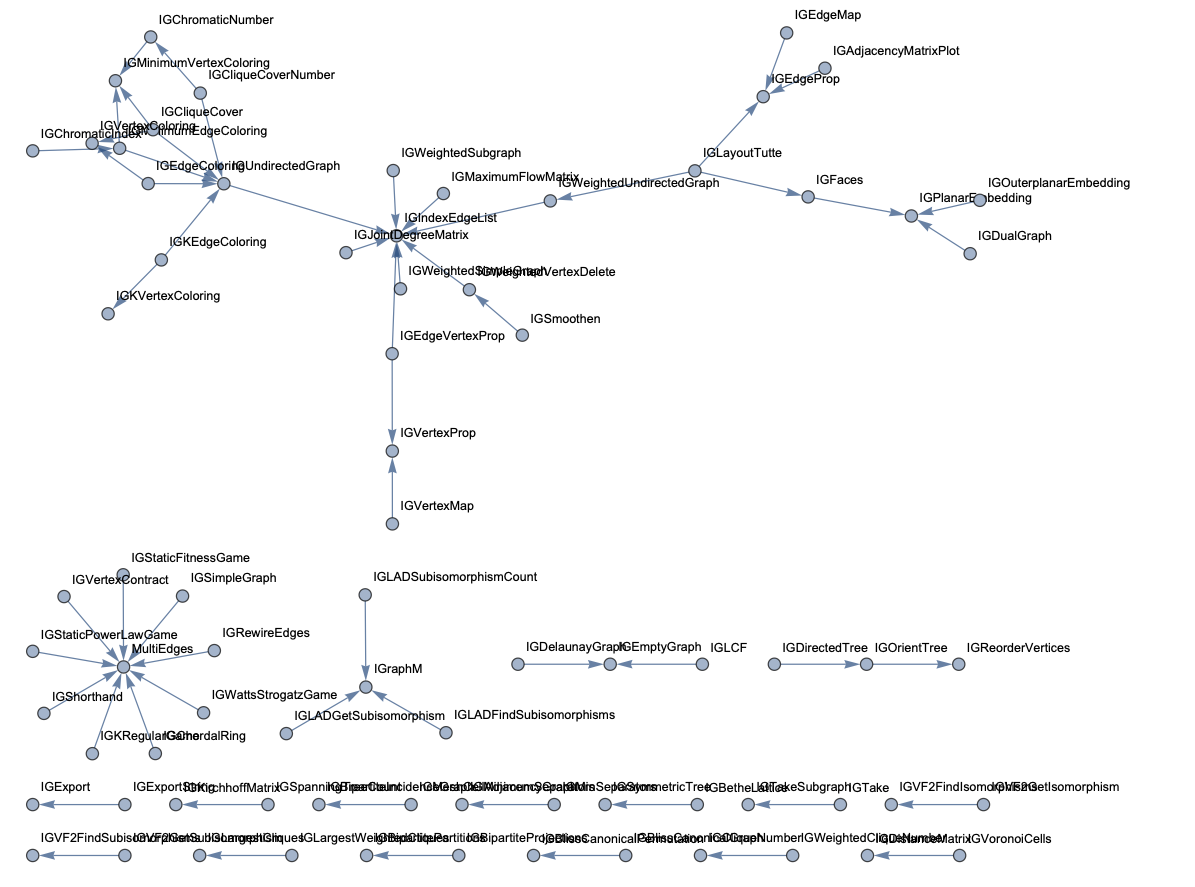
IGraphM-call-graph-with-usage-tooltips

Generate a call graph by excluding symbols

gr = CallGraph["IGraphM`", Exclusions -> Map[ToExpression, Names["IG*Q"]], ImageSize -> 900]

IGraphM-call-graph-with-exclusions

Generate call graph with buttons to print definitions

gr0 = CallGraph["IGraphM`", "UsageTooltips" -> False];
gr1 = CallGraphAddPrintDefinitionsButtons[gr0, GraphLayout -> "StarEmbedding", ImageSize -> 900]

IGraphM-call-graph-with-definition-buttons

Generate circular embedding graph color

cols = RandomSample[ ColorData["Rainbow"] /@ Rescale[Range[VertexCount[gr1]]]];

CallGraphBiColorCircularEmbedding[ gr1, "VertexColors" -> cols, ImageSize -> 900 ]

IGraphM-call-graph-bicolor-Bezie

(The core functions used for the implementation of CallGraphBiColorCircularEmbedding were taken from kglr’s Mathematica Stack Exchange answer: https://mathematica.stackexchange.com/a/188390/34008 . Those functions were modified to take additional arguments.)

Options

The package functions "CallGraph*" take all of the options of the function Graph. Below are described the additional options of CallGraph.

  • “PrivateContexts”
    Should the functions of the private contexts be included in the call graph.

  • “SelfReferencing”
    Should the self referencing edges be excluded or not.

  • “AtomicSymbols”
    Should atomic symbols be included in the call graph.

  • Exclusions
    Symbols to be excluded from the call graph.

  • “UsageTooltips”
    Should vertex labels with the usage tooltips be added.

  • “UsageTooltipsStyle”
    The style of the usage tooltips.

Possible issues

  • With large context (e.g. “System`”) the call graph generation might take long time. (See the TODOs below.)

  • With “PrivateContexts”->False the call graph will be empty if the public functions do not depend on each other.

  • For certain packages the scanning of the down values would produce (multiple) error messages or warnings.

Future plans

The following is my TODO list for this project.

  1. Special handling for the “System`” context.

  2. Use the symbols up-values to make the call graph.

  3. Consider/implement call graph making with specified patterns and list of symbols.

    • Instead of just using contexts and exclusions. (The current approach/implementation.)
  4. Provide special functions for “call sequence” tracing for a specified symbol.

The Great conversation in USA presidential speeches

Introduction

This document shows a way to chart in Mathematica / WL the evolution of topics in collections of texts. The making of this document (and related code) is primarily motivated by the fascinating concept of the Great Conversation, [Wk1, MA1]. In brief, all western civilization books are based on 103 great ideas; if we find the great ideas each significant book is based on we can construct a time-line (spanning centuries) of the great conversation between the authors; see [MA1, MA2, MA3].

Instead of finding the great ideas in a text collection we extract topics statistically, using dimension reduction with Non-Negative Matrix Factorization (NNMF), [AAp3, AA1, AA2].

The presented computational results are based on the text collections of State of the Union speeches of USA presidents [D2]. The code in this document can be easily configured to use the much smaller text collection [D1] available online and in Mathematica/WL. (The collection [D1] is fairly small, 51 documents; the collection [D2] is much larger, 2453 documents.)

The procedures (and code) described in this document, of course, work on other types of text collections. For example: movie reviews, podcasts, editorial articles of a magazine, etc.

A secondary objective of this document is to illustrate the use of the monadic programming pipeline as a Software design pattern, [AA3]. In order to make the code concise in this document I wrote the package MonadicLatentSemanticAnalysis.m, [AAp5]. Compare with the code given in [AA1].

The very first version of this document was written for the 2017 summer course “Data Science for the Humanities” at the University of Oxford, UK.

Outline of the procedure applied

The procedure described in this document has the following steps.

  1. Get a collection of documents with known dates of publishing.
    • Or other types of tags associated with the documents.
  2. Do preliminary analysis of the document collection.
    • Number of documents; number of unique words.

    • Number of words per document; number of documents per word.

    • (Some of the statistics of this step are done easier after the Linear vector space representation step.)

  3. Optionally perform Natural Language Processing (NLP) tasks.

    1. Obtain or derive stop words.

    2. Remove stop words from the texts.

    3. Apply stemming to the words in the texts.

  4. Linear vector space representation.

    • This means that we represent the collection with a document-word matrix.

    • Each unique word is a basis vector in that space.

    • For each document the corresponding point in that space is derived from the number of appearances of document’s words.

  5. Extract topics.

    • In this document NNMF is used.

    • In order to obtain better results with NNMF some experimentation and refinements of the topics search have to be done.

  6. Map the documents over the extracted topics.

    • The original matrix of the vector space representation is replaced with a matrix with columns representing topics (instead of words.)
  7. Order the topics according to their presence across the years (or other related tags).
    • This can be done with hierarchical clustering.

    • Alternatively,

      1. for a given topic find the weighted mean of the years of the documents that have that topic, and

      2. order the topics according to those mean values.

  8. Visualize the evolution of the documents according to their topics.

    1. This can be done by simply finding the contingency matrix year vs topic.

    2. For the president speeches we can use the president names for time-line temporal axis instead of years.

      • Because the corresponding time intervals of president office occupation do not overlap.

Remark: Some of the functions used in this document combine several steps into one function call (with corresponding parameters.)

Packages

This loads the packages [AAp1-AAp8]:

Import["https://raw.githubusercontent.com/antononcube/MathematicaForPrediction/master/MonadicProgramming/MonadicLatentSemanticAnalysis.m"];
Import["https://raw.githubusercontent.com/antononcube/MathematicaForPrediction/master/MonadicProgramming/MonadicTracing.m"]
Import["https://raw.githubusercontent.com/antononcube/MathematicaForPrediction/master/Misc/HeatmapPlot.m"];
Import["https://raw.githubusercontent.com/antononcube/MathematicaForPrediction/master/Misc/RSparseMatrix.m"];

(Note that some of the packages that are imported automatically by [AAp5].)

The functions of the central package in this document, [AAp5], have the prefix “LSAMon”. Here is a sample of those names:

Short@Names["LSAMon*"]

(* {"LSAMon", "LSAMonAddToContext", "LSAMonApplyTermWeightFunctions", <>, "LSAMonUnit", "LSAMonUnitQ", "LSAMonWhen"} *)

Data load

In this section we load a text collection from a specified source.

The text collection from “Presidential Nomination Acceptance Speeches”, [D1], is small and can be used for multiple code verifications and re-runnings. The “State of Union addresses of USA presidents” text collection from [D2] was converted to a Mathematica/WL object by Christopher Wolfram (and sent to me in a private communication.) The text collection [D2] provides far more interesting results (and they are shown below.)

If[True,
  speeches = ResourceData[ResourceObject["Presidential Nomination Acceptance Speeches"]];
  names = StringSplit[Normal[speeches[[All, "Person"]]][[All, 2]], "::"][[All, 1]],

  (*ELSE*)
  (*State of the union addresses provided by Christopher Wolfram. *)      
  Get["~/MathFiles/Digital humanities/Presidential speeches/speeches.mx"];
  names = Normal[speeches[[All, "Name"]]];
];

dates = Normal[speeches[[All, "Date"]]];
texts = Normal[speeches[[All, "Text"]]];

Dimensions[speeches]

(* {2453, 4} *)

Basic statistics for the texts

Using different contingency matrices we can derive basic statistical information about the document collection. (The document-word matrix is a contingency matrix.)

First we convert the text data in long-form:

docWordRecords = 
  Join @@ MapThread[
    Thread[{##}] &, {Range@Length@texts, names, 
     DateString[#, {"Year"}] & /@ dates, 
     DeleteStopwords@*TextWords /@ ToLowerCase[texts]}, 1];

Here is a sample of the rows of the long-form:

GridTableForm[RandomSample[docWordRecords, 6], 
 TableHeadings -> {"document index", "name", "year", "word"}]

Here is a summary:

Multicolumn[
 RecordsSummary[docWordRecords, {"document index", "name", "year", "word"}, "MaxTallies" -> 8], 4, Dividers -> All, Alignment -> Top]

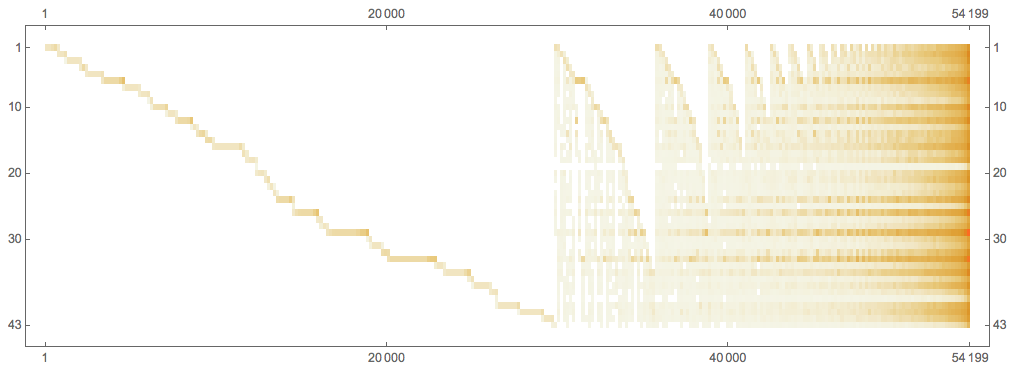
Using the long form we can compute the document-word matrix:

ctMat = CrossTabulate[docWordRecords[[All, {1, -1}]]];
MatrixPlot[Transpose@Sort@Map[# &, Transpose[ctMat@"XTABMatrix"]], 
 MaxPlotPoints -> 300, ImageSize -> 800, 
 AspectRatio -> 1/3]

Here is the president-word matrix:

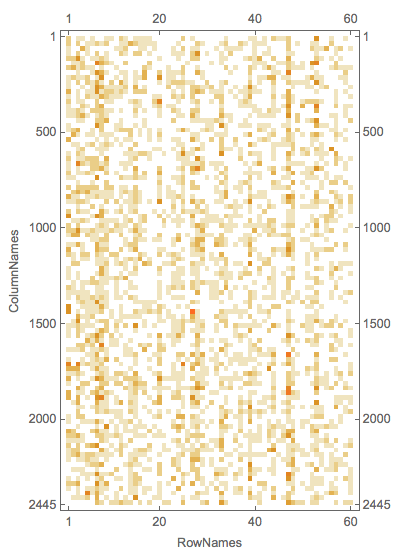
ctMat = CrossTabulate[docWordRecords[[All, {2, -1}]]];
MatrixPlot[Transpose@Sort@Map[# &, Transpose[ctMat@"XTABMatrix"]], MaxPlotPoints -> 300, ImageSize -> 800, AspectRatio -> 1/3]

Here is an alternative way to compute text collection statistics through the document-word matrix computed within the monad LSAMon:

LSAMonUnit[texts]⟹LSAMonEchoTextCollectionStatistics[];

Procedure application

Stop words

Here is one way to obtain stop words:

stopWords = Complement[DictionaryLookup["*"], DeleteStopwords[DictionaryLookup["*"]]];
Length[stopWords]
RandomSample[stopWords, 12]

(* 304 *)

(* {"has", "almost", "next", "WHO", "seeming", "together", "rather", "runners-up", "there's", "across", "cannot", "me"} *)

We can complete this list with additional stop words derived from the collection itself. (Not done here.)

Linear vector space representation and dimension reduction

Remark: In the rest of the document we use “term” to mean “word” or “stemmed word”.

The following code makes a document-term matrix from the document collection, exaggerates the representations of the terms using “TF-IDF”, and then does topic extraction through dimension reduction. The dimension reduction is done with NNMF; see [AAp3, AA1, AA2].

SeedRandom[312]

mObj =
  LSAMonUnit[texts]⟹
   LSAMonMakeDocumentTermMatrix[{}, stopWords]⟹
   LSAMonApplyTermWeightFunctions[]⟹
   LSAMonTopicExtraction[Max[5, Ceiling[Length[texts]/100]], 60, 12, "MaxSteps" -> 6, "PrintProfilingInfo" -> True];

This table shows the pipeline commands above with comments:

Detailed description

The monad object mObj has a context of named values that is an Association with the following keys:

Keys[mObj⟹LSAMonTakeContext]

(* {"texts", "docTermMat", "terms", "wDocTermMat", "W", "H", "topicColumnPositions", "automaticTopicNames"} *)

Let us clarify the values by briefly describing the computational steps.

  1. From texts we derive the document-term matrix \text{docTermMat}\in \mathbb{R}^{m \times n}, where n is the number of documents and m is the number of terms.
    • The terms are words or stemmed words.

    • This is done with LSAMonMakeDocumentTermMatrix.

  2. From docTermMat is derived the (weighted) matrix wDocTermMat using “TF-IDF”.

    • This is done with LSAMonApplyTermWeightFunctions.
  3. Using docTermMat we find the terms that are present in sufficiently large number of documents and their column indices are assigned to topicColumnPositions.

  4. Matrix factorization.

    1. Assign to \text{wDocTermMat}[[\text{All},\text{topicsColumnPositions}]], \text{wDocTermMat}[[\text{All},\text{topicsColumnPositions}]]\in \mathbb{R}^{m_1 \times n}, where m_1 = |topicsColumnPositions|.

    2. Compute using NNMF the factorization \text{wDocTermMat}[[\text{All},\text{topicsColumnPositions}]]\approx H W, where W\in \mathbb{R}^{k \times n}, H\in \mathbb{R}^{k \times m_1}, and k is the number of topics.

    3. The values for the keys “W, “H”, and “topicColumnPositions” are computed and assigned by LSAMonTopicExtraction.

  5. From the top terms of each topic are derived automatic topic names and assigned to the key automaticTopicNames in the monad context.

    • Also done by LSAMonTopicExtraction.

Statistical thesaurus

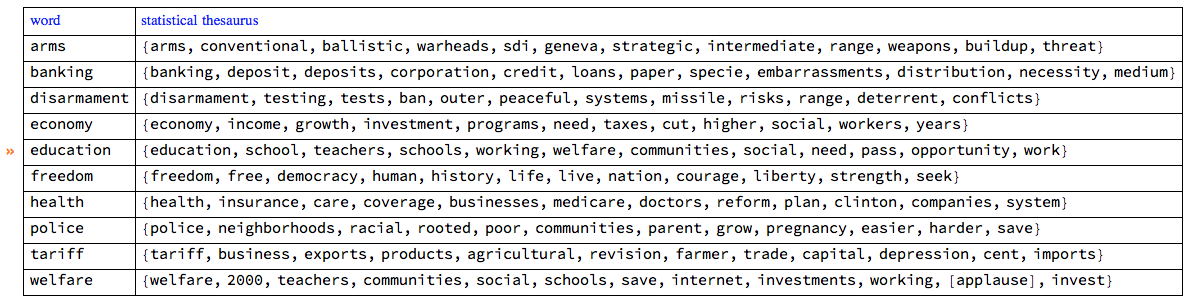
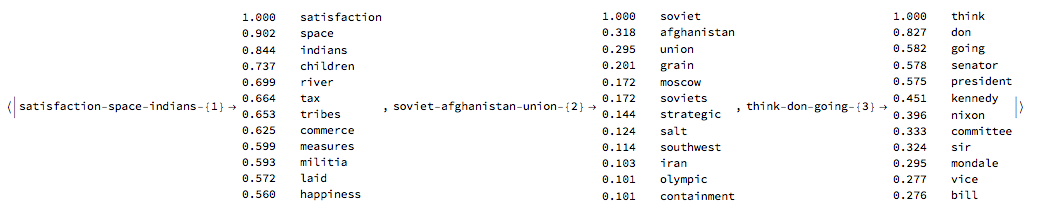
At this point in the object mObj we have the factors of NNMF. Using those factors we can find a statistical thesaurus for a given set of words. The following code calculates such a thesaurus, and echoes it in a tabulated form.
queryWords = {"arms", "banking", "economy", "education", "freedom", 
   "tariff", "welfare", "disarmament", "health", "police"};

mObj⟹
  LSAMonStatisticalThesaurus[queryWords, 12]⟹
  LSAMonEchoStatisticalThesaurus[];

By observing the thesaurus entries we can see that the words in each entry are semantically related.

Note, that the word “welfare” strongly associates with “[applause]”. The rest of the query words do not, which can be seen by examining larger thesaurus entries:

thRes =
  mObj⟹
   LSAMonStatisticalThesaurus[queryWords, 100]⟹
   LSAMonTakeValue;
Cases[thRes, "[applause]", Infinity]

(* {"[applause]", "[applause]"} *)

The second “[applause]” associated word is “education”.

Detailed description

The statistical thesaurus is computed by using the NNMF’s right factor H.

For a given term, its corresponding column in H is found and the nearest neighbors of that column are found in the space \mathbb{R}^{m_1} using Euclidean norm.

Extracted topics

The topics are the rows of the right factor H of the factorization obtained with NNMF .

Let us tabulate the topics found above with LSAMonTopicExtraction :

mObj⟹ LSAMonEchoTopicsTable["NumberOfTerms" -> 6, "MagnificationFactor" -> 0.8, Appearance -> "Horizontal"];

Map documents over the topics

The function LSAMonTopicsRepresentation finds the top outliers for each row of NNMF’s left factor W. (The outliers are found using the package [AAp4].) The obtained list of indices gives the topic representation of the collection of texts.

Short@(mObj⟹LSAMonTopicsRepresentation[]⟹LSAMonTakeContext)["docTopicIndices"]

{{53}, {47, 53}, {25}, {46}, {44}, {15, 42}, {18}, <>, {30}, {33}, {7, 60}, {22, 25}, {12, 13, 25, 30, 49, 59}, {48, 57}, {14, 41}}

Further we can see that if the documents have tags associated with them — like author names or dates — we can make a contingency matrix of tags vs topics. (See [AAp8, AA4].) This is also done by the function LSAMonTopicsRepresentation that takes tags as an argument. If the tags argument is Automatic, then the tags are simply the document indices.

Here is a an example:

rsmat = mObj⟹LSAMonTopicsRepresentation[Automatic]⟹LSAMonTakeValue;
MatrixPlot[rsmat]

Here is an example of calling the function LSAMonTopicsRepresentation with arbitrary tags.

rsmat = mObj⟹LSAMonTopicsRepresentation[DateString[#, "MonthName"] & /@ dates]⟹LSAMonTakeValue;
MatrixPlot[rsmat]

Note that the matrix plots above are very close to the charting of the Great conversation that we are looking for. This can be made more obvious by observing the row names and columns names in the tabulation of the transposed matrix rsmat:

Magnify[#, 0.6] &@MatrixForm[Transpose[rsmat]]

Charting the great conversation

In this section we show several ways to chart the Great Conversation in the collection of speeches.

There are several possible ways to make the chart: using a time-line plot, using heat-map plot, and using appropriate tabulation (with MatrixForm or Grid).

In order to make the code in this section more concise the package RSparseMatrix.m, [AAp7, AA5], is used.

Topic name to topic words

This command makes an Association between the topic names and the top topic words.

aTopicNameToTopicTable = 
  AssociationThread[(mObj⟹LSAMonTakeContext)["automaticTopicNames"], 
   mObj⟹LSAMonTopicsTable["NumberOfTerms" -> 12]⟹LSAMonTakeValue];

Here is a sample:

Magnify[#, 0.7] &@ aTopicNameToTopicTable[[1 ;; 3]]

Time-line plot

This command makes a contingency matrix between the documents and the topics (as described above):

rsmat = ToRSparseMatrix[mObj⟹LSAMonTopicsRepresentation[Automatic]⟹LSAMonTakeValue]

This time-plot shows great conversation in the USA presidents state of union speeches:

TimelinePlot[
 Association@
  MapThread[
   Tooltip[#2, aTopicNameToTopicTable[#2]] -> dates[[ToExpression@#1]] &, 
   Transpose[RSparseMatrixToTriplets[rsmat]]], 
 PlotTheme -> "Detailed", ImageSize -> 1000, AspectRatio -> 1/2, PlotLayout -> "Stacked"]

The plot is too cluttered, so it is a good idea to investigate other visualizations.

Topic vs president heatmap

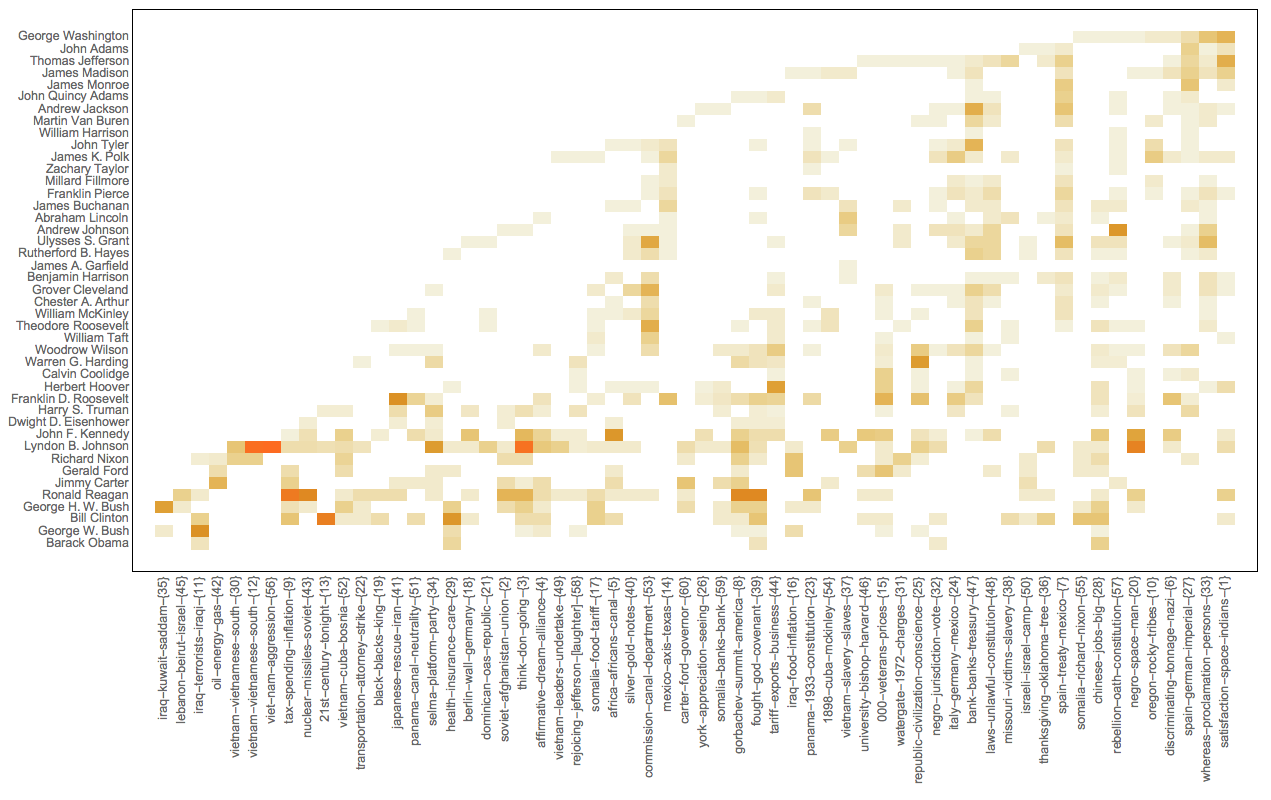
We can use the USA president names instead of years in the Great Conversation chart because the USA presidents terms do not overlap.

This makes a contingency matrix presidents vs topics:

rsmat2 = ToRSparseMatrix[
   mObj⟹LSAMonTopicsRepresentation[
     names]⟹LSAMonTakeValue];

Here we compute the chronological order of the presidents based on the dates of their speeches:

nameToMeanYearRules = 
  Map[#[[1, 1]] -> Mean[N@#[[All, 2]]] &, 
   GatherBy[MapThread[List, {names, ToExpression[DateString[#, "Year"]] & /@ dates}], First]];
ordRowInds = Ordering[RowNames[rsmat2] /. nameToMeanYearRules];

This heat-map plot uses the (experimental) package HeatmapPlot.m, [AAp6]:

Block[{m = rsmat2[[ordRowInds, All]]},
 HeatmapPlot[SparseArray[m], RowNames[m], 
  Thread[Tooltip[ColumnNames[m], aTopicNameToTopicTable /@ ColumnNames[m]]],
  DistanceFunction -> {None, Sort}, ImageSize -> 1000, 
  AspectRatio -> 1/2]
 ]

Note the value of the option DistanceFunction: there is not re-ordering of the rows and columns are reordered by sorting. Also, the topics on the horizontal names have tool-tips.

References

Text data

[D1] Wolfram Data Repository, "Presidential Nomination Acceptance Speeches".

[D2] US Presidents, State of the Union Addresses, Trajectory, 2016. ‪ISBN‬1681240009, 9781681240008‬.

[D3] Gerhard Peters, "Presidential Nomination Acceptance Speeches and Letters, 1880-2016", The American Presidency Project.

[D4] Gerhard Peters, "State of the Union Addresses and Messages", The American Presidency Project.

Packages

[AAp1] Anton Antonov, MathematicaForPrediction utilities, (2014), MathematicaForPrediction at GitHub.

[AAp2] Anton Antonov, Implementation of document-term matrix construction and re-weighting functions in Mathematica(2013), MathematicaForPrediction at GitHub.

[AAp3] Anton Antonov, Implementation of the Non-Negative Matrix Factorization algorithm in Mathematica, (2013), MathematicaForPrediction at GitHub.

[AAp4] Anton Antonov, Implementation of one dimensional outlier identifying algorithms in Mathematica, (2013), MathematicaForPrediction at GitHub.

[AAp5] Anton Antonov, Monadic latent semantic analysis Mathematica package, (2017), MathematicaForPrediction at GitHub.

[AAp6] Anton Antonov, Heatmap plot Mathematica package, (2017), MathematicaForPrediction at GitHub.

[AAp7] Anton Antonov, RSparseMatrix Mathematica package, (2015), MathematicaForPrediction at GitHub.

[AAp8] Anton Antonov, Cross tabulation implementation in Mathematica, (2017), MathematicaForPrediction at GitHub.

Books and articles

[AA1] Anton Antonov, "Topic and thesaurus extraction from a document collection", (2013), MathematicaForPrediction at GitHub.

[AA2] Anton Antonov, "Statistical thesaurus from NPR podcasts", (2013), MathematicaForPrediction at WordPress blog.

[AA3] Anton Antonov, "Monad code generation and extension", (2017), MathematicaForPrediction at GitHub.

[AA4] Anton Antonov, "Contingency tables creation examples", (2016), MathematicaForPrediction at WordPress blog.

[AA5] Anton Antonov, "RSparseMatrix for sparse matrices with named rows and columns", (2015), MathematicaForPrediction at WordPress blog.

[Wk1] Wikipedia entry, Great Conversation.

[MA1] Mortimer Adler, "The Great Conversation Revisited," in The Great Conversation: A Peoples Guide to Great Books of the Western World, Encyclopædia Britannica, Inc., Chicago,1990, p. 28.

[MA2] Mortimer Adler, "Great Ideas".

[MA3] Mortimer Adler, "How to Think About the Great Ideas: From the Great Books of Western Civilization", 2000, Open Court.

Creating and programming domain specific languages

Introduction

In this blog post I will provide links to documents, packages, blog posts, and discussions for creating and utilizing Domain Specific Languages (DSLs). I have discussed a few DSLs in previous blog posts (linked below). This blog post provides a more general, higher level view on the application and creation of DSLs. The concrete examples are with Mathematica, but the steps are general and can be done with any programming languages and tools.

When to apply DSLs

Here are some situations for applying DSLs.

  1. When designing conversational engines.
  2.  When there are too many usage scenarios and tuning options for the developed algorithms.
    • For example, we have a bunch of search, recommendation, and interaction algorithms for a dating site. A different, User Experience Department (UED) designs interactive user interfaces for these algorithms. We make a natural language DSL that invokes the different algorithms according to specified outcomes. With the DSL the different designs produced by UED are much easily prototyped, implemented, or fleshed out. The DSL also gives to UED easier to understand view on the functionalities provided by the algorithms.
  3. When designing an API for a collection of algorithms.
    • Just designing a DSL can bring clarity of what signatures should be in the API.
    • NIntegrate‘s Method option was designed and implemented using a DSL. See this video between 25:00 and 27:30.

Designing DSLs

  1. Decide what kind of sentences the DSL is going to have.
    • Are natural language sentences going to be used?
    • Are the language words known beforehand or not?
  2. Prepare, create, or accumulate a list of representative sentences.
    • In some cases using Morphological Analysis can greatly help for coming up with use cases and the corresponding sentences.
  3. Create a context free grammar that describes the sentences from the previous step. (Or a large subset of them.)
    • At this stage I use exclusively Extended Backus-Naur Form (EBNF).
    • In some cases the grammar terminals are not know at the design stage and have to retrieved in some way. (From a database or though natural language processing.)
    • Some conversational engine systems allow or require to the grammar specification to be done in XML. I would still do BNF and then move to XML
      •  It is not that hard to write a parser-and-interpreter that translates BNF into XML. See the end of this blog post for that kind of translation of BNF into OMPL.
  4. Program parser(s) for the grammar.
    • I use most of the time functional parsers.
    • The package FunctionalParsers.m provides a Mathematica implementation of this kind of parsing.
    • The package can automatically generate parsers from a grammar given in EBNF. (See the coding example below.)
    • I have programmed versions of this package in R and Lua.
  5. Program an interpreter for the parsed sentences.
    • At this stage the parsed sentences are hooked to the algorithms of the problem domain.
    • The package FunctionalParsers.m allows this to be done fairly easy.
  6. Test the parsing and interpretation.

See the code example below illustrating steps 3-6.

Introduction to using DSLs in Mathematica

  1. This blog post “Natural language processing with functional parsers” gives an introduction to the DSL application in Mathematica.
  2. This detailed slide-show presentation “Functional parsers for an integration requests language grammar” shows how to use the package FunctionalParsers.m over a small grammar.
  3. The answer of the MSE question “How to parse a clojure expression?” gives a good introduction with a simple grammar and shows both direct parser programming and automatic generation from EBNF.

Advanced example

The blog post “Simple time series conversational engine” discusses the creation (design and programming) of a simple conversational engine for time series analysis (data loading, finding outliers and trends.)

Here is a movie demonstrating that conversational engine: http://youtu.be/wlZ5ANglVI4.

Other discussions

  1. A small part, from 17:30 to 21:00, of the WTC 2012 “Spatial Access Methods and Route Finding” presentation shows a DSL for points of interest queries.
  2. The answer of the MSE question “CSS Selectors for Symbolic XML” uses FunctionalParsers.m .
  3. This Quantile Regression presentation is aided by the  “Simple time series conversational engine” mentioned above.

Coding example

This coding example demonstrates steps 3-6 discussed above.

EBNF-and-parsers-for-LoveFood

Interpreters-and-parsing-for-LoveFood

Object-Oriented Design Patterns in Mathematica

Introduction

In this blog post I would like to proclaim a recent completion of the first version of a document describing how to implement the most important (in my view) Object-Oriented Programming Designed Patterns by GoF.

Here is the link to the document in MathematicaForPrediction at GitHub:

“Implementation of Object-Oriented Programming Design Patterns in Mathematica”  , [1].

That document presents a particular style of programming in Mathematica (Wolfram Language) that allows the application of the Object-Oriented Programming (OOP) paradigm. The approach does not require the use of preliminary implementations, packages, or extra code. Using the OOP paradigm is achieved by following a specific programming style and conventions with native, fundamental programming constructs in Mathematica’s programming language.

A side product of working on this document is a Mathematica package for creating UML diagrams proclaimed in previous post, “UML diagram creation and generation”.

Below are several topics I consider most important not covered or briefly considered in that document.

Related presentation

Here is a video recording of my presentation “Object Oriented Design Patterns” at the Wolfram Technology Conference 2015. The presentation recording is also uploaded at YouTube.

Here is link to the presentation notebook : “Object-Oriented Design Patterns with Wolfram Language”.

Why use design patterns in Mathematica

For large development projects it is a good idea to use the well established, understood, and documented Design Patterns. Design Patterns help overcome limitations of programming languages, give higher level abstractions for program design, and provide design transformation guidance. Because of extensive documentation and examples, Design Patterns help knowledge transfer and communication between developers.

Because of these observations it is much better to emulate OOP in Mathematica through Design Patterns than through emulation of OOP objects. (The latter is done in all other approaches and projects I have seen.)

As it was said above the proposed method is minimalistic: native language features of Mathematica are used.

The larger context of Design Patterns

This diagram shows the large context of patterns:

VennDiagramForPatternsInGeneral-smallThe Mathematica implementations discussed in [1]  are for “Design Patterns by GoF”. One of the design patterns “Interpreter” is extended with the package FunctionalParsers.m that uses the so called “monadic programming”. (Hence the overlap of “Design Patterns by GoF” with “Functional programming patterns”.)

In order to provide a feel for the larger context in the diagram I have referenced the book “Go Rin no Sho”(“The book of five scrolls”) by Miyamoto Musashi. We can say that the book contains patterns applicable in antagonistic conflicts. It presents the patterns in abstract forms applicable to person-to-person fights, battles between armies, or other antagonistic settings. Another interesting idea in this book is that if you practice the explained strategy with a samurai sword you will become capable applying that strategy when leading an army.

Personal experiences with design patterns

I was introduced to OOP Design Patterns in the conferences ECOOP’99. At the time I was working on my Ph.D. in the field of large scale air pollution simulations.

Air pollution simulations over continents, like Europe, are grand challenge problems that encompass several scientific sub-cultures: computational fluid dynamics, computational chemistry, computational geometry, and parallel programming. I did not want to just a produce an OOP framework for addressing this problem — I wanted to produce the best OOP framework for the set of adopted methods to solve these kind of problems.

One way to design such a framework is to use Design Patterns and did so using C++. Because I wanted to bring sound arguments during my Ph.D. defense that I derived one of the best possible designs, I had to use some formal method for judging the designs made with Design Patterns. I introduced the relational algebra of the Database theory into the OOP Design Patterns, and I was able to come up with some sort of proof why the framework written is designed well. More practically this was proven by developing, running, and obtaining results with different numerical methods for the air-pollution problems.

In my Ph.D. thesis I showed how to prove that Design Patterns provide robust code construction through the theory Relational Databases, [2].

Justifying Design Patterns with the theory of Relational Databases

One of the key concepts and goals in OOP is reuse. In OOP when developing software we do not want changes in one functional part to bring domino effect changes in other parts. Design Patterns help with that. Relational Databases were developed with similar goals in mind — we want the data changes to be confined to only one relevant place. We can view OOP code as a database, the signatures of the functions being the identifiers and the function bodies being the data. If we bring that code-database into a third normal form we are going to achieve the stability in respect to changes desired in OOP. We can interpret the individual Design Patterns as bringing the code into such third normal forms for the satisfaction of different types of anticipated code changes.

References

[1] Anton Antonov, “Implementation of Object-Oriented Programming Design Patterns in Mathematica”, (2016), MathematicaForPrediction project at GitHub.

[2] Anton Antonov, Object-oriented framework for large scale air pollution models, 2001. Ph.D. thesis, Informatics and Mathematical Modelling, Technical University of Denmark, DTU.