
The Post List 2 widget provides an advanced list-style layout for displaying blog posts.
It enhances the standard list format with options for large and small images, author details, avatars, categories, dates, and comments, making it ideal for news and magazine-style layouts.
With extended query and display settings, it offers flexibility to create highly customized blog sections.
How to Use
- Open any page or template in the Elementor editor.
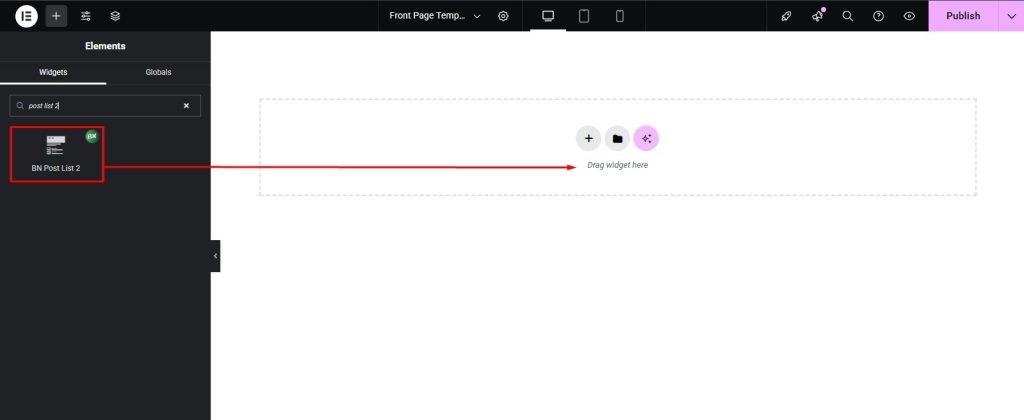
- Search for “Post List 2” in the widget panel.
- Drag and drop the widget into the desired section.
- Configure the Post Query to control which posts appear.
- Use the advanced Post Settings to toggle images, meta elements, and layout details.
- Customize everything with the Styling Controls to match the site design.
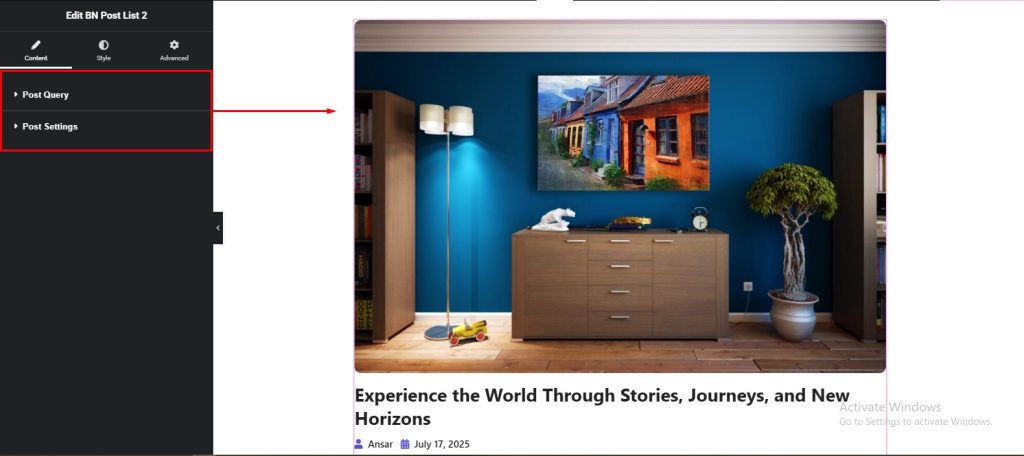
Content Settings
- Post Query → Choose layout style, categories, tags, number of posts, excerpt length, order by options, order type, category style, and control title length (in lines).
- Post Settings →Control spacing with Row Space. Toggle the main image using Show Image and choose its quality with Image Resolution. Add a secondary thumbnail via Show Small Image and adjust it with Small Image Resolution. Display author details using Show Author or Show Small Author, and optionally include profile pictures with Show Avatar or Show Small Avatar. Categories can be enabled with Show Category or Show Small Category, and icons added through Category Icon. Dates are controlled via Show Date or Show Small Date, while comments can be displayed using Show Comments or Show Small Comments.
Styling Controls
- Post Style → Background, padding, margin, border, radius, shadow.
- Category → Typography, color, hover, spacing.
- Image → Size, border, radius, hover, shadow.
- Title → Typography, color, hover, text shadow, margin.
- Metas → Author, date, comments, avatar styling with typography, colors, icon colors, spacing.
- Excerpt → Typography, color, margin.
- Small Post Style → Background, padding, border, radius, shadow.
- Small Meta Style → Typography, color, spacing.

Pro Tip
- For a magazine layout, combine large featured image posts at the top with smaller posts below for variety.