
Tenant Resources
Pay Rent
For convenience, pay your rent online
Maintenance
Submit a
maintenance request online
Login
Login to view tenant and lease information
Contact
Questions or Comments for Arrow staff
Refer & Earn $50
Refer a friend who becomes an Arrow Management tenant you will receive a $50 gift card.
Please complete the form below:
Thanks for Referring Arrow Management to your friends.
Please note:
You may not earn a reward for referring yourself, a roommate, spouse, current Arrow tenant, or multiple tenants per unit.

Get the App
Online Portal by Appfolio is a new mobile app and online resource made specifically to streamline your resident experience.
AppFolio Benefits:
- Make one-time or recurring payments anytime, anywhere
- Stay up-to-date with announcements, texting, and other communication features.


Maintenance Requests
Benefits of AppFolio for Maintenance Requests:
- Provides best-in-class resident experience
- Streamlines communication between tenants, maintenance, and management
- Provides features to sped up and prioritize repairs


Resident Benefits Package
Request an Appointment
Please fill out the following form to request an appointment with Arrow Management office staff. Responses to requests will be handled during regular business hours Monday-Friday in the order they were received.
Lease Renewal
If you are a current Arrow Management tenant and requesting lease renewal, please fill out attached form and provide us updated information. After requesting a lease renewal, a member of the Arrow Management team will be in contact with you regarding the next steps.
Move Out
If you are a current Arrow Management tenant and you plan to move out of your rental property, please provide notice at least 30 days before move out (or longer per the terms of your lease).
Please give notice to move out via Appfolio on the Contact Us tab. Select Request Notice to Vacate in the Contact Options block. Provide your desired move out date, your reason for leaving, and your forwarding address.
After providing proper notice, a member of the Arrow Management team will be in contact with you regarding the next steps.
Please note: If you are currently in a lease and attempting to break your lease terms early, you may be required to pay all remaining rent and/or other fees for early move out.
If you do not have access to AppFolio, please give notice with the attached form.
Tenant Tips
Appfolio: Get Connected
STEP 1: Download the Online Portal by Appfolio in the App Store or Google Play. Or visit Appfolio online
STEP 2: You’ll receive an Online Portal Activation email or text message from your property management company. Click Activate Now in the email, or tap the link in the email, or tap the link in the text message to establish a strong password to activate your portal.
OR
You can also self sign up for the Online Portal at ArrowManagement.appfolio.com/connect. Click Request access to the portal and input your information.
STEP 3: Bookmark, create a shortcut icon for the login page or download the mobile app so it is easy to return at any time.
STEP 4: You will receive a confirmation email once your portal is activated.
Appfolio: Update Your Contact Information
If you are a current Arrow Management tenant, per your lease agreement you we required to keep Arrow Management updated on your recent contact information. To update your contact information, please navigate to the AppFolio Account Profile tab to update the email address you use to log into your account, the phone number, mailing address, and vehicle information your property manager has on file for you.
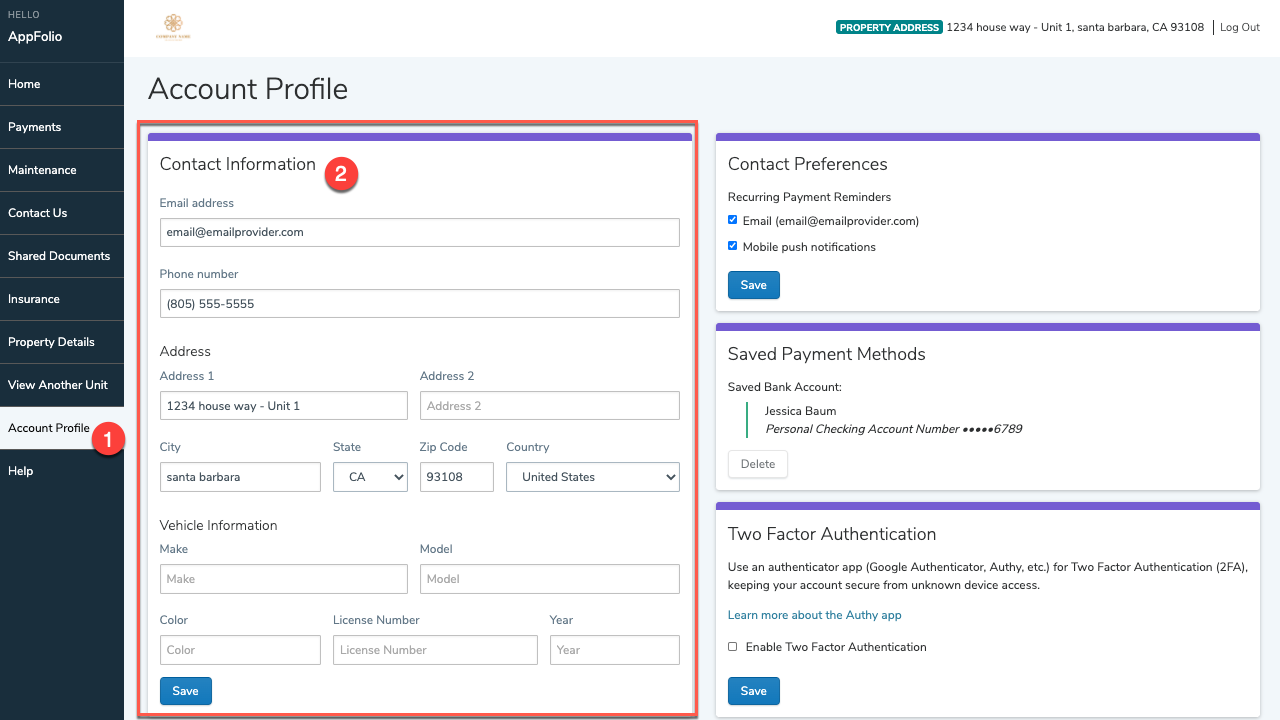
If you do not have access to AppFolio, please update any changes with the following form.
APPFOLIO: View Lease and Shared Documents
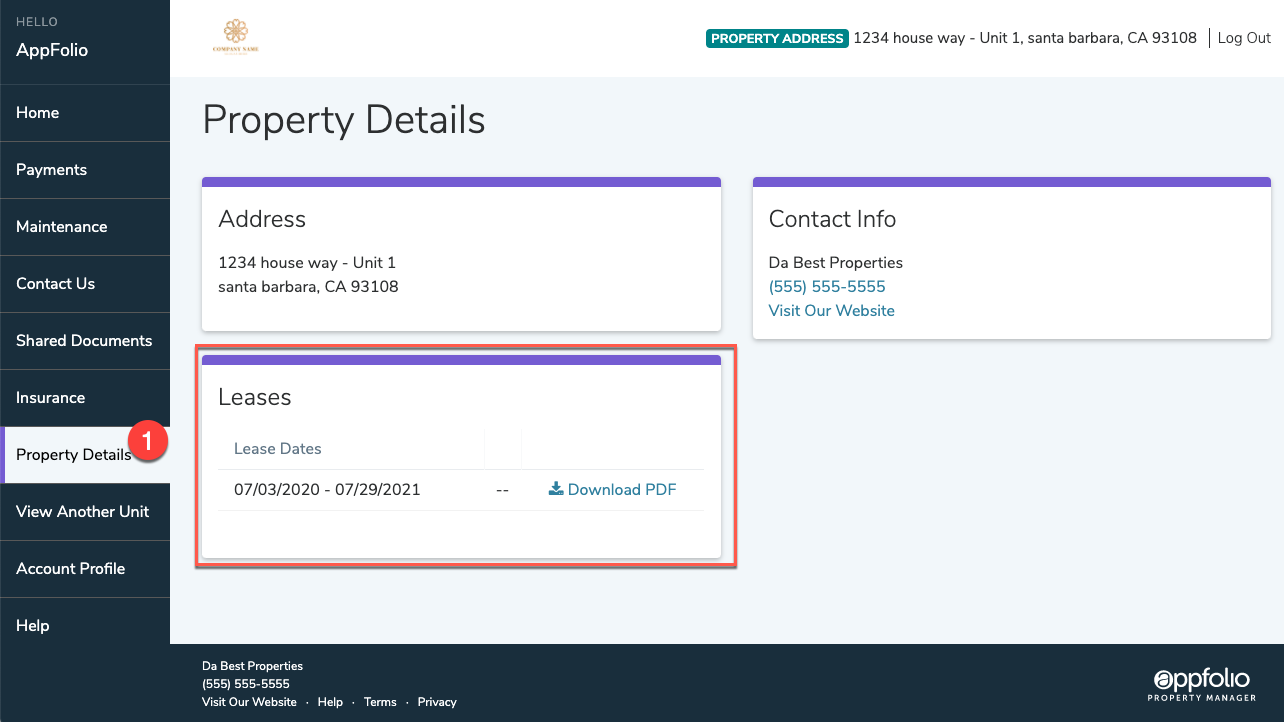
LEASE: View or Download your lease in Appfolio in Property Details located on the menu on the left
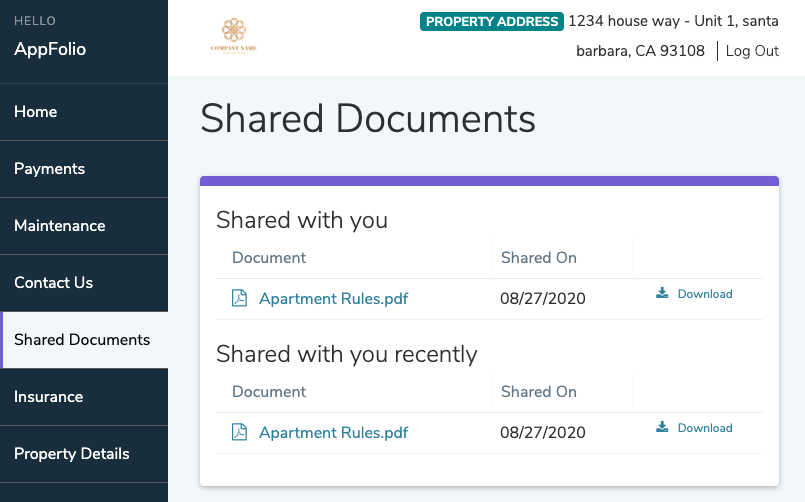
SHARED DOCUMENTS: You’ll receive an email notification any time Arrow Management sends you a document securely to your Appfolio Online Portal. In Appfolio navigate to the Shared Documents tab to access documents.
AppFolio: Maintenance Request
Collections: View Payment History
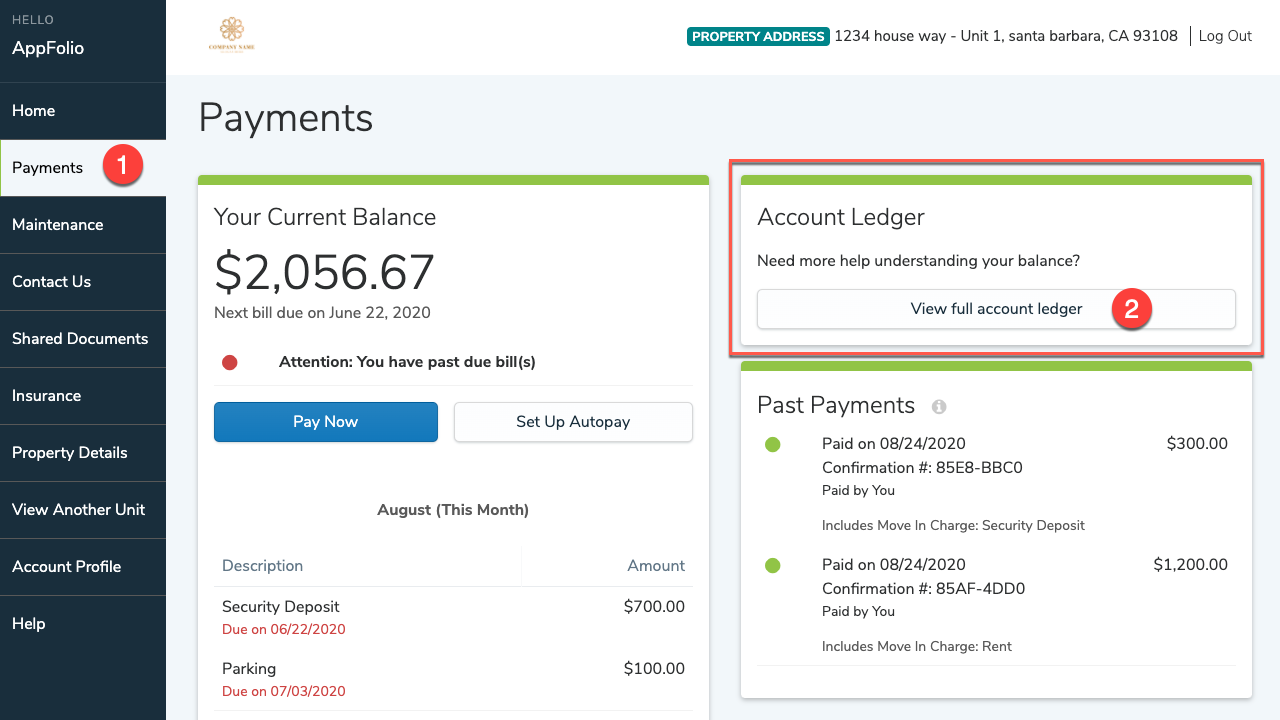
Click the Payments tab, then click View full account ledger to see a detailed account of all charges and payments posted to your account.
Collections: Make a One Time Payment
STEP 1: On the Home or Payments tab, click Pay Now to make a one-time payment.
STEP 2: If you have saved payment methods those will be displayed, or you can Create a New Payment Method.
STEP 3: Select your preferred payment method: eCheck (direct withdrawal from bank account), or Credit/debit card. You can then enter the associated payment information and click Continue. Please note: there are fees applied to payments paid by Credit/Debt Card
STEP 4: Choose to make your payment in full or to edit the amount. If online payments are required to be made in full, the payment amount will not be editable, and you will have the option of paying either the Balance Due, which includes past and current bills, or the Full Balance, which includes past, current, and any upcoming bills, including unposted, recurring bills.
STEP 5: Review the Payment Date and Payment Balance information for accuracy. A transaction fee will also be displayed.
STEP 5: Once you have verified all your payment information, click Make This Payment Now. You will receive a confirmation email once the payment is successfully submitted. The payment may take a few days to process and clear your account. If you didn’t receive a confirmation email your payment may not have been received, please reach out to your Arrow Management.
Collections: Set Up Auto Payment
STEP 1: On the Home or Payments tab, click Set Up Autopay to create an automatically recurring payment
STEP 2: If you have saved payment methods those will be displayed, or you can Create a New Payment Method.
STEP 3: Select your preferred payment method: eCheck (direct withdrawal from bank account), or Credit/debit card. You can then enter the associated payment information and click Continue. Please note: there are fees applied to payments paid by Credit/Debt Card
STEP 4: Give the payment a name, select whether you want to pay a fixed amount or your outstanding balance, choose the payment start date. If you choose to pay an outstanding balance, you will also notice a field for maximum limit. You may proceed with the suggested amount or choose a new one.
STEP 5: Click Create Autopay. You will receive a confirmation email when your payment processes. You can review your autopay details on the Payments tab of your Online Portal.

Collections: CONVENIENCE FEE
When you make a rent payment with a debt or credit card the credit card companies charge a convenience fee. To avoid the convenience fee, make electronic payments with your bank information (echeck) instead of a credit/debt
card.
Collections: LATE FEE/PAYMENT
Rent is due on the 1st of each month. A late fee will be assessed on any payment received after the 5th. After the 5th, all payments must be made in full—partial payments will not be accepted or processed. Please ensure your payment is submitted on time and in full to avoid additional fees and disruption to your account.
If you have any questions or concerns, please reach out to our Collections Department via Appfolio or at collections@arrowmidwest.com.
Collections: 7 Day Notices
On the 6th of each month, 7-Day Notices are automatically issued to any tenant with an outstanding rent balance. After the 5th, all payments must be made in full—partial payments will not be accepted or processed.
If you believe you received a 7-Day Notice in error or have questions about your account, please contact our Collections Department via Appfolio or at collections@arrowmidwest.com.
Collections: Evictions
If you are currently in eviction status, online payments will not be accepted. Any payment must be made in full and submitted in person using certified funds only (money order or cashier’s check).
Please note that additional reinstatement fees may apply when resolving an eviction.
To discuss your account or arrange payment, contact our Collections Department via Appfolio or at collections@arrowmidwest.com.
Lease: Renters Insurance
All tenants are required to maintain renters insurance as part of their lease agreement. At the time of lease signing or renewal, all residents will be enrolled in the Resident Benefits Package through Second Nature. This package includes a valuable renters insurance policy along with additional services designed to enhance your living experience. For more information, please contact our office or refer to your lease documents.
Lease: RESIDENT BENEFITS PACKAGE (RBP)
At Arrow Property Management, we are committed to enhancing your rental experience. That’s why we’ve partnered with Second Nature to provide a comprehensive Resident Benefits Package (RBP) designed to add value, convenience, and peace of mind to your tenancy. What’s Included in the RBP:
MOVE OUT: Give Notice to Vacate
If you are a current Arrow Management tenant and you plan to move out of your rental property, please provide notice at least 30 days before move out (or longer per the terms of your lease).
Please give notice to move out via Appfolio on the Contact Us tab. Select Request Notice to Vacate in the Contact Options block. Provide your desired move out date, your reason for leaving, and your forwarding address.
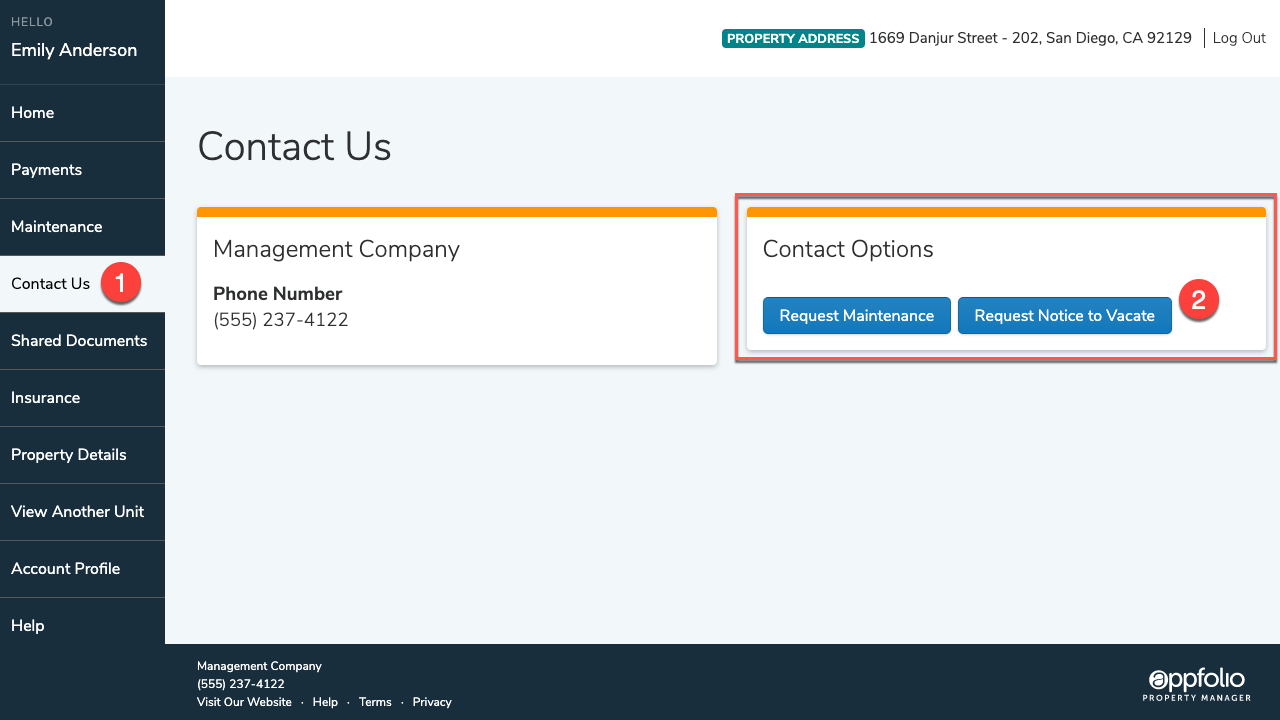
After providing proper notice, a member of the Arrow Management team will be in contact with you regarding the next steps.
Please note: If you are currently in a lease and attempting to break your lease terms early, you may be required to pay all remaining rent and/or other fees for early move out.
If you do not have access to AppFolio, please give notice with the attached form.
MOVE OUT: Security Deposit
The best way to ensure you receive your security deposit is to: provide a 30 day notice to vacate, return all keys, provide a forwarding address, and leave the property in the same or better condition than it was at move-in.
As a resource, use the move-in and move-out checklist. This could be a helpful way to track the condition of the property at the beginning and end of tenancy.
1 Bed / 1 Bath
2 Bed / 1 Bath
2 Bed / 2 Bath
3 Bed / 1 Bath
3 Bed / 2 Bath
4 Bed / 2 Bath
If you have met all conditions to receive all or some of your security deposit, a check will be mailed within 14 days of move out. The security deposit reconciliation will be mailed to one forwarding address provided to Arrow Management at move out. In the event of multiple tenants, the security deposit will be sent to one address and it is the tenant’s responsibility to divide the deposit amongst roommates, as needed.
MOVE OUT: Roommate Changes
During the lease term if there are changes to roommates
Removing Tenant/Roommate: All tenants will need to sign a Release From Lease form. Please note: There is a $150 administrative fee for roommate changes.
Adding Tenant/Roommate: All tenants will need to sign a lease addendum adding a new roommate. Please note: There is a $150 administrative fee for lease changes.
Tenant Tutorials
HOME SERVICES: Reset GFCI Outlet

GFCI outlets are typically found in rooms with water such as a bathroom or kitchen. GFCI outlets contain a reset and test button. When a GFCI outlet is tripped the reset button will pop out.
Please note: When a GFCI trips, it will trip all outlets connected to that GFCI.
STEP 1: Locate the tripped GFCI Outlet
STEP 2: Press the ‘Reset’ button on the outlet
STEP 3: To prevent the outlet from tripping in the future, make sure the outlet is not overloaded or short circuiting.
HOME SERVICES: Replace Furnace Filter

STEP 1: Turn off the furnace
STEP 2: Locate the service panel
STEP 3: Slide out the existing filter
STEP 4: Make sure the replacement filter is the correct size. Filter sizes are labeled on filter frame
STEP 5: Slide in a new filter. You should see an arrow on the furnace filter, the air flow direction arrow printed on the new filter should be pointed towards your furnace
STEP 6: Turn the furnace back on
Check and/or replace the filter each month. Clean more frequently if…
- You have pets
- You notice excessive dust buildup in your house
- One or more people in your home smoke
- Your heating system fan runs most of the time
- You open your doors and windows frequently,
- You notice dust or dirt buildup on your current filter
HOME SERVICES: REPLACE LOCK BATTERIES

STEP 1: Slide up the cover on the interior side of the door to access the battery compartment.
STEP 2: Remove all four old AA batteries.
STEP 3: Insert four fresh alkaline AA batteries, ensuring correct orientation.
STEP 4: Slide the battery cover back down.
STEP 5: Test the lock to confirm it is functioning properly.
Regular battery replacement helps ensure continued access and security. If you experience issues, please reach out to maintenance.
HOME SERVICES: Check Water Meter
 STEP 1: Locate the water meter
Water meters are located in the basement, exterior foundation of a home, or near the curb or sidewalk at the front of the property in a concrete box.
STEP 2: Remove lid (if applicable)
If located in a cement box, the water meter box will usually have a lid marked, “Water Meter.” When removing the lid, be cautious of possible insects, reptiles or small animals.
STEP 3: Write down all numbers indicated on the meter
HOME SERVICES: Check Gas Meter
 STEP 1: Locate the gas meter. Gas meters are usually mounted on the exterior foundation where gas pipes enter the home.
STEP 2: Write down reading on the dials.
Read your meter dials from left to right.
If the dial hand is between numbers, use the smaller of the two numbers
*Please note gas and electric meters look similar, make sure you are reading the correct meter

HOME SERVICES: Check Electrical Meter
 STEP 1: Locate the electric meter. Electric meters are usually mounted on the exterior foundation where electrical lines enter the home.
STEP 2: Write down the reading on the meter
If analog, Read your meter dials from left to right.
If the dial hand is between numbers, use the smaller of the two numbers
*Please note gas and electric meters look similar, make sure you are reading the correct meter