Convert string list to list in python

I have a string as below ,

val = '["10249/54","10249/147","10249/187","10249/252","10249/336"]'

I need to parse it and take the values after / and put into list as below

['54','147','187','252','336']

My code: [a[a.index('/')+1:] for a in val[1:-1].split(',')]

Output : ['54"', '147"', '187"', '252"', '336"']

It has double quotes also ” which is wrong.
After i tried as below

c = []
for a in val[1:-1].split(','):
    tmp = a[1:-1]
    c.append(tmp[tmp.index('/')+1:])

Output :

['54', '147', '187', '252', '336']

Is there any better way to do this?

Solution:

You can do it in one line pretty easily:

from ast import literal_eval
a = [i.split('/')[-1] for i in literal_eval(val)]
a
>>>['54', '147', '187', '252', '336']

literal_eval() converts your string into a literal list.

Removing an item from a list of lists based on each of the lists first element

Given:

a = [[1,2],[3,4],[5,6],[7,8]]
b = 3

I would like to remove an item of a that has b as it’s first item. So in this case we would remove [3,4] to give:

a = [[1,2],[5,6],[7,8]]

My current code is:

if b in [i[0] for i in a]:
    pos = [i[0] for i in a].index(b)
       del a[pos]

This works but it is slow. What would a better way to do this be?

EDIT:
I’ve not tested performance before so I may be doing this wrong but I get this:

def fun1():
    lst = [[x, 2*x] for x in range(1000000)]
    lst = [x for x in lst if x[0] != 500]
    return lst

def fun2():
    lst = [[x, 2*x] for x in range(1000000)]
    for i in reversed(range(len(lst))):
        if lst[i][0] == 500:
            del lst[i]
    return lst

cProfile.runctx('fun1()', None, locals())
        6 function calls in 0.460 seconds

cProfile.runctx('fun2()', None, locals())
        6 function calls in 0.502 seconds

Solution:

Reverse delete a, modifying it in-place:

for i in reversed(range(len(a))):
    if a[i][0] == 3:
        del a[i]

An in-place modification means that this is more efficient, since it does not create a new list (as a list comprehension would).


Since OP requests a performant solution, here’s a timeit comparison between the two top voted answers here.

Setup –

a = np.random.choice(4, (100000, 2)).tolist()

print(a[:5])
[[2, 1], [2, 2], [3, 2], [3, 3], [3, 1]]

List comprehension –

%timeit [x for x in a if x[0] != b]
11.1 ms ± 685 µs per loop (mean ± std. dev. of 7 runs, 100 loops each)

Reverse delete –

%%timeit
for i in reversed(range(len(a))):
    if a[i][0] == 3:
        del a[i]

10.1 ms ± 146 µs per loop (mean ± std. dev. of 7 runs, 1 loop each)

They’re really close, but reverse delete has a 1UP on performance because it doesn’t have to generate a new list in memory, as the list comprehension would.

Find the a 4 digit number who's square is 8 digits AND last 4 digits are the original number

From the comments on my answer here, the question was asked (paraphrase):

Write a Python program to find a 4 digit whole number, that when multiplied to itself, you get an 8 digit whole number who’s last 4 digits are equal to the original number.

I will post my answer, but am interested in a more elegant solutions concise but easily readable solution! (Would someone new-ish to python be able to understand it?)

Solution:

Here is a 1-liner solution without any modules:

>>> next((x for x in range(1000, 10000) if str(x*x)[-4:] == str(x)), None)
9376

If you consider numbers from 1000 to 3162, their square gives you a 7 digit number. So iterating from 3163 would be a more optimized because the square should be a 8 digit one. Thanks to @adrin for such a good point.

>>> next((x for x in range(3163, 10000) if str(x*x)[-4:] == str(x)), None)
9376

Find String Between Two Substrings in Python When There is A Space After First Substring

While there are several posts on StackOverflow that are similar to this, none of them involve a situation when the target string is one space after one of the substrings.

I have the following string (example_string):
<insert_randomletters>[?] I want this string.Reduced<insert_randomletters>

I want to extract “I want this string.” from the string above. The randomletters will always change, however the quote “I want this string.” will always be between [?] (with a space after the last square bracket) and Reduced.

Right now, I can do the following to extract “I want this string”.

target_quote_object = re.search('[?](.*?)Reduced', example_string)
target_quote_text = target_quote_object.group(1)
print(target_quote_text[2:])

This eliminates the ] and that always appear at the start of my extracted string, thus only printing “I want this string.” However, this solution seems ugly, and I’d rather make re.search() return the current target string without any modification. How can I do this?

Solution:

Your '[?](.*?)Reduced' pattern matches a literal ?, then captures any 0+ chars other than line break chars, as few as possible up to the first Reduced substring. That [?] is a character class formed with unescaped brackets, and the ? inside a character class is a literal ? char. That is why your Group 1 contains the ] and a space.

To make your regex match [?] you need to escape [ and ? and they will be matched as literal chars. Besides, you need to add a space after ] to actually make sure it does not land into Group 1. A better idea is to use \s* (0 or more whitespaces) or \s+ (1 or more occurrences).

Use

re.search(r'\[\?]\s*(.*?)Reduced', example_string)

See the regex demo.

import re
rx = r"\[\?]\s*(.*?)Reduced"
s = "<insert_randomletters>[?] I want this string.Reduced<insert_randomletters>"
m = re.search(r'\[\?]\s*(.*?)Reduced', s)
if m:
    print(m.group(1))
# => I want this string.

See the Python demo.

Return list of primes up to n using for loop

I have just picked up learing python and I am trying to create a simple function which accepts an integer and returns a list of all primes from 2 to that integer.

I have created the function but code doesn’t seem to work. I have found solutions only for more efficient (and complex) methodes (like this one Finding prime numbers using list comprehention) for this problem which don’t really help me in finding my mistake.

def list_of_primes(n):
    primes = []
    for y in range (2, n):
        for z in range(2, y):
            if y % x == 0:
                continue
            else:
                primes.append(y)
        primes.sort()
        return primes

What is wrong with the code?

Solution:

There are several errors in your code. Below is a working implementation of your algorithm.

def list_of_primes(n):
    primes = []
    for y in range (2, n):
        for z in range(2, y):
            if y % z == 0:
                break
        else:
            primes.append(y)
    primes.sort()
    return primes

list_of_primes(20)

# [2, 3, 5, 7, 11, 13, 17, 19]

Explanation

  • Indentation is crucial in Python.
  • You need to test if y is divisible by z, not by a variable x which has not been defined.
  • Sort your list and return at the very end, both outside your outer for loop.
  • Use break to skip a number when it is found to be non-prime.
  • Apply your else statement on the inner for loop, not as part of the if / else clause.

Group rows pandas

Background: I have the following dataframe:

import pandas as pd
d = {'day': ["t", "m", "m", "w", "t", "m","w"], 
     'month': ["01", "01", "01", "01", "02","02","02"], 
     'count': [1, 1, 1, 1,1,1,1]}
df = pd.DataFrame(data=d)

I group by day and month:

df.groupby(by=['day','month']).count()

Output:

day  month count    
m    01     2
     02     1
t    01     1
     02     1
w    01     1
     02     1

From here, I would like to organize the data to obtain the following output:

Desired Output:

day  month count    
m    01     2
t    01     1
w    01     1
m    02     1
t    02     1
w    02     1           

I tried df.sort_values('month') and df.sort_values('day') but it doesn’t quite give me what I am looking for

Question: What line(s) of code do I need to add to get my desired output?

Solution:

Here you go. It only happens to get the day ordering correct, but you might want to convert them to actually 0-6 for days of the week if you have more days later.

df.groupby(by=['day','month'], as_index=False).count().sort_values(by=['month', 'day'])

    day month   count
0   m   01  2
2   t   01  1
4   w   01  1
1   m   02  1
3   t   02  1
5   w   02  1

How to merge multiple pandas column object type values into one column while ignoring "None"?

Starting dataframe:

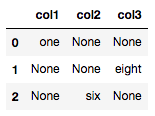
pd.DataFrame({'col1': ['one', 'None', 'None'], 'col2': ['None', 'None', 'six'], 'col3': ['None', 'eight', 'None']})

enter image description here

End goal:

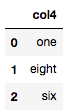
pd.DataFrame({'col4': ['one', 'eight', 'six']})

enter image description here

What I tried to do:

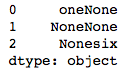
df['col1'].map(str)+df['col2'].map(str)+df['col3'].map(str)

enter image description here

How can I merge multiple pandas column object type values into one column while ignoring “None” values? By the way, in this dataset, there will never end up being more than one value in the final dataframe cells.

Solution:

You have string Nones, not actual null values, so you’ll need to replace them first.

Option 1
replace/mask/where + fillna + agg

df.replace('None', np.nan).fillna('').agg(''.join, axis=1).to_frame('col4')

Or,

df.mask(df.eq('None')).fillna('').agg(''.join, axis=1).to_frame('col4')

Or,

df.where(df.ne('None')).fillna('').agg(''.join, axis=1).to_frame('col4')

    col4
0    one
1  eight
2    six

Option 2
replace + pd.notnull

v = df.replace('None', np.nan).values.ravel()
pd.DataFrame(v[pd.notnull(v)], columns=['col4'])

    col4
0    one
1  eight
2    six

Option 3
A solution leveraging Divakar’s excellent justify function:

pd.DataFrame(justify(df.values, invalid_val='None')[:, 0], columns=['col4'])

    col4
0    one
1  eight
2    six

Reference
(Note, you will need to modify the function slightly to play nicely with string data.)

def justify(a, invalid_val=0, axis=1, side='left'):    
    """
    Justifies a 2D array

    Parameters
    ----------
    A : ndarray
        Input array to be justified
    axis : int
        Axis along which justification is to be made
    side : str
        Direction of justification. It could be 'left', 'right', 'up', 'down'
        It should be 'left' or 'right' for axis=1 and 'up' or 'down' for axis=0.

    """

    if invalid_val is np.nan:
        mask = ~np.isnan(a)
    else:
        mask = a!=invalid_val
    justified_mask = np.sort(mask,axis=axis)
    if (side=='up') | (side=='left'):
        justified_mask = np.flip(justified_mask,axis=axis)
    out = np.full(a.shape, invalid_val, dtype='<U8')    # change to be made is here
    if axis==1:
        out[justified_mask] = a[mask]
    else:
        out.T[justified_mask.T] = a.T[mask.T]
    return out

Close form solution for finding a root

Suppose I have a Pandas Series s whose values sum to 1 and whose values are also all greater than or equal to 0. I need to subtract a constant from all values such that the sum of the new Series is equal to 0.6. The catch is, when I subtract this constant, the values never end up less than zero.

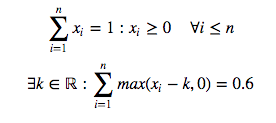
In math formula, assume I have a series of x‘s and I want to find k

enter image description here

MCVE

import pandas as pd
import numpy as np
from string import ascii_uppercase

np.random.seed([3, 141592653])
s = np.power(
    1000, pd.Series(
        np.random.rand(10),
        list(ascii_uppercase[:10])
    )
).pipe(lambda s: s / s.sum())

s

A    0.001352
B    0.163135
C    0.088365
D    0.010904
E    0.007615
F    0.407947
G    0.005856
H    0.198381
I    0.027455
J    0.088989
dtype: float64

The sum is 1

s.sum()

0.99999999999999989

What I’ve tried

I can use Newton’s method (among others) found in Scipy’s optimize module

from scipy.optimize import newton

def f(k):
    return s.sub(k).clip(0).sum() - .6

Finding the root of this function will give me the k I need

initial_guess = .1
k = newton(f, x0=initial_guess)

Then subtract this from s

new_s = s.sub(k).clip(0)
new_s

A    0.000000
B    0.093772
C    0.019002
D    0.000000
E    0.000000
F    0.338583
G    0.000000
H    0.129017
I    0.000000
J    0.019626
dtype: float64

And the new sum is

new_s.sum()

0.60000000000000009

Question

Can we find k without resorting to using a solver?

Solution:

Updated: Three different implementations – interestingly, the least sophisticated scales best.

import numpy as np

def f_sort(A, target=0.6):
    B = np.sort(A)
    C = np.cumsum(np.r_[B[0], np.diff(B)] * np.arange(N, 0, -1))
    idx = np.searchsorted(C, 1 - target)
    return B[idx] + (1 - target - C[idx]) / (N-idx)

def f_partition(A, target=0.6):
    target, l = 1 - target, len(A)
    while len(A) > 1:
        m = len(A) // 2
        A = np.partition(A, m-1)
        ls = A[:m].sum()
        if ls + A[m-1] * (l-m) > target:
            A = A[:m]
        else:
            l -= m
            target -= ls
            A = A[m:]
    return target / l            

def f_direct(A, target=0.6):
    target = 1 - target
    while True:
        gt = A > target / len(A)
        if np.all(gt):
            return target / len(A)
        target -= A[~gt].sum()
        A = A[gt]

N = 10
A = np.random.random(N)
A /= A.sum()

print(f_sort(A), np.clip(A-f_sort(A), 0, None).sum())
print(f_partition(A), np.clip(A-f_partition(A), 0, None).sum())
print(f_direct(A), np.clip(A-f_direct(A), 0, None).sum())

from timeit import timeit
kwds = dict(globals=globals(), number=1000)

N = 100000
A = np.random.random(N)
A /= A.sum()

print(timeit('f_sort(A)', **kwds))
print(timeit('f_partition(A)', **kwds))
print(timeit('f_direct(A)', **kwds))

Sample run:

0.04813686999999732 0.5999999999999999
0.048136869999997306 0.6000000000000001
0.048136869999997306 0.6000000000000001
8.38109541599988
2.1064437470049597
1.2743922089866828

Vectorized way of checking dataframe values (as key, value tuple) against a dictionary?

I’d like to create a column in my dataframe that checks whether the values in one column are the dictionary values of another column which comprises the dictionary keys, like so:

In [3]:
df = pd.DataFrame({'Model': ['Corolla', 'Civic', 'Accord', 'F-150'],
                   'Make': ['Toyota', 'Honda', 'Toyota', 'Ford']})
dic = {'Prius':'Toyota', 'Corolla':'Toyota', 'Civic':'Honda', 
       'Accord':'Honda', 'Odyssey':'Honda', 'F-150':'Ford', 
       'F-250':'Ford', 'F-350':'Ford'}
df

Out [3]:
     Model    Make
0  Corolla  Toyota
1    Civic   Honda
2   Accord  Toyota
3    F-150    Ford

And after applying a function, or whatever it takes, I’d like to see:

Out [10]:
     Model    Make   match
0  Corolla  Toyota    TRUE
1    Civic   Honda    TRUE
2   Accord  Toyota   FALSE
3    F-150    Ford    TRUE

Thanks in advance!

Edit: I tried making a function that is passed a tuple which would be the two columns, but I don’t think I’m passing the arguments correctly:

def is_match(make, model):
  try:
    has_item = dic[make] == model
  except KeyError:
    has_item = False
  return(has_item)

df[['Model', 'Make']].apply(is_match)

results in:
TypeError: ("is_match() missing 1 required positional 
argument: 'model'", 'occurred at index Model')

Solution:

You can using map

df.assign(match=df.Model.map(dic).eq(df.Make))
Out[129]: 
     Make    Model  match
0  Toyota  Corolla   True
1   Honda    Civic   True
2  Toyota   Accord  False
3    Ford    F-150   True

How can you re-use a variable scope in tensorflow without a new scope being created by default?

I have created a variable scope in one part of my graph, and later in another part of the graph I want to add OPs to an existing scope. That equates to this distilled example:

import tensorflow as tf

with tf.variable_scope('myscope'):
  tf.Variable(1.0, name='var1')

with tf.variable_scope('myscope', reuse=True):
  tf.Variable(2.0, name='var2')

print([n.name for n in tf.get_default_graph().as_graph_def().node])

Which yields:

['myscope/var1/initial_value', 
 'myscope/var1', 
 'myscope/var1/Assign', 
 'myscope/var1/read', 
 'myscope_1/var2/initial_value', 
 'myscope_1/var2', 
 'myscope_1/var2/Assign', 
 'myscope_1/var2/read']

My desired result is:

['myscope/var1/initial_value', 
 'myscope/var1', 
 'myscope/var1/Assign', 
 'myscope/var1/read', 
 'myscope/var2/initial_value', 
 'myscope/var2', 
 'myscope/var2/Assign', 
 'myscope/var2/read']

I saw this question which didn’t seem to have an answer that addressed the question directly: TensorFlow, how to reuse a variable scope name

Solution:

Here is one straightforward way to do this using as with somename in a context manager. Using this somename.original_name_scope property, you can retrieve that scope and then add more variables to it. Below is an illustration:

In [6]: with tf.variable_scope('myscope') as ms1:
   ...:   tf.Variable(1.0, name='var1')
   ...: 
   ...: with tf.variable_scope(ms1.original_name_scope) as ms2:
   ...:   tf.Variable(2.0, name='var2')
   ...: 
   ...: print([n.name for n in tf.get_default_graph().as_graph_def().node])
   ...: 
['myscope/var1/initial_value', 
 'myscope/var1', 
 'myscope/var1/Assign', 
 'myscope/var1/read', 
 'myscope/var2/initial_value', 
 'myscope/var2', 
 'myscope/var2/Assign', 
 'myscope/var2/read']

Remark
Please also note that setting reuse=True is optional; That is, even if you pass reuse=True, you’d still get the same result.

Another way (thanks to OP himself!) is to just add / at the end of the variable scope when reusing it as in the following example:

In [13]: with tf.variable_scope('myscope'):
    ...:   tf.Variable(1.0, name='var1')
    ...: 
    ...: # reuse variable scope by appending `/` to the target variable scope
    ...: with tf.variable_scope('myscope/', reuse=True):
    ...:   tf.Variable(2.0, name='var2')
    ...: 
    ...: print([n.name for n in tf.get_default_graph().as_graph_def().node])
    ...: 
['myscope/var1/initial_value', 
 'myscope/var1', 
 'myscope/var1/Assign', 
 'myscope/var1/read', 
 'myscope/var2/initial_value', 
 'myscope/var2', 
 'myscope/var2/Assign', 
 'myscope/var2/read']

Remark
Also, please note that setting reuse=True is again optional; That is, even if you pass reuse=True, you’d still get the same result.