Replace certain text with value if text in list

I’m just getting up to speed on Pandas and cannot resolve one issue. I have a list of Counties in NY State. If the County is one of the 5 boroughs, I want to change the county name to New York, otherwise I leave it alone. The following gives the idea, but is not correct.

EDIT – so if the counties in the County column of the first few rows were Albany, Allegheny, Bronx before the change, they would be Albany, Allegheny, New York after the change

# clean up county names
# 5 boroughs must be combined to New York City
# eliminate the word county
nyCounties = ["Kings", "Queens", "Bronx", "Richmond", "New York"]

nypopdf['County'] = ['New York' for nypopdf['County'] in nyCounties else   
nypopdf['County']]

Solution:

A small mockup:

In [44]: c = ['c', 'g']
In [45]: df = pd.DataFrame({'county': list('abccdefggh')})
In [46]: df['county'] = df['county'].where(~df['county'].isin(c), 'N')
In [47]: df
Out[47]:   county
         0      a
         1      b
         2      N
         3      N
         4      d
         5      e
         6      f
         7      N
         8      N
         9      h

So this is using pd.Series.where ~df['county'].isin(c) selects rows that are not in the list c (the ~ at the start is the ‘not’ operation), the second argument is the value to replace with (when the condition is False).

To fit your example:

nypopdf['County'] = nypopdf['County'].where(~nypopdf['County'].isin(nyCounties), 'New York')

or

nypopdf['County'].where(~nypopdf['County'].isin(nyCounties), 'New York', inplace=True)

Complete example:

nypopdf = pd.DataFrame({'County': ['Albany', 'Allegheny', 'Bronx']})
nyCounties = ["Kings", "Queens", "Bronx", "Richmond", "New York"]
print(nypopdf)
      County
0     Albany
1  Allegheny
2      Bronx
nypopdf['County'].where(~nypopdf['County'].isin(nyCounties), 'New York', inplace=True)
print(nypopdf)
      County
0     Albany
1  Allegheny
2   New York
Python, why is this lamdba function not correct?

flight_data is dataframe in panda:

  for c in flight_data.columns:
      if ('Delay' in c):
          flight_data[c].fillna(0, inplace = True)

How do I do this in 1 line using lambda function?

map(lambda c: flight_data[c].fillna(0, inplace = True), list(filter(lambda c : 'Delay' in c, flight_data.columns)))

Why aren’t these two equivalent?

When printing out the data, NaN is not replaced by 0.

Solution:

Don’t use lambda

lambda only obfuscates logic here. Just specify in-scope columns and use fillna directly:

cols = df.filter(like='Delay').columns
df[cols] = df[cols].fillna(0)

How do I do this in 1 line using lambda function?

But to answer your question, you can do this without relying on side-effects of map or a list comprehension:

df = df.assign(**df.pipe(lambda x: {c: x[c].fillna(0) for c in x.filter(like='Delay')}))

Find the dictionary from List which has key-pair 'isGeo':True

How to Find the dictionary from List which has key-pair ‘isGeo’:True

dimensions = [{'key': 2600330, 'id': 'location', 'name': 'Location', 'isGeo': True, 'geoType': 'region'}, {'key': 2600340, 'id': 'subject', 'name': 'Subject', 'isGeo': False, 'geoType': None}, {'key': 2600350, 'id': 'measure', 'name': 'Measure', 'isGeo': False, 'geoType': None}]

I want to below result:

{'key': 2600330, 'id': 'location', 'name': 'Location', 'isGeo': True, 'geoType': 'region'}

Solution:

Use next with a generator expression:

res = next((d for d in dimensions if d['isGeo']), None)

{'key': 2600330, 'id': 'location', 'name': 'Location', 'isGeo': True, 'geoType': 'region'}

Since you tagged , you can also use Pandas:

import pandas as pd

df = pd.DataFrame(dimensions)
res = df.loc[df['isGeo']].iloc[0].to_dict()

The above solutions assume you want only the first dictionary satisfying your condition. If you want a list of dictionaries use:

res = [d for d in dimensions if d['isGeo']]
res = df.loc[df['isGeo']].to_dict('records')

Insert dot in currency amount

Set-up

I have several integers that represent monetary values.

Problem is that the integers are missing a dot, i.e. 12345 should be 123.45.

My Code

amount = str(12345)
first_amount = amount[:-2]
last_amount = amount[-2:]
order_amount = float(first_amount + '.' + last_amount)

this works fine, i.e. I obtain 123.45.

I was wondering if there’s a one-line solution.

Solution:

Yes there’s a solution, dividing by 100.00, note the .00 part:

a = 12345
print(a/100.00) # prints 123.45

How to iterate over a dictionary and operate with its elements?

I have this dictionary, where the keys represent atom types and the values represent the atomic masses:

mass = {'H': 1.007825, 'C': 12.01, 'O': 15.9994, 'N': 14.0067, 'S': 31.972071,
        'P': 30.973762}

what I want to do is to create a function that given a molecule, for instance ('H2-N-C6-H4-C-O-2H'), iterates over the mass dictionary and calculates the atomic mass on the given molecule. The value of the mass must be multiplied by the number that comes right after the atom type: H2 = H.value * 2

I know that firstly I must isolate the keys of the given molecules, for this I could use string.split('-'). Then, I think I could use and if block to stablish a condition to accomplish if the key of the given molecule is in the dictionary. But later I’m lost about how I should proceed to find the mass for each key of the dictionary.

The expected result should be something like:

mass_counter('H2-N15-P3')

out[0] 39351.14

How could I do this?

EDIT:

This is what I’ve tried so far

# Atomic masses
mass = {'H': 1.007825, 'C': 12.01, 'O': 15.9994, 'N': 14.0067, 'S': 31.972071, 
        'P': 30.973762}

def calculate_atomic_mass(molecule):
    """
    Calculate the atomic mass of a given molecule
    """
    mass = 0.0
    mol = molecule.split('-')

    for key in mass:
        if key in mol:
            atom = key

    return mass

print calculate_atomic_mass('H2-O')
print calculate_atomic_mass('H2-S-O4')
print calculate_atomic_mass('C2-H5-O-H')
print calculate_atomic_mass('H2-N-C6-H4-C-O-2H')

Solution:

Given all components have the shape Aa123, It might be easier here to identify parts with a regex, for example:

import re
srch = re.compile(r'([A-Za-z]+)(\d*)')
mass = {'H': 1.007825, 'C': 12.01, 'O': 15.9994, 'N': 14.0067, 'S': 31.972071, 'P': 30.973762}

def calculate_atomic_mass(molecule):
    return sum(mass[a[1]]*int(a[2] or '1') for a in srch.finditer(molecule))

Here our regular expression [wiki] thus captures a sequence of [A-Z-a-z]s, and a (possibly empty) sequence of digits (\d*), these are the first and second capture group respectively, and thus can be obtained for a match with a[1] and a[2].

this then yields:

>>> print(calculate_atomic_mass('H2-O'))
18.01505
>>> print(calculate_atomic_mass('H2-S-O4'))
97.985321
>>> print(calculate_atomic_mass('C2-H5-O-H'))
46.06635
>>> print(calculate_atomic_mass('H2-N-C6-H4-C-O-2H'))
121.130875
>>> print(calculate_atomic_mass('H2-N15-P3'))
305.037436

We thus take the sum of the mass[..] of the first capture group (the name of the atom) times the number at the end, and we use '1' in case no such number can be found.

Or we can first split the data, and then look for a atom part and a number part:

import re
srch = re.compile(r'^([A-Za-z]+)(\d*)$')

def calculate_atomic_mass(molecule):
    """
    Calculate the atomic mass of a given molecule
    """
    result = 0.0
    mol = molecule.split('-')
    if atm in mol:
        c = srch.find(atm)
        result += result[c[1]] * int(c[2] or '1')
    return result

Pandas replace all numeric values not equal to a specific value

My DataFrame:

            HLLM  HXBX  JHWO  RPNZ  ZHNL
2008-08-31     0     0     0     0     0
2008-09-30     0     0     0     0     0
2008-10-31     3     1     0     0     5
2008-11-30     0    -1     0     0     0

I am trying to replace all values that are NOT equal to 0 to the value 1

df = df.replace(df != 0, 1)

How can I rewrite this so that it works?

Solution:

You can simply use

df[df != 0] = 1        

HLLM  HXBX  JHWO  RPNZ  ZHNL
2008-08-31     0     0     0     0     0
2008-09-30     0     0     0     0     0
2008-10-31     1     1     0     0     1
2008-11-30     0     1     0     0     0

Should I use property or private attribute?

Suppose I create a class:

class SomeClass:    
    def __init__(self, some_attribute):
        self._attribute = some_attribute

    @property
    def attribute(self):
        return self._attribute

Then, I add a method new_method to my object that will use the “attribute”.
Therefore, should I use self._attribute or self.attribute?:

def new_method(self):
    DoSomething(self.attribute) # or     DoSomething(self._attribute)

Does it make any impact or difference?

Solution:

Using self.attribute will trigger a call to SomeClass.attribute.__get__ and therefore come with more overhead.

Using self._attribute comes with less overhead but will introduce a bug in your code as soon as you add meaningful logic to the definition of attribute.

In my opinion, use self.attribute consistently. If the getter ever becomes a bottleneck, consider caching-strategies before using _attribute and attribute inside the class inconsistently. Sooner or later you will introduce a bug.

How do you escape this while loop?

I’m currently in year 10 (9th grade) and I’m making a program for school that converts binary numbers into decimal numbers and vice versa on python. My coding knowledge isn’t great so the program may not be as efficient as it can be so please bear with me.

The code below is checking whether the user input only contains 1’s and 0’s and that it does not go over the maximum of 8 bits. When I run it and input an invalid number, it works and loops just fine but when I input a valid number, it keeps on going back to the input command and asks me to input something instead of escaping the loop and moving onto the next thing. Please help!

max_8bits = 1
only_bin = 1
while max_8bits > 0 or only_bin > 0:

    b2d_num = input("Enter a binary number:")

    for i in range(len(b2d_num)):
        if b2d_num[i] == "0" or b2d_num[i] == "1":
            if i == len(b2d_num):
                only_bin -= 1
        else:
            print("Only enter a binary number! (0's and 1's)")
            break

    if len(b2d_num) > 8:
        print("Only enter up to 8 bits!")
    elif len(b2d_num) <= 8:
        max_8bits -= 1

Solution:

The major problem is that you never set your flags to exit the loop. You never get to the point of having an index 8 in a loop that goes 0-7.
When you break out of the for loop, you aren’t properly managing the values. Suggestions:

  1. Use Booleans, not integers: that’s the logic in your head.
  2. Simplify the value checking: use built-in Python functions.

Code:

too_long = True
not_bin = True

while too_long or not_bin:

    b2d_num = input("Enter a binary number:")

    # Check input length
    too_long = len(b2d_num) > 8
    if too_long:
        print("Only enter up to 8 bits!")
        continue

    # Check input content
    not_bin = False

    for i, bit in enumerate(b2d_num):
        not_bin = not_bin or bit not in "01"

    if not_bin:
        print("Only enter a binary number! (0's and 1's)")

Check if All Values Exist as Keys in Dictionary

I have a list of values, and a dictionary. I want to ensure that each value in the list exists as a key in the dictionary. At the moment I’m using two sets to figure out if any values don’t exist in the dictionary

unmapped = set(foo) - set(bar.keys())

Is there a more pythonic way to test this though? It feels like a bit of a hack?

Solution:

Your approach will work, however, there will be overhead from the conversion to set.

Another solution with the same time complexity would be:

all(i in bar for i in foo)

Both of these have time complexity O(len(foo))

bar = {str(i): i for i in range(100000)}
foo = [str(i) for i in range(1, 10000, 2)]

%timeit all(i in bar for i in foo)
462 µs ± 14.8 µs per loop (mean ± std. dev. of 7 runs, 1000 loops each)

%timeit set(foo) - set(bar)
14.6 ms ± 174 µs per loop (mean ± std. dev. of 7 runs, 100 loops each)

# The overhead is all the difference here:

foo = set(foo)
bar = set(bar)

%timeit foo - bar
213 µs ± 1.48 µs per loop (mean ± std. dev. of 7 runs, 1000 loops each)

The overhead here makes a pretty big difference, so I would choose all here.

IndentationError: unexpected indent after comment

I am trying to write some Python example code with a line commented out:

user_by_email = session.query(User)\
    .filter(Address.email=='one')\
    #.options(joinedload(User.addresses))\
    .first()

I also tried:

user_by_email = session.query(User)\
    .filter(Address.email=='one')\
#    .options(joinedload(User.addresses))\
    .first()

But I get IndentationError: unexpected indent.
If I remove the commented out line, the code works.
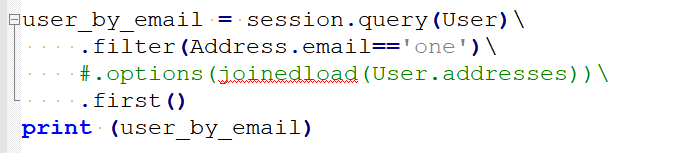
I am decently sure that I use only spaces (Notepad++ screenshot):

enter image description here

Solution:

Enclose the statement in paranthesis

user_by_email = (session.query(User)
     .filter(Address.email=='one')
     #.options(joinedload(User.addresses))
     .first())