Python – Using a variable as part of string formating

I searched for an answer but since it is a bit specific couldnt find an answer. A simple question for the experts (I hope).

I want to be able to use a int variable instead of the number (5) used in the code below. I hope there is a way or else I will have to put my code within if blocks which i am trying to avoid if possible (i don’t want it to go through a condition everytime in my loop).

my_array[1, 0] = '{0:.5f}'.format(a)

Is there a way for me to write the code below using a variable like:

x = 5
my_array[1, 0] = '{0:.xf}'.format(a)

Any help will be appreciated!

Solution:

Of course there is:

x = 5
a = '{1:.{0}f}'.format(x, 1.12345111)
print(a)  # -> 1.12345

Note that the following fails:

a = '{:.{}f}'.format(x, 1.12345111)

That is because the first argument to format() goes to the
first (outermost) bracket of the string and since {:1.12345111f} is invalid, an Error is raised.


If you do not want to specify the positions (0 & 1), you have to invert your input:

a = '{:.{}f}'.format(1.12345111, x)
#                    ^ now the number goes first.
Why python's function "open" automatically creates a file when the second parameter is "w"?

When I use this code,it will automatically creates a file.Why?Where can I see the source code of this function?

with open('E:/test.txt','w') as f:
    for i in range(10):
        f.write('abc\n')
f.close()

Solution:

The w flag opens a file, truncates it, and then begins writing from the beginning. I was interested in investigating why it creates files as soon as you call it, but there doesn’t seem to be much in the spec that describes it’s anticipated behavior.

While it mightn’t be easy to find the source code, you can see the documentation here. See the table under the modes argument for an explanation of all the modes you can use.

We can only guess as to the intentions of the people who wrote open(), but it would seem that the one thing consistent among all modes is:

Open file and return a corresponding file object. If the file cannot be opened, an OSError is raised.

Without getting input from whoever wrote the spec I would assume they consider “open file” to involve creating it if it doesn’t exist.

How can make my Python Discord bot I check if a message was sent by the bot itself?

I am writing a Discord bot using Python (v. 3.6.1) which detects all messages sent in a channel and replies to them in that same channel. However, the bot replies to messages by itself, causing an infinite loop.

@bot.event
async def on_message(message)
await bot.send_message(message.channel, message.content)

How would I fix this?

Solution:

The message class contains information on the message’s author, which you can utilize to determine whether or not to respond to the message. author is a Member object (or its superclass User if the channel is private), which has an id property but also supports direct logical comparisons between users.

For example:

@bot.event
async def on_message(message):
    if message.author != bot.user:
        await bot.send_message(message.channel, message.content)

Should function as desired

Accessing `self` from thread target

According to a number of sources, including this question, passing a runnable as the target parameter in __init__ (with or without args and kwargs) is preferable to extending the Thread class.

If I create a runnable, how can I pass the thread it is running on as self to it without extending the Thread class? For example, the following would work fine:

class MyTask(Thread):
    def run(self):
        print(self.name)
MyTask().start()

However, I can’t see a good way to get this version to work:

def my_task(t):
    print(t.name)
Thread(target=my_task, args=(), kwargs={}).start()

This question is a followup to Python – How can I implement a 'stoppable' thread?, which I answered, but possibly incompletely.

Update

I’ve thought of a hack to do this using current_thread():

def my_task():
    print(current_thread().name)
Thread(target=my_task).start()

Problem: calling a function to get a parameter that should ideally be passed in.

Update #2

I have found an even hackier solution that makes current_thread seem much more attractive:

class ThreadWithSelf(Thread):
    def __init__(self, **kwargs):
        args = kwargs.get('args', ())
        args = (self,) + tuple(args)
        kwargs[args] = args
        super().__init__(**kwargs)
ThreadWithSelf(target=my_task).start()

Besides being incredibly ugly (e.g. by forcing the user to use keywords only, even if that is the recommended way in the documentation), this completely defeats the purpose of not extending Thread.

Update #3

Another ridiculous (and unsafe) solution: to pass in a mutable object via args and to update it afterwards:

def my_task(t):
    print(t[0].name)
container = []
t = Thread(target=my_task, args=(container,))
container[0] = t
t.start()

To avoid synchronization issues, you could kick it up a notch and implement another layer of ridiculousness:

 def my_task(t, i):
     print(t[i].name)
 container = []
 container[0] = Thread(target=my_task, args=(container, 0))
 container[1] = Thread(target=my_task, args=(container, 1))
 for t in container:
     t.start()

I am still looking for a legitimate answer.

Solution:

It seems like your goal is to get access to the thread currently executing a task from within the task itself. You can’t add the thread as an argument to the threading.Thread constructor, because it’s not yet constructed. I think there are two real options.

  1. If your task runs many times, potentially on many different threads, I think the best option is to use threading.current_thread() from within the task. This gives you access directly to the thread object, with which you can do whatever you want. This seems to be exactly the kind of use-case this function was designed for.

  2. On the other hand, if your goal is implement a thread with some special characteristics, the natural choice is to subclass threading.Thread, implementing whatever extended behavior you wish.

Also, as you noted in your comment, insinstance(current_thread(), ThreadSubclass) will return True, meaning you can use both options and be assured that your task will have access to whatever extra behavior you’ve implemented in your subclass.

Python recursion is very slow

I am a novice at python, but was surprised at how slow this recursive call took to execute:

def daH(m:int):
    if m == 1:
        return int(1)
    else:
        if m <= .5 * (daH(m-1) * (daH(m-1) +1)):
            return int(daH(m-1))
        else:
            return int(daH(m-1) + 1)

print(daH(10)) # prints 4
print(daH(11)) # prints 5
print(daH(15)) # prints 5    
print(daH(16)) # prints 6

print(daH(106)) # prints ??? (gave up waiting)    

I ran it on IDLE, python 3.6. I added the INT stuff but it did not help. I had no problems running the standard factorial recursion and printing factorial(106).

Can this attempt at recursion be salvaged?

Solution:

You are computing daH(m-1) 3 times, making the algorithm slower than necessary. Instead, calculate it just once and bind the result to a local variable. (Also, not necessary to cast to int)

def daH(m:int):
    if m == 1:
        return 1
    else:
        r = daH(m-1)
        if m <= .5 * r * (r + 1):
            return r
        else:
            return r + 1

Calling the function three times instead of once may not seem like much, but remember that those calls will stack exponentially! You call it three times, and each of those again call it three times, and so on. This results in a complexity of O(3m), which even for m=15 results in about 15 million recursive calls, as opposed to the 15 that are actually necessary.

is operator not working on objects with same identity?

I’m running:

Python 2.7.8 (default, Oct  6 2017, 09:25:50)
[GCC 4.1.2 20070626 (Red Hat 4.1.2-14)] on linux2

As per the docs:

The operators is and is not test for object identity: x is y is True if and only if x and y are the same object.

To get an object’s identity, we can use the id function


If we open up a new REPL we can see that 300 and -6 have the same identity (on CPython, this means that both refer to the same memory address):

>>> id(300)
94766593705400
>>> id(-6)
94766593705400

Note that the actual values may differ from execution to execution, but they are always equal.

However, doing 300 is -6 yields False:

>>> 300 is -6
False

I have a couple of questions:

  • Why (and how) do 300 and -6 share the same identity?
  • If they do, why is 300 is -6 yielding False ?

Solution:

After id(300) is executed, no more references to 300 exist, so the id is freed. When you execute id(6), it gets that same chunk of memory and stores 6 instead. When you do -300 is 6, -300 and 6 are both referenced at the same time, so they won’t have the same address anymore.

If you keep references to both -300 and 6, this happens:

>>> a, b = -300, 6
>>> id(a)
some number
>>> id(b)
some different number; 6 is still in the other memory address.

Note: In CPython, numbers from -5 to 256 (I think) are cached, and will always have the same address, so this will not happen.

Broadcast rotation matrices multiplication

How to do the line marked with # <---- in a more direct way?

In the program, each row of x is coordinates of a point, rot_mat[0] and rot_mat[1] are two rotation matrices. The program rotates x by each rotation matrix.

Changing the order of multiplication between each rotation matrix and the coordinates is fine, if it makes things simpler. I want to have each row of x or the result representing coordinate of a point.

The result should match the checks.

Program:

# Rotation of coordinates of 4 points by 
# each of the 2 rotation matrices.
import numpy as np
from scipy.stats import special_ortho_group
rot_mats = special_ortho_group.rvs(dim=3, size=2)  # 2 x 3 x 3
x = np.arange(12).reshape(4, 3)
result = np.dot(rot_mats, x.T).transpose((0, 2, 1))  # <----
print("---- result ----")
print(result)
print("---- check ----")
print(np.dot(x, rot_mats[0].T))
print(np.dot(x, rot_mats[1].T))

Result:

---- result ----
[[[  0.20382264   1.15744672   1.90230739]
  [ -2.68064533   3.71537598   5.38610452]
  [ -5.56511329   6.27330525   8.86990165]
  [ -8.44958126   8.83123451  12.35369878]]

 [[  1.86544623   0.53905202  -1.10884323]
  [  5.59236544  -1.62845022  -4.00918928]
  [  9.31928465  -3.79595246  -6.90953533]
  [ 13.04620386  -5.9634547   -9.80988139]]]
---- check ----
[[  0.20382264   1.15744672   1.90230739]
 [ -2.68064533   3.71537598   5.38610452]
 [ -5.56511329   6.27330525   8.86990165]
 [ -8.44958126   8.83123451  12.35369878]]
[[  1.86544623   0.53905202  -1.10884323]
 [  5.59236544  -1.62845022  -4.00918928]
 [  9.31928465  -3.79595246  -6.90953533]
 [ 13.04620386  -5.9634547   -9.80988139]]

Solution:

Use np.tensordot for multiplication involving such tensors

np.tensordot(rot_mats, x, axes=((2),(1))).swapaxes(1,2)

Here’s some timings to convince ourselves why tensordot works better with tensors

In [163]: rot_mats = np.random.rand(20,30,30)
     ...: x = np.random.rand(40,30)

# With numpy.dot
In [164]: %timeit np.dot(rot_mats, x.T).transpose((0, 2, 1))
1000 loops, best of 3: 670 µs per loop

# With numpy.tensordot
In [165]: %timeit np.tensordot(rot_mats, x, axes=((2),(1))).swapaxes(1,2)
10000 loops, best of 3: 75.7 µs per loop

In [166]: rot_mats = np.random.rand(200,300,300)
     ...: x = np.random.rand(400,300)

# With numpy.dot
In [167]: %timeit np.dot(rot_mats, x.T).transpose((0, 2, 1))
1 loop, best of 3: 1.82 s per loop

# With numpy.tensordot
In [168]: %timeit np.tensordot(rot_mats, x, axes=((2),(1))).swapaxes(1,2)
10 loops, best of 3: 185 ms per loop

python separate text into different column with comma

I’m pulling data from a database and writing to a new Excel file for a report. My issue is that the last column of data has data that is separated by commas and needs to be separated into separate columns.

As an example I have data like the following:

Name  Info
Mike  "a, b, c, d"
Joe  "a, f, z"

I need to break these letters out into separate columns. The a’s, b’s, etc. don’t have to line up so that each letter is in the “correct” column. They just need to be broken out into separate columns.

I’m doing this in Python. I’m open to using other libraries like Pandas. There will be other columns included, not just two. I made a simple example.

Any help is appreciated.

Solution:

From pandas str.split

df=pd.concat([df,df.Info.str.split(',',expand=True)],1)
df
Out[611]: 
   Name        Info  0   1   2     3
0  Mike  a, b, c, d  a   b   c     d
1   Joe     a, f, z  a   f   z  None

Conditional statements on Panda Dataframes using Lambdas

I’m getting stuck on a simple point. I’m trying to establish a column within a Panda dataframe, which only pulls up the age for males (0), but for some reason I cannot iterate over the Dataframe (it only repeats the first result, which is 22).

Here is my code:

new_tab['menage'] = new_tab.Gender.apply(
        lambda x: new_tab.iloc[:,1] if x==0 
        else 0)

    Original Age    Gender  menage
0   22.0    0   22.0
1   38.0    1   0.0
2   26.0    1   0.0
3   35.0    1   0.0
4   35.0    0   22.0

I’m specifically trying to do this for lambda, whilst recognising there are other alternatives available.

I’m sure it’s something really straightforward, but being new to coding, is beyond me at present.

Any help would be brilliant.

Thanks

Solution:

Your current operation does not work, because new_tab.iloc[:,1] in its entirety is applied each and every time the lambda is invoked (rather than in an iterative fashion as you’d expect). There are, however, faster options besides apply.

Option 1
mask

v = df['Original Age'].mask(df['Gender'].astype(bool)).fillna(0)
v

0    22.0
1     0.0
2     0.0
3     0.0
4    35.0
Name: Original Age, dtype: float64

df['menage'] = v

Option 2
np.where

np.where(df['Gender'], 0, df['Original Age'])

0    22.0
1     0.0
2     0.0
3     0.0
4    35.0
Name: Original Age, dtype: float64

Option 3
The loopy solution with apply would involve calling apply over the entire df, as you need multiple columns accessible in the lambda.

df.apply(lambda r: r['Original Age'] if r['Gender'] == 0 else 0, axis=1)

0    22.0
1     0.0
2     0.0
3     0.0
4    35.0
dtype: float64

Index of last occurrence of max before min

The title might not be intuitive–let me provide an example. Say I have df, created with:

a = np.array([[ 1. ,  0.9,  1. ],
              [ 0.9,  0.9,  1. ],
              [ 0.8,  1. ,  0.5],
              [ 1. ,  0.3,  0.2],
              [ 1. ,  0.2,  0.1],
              [ 0.9,  1. ,  1. ],
              [ 1. ,  0.9,  1. ],
              [ 0.6,  0.9,  0.7],
              [ 1. ,  0.9,  0.8],
              [ 1. ,  0.8,  0.9]])

idx = pd.date_range('2017', periods=a.shape[0])
df = pd.DataFrame(a, index=idx, columns=list('abc'))

I can get the index location of each respective column minimum with

df.idxmin()

Now, how could I get the location of the last occurrence of the column-wise maximum, up to the location of the minimum?

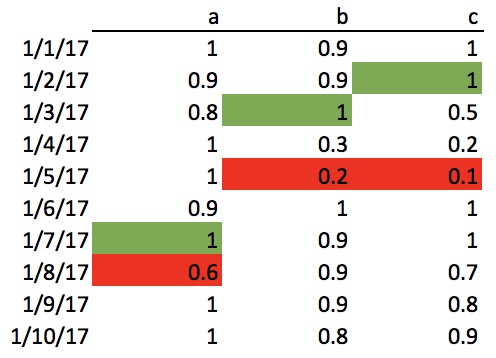
Visually, I want to find the location of the green max’s below:

enter image description here

where the max’s after the minimum occurrence are ignored.

I can do this with .apply, but can it be done with a mask/advanced indexing?

Desired result:

a   2017-01-07
b   2017-01-03
c   2017-01-02
dtype: datetime64[ns]

Solution:

Apply a mask and then call idxmax on the reversed dataframe.

df.mask((df == df.min()).cumsum().astype(bool))[::-1].idxmax()

a   2017-01-07
b   2017-01-03
c   2017-01-02
dtype: datetime64[ns]

Details

First, identify the location of the smallest items per column.

df.min()

a    0.6
b    0.2
c    0.1
dtype: float64

i = df == df.min()
i

                a      b      c
2017-01-01  False  False  False
2017-01-02  False  False  False
2017-01-03  False  False  False
2017-01-04  False  False  False
2017-01-05  False   True   True
2017-01-06  False  False  False
2017-01-07  False  False  False
2017-01-08   True  False  False
2017-01-09  False  False  False
2017-01-10  False  False  False

Now, mask those values and beyond!

j = df.mask(i).cumsum().astype(bool))
j

              a    b    c
2017-01-01  1.0  0.9  1.0
2017-01-02  0.9  0.9  1.0
2017-01-03  0.8  1.0  0.5
2017-01-04  1.0  0.3  0.2
2017-01-05  1.0  NaN  NaN
2017-01-06  0.9  NaN  NaN
2017-01-07  1.0  NaN  NaN
2017-01-08  NaN  NaN  NaN
2017-01-09  NaN  NaN  NaN
2017-01-10  NaN  NaN  NaN

To find the last maximum, just reverse and call idxmax.

j[::-1].idxmax()

a   2017-01-07
b   2017-01-03
c   2017-01-02
dtype: datetime64[ns]