All possible combinations of a given string

I need to find all possible combinations of a given string, from a minimum length to a maximum length.

interface allCombos(string: String, min: Number, max:Number): Array {}

So if my input string is ‘abcde’, and my minimum length is 3, I want the result to be:

For length 3:

[‘abc’, ‘abd’, ‘abe’, ‘acd’, ..., ‘bcd’, ‘bce’, ..., ‘eda’, ...]

Concatenated with length 4:

[‘abcd’, ‘abdc’, ‘acdb’, ‘acbd’, …etc]

Concatenated with all possible combinations with length up to the max parameter. Which shouldn’t be higher than the input word length.

I started thinking that all possible combinations would be ∑(3! + 4! + … + n!). But then I saw I’m wrong because for every length subset, there are many combinations for the whole world (for example 3-length combinations of a 6 letter string).

Can the community help me with this problem?

The solution can either be in JavaScript, Python or even pseudo code.

Edit

For knowledge’s sake. Could anyone answer me, the formula that describes the result size in this case? I know its not ∑(3! + 4! + … + n!).

Solution:

You can use itertools.combinations for this:

from itertools import combinations

["".join(li) for li in combinations('abcde', 3)]

This will give

['abc', 'abd', 'abe', 'acd', 'ace', 'ade', 'bcd', 'bce', 'bde', 'cde']

Brief explanation:

list(combinations('abcde', 3))

will give

[('a', 'b', 'c'),
 ('a', 'b', 'd'),
 ('a', 'b', 'e'),
 ('a', 'c', 'd'),
 ('a', 'c', 'e'),
 ('a', 'd', 'e'),
 ('b', 'c', 'd'),
 ('b', 'c', 'e'),
 ('b', 'd', 'e'),
 ('c', 'd', 'e')]

so all combinations of three of your letters. You can join the individual tuples then in a list comprehension.

You can then of course easily put this in a loop if you like:

min_length = 3
max_length = 5

res = {str(i): ["".join(li) for li in combinations('abcde', i)] for i in range(min_length, max_length + 1)}

This gives

{'3': ['abc', 'abd', 'abe', 'acd', 'ace', 'ade', 'bcd', 'bce', 'bde', 'cde'],
 '4': ['abcd', 'abce', 'abde', 'acde', 'bcde'],
 '5': ['abcde']}

If you want to have it in a single list:

import numpy as np
final_list = np.concatenate(res.values())

which yields

array(['abc', 'abd', 'abe', 'acd', 'ace', 'ade', 'bcd', 'bce', 'bde',
       'cde', 'abcde', 'abcd', 'abce', 'abde', 'acde', 'bcde'],
      dtype='|S5')

python .sort() has higher priority for __lt__ than __gt__?

I have seen similar questions, but they did not answer why python __lt__ has higher priority than __gt__?

Quick example, let me give a superclass and a subclass:

class Person(object):
    id = 0
    def __init__(self, name):
        self.name = name
        self.id = Person.id
        Person.id += 1

    def __str__(self):
        return self.name

    def __lt__(self, other):
        return self.id < other.id

class SubPerson(Person):
    def __gt__(self, other):
        return self.name > other.name

Here in superclass Person, I created a __lt__ method, to compare based on Person’s self.id. In sub class SubPerson, I created a __gt__ method to compare based on the self.name.

What I found is that if I created a number of SubPerson instances in a list:

s1 = SubPerson('WWW'); s1.id = 14
s2 = SubPerson('XXX'); s2.id = 12
s3 = SubPerson('YYY'); s3.id = 11
s4 = SubPerson('ZZZ'); s4.id = 13
lst2 = [s2, s1, s4, s3]
lst2.sort()
print([i.__str__() for i in lst2])  # >>> ['YYY', 'XXX', 'ZZZ', 'WWW']

What I found is that:
if __lt__ is defined in superclass, then even if you define __gt__ in subclass, it will still sort by the __lt__ method in superclass

But if it is the other way around, define __gt__ in superclass and __lt__ in subclass, then it will then sort by __lt__ in subclass

If the two method names are the same (both lt or both gt), obviously, the subclass will override superclass, as it should be.

But it seems when they are different, it follows a different rule: by whatever __lt__ defines. I’ve also noticed that even if in one class, if both __lt__ and __gt__ are defined (based on different things, it will still sort by __lt__ method)

SO back to my question, is my observation true or not? and since I am a beginner, and I have not read through the whole python documents, can somebody point me out where in the documents that this rule is written.

Solution:

list.sort uses only < comparisons. This is documented.

Binary operators like < will try the left-hand operand’s method first unless the right-hand operand’s class is a subclass of the left-hand operand’s class. The other operand’s method will only be considered if the first method is missing or returns NotImplemented. The left-hand operand’s method for < is __lt__, and the right-hand operand’s method is __gt__. This is also documented.

Since all your list elements have the same class and __lt__ always succeeds, only the __lt__ methods end up getting called.

Too many values to unpack error

Hi I am working with a list of tuple and I want to convert it to a dict. I am using list comprehensions, below is my code:

output_dict["leftovers"] = dict((position, token) for leftover in total_leftover
                                    for token, position in leftover)

I am not able to identify where I am going wrong.

total_leftover = [('alice',0),('carrot',4)]

Solution:

You’re doing it wrong! Your list comprehension equates to

for leftover in total_leftover:
    for token, position in leftover:
        ...

Notice the issue is here with the second loop, leftover is a 2-tuple, and you are attempting to iterate over it, unpacking two elements at a time. This is not correct, as the tuple only has two scalars (you’re trying to extract two scalars per iteration, and there’s a difference).

If you’re just mapping values to keys, then this should suffice. Reverse every tuple using map + reversed, and then pass the result to dict.

>>> dict(map(reversed, total_leftover))
{0: 'alice', 4: 'carrot'}

Alternatively, use a dict comprehension and swap the items.

>>> {y : x for x, y in total_leftover}
{0: 'alice', 4: 'carrot'}

As a matter of which is better to use, I’ll do a little benchmarking. First, the setup –

x = np.arange(1000000) 
y = x.copy()
np.random.shuffle(x)

z = list(zip(x, y))

# solution with `map` + `reversed`
%timeit dict(map(reversed, z))
1 loop, best of 3: 965 ms per loop

# Daniel Roseman's solution with `dict`
%timeit dict((y, x) for x, y in z)
1 loop, best of 3: 341 ms per loop

# dict comprehension
%timeit {y : x for x, y in z}
1 loop, best of 3: 235 ms per loop

The dictionary comprehension is by far the most performant method here, because it is part of the language’s literal syntax, rather than setting up a generator and delegating the dictionary creation to a function call.

How to choose different elements of a list other than the indexed element?

I have a list, for instance I want to select all elements other than the indexed element if I run a for loop on the list.

For example,

  var = [a,b,c,d,e]
  1st iteration: Choose b,c,d,e and ignore a
  2nd iteration: Choose a,c,d,e and ignore b
  3rd iteration: Choose a,b,d,e and ignore c
  and so on...

I tried using slicing but I am no able to have condition on the previous elements and how to take them.

Can someone suggest any other method?

Solution:

This worked like a charm:

var = [1, 2, 3, 4, 5]

for i in range(len(var)):
    print(var[:i] + var[i+1:])

Results:

[2, 3, 4, 5]
[1, 3, 4, 5]
[1, 2, 4, 5]
[1, 2, 3, 5]
[1, 2, 3, 4]

How to remove duplicate tuples from a list in python?

I have a list that contains list of tuples as follows.

mylist = [['xxx', 879], ['yyy', 315], ['xxx', 879], ['zzz', 171], ['yyy', 315]]

I want to remove the duplicate tuples from mylist and get an output as follows.

mylist = [['xxx', 879], ['yyy', 315], ['zzz', 171]]

It seems like set in python does not work for it.

mylist = list(set(mylist))

Is there any fast and easy way of doing this in python (perhaps using libraries)?

Solution:

You need to write code that keeps the first of the sub-lists, dropping the rest. The simplest way to do this is to reverse mylist, load it into an dict object, and retrieve its key-value pairs as lists again.

>>> list(map(list, dict(mylist).items()))

Or, using a list comprehension

>>> [list(v) for v in dict(mylist).items()]

[['zzz', 171], ['yyy', 315], ['xxx', 879]]

Note, that this answer does not maintain order! Also, if your sub-lists can have more than 2 elements, an approach involving hashing the tuplized versions of your data, as @JohnJosephFernandez’ answer shows, would be the best thing to do.

How to replace all values in a numpy array with zero except one specific value?

I have a 2D numpy array with ‘n’ unique values.
I want to produce a binary matrix, where all values are replaced with
‘zero’ and a value which I specify is assigned as ‘one’.

For example, I have an array as follows and I want all instances
of 35 to be assigned ‘one’:

array([[12, 35, 12, 26],
       [35, 35, 12, 26]])

I am trying to get the following output:

array([[0, 1, 0, 0],
       [1, 1, 0, 0]])

what is the most efficient way to do it in Python?

Solution:

import numpy as np
x = np.array([[12, 35, 12, 26], [35, 35, 12, 26]])
(x == 35).astype(int)

will give you:

array([[0, 1, 0, 0],
       [1, 1, 0, 0]])

The == operator in numpy performs an element-wise comparison, and when converting booleans to ints True is encoded as 1 and False as 0.

Understanding Scipy Convolution

I am trying to understand the differences between the discrete convolution provided by Scipy and the analytic result one would obtain. My question is how does the time axis of the input signal and the response function relate the the time axis of the output of a discrete convolution?

To try and answer this question I considered an example with an analytic result. My input signal is a Gaussian and my response function is a exponential decay with a step function. The analytic results of the convolution of these two signals is a modified Gaussian (https://en.wikipedia.org/wiki/Exponentially_modified_Gaussian_distribution). enter image description here
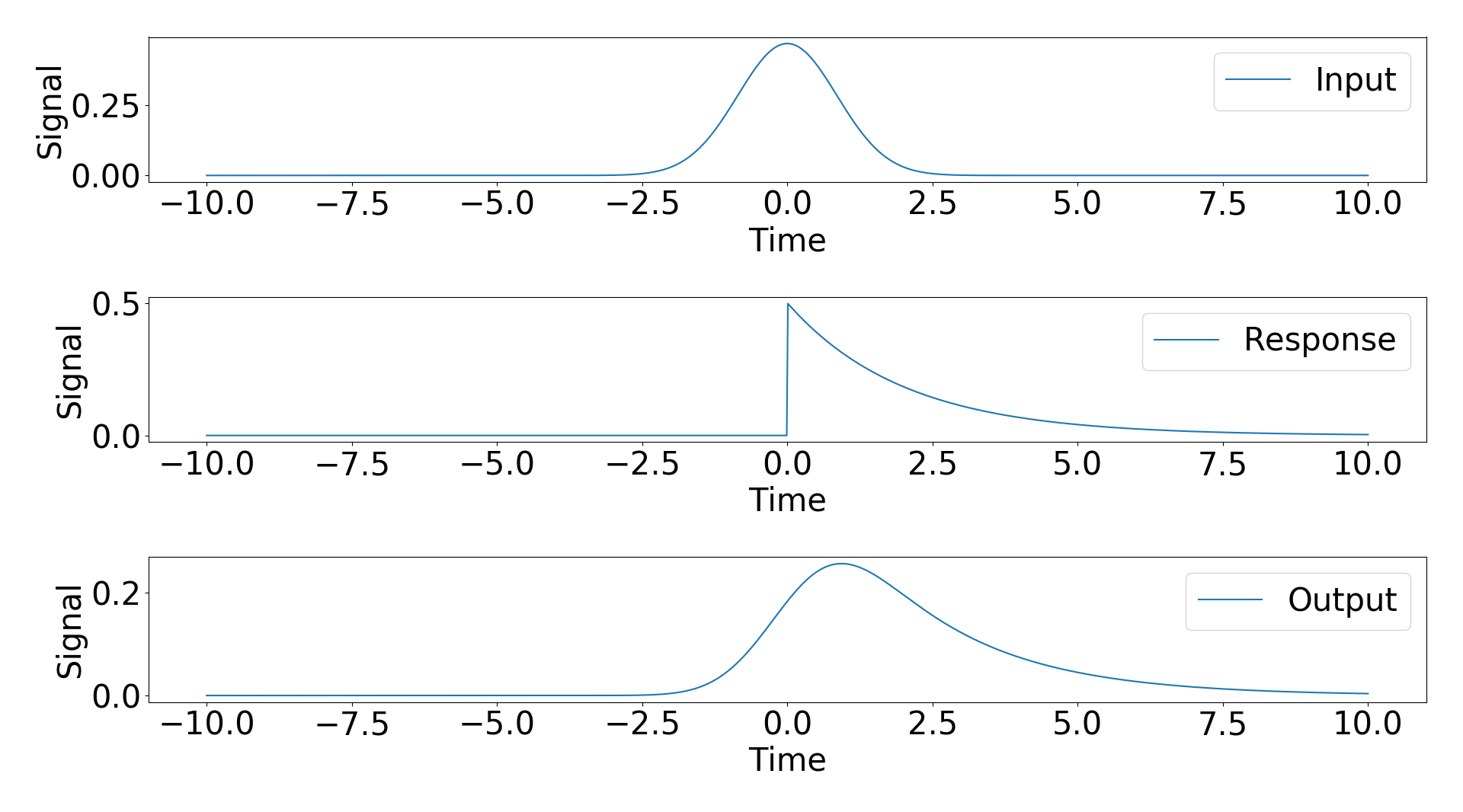
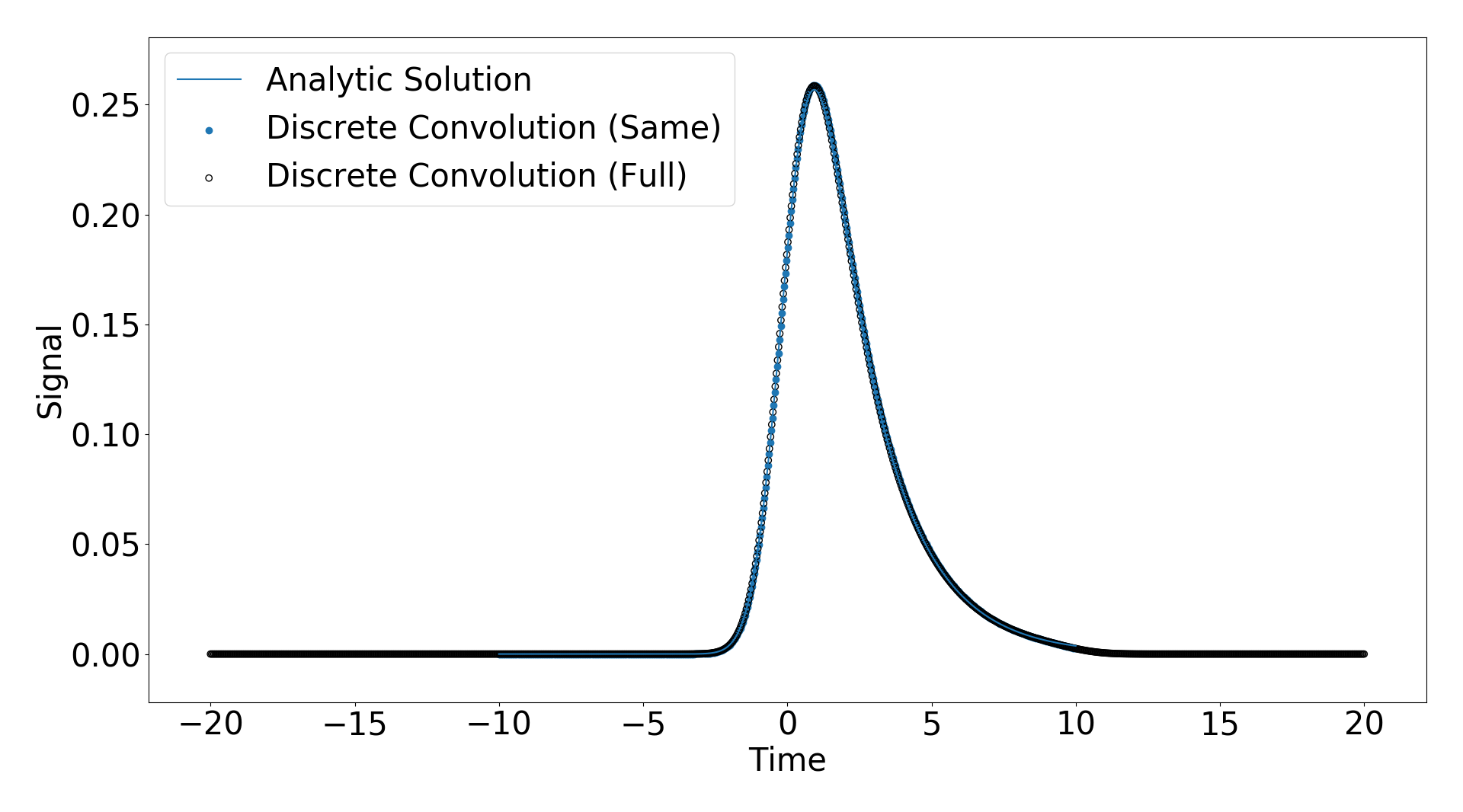
Scipy gives three modes of convolution, “same”, “full”, “valid”. I applied the “same” and “full” convolutions and plotted the result against the analyitic solution below.
enter image description here

You can see they match extremely well.

One important feature to note is that for the “full” discrete convolution, the resulting time domain is much larger than the input signal time domain (see. https://www.researchgate.net/post/How_can_I_get_the_convolution_of_two_signals_in_time_domain_by_just_having_the_values_of_amplitude_and_time_using_Matlab), but for the “same” discrete convolution the time domains are the same and the input and response domains (which I have chosen to be the same for this example).

My confusion arose when I observed that changing the domain in which my response function was populated changed the result of the convolution functions. That means when I set t_response = np.linspace(-5,10,1000) instead of t_response = np.linspace(-10,10,1000) I got different results as shown below
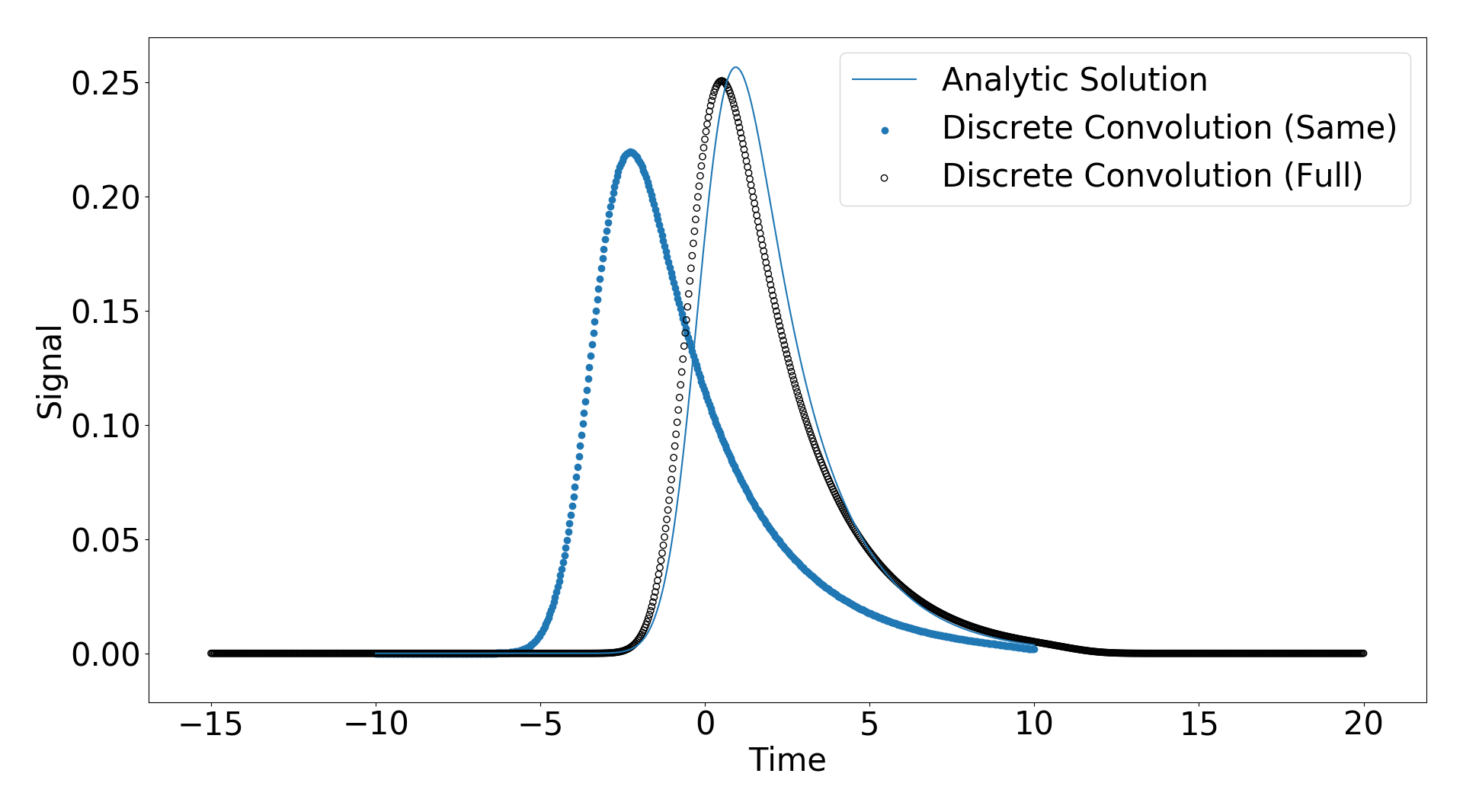
enter image description here

As you can see the solutions shift slightly. My question is how does the time axis of the input signal and the response function relate the the time axis of the output? I have attached the code I am using below and any help would be appreciated.

import numpy as np
import matplotlib as mpl
from scipy.special import erf
import matplotlib.pyplot as plt
from scipy.signal import convolve as convolve
params = {'axes.labelsize': 30,'axes.titlesize':30, 'font.size': 30, 'legend.fontsize': 30, 'xtick.labelsize': 30, 'ytick.labelsize': 30}
mpl.rcParams.update(params)

def Gaussian(t,A,mu,sigma):
    return A/np.sqrt(2*np.pi*sigma**2)*np.exp(-(t-mu)**2/(2.*sigma**2))
def Decay(t,tau,t0):
    ''' Decay expoential and step function '''
    return 1./tau*np.exp(-t/tau) * 0.5*(np.sign(t-t0)+1.0)
def ModifiedGaussian(t,A,mu,sigma,tau):
        ''' Modified Gaussian function, meaning the result of convolving a gaussian with an expoential decay that starts at t=0'''
        x = 1./(2.*tau) * np.exp(.5*(sigma/tau)**2) * np.exp(- (t-mu)/tau)
        s = A*x*( 1. + erf(   (t-mu-sigma**2/tau)/np.sqrt(2*sigma**2)   ) )
        return s

### Input signal, response function, analytic solution
A,mu,sigma,tau,t0 = 1,0,2/2.344,2,0  # Choose some parameters for decay and gaussian
t = np.linspace(-10,10,1000)         # Time domain of signal
t_response = np.linspace(-5,10,1000)# Time domain of response function

### Populate input, response, and analyitic results
s = Gaussian(t,A,mu,sigma)
r = Decay(t_response,tau,t0)
m = ModifiedGaussian(t,A,mu,sigma,tau)

### Convolve
m_full = convolve(s,r,mode='full')
m_same = convolve(s,r,mode='same')
# m_valid = convolve(s,r,mode='valid')
### Define time of convolved data
t_full = np.linspace(t[0]+t_response[0],t[-1]+t_response[-1],len(m_full))
t_same = t
# t_valid = t

### Normalize the discrete convolutions
m_full /= np.trapz(m_full,x=t_full)
m_same /= np.trapz(m_same,x=t_same)
# m_valid /= np.trapz(m_valid,x=t_valid)

### Plot the input, repsonse function, and analytic result
f1,(ax1,ax2,ax3) = plt.subplots(nrows=3,ncols=1,num='Analytic')
ax1.plot(t,s,label='Input'),ax1.set_xlabel('Time'),ax1.set_ylabel('Signal'),ax1.legend()
ax2.plot(t_response,r,label='Response'),ax2.set_xlabel('Time'),ax2.set_ylabel('Signal'),ax2.legend()
ax3.plot(t_response,m,label='Output'),ax3.set_xlabel('Time'),ax3.set_ylabel('Signal'),ax3.legend()

### Plot the discrete  convolution agains analytic
f2,ax4 = plt.subplots(nrows=1)
ax4.scatter(t_same[::2],m_same[::2],label='Discrete Convolution (Same)')
ax4.scatter(t_full[::2],m_full[::2],label='Discrete Convolution (Full)',facecolors='none',edgecolors='k')
# ax4.scatter(t_valid[::2],m_valid[::2],label='Discrete Convolution (Valid)',facecolors='none',edgecolors='r')
ax4.plot(t,m,label='Analytic Solution'),ax4.set_xlabel('Time'),ax4.set_ylabel('Signal'),ax4.legend()
plt.show()

Solution:

The crux of the problem is that in the first case your signals have the same sampling rates, while in the second they do not.

I feel that it’s easier to think about this in the frequency domain, where convolution is multiplication. When you create a signal and filter with the same time axis, np.linspace(-10, 10, 1000), they now have the same sampling rates. Applying the Fourier transform to each, the resulting arrays give the power at the same frequencies for the signal and filter. So you can directly multiply corresponding elements of those arrays.

But when you create a signal with time axis np.linspace(-10, 10, 1000) and a filter with time axis np.linspace(-5, 10, 1000), that’s no longer true. Applying the Fourier transform and multiplying corresponding elements is no longer correct, because the frequencies at the corresponding elements is not the same.

Let’s make this concrete, using your example. The frequency of the first element of the transform (i.e., np.fft.fftfreq(1000, np.diff(t).mean())[1]) of the signal (s) is about 0.05 Hz. But for the filter (r), the frequency of the first element is about 0.066 Hz. So multiplying those two elements is multiplying the power at two different frequencies. (This subtlety is why you often see signal processing examples first defining the sampling rate, and then creating time arrays, signals, and filters based on that.)

You can verify that this is correct by creating a filter which extends over the time range you’re interested in [-5, 10), but with the same sampling rate as the original signal. So using:

t = np.linspace(-10, 10, 1000)
t_response = t[t > -5.0]

generates a signal and filter over different time ranges but at the same sampling rate, so the convolution should be correct. This also means you need to modify how each array is plotted. The code should be:

ax4.scatter(t_response[::2], m_same[125:-125:2], label='Same') # Conv extends beyond by ((N - M) / 2) == 250 / 2 == 125 on each side
ax4.scatter(t_full[::2], m_full[::2], label='Full')
ax4.scatter(t_response, m, label='Analytic solution')

This generates the plot below, in which the analytic, full, and same convolutions match up well.

enter image description here

name collision use 'from import' and I can't use the variable that is imported?

So for example: here I have fake.py file and real.py file. And in fake.py:

a = 'fake a'
b = 'fake b'

and in real.py:

from fake import*
a = 'real a'
print(a,b)

then it prints out: real a fake b

Why is that?
What if I want to use a in fake.py?
Do I have to use import fake and fake.a?

‘statements within a module(fake in this example?) are executed only the first time a module is imported’

what does this mean ?

I am new to programming please help thank you.

Solution:

Keep away from from some_module import * because you import all names from that module into your current module namespace.

This will – in case of a “name clash” – not only overwrite any previously defined names but they are also, as you’ve seen, likely to be overwritten.


Why is that?

The from fake import * in your case is very roughly equivalent to:

# equivalent to "from fake import *"
import fake
a = fake.a
b = fake.b
del fake

# Rest of the file
a = "real a"
print(a, b)

So no wonder that the "fake a" isn’t accessible (nor printed).


Do I have to use import fake and fake.a?

That’s a good start if you want to “reduce” the likelyhood of such name collisions:

import fake
a = "real a"
print(a, fake.a, fake.b)

But you could also use an alias:

import fake as f
a = "real a"
print(a, f.a, f.b)

You could also import specific names from fake (also with aliases):

from fake import a as fake_a, b as fake_b
a = "real a"
print(a, fake_a, fake_b)

As for

What if I want to use a in fake.py?

There should be no problem because there is no import in fake.py so no name collision there.

How to remove case-insensitive duplicates from a list, while maintaining the original list order?

I have a list of strings such as:

myList = ["paper", "Plastic", "aluminum", "PAPer", "tin", "glass", "tin", "PAPER", "Polypropylene Plastic"]

I want this outcome (and this is the only acceptable outcome):

myList = ["paper", "Plastic", "aluminum", "tin", "glass", "Polypropylene Plastic"]

Note that if an item ("Polypropylene Plastic") happens to contain another item ("Plastic"), I would still like to retain both items. So, the cases can be different, but the item must be a letter-for-letter match, for it to be removed.

The original list order must be retained. All duplicates after the first instance of that item should be removed. The original case of that first instance should be preserved, as well as the original cases of all non-duplicate items.

I’ve searched and only found questions that address one need or the other, not both.

Solution:

It’s difficult to code that with a list comprehension (or at the expense of clarity) because of the accumulation/memory effect that you need to filter out duplicates.

It’s also not possible to use a set comprehension because it destroys the original order.

Classic way with a loop and an auxiliary set where you store the lowercase version of the strings you’re encountering. Store the string in the result list only if the lowercased version isn’t in the set

myList = ["paper", "Plastic", "aluminum", "PAPer", "tin", "glass", "tin", "PAPER", "Polypropylene Plastic"]
result=[]

marker = set()

for l in myList:
    ll = l.lower()
    if ll not in marker:   # test presence
        marker.add(ll)
        result.append(l)   # preserve order

print(result)

result:

['paper', 'Plastic', 'aluminum', 'tin', 'glass', 'Polypropylene Plastic']

using .casefold() instead of .lower() allows to handle subtle “casing” differences in some locales (like the german double “s” in Strasse/Straße).

Edit: it is possible to do that with a list comprehension, but it’s really hacky:

marker = set()
result = [not marker.add(x.casefold()) and x for x in myList if x.casefold() not in marker]

It’s using and on the None output of set.add to call this function (side effect in a list comprehension, rarely a good thing…), and to return x no matter what. The main disavantages are:

  • readability
  • the fact that casefold() is called twice, once for testing, once for storing in the marker set

numpy – use arrays as start and end of range

This is a simplified array of what I have:

a = np.array([ 1, 12, 60, 80, 90, 210])
b = np.array([11, 30, 79, 89, 99, 232])

How can I get a result that uses a as the start range, and b as the end of the range, that can compute a list of numbers (quickly).

so, c would look like:

c = np.array([1,2,3,...,11, 12,13,14,...,29,30, 
              60,61,62,...79, ..., 210,211,...,231,232])

Ideally, this would be done in a vectorised way (using numpy/pandas) rather than python.

Solution:

Summarizing the comments above: One way is to use zip() and np.concatenate().

c = np.concatenate([np.arange(x, y+1) for x, y in zip(a,b)])

HT to @VasilisG. And @ThomasKühn