
Suchen Sie etwas anderes?
Table of Contents
Basic Settings
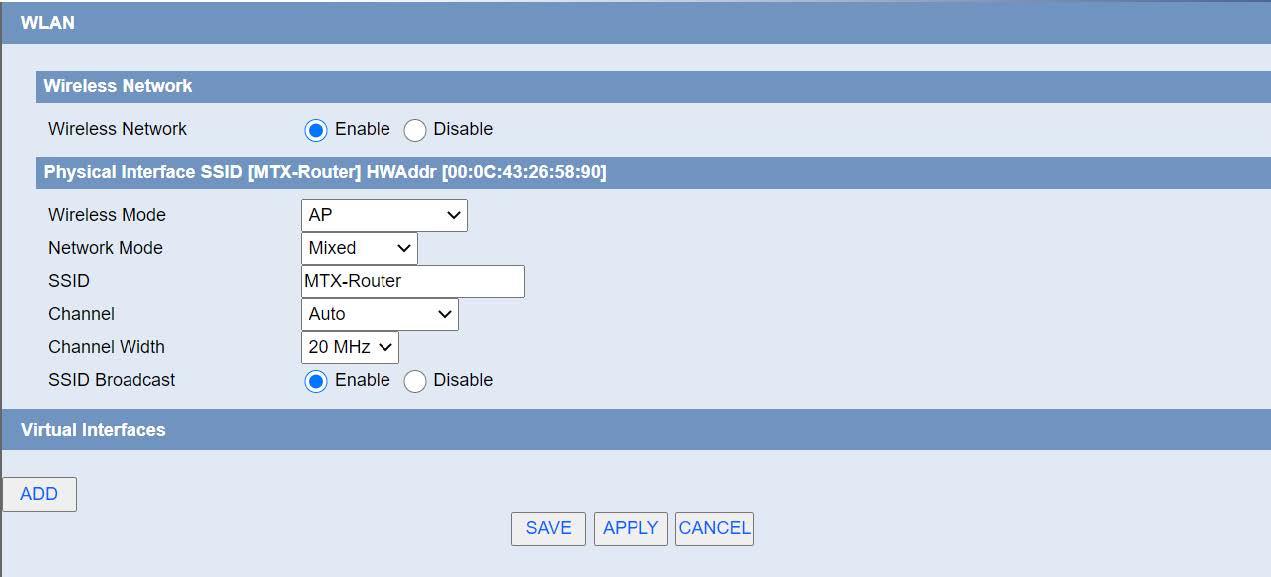
Wireless Network: “Eanble”, radio on. “Disable”, radio off.
Wireless Mode: AP.
Network Mode:
Mixed: Support 802.11b, 802.11g, 802.11n wireless devices.
BG-Mixed: Support 802.11b, 802.11g wireless devices.
B-only: Only supports the 802.11b standard wireless devices.
B-only: Only supports the 802.11b standard wireless devices.
G-only: Only supports the 802.11g standard wireless devices.
NG-Mixed: Support 802.11g, 802.11n wireless devices.
N-only: Only supports the 802.11g standard wireless devices.
SSID: The SSID is the network name shared among all devices in a wireless network. The SSID must be identical for all devices in the wireless network. It is case-sensitive and must not exceed 32 alphanumeric characters, which may be any keyboard character. Make sure this setting is the same for all devices in your wireless network.
Channel: A total of 1-13 channels to choose more than one wireless device environment, please try to avoid using the same channel with other devices.
Channel Width: 20MHZ and 40MHZ.
Channel: Channel for 40MHZ, you can choose upper or lower.
Wireless SSID Broadcast: Enable, SSID broadcasting; Disable, Hidden SSID.
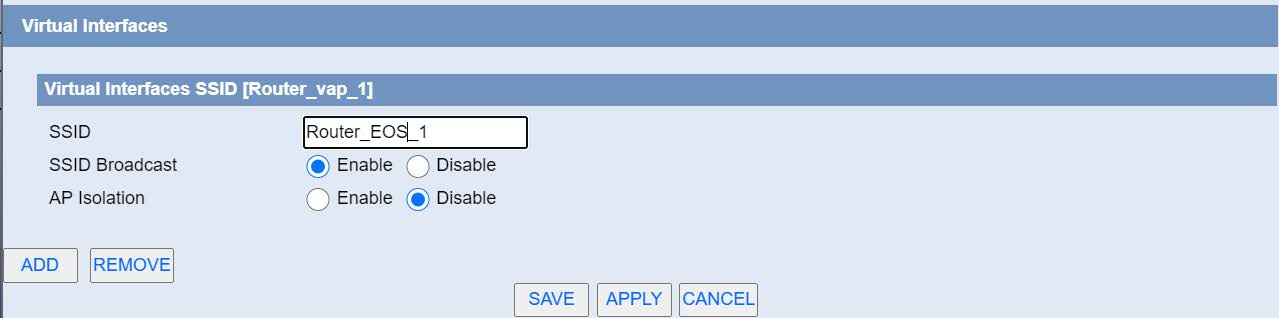
Virtual Interfaces: Click Add to add a virtual interface. Add successfully, click on the remove, you can remove the virtual interface.
AP Isolation: This setting isolates wireless clients so access to and from other wireless clients are stopped.

 Enter the “ethernet” or “modem” connection type:
 For an ethernet configuration, make sure the IP parameters are compatible with server access according to the concentrator local network configuration. For an ethernet connection, the configuration must be compatible with the concentrator’s local network topology so that it can access the servers. This configuration is done from the “Networks” configuration page (see section 3.2.2.3: “Networks”).
For a modem connection, the modem configuration must be correct before a connection can be set up. This configuration is done from the “Modem” configuration page (see section 3.2.2.4: “Modem”).
The parameters for the servers to be configured are at least the following:
For an ethernet configuration, make sure the IP parameters are compatible with server access according to the concentrator local network configuration. For an ethernet connection, the configuration must be compatible with the concentrator’s local network topology so that it can access the servers. This configuration is done from the “Networks” configuration page (see section 3.2.2.3: “Networks”).
For a modem connection, the modem configuration must be correct before a connection can be set up. This configuration is done from the “Modem” configuration page (see section 3.2.2.4: “Modem”).
The parameters for the servers to be configured are at least the following:
 Therefore the following fields need to be configured: “Interface”, “Type”, “Server type”, “Address”, “Port”, “Login” and “Password”.
The other fields can be left at the default values subject to the directories having been properly created beforehand. See section 3.1.2: “Configuration files” for more details.
Therefore the following fields need to be configured: “Interface”, “Type”, “Server type”, “Address”, “Port”, “Login” and “Password”.
The other fields can be left at the default values subject to the directories having been properly created beforehand. See section 3.1.2: “Configuration files” for more details.


 Wait. The concentrator will reboot using its factory configuration.


