
What is Exception Handling?
When executing Python code, different errors may occur: coding errors made by the programmer, errors due to wrong input, or other unforeseeable things.
When an error occurs, Python’s default exception-handling behavior kicks in: it stops the program and prints an error message.
If you don’t want this default behavior, you need to handle these exceptions.
The try and except Block
In Python, exceptions are handled using the try and except block.
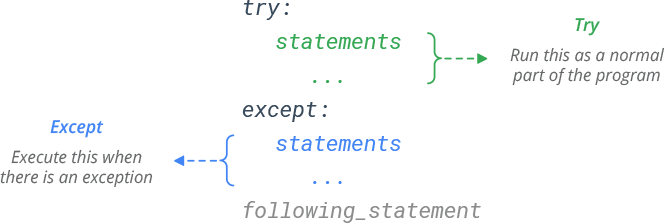
Python executes the try block as a normal part of the program.
When an error occurs during its execution, the rest of the block is skipped and except block is executed.
Basic Examples
In below example, the try block will generate an exception, because a number is divided by zero.
Hence, the except block will be executed.
try:
    x = 1/0
except:
    print('Something went wrong.')
# Prints Something went wrong.
Python don’t just handle exceptions if they occur immediately in the try block, but also if they occur inside functions that are called in the try block.
def this_fails():
    x = 1/0

try:
    this_fails()
except Exception as e:
    print(e)
# Prints division by zero
Catch Multiple Exceptions
You can define as many except blocks as you want, to catch and handle specific exceptions.
# Print one message for ZeroDivisionError and another for all other errors
try:
	x = 1/0
except ZeroDivisionError:
	print('Attempt to divide by zero')
except:
	print('Something else went wrong')
# Prints Attempt to divide by zero
If you want to execute the same block of code for multiple exceptions, specify all the exceptions in a parenthesized tuple.
# Execute same block of code for multiple exceptions
try:
    x = 1/0
except (ZeroDivisionError, ValueError):
    print('ZeroDivisionError or ValueError is raised')
except:
    print('Something else went wrong')
# Prints ZeroDivisionError or ValueError is raised
The Else Clause
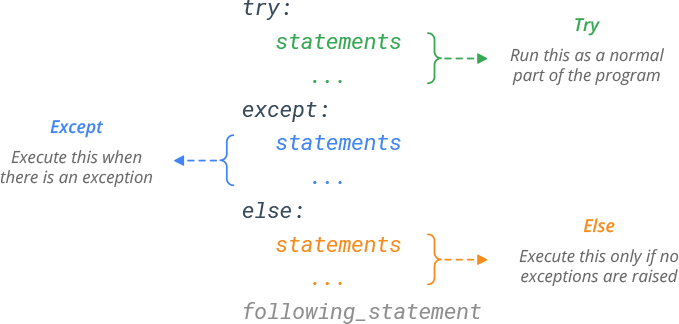
The try…except block has an optional else clause.
The else clause is executed only if no exceptions are raised.
try:
    x = 1/1
except:
    print('Something went wrong')
else:
    print('Nothing went wrong')
# Prints Nothing went wrong
The Finally Clause
The try…except block has another optional finally clause.
A finally clause is always executed, whether an exception has occurred or not.

# finally clause is always executed
try:
	x = 1/0
except:
	print('Something went wrong')
finally:
	print('Always execute this')
# Prints Something went wrong
# Prints Always execute this
Use finally clause to define clean-up actions that must be executed under all circumstances e.g. closing a file.
# Exception handling during file manipulation
f = open('myfile.txt')
try:
	print(f.read())
except:
	print("Something went wrong")
finally:
	f. close()
Raising an Exception
If you want to raise an exception when a certain condition occurs, use raise keyword.
# Raise built-in exception 'NameError'
raise NameError('An exception occured!')

# Output:
# Traceback (most recent call last):
#   File "<stdin>", line 1, in <module>
# NameError: An exception occured!
User-defined Exceptions
You can create your own exceptions by creating a new exception class like this:
# Create and raise Custom exception 'InputError'
class InputError(Exception):
    pass

raise InputError('Custom exception')

# Output:
# Traceback (most recent call last):
#   File "<stdin>", line 4, in <module>
# InputError: Custom exception
Custom exceptions should typically be derived from the Exception class.