
The object-position property of CSS specifies how an image or video element is positioned with x/y coordinates inside its content box.
Syntax
object-position: <position> | initial | inherit Property values
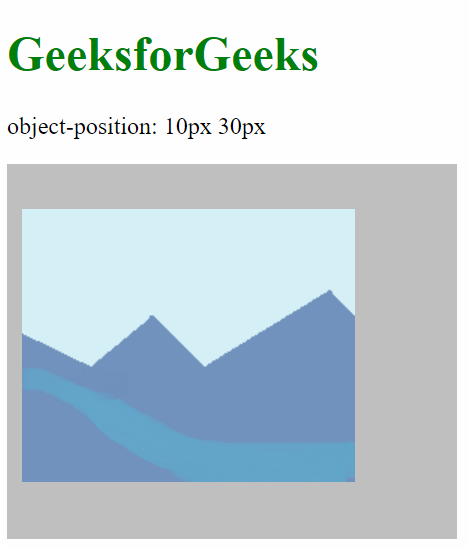
- position: This specifies the position of the element. It takes 2 numerical values corresponding to the distance from the left of the content-box and the distance from the top of the content-box respectively. It is also possible to use negative values.
Example 1:
<!--Driver Code Starts-->
<html>
<head>
<!--Driver Code Ends-->

    <style>
        img {
            width: 300px;
            height: 250px;
            background-color: silver;
            object-fit: none;
            object-position: 10px 30px;
        }
    </style>

<!--Driver Code Starts-->
</head>
<body>
    <h1 style="color: green">GeeksforGeeks</h1>
    <p>object-position: 10px 30px</p>
    <img id="object" src=
      "https://media.geeksforgeeks.org/wp-content/uploads/sample_image.png" />
</body>
</html>
<!--Driver Code Ends-->
Output:
Example 2
<!--Driver Code Starts-->
<html>
<head>
<!--Driver Code Ends-->

    <style>
        img {
            width: 300px;
            height: 250px;
            background-color: silver;
            object-fit: none;
            object-position: 50% 75%;
        }
    </style>

<!--Driver Code Starts-->
</head>
<body>
    <h1 style="color: green">GeeksforGeeks</h1>
    <p>object-position: 50% 75%</p>
    <img id="object" src=
     "https://media.geeksforgeeks.org/wp-content/uploads/sample_image.png" />
</body>
</html>
<!--Driver Code Ends-->
Output:

Example 3:
<!--Driver Code Starts-->
<html>
<head>
<!--Driver Code Ends-->

    <style>
        img {
            width: 300px;
            height: 250px;
            background-color: silver;
            object-fit: none;
            object-position: left bottom;
        }
    </style>

<!--Driver Code Starts-->
</head>
<body>
    <h1 style="color: green">GeeksforGeeks</h1>
    <p>object-position: left bottom</p>
    <img id="object" src=
     "https://media.geeksforgeeks.org/wp-content/uploads/sample_image.png" />
</body>
</html>
<!--Driver Code Ends-->
Output:

Example 4:
<!--Driver Code Starts-->
<html>
<head>
<!--Driver Code Ends-->

    <style>
        img {
            width: 300px;
            height: 250px;
            background-color: silver;
            object-fit: none;
            object-position: center top;
        }
    </style>

<!--Driver Code Starts-->
</head>
<body>
    <h1 style="color: green">GeeksforGeeks</h1>
    <p>object-position: center top</p>
    <img src=
     "https://media.geeksforgeeks.org/wp-content/uploads/sample_image.png" />
</body>
</html>
<!--Driver Code Ends-->
Output:

initial: This sets the default value of the property, that is 50% 50%, where the element is in the middle of the content box.
<!--Driver Code Starts-->
<html>
<head>
<!--Driver Code Ends-->

    <style>
        img {
            width: 300px;
            height: 250px;
            background-color: silver;
            object-fit: none;
            object-position: initial
        }
    </style>

<!--Driver Code Starts-->
</head>
<body>
    <h1 style="color: green">GeeksforGeeks</h1>
    <p>object-position: initial</p>
    <img src=
    "https://media.geeksforgeeks.org/wp-content/uploads/sample_image.png" />
</body>
</html>
<!--Driver Code Ends-->
Output:
 inherit: This receives the property from the parent element. When used with the root element, the initial property is used instead.
<!--Driver Code Starts-->
<html>
<head>
<!--Driver Code Ends-->

    <style>
        #parent {
            object-position: 60% 80%;
        }
        img {
            width: 300px;
            height: 250px;
            background-color: silver;
            object-fit: none;
            object-position: inherit;
        }
    </style>

<!--Driver Code Starts-->
</head>
<body>
    <h1 style="color: green">GeeksforGeeks</h1>
    <p>object-position: inherit</p>
    <div id="parent">
        <img src=
     "https://media.geeksforgeeks.org/wp-content/uploads/sample_image.png" />
    </div>
</body>
</html>
<!--Driver Code Ends-->
Output:
