
The [attribute=value] selector in CSS is used to select those elements whose attribute value is equal to "value".
Syntax:
element [attribute = "value"] {
    // CSS Property
}
Note: <!DOCTYPE> must be declared for IE8 and earlier versions.
Example 1: In this example, The selector h1[id="geeks"] targets the h1 element with id="geeks" and applies a green background color and white text color and The selector li[class="gfg"] targets li elements with class="gfg" and sets the text color to green.
<!DOCTYPE html>
<html>

<head>
    <!-- CSS property used here -->
    <style>
        h1[id="geeks"] {
            background-color: green;
            color: white;
        }

        li[class="gfg"] {
            color: green;
        }
    </style>
</head>

<body>
    <h1 id="geeks">GeeksforGeeks</h1>
    <ul>
        <li class="gfg">Data Structure</li>
        <li class="geeks">Algorithm</li>
        <li class="gfg">DBMS</li>
        <li class="geeks">C++ programming</li>
    </ul>

</body>

</html>
Output:

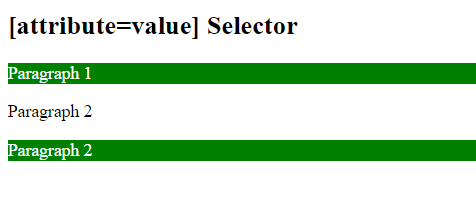
Example 2: In this example, The CSS selector p[this=Geeks] targets <p> elements with this="Geeks" attribute value and applies green background color and white text color.
<!DOCTYPE html>
<html>

<head>
    <title>
        CSS [attribute=value] Selector
    </title>

    <!-- CSS property -->
    <style>
        p[this=Geeks] {
            background-color: green;
            color: white;
        }
    </style>
</head>

<body>
    <h2>[attribute=value] Selector</h2>
    <p this="Geeks">Paragraph 1</p>

    <p this="geeks">Paragraph 2</p>

    <p this="Geeks">Paragraph 2</p>

</body>

</html>
Output:
Supported Browser:
- Google Chrome
- Microsoft Edge
- Firefox
- Opera
- Safari