
An array is a collection of elements of the same data type stored in contiguous memory locations. It allows multiple values to be stored under a single name and accessed using an index.
- Indexing of an array starts from 0, meaning the first element is stored at the 0th index, the second at 1st and so on.
- Once an array is declared, it's size remains constant throughout the program.
- Size of an array can be determined by the "sizeof" operator using which we can also find the number of elements in the array.
Example: Iterating an array element using a for loop
#include <iostream>
using namespace std;

int main() {
    // declaring and initializing an array of size 5
    int arr[5] = {2, 4, 8, 12, 16};

    // printing array elements
    for (int i = 0; i < 5; i++) {
        cout << arr[i] << " ";
    }

    return 0;
}
Output
2 4 8 12 16
Explanation:
- int arr[5] declares an array of 5 integers.
- The elements are initialized with {2, 4, 8, 12, 16}.
- The for loop is used to iterate over the array and print each element.
- Array indices in C++ start from 0, so arr[0] refers to the first element, and arr[4] refers to the last one in this case.

Declaration of an Array
We can create/declare an array by simply specifying the data type first and then the name of the array with its size inside [] square brackets(better known as array subscript operator).
Syntax:
data_type array_name [size]
This statement will create an array with name array_name that can store size elements of given data_type. Once the array is declared, its size cannot be changed.
Example:
int arr[5];
This will create an array with name arr that can store 5 integers.

When we declared an array, the elements of array do not contain any valid value.
Initialize the Array
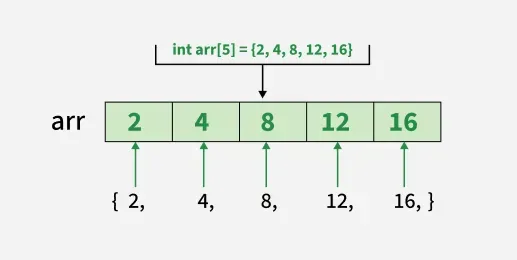
Initialization means assigning initial values to array elements. We can initialize the array with values enclosed in curly braces '{}' are assigned to the array.
Example:
int arr[5] = {2, 4, 8, 12, 16};
These values will be assigned sequentially. It means that the first element (index 0) will be 2, second will be 4, and so on. The number of values in the list cannot be more than the size of the array. But they can be less that the size. This is called partial initialization.
int arr[5] = {2, 4, 8};

The size of the array can be skipped if the size should be same as the number of values.
int arr[] = {2, 4, 8, 12, 16};
Moreover, all the elements can be easily initialized to 0 as shown below:
int arr[5] = {0};
This method only works for 0, but not for any other value.

Note: The value assigned should be of the same type of the array elements specified in the declaration
Operations on Array Elements
These are the common actions performed on arrays to store, access, modify, and manage data efficiently. let's discuss one by one
1. Access Array Elements
Elements of an array can be accessed by their position (called index) in the sequence. In C++, indexes of an array starts from 0 instead of 1. We just have to pass this index inside the [] square brackets with the array name as shown:
array_name[index];

It is important to note that index cannot be negative or greater than size of the array minus 1. (0 ≤ index ≤ size - 1). Also, it can also be any expression that results in valid index value. Example:
#include <iostream>
using namespace std;

int main() {
    int arr[] = {2, 4, 8, 12, 16};

    // Accessing fourth element
    cout << arr[3] << " ";

    // Accessing first element
    cout << arr[0];

    return 0;
}
Output
12 2
2. Update Array Elements
To change the element at a particular index in an array, just use the = assignment operator with new value as right hand expression while accessing the array element.
array_name[index] = value;
Example:
#include <iostream>
using namespace std;

int main() {
    int arr[] = {2, 4, 8, 12, 16};

    // Updating first element
    arr[0] = 90;
    cout << arr[0] << endl;

    return 0;
}
Output
90

3. Traverse Array
Traversing means visiting each element one by one. The advantage of array is that it can be easily traversed by using a loop with loop variable that runs from 0 to size - 1. We use this loop variable as index of the array and access each element one by one sequentially. Example:
#include <iostream>
using namespace std;

int main() {
    int arr[5] = {2, 4, 8, 12, 16};

    // Traversing and printing arr
    for (int i = 0; i < 5; i++)
        cout << arr[i] << " ";

    return 0;
}
Output
2 4 8 12 16

4. Size of Array
The size of the array refers to the number of elements that can be stored in the array. The array does not contain the information about its size but we can extract the size using sizeof() operator.
#include <iostream>
using namespace std;

int main() {
    char arr[] = {'a', 'b', 'c', 'd', 'f'};

    // Size of one element of an array
    cout << "Size of arr[0]: " << sizeof(arr[0])
    << endl;

    // Size of  'arr'
    cout << "Size of arr: " << sizeof(arr) << endl;

    // Length of an array
    int n = sizeof(arr) / sizeof(arr[0]);

    cout << "Length of an array: " << n << endl;

    return 0;
}
Output
Size of arr[0]: 1
Size of arr: 5
Length of an array: 5
C++ supports multidimensional arrays in addition to single-dimension structures. For more detailed information, refer to Multidimensional Arryays in C++.
Practice Problems: Print Array in Reverse, Count the Zeros in an Array, Search an Element in an Array, First Repeating Element, Sum of All Array Elements, Count Smaller Than X, Largest Element in Array