
I’ve been using Claude Code on the Pro Plan for day-to-day development, and it’s honestly a great value—especially if you treat usage limits like a budget you can manage, not a mystery that randomly runs out.
Here’s how the Pro Plan behaves in practice, why it’s so useful for coding, and the exact tactics I use to get “decent usage” even on a medium-size repo.
How usage limits work (and why it matters for Claude Code)

On Pro (and Max), usage limits are shared across Claude and Claude Code. That means all activity in both tools counts against the same pool. The practical takeaway: if you spend the morning chatting long-form strategy in Claude, you can absolutely feel it later when you hop into Claude Code.
- Claude (chat) usage varies with message length, conversation length, and file attachments.
- Claude Code usage varies with project complexity, codebase size, and auto-accept settings.
- More compute-intensive models will hit limits sooner.
Also: it’s surprisingly easy to burn through short-term limits if you’re not careful, while weekly limits are usually less “accident-prone” as long as you don’t run huge sessions all day.
You can keep a close eye on your consumption here: https://claude.ai/settings/usage
What you get on Pro: Sonnet by default, Opus 4.5 when you choose it
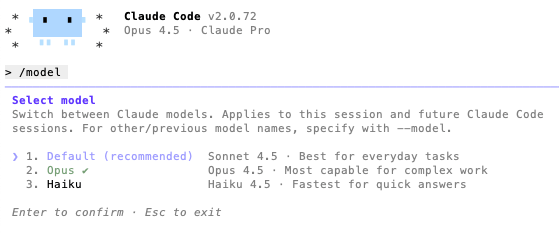
One of the most underrated parts of Pro is that you can use Sonnet or Opus 4.5 in Claude Code. You can switch between them using the /model command.
In my experience, Sonnet often ends up being the default, so if you want Opus you’ll typically need to switch manually.
/model opus
That manual switch matters because Opus is powerful—but it’s also easier to blow through limits if you use it for everything. The win is using Opus intentionally for the parts where it actually pays off.
Who Pro is “best for” (and how that matches real usage)
Officially, the Pro Plan is positioned as best for light work on small repositories (often described as “typically under ~1,000 lines of code”). In reality, I’m finding it still works well on a medium-size repo—as long as I’m deliberate about what I ask and how I ask it.
Think of Pro as: “You can absolutely do serious work—just don’t treat it like an infinite loop of autopilot refactors.”
The mindset that makes Pro feel huge: be intentional with tokens
The biggest unlock for Pro is learning to ask for fewer, clearer things—because vague requests create long back-and-forth, and back-and-forth is what eats your limits.
When I feel myself drifting into “try stuff until it works,” I reset and do this instead:
- Say what “done” means. (Tests passing? A specific endpoint response? A performance target?)
- Constrain the change. (“Only touch these files,” “no new dependencies,” “keep the public API stable.”)
- Ask for a plan first. Then execute step-by-step.
A prompt pattern that’s consistently efficient
Goal: <one sentence>
Constraints: <bullets>
Context: <what you already tried / what’s failing>

Step 1: propose the smallest safe plan (max 6 steps).
Step 2: wait for me to confirm before applying changes.
This reduces wasted exploration and keeps you in control—especially helpful when you’re switching into Opus for the hard parts.
When I use Sonnet vs. when I switch to Opus 4.5
Here’s the practical split that keeps Pro comfortable:
Use Sonnet for “fast iteration” work
- Small refactors and cleanup
- Adding tests
- Explaining unfamiliar code paths
- Generating boilerplate and quick utilities
- Lint/type fixes and straightforward bugs
Switch to Opus 4.5 for “expensive thinking”
- Tricky architecture decisions (API boundaries, module design, redesigns)
- Multi-file changes where sequencing matters
- Subtle production bugs (race conditions, caching, state issues)
- Hard debugging where you want hypothesis → experiment → conclusion
In other words: Sonnet is the daily driver. Opus is the specialist. Pro becomes a lot more “unlimited-feeling” when you treat Opus like a scalpel, not a hammer.
Make Claude Code more efficient with a claude.md file
If you want to spend fewer tokens repeating yourself, a project instruction file (often named claude.md) can help keep Claude Code grounded in your repo’s reality: conventions, commands, and guardrails. The goal is simple: fewer clarification questions, fewer wrong turns.
Here’s a template you can paste and adapt:
# claude.md — Project Instructions

## What this repo is
- One-sentence purpose:
- Key users / stakeholders:
- Critical paths (auth, payments, migrations, etc.):

## Tech stack
- Language(s):
- Framework(s):
- Build tooling:
- Test tooling:
- Package manager:

## Commands Claude should use
- Install: <command>
- Tests: <command>
- Lint: <command>
- Typecheck: <command>
- Dev server: <command>

## Coding conventions
- Style (formatting, naming, imports):
- Error handling expectations:
- Logging rules:
- Comments/docstrings rules:

## Architecture notes
- High-level module boundaries:
- “Do not touch” areas (legacy, generated code, vendor):
- Where config lives:
- Where docs live:

## PR expectations
- Keep changes minimal and focused.
- Prefer tests for new behavior.
- When unsure, ask before adding dependencies.
- Include a short summary + verification steps.
Even a short version of this pays back quickly on Pro. It reduces repeated context and keeps sessions tighter.
A few “Pro-friendly” habits that save a lot of usage
- Start with a plan request (then execute in steps). Less thrash = fewer tokens.
- Batch related changes into one clear request instead of 10 micro-prompts.
- Limit scope: tell it which directories/files matter.
- Ask for diffs + verification steps so you don’t need follow-up questions.
- Keep attachments intentional. Big files and lots of context are useful—until they’re not.
New windows for new tasks
Would it be sometimes wise to use a new Claude window to reduce context size? Yes, and on the Pro plan it’s often a very smart move.
Short answer: starting a new Claude / Claude Code window can significantly reduce token usage and improve response quality, if you do it at the right moments.
Why a new window helps:
Claude keeps the entire conversation history as context. Over time this means:
- Old assumptions stick around
- Deprecated code paths stay “mentally alive”
- Token usage grows even if your new question is small
- You pay for context you no longer need
On Pro, this matters because:
- Short-term limits burn fast
- Opus becomes expensive when dragging a long history behind it
A fresh window = clean context + lower token cost + sharper reasoning.
The one “gotcha”: remember to switch to Opus when it’s worth it
The only annoyance I regularly hit is that Sonnet gets used by default unless I explicitly switch. If you’re paying for Pro partly because you want Opus 4.5 available, build the habit:
- Begin in Sonnet for exploration and setup
- Switch to Opus for the hardest part
- Switch back to Sonnet for cleanup and iteration
/model sonnet
/model opus
Verdict: Pro is a great value plan (if you use it like one)
All-in-all, the Claude Code Pro Plan hits a really nice balance: you get a strong daily model in Sonnet, and you still have access to Opus 4.5 for the moments where you want maximum capability. With a medium-size repo, I’m consistently getting a solid amount of usage—especially when I’m careful about prompt clarity and keep an eye on limits.
If you’re curious where your usage is going (and want to course-correct before you hit the wall), keep this bookmarked: https://claude.ai/settings/usage
If you want, paste your repo’s tech stack (language/framework/test command) and I’ll generate a tailored claude.md that matches your conventions and makes Claude Code even more efficient.
Last Updated on 19 December 2025


 English
  Deutsch
  Nederlands
  Français
  Español
  Italiano
  Svenska