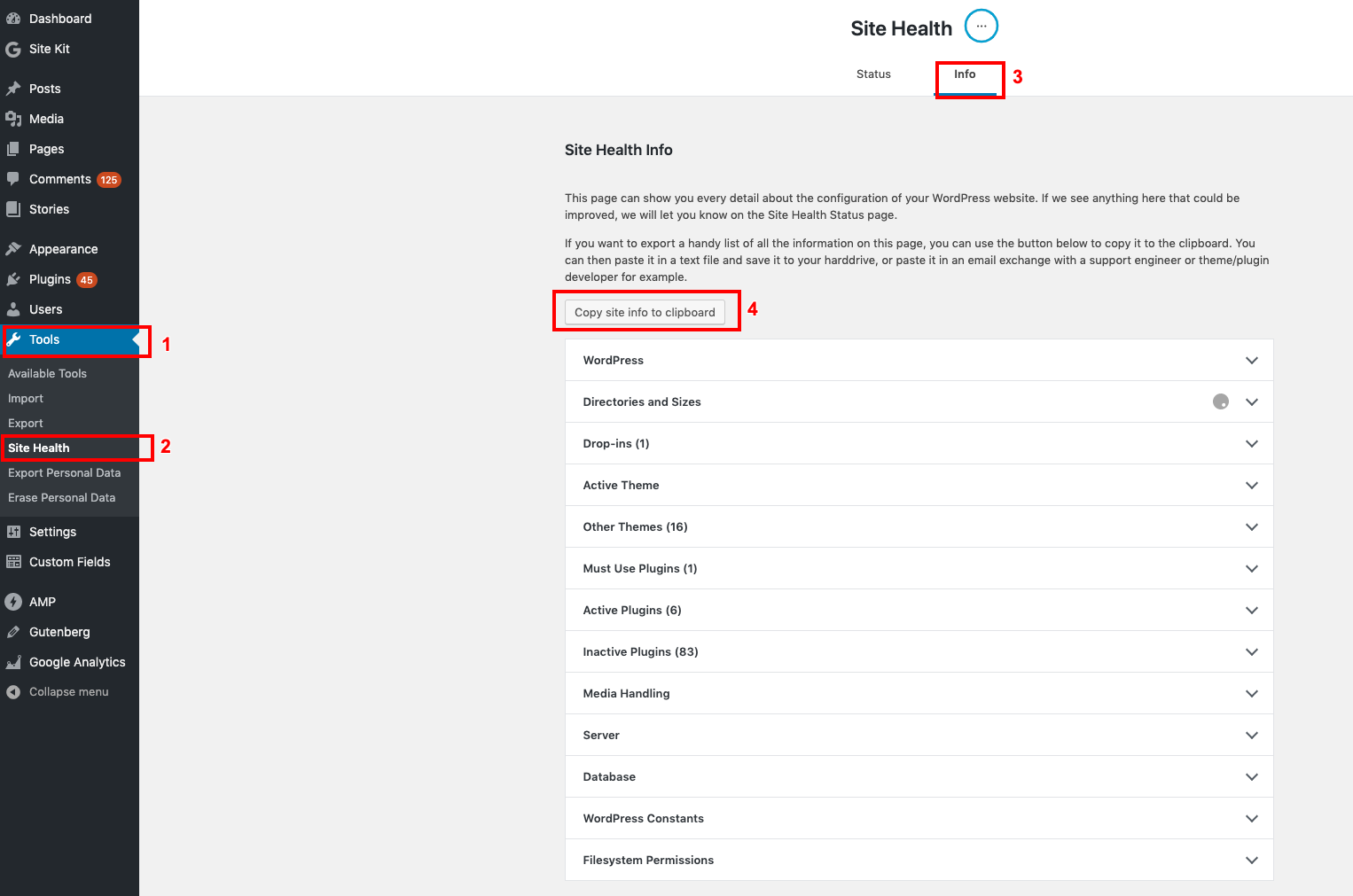
Thanks for reaching out @wigglepit, and sorry to hear of your experience having to restore multiple sites. So we can determine more on this, please share the following:
- Your Site Health information for one of the impacted sites, since restoring. You can use this form to share privately if preferred.
- Are all these sites on the same hosting platform, and are they using some common plugins among them, or the same theme? I ask as this may be related to another plugin or theme, possibly CocoBasic plugins or themes. The notice you’re encountering is stating that the code for a CocoBasic translation string is attempting to load its translations before WordPress is fully ready for it. There are other errors and/or warnings relating to Site Kit which may be follow on errors which we can investigate further.
- Did you update Site Kit on each site individually, with the error occurring each time, or do you have auto updates enabled? If possible, should you be able to replicate this error, please share screen recording of your experience. You can use a service such as Loom or Zight to share a screen recording, while using the same form to share this privately.
Note that if you feel Site Kit is conflicting with any plugins going forward, and your wp-admin dashboard is inaccessible, you may wish to temporarily rename or even delete the Site Kit plugin directory, typically located at wp-content/plugins/google-site-kit.
Let me know if you have any questions with the above. Thank you.
Wow – thanks for the super quick reply! I sent my info via the form.
2 – Yes, all hosted on same platform, sent that info via your form. Yes, using common plugins and themes, though it happened across some sites that had different themes and plugins, they weren’t all identical. Not using CoCo Basic plugins or themes that I’m aware of?
3- Bulk updated. Normally do that because I have so many sites, it would take too long to update individually. Not every site broke, only some of them. I renamed the directory to bring the sites back online. Then I logged in and deleted the old SiteKit plugin. I am now reinstsalling the plugin from scratch on those sites and so far, it is working.
Thanks!
Edited to add that I got this error when turning on Debug from one of the sites:
Notice: Function _load_textdomain_just_in_time was called incorrectly. Translation loading for the cocobasic-shortcode domain was triggered too early. This is usually an indicator for some code in the plugin or theme running too early. Translations should be loaded at the init action or later. Please see Debugging in WordPress for more information. (This message was added in version 6.7.0.) in /wordpress/wp-includes/functions.php on line 6121
Update: Was able to reinstall Site Kit on all sites and re-setup, all are working again.
-
This reply was modified 9 months, 1 week ago by
 wigglepit.
-
This reply was modified 9 months, 1 week ago by wigglepit.
-
This reply was modified 9 months, 1 week ago by wigglepit.
-
This reply was modified 9 months, 1 week ago by wigglepit.
Glad to hear that you had the technical know-how to install Site Kit manually after deleting the plugin, and appreciate you sharing the additional insights. I’ve been performing some checks on your site and while I also don’t see any CoCo basic plugins or features on your site. I suspect that something may have went wrong with the last plugin update, possibly at host level given the fatal warning for a missing file within the Site Kit directory. Such issues are rare but not uncommon, as there could have been any host related issue at the time.
While you mentioned all is working as expected at preset, if you wish, you can update to the latest version of the plugin on any sites using an older version, while conforming you can update without issue. I can see that you have htaccess_extra_rules: true, and various optimiztions performed on your site, but I don’t see anything that sounds out that would indicate an overall issue.
Regarding the Notice: Function _load_textdomain_just_in_time was called incorrectly error, this seems more a WordPress internationalization/localization issue as opposed to Site Kit, and it seems to be a notice as opposed to any fatal error that would cause your site to break.
I’m happy to keep this support topic open while you perform these checks on updating Site Kit if you wish, or ask if you have any questions. Thank you.
Thanks for checking, I appereciate it!
I think we’re all good. I was able to easily reconnect after reinstalling.
If it helps, I reinstalled from within the dashboard (not manually thrrough FTP). I worried that would trigger the error again but it didn’t. I did do them one at a time, though – not bulk.
All seem to be working well and errors are missing. Thanks again!
Glad to hear it @wigglepit, and good to know that you were able to successfully install Site Kit once more from the standard plugin installation method from WordPress.org. I’ll go ahead and close this support topic, but do reach out should you encounter any further issues. If you have a moment free please also consider leaving a review after testing out the dashboard, or if you’ve been a Site Kit user for some time across multiple sites. We’d love to hear your feedback.