Twitter Followers Count
php
function tcount( $username, $field, $display = false ) {
$interval = 3600;
$cache = get_option('tcount');
$url = 'http://api.twitter.com/1/users/show.json?screen_name='.urlencode($username);
if ( false == $cache )
$cache = array();
if ( !isset( $cache[$username][$field] ) ) {
$cache[$username][$field] = NULL;
$cache[$username]['lastcheck'] = 0;
}
if( $cache[$username]['lastcheck'] $value)
if( isset($data->$key) )
$cache[$username][$key] = $data->$key;
$cache[$username]['lastcheck'] = time();
}
else {
$cache[$username]['lastcheck'] = time()+60;
}
update_option( 'tcount , $cache );
}
if ( false != $display )
echo $cache[$username][$field];
return $cache[$username][$field];
}
?>
To Display Twitter Count Use Code Below
echo tcount(“Your_twitter_user_name”,”followers_count”);
Face Book Fan Count
Have to download facebook.php file into theme folder.
Get file from following url http://github.com/facebook/php-sdk/raw/master/src/facebook.php
<?php
require_once('facebook.php');
$facebook = new Facebook(array(
'155396374496007',
'secret' => '33a5523fa4fdeecb2e5c29d55afc9627',
'cookie' => true,
));
$result = $facebook->api(array(
'method' => 'fql.query',
'query' => 'select fan_count from page where page_id = give_ur_page_ID_here;'
));
$fb_fans = $result[0]['fan_count'];
?>
To Display facebook fans Count Use Code Below
echo $fb_fans;
Site status for wordpress users using wordpress.com stats
If you installed wordpress.com stats plugin you can easily bring your site visitor status to front page. Copy the code below and paste where ever you wants to show.
php
$post_stats = null;
$views=0;
if ( function_exists('stats_get_csv') )
{
global $post_views;
$post_stats = stats_get_csv('postviews', 'days=-1&limit=-1&summarize');
foreach($post_stats as $posts)
{
$views+=$posts['views'];
}
echo "Visitors:".$views;
}
?>
tim thumb your image
1.thimthumb your image with reduced in width and height also with the file size..
2.download the file under link and use instruction as in file…
3.Warning you can’t increase the size of image beyond the original size..
4.you can only reduce size of image..
5.Put this file under your themes directory and cal the file path as specified in the thumb_image.php file
Filter post
Filter your post for the day week month and display it in your side bar…. its just simple download plugin in link and call filter_posts(); where ever you want..
if you have jquery.js no need to call jquery.js…

Custom Post Feed plugin
Download the plugin under the link and follow the rules given below
1.Custom_post must be created and registered.
2.Should be atleast one post under that custom-post-type.
3.Should create feed for each custom post in feeds.feedburner.com
4.Login with your google account here…
5.Enter your site address here in the text box before next button 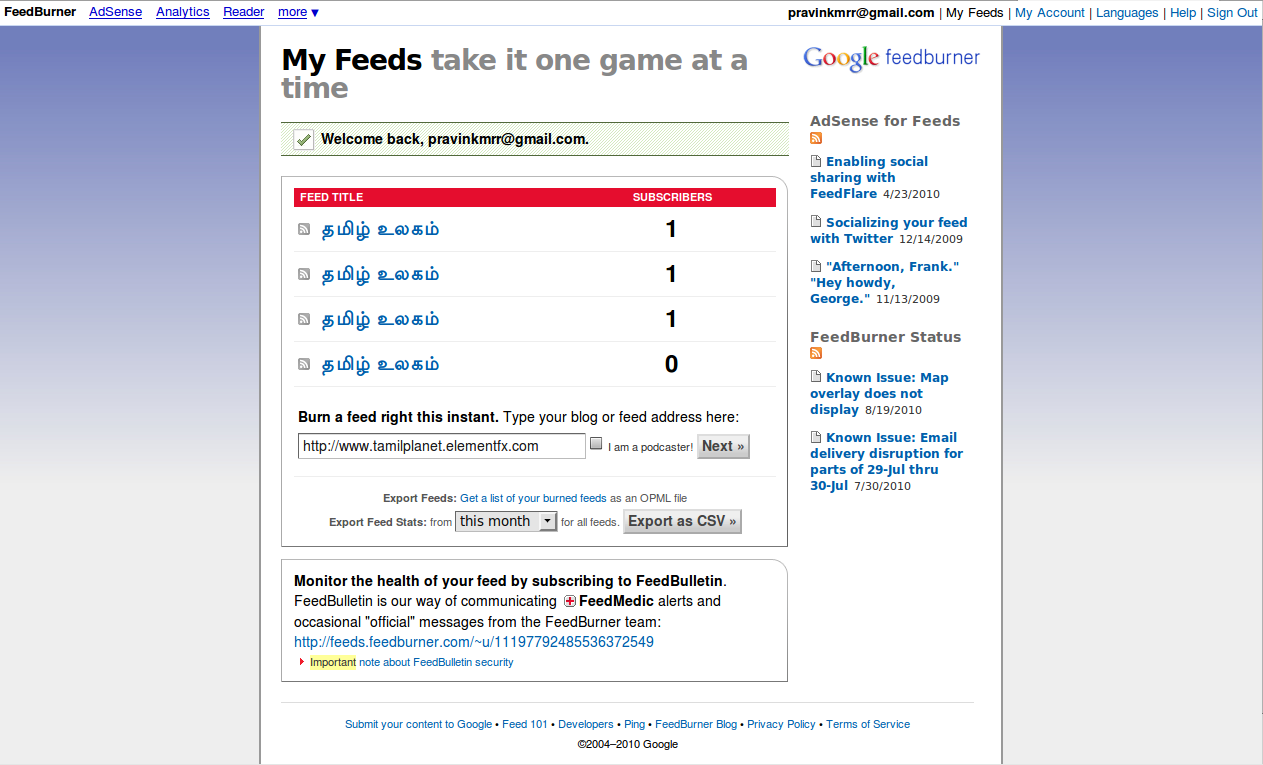
6.Hit next button it will navigate here.. select user custom post type feed here.. if more than one custom post create another feed address..

7.Hit next and Enter your feed address here…

8.click on skip to feed management..

9.click on button shown and see your feed

10.here you will be shown by your feed..


 Web Development