
تفصیل
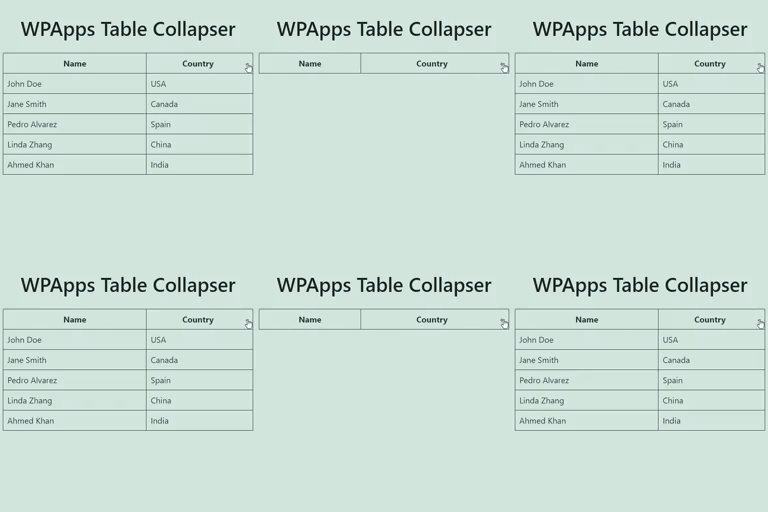
WPApps Table Collapser is a lightweight plugin that makes your tables collapsible. By adding a collapsible-table class to your tables, you enable users to toggle the visibility of the table body by simply clicking on the table header.
Features
- Collapsible Tables: Make any table collapsible by adding a simple class.
- Toggle Indicator: Automatically adds a
+/-indicator to the last column of the table header. - Customizable: Style the toggle indicator and table appearance with your own CSS.
- Block Editor Support: Includes a Gutenberg block for easy table creation and collapsing functionality.
- Mobile Friendly: Works seamlessly on mobile devices with responsive design.
Usage:
- Ensure that your table has a
<thead>tag for the table header, though it’s not mandatory if you enable the "Allow Table Without<thead>” option in settings. - Add the class
collapsible-tableto your table. - Optionally, add a
data-titleattribute to your table to set a custom title for the mobile compact view. - The last column in the table header will have a toggle indicator (
+/-) added to it. Clicking anywhere in the header will show or hide the table body.
اسکرین شاٹس

Example of a Collapsible Table: 
Settings Page: 
Detailed Guidelines on CSS Customization: 
Responsive Table View: 
Block Support:
بلاکس
یہ پلگ ان 1 بلاک مہیا کرتی ہے۔
- Table Collapser A block that makes tables collapsible.
انسٹالیشن
- Upload the
wpapps-table-collapserfolder to the/wp-content/plugins/directory. - Activate the plugin through the ‘Plugins’ menu in WordPress.
- Add the
collapsible-tableclass to any table you want to make collapsible.
عمومی سوالات
-
Does the table require any specific structure?
-
For optimal functionality, the table should have a
<thead>tag defining the header. The collapsing functionality is primarily activated by clicking on this header. However, if you enable the "Allow Table Without<thead>” option in the settings, the plugin will also work without a<thead>. -
Can I style the toggle indicator?
-
Yes, you can style the toggle indicator by targeting the
.toggle-indicatorclass in your CSS. -
How do I set a custom title for the mobile view?
-
You can add a
data-titleattribute to your table element to set a custom title that will be displayed in the mobile compact view. -
Is the plugin compatible with the Gutenberg block editor?
-
Yes, the plugin includes a Gutenberg block for easy creation and management of collapsible tables.
جائزے
There are no reviews for this plugin.
شراکت دار اور ڈیویلپرز
“WPApps Table Collapser” اوپن سورس سافٹ ویئر ہے۔ مندرجہ ذیل لوگوں نے اس پلگ ان میں حصہ لیا:
شراکت دار
“WPApps Table Collapser” کا اپنی زبان میں ترجمہ کریں۔
ڈویلپمینٹ میں دلچسپی ہے؟
کوڈ براؤز کریں، ایس این وی ریپوزیٹری کو چیک کریں یا ڈویلپمینٹ لاگ کو سبسکرائب کریں بذریعہ آر ایس ایس۔
چینج لاگ
1.1.0
- Fixed a bug where the block editor css gets loaded in the front-end.
1.0.0
- Initial release.