Blog Archives
v2.6 Beta Available
New version of Unreal X-Editor is now available. Click on “Check For Updates” to download.
KNOWN ISSUE: I just noticed that in this version No-Ribbon UI and new commandlines are completely broken. That means if you run with “-noribbon” or “-noweb” or “-nostartupweb” will crash Unreal X-Editor on startup. A fix will be released soon. I apologize for the inconvenience.
Issue Fixed. Please download here. (NOTE: This is ONLY for v2.6. DO NOT apply this fix if you are using v2.4 or earlier.)
Changelog:
–New and Improved Application menu now shows Recent Files and Folders (Ribbon-UI Only)
–Hovering mouse over current tab will show filepath
–Previous tab is now selected after closing a tab
–Window State setting has been removed
–Reset Dock Layout button added
–Font selection has been added
–Users can add Custom Parameters for UDK Game
–Added UDK Game Remote Control
–Added a few more commandline arguments
–Unsaved files will show asterisk
–Folding lines (dotted lines between brackets) is available
–Shift+Backspace now works
–Users can choose Win64 compiler
–Autocomplete will now show quickly
–Autocomplete now supports TAB key
–Added Embed Selection
–Users can submit if any Unhandled Exception occurs
–Auto Indent added
–Added Shortcut Editor
–Fixed a rare popup error message while compiling scripts
–Fixed issues with Save As button
–Fixed Save button not updating when switching tabs
–Fixed incorrect information displayed on UDKGame pop up window
–Fixed Not valid tray icon showing even if correctly configured
–Fixed tray icon issues after exiting Unreal X-Editor
–Fixed Multi-Comment issues

Recent File List
Embed Selection Feature:

Select some text –> Right Click –> Embed Selection
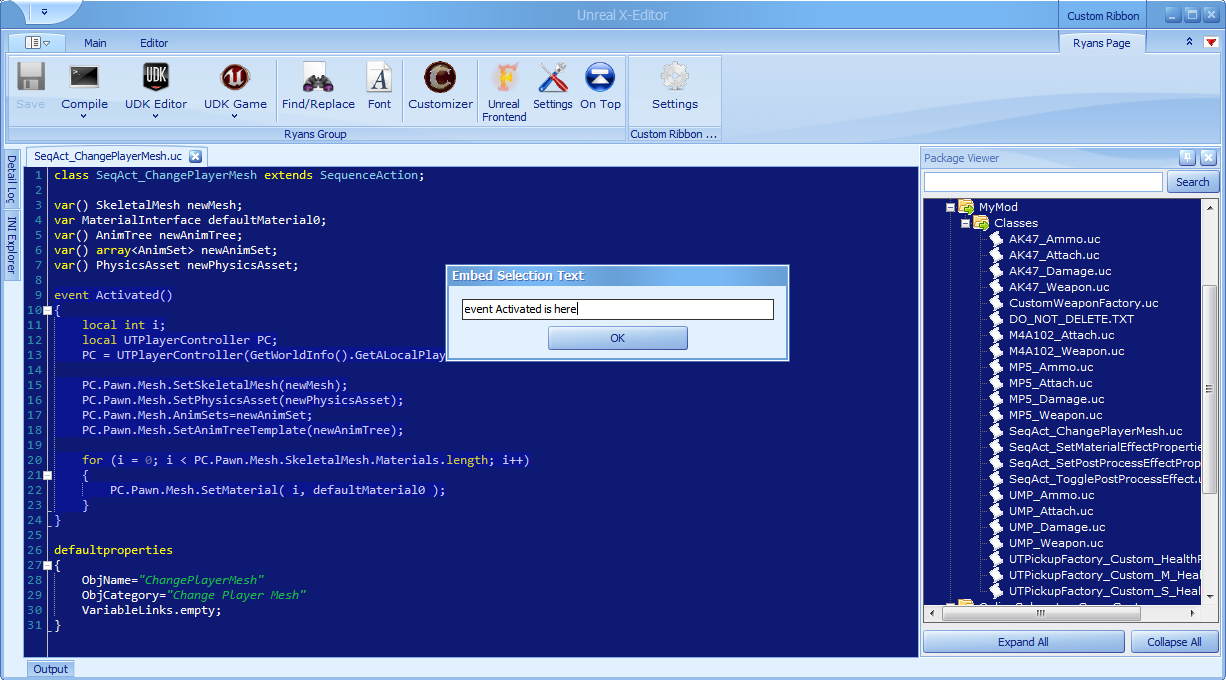
Type a name for your selection and press OK

The selected text is now folded with the specified name
[Tutorial] Change Player Mesh via Kismet
Hello everyone…In this tutorial you will learn to change Player Mesh by pressing any button in-game. We achieve this by using a custom Kismet Node.
v2.1.1 Beta Available
This update fixes two issues in Unreal X-Editor.
Changelog:
–Fixed a rare critical bug which shows infinite loop of messages
–Fixed Unreal X-Editor not responding when UDK Editor/Game is pressed
v2.1 Beta Available
New version of Unreal X-Editor is now available. Click on “Check For Updates” to download.
Changelog:
–Fixed startup crash when double clicking on UC Files
–Added “Comment” section in Registration
–Changing colors in Settings will now update instantly
–Quick Access Toolbar settings will be automatically saved on Exit (Ribbon UI Only)
–Minimize to Tray has been added (Ribbon UI Only)
–Fixed Autocomplete not showing on file opened from Package Viewer
–Fixed Empty File showing save prompt
–Fixed Unreal X-Editor lock up when registering
–Fixed a rare issue where Unreal X-Editor runs in backgound after exiting
–Fixed right click menu not showing on file opened from Package Viewer
–Fixed scroll bar snap-to-top after opening a file
–Fixed weird minimize when UDK Editor or UDK Game is pressed
–Fixed Unreal X-Editor window not properly showing on startup
–Custom Syntax Highlighting is available
–Added various Color Schemes
–Tab location can now be changed
–Glass button has been removed in order to support Windows XP
Two Color Schemes:

Turbo Pascal Revisited

Visual Studio 2011 Dark
New v2.0 BETA available now
So here it is. Unreal X-Editor v2.0 is now available 🙂
KNOWN ISSUE with Windows XP: Currently Unreal X-Editor will crash with an Unhandled Exception error when executed under Windows XP. At the moment, the only way to overcome this issue is to run Unreal X-Editor with No-Ribbon UI.
Click Here for Windows XP fix. <–Download and replace the old exe with this new one.
Changelog:
- New No-Ribbon version is available
- Unreal Script Wizard has been integrated
- Tab support has been added
- Dock panels has been added
- Startup page has been added
- Detail Log viewer has been added
- Fixed a rare issue where Unreal X-Editor will not restart after changing UDK directory
- Unreal X-Editor now asks for user permission to restart
- Added Right Click menu for editor
- Added ability to navigate to custom game exe
- Added Log parameter in UDK Game options
- New About Dialog
- New Skins added
- 2 New Ribbon Styles added
- Package tree viewer Search has been added
- New warning message when trying to execute multiple instances of Unreal X-Editor
- New Help file available (Click Here to see the Online Help)
New UDK Released
February UDK Beta Upgrade Notes
iOS Rendering
- Added support for uniform color multiply mask

- Documentation can be found here

 Unreal X-Editor