About Stack Team
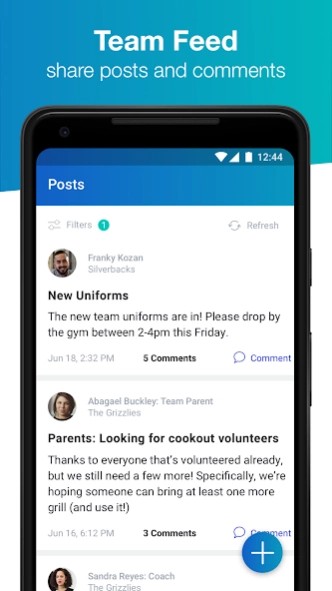
Manage your team from anywhere with Stack Team! Have the world of team management at your fingertips, whether it's keeping your game schedule up to date, sending text alerts to parents about a cancelled practice, or...
Manage your team from anywhere with Stack Team!
Have the world of team management at your fingertips, whether it's keeping your game schedule up to date, sending text alerts to parents about a cancelled practice, or anything else you need to keep your focus on the field.
On multiple teams? Not a problem! As a player or parent or coach, you'll have access to each of your teams from your personalized homepage. Access schedules, communications, contact info and more, making it easier than ever to stay in touch and in the know.
• MESSAGING — Send messages and alerts to individuals or your entire team without ever leaving the Stack Team app.
• SCHEDULING — Create events that will show up on every team member's calendar.
• ROSTERS — Keep track of your team's members and their contact information, and also attach parent profiles to players' so you can always get in touch.
How to get started:
1. Download Stack Team and create your account.
2. Complete your team’s roster by adding and inviting all of your players & parents
3. Schedule your first event and let the team know
Previous Versions
Here you can find the changelog of Stack Team since it was posted on our website on 2023-07-03 18:07:06.
The latest version is 1.8.0 and it was updated on 2026-06-22 06:22:13. See below the changes in each version.
Stack Team version v1.8.0
Updated At: 2020-02-07
Changes: - Add the ability to upload files and forms
- Add the ability to download and print files and forms
- Add filter view for rosters
- Add the ability to import previous roster (Coach View)
- Add the ability to add a family member to the team that is associated with a player
- Add the ability to print roster
- Enhance photo albums including multi-user photo syncing
- Enhance the check-in feature
- Add single-game scoring
- Add calendar syncing
Disclaimer
Official Google Play Link
We do not host Stack Team on our servers. We did not scan it for viruses, adware, spyware or other type of malware. This app is hosted by Google and passed their terms and conditions to be listed there. We recommend caution when installing it.
The Google Play link for Stack Team is provided to you by apps112.com without any warranties, representations or guarantees of any kind, so access it at your own risk.
If you have questions regarding this particular app contact the publisher directly. For questions about the functionalities of apps112.com contact us.