Tag Archives: Sql Server

Looping through table records in Sql Server

This article lists out extensive list of example scripts for looping through table records one row at a time. This article covers the examples for the following scenario’s for looping through table rows

  1. Looping column having no gaps/duplicate values
  2. Looping column having gaps
  3. Looping column having duplicates

[ALSO READ] WHILE loop in Sql Server

To understand the looping of the table records in the above listed scenarios, let us first create a temporary table #Employee as shown in the below image with sample data using the following script.
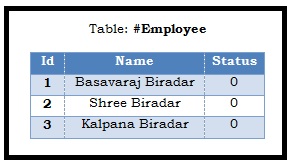
WHILE Loop Example Sql Server
Script:

USE TEMPDB
GO
CREATE TABLE #Employee
(Id INT, Name NVARCHAR(100), Status TINYINT)
GO
INSERT INTO #Employee ( Id, Name, Status)
Values (1, 'Basavaraj Biradar', 0),
		(2, 'Shree Biradar', 0),
		(3, 'Kalpana Biradar', 0)
GO

The below examples illustrates how we can loop through table records in various ways. And also highlights the problem if any. Please go through all the examples before deciding on using one particular approach.

Example 1: Looping column having no gaps/duplicate values

Approach 1: Looping through table records with static loop counter initialization

DECLARE @LoopCounter INT = 1, @MaxEmployeeId INT = 3 , 
        @EmployeeName NVARCHAR(100)

WHILE(@LoopCounter <= @MaxEmployeeId)
BEGIN
   SELECT @EmployeeName = Name 
   FROM #Employee WHERE Id = @LoopCounter

   PRINT @EmployeeName	
   SET @LoopCounter  = @LoopCounter  + 1 	    
END

RESULT:
Looping through table records Sql Server 1

In this example the loop running variable @LoopCounter and the maximum loop counter variable @MaxEmployeeId values are initialized with a static value.

Note: This approach of looping through table rows doesn’t work if the looping column (i.e. in this case Id column of the #Employee table) values have gaps or if it has duplicate values

Approach 2: Looping through table records with dynamic loop counter initialization

DECLARE @LoopCounter INT , @MaxEmployeeId INT, 
        @EmployeeName NVARCHAR(100)
SELECT @LoopCounter = min(id) , @MaxEmployeeId = max(Id) 
FROM #Employee

WHILE(@LoopCounter IS NOT NULL 
      AND @LoopCounter <= @MaxEmployeeId)
BEGIN
   SELECT @EmployeeName = Name 
   FROM #Employee WHERE Id = @LoopCounter
   
   PRINT @EmployeeName	
   SET @LoopCounter  = @LoopCounter  + 1 	    
END

RESULT:
Looping through table records Sql Server 2

In this example the loop running variable @LoopCounter and the maximum loop counter variable @MaxEmployeeId values are initialized dynamically.

Note: This approach of looping through table rows doesn’t work if the looping column (i.e. in this case Id column of the #Employee table) values have gaps or if it has duplicate values

Example 2: Looping through table records where looping column has gaps

Issue with example 1’s approach 1 and 2: These example approaches are assuming that looping column values doesn’t have any gap in it. Let us see what is the output of the example 1’s approach 1 and 2 if we have gaps in the looping column value.

To create a gap, delete employee record from the #Employee table with id = 2 by the following script:

DELETE FROM #EMPLOYEE WHERE Id = 2

RESULT:
Looping through table records Sql Server 3

Now let us run the example 1’s approach 1 and 2 script on #Employee table which is having gap in the Id column value (i.e. record with id column value 2 is missing).

Looping through table records Sql Server 12

From the above result it is clear that the example 1’s approach 1 and 2 script will not work in the scenarios where we have gap in the looping tables column values.

This problem can solved in multiple ways, below are two such example approaches. I would prefer the first approach.

Approach 1: Looping through table records where looping column has gaps in the value

DECLARE @LoopCounter INT , @MaxEmployeeId INT, 
        @EmployeeName NVARCHAR(100)
SELECT @LoopCounter = min(id) , @MaxEmployeeId = max(Id) 
FROM #Employee

WHILE ( @LoopCounter IS NOT NULL 
        AND  @LoopCounter <= @MaxEmployeeId)
BEGIN
   SELECT @EmployeeName = Name FROM #Employee 
   WHERE Id = @LoopCounter
   PRINT @EmployeeName	
   SELECT @LoopCounter  = min(id) FROM #Employee
   WHERE Id > @LoopCounter
END

RESULT:
Looping through table records Sql Server 6

From the above result it is clear that this script works even when we have gaps in the looping column values.

Note: This approach of looping through table rows doesn’t work if the looping column (i.e. in this case Id column of the #Employee table) has duplicate values

Approach 2: Looping through table records where looping column has gaps in the value

DECLARE @LoopCounter INT , @MaxEmployeeId INT, 
        @EmployeeName NVARCHAR(100)
SELECT @LoopCounter = min(id) , @MaxEmployeeId = max(Id) 
FROM #Employee
WHILE ( @LoopCounter IS NOT NULL 
        AND  @LoopCounter <= @MaxEmployeeId)
BEGIN
   SELECT @EmployeeName = Name 
   FROM #Employee WHERE Id = @LoopCounter
   --To handle gaps in the looping column value
   IF(@@ROWCOUNT = 0 )
   BEGIN
	 SET @LoopCounter  = @LoopCounter  + 1 
	 CONTINUE
   END

   PRINT @EmployeeName	
   SET @LoopCounter  = @LoopCounter  + 1 	    
END

Looping through table records Sql Server 7

From the above result it is clear that this script works even when we have gaps in the looping column values.

Note: This approach of looping through table rows doesn’t work if the looping column (i.e. in this case Id column of the #Employee table) has duplicate values

Example 3: Looping through table records where looping column having duplicates

To create a duplicate record, insert one more employee record to the #Employee table with id = 1 by the following script:

INSERT INTO #Employee ( Id, Name, Status)
Values (1, 'Sharan Biradar', 0)

RESULT:
Looping through table records Sql Server 8

Now let us run the example 2’s approach 1 and 2 script on #Employee table which is having duplicate Id column values (i.e. there are two records with with Id column value as 1)

Looping through table records Sql Server 13

From the above result it is clear that the example 2’s approach 1 and 2 script will not work in the scenarios where we have duplicates in the looping column. Here only one record of the employee with id =1 is displayed and other record is skipped. This problem can solved in multiple ways, below are two such example approaches.

Approach 1: Looping through table records where looping column has duplicate values

SET NOCOUNT ON
DECLARE @LoopCounter INT , @MaxEmployeeId INT, 
        @EmployeeName NVARCHAR(100)
SELECT @LoopCounter = min(id) , @MaxEmployeeId = max(Id) 
FROM #Employee
 
WHILE  ( @LoopCounter IS NOT NULL
         AND  @LoopCounter <= @MaxEmployeeId)
BEGIN
   UPDATE TOP(1) #Employee
   SET  Status = 1, @EmployeeName = Name
   WHERE Id = @LoopCounter  AND Status = 0 
 
   PRINT @EmployeeName  
 
   SELECT @LoopCounter  = min(id) FROM #Employee  
   WHERE Id >= @LoopCounter AND Status = 0
END

RESULT:
Looping through table records Sql Server 10

In this approach using the Status column to mark the records which are already processed. And also the update statement is used to update the status and also get the row values and one more thing is in Update using the TOP statement to update only one record at a time.

Approach 2: Looping through table records where looping column has duplicate values by inserting records into another temp table with identity column

--Create another temp table with identity column
CREATE TABLE #EmployeeCopy (LoopId INT IDENTITY(1,1), 
  Id INT, Name NVARCHAR(100), Status TINYINT)
--Copy data to the table with identity column
INSERT INTO #EmployeeCopy(Id, Name, Status)
SELECT Id, Name, Status FROM #Employee 

DECLARE @LoopCounter INT , @MaxEmployeeId INT, 
        @EmployeeName NVARCHAR(100)
SELECT @LoopCounter = min(LoopId),@MaxEmployeeId = max(LoopId) 
FROM #EmployeeCopy
WHILE ( @LoopCounter IS NOT NULL 
        AND  @LoopCounter <= @MaxEmployeeId)
BEGIN
   SELECT @EmployeeName = Name 
   FROM #EmployeeCopy  WHERE LoopId = @LoopCounter
   PRINT @EmployeeName	
   SELECT @LoopCounter  = min(LoopId) 
   FROM #EmployeeCopy  WHERE LoopId > @LoopCounter
END

RESULT:
Looping through table records Sql Server 11

In this article I have covered most of the basic scenarios which we across. If you have any other scenario and use different approach, post a comment I will update the article.

[ALSO READ] PRINT/SELECT Statement messages within WHILE LOOP or BATCH of statement is not displayed immediately after it’s execution- Sql Server

How to rename column name in Sql Server

Many times we come across a scenario where we need to rename / change the existing table column name. We can use the SP_RENAME system stored to change/rename the table column name. In this article we will cover the following:

  1. Rename table column name using SP_Rename system stored procedure
  2. Why SP_RENAME returns the warning: “Caution: Changing any part of an object name could break scripts and stored procedures.” when renaming the column name?
  3. How to rename table column which is enclosed by “[” and “]” (i.e. Square brackets) symbol
  4. How to rename table column which has . (i.e. dot) symbol in the column name
  5. How to rename temporary table column name
  6. How to rename temporary table variable column name

To understand table column rename using SP_RENAME with extensive list of examples, let us first create a Customer table with sample records as depicted in the below image by using the following script:

Rename column name in Sql Server 1
Script:

USE TEMPDB
GO
--Create Customer Table for the Demo
CREATE TABLE dbo.Customer(Id INT, CustName NVARCHAR(50), 
[[PhoneNo]]] VARCHAR(20), [Zip Code] VARCHAR(10), 
[City.Name] VARCHAR(50))
GO
--Add sample records to the Customer table
INSERT INTO dbo.Customer(id, CustName, [[PhoneNo]]],
	[Zip Code], [City.Name])
VALUES(1,'Basavaraj Biradar', '123-123', '560001', 'Bangalore'),
      (2,'Shreeganesh Biradar', '321-321', '560025', 'Mysore')
GO 
--Create Procedure to get all the records from customer table
CREATE PROCEDURE dbo.GetCustomers
AS 
	SELECT id, CustName, [[PhoneNo]]],
		[Zip Code], [City.Name]
	FROM dbo.Customer
GO
--Get customer table data
EXEC dbo.GetCustomers
GO

1. Rename table column name using SP_Rename system stored procedure

Below is the SYNTAX of the SP_RENAME system stored procedure for renaming the column name:

SYNTAX:

SP_RENAME 'TableName.OldColumnName' , 'NewColumnName', 'COLUMN'

Example 1: Rename Customer table column CustName to FullName using SP_RENAME

SP_RENAME 'Customer.CustName' , 'FullName', 'COLUMN'

Result:
Rename column name in Sql Server 2
Below is the pictorial representation of the table column rename using SP_RENAME
Rename column name in Sql Server 3

2) Why SP_RENAME returns the warning: “Caution: Changing any part of an object name could break scripts and stored procedures.” when renaming the column name?

Basically, sql server returns this warning to alert us to update all the places wherever we are referring this column. For example take a scenario where if the old column name is still referred in a stored procedure even after the column rename using sp_rename. In this scenario, the sp will start throwing error post the column rename. To avoid such issues, Sql server alerts us by returning the warning when we use SP_RENAME.

Example:The script at the beginning of this article is creating the stored procedure: GetCustomers and it was working. Now let us verify whether it is still working after renaming the column CustName to FullName by the previous example:

--Get customer table data
EXEC dbo.GetCustomers
GO

RESULT:

Msg 207, Level 16, State 1, Procedure GetCustomers, Line 4
Invalid column name ‘CustName’.

From the above result it is clear that column rename using SP_RENAME will just change the column name in the table. It will to change in all the places, it is developer’s responsibility to update at all the place. Let us modify the GetCustomers stored procedure to reflect the new column name using the below script and then verify the stored procedure execution:

–Modify the stored procedure to refer the new column

ALTER PROCEDURE dbo.GetCustomers
AS 
	SELECT id, FullName, [[PhoneNo]]],
		[Zip Code], [City.Name]
	FROM dbo.Customer
GO
--Now the storde procedure works
EXEC dbo.GetCustomers
GO

RESULT:
Rename column name in Sql Server 5

3. How to rename table column which is enclosed by “[” and “]” (i.e. Square brackets) symbol

Example: The Customer table created at the beginning of this article has a column [PhoneNo]. As Square bracket has special meaning it doesn’t work straight forward. Let us try renaming by the below script:

SP_RENAME 'Customer.[PhoneNo]' , 'PhoneNo', 'COLUMN'
GO

RESULT:

Msg 15248, Level 11, State 1, Procedure sp_rename, Line 238
Either the parameter @objname is ambiguous or the claimed @objtype (COLUMN) is wrong.

The reason for the above error is, sql server treats Customer.[PhoneNo] as Customer.PhoneNo. To solve this issue we have to add two open square brackets at the beginning of PhoneNo column and three closing square brackets at the end of the PhoneNo column as shown below:

SP_RENAME 'Customer.[[PhoneNo]]]' , 'PhoneNo', 'COLUMN'
GO
SELECT * FROM dbo.Customer

RESULT:
Rename column name in Sql Server 6

4. How to rename table column which has . (i.e. dot) symbol in the column name

Example: The Customer table created at the beginning of this article has a column City.Name. This column has . (i.e. dot symbol) in it’s name, let us try renaming by the below script:

SP_RENAME 'Customer.City.Name' , 'City', 'COLUMN'
GO

RESULT:

Msg 15248, Level 11, State 1, Procedure sp_rename, Line 238
Either the parameter @objname is ambiguous or the claimed @objtype (COLUMN) is wrong.

The reason for the above error is, sql server treats Customer.City.Name as three part naming convention and treating City as table name and Name as column name and Customer as Schema. Because of this it is not finding the column name in the table definition and failing to update it. To solve this issue we have to enclose column name within square brackets as shown in the below script:

SP_RENAME 'Customer.[City.Name]' , 'City', 'COLUMN'
GO
SELECT * FROM dbo.Customer

RESULT:
Rename column name in Sql Server 8

5. How to rename temporary table column name

Renaming a temporary table column name is same as that of the regular table column name.

Example: Let us create a temporary table #Customer and insert a record by using the below script

CREATE TABLE #Customer(Id INT)
GO
INSERT INTO #Customer (Id) Values ('100')
GO

Now we can rename the temporary table #Customer column Id name to SlNo using the below script:

SP_RENAME '#Customer.ID' , 'SlNo', 'COLUMN'
GO

Rename column name in Sql Server 9

6. How to rename temporary table variable column name

Sql Server doesn’t support the renaming of the Table Variable column name

Example: Let us verify this behaviour with an example

DECLARE  @Customer TABLE(id INT)
EXEC SP_RENAME '@i.ID' , 'SlNo', 'COLUMN'

RESULT:

Msg 15248, Level 11, State 1, Procedure sp_rename, Line 238
Either the parameter @objname is ambiguous or the claimed @objtype (COLUMN) is wrong.

Rename column name in Sql Server 10

How to Subtract Days, Weeks, Months, Quarters or Years from Date in Sql Server

In this article we will discuss on How to Subtract Days, Weeks, Months, Quarters or Years from DateTime in Sql Server?

You may also like to read the following other popular articles on Date and Time in Sql Server:

How to Subtract Days from DateTime in Sql Server?

We can use DATEADD() function like below to Subtract days from DateTime in Sql Server. DATEADD() functions first parameter value can be day or dd or d all will return the same result. Below example shows how we can subtract two days from Current DateTime in Sql Server:

SELECT GETDATE() 'Today', 
           DATEADD(day,-2,GETDATE()) 'Today - 2 Days'
SELECT GETDATE() 'Today', 
           DATEADD(dd,-2,GETDATE()) 'Today - 2 Days'
SELECT GETDATE() 'Today', 
           DATEADD(d,-2,GETDATE()) 'Today - 2 Days'

RESULT:
Subtract days from Datetime in Sql Server

Alternatively, we can Subtract Days from Datetime like below in Sql Server. In the below example we are subtracting 2 days from DateTime.

SELECT GETDATE() 'Today', GETDATE() - 2 'Today - 2 Days'

RESULT:
Subtract days from Datetime in Sql Server 1

How to Subtract Weeks from DateTime in Sql Server?

We can use DATEADD() function to Subtract weeks to DateTime in Sql Server. DATEADD() functions first parameter value can be week or wk or ww, all will return the same result. Below example shows how we can Subtract two weeks from Current DateTime in Sql Server:

SELECT GETDATE() 'Today',
           DATEADD(week,-2,GETDATE()) 'Today - 2 Weeks'
SELECT GETDATE() 'Today',
           DATEADD(wk,-2,GETDATE()) 'Today - 2 weeks'
SELECT GETDATE() 'Today',
           DATEADD(ww,-2,GETDATE()) 'Today - 2 Weeks'

RESULT:
Subtract weeks from Datetime in Sql Server

How to Subtract Months from DateTime in Sql Server?

We can use DATEADD() function like below to Subtract Months from DateTime in Sql Server. DATEADD() functions first parameter value can be month or mm or m, all will return the same result. Below example shows how we can Subtract two months from Current DateTime in Sql Server:

SELECT GETDATE() 'Today', 
           DATEADD(month,-2,GETDATE()) 'Today - 2 Months'
SELECT GETDATE() 'Today',
           DATEADD(mm,-2,GETDATE()) 'Today - 2 Months'
SELECT GETDATE() 'Today',
           DATEADD(m,-2,GETDATE()) 'Today - 2 Months'

RESULT:
Subtract months from Datetime in Sql Server

How to Subtract Quarters from DateTime in Sql Server?

We can use DATEADD() function like below to Subtract Quarters from DateTime in Sql Server. DATEADD() functions first parameter value can be quarter or qq or q, all will return the same result. Below example shows how we can Subtract two Quarters from Current DateTime in Sql Server:

SELECT GETDATE() 'Today',
         DATEADD(quarter,-2,GETDATE()) 'Today - 2 Quarters'
SELECT GETDATE() 'Today',
         DATEADD(qq,-2,GETDATE()) 'Today - 2 Quarters'
SELECT GETDATE() 'Today',
         DATEADD(q,-2,GETDATE()) 'Today - 2 Quarters'

RESULT:
Subtract Quarters from Datetime in Sql Server

How to Subtract Years from DateTime in Sql Server?

We can use DATEADD() function like below to Subtract Years from DateTime in Sql Server. DATEADD() functions first parameter value can be year or yyyy or yy, all will return the same result. Below example shows how we can Subtract two Years from Current DateTime in Sql Server:

SELECT GETDATE() 'Today',
           DATEADD(year,-2,GETDATE()) 'Today - 2 Years'
SELECT GETDATE() 'Today',
           DATEADD(yyyy,-2,GETDATE()) 'Today - 2 Years'
SELECT GETDATE() 'Today',
           DATEADD(yy,-2,GETDATE()) 'Today - 2 Years'

RESULT:
Subtract Years from Datetime in Sql Server

Also Read: