Tag Archives: Sql Server

Must declare the scalar variable – Error Message 137

This article lists out the extensive list of scenarios in which we get the following error message and how to resolve it.

Error Message:

Msg 137, Level 15, State 1, Line 1
Must declare the scalar variable “%.*ls”.

Root Cause:

This error occurs if we are trying to use an undeclared variable

Below are the couple of scenarios in which we come across this error and how to resolve it.

Scenario 1: Trying to use an undeclared variable

Try executing the below statement

PRINT @AuthorName

RESULT:

Msg 137, Level 15, State 2, Line 1
Must declare the scalar variable “@AuthorName”.

Reason for this error: In the above example, the variable @AuthorName is used in the PRINT statement without declaring it, which is not allowed by Sql Server.

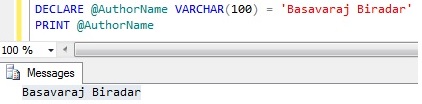
Solution:Declare the @AuthorName variable before using it in the PRINT statement as below:

DECLARE @AuthorName VARCHAR(100) = 'Basavaraj Biradar'
PRINT @AuthorName

RESULT:
Error Message 128

Scenario 2: Trying to use a local declared variable after batch separator GO statement

Try executing the below statement

DECLARE @AuthorName VARCHAR(100) = 'Basavaraj Biradar'
PRINT @AuthorName
GO
PRINT @AuthorName

RESULT:

Basavaraj Biradar
Msg 137, Level 15, State 2, Line 1
Must declare the scalar variable “@AuthorName”.

Reason for this error: In the above example, the variable @AuthorName is used in the PRINT statement after the batch separator GO Statement. Basically the scope of the local variables is within the batch in which it is declared.

Solution:Re-declare the @AuthorName variable before using it in the PRINT statement after the GO statement as below:

DECLARE @AuthorName VARCHAR(100) = 'Basavaraj Biradar'
PRINT @AuthorName
GO
DECLARE @AuthorName VARCHAR(100) = 'Basava'
PRINT @AuthorName

RESULT:
Error Message 137

Scenario 3: Using local declared variable in the dynamic sql statement executed by the EXECUTE statement

Try executing the below statement

DECLARE @AuthorName VARCHAR(100) = 'Basavaraj Biradar'
EXECUTE ('PRINT @AuthorName')

RESULT:

Msg 137, Level 15, State 2, Line 1
Must declare the scalar variable “@AuthorName”.

Reason for this error: In the above example, the variable @AuthorName is used in the statement executed by EXECUTE statement. EXECUTE statement doesn’t have the visibility of the variables declared outside of it.

Solution: We can rewrite the above statements as below to resolve this issue:

DECLARE @AuthorName VARCHAR(100) = 'Basavaraj Biradar'
EXECUTE ('PRINT ''' + @AuthorName + '''' )

RESULT:
Must declare the scalar variable

Alternative solution: One more alternative solution for the above problem, is to use the SP_EXECUTESQL statement which allows parameterized statement as below:

DECLARE @AuthorName VARCHAR(100) = 'Basavaraj Biradar'
EXECUTE SP_EXECUTESQL N'PRINT @AuthorName',
           N'@AuthorName VARCHAR(100)',@AuthorName

RESULT:
Must declare the scalar variable SP_EXECUTESQL

Let me know if you have encountered this error in any other scenario.
Msg 128, Level 15, State 1, Line 1 The name “%.*s” is not permitted in this context. Valid expressions are constants, constant expressions, and (in some contexts) variables. Column names are not permitted.

This article lists out the extensive list of scenarios in which we get the following error message and how to solve it.

Error Message:

Msg 128, Level 15, State 1, Line 1
The name “%.*s” is not permitted in this context. Valid expressions are constants, constant expressions, and (in some contexts) variables. Column names are not permitted.

Below are the couple of scenarios in which we come across this error and solution for it

Scenario 1: PRINT statement having table name or column name as it’s parameter

Try executing the below statement

DECLARE @AuthorName VARCHAR(100) = 'Basavaraj Biradar'
PRINT AuthorName

RESULT:

Msg 128, Level 15, State 1, Line 2
The name “AuthorName” is not permitted in this context. Valid expressions are constants, constant expressions, and (in some contexts) variables. Column names are not permitted.

Reason for this error

In the above example, the variable AuthorName name is missing @ prefix symbol in the PRINT statement and resulting in this error message. Because of the missing @ prefix, Sql Server is interpreting it as Table Column name and which is not allowed in the PRINT statement.

Solution:
Let us correct the AuthorName variable’s missing @ prefix symbol in the PRINT statement and verify the result

DECLARE @AuthorName VARCHAR(100) = 'Basavaraj Biradar'
PRINT @AuthorName

RESULT:
Error Message 128

Scenario 2: DEFAULT value defined for the column is referring other columns of the table

Try executing the below create table statement

CREATE TABLE dbo.Orders (OrderId INT,
 Amount MONEY,  Tax    MONEY, Discount MONEY,
 Total MONEY DEFAULT (Amount + Tax + Discount))

RESULT:

Msg 128, Level 15, State 1, Line 3
The name “Amount” is not permitted in this context. Valid expressions are constants, constant expressions, and (in some contexts) variables. Column names are not permitted.

Reason for this error

The reason for this error is we are trying to use tables other columns as default value for a column which is not supported. Default value for the column can only be either a constant value or a scalar function or a NULL value.

Solution: One solution to this problem is, we can create Total as a computed column like below:

CREATE TABLE dbo.Orders (OrderId INT,
 Amount MONEY,  Tax    MONEY, Discount MONEY,
 Total AS (Amount + Tax + Discount))

RESULT:
Computed Column

Let me know if you have encountered this error in any other scenario.

WHILE loop in Sql Server

WHILE loop is the looping construct supported by Sql Server. Sql server doesn’t have for…loop, do…while loop etc, but with WHILE loop we can simulate these missing looping constructs behaviour.

This article will cover the following:

WHILE LOOP

A while loop will check the condition first and then executes the block of Sql Statements within it as along as the condition evaluates to true.
Syntax:
WHILE Condition
BEGIN
Sql Statements
END

Example: Basic while loop example. The below while loop executes the statements within it 4 times.

DECLARE @LoopCounter INT = 1
WHILE ( @LoopCounter <= 4)
BEGIN
	PRINT @LoopCounter  
	SET @LoopCounter  = @LoopCounter  + 1
END	

RESULT:
1
2
3
4

BREAK Statement

If a BREAK statement is executed within a WHILE loop, then it causes the control to go out of the while loop and start executing the first statement immediately after the while loop.

Example: WHILE loop with BREAK statement

DECLARE @LoopCounter INT = 1
WHILE ( @LoopCounter <= 4)
BEGIN
	PRINT @LoopCounter  
	IF(@LoopCounter = 2)
		BREAK
 	SET @LoopCounter  = @LoopCounter  + 1
END
PRINT 'Statement after while loop'

RESULT:
WHILE Loop Break Statement Sql Server

CONTINUE Statement

If a CONTINUE statement is executed within a WHILE loop, then it skips executing the statements following it and transfers control to the beginning of while loop to start the execution of the next iteration.

Example: WHILE loop with CONTINUE statement

DECLARE @LoopCounter INT = 0
	WHILE ( @LoopCounter <= 3)
	BEGIN
		SET @LoopCounter  = @LoopCounter  + 1 

		IF(@LoopCounter = 2)
		  CONTINUE
 
		PRINT @LoopCounter 
	END
	PRINT 'Statement after while loop'

RESULT:
WHILE Loop Continue Statement Sql Server

DO…WHILE Loop in Sql Server

Sql Server doesn’t have a DO…WHILE loop construct, but same behaviour can be achieved using a WHILE loop as shown by the below example.

DECLARE @LoopCounter INT = 1
WHILE(1=1)
BEGIN
   PRINT @LoopCounter
   SET @LoopCounter  = @LoopCounter  + 1 	
   IF(@LoopCounter > 4)
	BREAK;		   
END

RESULT:
DO WHILE Loop in Sql Server

Looping through table records one row at a time

Article Looping through table records in Sql Server lists out the various approaches of looping through table records row by row.

[ALSO READ] PRINT/SELECT Statement messages within WHILE LOOP or BATCH of statement is not displayed immediately after it’s execution- Sql Server