
<< Previous – 1) Dealing with data
In our previous tutorial, we learned about how important it is be able to parse data in python in order to be a successful python programmer. Another important skill to have in python is understanding classes and Object Oriented Programming, or OOP. Object Oriented Programming is such a large topic and ties into discussions around data structures, that it would be impossible to try to fit that into this blog post. In fact, there are entire college courses designed around this topic. My goal is to teach you enough that you can start writing your own classes today, in an easy and efficient manner. I also would like to convince you that you should be writing your code in classes, as this is sometimes the greatest obstacle for many programmers that are starting out in any language.
Start Your Freelance Career Today – Click Here To Find Out How
What Are Classes?
I’ll give you my 5 minute elevator pitch description of what classes are so we can ht the ground running. Classes are meant to encapsulate code functionality within a common classification. In other words, if you have bananas, you have specific functions you can perform on bananas. You need to peel a banana, for instance. If you have an apple, an apple you just start eating and don’t have to peel it. Those are two separate classes. You can define these two very different things, and if you wanted to, create as many apples and bananas as you want, since you have the blueprint to do so. That blueprint is called the class definition, and the act of creating many apples and bananas is called instantiation. This is a good introductory description into classes, but I recommend continuing reading on the subject in order to master it however.
Why Do I Need Classes in My Code?
In most programming languages, it’s desired to use an object oriented approach in order to keep things separated. There are design models that require you to separate functionality from display for instance. Sometimes you just have thousands of lines of code and it makes more sense to put them into classes so that it’s easier to follow. Organization is definitely one of the greater benefits of using classes. There’s also re-usability and scalability. Imagine having to copy and paste code snippets every time you need to use them. That’s what a beginner does, sure, but a more advanced python programmer knows to take advantage of methods and classes to avoid redundancy.
Example Class
Consider this example python class:
class Example:
    def __init__(self, a, b):
        print("Class Constructed")
        self.a = a
        self.b = b

    def method1(self):
        print("I am method 1")

    @classmethod
    def class_method2(cls, a, b):
        return a + b

    @staticmethod
    def static_method3(a, b):
        return a * b
Start Your Freelance Career Today – Click Here To Find Out How
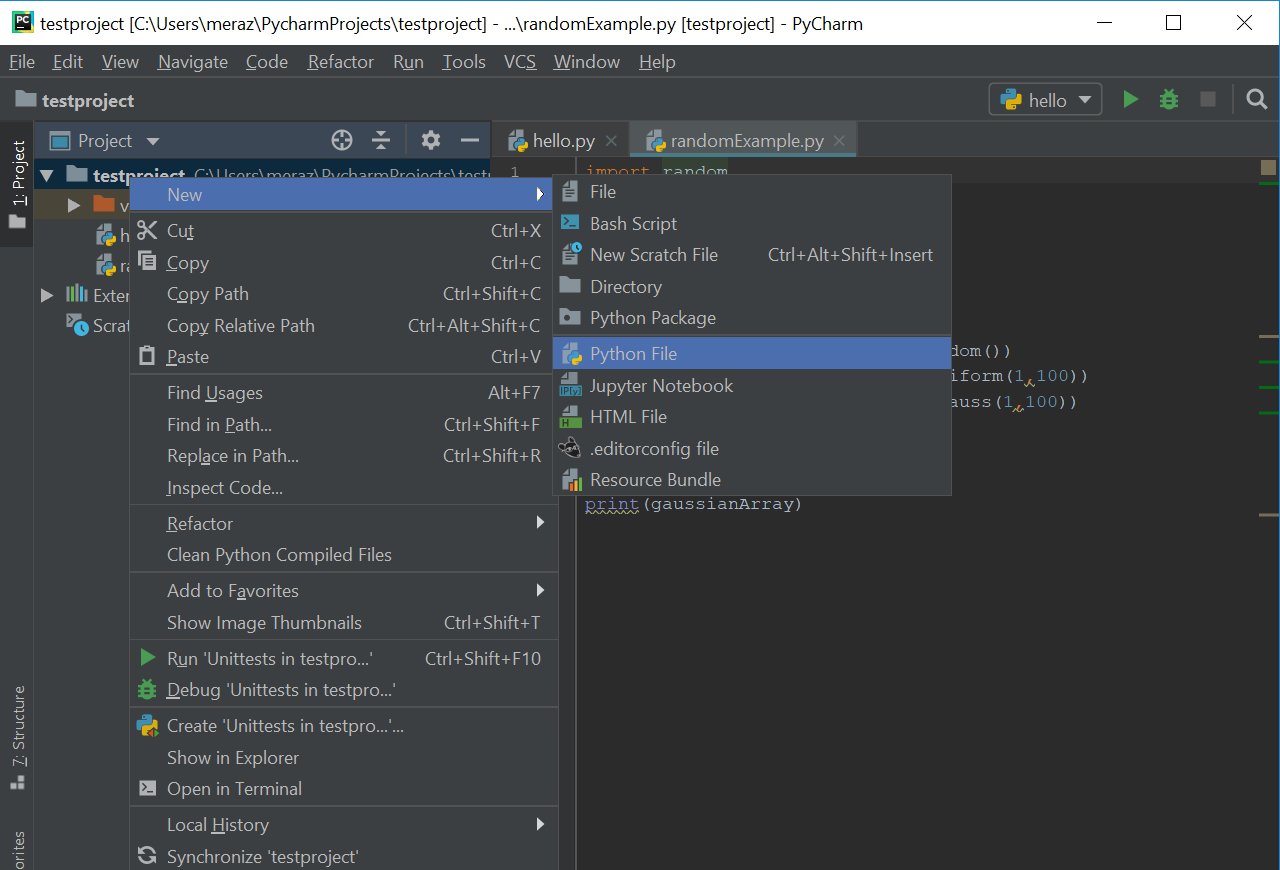
Let’s throw our new class into its own PyCharm file. You can add a new file in PyCharm, by right-clicking on your project folder and selecting New->File. When prompted for a name enter “Example.py”.

Class Definition
In this example class, Example, is the the name of the class, and the def keyword is how we define the class. Pretty straightforward right? A class has an optional class constructor, which we will discuss further below, and member variables and methods that belong to that particular class. Together, these methods and variables make up the class definition. One PyCharm trick that you can use when wanting to find a class definition is to hold down the Ctrl(Windows)/Command(MacLinux) key and clicking on the class instance you want the definition for.
Self
You will notice the word self in the class constructor(__init__ class constructors explained below) and in method1. Don’t be alarmed! self is just a method argument telling the method that it belongs to the class, with some exceptions. Notice that methods that contain the @classmethod and @staticmethod keyword do not contain self, because it is implied and unnecessary. More on @classmethod and @staticmethod to follow below. Also, notice that every class method is indented from the class definition statement. This is how python knows that a method belongs to a class.
@classmethod
When a @classmethod keyword is used before a method definition, it is not necessary to place self as a method argument in the method definition. You do however have to pass cls, which means that the method is attached to the class itself, and not the class instantiated object. @classmethod is typically used when you want to call a method from a class itself, and not from a class instance. A class method defined with @classmethod is not bound to an object but rather the class itself. I know I’m sounding a bit repetitive here, but I know it will help make sure that this principle sticks in your head as you learn about classes in python. Class instantiation is explained down below. Here is a simple example, using the Example class defined above:
e = Example(1,2)
# Call method1 on the class instance
# because it doesn't use @classmethod
e.method1()
# Call class_method2 on Class itself
# because it used @classmethod
Example.class_method2(3,4)
@staticmethod
When a @staticmethod keyword is used before a method definition, you do not place neither self nor cls in the method definition. A static method can be called from either the class itself or an instantiated object. Consider the example below:
e = Example(3,4)
# Call static_method3 on Class itself
Example.static_method3(5,6)
# Call static_method3 on class instance
e.static_method3(7,8)
Class Constructor
A class constructor is a piece of code that runs once every time that a class is instantiated. This code is defined inside of a method called __init__ . You can send other method arguments to __init__ so that you can perform any initialization tasks when a class is instantiated. For instance, here is a constructor that takes two input arguments:
def __init__(self, a, b)
Class Instantiation
Class instantiation basically means creating copies of the class. Let’s say for instance that your class defines cells inside of a human body. It would be pretty boring if you only had once cell, but you may want to have thousands or millions! Your class may define the different attributes and functions of cells in a human body, but in order to have many cells, you’d have to instantiate them. If your class was called Cells, instantiation may look something like this: something like this:
cell1 = Cells()
cell2 = Cells()
Let’s take our example class now, and look at how we may instantiate examples:
ex1 = Example(1,2)
ex2 = Example(3,4)
print(ex1.a)
print(ex2.b)
Pretty simple right? You’ve instantiated two example instances and called a few class variables.
Methods & Variables
We’ve just seen how to call a class variable, but what about a method? The word method is used to describe functions that belong to a class. We saw this earlier when discussing class and static methods. This is how it’s done, using the Example class:
# Instantiate a few examples
ex1 = Example(1,2)
ex2 = Example(3,4)
# Print a class variable from each
print(ex1.a)
print(ex2.b)
# Run method1 on each class instance
ex1.method1()
ex2.method1()
Want To Work From Home? Take This Online Course To Find Out How
Although very simple, this example class will get you on your way to writing your own classes in python. I hope this short tutorial was helpful in your python journey, and I look forward to the next one!
 Python Unleashed
2 Comments