

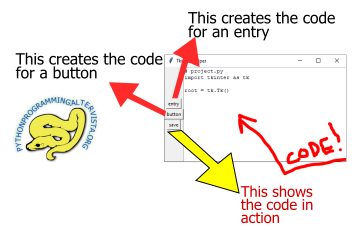
Can we make an app that generate code to make graphic user interface fastly? I think we can. Let’s build it by ourselves. Tkinter, Python and the usual tools, in the following code with a little video explanation at the end.
The code
import tkinter as tk
import os

# WIDGETS STRINGS


entry_counter = 1
button_counter = 1
def entry_code():
    global entry_counter
    w_string = """
display1 = tk.StringVar()
entry1 = tk.Entry(root,
    relief=tk.FLAT,
    textvariable=display1,
    justify='right',
    bg='orange')
entry1.pack()
entry1["font"] = "arial 30 bold"
    """
    w_string2 = w_string.replace("display1", "display" + str(entry_counter))
    w_string2 = w_string2.replace("entry1", "entry" +  str(entry_counter))
    text.insert(tk.END, w_string2)
    entry_counter += 1
    place_mainloop()

def button_code():
    global button_counter
    w_string = """
b1 = tk.Button(root,
            #relief=tk.FLAT,
            compound=tk.LEFT,
            text="new",
            #command=None,
            #image=tk.PhotoImage("img.png")
            )
b1.pack()
"""
    w_string2 = w_string.replace("b1", "b" + str(button_counter))
    text.insert(tk.END, w_string2)
    button_counter += 1
    place_mainloop()

def place_mainloop():
        rep = text.get("0.0", tk.END)
        rep = rep.replace("root.mainloop()", "")
        text.delete("0.0", tk.END)
        text.insert("0.0", rep)
        text.insert(tk.END, "root.mainloop()")

def save_code():
    if "root.mainloop()" not in text.get("0.0", tk.END):
        text.insert(tk.END, "root.mainloop()")
    with open("project.py", "w") as file:
        file.write(text.get("0.0", tk.END))
    os.startfile("project.py")

root = tk.Tk()
root.title("Tkinter Helper")
frame1 = tk.Frame(root)
frame1.pack(side="left")

def menu():
    # BUTTON TO CREATE ONE OR MORE ENTRIES
    b1 = tk.Button(frame1, text="entry", command=entry_code)
    b1.pack()

    # BUTTON TO CREATE ONE OR MORE BUTTONS
    b2 = tk.Button(frame1, text="button", command=button_code)
    b2.pack()

    # BUTTON THAT SHOWS THE WINDOW WITH THE WIDGETS
    b3 = tk.Button(frame1, text="save", command=save_code)
    b3.pack()

menu()

frame2 = tk.Frame(root)
frame2.pack(side="left")
text = tk.Text(frame2)
text.pack()
start_string = """# project.py
import tkinter as tk

root = tk.Tk()
"""
text.insert("0.0", start_string)

root.mainloop()
The video
 Subscribe to the newsletter for updates
 Tkinter templates
 My youtube channel
Twitter: @pythonprogrammi - python_pygame
Claude's Games
1. Memory gameVideos
Speech recognition gamePygame's Platform Game
