If we want to make a platform, it could be a good Idea to think to the map editor, if we want to make the game scenario quickly and easily changeable.
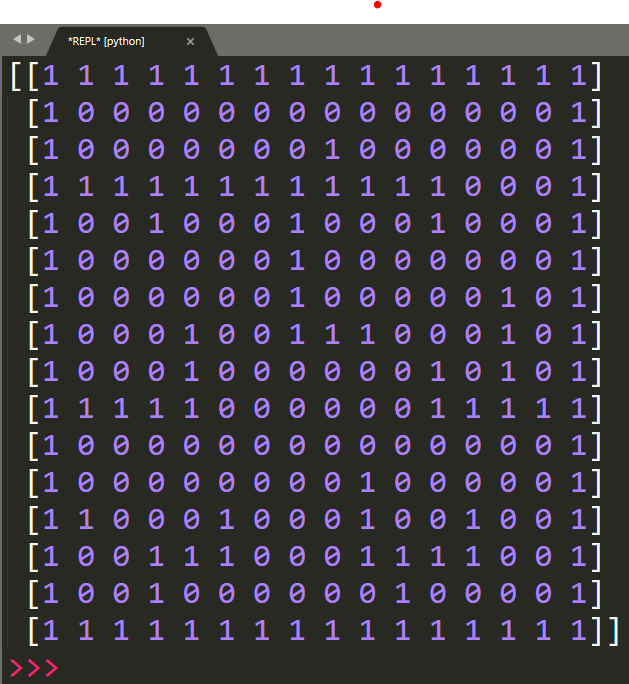
I thought that it would be nice to just use a black and white image like this to be drawn with a simple image editor like paint or paint.net (free) to do it. This is just 16×16, so it’s very tiny. I will show it big, but it’s little.

Map to array converter
This script will convert the image into an array
import numpy as np
from PIL import Image


def map_to_array(image):
	img = Image.open(image)
	img = img.convert(mode="1", dither=Image.NONE)
	array = np.array(img, dtype=np.uint8)
	print(array)
	return array

if __name__ == "__main__":
	map_to_array("map1.png")
This is the result
Ok, now we can render this map into a pygame window. Let’s create the window first.
import pygame as pg


class Game:

	def __init__(self, w, h):
		"Initialize main surface (screen) and starting the loop"
		self.w = w
		self.h = h
		self.size = w, h
		self.screen = pg.display.set_mode(self.size)
		self.loop()

	def close_window(self, event, game):
		"Close the window with the x button or Esc"
		quit = event.type == pg.QUIT
		escape = event.type == pg.KEYDOWN and event.key == pg.K_ESCAPE
		if quit or escape:
			game = 0
		return game

	def loop(self):
		"The loop that make the game go on"
		game = 1
		while game:
			for event in pg.event.get():
				game = self.close_window(event, game)
		pg.quit()


game = Game(16x50, 16x50)
This code will do this:

Let’s make the window 16*50×16*50, i.e. 800×800, so the window is 50 times the image 16×16. Each tile in the game will be 32×32. Now we are going to render the tiles. The tiles is this one only (a brick in the wall).
[continues…]
 Subscribe to the newsletter for updates
 Tkinter templates
 My youtube channel
Twitter: @pythonprogrammi - python_pygame
Claude's Games
1. Memory gameVideos
Speech recognition gamePygame's Platform Game
