
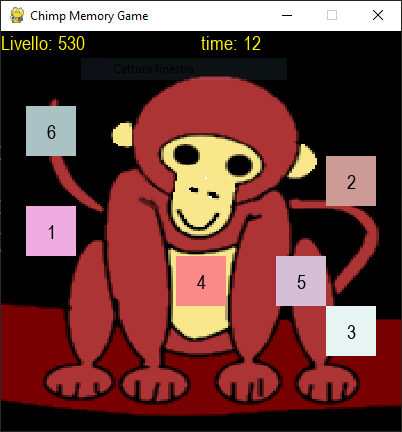
Test your memory with this new free game made with pygame by me. This is the code. You got it also on github with also sounds and graphic. This one tests your working memory, that is the one that you use to store informations temporarly.
import pygame
import random
from glob import glob

# all the possible positions for the numbers
pos = [(x, y) for x in range(1, 8) for y in range(1, 8)]
# print(pos)
# print(pos.pop(pos.index(random.choice(pos))))
# print(pos)

def game_init():
    global screen, font

    pygame.init()
    size = w, h = 400, 400
    screen = pygame.display.set_mode((size))
    pygame.display.set_caption("Chimp Memory Game")
    font = pygame.font.SysFont("Arial", 20)


class Square(pygame.sprite.Sprite):
    def __init__(self, number):
        super(Square, self).__init__()
        self.number = number
        self.make_image()

    def make_image(self):
        global font

        self.x, self.y = self.random_pos()
        self.image = pygame.Surface((50, 50))
        r, g, b = [random.randrange(128, 256) for x in range(3)]
        self.image.fill((r, g, b))
        self.rect = self.image.get_rect()
        self.rect.center = self.x, self.y
        self.number = str(self.number)
        # text_rect = self.text.get_rect(center=(50 // 2, 50 // 2))
        self.text = font.render(self.number, 1, (0, 0, 0))
        text_rect = self.text.get_rect(center=(50 // 2, 50 // 2))
        self.image.blit(self.text, text_rect)

    def update(self):
        self.make_image()
        screen.blit(self.image, (self.x, self.y))

    def random_pos(self):
        position = random.choice(pos)
        x, y = position
        pos.pop(pos.index(position))
        # x = random.randrange(0, 16)
        # y = random.randrange(0, 16)
        x = x * 50
        y = y * 50

        return x, y


g = pygame.sprite.Group()
num_order = []
score = 0
# This covers the numbers...
bgd = pygame.Surface((50, 50))
bgd.fill((255, 0, 0))


def hide_cards():
    for sprite in g:
        bgd.fill((0, 255, 0))
        sprite.image.blit(bgd, (0, 0))


def mouse_collision(sprite):
    global num_order, score, counter_on, max_count, cards_visible
    global bonus


    # Check the collision only when conter is off
    x, y = pygame.mouse.get_pos()
    if sprite.rect.collidepoint(x, y):
        play("click")
        print("touched")
        print(sprite.rect.collidepoint(x, y))
        print(sprite.number)
        # bgd.fill((0, 255, 0))
        # sprite.image.blit(bgd, (0, 0))
        num_order.append(sprite.number)
        sprite.rect = pygame.Rect(-50, -50, 50, 50)

        # Check if you are wrong as you type
        if sprite.number != str(len(num_order)):
            num_order = []
            counter_on = 1
            # pygame.mouse.set_visible(False)
            g.update()
            screen.fill((0,0,0))
            bgd.fill((255, 0, 0))

    if len(num_order) == len(g):
        print("fine")
        print(num_order)
        # =========================== YOU GUESSED ========== Score: add bonus for quick click
        win = num_order == [str(s.number) for s in g]
        if win:
            # bonus is for clicking before counter stops
            # when you click... it memories the bonus in main()
            score += 100 + bonus
            print("You won - Score: " + str(score))
            num_order = []
            g.add(Square(len(g) + 1))
            counter_on = 1
            max_count = max_count + 10
            cards_visible = 1
            # pygame.mouse.set_visible(False)
        else:
            num_order = []
            counter_on = 1
            cards_visible = 1
            # pygame.mouse.set_visible(False)
        g.update()
        screen.fill((0,0,0))
        bgd.fill((255, 0, 0))


######################
#     sound          #
######################
def init():
    "Initializing pygame and mixer"
    pygame.mixer.pre_init(44100, -16, 1, 512)
    pygame.init()
    pygame.mixer.quit()
    pygame.mixer.init(22050, -16, 2, 512)
    pygame.mixer.set_num_channels(32)
    # Load all sounds
    lsounds = glob("sounds\\*.mp3")
    print(lsounds)
    # Dictionary with all sounds, keys are the name of wav
    sounds = {}
    for sound in lsounds:
        sounds[sound.split("\\")[1][:-4]] = pygame.mixer.Sound(f"{sound}")
    return sounds
# =========================== ([ sounds ]) ============

sounds = init()

base = pygame.mixer.music
def soundtrack(filename, stop=0):
    "This load a base from sounds directory"
    base.load(filename)
    if stop == 1:
        base.stop()
    else:
        base.play(-1)

def play(sound):
    pygame.mixer.Sound.play(sounds[sound])

def squares_init():
    for i in range(1, 4):
        g.add(Square(i))

counter = 0
counter_on = 1
max_count = 100
cards_visible = 1
def main():
    global counter_on, counter, max_count, cards_visible
    global bonus

    game_init()
    squares_init()
    clock = pygame.time.Clock()
    loop = 1
    # pygame.mouse.set_visible(False)
    soundtrack("sounds/soave.ogg")
    while loop:
        screen.fill((0, 0, 0))
        text = font.render("Livello: " + str(score), 1, (255, 244, 0))
        screen.blit(text, (0, 0))
        if counter_on:
            text = font.render("time: " + str(max_count - counter), 1, (255, 244, 0))
            screen.blit(text, (200, 0))
            counter += 1
            if counter % 4 == 0:
                play("click")
        for event in pygame.event.get():
            # ========================================= QUIT
            if event.type == pygame.QUIT:
                loop = 0
            if event.type == pygame.KEYDOWN:
                if event.key == pygame.K_s:
                    loop = 0
                if event.key == pygame.K_s:
                    g.update()
                    screen.fill((0,0,0))
            if event.type == pygame.MOUSEBUTTONDOWN:
                # Click mouse and stop the timer and hide the cards
                if cards_visible:
                    hide_cards()
                    # bonus to click early: add to score if win
                    bonus = max_count - counter
                    cards_visible = 0
                    counter_on = 0
                    counter = 0
                # This checks the cards you hit
                for s in g:
                    mouse_collision(s)


        g.draw(screen)
        # Hides the number...
        if counter == max_count:
            hide_cards()
            counter = 0
            counter_on = 0

                # pygame.mouse.set_visible(True)
        pygame.display.update()
        clock.tick(20)

    pygame.quit()


main()
The sounds arein the sounds folder and are this. The first is click.mp3 and the second is soave.ogg. This are very basic and I will add new more exciting ones in a future version of this new game. Also new stuffs, like memorizing the position instead of numbers order.

Maybe I’ll do a video about this game soon.