One of the most valuable parts of React is its component lifecycle — so understanding exactly how components function over time is instrumental in building a maintainable application.
High-Level Component Lifecycle
At the highest level, React components have lifecycle events that fall into three general categories:
- Initialization
- State/Property Updates
- Destruction
Every React component defines these events as a mechanism for managing its properties, state, and rendered output. Some of these events only happen once, others happen more frequently; understanding these three general categories should help you clearly visualize when certain logic needs to be applied.
For example, a component may need to add event listeners to the DOM when it first mounts. However, it should probably remove those event listeners when the component unmounts from the DOM so that irrelevant processing does not occur.
class MyComponent extends React.Component {
  // when the component is added to the DOM...
  componentDidMount() {
    window.addEventListener('resize', this.onResizeHandler);
  }

  // when the component is removed from the DOM...
  componentWillUnmount() {
    window.removeEventListener('resize', this.onResizeHandler);
  }

  onResizeHandler() {
    console.log('The window has been resized!');
  }
}
Low-Level Component Lifecycle
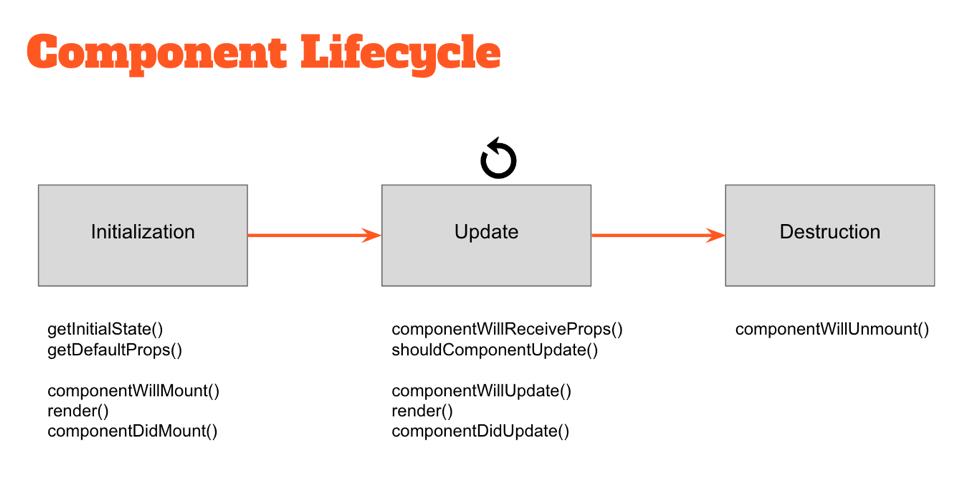
Within these three general buckets exist a number of specific lifecycle hooks — essentially abstract methods — that can be utilized by any React component to more accurately manage updates. Understanding how and when these hooks fire is key to building stable components and will enable you to control the rendering process (improving performance).
Take a look at the diagram above. The events under “Initialization” only happen when a component is first initialized or added to the DOM. Similarly, the events under “Destruction” only happen once (when the component is removed from the DOM). However, the events under “Update” happen every time the properties or state of the component change.
For example, components will automatically re-render themselves any time their properties or state change. However, in some cases a component might not need to update — so preventing the component from re-rendering might improve the performance of our application.
class MyComponent extends React.Component {
  // only re-render if the ID has changed!
  shouldComponentUpdate(nextProps, nextState) {
    return nextProps.id === this.props.id;
  }
}


 PHP-TUTORIAL
Thanks for sharing such a useful info here.
LikeLike
Must read this info.
LikeLike